























Skip to technology filters Skip to main content
Dynatrace Hub

Extend the platform,
empower your team.

Popular searches:
Home hero bg
Salesforce ExtensionSalesforce Extension
Salesforce Extension

Salesforce Extension

Monitor your Salesforce account using Dynatrace

Extension
Free trialDocumentation
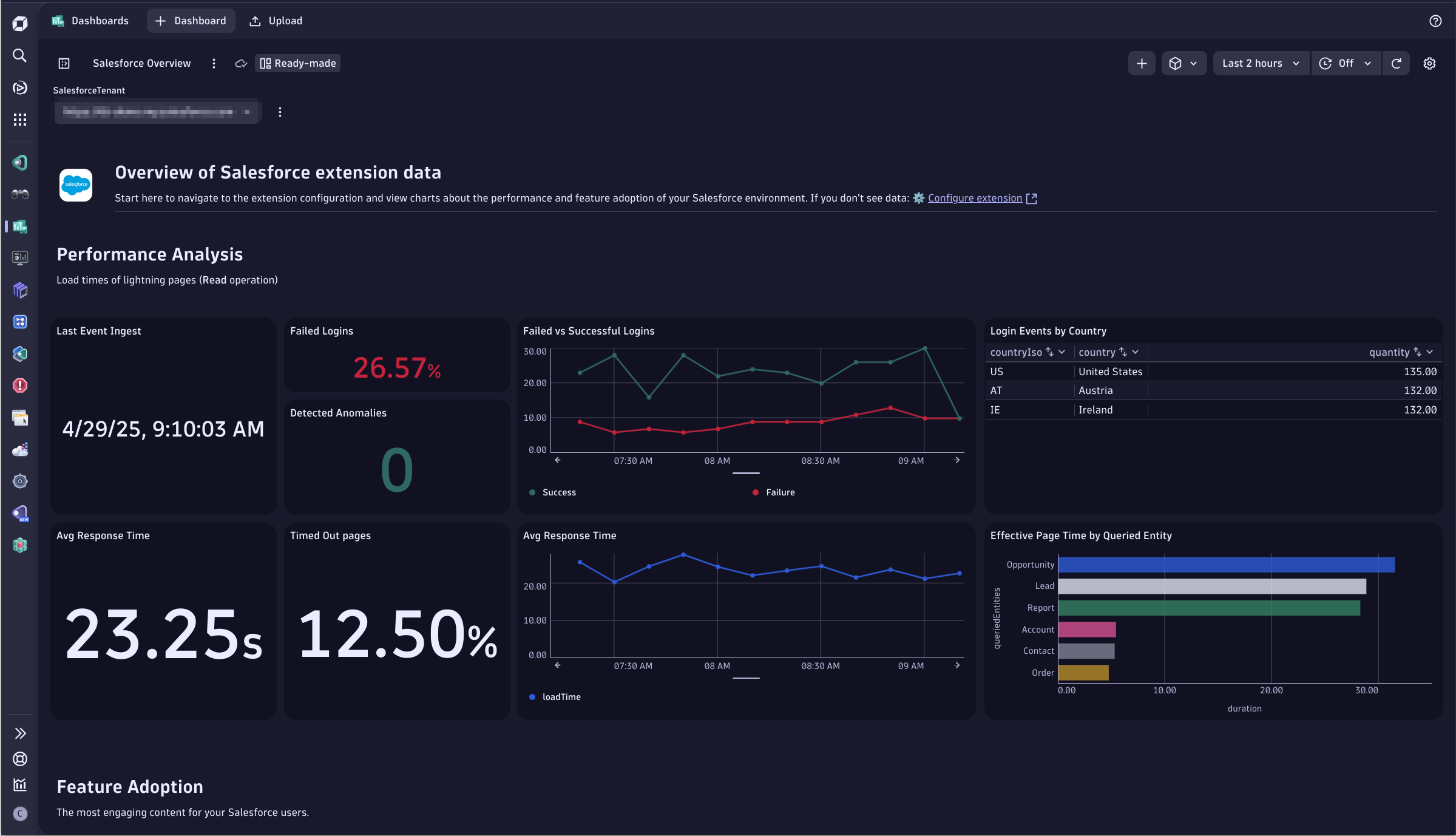
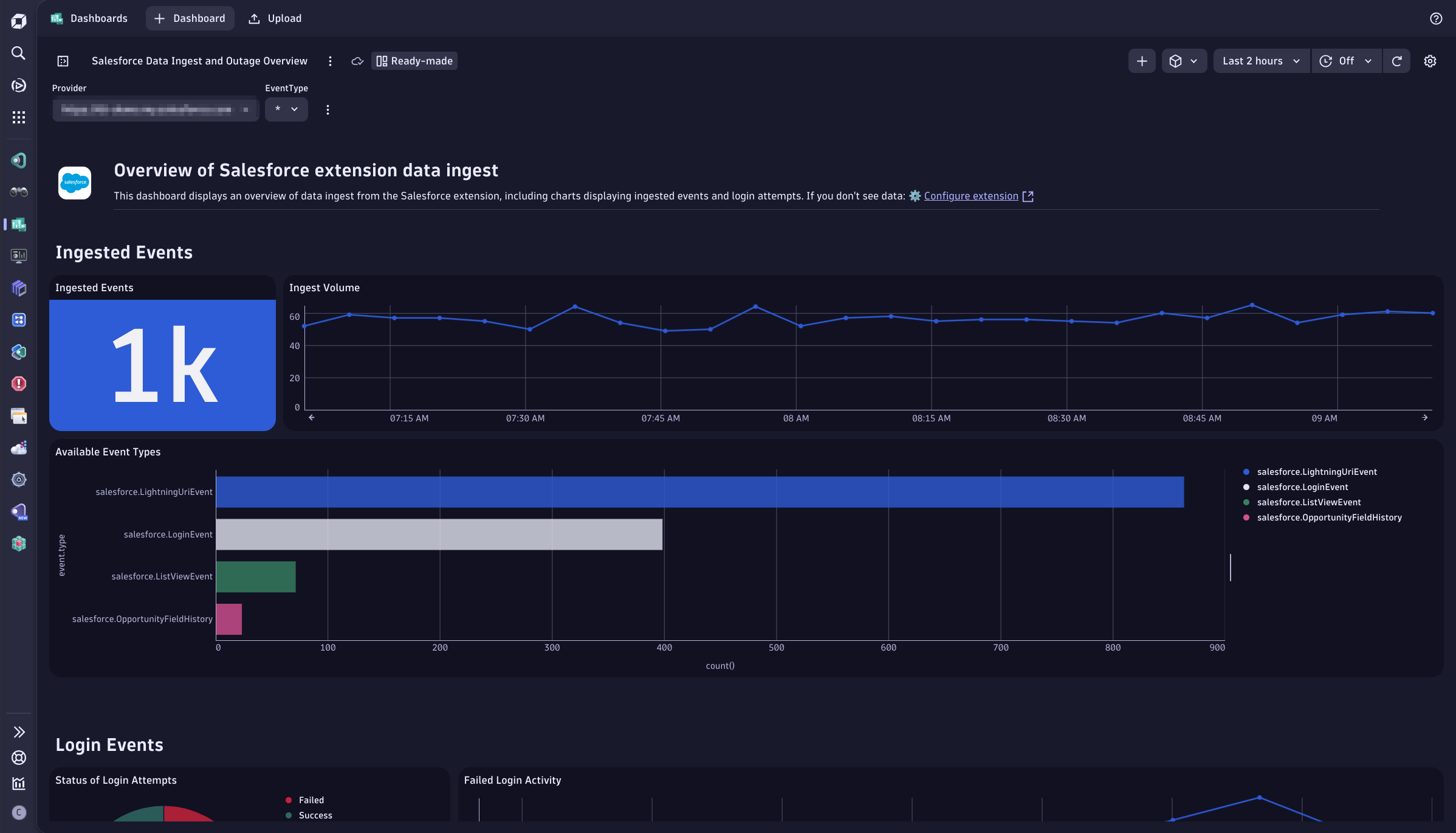
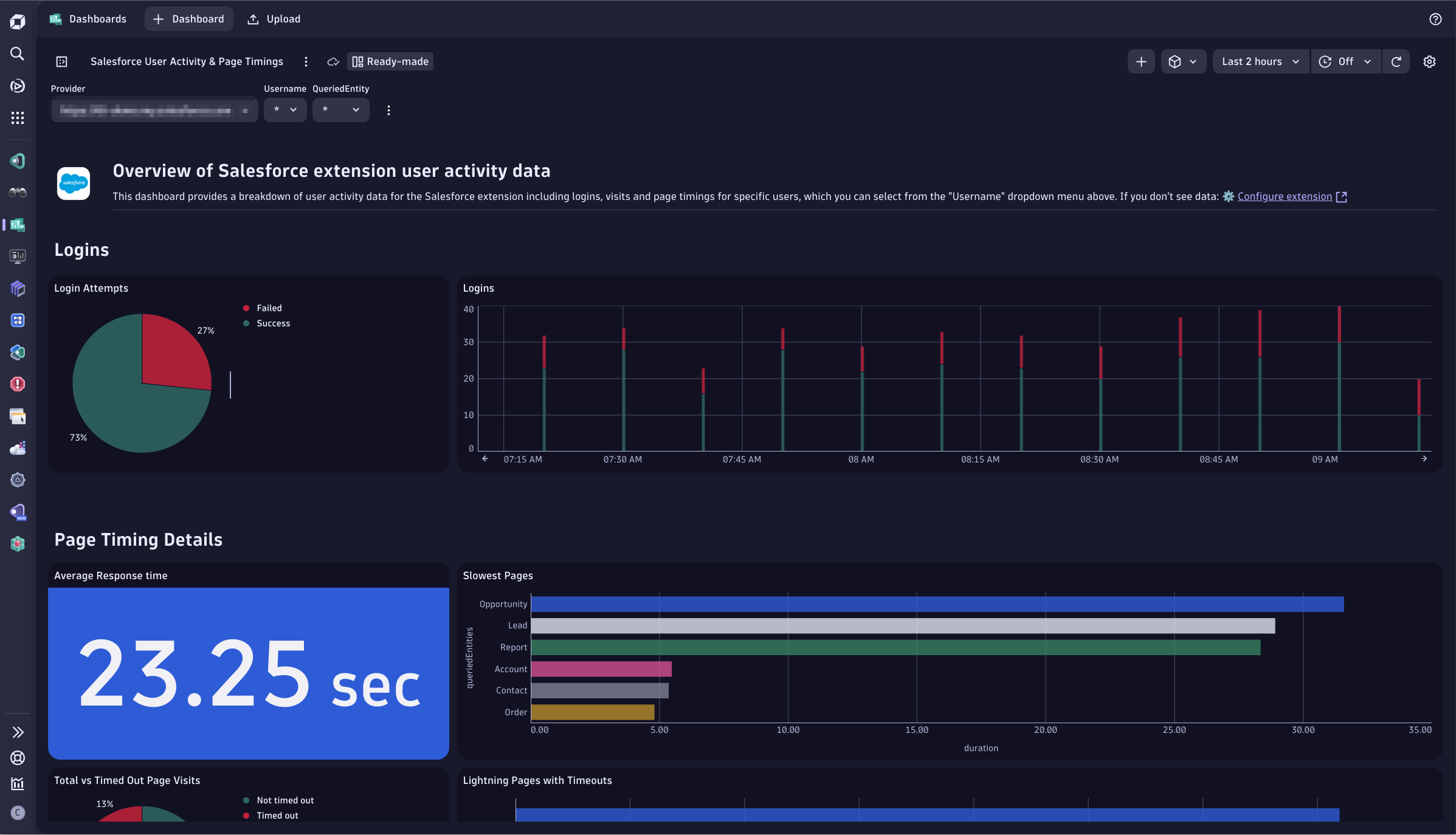
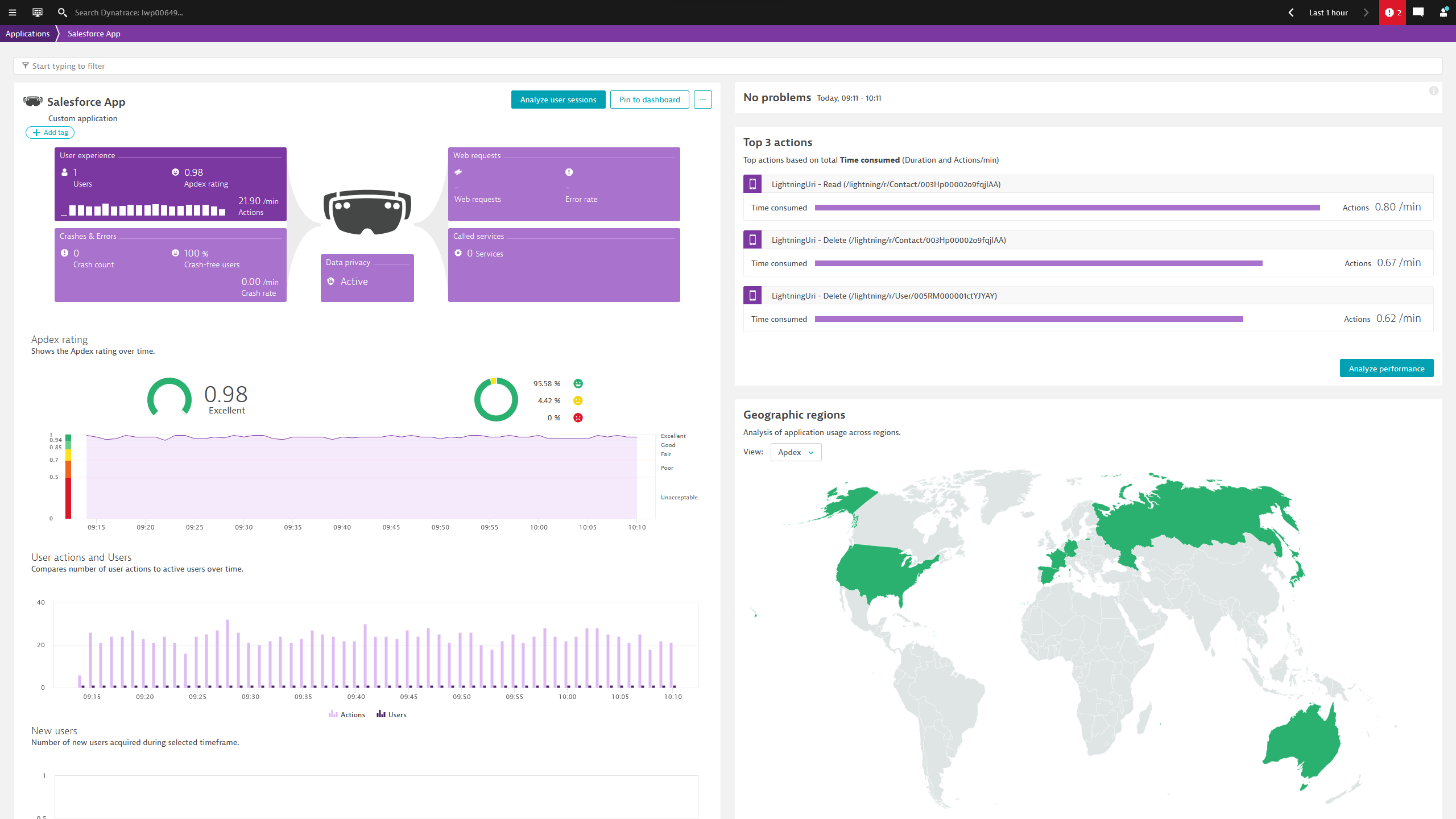
The Overview Dashboard provides a starting point to view charts about the performance and feature adoption of your Salesforce environment.The Data Ingest and Outage Overview Dashboard displays an overview of data ingest from the Salesforce extension, including charts displaying ingested events and login attempts.The User Activity and Page Timings Dashboard provides a breakdown of user activity data in Salesforce, including logins, visits and page timings for specific users.Salesforce visualized in Dynatrace as Real User Monitoring.
  • Product information
  • Release notes

Overview

The Salesforce Extension enables Salesforce administrators and IT operation teams to monitor their Salesforce environment in Dynatrace with the use of this extension.

Use cases

  • Monitor the performance and feature adoption of your Salesforce environment.
  • Monitor user activity data in Salesforce, including logins, visits and page timings for specific users, or as a whole.
  • Ingest Real-Time Events for auditing or monitoring purposes to understand who is viewing what data, and when.

Compatibility information

  • Custom certificates (such as the ones injected by certain proxies) are not supported.
Dynatrace
Documentation
By Dynatrace
Dynatrace support center
Subscribe to new releases
Copy to clipboard

Extension content

Content typeNumber of items included
document dashboard
3

Full version history

To have more information on how to install the downloaded package, please follow the instructions on this page.
ReleaseDate

Full version history

Version 2.4.12

  • EventLogFile - Fix an issue where sometimes log lines were not reported if a large amount of files was processed at once
  • Add Dynatrace error codes for the different error messages

Full version history

Version 2.4.10

  • EventLogFile will now trigger a python garbage collection after each log processing, to force memory to be freed.

Full version history

Version 2.4.9

  • Update the avro package to the latest upstream version

Full version history

Version 2.4.8

  • EventLogFile will now use the extension log directory as the temporary cache to process new files
  • The extension now checks for the restInterface and beacon_forwarder modules on the AG during the fastcheck

Full version history

Version 2.4.7

  • Fix an issue where the max field size was too large on some systems.

Full version history

Version 2.4.6

  • Fix an issue where EventLogFiles with large fields could not be ingested

Full version history

Version 2.4.5

  • EventLogFile lines are now batched to improve memory utilization
  • Users can configure the amount of lines processed in each batch, the default is 30,000 lines.

Full version history

Version 2.4.3

Features

  • Revamped the Business Events dashboards to follow Dynatrace best practices.

Bugfixes

  • Fix an issue with SOQL queries not running due to an import error

Full version history

Version 2.4.2

Features

  • Users can optionally blocklist usernames on part of the username by selecting "Partial match" on the monitoring configuration

Full version history

Version 2.4.1

Features

  • Customers can now ingest Platform events. The extension can subscribe to any topics, like /event/My_Billing_Event__e or /data/ChangeEvents to consume Platform Events or Change Data Capture events, or unsupported Event Stream events, etc.
  • Any event available via Pub/Sub can be subscribed to
  • This feature will only ingest events as Business Events

Bug Fixes

  • Customers can now configure the HTTP Client timeout, ie for ingesting very large Event Log Files, the default is 10 seconds.
  • Fix an issue where scheduled methods were left running when a subscriber no longer existed, possibly causing a resource leak in Business Events mode.

Full version history

Version 2.3.29

  • Users can now configure the HTTP Client Timeout, useful for long running requests like retrieving large EventLogFile objects. The default is 10 seconds.

Full version history

Version 2.3.28

  • Send an error event when a permission denied error is received when attempting to subscribe to an Event Stream topic
  • Do not attempt to resubscribe automatically in case of Permission Denied errors.

Full version history

Version 2.3.27

  • Fix an issue with the username retrieval in the User analysis dashboard
  • Improve memory handling when using Event Streaming
  • Fix demo mode generation when running business events in demo mode

Full version history

Version 2.3.24

  • Fix an issue with a missing dependency (google.protobuf)

Full version history

Version 2.3.19

  • Address an issue with business events where the payload was too large, the extension will now create payloads under 5 MB instead of using a fixed number of events

Full version history

Version 2.3.18

  • Event Streaming - Fix a race condition issue when handling over 20 thousand sessions in OpenKit mode
  • Event Streaming - Reduce the payload size of business events mode to avoid hitting the size limit

Full version history

Version 2.3.15

🐛Bugfixes

  • Event Streaming - Fixed a race condition in OpenKit which caused actions to be lost on environments with very high load
  • Event Streaming - Performance improvements for RUM mode where actions are reported faster and in parallel
  • Event Streaming - Improved restart logic for lost subscribers in case of network issues
  • Event Streaming - INFO level logging is now less verbose

Features

  • Added new metric salesforce.events.received that can chart how many events were received for every topic
  • Added new metric "salesforce.events.sessions" that can chart how many sessions are currently being held by the in-memory cache

Full version history

Version 2.3.13

  • Fix an issue where Event Streaming subscribers were not restarted correctly under certain conditions

Full version history

Version 2.3.11

🐛 Bugfixes

  • Fix an issue where demo mode did not work with business events

Full version history

Version 2.3.10

🚀 Features

  • It is now possible to select the Salesforce API Version when configuring the extension.

Full version history

Version 2.3.9

🐛Bugfixes

  • Fix an issue where a single EventLogFile could not be ingested

Full version history

  • Added support for ingesting SOQL queries as business events
  • Set the appropriate log level for the SOQL and Event Log File monitoring modes
  • Added gen3 dashboards

Full version history

Version 2.3.4

  • Stagger log file processing to preserve AG resources

Full version history

Version 2.3.3

  • Increase the limit of characters for the SOQL query to 5000

Full version history

Version 2.3.2

  • Fix an issue where an import was missing when using a proxy

Full version history

Version 2.3.1

  • Add support for EventLogFile ingestion
  • Add support for Salesforce Object Query Language queries

Users can now ingest EventLogFile data and run SOQL queries against Salesforce, please check the hub for documentation on how to use these features.

Full version history

Version 2.2.6

  • Fix an issue where private keys in the format BEGIN RSA PRIVATE KEY were not parsed correctly

Full version history

Version 2.2.5

  • Fix an issue with logging the proxy URL

Full version history

Version 2.2.4

  • Fix an issue where fields were being reported in lower case characters when capture pii was enabled
  • Fix an issue where fields were being reported with an empty value instead of being removed when capture pii was enabled

Full version history

Version 2.2.3

  • Capture PII is False by default

Full version history

Version 2.2.2

  • Add the option to define the fields that should be considered PII

Full version history

Version 2.2.1

  • Correctly set the extension log level as configured in the UI

Full version history

Version 2.2.0

  • Users can now choose to not capture PII data
  • Adds an option to report the events as Business Events instead of Openkit

Full version history

  • Use latest version of OpenKit framework

Full version history

Version 2.1.1

  • Add the option to use port 443 instead of 7443 for the pub sub API
  • Fix an issue where sometimes beacons were too large for the VDA mode

Full version history

Version 2.0.15

  • More aggressively clear the cache to reduce memory footprint

Full version history

Version 2.0.14

Fixes an issue where in some installations the install directory could not be determined

Full version history

Version 2.0.13

  • Fix an issue with initialization

Full version history

Version 2.0.11

  • Fix an issue where the Tenant ID could not be found if Dynatrace was installed in a non-default path

Full version history

Version 2.0.10

  • Add option to manually input instance URL
  • Fix an issue where proxies were not using during fastcheck
  • Retry the connection on different pub sub errors

Full version history

Version 2.0.7

  • Build with glibc 2.17 for compatibility with linux AGs running older glibc

Full version history

Version 2.0.6

  • Reduce the http client timeout from 60 to 30 seconds, to better display error messages during the fastcheck

Full version history

Version 2.0.5

  • Fix an issue where sometimes the thread ID for the OpenKit beacon was higher than what is allowed, causing data to not be reported.

Full version history

No release notes

Dynatrace Hub
Get data into DynatraceBuild your own app
All (811)Log Management and AnalyticsKubernetesAI and LLM ObservabilityInfrastructure ObservabilitySoftware DeliveryApplication ObservabilityApplication SecurityDigital ExperienceBusiness Observability
Filter
Type
Built and maintained by
Deployment model
SaaS
  • SaaS
  • Managed
Partner FinderBecome a partnerDynatrace Developer

Discover recent additions to Dynatrace

Problems logo

Problems

Analyze abnormal system behavior and performance problems detected by Davis AI.

Logs logo

Logs

Explore all your logs without writing a single query.

Security Investigator logo

Security Investigator

Fast and precise forensics for security and logs on Grail data with DQL queries.

Business Flow logo

Business Flow

Track, analyze, and optimize your critical business processes.

Cost & Carbon Optimization logo

Cost & Carbon Optimization

Track, analyze, and optimize your IT carbon footprint and public cloud costs.

Davis Anomaly Detection logo

Davis Anomaly Detection

Detect anomalies in timeseries using the Davis AI

Analyze your data

Understand your data better with deep insights and clear visualizations.

Notebooks logo

Notebooks

Create powerful, data-driven documents for custom analytics and collaboration.

Dashboards logo

Dashboards

Transform complex data into clear visualizations with custom dashboards.

Automate your processes

Turn data and answers into actions, securely, and at scale.

Workflows logo

Workflows

Automate tasks in your IT landscape, remediate problems, and visualize processes

Jira logo

Jira

Create, query, comment, transition, and resolve Jira tickets within workflows.

Slack logo

Slack

Automate Slack messaging for security incidents, attacks, remediation, and more.

Secure your cloud application

See vulnerabilities and attacks in your environment.

Security Overview logo

Security Overview

Get a comprehensive overview of the security of your applications.

Code-Level Vulnerabilities logo

Code-Level Vulnerabilities

Detect vulnerabilities in your code in real time.

Security Posture Management logo

Security Posture Management

Detect, prioritize, and remediate security and compliance findings with SPM.

Threats & Exploits logo

Threats & Exploits

Understand, triage, and investigate detection findings and alerts.

Are you looking for something different?

We have hundreds of apps, extensions, and other technologies to customize your environment

Leverage our newest innovations of Dynatrace Saas

Kick-start your app creation

Kick-start your app creation

Whether you’re a beginner or a pro, Dynatrace Developer has the tools and support you need to create incredible apps with minimal effort.
Go to Dynatrace Developer

Upgrading from Dynatrace Managed to SaaS

Upgrading from Dynatrace Managed to SaaS

Drive innovation, speed, and agility in your organization by seamlessly and securely upgrading.
Learn More
Log Management and Analytics

Log Management and Analytics

Innovate faster and more efficiently with unified log management and log analytics for actionable insights and automation.
Learn more

