


























Kick-start your app creation
Whether you’re a beginner or a pro, Dynatrace Developer has the tools and support you need to create incredible apps with minimal effort.
Go to Dynatrace Developer
 Proxmox
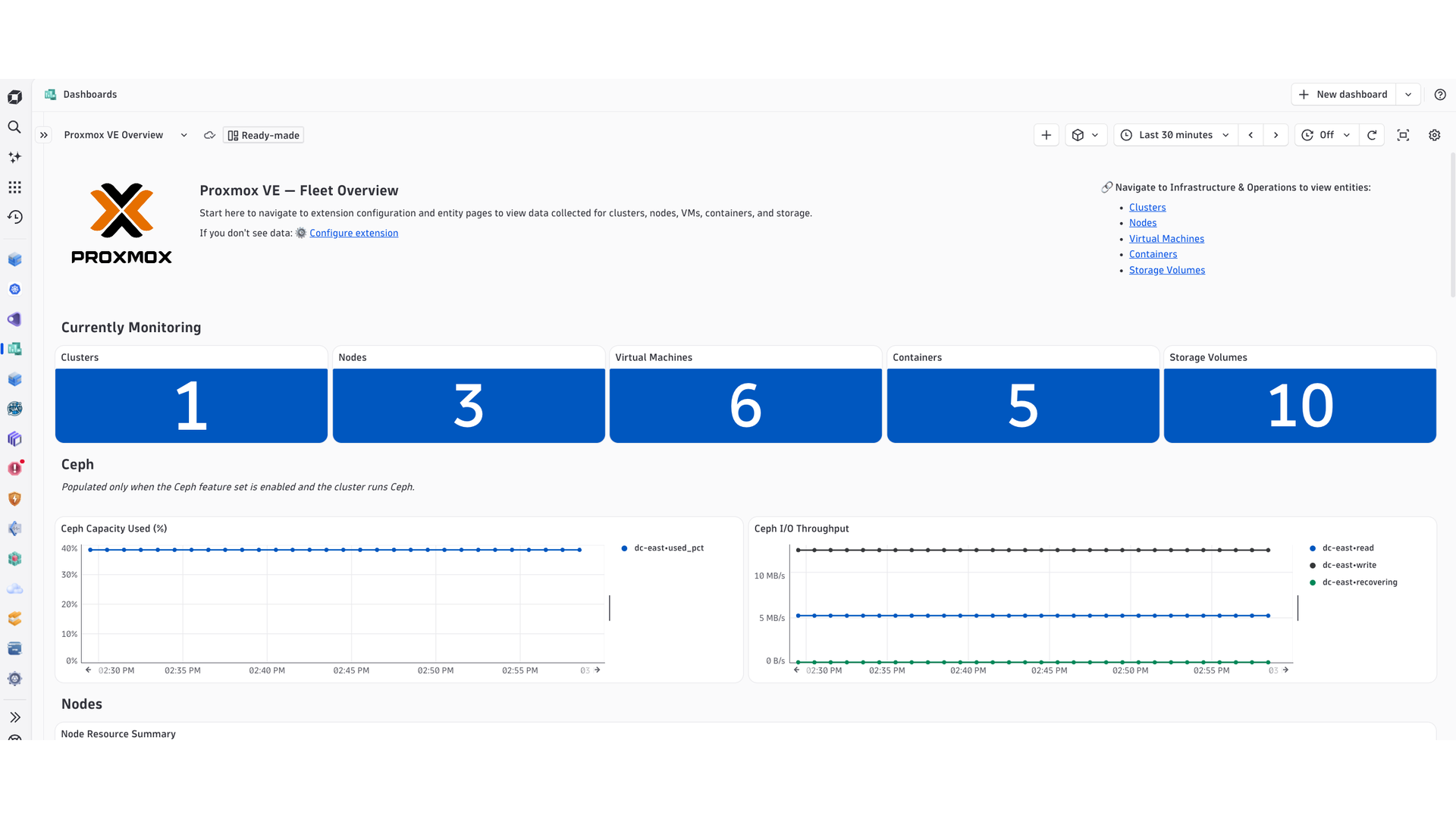
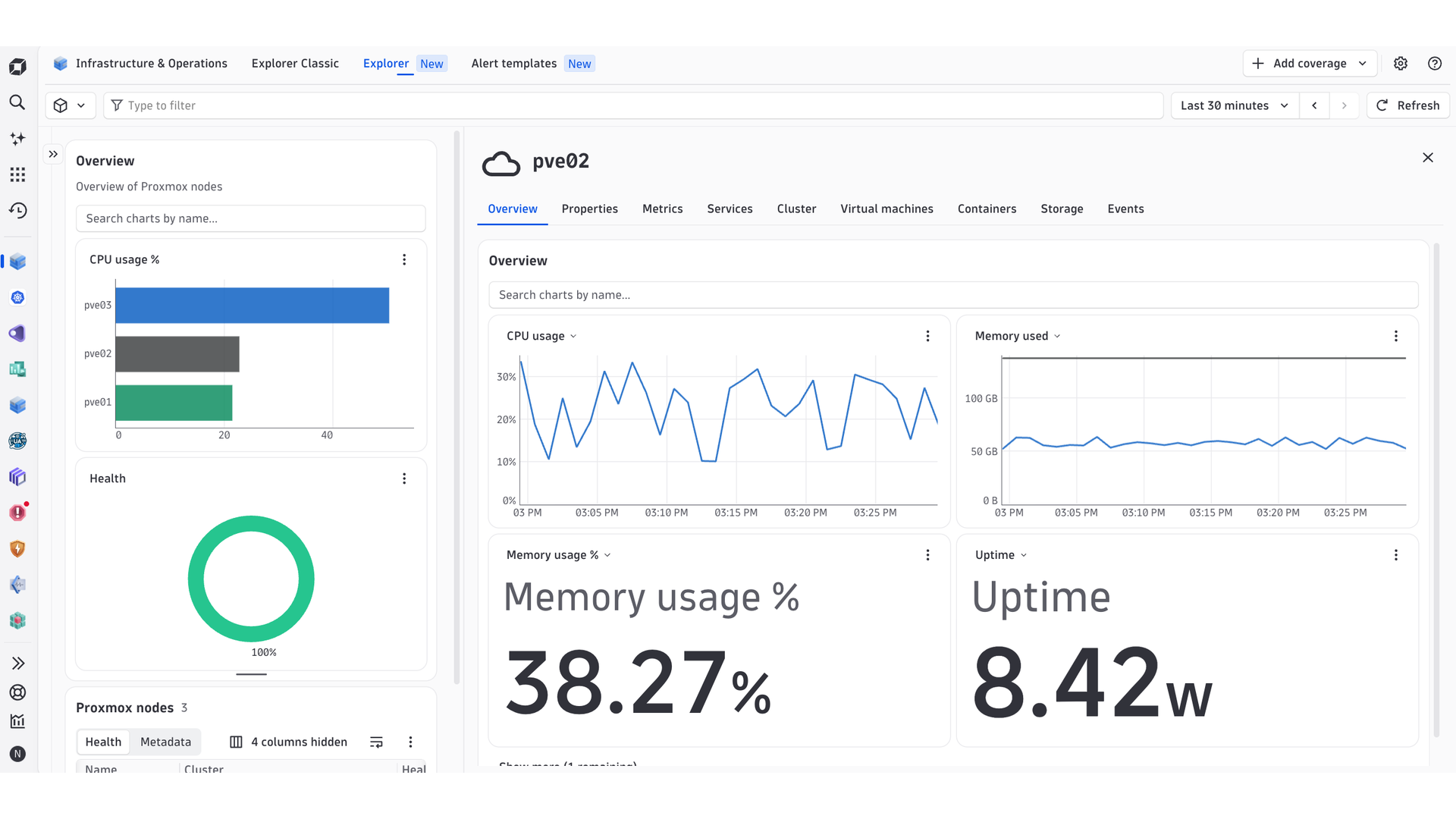
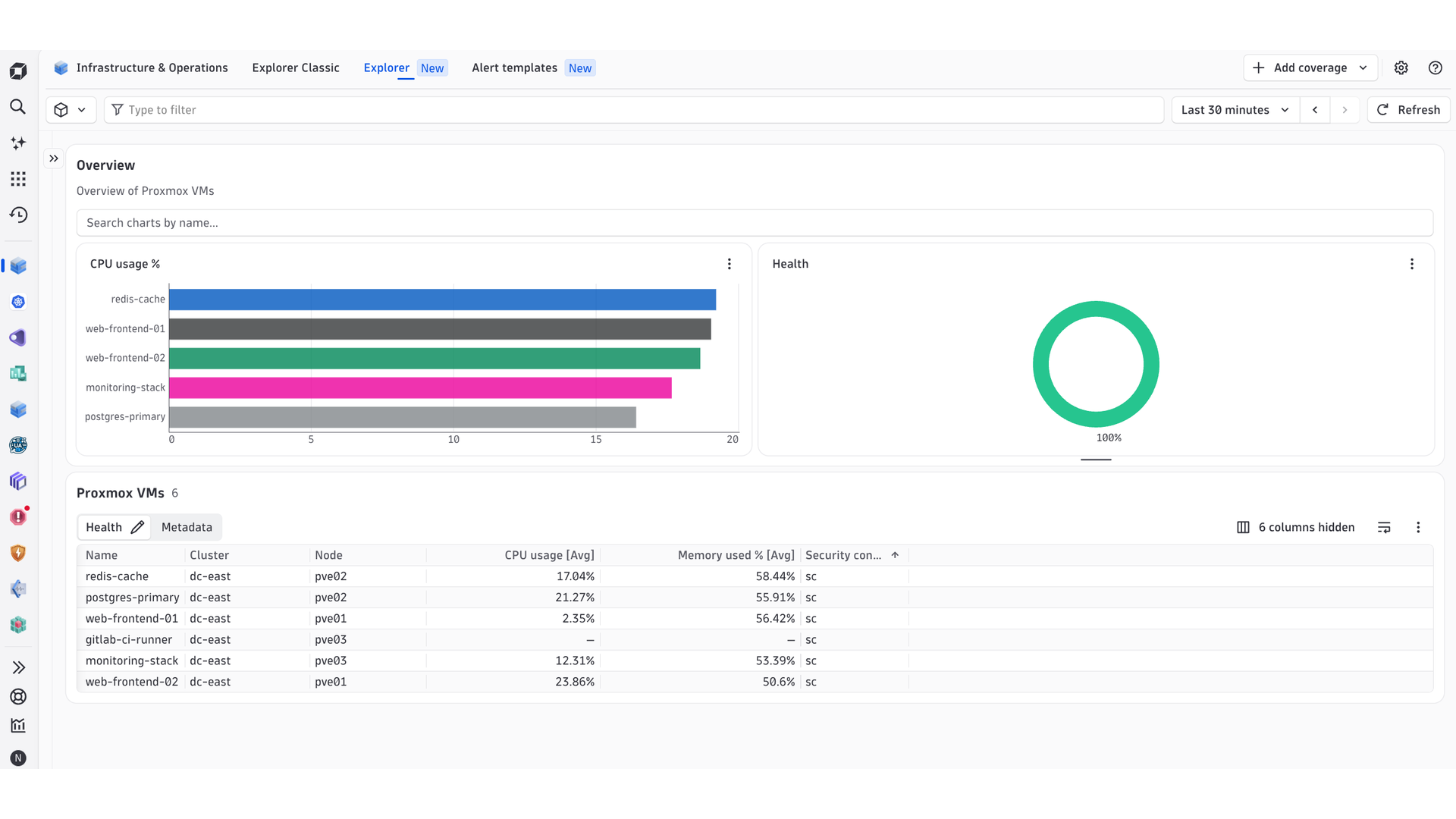
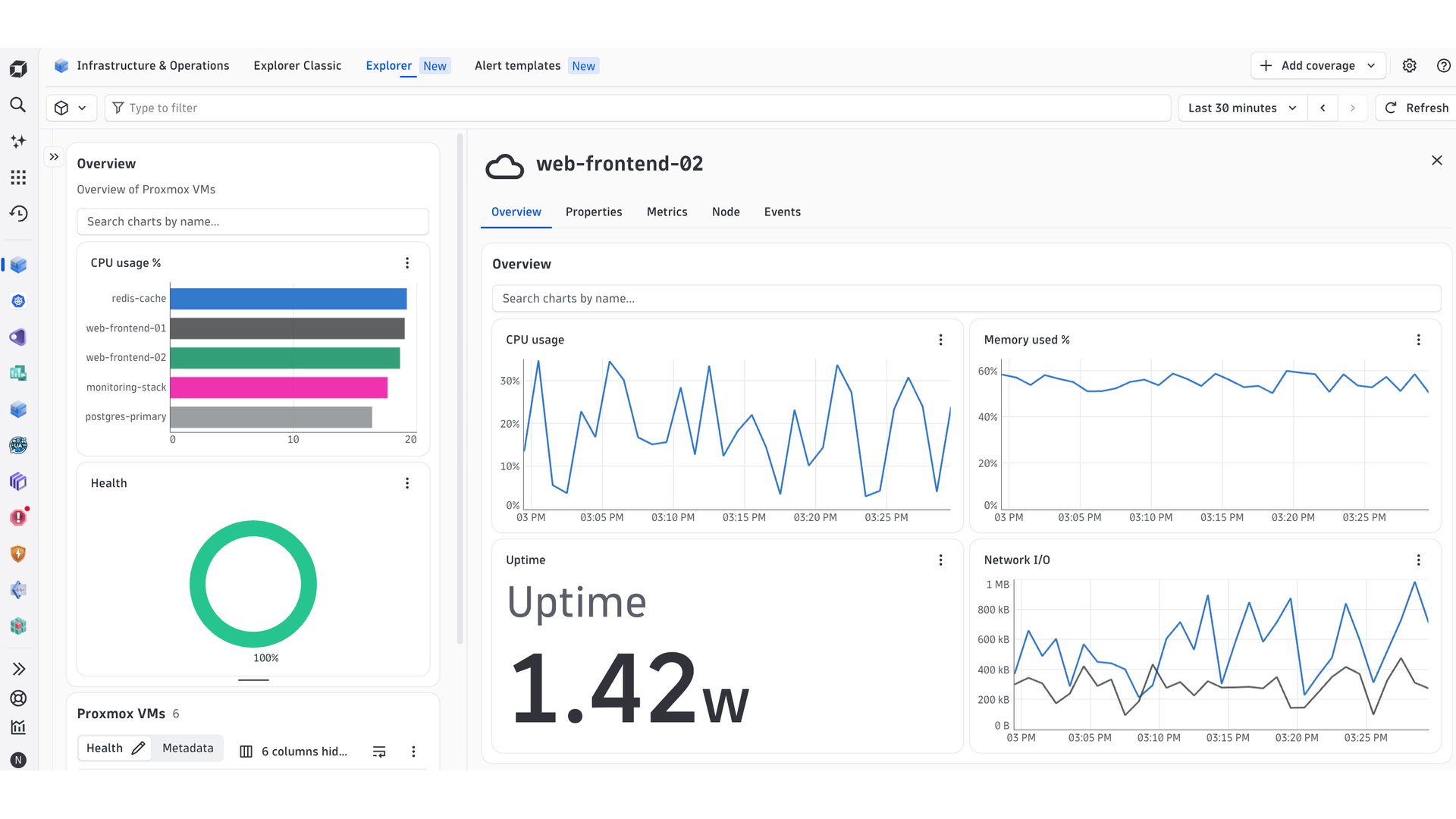
Monitor the health and performance of your Proxmox infrastructure.
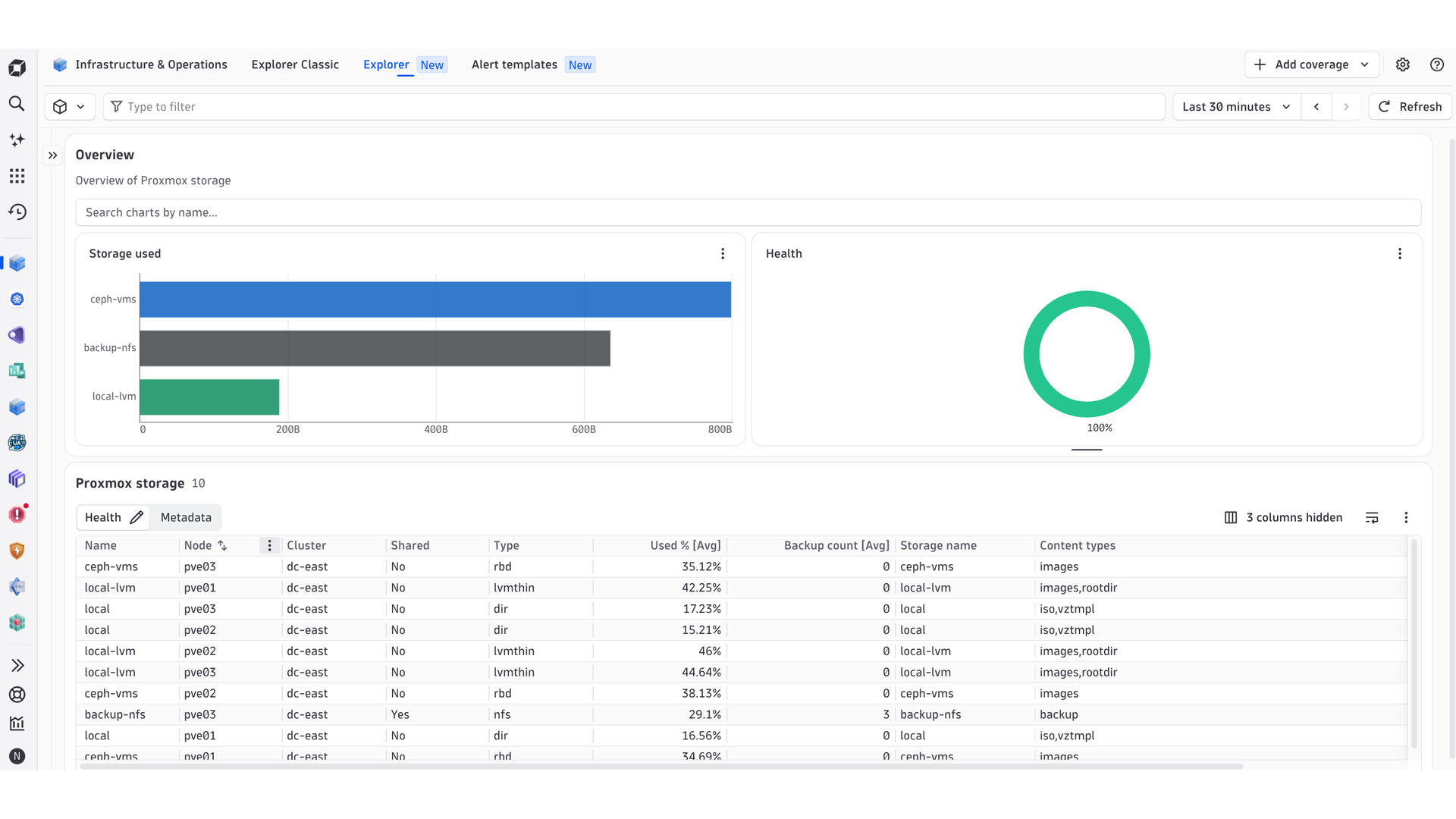
ExtensionThis Proxmox VE Extension connects to the Proxmox REST API to gather metrics about your Clusters, Nodes, Virtual Machines, Containers, Storage, and Ceph infrastructure.
For more information on the installation and configuration, please see Proxmox extension in the Dynatrace Documentation.
Below is a complete list of the feature sets provided in this version. To ensure a good fit for your needs, individual feature sets can be activated and deactivated by your administrator during configuration.
| Metric name | Metric key | Description | Unit |
|---|---|---|---|
| Container Status | proxmox.container.status | 1 if the container is running | Count |
| Container CPU Usage | proxmox.container.cpu.usage | CPU utilization | Percent |
| Container vCPU Count | proxmox.container.cpu.count | Allocated virtual CPUs | Count |
| Container Memory Used | proxmox.container.memory.used | Memory currently in use | Byte |
| Container Memory Total | proxmox.container.memory.total | Maximum allocated memory | Byte |
| Container Swap Used | proxmox.container.swap.used | Swap space in use | Byte |
| Container Swap Total | proxmox.container.swap.total | Maximum allocated swap | Byte |
| Container Disk Read | proxmox.container.disk.read | Cumulative bytes read since the container started | Byte |
| Container Disk Write | proxmox.container.disk.write | Cumulative bytes written since the container started | Byte |
| Container Disk Size | proxmox.container.disk.size | Allocated root disk size | Byte |
| Container Network In | proxmox.container.network.in | Cumulative bytes received since the container started | Byte |
| Container Network Out | proxmox.container.network.out | Cumulative bytes sent since the container started | Byte |
| Container Uptime | proxmox.container.uptime | Time since the container last started | Second |
| Metric name | Metric key | Description | Unit |
|---|---|---|---|
| Cluster Nodes Total | proxmox.cluster.nodes.total | Total nodes registered in the cluster | Count |
| Cluster Nodes Online | proxmox.cluster.nodes.online | Nodes currently online | Count |
| Cluster Nodes Offline | proxmox.cluster.nodes.offline | Nodes currently offline (total minus online) | Count |
| Cluster CPU Usage | proxmox.cluster.cpu.usage | Cluster-wide CPU utilisation as a weighted average across all online nodes. Calculated as sum(node_cpu_fraction × node_cpu_count) / sum(node_cpu_count) × 100, so nodes with more CPUs contribute proportionally more to the result. | Percent |
| Cluster Memory Used | proxmox.cluster.memory.used | Total memory used across all online cluster nodes in bytes | Byte |
| Cluster Memory Total | proxmox.cluster.memory.total | Total memory capacity across all online cluster nodes in bytes | Byte |
| Cluster Memory Usage | proxmox.cluster.memory.usage | Cluster-wide memory utilisation as a percentage (memory.used / memory.total × 100) | Percent |
| Cluster Quorate | proxmox.cluster.quorate | 1 if the cluster has quorum (majority of nodes online for Corosync decisions), 0 if not | Count |
| SDN Status | proxmox.cluster.sdn.status | 1 if all SDN zones are applied and clean, 0 if any zone is in a pending or error state | Count |
| HA Quorate | proxmox.cluster.ha.quorate | 1 if the HA manager reports quorum | Count |
| HA Resource Running | proxmox.cluster.ha.resource.running | 1 if the HA-managed resource is started | Count |
| HA Resource Error | proxmox.cluster.ha.resource.error | 1 if the HA-managed resource is in an error state | Count |
| HA Resource Stopped | proxmox.cluster.ha.resource.stopped | 1 if the HA-managed resource is stopped | Count |
| Guests Without Backup | proxmox.cluster.backup.unprotected_guests | VMs/containers with no backup job covering them | Count |
| Metric name | Metric key | Description | Unit |
|---|---|---|---|
| VM Configured Cores | proxmox.vm.config.cores | Configured CPU cores | Count |
| VM Configured Sockets | proxmox.vm.config.sockets | Configured CPU sockets | Count |
| VM Configured Memory | proxmox.vm.config.memory | Configured maximum memory | Byte |
| VM Configured Balloon Minimum | proxmox.vm.config.balloon_min | Configured minimum balloon memory | Byte |
| VM CPU Limit | proxmox.vm.config.cpu_limit | Configured CPU limit (0 = unlimited) | Count |
| VM CPU Priority Units | proxmox.vm.config.cpu_units | Configured relative CPU scheduling weight | Count |
| VM Start On Boot | proxmox.vm.config.start_on_boot | 1 if the VM is configured to start on node boot | Count |
| VM Snapshot Count | proxmox.vm.snapshot.count | Snapshots currently held | Count |
| VM Disk Used (actual) | proxmox.vm.disk.used | Actual disk space consumed, distinct from allocated size | Byte |
| VM Host Memory Used | proxmox.vm.memory.host | Host-side memory held by this guest (balloon perspective) | Byte |
| VM CPU Pressure (some) | proxmox.vm.pressure.cpu.some | Linux PSI: share of time some task was stalled on CPU | Percent |
| VM CPU Pressure (full) | proxmox.vm.pressure.cpu.full | Linux PSI: share of time all tasks were stalled on CPU | Percent |
| VM I/O Pressure (some) | proxmox.vm.pressure.io.some | Linux PSI: share of time some task was stalled on I/O | Percent |
| VM Memory Pressure (some) | proxmox.vm.pressure.memory.some | Linux PSI: share of time some task was stalled on memory | Percent |
| VM Memory Pressure (full) | proxmox.vm.pressure.memory.full | Linux PSI: share of time all tasks were stalled on memory | Percent |
| VM Guest Disk Used | proxmox.vm.agent.disk.used | In-guest filesystem space used, reported by the guest agent | Byte |
| VM Guest Disk Total | proxmox.vm.agent.disk.total | In-guest filesystem capacity, reported by the guest agent | Byte |
| VM Guest NIC RX Bytes | proxmox.vm.agent.network.rx_bytes | In-guest NIC receive bytes, reported by the guest agent | Byte |
| VM Guest NIC TX Bytes | proxmox.vm.agent.network.tx_bytes | In-guest NIC transmit bytes, reported by the guest agent | Byte |
| VM Guest NIC RX Errors | proxmox.vm.agent.network.rx_errors | In-guest NIC receive errors, reported by the guest agent | Count |
| VM Guest NIC TX Errors | proxmox.vm.agent.network.tx_errors | In-guest NIC transmit errors, reported by the guest agent | Count |
| VM Guest NIC RX Dropped | proxmox.vm.agent.network.rx_dropped | In-guest NIC receive drops, reported by the guest agent | Count |
| VM Guest NIC TX Dropped | proxmox.vm.agent.network.tx_dropped | In-guest NIC transmit drops, reported by the guest agent | Count |
| Metric name | Metric key | Description | Unit |
|---|---|---|---|
| Storage Total | proxmox.storage.total | Total storage capacity | Byte |
| Storage Used | proxmox.storage.used | Storage space used | Byte |
| Storage Available | proxmox.storage.avail | Storage space available | Byte |
| Storage Used % | proxmox.storage.used_pct | Percentage of storage capacity consumed (used / total x 100). Only reported when total > 0. | Percent |
| Storage Enabled | proxmox.storage.enabled | 1 if the storage is enabled | Count |
| Storage Active | proxmox.storage.active | 1 if the storage is currently active | Count |
| Storage Backup Count | proxmox.storage.backup_count | Backup archives held on this storage | Count |
| Metric name | Metric key | Description | Unit |
|---|---|---|---|
| Node Subscription Active | proxmox.node.subscription.active | 1 if the node has an active Proxmox subscription | Count |
| Node Updates Pending | proxmox.node.updates.pending | Total pending APT package updates | Count |
| Node Proxmox Updates Pending | proxmox.node.updates.pending_proxmox | Pending updates originating from the Proxmox repositories | Count |
| Node Tasks Failed | proxmox.node.tasks.failed | Tasks in the recent history that ended in FAILED status | Count |
| Node Tasks Running | proxmox.node.tasks.running | Tasks currently in progress | Count |
| Physical Disk Size | proxmox.node.disk.size | Raw physical disk capacity | Byte |
| Physical Disk SMART Health | proxmox.node.disk.smart_passed | 1 if SMART overall health is PASSED | Count |
| Physical Disk SMART Attribute | proxmox.node.disk.smart_attribute | Raw value of a tracked SMART attribute | Count |
| Node Memory Available | proxmox.node.memory.available | Usable memory including reclaimable page cache | Byte |
| Node ZFS ARC Size | proxmox.node.zfs.arc_size | ZFS adaptive replacement cache size (0 on non-ZFS hosts) | Byte |
| Node CPU Pressure (some) | proxmox.node.pressure.cpu.some | Linux PSI: share of time some task was stalled on CPU | Percent |
| Node I/O Pressure (some) | proxmox.node.pressure.io.some | Linux PSI: share of time some task was stalled on I/O | Percent |
| Node I/O Pressure (full) | proxmox.node.pressure.io.full | Linux PSI: share of time all tasks were stalled on I/O | Percent |
| Node Memory Pressure (some) | proxmox.node.pressure.memory.some | Linux PSI: share of time some task was stalled on memory | Percent |
| Node Memory Pressure (full) | proxmox.node.pressure.memory.full | Linux PSI: share of time all tasks were stalled on memory | Percent |
| Metric name | Metric key | Description | Unit |
|---|---|---|---|
| VM Status | proxmox.vm.status | 1 if the VM is running | Count |
| VM CPU Usage | proxmox.vm.cpu.usage | CPU utilization | Percent |
| VM vCPU Count | proxmox.vm.cpu.count | Allocated virtual CPUs | Count |
| VM Memory Used | proxmox.vm.memory.used | Memory currently in use | Byte |
| VM Memory Total | proxmox.vm.memory.total | Maximum allocated memory | Byte |
| VM Memory Free | proxmox.vm.memory.free | Estimated free memory (maxmem - mem). When the balloon driver is active this may overstate available memory, since the balloon reports how much the host has reclaimed rather than what the guest OS considers free. | Byte |
| VM Memory Used % | proxmox.vm.memory.used_pct | Percentage of allocated memory in use (mem / maxmem × 100). Only reported when maxmem > 0. | Percent |
| VM Disk Read | proxmox.vm.disk.read | Cumulative bytes read since the VM started | Byte |
| VM Disk Write | proxmox.vm.disk.write | Cumulative bytes written since the VM started | Byte |
| VM Disk Size | proxmox.vm.disk.size | Allocated root disk size | Byte |
| VM Network In | proxmox.vm.network.in | Cumulative bytes received since the VM started | Byte |
| VM Network Out | proxmox.vm.network.out | Cumulative bytes sent since the VM started | Byte |
| VM Uptime | proxmox.vm.uptime | Time since the VM last started | Second |
| VM QMP Status | proxmox.vm.qmp_status | 1 if the QEMU Machine Protocol monitor reports the VM running | Count |
| VM Lock | proxmox.vm.lock | 1 if the VM has an active configuration lock, 0 if unlocked. The lock type (e.g. "backup", "migrate", "snapshot") is stored in the vm_lock dimension. A value of "none" means no lock is held. Locked VMs cannot be started, stopped, or reconfigured until the operation completes. | Count |
| VM HA State | proxmox.vm.ha.state | Always 1 for each reporting interval; the HA service state (e.g. "started", "stopped", "error", "migrate") is captured in the vm_ha_state dimension. Only reported for VMs registered with the Proxmox HA manager. Use vm_ha_state == "error" to alert on HA failures. | Count |
| Metric name | Metric key | Description | Unit |
|---|---|---|---|
| Container Configured Cores | proxmox.container.config.cores | Configured CPU cores | Count |
| Container Configured Memory | proxmox.container.config.memory | Configured maximum memory | Byte |
| Container Configured Swap | proxmox.container.config.swap | Configured maximum swap | Byte |
| Container CPU Limit | proxmox.container.config.cpu_limit | Configured CPU limit (0 = unlimited) | Count |
| Container CPU Priority Units | proxmox.container.config.cpu_units | Configured relative CPU scheduling weight | Count |
| Container Start On Boot | proxmox.container.config.start_on_boot | 1 if the container is configured to start on node boot | Count |
| Container Unprivileged | proxmox.container.config.unprivileged | 1 if the container runs unprivileged | Count |
| Container Snapshot Count | proxmox.container.snapshot.count | Snapshots currently held | Count |
| Container Disk Used (actual) | proxmox.container.disk.used | Actual disk space consumed, distinct from allocated size | Byte |
| Container Host Memory Used | proxmox.container.memory.host | Host-side memory held by this guest | Byte |
| Container CPU Pressure (some) | proxmox.container.pressure.cpu.some | Linux PSI: share of time some task was stalled on CPU | Percent |
| Container CPU Pressure (full) | proxmox.container.pressure.cpu.full | Linux PSI: share of time all tasks were stalled on CPU | Percent |
| Container I/O Pressure (some) | proxmox.container.pressure.io.some | Linux PSI: share of time some task was stalled on I/O | Percent |
| Container Memory Pressure (some) | proxmox.container.pressure.memory.some | Linux PSI: share of time some task was stalled on memory | Percent |
| Container Memory Pressure (full) | proxmox.container.pressure.memory.full | Linux PSI: share of time all tasks were stalled on memory | Percent |
| Metric name | Metric key | Description | Unit |
|---|---|---|---|
| Node Online | proxmox.node.online | 1 if the node is online in the cluster | Count |
| Node CPU Usage | proxmox.node.cpu.usage | CPU utilization | Percent |
| Node CPU I/O Wait | proxmox.node.cpu.wait | CPU time spent waiting on I/O | Percent |
| Node CPU Count | proxmox.node.cpu.count | Logical CPUs available to the node | Count |
| Node CPU Sockets | proxmox.node.cpu.sockets | Physical CPU sockets | Count |
| Node Load Average (1m) | proxmox.node.loadavg.1m | 1-minute load average | Count |
| Node Load Average (5m) | proxmox.node.loadavg.5m | 5-minute load average | Count |
| Node Load Average (15m) | proxmox.node.loadavg.15m | 15-minute load average | Count |
| Node Memory Used | proxmox.node.memory.used | Physical memory in use | Byte |
| Node Memory Total | proxmox.node.memory.total | Total physical memory | Byte |
| Node Memory Free | proxmox.node.memory.free | Free physical memory | Byte |
| Node Memory Usage | proxmox.node.memory.used_pct | Physical memory utilisation as a percentage (memory.used / memory.total × 100) | Percent |
| Node Swap Used | proxmox.node.swap.used | Swap space in use | Byte |
| Node Swap Total | proxmox.node.swap.total | Total swap space | Byte |
| Node Swap Free | proxmox.node.swap.free | Free swap space | Byte |
| Node Root FS Used | proxmox.node.rootfs.used | Root filesystem space used | Byte |
| Node Root FS Total | proxmox.node.rootfs.total | Root filesystem capacity | Byte |
| Node Root FS Available | proxmox.node.rootfs.avail | Root filesystem space available | Byte |
| Node Uptime | proxmox.node.uptime | Time since the node last booted | Second |
| Node KSM Shared Memory | proxmox.node.ksm.shared | Memory de-duplicated by Kernel Samepage Merging | Byte |
| Metric name | Metric key | Description | Unit |
|---|---|---|---|
| Node Service Active | proxmox.node.service.active | 1 if the monitored systemd service is active (active-state == "active"), 0 otherwise. The state dimension holds the derived value ("active" or "inactive"). | Count |
| Node Service State | proxmox.node.service.state | Always 1 for each reporting interval; the raw systemd active-state string (e.g. "active", "inactive", "failed", "activating") is captured in the service_state dimension. Filter on service_state to isolate services in a particular state. | Count |
| Node Service Enabled | proxmox.node.service.enabled | 1 if the service is configured to start on boot (unit-state is "enabled" or "enabled-runtime"), 0 otherwise. The raw unit-state string is stored in the service_unit_state dimension. A value of 0 with state "active" indicates a service that is running but will not survive a reboot. | Count |
| Metric name | Metric key | Description | Unit |
|---|---|---|---|
| Ceph Health | proxmox.ceph.health | 2=HEALTH_OK, 1=HEALTH_WARN, 0=HEALTH_ERR, -1=unknown | Count |
| Ceph OSDs Total | proxmox.ceph.osd.total | Total OSDs in the cluster | Count |
| Ceph OSDs Up | proxmox.ceph.osd.up | OSDs currently up | Count |
| Ceph OSDs In | proxmox.ceph.osd.in | OSDs currently in the CRUSH map | Count |
| Ceph OSDs Down | proxmox.ceph.osd.down | OSDs that are not up (total minus up). Derived as num_osds - num_up_osds. | Count |
| Ceph OSDs Out | proxmox.ceph.osd.out | OSDs removed from the CRUSH map (total minus in). Derived as num_osds - num_in_osds. | Count |
| Ceph Placement Groups | proxmox.ceph.pg.total | Total placement groups | Count |
| Ceph Active PGs | proxmox.ceph.pg.active | Placement groups currently in an active state (sum of all PG states containing "active") | Count |
| Ceph Degraded PGs | proxmox.ceph.pg.degraded | Placement groups with reduced redundancy (sum of all PG states containing "degraded"). Non-zero indicates data protection loss. | Count |
| Ceph Recovering PGs | proxmox.ceph.pg.recovering | Placement groups currently recovering data (sum of all PG states containing "recovering") | Count |
| Ceph Undersized PGs | proxmox.ceph.pg.undersized | Placement groups with fewer replicas than required (sum of all PG states containing "undersized") | Count |
| Ceph Bytes Used | proxmox.ceph.bytes.used | Raw bytes used across the Ceph cluster | Byte |
| Ceph Bytes Available | proxmox.ceph.bytes.avail | Raw bytes available across the Ceph cluster | Byte |
| Ceph Bytes Total | proxmox.ceph.bytes.total | Raw capacity across the Ceph cluster | Byte |
| Ceph Capacity Used % | proxmox.ceph.bytes.used_pct | Percentage of raw Ceph cluster capacity used. Derived as bytes_used / bytes_total * 100. | Percent |
| Ceph Read Throughput | proxmox.ceph.io.read_bps | Cluster-wide read throughput | BytePerSecond |
| Ceph Write Throughput | proxmox.ceph.io.write_bps | Cluster-wide write throughput | BytePerSecond |
| Ceph Recovery Throughput | proxmox.ceph.io.recovering_bps | Data movement rate during recovery/backfill | BytePerSecond |
| Ceph Read IOPS | proxmox.ceph.io.read_ops | Cluster-wide read operations per second | PerSecond |
| Ceph Write IOPS | proxmox.ceph.io.write_ops | Cluster-wide write operations per second | PerSecond |
| Ceph Monitor Count | proxmox.ceph.mon.count | Number of Ceph monitors | Count |
| Ceph Monitors in Quorum | proxmox.ceph.mon.quorum | Number of Ceph monitors participating in quorum. Quorum loss (drops below majority) causes full cluster outage. | Count |
| Ceph Flag Active | proxmox.ceph.flag | 1 if the named Ceph cluster flag is set | Count |
| Ceph Pool Used Bytes | proxmox.ceph.pool.used_bytes | Bytes used by this pool. Dimension pool_name identifies the pool. | Byte |
| Ceph Pool Used % | proxmox.ceph.pool.used_pct | Percentage of pool quota used. Dimension pool_name identifies the pool. | Percent |
Update the certifi dependency to address CVE-2026-111943
Initial release of the Proxmox extension