

























Skip to technology filters Skip to main content
Dynatrace Hub

Extend the platform,
empower your team.

Popular searches:
Home hero bg
Outbound Connections SettingOutbound Connections Setting
Outbound Connections Setting

Outbound Connections Setting

Manage forwarding to private endpoints and restrict access to external hosts.

App
Free trialDocumentation
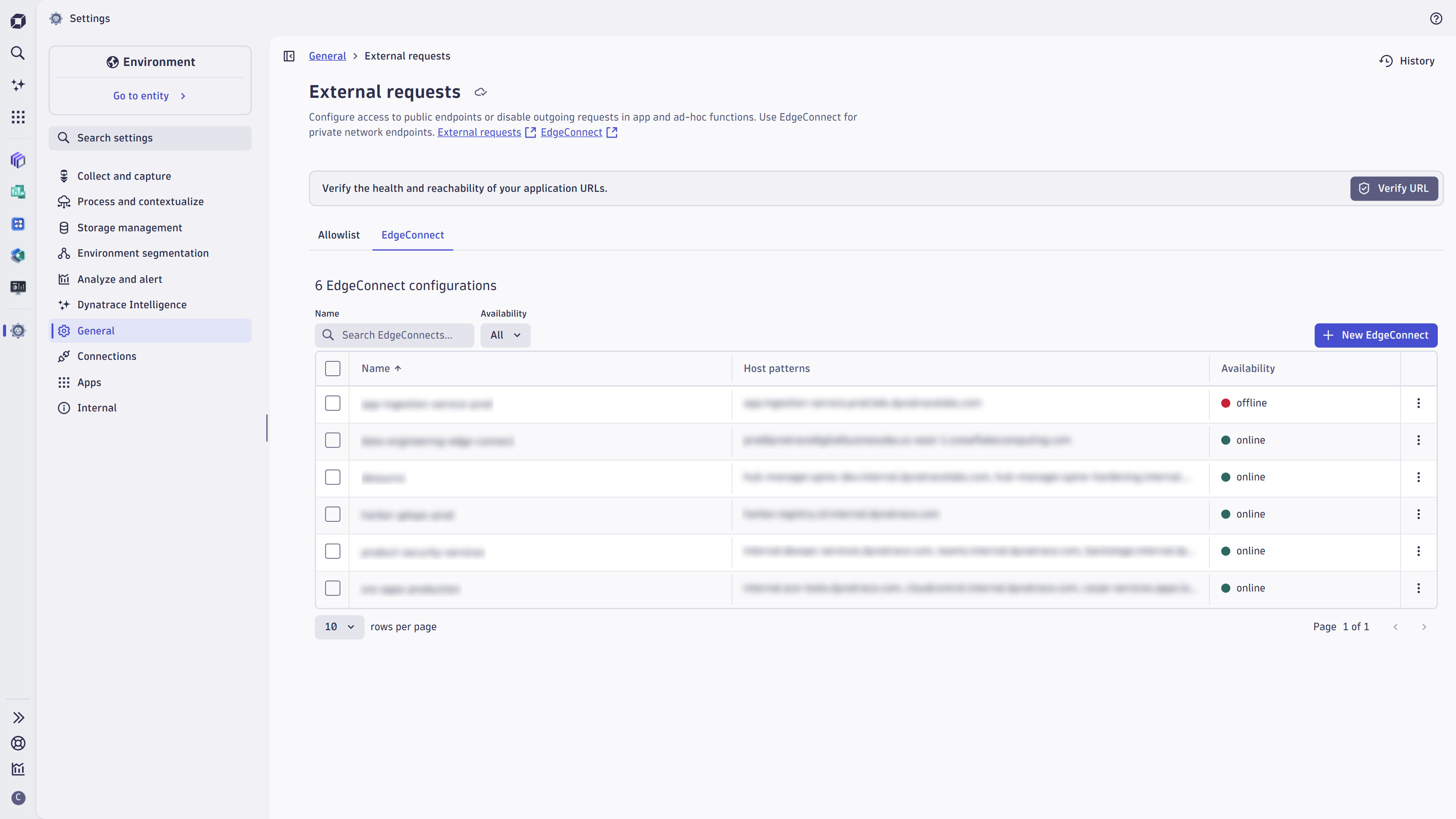
Manage connections to private endpoints using EdgeConnectConfigure the Outbound connection settings for App functions and ad-hoc functions.
  • Product information
  • Release notes

Overview

Securely connect and interact with your IT environment from within Dynatrace® apps or workflows, whether it is on running on-premises or a private cloud network. This enables you to e.g. access your private network's Jira instance from a workflow and create or update a Jira issue.

Use cases

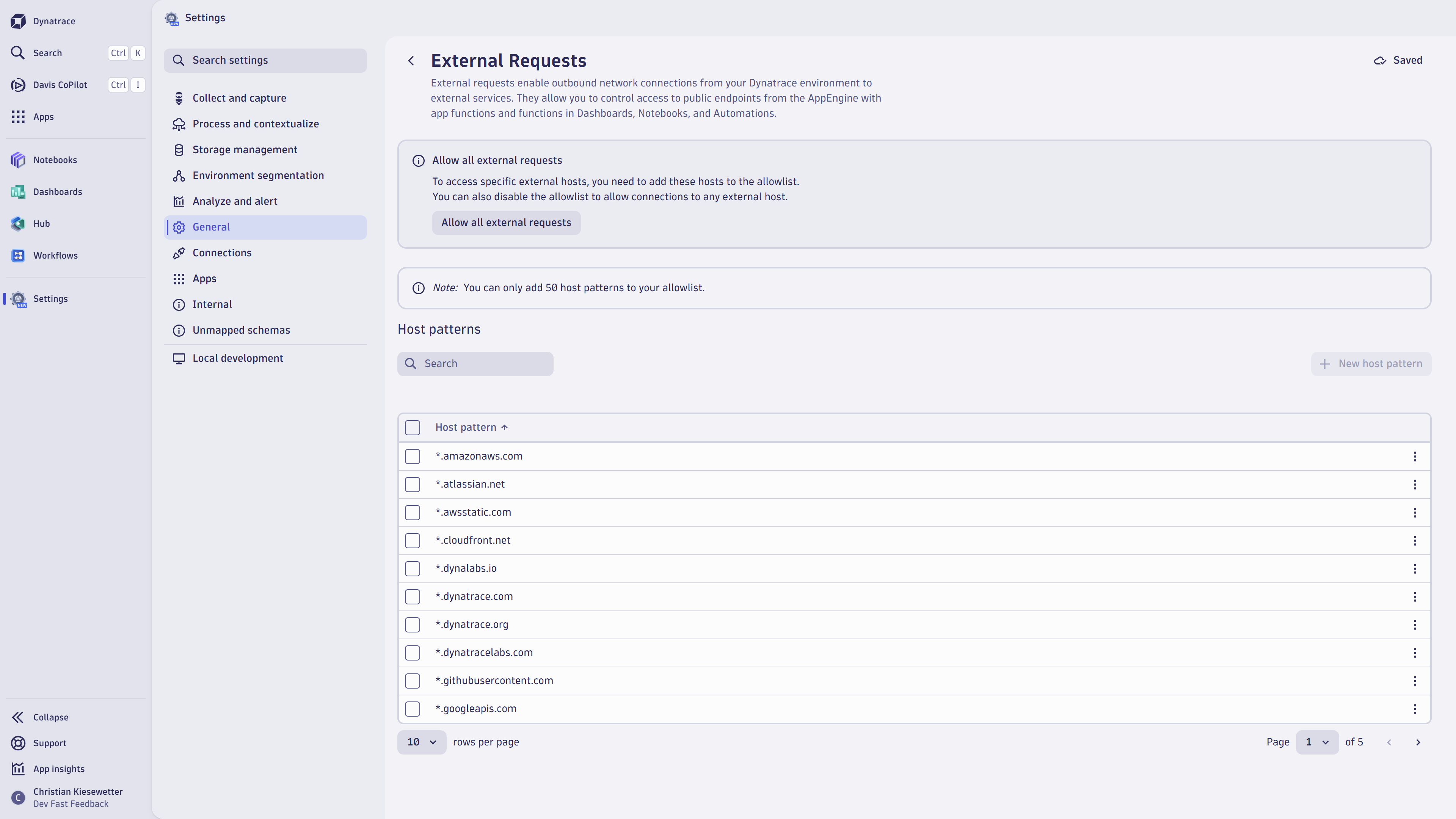
  • create and manage outbound connections as external requests using allow lists

outbound connection

  • connect to private network endpoints using EdgeConnect
  • define which requests are forwarded to which EdgeConnect connection
  • perform health tests
  • Limit the accessibility of public endpoints from functions running in the Dynatrace JavaScript runtime, whether it's App functions (which build the backend of Dynatrace Apps) or Ad-hoc functions (used in Notebooks, Dashboards, Workflows or via API).

Get started

Outbound Connections Settings comes pre-installed with every Dynatrace environment and extends the capabilities of Settings, which can be found under "General - Environment management - External requests"

Dynatrace
DocumentationMore Information
By Dynatrace
Dynatrace support center
Subscribe to new releases
Copy to clipboard

Full version history

ReleaseDate

Full version history

1.12.0

Minor Changes

  • Dependency updates.

Full version history

1.11.1

Minor Changes

  • Move loading indicators for matching URLs and testing http requests into the respective button.
  • Ask user for confirmation if navigating away during modal opened

Patch Changes

  • render EdgeConnect details accordion no longer as surface to align to design draft

Full version history

1.9.0

  • EdgeConnect configurations can be configured
  • New Verify-URL feature previews whether a URL is accessible given the current configurations

Full version history

1.5.7

  • Number of host patterns is displayed above table showing host patterns
  • Host pattern property is required in add-on modal for adding a host pattern
  • Dependency updates

Full version history

1.5.5

Minor Changes

  • Display more striking warning concerning removal of host patterns when allowlist is disabled
  • Display breadcrumbs and button to browse history of configuration changes

Full version history

1.4.0

Minor Changes

  • Add-on intent shows a better styled error message in the edge case where allowlist is disabled
  • Table interactions are disabled when users are missing the necessary permissions for writing the setting

Full version history

1.3.2

Initial version

Dynatrace Hub
Get data into DynatraceBuild your own app
Dynatrace Intelligence - Agentic Operations SystemThe Dynatrace Agentic AI ecosystem
All (915)Log Management and AnalyticsKubernetesAI and LLM ObservabilityInfrastructure ObservabilitySoftware DeliveryApplication ObservabilityApplication SecurityBusiness ObservabilityDigital Experience
Filter
Type
Built and maintained by
Deployment model
SaaS
  • SaaS
  • Managed
Partner FinderBecome a partnerDynatrace Developer

Discover recent additions to Dynatrace

Dynatrace Assist logo

Dynatrace Assist

Dynatrace Assist: Ask, analyze, and act with Dynatrace Intelligence.

Smartscape logo

Smartscape

Interactively explore and analyze topology and relationships in digital systems.

Compliance Assistant logo

Compliance Assistant

Track, manage, and automate compliance across your IT and business landscape.

Experience Vitals logo

Experience Vitals

Optimize UX with core vitals, frontend error tracking, and end-to-end visibility.

Error Inspector logo

Error Inspector

Discover, triage, and manage errors across all your frontends.

Users & Sessions logo

Users & Sessions

Discover how users and cohorts with common characteristics experience your app.

Analyze your data

Understand your data better with deep insights and clear visualizations.

Notebooks logo

Notebooks

Create powerful, data-driven documents for custom analytics and collaboration.

Dashboards logo

Dashboards

Transform complex data into clear visualizations with custom dashboards.

Investigations logo

Investigations

Fast and precise incident response on Grail data with DQL queries.

Smartscape logo

Smartscape

Interactively explore and analyze topology and relationships in digital systems.

Logs logo

Logs

Explore all your logs without writing a single query.

Problems logo

Problems

Detect, explain and triage problems automatically using Dynatrace Intelligence.

Automate your processes

Turn data and answers into actions, securely, and at scale.

Workflows logo

Workflows

Automate tasks in your IT landscape and move towards autonomous operations.

Jira logo

Jira

Open, update, and close Jira tickets automatically from Dynatrace Workflows.

Slack logo

Slack

Automate Slack messaging for security incidents, attacks, remediation, and more.

Secure your cloud application

See vulnerabilities and attacks in your environment.

Security Posture Management logo

Security Posture Management

Detect, prioritize, and remediate security and compliance findings with SPM.

Threats & Exploits logo

Threats & Exploits

Understand, triage, and investigate detection findings and alerts.

More resources

Observability for Developers on Cursor logo

Observability for Developers on Cursor

Get Real time Code-Level data directly to your Cursor IDE.

Documents logo

Documents

Manage Dashboards, Notebooks and other documents in your Dynatrace environment.

GitHub Copilot Coding Agent logo

GitHub Copilot Coding Agent

Automate vulnerability remediation and boost developer productivity.

GitHub Copilot Custom Agent logo

GitHub Copilot Custom Agent

Automate your development workflows with specialized agent definitions.

Observability for Developer on JetBrains logo

Observability for Developer on JetBrains

Get real-time code-level data directly to your Jetbrains IDE.

Metrics logo

Metrics

Browse, search, and manage all your metrics in one central catalog.

Pagerduty for Dynatrace Workflows logo

Pagerduty for Dynatrace Workflows

Streamline incident management with automated Pageruty workflows.

Cursor IDE logo

Cursor IDE

Boost developer productivity and get real-time, code-level insights into Cursor.

Observability for Developers on Windsurf logo

Observability for Developers on Windsurf

Get real-time code-level data directly to your Windsurf IDE.

Are you looking for something different?

We have hundreds of apps, extensions, and other technologies to customize your environment

Leverage our newest innovations of Dynatrace Saas

Kick-start your app creation

Kick-start your app creation

Whether you’re a beginner or a pro, Dynatrace Developer has the tools and support you need to create incredible apps with minimal effort.
Go to Dynatrace Developer

Upgrading from Dynatrace Managed to SaaS

Upgrading from Dynatrace Managed to SaaS

Drive innovation, speed, and agility in your organization by seamlessly and securely upgrading.
Learn More
Log Management and Analytics

Log Management and Analytics

Innovate faster and more efficiently with unified log management and log analytics for actionable insights and automation.
Learn more

