














Skip to technology filters Skip to main content
Dynatrace Hub

Extend the platform,
empower your team.

Popular searches:
Home hero bg
GitHub Copilot MonitoringGitHub Copilot Monitoring
GitHub Copilot Monitoring

GitHub Copilot Monitoring

End-to-end insight into Copilot model calls, tools, latency, and tokens.

Technology
Free trialDocumentation
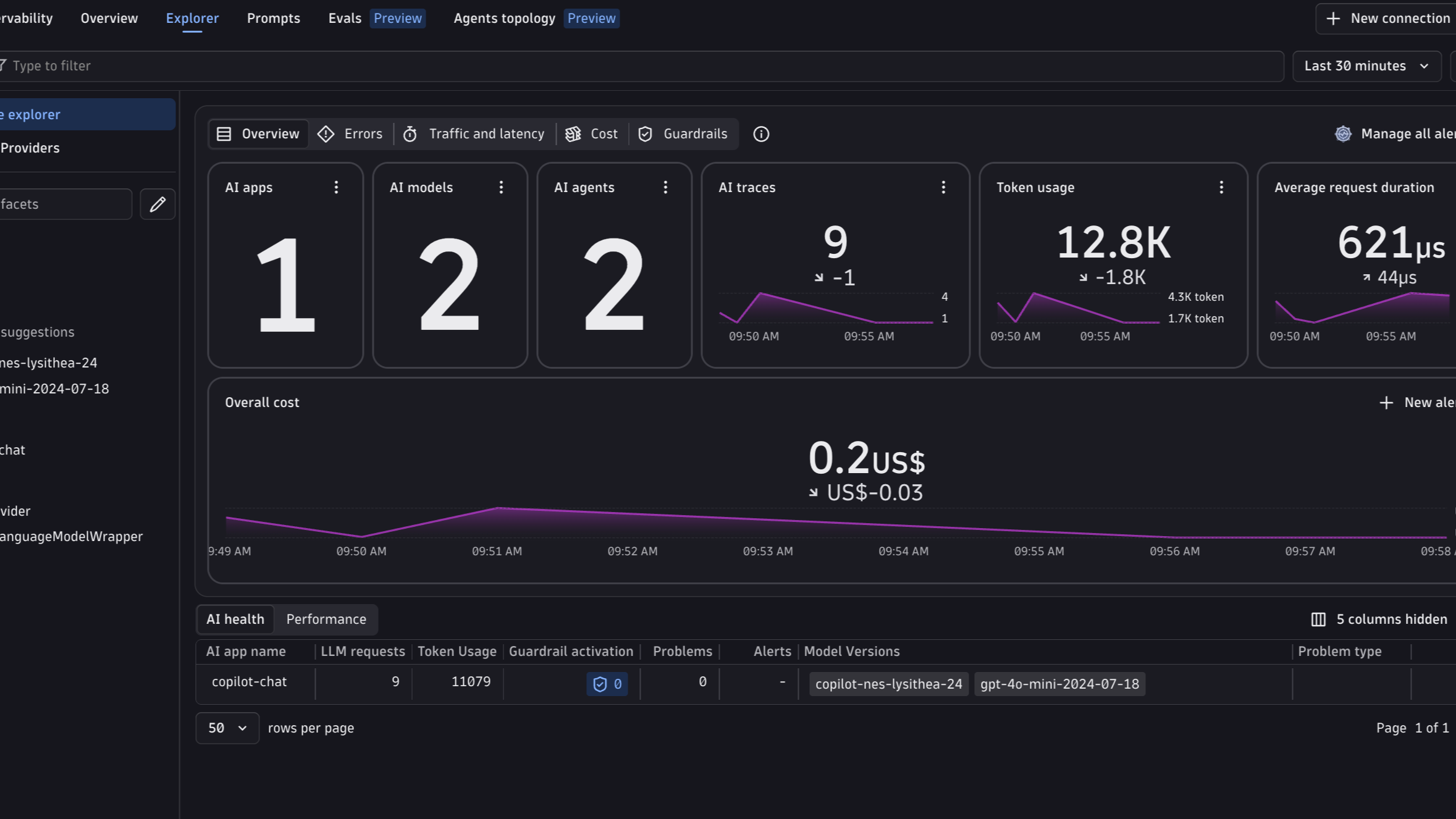
Copilot in the AI Observability app: models, agents, traces, token usage, latency, and cost
  • Product information

Overview

Dynatrace AI Observability provides visibility into GitHub Copilot through Copilot's native OpenTelemetry support. Copilot emits traces, metrics, and events using the OpenTelemetry GenAI semantic conventions, covering agent invocations, LLM calls, tool and hook execution, token usage, latency, and errors. No code instrumentation is required: you configure telemetry and use Copilot normally.

Two setups are covered. Applications built on the GitHub Copilot SDK pass a telemetry configuration to the client and export through an OpenTelemetry Collector, which handles Dynatrace authentication and maps token metrics for the AI Observability app. VS Code Copilot Chat exports directly to Dynatrace using standard OTLP environment variables or enterprise-managed settings. In both cases, Copilot activity appears in the AI Observability app with models, token usage, agents, and traces.

Use cases

Understand LLM behavior

See each LLM call Copilot makes, including requested and response models, token usage, finish reasons, and latency.

Monitor tool execution

Track tool and hook calls, how long they take, and how they contribute to each agent invocation.

Analyze agent sessions

Follow agent invocations, turns, and conversations to understand how Copilot handles requests across the CLI, VS Code, and SDK applications.

Troubleshoot performance issues

Use traces and metrics in Dynatrace to spot slow models, token-heavy prompts, and errors.

Explore Copilot in AI Observability

View Copilot as an AI app in the AI Observability app, with models, agents, token usage, and traces available out of the box.

Get started

Choose the example that matches how you use Copilot:

  • Copilot SDK applications: Follow the GitHub Copilot SDK example to run the included OpenTelemetry Collector and enable the SDK's built-in telemetry.
  • VS Code Copilot Chat: Follow the VS Code Copilot Chat example to export telemetry directly from VS Code to Dynatrace.

Details

Requirements

  • A Dynatrace API token with the openTelemetryTrace.ingest and metrics.ingest scopes, plus logs.ingest for VS Code Copilot Chat events.
  • Delta temporality for metrics, which Dynatrace requires.

Privacy

Prompt, response, tool-argument, and tool-result content is not exported by default. Enable content capture only after privacy and security approval, as it can include source code and other sensitive data.

Cost

Copilot does not emit a native monetary cost attribute.

Dynatrace
Documentation
By Dynatrace
Dynatrace support center
Copy to clipboard
Dynatrace Hub
Get data into DynatraceBuild your own app
Dynatrace Intelligence - The Agentic PlatformThe Dynatrace Agentic AI ecosystem
All (948)Log Management and AnalyticsKubernetesAI and LLM ObservabilityInfrastructure ObservabilitySoftware DeliveryApplication ObservabilityApplication SecurityBusiness ObservabilityDigital Experience
Filter
Type
Built and maintained by
Partner FinderBecome a partnerDynatrace Developer

Discover recent additions to Dynatrace

Arize AX logo

Arize AX

Analyze traces, latency, and evals of LLM apps through Arize OpenInference data.

AI Observability logo

AI Observability

End-to-end observability for your Agentic AI and LLM workloads.

Dynatrace Assist logo

Dynatrace Assist

Dynatrace Assist: Ask, analyze, and act with Dynatrace Intelligence.

SRE Agent logo

SRE Agent

Analyze and triage incidents.

Smartscape logo

Smartscape

Interactively explore and analyze topology and relationships in digital systems.

Clouds logo

Clouds

Gain full visibility and proactive monitoring across your cloud infrastructure.

Analyze your data

Understand your data better with deep insights and clear visualizations.

Notebooks logo

Notebooks

Create powerful, data-driven documents for custom analytics and collaboration.

Dashboards logo

Dashboards

Transform complex data into clear visualizations with custom dashboards.

Investigations logo

Investigations

Fast and precise incident response on Grail data with DQL queries.

Smartscape logo

Smartscape

Interactively explore and analyze topology and relationships in digital systems.

Logs logo

Logs

Explore all your logs without writing a single query.

Problems logo

Problems

Detect, explain and triage problems automatically using Dynatrace Intelligence.

Automate your processes

Turn data and answers into actions, securely, and at scale.

Workflows logo

Workflows

Automate tasks in your IT landscape and move towards autonomous operations.

Jira logo

Jira

Open, update, and close Jira tickets automatically from Dynatrace Workflows.

Slack logo

Slack

Automate Slack messaging for security incidents, attacks, remediation, and more.

Secure your cloud application

See vulnerabilities and attacks in your environment.

Security Posture Management logo

Security Posture Management

Detect, prioritize, and remediate security and compliance findings with SPM.

Threats & Exploits logo

Threats & Exploits

Understand, triage, and investigate detection findings and alerts.

More resources

Cursor (Live-Debugger) logo

Cursor (Live-Debugger)

Get Real time Code-Level data directly to your Cursor IDE.

Documents logo

Documents

Manage Dashboards, Notebooks and other documents in your Dynatrace environment.

GitHub Copilot Coding Agent logo

GitHub Copilot Coding Agent

Automate vulnerability remediation and boost developer productivity.

GitHub Copilot Custom Agent logo

GitHub Copilot Custom Agent

Automate your development workflows with specialized agent definitions.

Dynatrace Live Debugger on JetBrains logo

Dynatrace Live Debugger on JetBrains

Get real-time code-level data directly to your Jetbrains IDE.

Metrics logo

Metrics

Browse, search, and manage all your metrics in one central catalog.

Dynatrace Live Debugger on Windsurf logo

Dynatrace Live Debugger on Windsurf

Get real-time code-level data directly to your Windsurf IDE.

Are you looking for something different?

We have hundreds of apps, extensions, and other technologies to customize your environment

Leverage our newest innovations of Dynatrace Saas

Kick-start your app creation

Kick-start your app creation

Whether you’re a beginner or a pro, Dynatrace Developer has the tools and support you need to create incredible apps with minimal effort.
Go to Dynatrace Developer

Upgrading from Dynatrace Managed to SaaS

Upgrading from Dynatrace Managed to SaaS

Drive innovation, speed, and agility in your organization by seamlessly and securely upgrading.
Learn More
Log Management and Analytics

Log Management and Analytics

Innovate faster and more efficiently with unified log management and log analytics for actionable insights and automation.
Learn more