

























Skip to technology filters Skip to main content
Dynatrace Hub

Extend the platform,
empower your team.

Popular searches:
Home hero bg
CPU Core MonitoringCPU Core Monitoring
CPU Core Monitoring

CPU Core Monitoring

Get insights into CPU Core utilization on your OneAgent hosts.

Extension
Free trialDocumentation
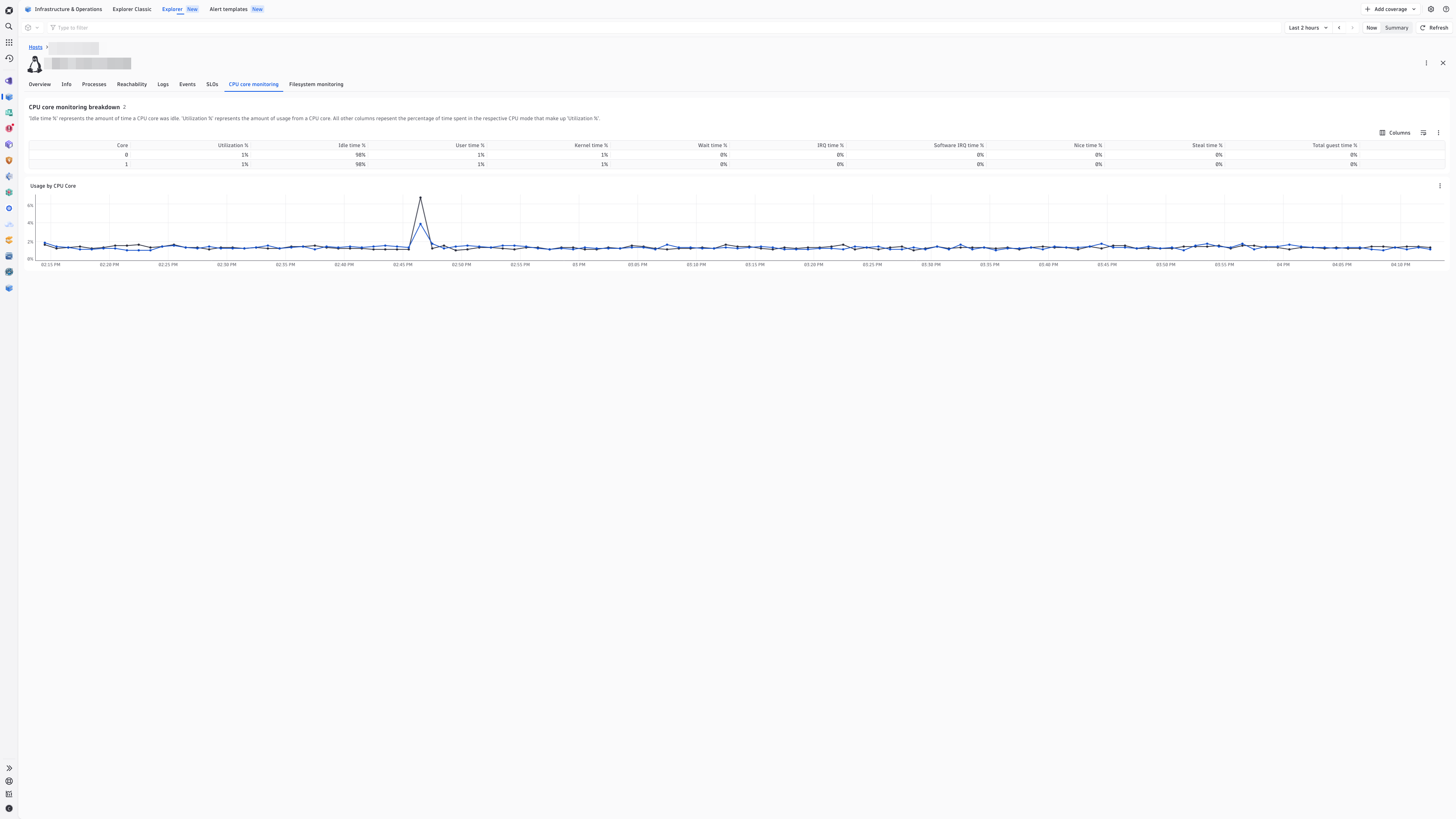
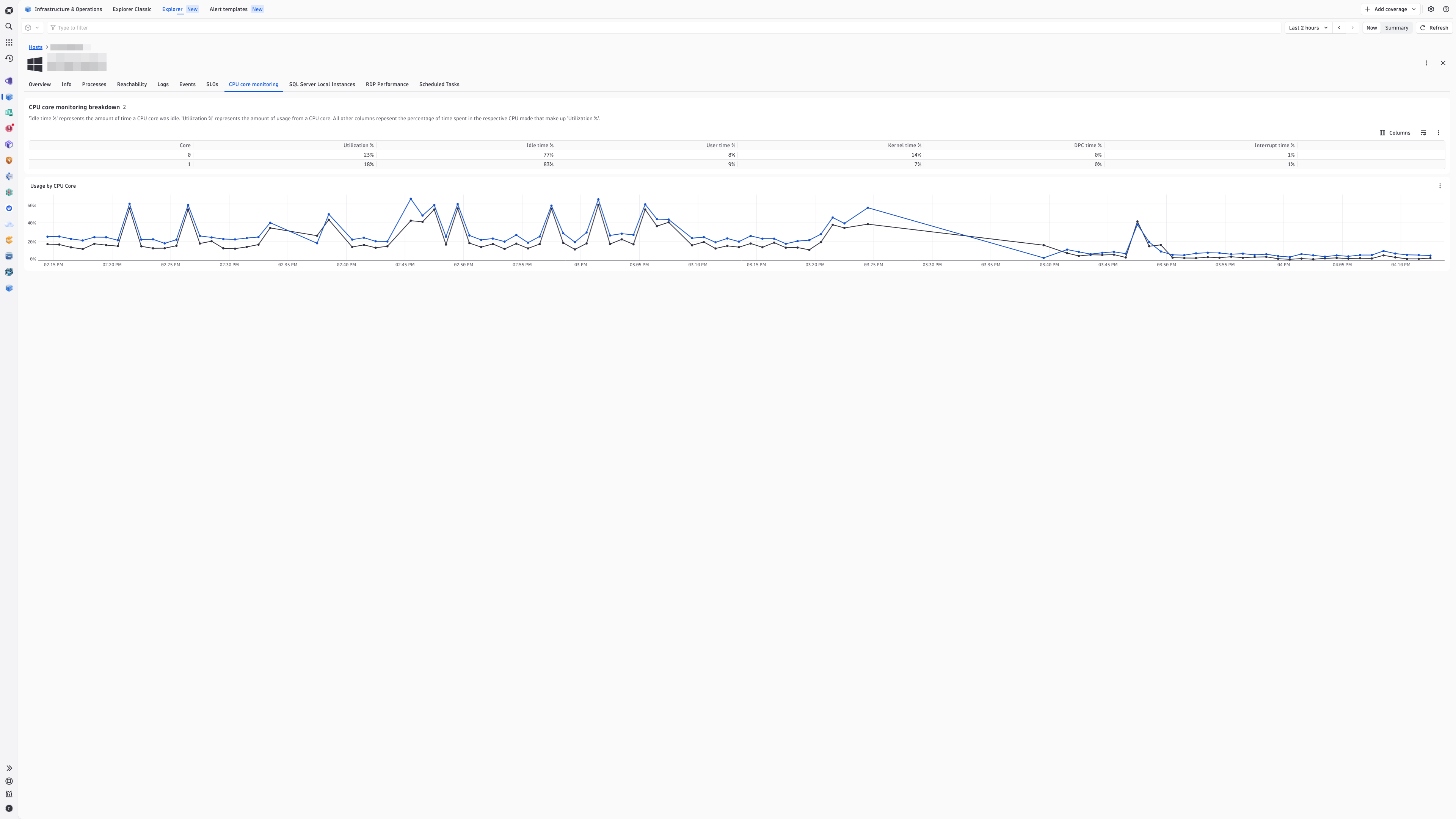
View CPU core usage for your Linux hosts in the Infrastructure & Operations app.View CPU core usage for your Windows hosts in the Infrastructure & Operations app.
  • Product information
  • Release notes

Overview

Monitor your CPU usage for your Linux and Windows hosts. This extension collects in-depth metrics on OneAgent monitored hosts by reporting CPU utilization for each core.

Use cases

  • Monitor utilization for each CPU core.
  • Identify high CPU utilization on specific CPU cores.
  • Break down the components of CPU core utilization:
    • See percentages of that make up CPU utilization with metrics for user time, kernel time, IRQ time and more.

Get started

Activate the extension in your environment from Dynatrace Hub, and configure which OneAgent hosts to monitor.

Details

This extension package contains:

  • Screen injections for OneAgent hosts in the Infrastructure and Operations app, as well as the Hosts Classic app.
  • Specific CPU core-related metrics for both Linux and Windows.
Dynatrace
Documentation
By Dynatrace
Dynatrace support center
Subscribe to new releases
Copy to clipboard

Feature sets

Below is a complete list of the feature sets provided in this version. To ensure a good fit for your needs, individual feature sets can be activated and deactivated by your administrator during configuration.

Feature setsNumber of metrics included
Metric nameMetric keyDescriptionUnit
CPU core I/O wait timehost.cpu_core.iowaitPercentage of CPU core time when the CPU core was idle during which the system had an outstanding I/O request (Linux only).Percent
CPU core idle timehost.cpu_core.idlePercentage of CPU core time, when the CPU core didn't have anything to do.Percent
CPU core steal timehost.cpu_core.stealAverage CPU core time, when a virtual machine waits to get CPU cycles from the hypervisor. In a virtual environment, CPU cycles are shared across virtual machines on the hypervisor server. If your virtualized host displays a high CPU steal, it means CPU cycles are being taken away from your virtual machine to serve other purposes. It may indicate an overloaded hypervisor (Linux only).Percent
CPU core system timehost.cpu_core.systemPercentage of CPU core time when CPU core was running in Kernel mode.Percent
CPU core user timehost.cpu_core.userPercentage of CPU core time when CPU core was running in User mode.Percent
CPU core IRQ timehost.cpu_core.irqPercentage of CPU core time when CPU core was running in IRQ mode (Linux only).Percent
CPU core software IRQ timehost.cpu_core.softirqPercentage of CPU core time when CPU core was running in software IRQ mode (Linux only).Percent
Cpu core nice timehost.cpu_core.nicePercentage of CPU core time when CPU core was running in nice mode (Linux only).Percent
CPU core guest total timehost.cpu_core.guest_totalPercentage of total CPU core time when CPU core was running in guest mode (Linux only).Percent
CPU core DPC timehost.cpu_core.dpcPercentage of CPU core time when CPU was running in define procedure call (DPC) mode. (Windows only).Percent
CPU core interrupt timehost.cpu_core.interruptPercentage of CPU core time when CPU was running in interrupt mode. (Windows only).Percent
Metric nameMetric keyDescriptionUnit
CPU core informationhost.cpu_core.infoReturns a constant metric value of `1` every minute and supplies dimensions to be used as metadata, such as logical core count.Unspecified
CPU core usagehost.cpu_core.usagePercentage of CPU core time when CPU core was utilized. A value close to 100% means most host processing resources are in use, and host CPU cores can't handle additional work.Percent

Full version history

To have more information on how to install the downloaded package, please follow the instructions on this page.
ReleaseDate

Full version history

New in this version

  • CPU time % Feature set added for related metrics (No new metrics have been added, this is just re-organizing existing metrics).

Fixed in this version

  • Fixes Could not retrieve type information error message seen in the Technologies and Processes Classic app in version 1.0.6 of the extension.

Full version history

✨New in this version:

  • Initial release including Screen Injections for the Infrastructure & Operations app, as well as the Hosts Classic app.
Dynatrace Hub
Get data into DynatraceBuild your own app
Dynatrace Intelligence - Agentic Operations SystemThe Dynatrace Agentic AI ecosystem
All (890)Log Management and AnalyticsKubernetesAI and LLM ObservabilityInfrastructure ObservabilitySoftware DeliveryApplication ObservabilityApplication SecurityBusiness ObservabilityDigital Experience
Filter
Type
Built and maintained by
Deployment model
SaaS
  • SaaS
  • Managed
Partner FinderBecome a partnerDynatrace Developer

Discover recent additions to Dynatrace

Dynatrace Assist logo

Dynatrace Assist

Dynatrace Assist: Ask, analyze, and act with Dynatrace Intelligence.

Smartscape logo

Smartscape

Interactively explore and analyze topology and relationships in digital systems.

Compliance Assistant logo

Compliance Assistant

Track, manage, and automate compliance across your IT and business landscape.

Experience Vitals logo

Experience Vitals

Optimize UX with core vitals, frontend error tracking, and end-to-end visibility

Error Inspector logo

Error Inspector

Discover, triage, and manage errors across all your frontends.

Users & Sessions logo

Users & Sessions

Discover how users and cohorts with common characteristics experience your app.

Analyze your data

Understand your data better with deep insights and clear visualizations.

Notebooks logo

Notebooks

Create powerful, data-driven documents for custom analytics and collaboration.

Dashboards logo

Dashboards

Transform complex data into clear visualizations with custom dashboards.

Investigations logo

Investigations

Fast and precise incident response on Grail data with DQL queries.

Smartscape logo

Smartscape

Interactively explore and analyze topology and relationships in digital systems.

Logs logo

Logs

Explore all your logs without writing a single query.

Problems logo

Problems

Detect, explain and triage problems automatically using Dynatrace Intelligence.

Automate your processes

Turn data and answers into actions, securely, and at scale.

Workflows logo

Workflows

Automate tasks in your IT landscape and move towards autonomous operations.

Jira logo

Jira

Create, query, comment, transition, and resolve Jira tickets within workflows.

Slack logo

Slack

Automate Slack messaging for security incidents, attacks, remediation, and more.

Secure your cloud application

See vulnerabilities and attacks in your environment.

Security Posture Management logo

Security Posture Management

Detect, prioritize, and remediate security and compliance findings with SPM.

Threats & Exploits logo

Threats & Exploits

Understand, triage, and investigate detection findings and alerts.

More resources

Observability for Developers on Cursor logo

Observability for Developers on Cursor

Get Real time Code-Level data directly to your Cursor IDE

Documents logo

Documents

Manage Dashboards, Notebooks and other documents in your Dynatrace environment

GitHub Copilot Coding Agent logo

GitHub Copilot Coding Agent

Automate vulnerability remediation and boost developer productivity

GitHub Copilot Custom Agent logo

GitHub Copilot Custom Agent

Automate your development workflows with specialized agent definitions

Observability for Developer on JetBrains logo

Observability for Developer on JetBrains

Get real-time code-level data directly to your Jetbrains IDE

Metrics logo

Metrics

Browse, search, and manage all your metrics in one central catalog.

Pagerduty for Dynatrace Workflows logo

Pagerduty for Dynatrace Workflows

Streamline incident management with automated Pageruty workflows

Cursor IDE logo

Cursor IDE

Boost developer productivity and get real-time, code-level insights into Cursor

Observability for Developers on Windsurf logo

Observability for Developers on Windsurf

Get real-time code-level data directly to your Windsurf IDE

Are you looking for something different?

We have hundreds of apps, extensions, and other technologies to customize your environment

Leverage our newest innovations of Dynatrace Saas

Kick-start your app creation

Kick-start your app creation

Whether you’re a beginner or a pro, Dynatrace Developer has the tools and support you need to create incredible apps with minimal effort.
Go to Dynatrace Developer

Upgrading from Dynatrace Managed to SaaS

Upgrading from Dynatrace Managed to SaaS

Drive innovation, speed, and agility in your organization by seamlessly and securely upgrading.
Learn More
Log Management and Analytics

Log Management and Analytics

Innovate faster and more efficiently with unified log management and log analytics for actionable insights and automation.
Learn more

