Skip to technology filters Skip to main content
Dynatrace Hub

Extend the platform,
empower your team.

Popular searches:
Home hero bg
CloudsClouds
Clouds

Clouds

Gain full visibility and proactive monitoring across your cloud infrastructure

App
Try in PlaygroundDocumentation
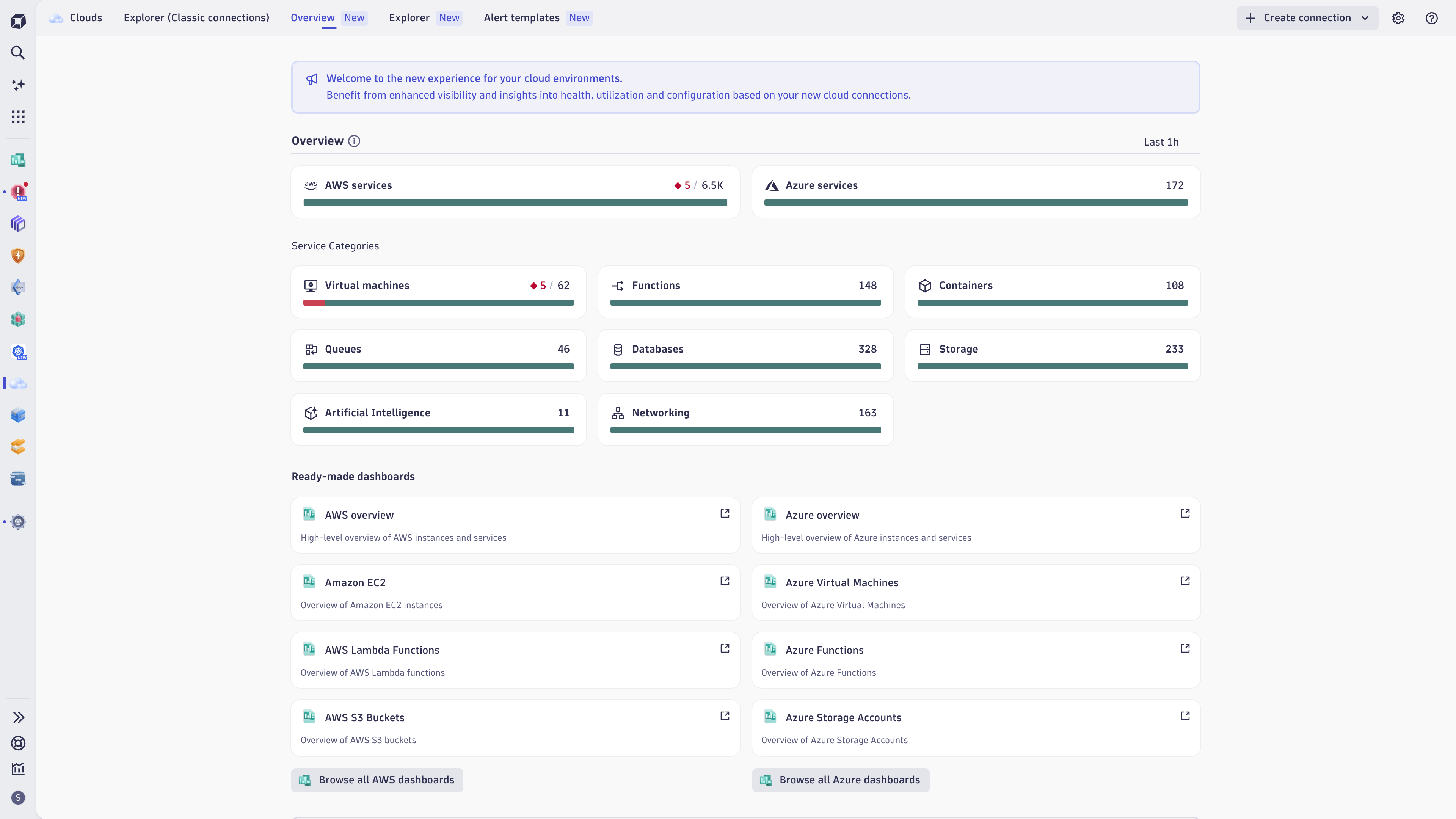
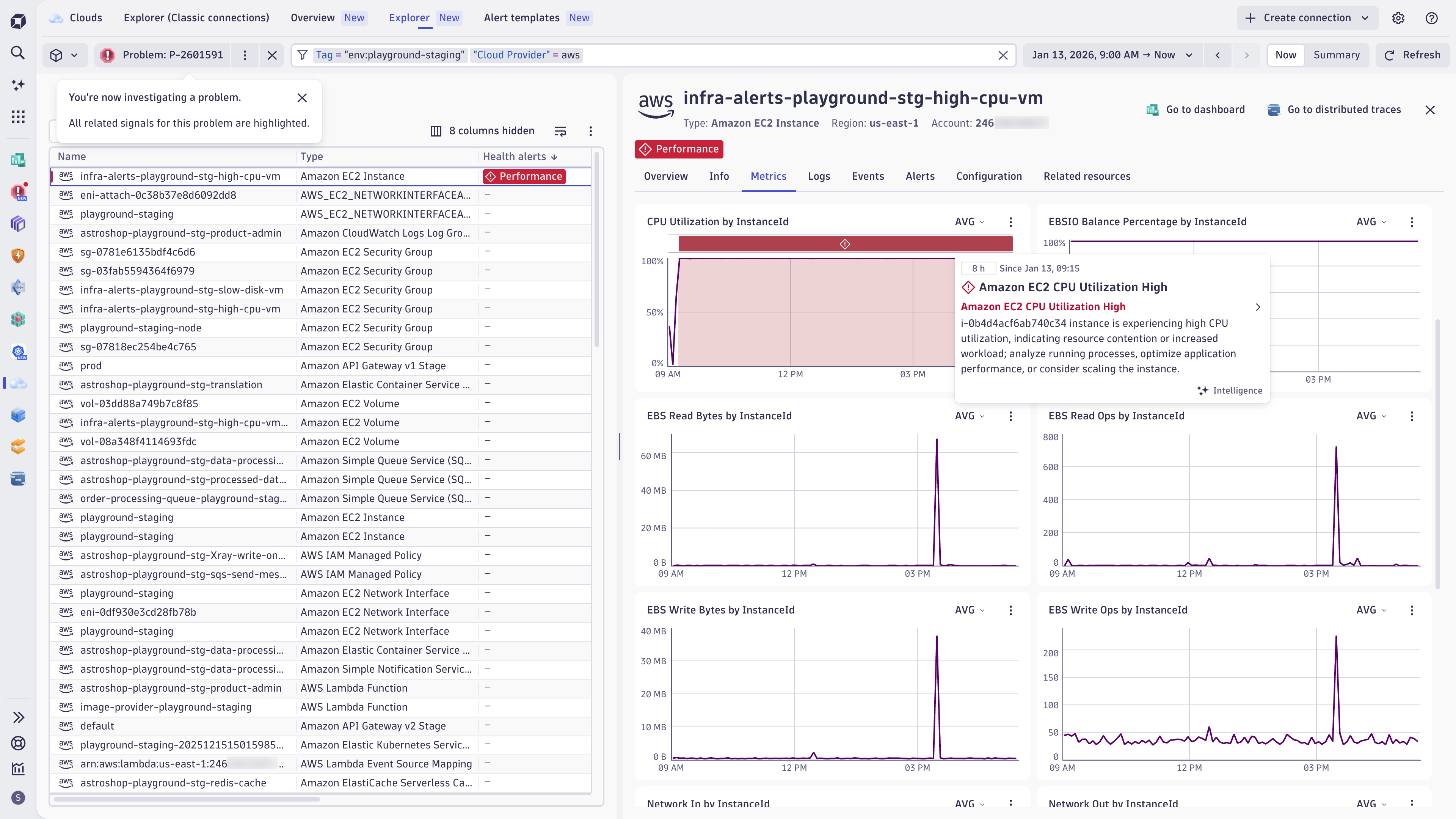
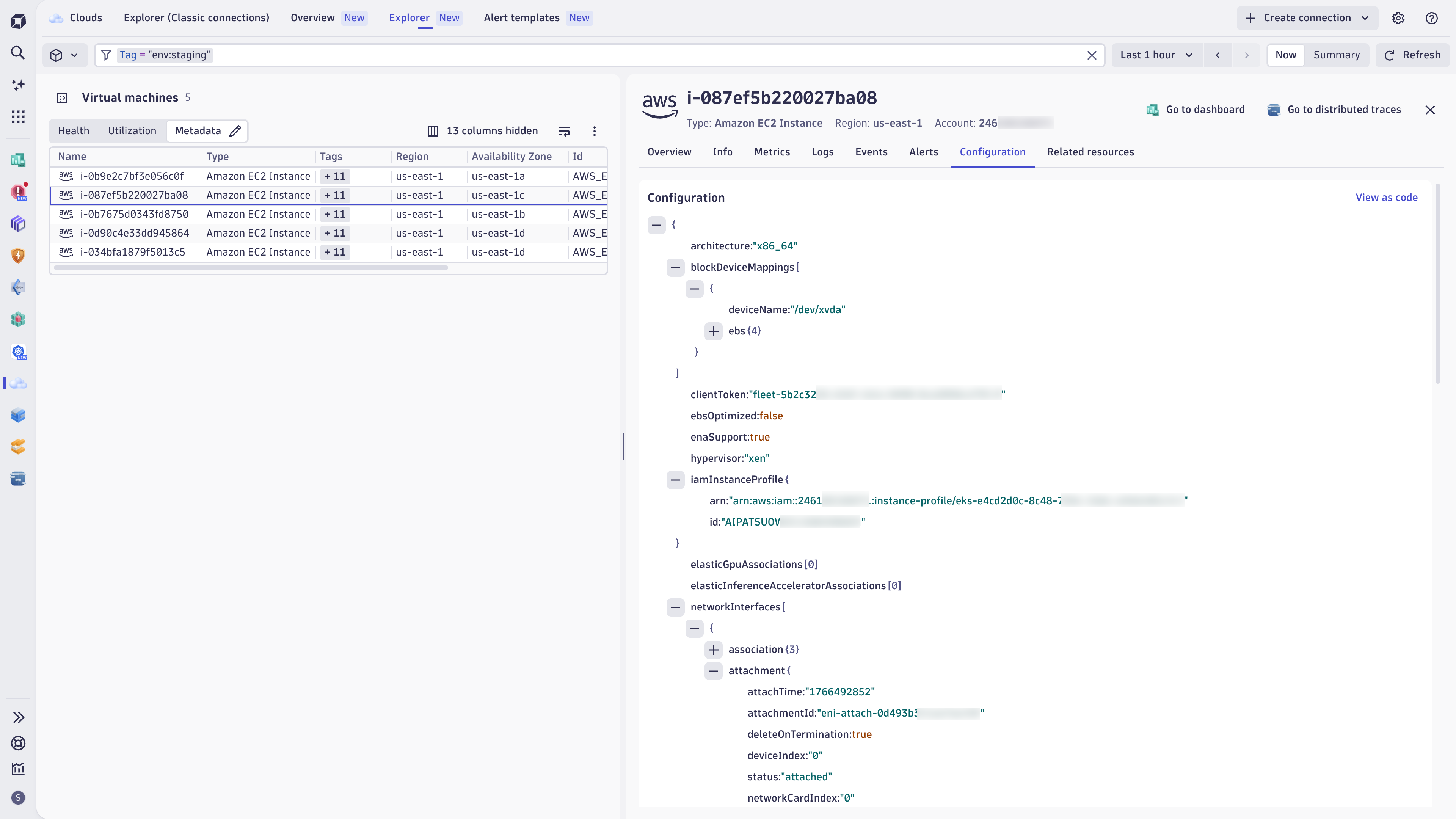
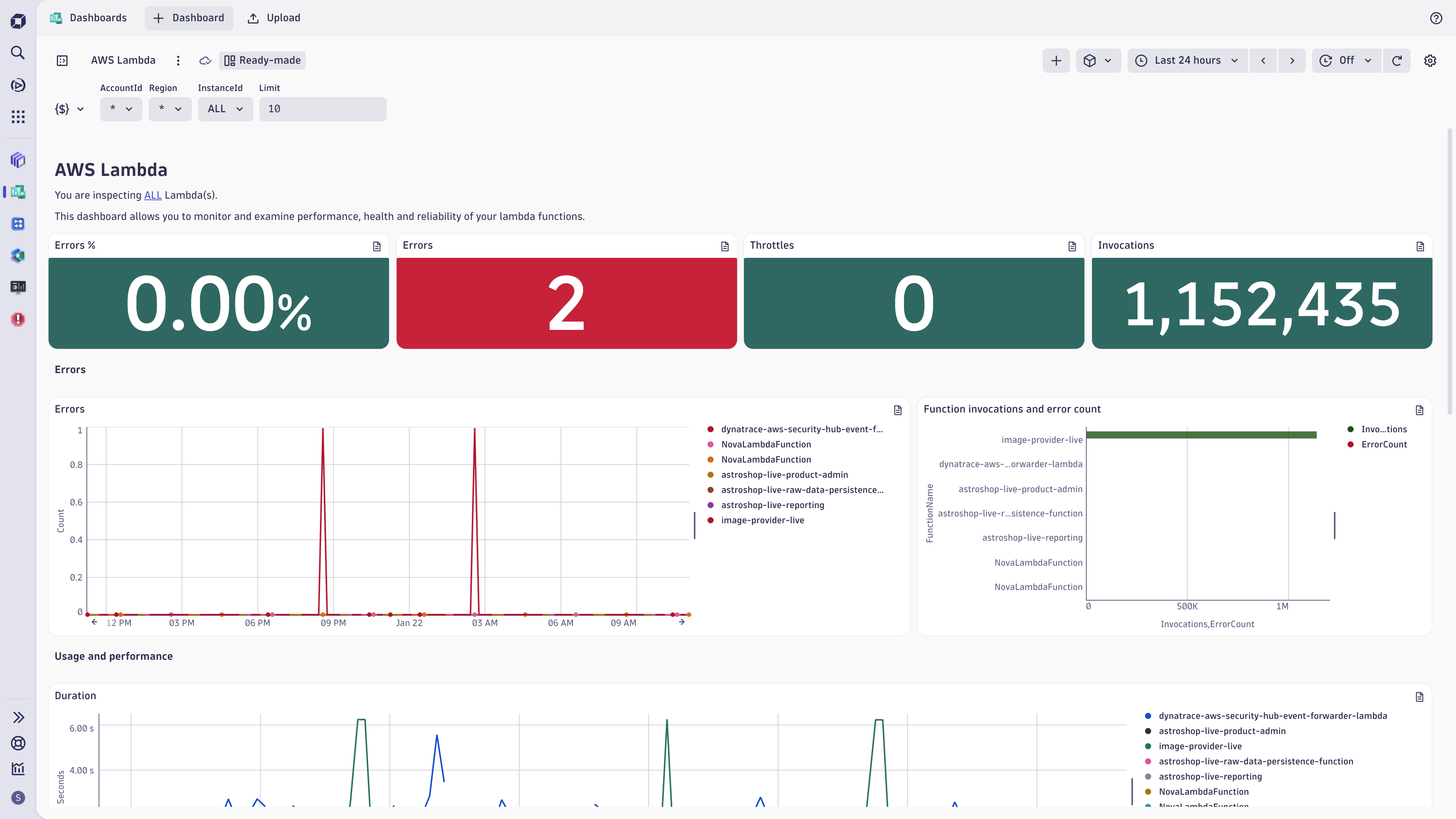
Get a comprehensive view of your multi-cloud environments and see your full cloud inventoryDetails of problems associated with selected cloud resources are easy to analyzeSee full configuration details of cloud servicesGet started immediately with ready-made dashboards. Customize them according to your needs.Use ready-made health alerts and warning signals and custom alert templates to assess health of your cloud services.Easily and seamlessly set up a new AWS connection. New Cloud Connections simplifies the onboarding experience for customers.You can still use Explorer Classic for classic cloud connections
  • Product information
  • Release notes

Overview

The Dynatrace Clouds app is your one-stop solution for complete cloud observability, governance, and operations. It allows Cloud Ops and SRE teams to proactively monitor and manage the health, performance, utilization, and security of their (multi-)cloud infrastructure and services. Leveraging the Dynatrace Smartscape real-time dependency graph and Dynatrace Intelligence, the Clouds app provides critical dependency visibility and alerting out of the box. Built on Dynatrace’s unified observability platform, the Clouds app ensures confident operations and better business outcomes from day one.

Use cases

Keep up with rapidly dynamic environments: Break down complexity to understand and optimize your entire cloud estate.

  • Onboard your cloud accounts within minutes and immediately see your full (multi-)cloud inventory.
  • Gain a detailed view of your cloud services and their dependencies, independent of the cloud provider and architecture.
  • Analyze metrics, logs, events, traces, metadata, full configuration, and topology of your cloud services: All in-context, in one view.
  • Utilize (existing) cloud tags to define ownership, cost control, route alert notification, and drive preventive operations.

Ensure optimal health and performance across all cloud services and infrastructure by leveraging AI-driven insights.

  • Quickly pinpoint root cause and troubleshoot issues to minimize impact on end users with Dynatrace Intelligence
  • Troubleshoot faster with real-time insights into all metrics, logs, events, traces, and metadata (in context)
  • Proactive alerts, ready-made dashboards, and tag-enriched signals deliver instant clarity, accurate notifications, and faster resolution.
  • Visualize requests end-to-end with distributed tracing and code-level profiling.

Drive efficiency at scale by streamlining operations through intelligent automation

  • Provide centralized governance and orchestration across distributed teams and environments.
  • Execute remediation workflows through runbook integrations or natively through Dynatrace. Employ predictive analysis to optimize cloud infrastructure sizing and to analyze implications for cloud workloads or end users.
  • Automation: Automate remediation and optimization on cloud topology and native health events (for example, AWS Health Events)

Get started

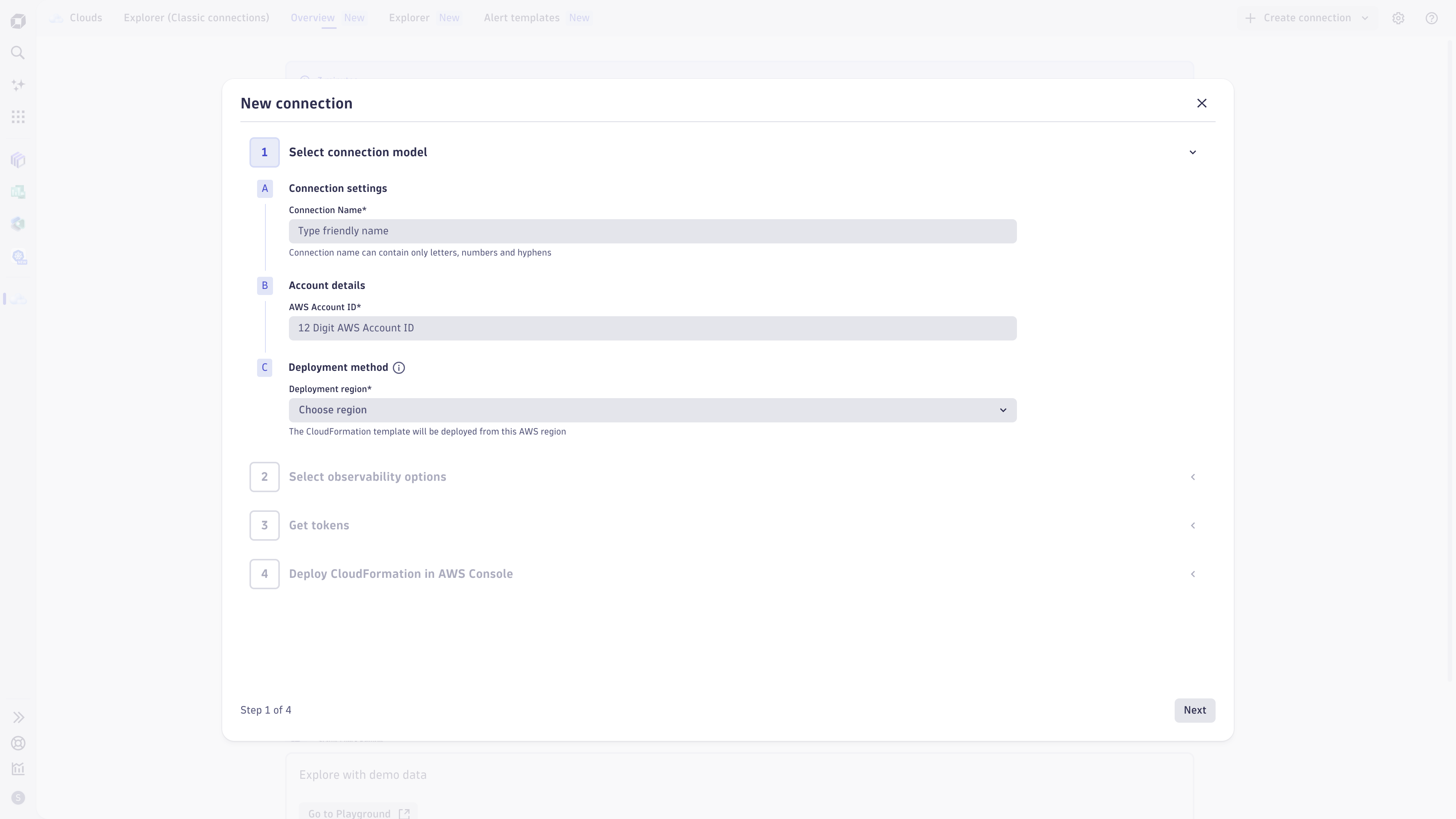
This app has an integrated onboarding flow ("Create connection") that guides you through all required steps.

Requirements: New cloud connections require a Dynatrace Platform Subscription, including "Metrics powered by Grail", "Logs powered by Grail", and "Events powered by Grail". Classic cloud connections have no specific license requirements.

Find more information in the documentation.

Dynatrace
DocumentationMore Information
By Dynatrace
Dynatrace support center
Subscribe to new releases
Copy to clipboard

Related to Clouds

Google Cloud logo

Google Cloud

Meet your business challenges head on with cloud computing services from Google.

Microsoft Azure logo

Microsoft Azure

Cloud computing service for building, testing, deploying, and managing services.

AWS logo

AWS

Reliable, scalable, and inexpensive cloud computing services.

More resources

Observe and optimize multicloud environments with the Dynatrace Clouds app

Observe and optimize multicloud environments with the Dynatrace Clouds app

Dynatrace's new Clouds app enables streamlined multicloud management, offering a holistic view for varied cloud services. It aids in resource usage analysis and swiftly pinpoints under-utilized or over-utilized components.
Blog Post

Full version history

ReleaseDate

Full version history

2.0.4

Patch Changes

  • Improve performance and stability of the application.

Full version history

2.0.2

New Cloud Platform Monitoring

We're excited to introduce an enhanced AWS cloud platform monitoring based on new AWS connections. This new experience provides deeper, actionable insights and context, greater usability, and enhanced health and troubleshooting flows for monitored AWS accounts.

With this new Cloud App release, you can:

  • Onboard new AWS connections conveniently through the Clouds App (Create New Connection).
  • Manage the configuration of new cloud connections and assess connection health through new Settings. The connection settings are now linked in the App Header within Clouds App for new as well as classic cloud connections.
  • Use the new Overview page to get a summary of the health state of your cloud services by service category based on new AWS connections.
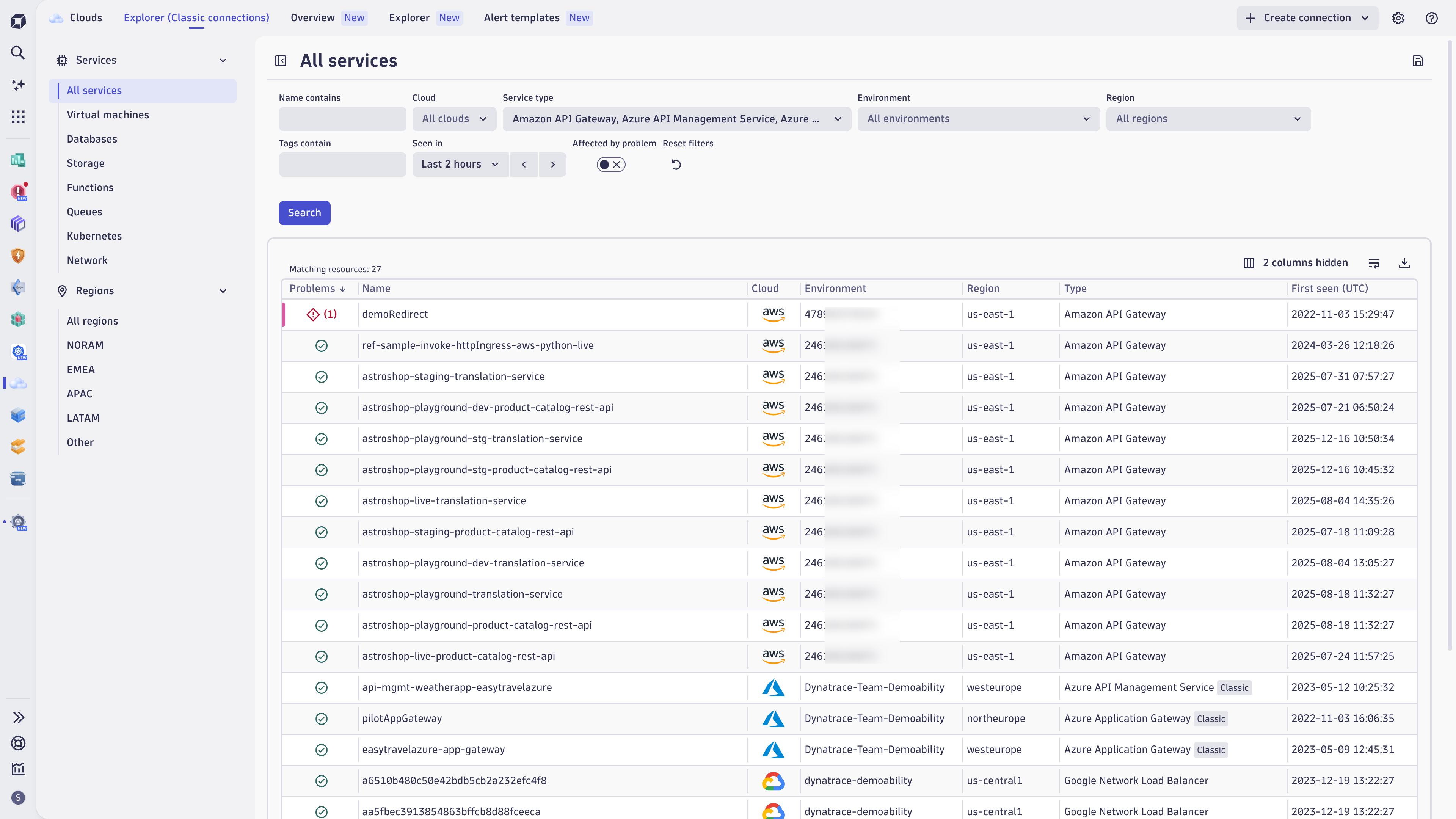
  • Use the new Explorer view to analyze your cloud services and accounts based on new AWS connections.
    • Explore your cloud inventory and understand your cloud architecture and dependencies.
    • Use cloud tags in the filter bar, facets, or segments to focus your exploratory analysis.
    • Access detailed AWS resource configurations and metadata.
    • Analyze the relationships between cloud services.
    • View telemetry signals (metrics, logs, cloud events) in the context of their associated cloud services.
  • Use problem mode to enable a focused investigation and analysis of a specific health-related issue.
  • Take advantage of ready-made dashboards for enhanced visibility.
    • Navigate to ready-made dashboards in context: The selected timeframe, segment and applied filters will be carried over from the Clouds App to the respective Dashboard.
  • Use alerts to automatically assess health of your cloud workloads, get notified or trigger auto-remediation workflows
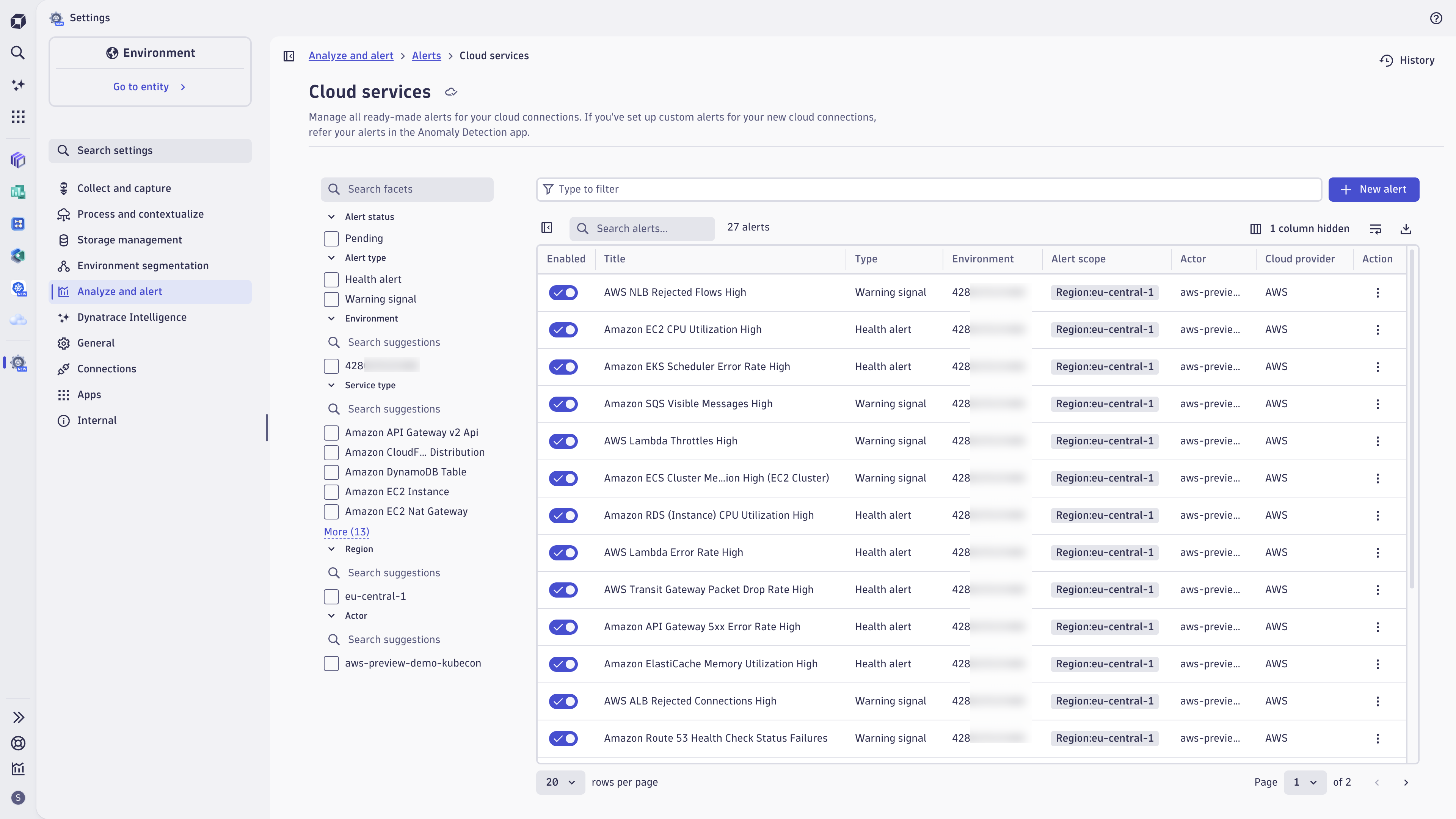
    • Easily setup ready-made recommended alerts and warning signals, also upon onboarding your AWS connections.
    • Benefit from pre-defined custom alert templates for additional cloud service anomalies.
  • The Integration Manager was removed from Clouds App. Classic integrations can still be managed in Settings.

Visit the documentation to get more information about the new Clouds App or the new cloud platform monitoring overall.

Note: You can still continue to use the previously existing "Explorer (Classic connections)" to observe and analyze data coming from classic cloud connections (AWS, Azure, Google Cloud).

Azure Cloud Platform Monitoring - Preview

Want to get a similar experience for your Azure subscriptions? Request access and join our preview program

Full version history

1.13.5

Patch Changes

  • Improves stability of vulnerability components related to specific entity.

Full version history

1.13.4

Patch Changes

  • A user with limited access to entities is no longer presented with the welcome page.

Full version history

1.13.3

Patch Changes

  • Improves query performance for Azure and AWS entities.
  • Improves stabiity of the app on bigger environments.

Full version history

1.13.1

Patch Changes

  • The user can invoke the 'Add Log' integration in the entity details section under the empty Log Card.

1.13.0

Minor Changes

  • The user can now download the data from the entities table as CSV by selecting a new download button at the top right of the table.

Patch Changes

  • Addressed an uncommon issue where a user lacking the necessary permissions would encounter a blank page upon accessing the integration manager.

Full version history

1.12.0

Minor Changes

  • Now custom app developers can use 'connect_to_cloud' intent to redirect users to connection creation window of Integration Manager page.

Patch Changes

  • Improve accuracy and clarity of permission-related error messages displayed when users lack access to the 'Integration Manager' page.
  • Tooltip in "Service Type" and "Regions" filter in no longer available.

Full version history

1.11.0

Minor Changes

  • Extend the timeout period to 30 seconds to accommodate longer entity loading durations. Add informative error messages when entity loading exceeds the timeout.
  • Merge multiple items representing the same service type (with different ways of monitoring) into single option in the 'Service type' filter selector.

Patch Changes

  • Fix unintended hiding of the metrics that share the same key across various service types in the details section.

Full version history

1.10.3

Patch Changes

  • Small user interface fixes and updates.

Full version history

1.10.2

Minor Changes

  • New "Integration Manager" page where you can manage your AWS and Azure connections within the Clouds App.
  • The empty Logs tab in the details panel is now the entry point to the new log onboarding flow.
  • Preinstalled dashboards with overview of AWS & Azure monitoring.
  • New sidebar tab with "Network" related services and common metrics for them in the table.

Patch Changes

  • User state of displayed/hidden columns is now saved for future sessions on the same device.

Full version history

1.9.2

Patch Changes

  • Minor bug fixes and improvements.

Full version history

1.9.1

Patch Changes

  • Resolved the problem with the Cloud selector not being displayed correctly.

Full version history

1.9.0

Minor Changes

  • Increased the limit of entities per DQL query to 150000
  • Improve intents in Properties block in entity details side menu

Full version history

1.8.1

Minor Changes

  • Add new GCP entities to the app:
    • Cloud Bigtable Cluster
    • Cloud Bigtable Table
    • Cloud ML Job
    • Cloud ML Model Version
    • Google AlloyDB database
    • Google AlloyDB instance
    • Google BigQuery BI Engine Model
    • Google Cloud Composer Environment
    • Google Cloud Interconnect
    • Google Cloud Interconnect Attachment
    • Google Cloud NetApp Replication
    • Google Cloud NetApp Storage Pool
    • Google Cloud NetApp Volume
    • Google Cloud Router
    • Google Cloud VPN Gateway
    • Google Dataproc cluster
    • Google Firestore Database
    • Google Network Security Policy
    • Google reCAPTCHA Enterprise Key
    • Google Storage Transfer agent
    • Google Storage Transfer job
    • Google Uptime Check URL
    • Google VPC Access Connector
    • Microsoft Active Directory Domain

Patch Changes

  • Resolved problems with counters in service/environment/region selectors
  • Fixed link to onboarding documentation on no-monitoring page
  • Fixed error (resulting in the app's crash) when loading a preset with an absolute timeframe. Fixed error on the Problem tab when changing the timeframe.

Full version history

1.7.1

Minor Changes

  • Increased the limit of entities per DQL query to 75000
  • Add "Azure Front Door and CDN profiles" service support and update metrics list for all services
  • "Install OneAgent" button opens Discovery & Coverage app with information about installer in modal window
  • Intents can contain additional reference to related environment entity (e.g. dt.entity.cloud:gcp:project or dt.entity.aws_credentials)
  • More retry attempts when DQL query fails. Stacking some queries and executing as one bigger query (up to 10 queries per stack).

Patch Changes

  • Fixed: The app crashes while rapid switching between selected entities in the table

Full version history

1.6.0

Minor Changes

  • Improve metric aggregation selectors in the entity details menu
  • Add intents for parent_of and same_as properties in the entity details menu
  • Add GKE Node info for proper GCP VM entities

Full version history

1.5.0

Minor Changes

  • Metrics displayed in the table for selected AWS Metric Streams entities
  • "No monitoring" page displayed without the change of original URL
  • OneAgent status now redirects to host entity if possible
  • It is now possible to install OneAgent by clicking a OneAgent Status Button by oppening Coverage Modal
  • Updated list of app's scopes (required permissions)

Patch Changes

  • Add queries syntax highlighting and remove unnecessary information about queries execution

Full version history

1.4.0

Minor Changes

  • New feature: Storing filters as presets
  • Presenting entities from AWS Metric Streams integration

Full version history

1.3.0

Minor Changes

  • f5c3903: Added Feedback button so customers can send feedback about the app

Patch Changes

  • 48ec21e: Fix AWS S3 global region filter handling
  • d81e077: Added filtering e2e tests

Full version history

1.2.2

Patch Changes

  • 35c3d1c: Added queryFailedEntities to self-monitoring event
  • 3dfad7b: PCLOUDS-2918 - Model and validator for cloud filters presets
  • db2a512: Handle NOT_STARTED query execution state

1.2.1

Patch Changes

  • ddca38a: Fix problem counts in table

1.2.0

Minor Changes

  • 5eb63d2: PCLOUDS-2918 - optimizing filters state
  • ad8e84d: PCLOUDS-3617 - intents fix
  • 95b69d8: Update vulnerable eslint-config-airbnb-typescript dependency
  • 6c2f233: PCLOUDS-3464 - From 2024, March 1st: presenting Azure (built-in) metrics that could have contained broken data before

Full version history

1.1.0

Minor Changes

  • 1393e00: Fix entity sorting by type
  • 0ff9928: Split lifetime to parts

Full version history

1.0.2

Patch Changes

  • 8c068bd: Dependency update unified-analysis -> 0.10.0

1.0.1

Patch Changes

  • 3036ef3: PCLOUDS-3256 - long text tooltips
  • f873374: PCLOUDS-3479 - Presenting details for entity that is not present in the table.
  • 53723bb: PCLOUDS-3455 - Better handling the SUM aggregation of GAUGE metrics in entity details section (SUM of AVG)
  • f464c37: Fix problems fetching query

1.0.0

General release

Dynatrace Hub
Get data into DynatraceBuild your own app
Dynatrace Intelligence - Agentic Operations SystemAgentic AI ecosystem
All (866)Log Management and AnalyticsKubernetesAI and LLM ObservabilityInfrastructure ObservabilitySoftware DeliveryApplication ObservabilityApplication SecurityBusiness ObservabilityDigital Experience
Filter
Type
Built and maintained by
Deployment model
SaaS
  • SaaS
  • Managed
Partner FinderBecome a partnerDynatrace Developer

Discover recent additions to Dynatrace

Problems logo

Problems

Detect, explain and triage problems automatically using Dynatrace Intelligence.

Logs logo

Logs

Explore all your logs without writing a single query.

Investigations logo

Investigations

Fast and precise incident response on Grail data with DQL queries.

Business Flow logo

Business Flow

Track, analyze, and optimize your critical business processes.

Cost & Carbon Optimization logo

Cost & Carbon Optimization

Track, analyze, and optimize your IT carbon footprint and public cloud costs.

Anomaly Detection logo

Anomaly Detection

Detect and alert on anomalies and custom patterns using any DQL time series.

Analyze your data

Understand your data better with deep insights and clear visualizations.

Notebooks logo

Notebooks

Create powerful, data-driven documents for custom analytics and collaboration.

Dashboards logo

Dashboards

Transform complex data into clear visualizations with custom dashboards.

Automate your processes

Turn data and answers into actions, securely, and at scale.

Workflows logo

Workflows

Automate tasks in your IT landscape and move towards autonomous operations.

Jira logo

Jira

Create, query, comment, transition, and resolve Jira tickets within workflows.

Slack logo

Slack

Automate Slack messaging for security incidents, attacks, remediation, and more.

Secure your cloud application

See vulnerabilities and attacks in your environment.

Security Posture Management logo

Security Posture Management

Detect, prioritize, and remediate security and compliance findings with SPM.

Threats & Exploits logo

Threats & Exploits

Understand, triage, and investigate detection findings and alerts.

More resources

Observability for Developers on Cursor logo

Observability for Developers on Cursor

Get Real time Code-Level data directly to your Cursor IDE

GitHub CoPilot Coding Agent logo

GitHub CoPilot Coding Agent

Automate vulnerability remediation and boost developer productivity

GitHub Copilot Custom Agent logo

GitHub Copilot Custom Agent

Automate your development workflows with specialized agent definitions

Observability for Developer on JetBrains logo

Observability for Developer on JetBrains

Get real-time code-level data directly to your Jetbrains IDE

Pagerduty for Dynatrace Workflows logo

Pagerduty for Dynatrace Workflows

Streamline incident management with automated Pageruty workflows

Cursor IDE logo

Cursor IDE

Boost developer productivity and get real-time, code-level insights into Cursor

Observability for Developers on Windsurf logo

Observability for Developers on Windsurf

Get real-time code-level data directly to your Windsurf IDE

Are you looking for something different?

We have hundreds of apps, extensions, and other technologies to customize your environment

Leverage our newest innovations of Dynatrace Saas

Kick-start your app creation

Kick-start your app creation

Whether you’re a beginner or a pro, Dynatrace Developer has the tools and support you need to create incredible apps with minimal effort.
Go to Dynatrace Developer
Upgrading from Dynatrace Managed to SaaS

Upgrading from Dynatrace Managed to SaaS

Drive innovation, speed, and agility in your organization by seamlessly and securely upgrading.
Learn More
Log Management and Analytics

Log Management and Analytics

Innovate faster and more efficiently with unified log management and log analytics for actionable insights and automation.
Learn more