

























Kick-start your app creation
Whether you’re a beginner or a pro, Dynatrace Developer has the tools and support you need to create incredible apps with minimal effort.
Go to Dynatrace Developer
 Cisco ACI/APIC
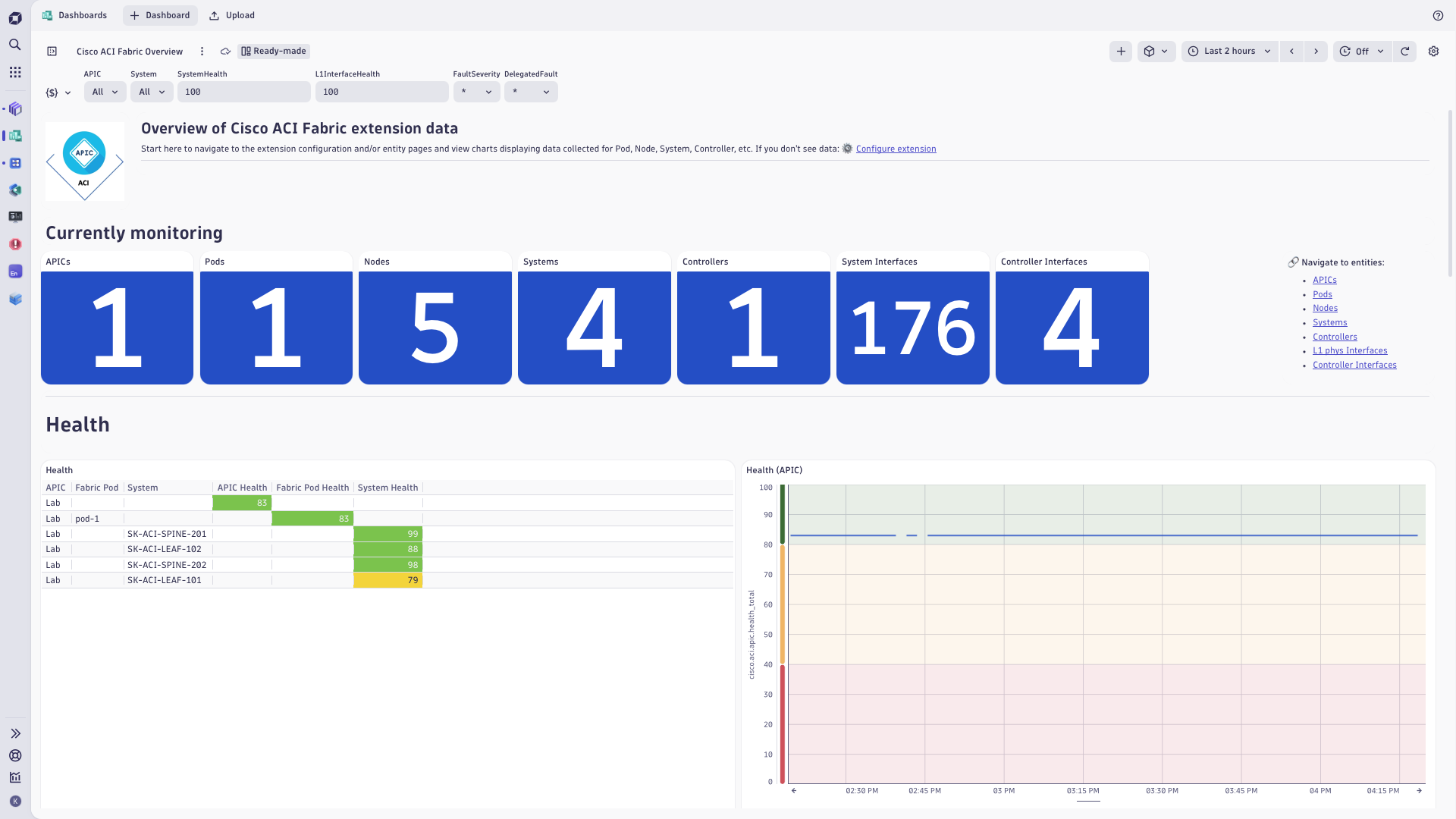
Monitor Cisco ACI fabric and tenants health, performance, faults - through APIC.
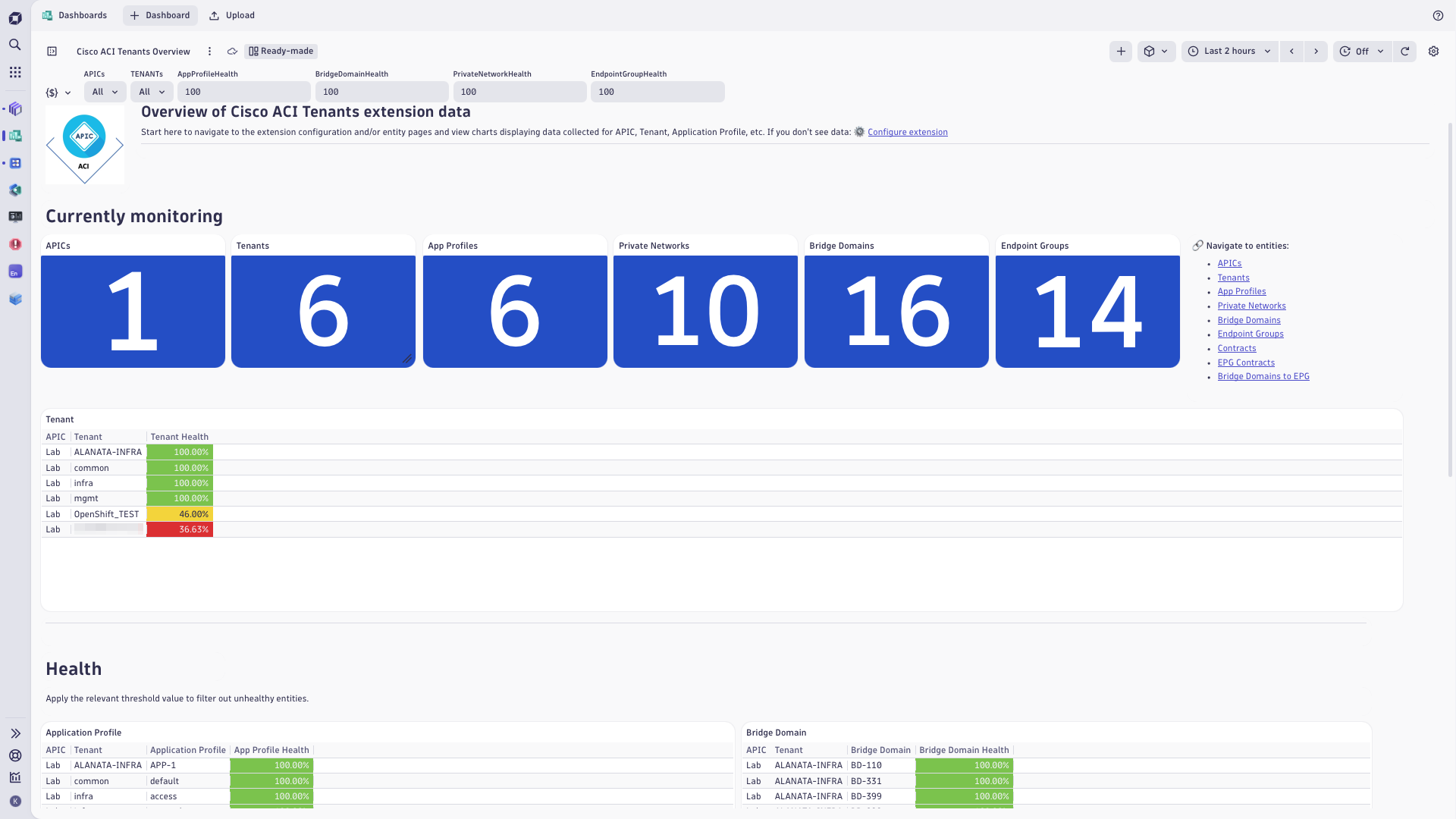
ExtensionThe Cisco ACI/APIC extension uses the Cisco APIC REST API to monitor the network fabric and tenants managed by Application Policy Infrastructure Controllers (APIC). Running on an ActiveGate, it reports health scores and performance metrics for pods, leaf and spine nodes, controllers, and their interfaces, and for tenants with their application profiles, VRFs, bridge domains, contracts, and endpoint groups (EPGs). It builds the Smartscape topology of the fabric and tenants, and turns ACI faults into log records and Davis problems that open and close with the fault lifecycle on the APIC.
You need Cisco APIC 6.0 or later and an ActiveGate that can reach the APIC controllers. On the APIC, create a dedicated read-only user for Dynatrace.
For step-by-step instructions on the installation and configuration on both APIC and Dynatrace sides, please see Cisco ACI/APIC extension in the Dynatrace Documentation.
The Cisco ACI/APIC extension collects metrics, topology, and log data for:
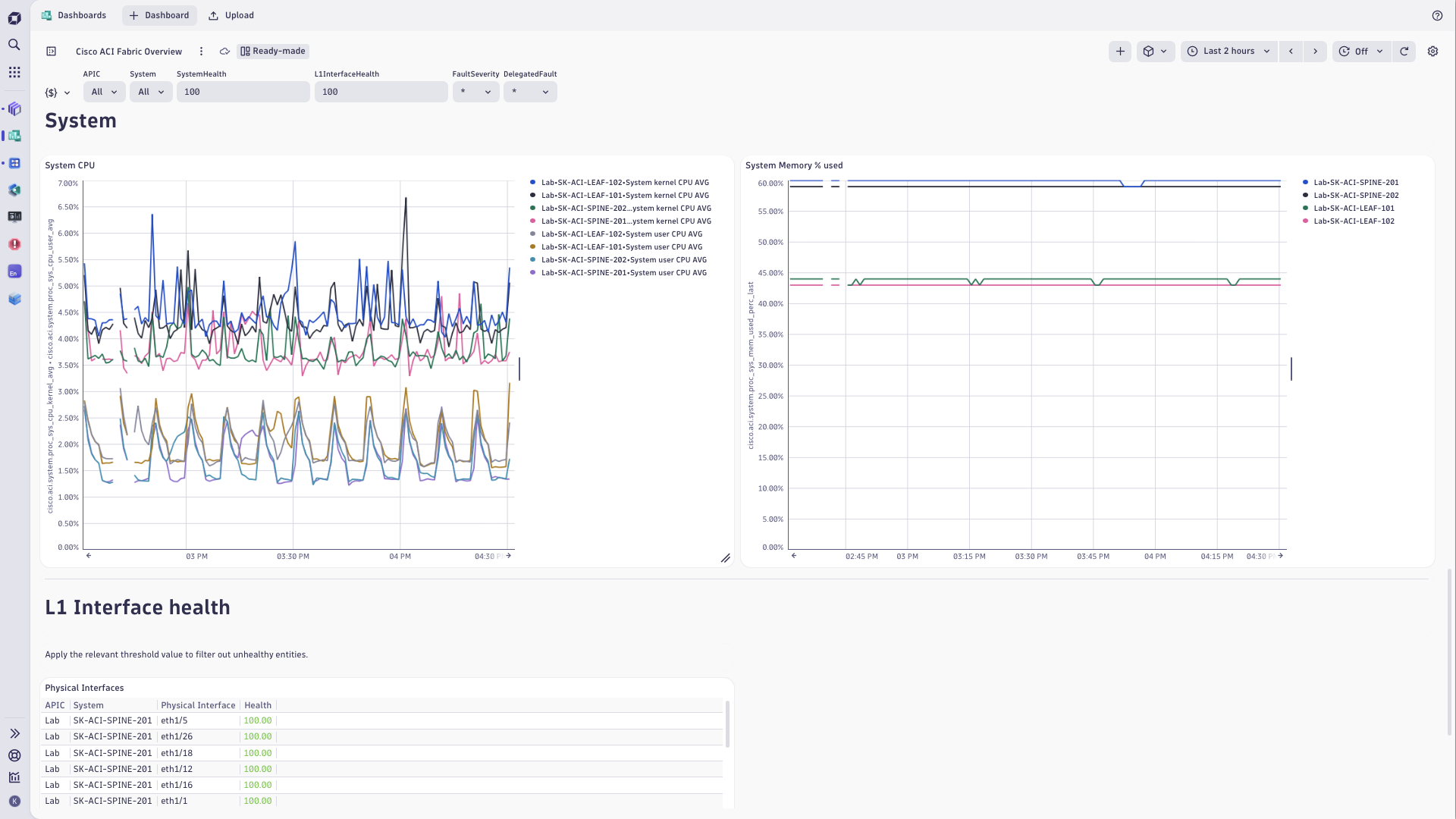
The extension brings fabric and tenant dashboards, Explorer screens in Infrastructure & Operations, and unified analysis pages for Dynatrace Managed.
Below is a complete list of the feature sets provided in this version. To ensure a good fit for your needs, individual feature sets can be activated and deactivated by your administrator during configuration.
| Metric name | Metric key | Description | Unit |
|---|---|---|---|
| Overall Metrics Data Collection Time | sfm.cisco.aci.monitor.run.duration | Total duration of all queries to collect data reported as metrics and log records | Seconds |
| Metrics Data Collection Error | sfm.cisco.aci.monitor.run.error | Indicates whether an error occurred during the most recent data collection. | Count |
| Paged Data Query Duration | sfm.cisco.aci.fetch_class_page.duration | Duration of paged queries to collect data reported as metrics and log records | Seconds |
| Paged Data Query Errors | sfm.cisco.aci.fetch_class_page.error | Number of errors that occurred during the most recent paged queries to collect data reported as metrics and log records | Count |
| Paged Data Count Query Duration | sfm.cisco.aci.fetch_class_count.duration | Duration of queries to get object counts for paged queries | Seconds |
| Paged Data Count Query Errors | sfm.cisco.aci.fetch_class_count.error | Number of errors that occurred during the most recent queries to get object counts for paged queries | Count |
| Object Count Query Duration | sfm.cisco.aci.fetch_count_query.duration | Duration of queries to get object counts reported as metrics | Seconds |
| Object Count Query Errors | sfm.cisco.aci.fetch_count_query.error | Number of errors that occurred during the most recent queries to get object counts reported as metrics | Count |
| Metric name | Metric key | Description | Unit |
|---|---|---|---|
| - | com.dynatrace.extension.network_device.sysuptime | - | - |
| - | com.dynatrace.extension.network_device.memory_usage | - | - |
| - | com.dynatrace.extension.network_device.memory_free | - | - |
| - | com.dynatrace.extension.network_device.memory_total | - | - |
| - | com.dynatrace.extension.network_device.memory_used | - | - |
| - | com.dynatrace.extension.network_device.cpu_usage | - | - |
| - | com.dynatrace.extension.network_device.if.status | - | - |
| - | com.dynatrace.extension.network_device.if.bytes_in.count | - | - |
| - | com.dynatrace.extension.network_device.if.bytes_out.count | - | - |
| Fabric Monitoring Endpoint Status | cisco.aci.apic.status | Fabric - Extension Monitoring Endpoint Status. A state metric representing a monitored Fabric endpoint, whose value is always 1 and its dimensions indicate its endpoint configuration details, including how faults are reported (as log records or as Davis events) and the enabled feature sets. | State |
| Metric name | Metric key | Description | Unit |
|---|---|---|---|
| - | cisco.aci.app_profile.l2_egr_bytes_ag_hist.multicast_cum | - | - |
| Application Profile Multicast Egress Bytes Rate | cisco.aci.app_profile.l2_egr_bytes_ag_hist.multicast_rate | Application Profile - Multicast Egress Bytes Rate in a 15 minute sampling interval | BytePerSecond |
| - | cisco.aci.app_profile.l2_egr_bytes_ag_hist.unicast_cum | - | - |
| Application Profile Unicast Egress Bytes Rate | cisco.aci.app_profile.l2_egr_bytes_ag_hist.unicast_rate | Application Profile - Unicast Egress Bytes Rate in a 15 minute sampling interval | BytePerSecond |
| - | cisco.aci.app_profile.l2_ingr_bytes_ag_hist.drop_cum | - | - |
| Application Profile Ingress Drop Rate | cisco.aci.app_profile.l2_ingr_bytes_ag_hist.drop_rate | Application Profile - Ingress Drop Rate in a 15 minute sampling interval | BytePerSecond |
| - | cisco.aci.app_profile.l2_ingr_bytes_ag_hist.flood_cum | - | - |
| Application Profile Ingress Flood Rate | cisco.aci.app_profile.l2_ingr_bytes_ag_hist.flood_rate | Application Profile - Ingress Flood Rate in a 15 minute sampling interval | BytePerSecond |
| - | cisco.aci.app_profile.l2_ingr_bytes_ag_hist.multicast_cum | - | - |
| Application Profile Multicast Ingress Bytes Rate | cisco.aci.app_profile.l2_ingr_bytes_ag_hist.multicast_rate | Application Profile - Multicast Ingress Bytes Rate in a 15 minute sampling interval | BytePerSecond |
| - | cisco.aci.app_profile.l2_ingr_bytes_ag_hist.unicast_cum | - | - |
| Application Profile Unicast Ingress Bytes Rate | cisco.aci.app_profile.l2_ingr_bytes_ag_hist.unicast_rate | Application Profile - Unicast Ingress Bytes Rate in a 15 minute sampling interval | BytePerSecond |
| - | cisco.aci.bridge_domain.l2_egr_bytes_ag_hist.multicast_cum | - | - |
| Bridge Domain Multicast Egress Bytes Rate | cisco.aci.bridge_domain.l2_egr_bytes_ag_hist.multicast_rate | Bridge Domain - Multicast Egress Bytes Rate in a 15 minute sampling interval | BytePerSecond |
| - | cisco.aci.bridge_domain.l2_egr_bytes_ag_hist.unicast_cum | - | - |
| Bridge Domain Unicast Egress Bytes Rate | cisco.aci.bridge_domain.l2_egr_bytes_ag_hist.unicast_rate | Bridge Domain - Unicast Egress Bytes Rate in a 15 minute sampling interval | BytePerSecond |
| - | cisco.aci.bridge_domain.l2_ingr_bytes_ag_hist.drop_cum | - | - |
| Bridge Domain Ingress Drop Rate | cisco.aci.bridge_domain.l2_ingr_bytes_ag_hist.drop_rate | Bridge Domain - Ingress Drop Rate in a 15 minute sampling interval | BytePerSecond |
| - | cisco.aci.bridge_domain.l2_ingr_bytes_ag_hist.flood_cum | - | - |
| Bridge Domain Ingress Flood Rate | cisco.aci.bridge_domain.l2_ingr_bytes_ag_hist.flood_rate | Bridge Domain - Ingress Flood Rate in a 15 minute sampling interval | BytePerSecond |
| - | cisco.aci.bridge_domain.l2_ingr_bytes_ag_hist.multicast_cum | - | - |
| Bridge Domain Multicast Ingress Bytes Rate | cisco.aci.bridge_domain.l2_ingr_bytes_ag_hist.multicast_rate | Bridge Domain - Multicast Ingress Bytes Rate in a 15 minute sampling interval | BytePerSecond |
| - | cisco.aci.bridge_domain.l2_ingr_bytes_ag_hist.unicast_cum | - | - |
| Bridge Domain Unicast Ingress Bytes Rate | cisco.aci.bridge_domain.l2_ingr_bytes_ag_hist.unicast_rate | Bridge Domain - Unicast Ingress Bytes Rate in a 15 minute sampling interval | BytePerSecond |
| - | cisco.aci.endpoint_group.l2_egr_bytes_ag_hist.multicast_cum | - | - |
| Endpoint Group Multicast Egress Bytes Rate | cisco.aci.endpoint_group.l2_egr_bytes_ag_hist.multicast_rate | Endpoint Group - Multicast Egress Bytes Rate in a 15 minute sampling interval | BytePerSecond |
| - | cisco.aci.endpoint_group.l2_egr_bytes_ag_hist.unicast_cum | - | - |
| Endpoint Group Unicast Egress Bytes Rate | cisco.aci.endpoint_group.l2_egr_bytes_ag_hist.unicast_rate | Endpoint Group - Unicast Egress Bytes Rate in a 15 minute sampling interval | BytePerSecond |
| - | cisco.aci.endpoint_group.l2_ingr_bytes_ag_hist.drop_cum | - | - |
| Endpoint Group Ingress Drop Rate | cisco.aci.endpoint_group.l2_ingr_bytes_ag_hist.drop_rate | Endpoint Group - Ingress Drop Rate in a 15 minute sampling interval | BytePerSecond |
| - | cisco.aci.endpoint_group.l2_ingr_bytes_ag_hist.flood_cum | - | - |
| Endpoint Group Ingress Flood Rate | cisco.aci.endpoint_group.l2_ingr_bytes_ag_hist.flood_rate | Endpoint Group - Ingress Flood Rate in a 15 minute sampling interval | BytePerSecond |
| - | cisco.aci.endpoint_group.l2_ingr_bytes_ag_hist.multicast_cum | - | - |
| Endpoint Group Multicast Ingress Bytes Rate | cisco.aci.endpoint_group.l2_ingr_bytes_ag_hist.multicast_rate | Endpoint Group - Multicast Ingress Bytes Rate in a 15 minute sampling interval | BytePerSecond |
| - | cisco.aci.endpoint_group.l2_ingr_bytes_ag_hist.unicast_cum | - | - |
| Endpoint Group Unicast Ingress Bytes Rate | cisco.aci.endpoint_group.l2_ingr_bytes_ag_hist.unicast_rate | Endpoint Group - Unicast Ingress Bytes Rate in a 15 minute sampling interval | BytePerSecond |
| - | cisco.aci.private_network.l2_egr_bytes_ag_hist.multicast_cum | - | - |
| Private Network Multicast Egress Bytes Rate | cisco.aci.private_network.l2_egr_bytes_ag_hist.multicast_rate | Private Network - Multicast Egress Bytes Rate in a 15 minute sampling interval | BytePerSecond |
| - | cisco.aci.private_network.l2_egr_bytes_ag_hist.unicast_cum | - | - |
| Private Network Unicast Egress Bytes Rate | cisco.aci.private_network.l2_egr_bytes_ag_hist.unicast_rate | Private Network - Unicast Egress Bytes Rate in a 15 minute sampling interval | BytePerSecond |
| - | cisco.aci.private_network.l2_ingr_bytes_ag_hist.drop_cum | - | - |
| Private Network Ingress Drop Rate | cisco.aci.private_network.l2_ingr_bytes_ag_hist.drop_rate | Private Network - Ingress Drop Rate in a 15 minute sampling interval | BytePerSecond |
| - | cisco.aci.private_network.l2_ingr_bytes_ag_hist.flood_cum | - | - |
| Private Network Ingress Flood Rate | cisco.aci.private_network.l2_ingr_bytes_ag_hist.flood_rate | Private Network - Ingress Flood Rate in a 15 minute sampling interval | BytePerSecond |
| - | cisco.aci.private_network.l2_ingr_bytes_ag_hist.multicast_cum | - | - |
| Private Network Multicast Ingress Bytes Rate | cisco.aci.private_network.l2_ingr_bytes_ag_hist.multicast_rate | Private Network - Multicast Ingress Bytes Rate in a 15 minute sampling interval | BytePerSecond |
| - | cisco.aci.private_network.l2_ingr_bytes_ag_hist.unicast_cum | - | - |
| Private Network Unicast Ingress Bytes Rate | cisco.aci.private_network.l2_ingr_bytes_ag_hist.unicast_rate | Private Network - Unicast Ingress Bytes Rate in a 15 minute sampling interval | BytePerSecond |
| - | cisco.aci.tenant.l2_egr_bytes_ag_hist.multicast_cum | - | - |
| Tenant Multicast Egress Bytes Rate | cisco.aci.tenant.l2_egr_bytes_ag_hist.multicast_rate | Tenant - Multicast Egress Bytes Rate in a 15 minute sampling interval | BytePerSecond |
| - | cisco.aci.tenant.l2_egr_bytes_ag_hist.unicast_cum | - | - |
| Tenant Unicast Egress Bytes Rate | cisco.aci.tenant.l2_egr_bytes_ag_hist.unicast_rate | Tenant - Unicast Egress Bytes Rate in a 15 minute sampling interval | BytePerSecond |
| - | cisco.aci.tenant.l2_ingr_bytes_ag_hist.drop_cum | - | - |
| Tenant Ingress Drop Rate | cisco.aci.tenant.l2_ingr_bytes_ag_hist.drop_rate | Tenant - Ingress Drop Rate in a 15 minute sampling interval | BytePerSecond |
| - | cisco.aci.tenant.l2_ingr_bytes_ag_hist.flood_cum | - | - |
| Tenant Ingress Flood Rate | cisco.aci.tenant.l2_ingr_bytes_ag_hist.flood_rate | Tenant - Ingress Flood Rate in a 15 minute sampling interval | BytePerSecond |
| - | cisco.aci.tenant.l2_ingr_bytes_ag_hist.multicast_cum | - | - |
| Tenant Multicast Ingress Bytes Rate | cisco.aci.tenant.l2_ingr_bytes_ag_hist.multicast_rate | Tenant - Multicast Ingress Bytes Rate in a 15 minute sampling interval | BytePerSecond |
| - | cisco.aci.tenant.l2_ingr_bytes_ag_hist.unicast_cum | - | - |
| Tenant Unicast Ingress Bytes Rate | cisco.aci.tenant.l2_ingr_bytes_ag_hist.unicast_rate | Tenant - Unicast Ingress Bytes Rate in a 15 minute sampling interval | BytePerSecond |
| Metric name | Metric key | Description | Unit |
|---|---|---|---|
| Global pcTag | cisco.aci.apic.global_pc_tags | Fabric Capacity - Global pcTag | Count |
| MAC Endpoints | cisco.aci.apic.global_mac_endpoints | Fabric Capacity - MAC Endpoints | Count |
| IPv6 Endpoints | cisco.aci.apic.global_ipv6_endpoints | Fabric Capacity - IPv6 Endpoints | Count |
| IPv4 Endpoints | cisco.aci.apic.global_ipv4_endpoints | Fabric Capacity - IPv4 Endpoints | Count |
| Proxy Database Entries | cisco.aci.apic.global_proxy_db_entries | Fabric Capacity - MAC + IP Endpoints | Count |
| Fabric Health AVG | cisco.aci.apic.health_avg | Fabric Health AVG in a 5 minute sampling interval | Unspecified |
| Fabric Health MAX | cisco.aci.apic.health_max | Fabric Health MAX in a 5 minute sampling interval | Unspecified |
| Fabric Health MIN | cisco.aci.apic.health_min | Fabric Health MIN in a 5 minute sampling interval | Unspecified |
| Fabric Total Health Score | cisco.aci.apic.health_total | Fabric Total Health Score | Unspecified |
| Admin State (in-service) | cisco.aci.cluster_element.admin_state_in_service | Cluster Element - Admin State of the cluster is: in-service | State |
| Health State (fully-fit) | cisco.aci.cluster_element.health_fully_fit | Controller - Health State is: fully-fit | State |
| Operational State (available) | cisco.aci.cluster_element.oper_state_available | Controller - Operational State is: available | State |
| Administrative State | cisco.aci.cnw_phys_if.admin_status | Controller Physical Interface - Administrative State | State |
| Operational Status | cisco.aci.cnw_phys_if.oper_status | Controller Physical Interface - Operational Status | State |
| Admin State (on) | cisco.aci.fabric_node.admin_state_on | Fabric Node - Admin State is: on | State |
| Fabric State (active) | cisco.aci.fabric_node.fabric_state_active | Fabric Node - Fabric State is: active | State |
| Fabric Pod Controllers | cisco.aci.fabric_pod.controllers | Fabric Pod - Controllers | Count |
| Fabric Pod Nodes | cisco.aci.fabric_pod.fabric_nodes | Fabric Pod - Nodes | Count |
| Fabric Health AVG | cisco.aci.fabric_pod.health_avg | Fabric Pod - Fabric Health AVG in a 5 minute sampling interval | Unspecified |
| Fabric Health MAX | cisco.aci.fabric_pod.health_max | Fabric Pod - Fabric Health MAX in a 5 minute sampling interval | Unspecified |
| Fabric Health MIN | cisco.aci.fabric_pod.health_min | Fabric Pod - Fabric Health MIN in a 5 minute sampling interval | Unspecified |
| Fabric Total Health Score | cisco.aci.fabric_pod.health_total | Fabric Pod - Fabric Total Health Score | Unspecified |
| Fabric Pod Leaves | cisco.aci.fabric_pod.leaves | Fabric Pod - Leaves | Count |
| Fabric Pod Spines | cisco.aci.fabric_pod.spines | Fabric Pod - Spines | Count |
| Faults by Domain | cisco.aci.fault_count.domain | Faults by Domain | Count |
| Faults by Type | cisco.aci.fault_count.type | Faults by Type | Count |
| Administrative State | cisco.aci.l1_phys_if.admin_status | Physical Interface - Administrative State | State |
| Interface Health | cisco.aci.l1_phys_if.health | Physical Interface - Health | Unspecified |
| Operational State | cisco.aci.l1_phys_if.oper_status | Physical Interface - Operational State | State |
| Administrative State | cisco.aci.mgmt_if.admin_status | Management Interface - Administrative State | State |
| Interface Health | cisco.aci.mgmt_if.health | Management Interface - Health | Percent |
| Operational Port State | cisco.aci.mgmt_if.oper_status | Management Interface - Operational Port State | State |
| System Health Score | cisco.aci.system.health | System - Health Score | Unspecified |
| System Health AVG | cisco.aci.system.health_avg | System - System Node Health AVG in a 5 minute sampling interval | Unspecified |
| System Health MAX | cisco.aci.system.health_max | System - System Node Health MAX in a 5 minute sampling interval | Unspecified |
| System Health MIN | cisco.aci.system.health_min | System - System Node Health MIN in a 5 minute sampling interval | Unspecified |
| Total L2 Endpoints | cisco.aci.system.l2_total_ep_last | Leaf Layer2 usage statistics - Total L2 Endpoints in a 5 minute sampling interval | Count |
| L2 Endpoints Capacity | cisco.aci.system.l2_total_ep_max | Leaf Layer2 usage statistics - L2 Endpoints capacity in a 5 minute sampling interval | Count |
| L2 Endpoints Usage | cisco.aci.system.l2_total_ep_perc | Leaf Layer2 usage statistics - Total L2 Endpoints divided by L2 Endpoints capacity | Percent |
| TCAMs | cisco.aci.system.pol_tcams | Leaf Policy entries usage statistics - TCAMs = (Cumulative - Baseline) | Count |
| Policy Usage Capacity | cisco.aci.system.pol_tcams_max | Leaf Policy entries usage statistics - Policy Usage Capacity | Count |
| TCAMs Usage | cisco.aci.system.pol_tcams_perc | Leaf Policy entries usage statistics - TCAMs Usage = (Cumulative - Baseline) / Capacity | Percent |
| Policy Usage Baseline | cisco.aci.system.pol_usage_base | Leaf Policy entries usage statistics - Policy Usage Baseline | Count |
| Policy Usage Cumulative | cisco.aci.system.pol_usage_cum | Leaf Policy entries usage statistics - Policy Usage Cumulative | Count |
| System Kernel CPU Utilization AVG | cisco.aci.system.proc_sys_cpu_kernel_avg | System - Kernel CPU Utilization AVG | Percent |
| System Kernel CPU Utilization AVG Last | cisco.aci.system.proc_sys_cpu_kernel_avg_last | System - Kernel CPU Utilization AVG Last | Percent |
| System User CPU Utilization AVG | cisco.aci.system.proc_sys_cpu_user_avg | System - User CPU Utilization AVG | Percent |
| System User CPU Utilization AVG Last | cisco.aci.system.proc_sys_cpu_user_avg_last | System - User CPU Utilization AVG Last | Percent |
| System Load Average (1 min) | cisco.aci.system.proc_sys_load_avg | System - one-minute load average of the switch operating system | Unspecified |
| System Load Average (1 min) Last | cisco.aci.system.proc_sys_load_avg_last | System - one-minute load average of the switch operating system (last value) | Unspecified |
| System Memory Free Last | cisco.aci.system.proc_sys_mem_free_last | System - Memory Free Last | KiloByte |
| System Memory Total Last | cisco.aci.system.proc_sys_mem_total_last | System - Memory Total Last | KiloByte |
| System Memory Used Last | cisco.aci.system.proc_sys_mem_used_last | System - Memory Used Last | KiloByte |
| System Memory Used % Last | cisco.aci.system.proc_sys_mem_used_perc_last | System - Memory Used % Last | Percent |
| System Uptime | cisco.aci.system.system_uptime | System - Uptime | MilliSecond |
| IPv4 Addresses | cisco.aci.system.v4_addresses | Leaf Layer3 v4/32 total entries usage statistics - IPv4 Addresses = (Cumulative - Baseline) | Count |
| Total v4 Endpoints Capacity | cisco.aci.system.v4_addresses_max | Leaf Layer3 total entries usage capacity - Total v4 Endpoints capacity current value | Count |
| IPv4 Addresses Usage | cisco.aci.system.v4_addresses_perc | Leaf Layer3 v4/32 total entries usage statistics, Leaf Layer3 total entries usage capacity - IPv4 Addresses Usage = (Cumulative - Baseline) / Capacity | Percent |
| Total v4 32 Endpoints Baseline | cisco.aci.system.v4_ep_base | Leaf Layer3 v4/32 total entries usage statistics - Total v4 32 Endpoints Baseline | Count |
| Total v4 32 Endpoints Cumulative | cisco.aci.system.v4_ep_cum | Leaf Layer3 v4/32 total entries usage statistics - Total v4 32 Endpoints Cumulative | Count |
| Total Vlan Entries Baseline | cisco.aci.system.vlan_usage_total_base | Leaf Vlan entries usage statistics - Total vlan entries Baseline | Count |
| Total Vlan Entries Cumulative | cisco.aci.system.vlan_usage_total_cum | Leaf Vlan entries usage statistics - Total Vlan Entries Cumulative | Count |
| Vlans | cisco.aci.system.vlan_vlans | Leaf Vlan entries usage statistics - Vlans = (Cumulative - Baseline) | Count |
| Vlan Entries Capacity | cisco.aci.system.vlan_vlans_max | Leaf Vlan entries usage statistics - Vlan Entries Capacity | Count |
| Vlans Usage | cisco.aci.system.vlan_vlans_perc | Leaf Vlan entries usage statistics - Vlans Usage = (Cumulative - Baseline) / Capacity | Percent |
| Metric name | Metric key | Description | Unit |
|---|---|---|---|
| Application Profile Health | cisco.aci.app_profile.health | Application Profile - Health | Unspecified |
| Bridge Domain Health | cisco.aci.bridge_domain.health | Bridge Domain - Health | Unspecified |
| Endpoint Group Contract Consumers | cisco.aci.endpoint_group.contract_consumers | Endpoint Group - Contract Consumers | Count |
| Endpoint Group Contract Providers | cisco.aci.endpoint_group.contract_providers | Endpoint Group - Contract Providers | Count |
| Endpoint Group Health | cisco.aci.endpoint_group.health | Endpoint Group - Health | Unspecified |
| Private Network Health | cisco.aci.private_network.health | Private Network - Health | Unspecified |
| Application Profiles | cisco.aci.tenant.app_profiles | Application Profiles | Count |
| Bridge Domains | cisco.aci.tenant.bridge_domains | Bridge Domains | Count |
| Contracts | cisco.aci.tenant.contracts | Contracts | Count |
| Tenant health | cisco.aci.tenant.health | Tenant - Health | Unspecified |
| Private Networks | cisco.aci.tenant.private_networks | Private Networks | Count |
| Metric name | Metric key | Description | Unit |
|---|---|---|---|
| Egress Bytes Cumulative | cisco.aci.l1_phys_if.eqpt_egr_total_hist_5min.bytes_cum.count | Physical Interface - Egress Bytes Cumulative | Byte |
| Egress Bytes Rate | cisco.aci.l1_phys_if.eqpt_egr_total_hist_5min.bytes_rate | Physical Interface - Egress Bytes Rate | BytePerSecond |
| Egress Packets rate | cisco.aci.l1_phys_if.eqpt_egr_total_hist_5min.pkts_rate | Physical Interface - Egress Packets rate | PerSecond |
| Egress Link Utilization | cisco.aci.l1_phys_if.eqpt_egr_total_hist_5min.util_avg | Physical Interface - Egress Link Utilization | Percent |
| Ingress Bytes Cumulative | cisco.aci.l1_phys_if.eqpt_ingr_total_hist_5min.bytes_cum.count | Physical Interface - Ingress Bytes Cumulative | Byte |
| Ingress Bytes rate | cisco.aci.l1_phys_if.eqpt_ingr_total_hist_5min.bytes_rate | Physical Interface - Ingress Bytes Rate | BytePerSecond |
| Ingress Packets rate | cisco.aci.l1_phys_if.eqpt_ingr_total_hist_5min.pkts_rate | Physical Interface - Ingress Packets rate | PerSecond |
| Ingress Link Utilization | cisco.aci.l1_phys_if.eqpt_ingr_total_hist_5min.util_avg | Physical Interface - Ingress Link Utilization | Percent |
| Egress Bytes Cumulative | cisco.aci.mgmt_if.eqpt_egr_total_hist_5min.bytes_cum.count | Management Interface - Egress Bytes Cumulative | Byte |
| Egress Bytes Rate | cisco.aci.mgmt_if.eqpt_egr_total_hist_5min.bytes_rate | Management Interface - Egress Bytes Rate | BytePerSecond |
| Egress Packets rate | cisco.aci.mgmt_if.eqpt_egr_total_hist_5min.pkts_rate | Management Interface - Egress Packets rate | PerSecond |
| Egress Link Utilization | cisco.aci.mgmt_if.eqpt_egr_total_hist_5min.util_avg | Management Interface - Egress Link Utilization | Percent |
| Ingress Bytes Cumulative | cisco.aci.mgmt_if.eqpt_ingr_total_hist_5min.bytes_cum.count | Management Interface - Ingress Bytes Cumulative | Byte |
| Ingress Bytes Rate | cisco.aci.mgmt_if.eqpt_ingr_total_hist_5min.bytes_rate | Management Interface - Ingress Bytes Rate | BytePerSecond |
| Ingress Packets rate | cisco.aci.mgmt_if.eqpt_ingr_total_hist_5min.pkts_rate | Management Interface - Ingress Packets rate | PerSecond |
| Ingress Link Utilization | cisco.aci.mgmt_if.eqpt_ingr_total_hist_5min.util_avg | Management Interface - Ingress Link Utilization | Percent |
The minimum Dynatrace version is now 1.347.0.
Davis events of ACI faults have a new title: [<fault code>] <cause> - <affected object>. They are now linked to the affected object, not to the fabric. Update alerting profiles, workflows, management zones and segments that use these events.
Fault log records now use the log levels CRITICAL, ERROR, WARN and INFO. The properties have new names: fault_lc, fault_severity, fault_type, fault_cause and fault_code. The old names are removed in the next version. Update DQL queries, alerts and log processing rules.
Explorer screens in the Infrastructure & Operations app for fabrics, pods, fabric nodes, tenants, application profiles, endpoint groups, bridge domains, VRFs and contracts. Network devices and interfaces have new ACI tabs.
Tenants, application profiles, endpoint groups, bridge domains, VRFs and contracts are now Smartscape nodes.
A Davis problem opens when the APIC raises a fault. It closes when the fault is cleared, acknowledged or deleted. Consult the documentation for more information.
New setting Fault Collection Frequency.
New metric dimension polling.interval: the number of minutes one value covers.
Fault collection needs less memory.
Dashboards Cisco ACI Fabric Overview and Cisco ACI Tenants Overview.
After a start, the extension reports only the faults that changed in the last day. Raise Max age of faults on start (days) to include older faults.
A Metrics Collection Frequency above 300 minutes is reduced to 300 minutes.
Fault records are now reported as log records when Report Faults Records as Log Messages is on.
Wrong metric values: leaf capacity usage (100 times too small), system memory (1,024 times too small), load average (shown as CPU percent).
The ip field of network device nodes is now a list of IP addresses.
The minimum Dynatrace version is now 1.347.0.
Davis events of ACI faults have a new title: [<fault code>] <cause> - <affected object>. Update alerting profiles, workflows and filters that match the old title.
Davis events of ACI faults are now linked to the object the fault is on, not to the whole fabric. Check management zones, segments, alerting profiles and workflows that select these problems by entity.
Fault log records now use the standard log levels CRITICAL, ERROR, WARN and INFO. Update log queries and alerts that filter fault logs by status or loglevel.
Fault log records have new property names: fault_lc, fault_severity, fault_type, fault_cause and fault_code. The old names lifecycle, severity, type, cause and code are still sent in this version and will be removed in the next one. Update DQL queries, alerts and log processing rules now.
This extension is now using all rich visualization features of Grail within Infrastructure & Operations App.
Explorer screens for fabrics, pods, fabric nodes, tenants, application profiles, endpoint groups, bridge domains, VRFs and contracts, and ACI tabs on network devices and interfaces.
Tenants, application profiles, endpoint groups, bridge domains, VRFs and contracts are now Smartscape nodes, linked to each other.
Davis problems from ACI faults follow the APIC fault lifecycle: a problem opens when the APIC raises a fault and closes when the fault is cleared, acknowledged or deleted. How fault reporting works: Faults reporting and event integration in the extension documentation.
New setting Fault Collection Frequency.
More APIC details on the Smartscape nodes, including the APIC cluster on the controller.
Fault collection needs less memory.
In Dynatrace Managed, fault log records are also shown on the controller interface and APIC cluster element entities.
Management interface traffic is reported in every collection.
Improved dashboards for the latest Dynatrace: Cisco ACI Fabric Overview and Cisco ACI Tenants Overview.
After a start or a restart, the extension reports only the faults that changed in the last day. To include older faults, raise Max age of faults on start (days). Details: Faults reporting and event integration in the extension documentation.
A Metrics Collection Frequency above 300 minutes is reduced to 300 minutes.
The APIC connection status metric cisco.aci.apic.status is in the default feature set.
Some metric display names follow the Cisco ACI naming. The metric keys are unchanged.
Fault records are now reported as log records when Report Faults Records as Log Messages is on.
The leaf capacity usage metrics (VLAN, policy CAM, MAC, IPv4) showed values 100 times too small.
The system memory metrics (free, total, used), also on the generic network device, showed values 1,024 times too small.
The ip field of network device (EXT_NETWORK_DEVICE) nodes is now a list of IP addresses, as the Dynatrace semantic dictionary defines it. Before, it was a single text value.
The load average metrics (cisco.aci.system.proc_sys_load_avg and …_last) were shown as CPU utilization in percent. They are now shown as the 1-minute load average.
The EPG Contract Provided / Consumed attribute of the classic EPG contract entities (Dynatrace Managed) was swapped.
Update the certifi dependency to address CVE-2026-111943
Note: the fault log event properties renamed in 2.0.4 are still reported under both their old and new names. The old names — lifecycle, severity, type, cause, code — remain deprecated in favor of fault_lc, fault_severity, fault_type, fault_cause and fault_code. They will be kept until a future minor release, not removed in a bugfix release.
apic dimension/property is deprecated and will be discontinued in a future release. Note that this dimension doesn't identify an APIC controller — its value reflects the monitored fabric infrastructure name as defined in the extension's monitoring configuration (the configuration name). The new fabric_name property carries that exact value under an accurate name. apic is still reported for backward compatibility. Please base any custom dashboards, notebooks, alerts, and DQL queries on fabric_name instead of apic.| Old name | New name |
|---|---|
code | fault_code |
cause | fault_cause |
severity | fault_severity |
type | fault_type |
lifecycle | fault_lc |
This applies to both fault_info and fault_record log event types (filtered by cisco_aci_event_type).
vendor, software_revision, and serial_number properties to fabric node discovery log events, surfaced as entity attributes on cisco_aci:fabric_node.if_name property to management interface discovery log events.fabric_name dimension/property identifying the monitored ACI fabric (one per monitoring configuration). It is present on all metrics and log events, on the classic cisco_aci:* entities, and on the Smartscape nodes. It carries the same value as the existing apic dimension.faultRecord) are reported even when no matching fault instance (faultInst or faultDelegate) is reported. Default: disabled. Useful when fault instances are filtered out due to APIC security domain restrictions (e.g. Report Fault Instance Only combined with an APIC user that only sees faultDelegate entries).lc (lifecycle), severity, or cause properties actually change. Previously, APIC's ~5-minute heartbeat on lastTransition caused the same fault to be re-reported ~288 times/day. The occur (occurrence count) change is intentionally not considered a re-report trigger as it represents the same periodic re-evaluation, not a meaningful state change.faultRecord) are reported even when no matching fault instance (faultInst or faultDelegate) is reported. Default: disabled. Useful when fault instances are filtered out due to APIC security domain restrictions (e.g. Report Fault Instance Only combined with an APIC user that only sees faultDelegate entries).lc (lifecycle), severity, or cause properties actually change. Previously, APIC's ~5-minute heartbeat on lastTransition caused the same fault to be re-reported ~288 times/day. The occur (occurrence count) change is intentionally not considered a re-report trigger as it represents the same periodic re-evaluation, not a meaningful state change.The following fault log event properties have been renamed for consistency. Both old and new names are present in this release. The old names will be removed in the next release — update your DQL queries and log processing rules to use the new names.
| Old name | New name |
|---|---|
code | fault_code |
cause | fault_cause |
severity | fault_severity |
type | fault_type |
lifecycle | fault_lc |
This applies to both fault_info and fault_record log event types (filtered by cisco_aci_event_type).
Improved in this version
Patch level changes
com.dynatrace.extension.network_device.sysuptime metric was calculated incorrectly.This is the first generally available release of this extension.
Note to the early adopters of the pre-release version: monitoring configuration needs to be re-created from scratch, it won't upgrade. However, if you keep the same configuration name, your previously collected metrics will remain available.