




























Kick-start your app creation
Whether you’re a beginner or a pro, Dynatrace Developer has the tools and support you need to create incredible apps with minimal effort.
Go to Dynatrace Developer
 Observability for Developers on VSCode
Get Real time Code-Level data directly to your VSCode IDE
TechnologyInstantly access live, code-level data to troubleshoot and understand complex, cloud-native applications, reduce troubleshooting time and enhance productivity and developers satisfaction. Main capabilities include:
You can access the necessary and relevant data without adding additional code, waiting for redeployment, or attempting to reproduce issues locally.
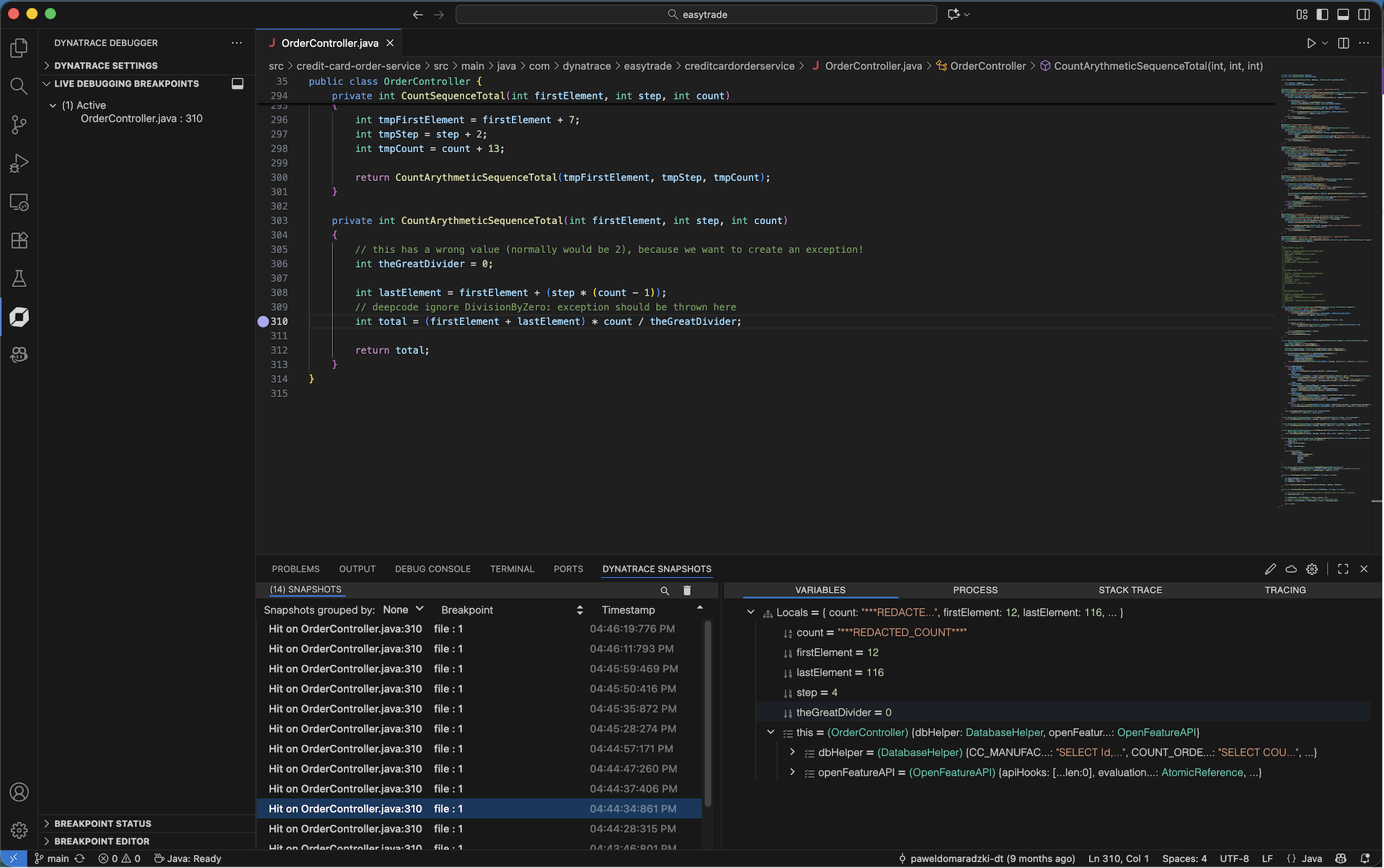
Using non-breaking breakpoints, you can instantly see the complete state of your app, including stack trace, variable values, and more, all without stopping or breaking your running code.
Having the Dynatrace data presented directly in your IDE, helps you maintain the flow without losing time or losing context jumping between tools and screens.
The Dynatrace live snapshot contains variables values, stack trace, process and tracing information.
The code you want to debug is already present and ready in the IDE, hence source fetching is not needed (as in the Live Debugging web-app).
Enhance your troubleshooting experience by integrating MCP server and asking Dynatrace to help with real-time data and insights in natural language via MCP client and AI assistance. learn more of Dynatrace MCP Server and the Local MCP Hubtiles.
Capture real-time debug data - Instantly understand the state of your application with instant snapshot output of data and context
Troubleshoot faster - Instantly debug complex flows and apps including third party and opensource components without stopping your app
Dev-friendly debugging experience - On-demand and intuitive access to code-level data from any environment directly to your VSCode IDE
Test and optimize your code faster - Instantly understand if specific line of code was reached at all with exploratory analytics
Requirements:
A Dynatrace account with DPS licensing
Code Monitoring rate card enabled
VSCode version 1.85.0
For all permissions pls refer to Docs here
You can install the extension from the Microsoft Visual Studio Code Marketplace or directly from the extensions tab inside your Visual Studio Code IDE.
Install the extension:
Open the Dynatrace Snapshots panel. The panel is located at the bottom of the IDE.
Log in to your Dynatrace account from the Dynatrace Snapshots panel.
Select the environment you’d like to debug by clicking on the cloud icon in the Dynatrace Snapshots panel header. The environment picker will open above, displaying all Dynatrace environments where you have Live Debugging permissions. Select an environment from the list.
Configure your debug session by clicking on the pencil icon in the Dynatrace Snapshots panel header. Only instances with Live Debugging enabled will appear. Select filters for the instances you’d like to debug and click “Set”.
Add a Live Debugging breakpoint. Right click next to a line number to add a Live Debugging breakpoint. The breakpoint will be applied to instances matching the filters you configured in step 5, within the environment selected in step 4.
View data. When your breakpoints are triggered, data will stream into the Dynatrace Snapshots panel. Click on a snapshot to see local variables, stack trace, process information, and tracing data.
Works with VSCode version 1.85.0 or later

