


Skip to technology filters Skip to main content
Dynatrace Hub

Extend the platform,
empower your team.

Popular searches:
Home hero bg
Syslog (via ActiveGate)Syslog (via ActiveGate)
Syslog (via ActiveGate)

Syslog (via ActiveGate)

Secure native syslog collection via endpoint on Dynatrace ActiveGate

Technology
Free trialDocumentation
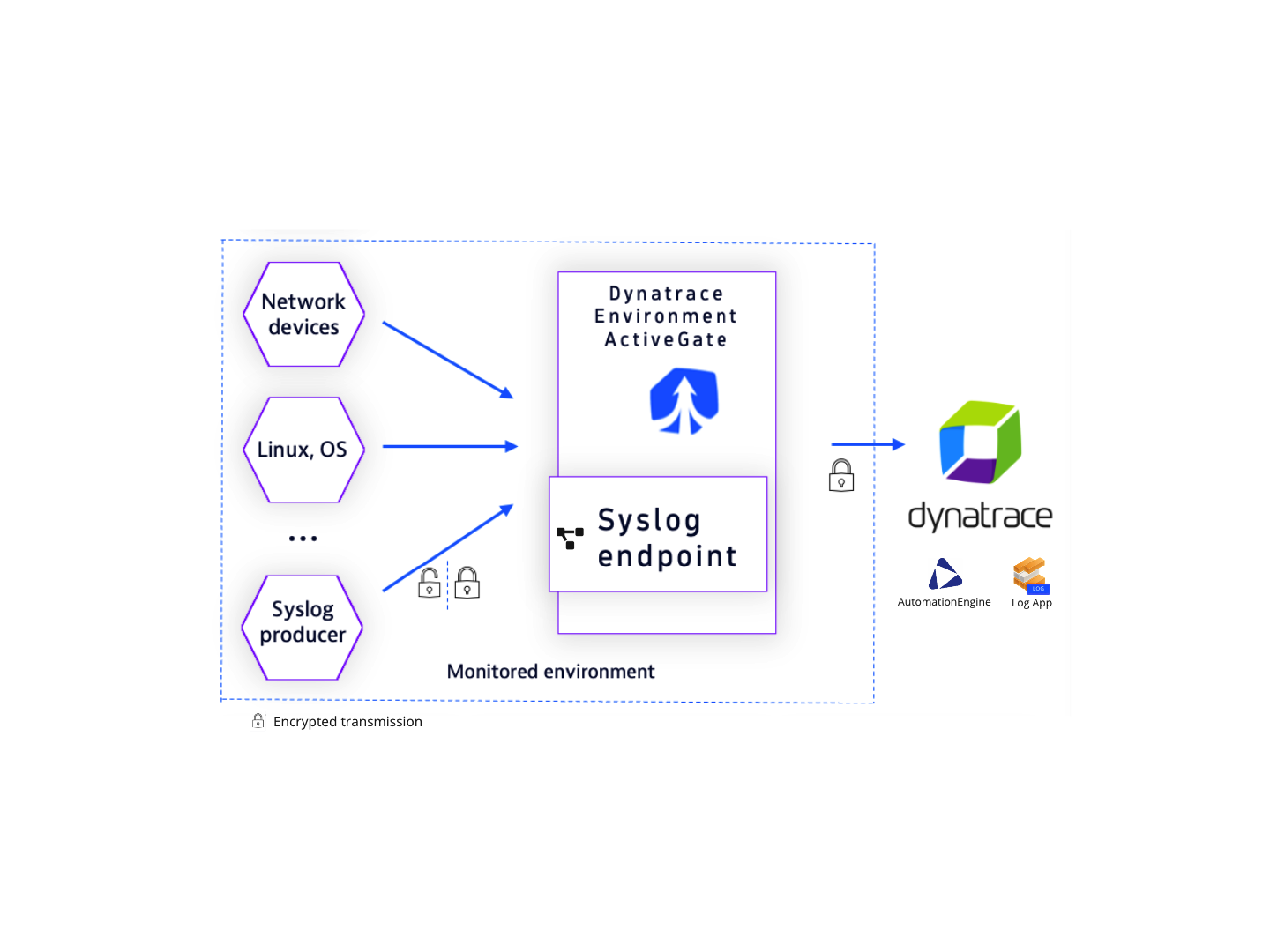
Syslog integration diagram
  • Product information

Overview

Syslog, short for system logging protocol, enables system administrators to oversee and control log data from various components, such as network devices, Linux host syslogs, syslog servers, or other syslog producers.

Dynatrace Environment ActiveGate installed in monitor remote technologies mode enables a syslog endpoint that is easily configurable for a number of observability and security use cases. Environment ActiveGate is a known Dynatrace edge component with valuable advantages for enterprise environments:

  • Optimised cost of ownership with reliable lifecycle management
  • Enterprise support and security

This is intended for users who want to: Integrate syslog to Dynatrace for host and network device observability, automation, and security.

This enables you to: Seamlessly configure syslog integration and learn about recommended syslog observability strategy based on Environment ActiveGate.

In the case where Linux system syslog observability is the main focus, we recommend deploying OneAgent which autodiscovers host syslog data, preserves topology context, and requires minimal configuration and maintenance for use at scale.

Use cases

Network monitoring - observe internal errors and interruptions in the connectivity of your network devices.

Security - alert on abnormal behaviour, monitor failed login attempts, set events based on incoming logs, and investigate findings with Dynatrace DQL.

Advanced analytics and automated observability - easily integrate syslog from existing collectors like Syslog-ng or Rsyslog servers to Dynatrace for advanced analytics in Grail data lakehouse with Notebooks. Automatically resolve issues with Workflows. Take advantage of AI in the Dynatrace Platform to resolve issues before they impact application users. If required, Syslog collection via ActiveGate is also supported for Dynatrace Managed.

Edge data transformation - Mask sensitive data, filter logs to ingest only relevant data, and decorate log lines with meaningful attributes.

  • Syslog implementation is based on an embedded Dynatrace OpenTelemtry collector. Review Dynatrace OpenTelemtry Collector documentation for available components and links to configuration details.

Get started

Prerequisites:

  • Environment ActiveGate version 1.295+ on Linux installed to monitor remote technologies.
  • Your network devices have the syslog enabled or you have other syslog producers configured in your network. Dynatrace supports a wide variety of syslog implementations, including RSysLog, Syslog-NG, NXLog, and others. Refer to RFC3164 and RFC5424 standards for syslog protocol and format details.

Single change to Environment AcitveGate configuration enables endpoint to receive syslog via TCP (port 601) and UDP (port 514)

The detailed guide available in Dynatrace Syslog ingestion with ActiveGate documentation explains how to configure and verify connection on your Environment ActiveGate on Linux to collect syslog logs in your network and ingest them to Dynatrace.

Dynatrace
Documentation
By Dynatrace
Dynatrace support center
Copy to clipboard

More resources

Observe syslog with Dynatrace ActiveGate, a secure, trusted edge component

Observe syslog with Dynatrace ActiveGate, a secure, trusted edge component

Dynatrace Environment ActiveGate edge component solves this hassle with flexible syslog endpoint configuration, making data actionable on the Dynatrace® platform.
Read more

Dynatrace Hub
Get data into DynatraceBuild your own app
Dynatrace Intelligence - Agentic Operations SystemAgentic AI ecosystem
All (865)Log Management and AnalyticsKubernetesAI and LLM ObservabilityInfrastructure ObservabilitySoftware DeliveryApplication ObservabilityApplication SecurityBusiness ObservabilityDigital Experience
Filter
Type
Built and maintained by
Deployment model
SaaS
  • SaaS
  • Managed
Partner FinderBecome a partnerDynatrace Developer

Discover recent additions to Dynatrace

Problems logo

Problems

Detect, explain and triage problems automatically using Dynatrace Intelligence.

Logs logo

Logs

Explore all your logs without writing a single query.

Investigations logo

Investigations

Fast and precise incident response on Grail data with DQL queries.

Business Flow logo

Business Flow

Track, analyze, and optimize your critical business processes.

Cost & Carbon Optimization logo

Cost & Carbon Optimization

Track, analyze, and optimize your IT carbon footprint and public cloud costs.

Anomaly Detection logo

Anomaly Detection

Detect and alert on anomalies and custom patterns using any DQL time series.

Analyze your data

Understand your data better with deep insights and clear visualizations.

Notebooks logo

Notebooks

Create powerful, data-driven documents for custom analytics and collaboration.

Dashboards logo

Dashboards

Transform complex data into clear visualizations with custom dashboards.

Automate your processes

Turn data and answers into actions, securely, and at scale.

Workflows logo

Workflows

Automate tasks in your IT landscape and move towards autonomous operations.

Jira logo

Jira

Create, query, comment, transition, and resolve Jira tickets within workflows.

Slack logo

Slack

Automate Slack messaging for security incidents, attacks, remediation, and more.

Secure your cloud application

See vulnerabilities and attacks in your environment.

Security Posture Management logo

Security Posture Management

Detect, prioritize, and remediate security and compliance findings with SPM.

Threats & Exploits logo

Threats & Exploits

Understand, triage, and investigate detection findings and alerts.

More resources

Observability for Developers on Cursor logo

Observability for Developers on Cursor

Get Real time Code-Level data directly to your Cursor IDE

GitHub CoPilot Coding Agent logo

GitHub CoPilot Coding Agent

Automate vulnerability remediation and boost developer productivity

GitHub Copilot Custom Agent logo

GitHub Copilot Custom Agent

Automate your development workflows with specialized agent definitions

Observability for Developer on JetBrains logo

Observability for Developer on JetBrains

Get real-time code-level data directly to your Jetbrains IDE

Pagerduty for Dynatrace Workflows logo

Pagerduty for Dynatrace Workflows

Streamline incident management with automated Pageruty workflows

Cursor IDE logo

Cursor IDE

Boost developer productivity and get real-time, code-level insights into Cursor

Observability for Developers on Windsurf logo

Observability for Developers on Windsurf

Get real-time code-level data directly to your Windsurf IDE

Are you looking for something different?

We have hundreds of apps, extensions, and other technologies to customize your environment

Leverage our newest innovations of Dynatrace Saas

Kick-start your app creation

Kick-start your app creation

Whether you’re a beginner or a pro, Dynatrace Developer has the tools and support you need to create incredible apps with minimal effort.
Go to Dynatrace Developer
Upgrading from Dynatrace Managed to SaaS

Upgrading from Dynatrace Managed to SaaS

Drive innovation, speed, and agility in your organization by seamlessly and securely upgrading.
Learn More
Log Management and Analytics

Log Management and Analytics

Innovate faster and more efficiently with unified log management and log analytics for actionable insights and automation.
Learn more


























