


























Skip to technology filters Skip to main content
Dynatrace Hub

Extend the platform,
empower your team.

Popular searches:
Home hero bg
OCSFOCSF
OCSF

OCSF

Ingest security findings in Open Cybersecurity Schema Framework (OCSF) format.

App
Free trialDocumentation
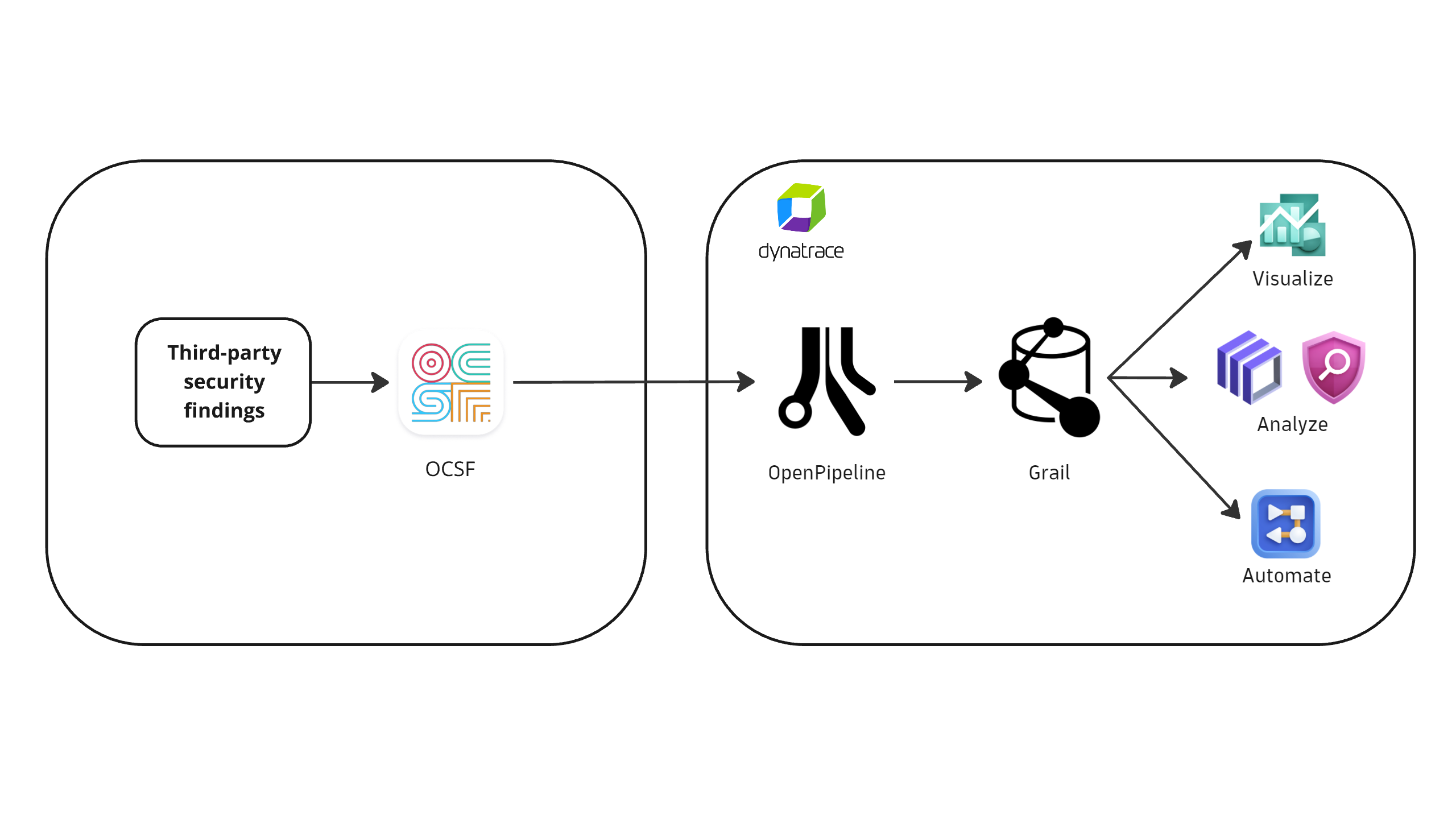
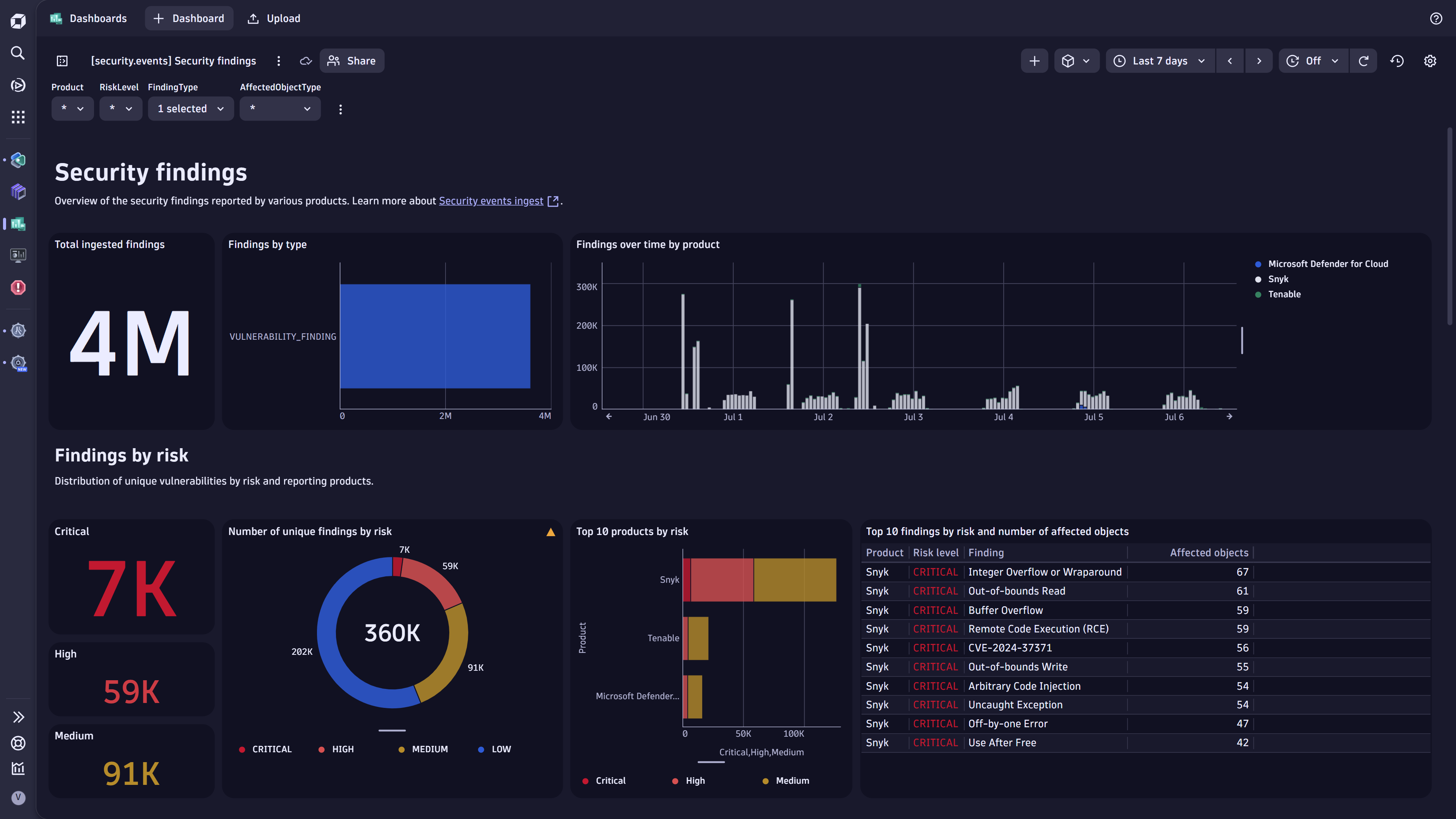
Architecture diagram.Security findings dashboard.
  • Product information
  • Release notes

Overview

Dynatrace integrates with third-party tools by supporting the Open Cybersecurity Schema Framework (OCSF) for security findings. This provides users with:

  • Single pane of glass: Ingest security findings in OCSF into Dynatrace (powered by OpenPipeline™).

  • Unified analysis: Dynatrace transforms and maps the OCSF security findings to a unified format (powered by Semantic Dictionary).

  • Findings operationalization: Prioritize, visualize, and automate security findings with runtime context.

Use cases

  • Overview: Visualize and report your current security posture and trends around vulnerability findings across container registries with Dashboards.
  • Prioritization: Analyze and prioritize vulnerability findings across multiple tools and products uniformly with Notebooks.
  • Automation: Automate the orchestration of the critical vulnerability findings by creating notifications and tickets using Workflows.
  • Investigation: Use vulnerability findings as an additional dimension for the threat hunting and incident forensics using Security Investigator.

Get started

You can ingest OCSF security findings from any third-party tool by forwarding the individual findings to our built-in security events endpoint. For instructions, go to OCSF security findings.

Details

(Coming soon) This integration app delivers several sample dashboards and workflows to help you

  • Visualize security findings (dashboard)
  • Summarize product security coverage (dashboard)
  • Send email notification for critical security findings (workflow)

Compatibility information

  • OCSF version 1.1.0
Dynatrace
DocumentationMore Information
By Dynatrace
Dynatrace support center
Subscribe to new releases
Copy to clipboard

Related to OCSF

OpenPipeline logo

OpenPipeline

Configure ingest, processing, and persistence of data sent to Grail.

Full version history

ReleaseDate

Full version history

1.2.2

Patch Changes

  • Update connection filter's label

1.2.1

Patch Changes

  • Connection filter now only filters for the connection's name

1.2.0

Minor Changes

  • Updated footer to provide an option for giving feedback

Full version history

1.2.0

Minor Changes

  • Updated footer to provide an option for giving feedback

Full version history

1.1.2

Patch Changes

  • Change display name of ready-made dashboards

1.1.0

Minor Changes

  • Add footer with ready made dashboards and workflow

Full version history

1.0.1

Patch Changes

  • Remove duplicated endpoint field in Connection modal

1.0.0 Initial release

  • Connection creation, sample cURL, basic monitoring inside the app

Full version history

1.0.0 Initial release

  • Connection creation, sample cURL, basic monitoring inside the app
Dynatrace Hub
Get data into DynatraceBuild your own app
All (811)Log Management and AnalyticsKubernetesAI and LLM ObservabilityInfrastructure ObservabilitySoftware DeliveryApplication ObservabilityApplication SecurityDigital ExperienceBusiness Observability
Filter
Type
Built and maintained by
Deployment model
SaaS
  • SaaS
  • Managed
Partner FinderBecome a partnerDynatrace Developer

Discover recent additions to Dynatrace

Problems logo

Problems

Analyze abnormal system behavior and performance problems detected by Davis AI.

Logs logo

Logs

Explore all your logs without writing a single query.

Security Investigator logo

Security Investigator

Fast and precise forensics for security and logs on Grail data with DQL queries.

Business Flow logo

Business Flow

Track, analyze, and optimize your critical business processes.

Cost & Carbon Optimization logo

Cost & Carbon Optimization

Track, analyze, and optimize your IT carbon footprint and public cloud costs.

Davis Anomaly Detection logo

Davis Anomaly Detection

Detect anomalies in timeseries using the Davis AI

Analyze your data

Understand your data better with deep insights and clear visualizations.

Notebooks logo

Notebooks

Create powerful, data-driven documents for custom analytics and collaboration.

Dashboards logo

Dashboards

Transform complex data into clear visualizations with custom dashboards.

Automate your processes

Turn data and answers into actions, securely, and at scale.

Workflows logo

Workflows

Automate tasks in your IT landscape, remediate problems, and visualize processes

Jira logo

Jira

Create, query, comment, transition, and resolve Jira tickets within workflows.

Slack logo

Slack

Automate Slack messaging for security incidents, attacks, remediation, and more.

Secure your cloud application

See vulnerabilities and attacks in your environment.

Security Overview logo

Security Overview

Get a comprehensive overview of the security of your applications.

Code-Level Vulnerabilities logo

Code-Level Vulnerabilities

Detect vulnerabilities in your code in real time.

Security Posture Management logo

Security Posture Management

Detect, prioritize, and remediate security and compliance findings with SPM.

Threats & Exploits logo

Threats & Exploits

Understand, triage, and investigate detection findings and alerts.

Are you looking for something different?

We have hundreds of apps, extensions, and other technologies to customize your environment

Leverage our newest innovations of Dynatrace Saas

Kick-start your app creation

Kick-start your app creation

Whether you’re a beginner or a pro, Dynatrace Developer has the tools and support you need to create incredible apps with minimal effort.
Go to Dynatrace Developer
Upgrading from Dynatrace Managed to SaaS

Upgrading from Dynatrace Managed to SaaS

Drive innovation, speed, and agility in your organization by seamlessly and securely upgrading.
Learn More
Log Management and Analytics

Log Management and Analytics

Innovate faster and more efficiently with unified log management and log analytics for actionable insights and automation.
Learn more

