
























Skip to technology filters Skip to main content
Dynatrace Hub

Extend the platform,
empower your team.

Popular searches:
Home hero bg
Logs via Amazon Data FirehoseLogs via Amazon Data Firehose
Logs via Amazon Data Firehose

Logs via Amazon Data Firehose

Stream AWS services logs collected in CloudWatch or directly via Firehose

Technology
Free trialDocumentation
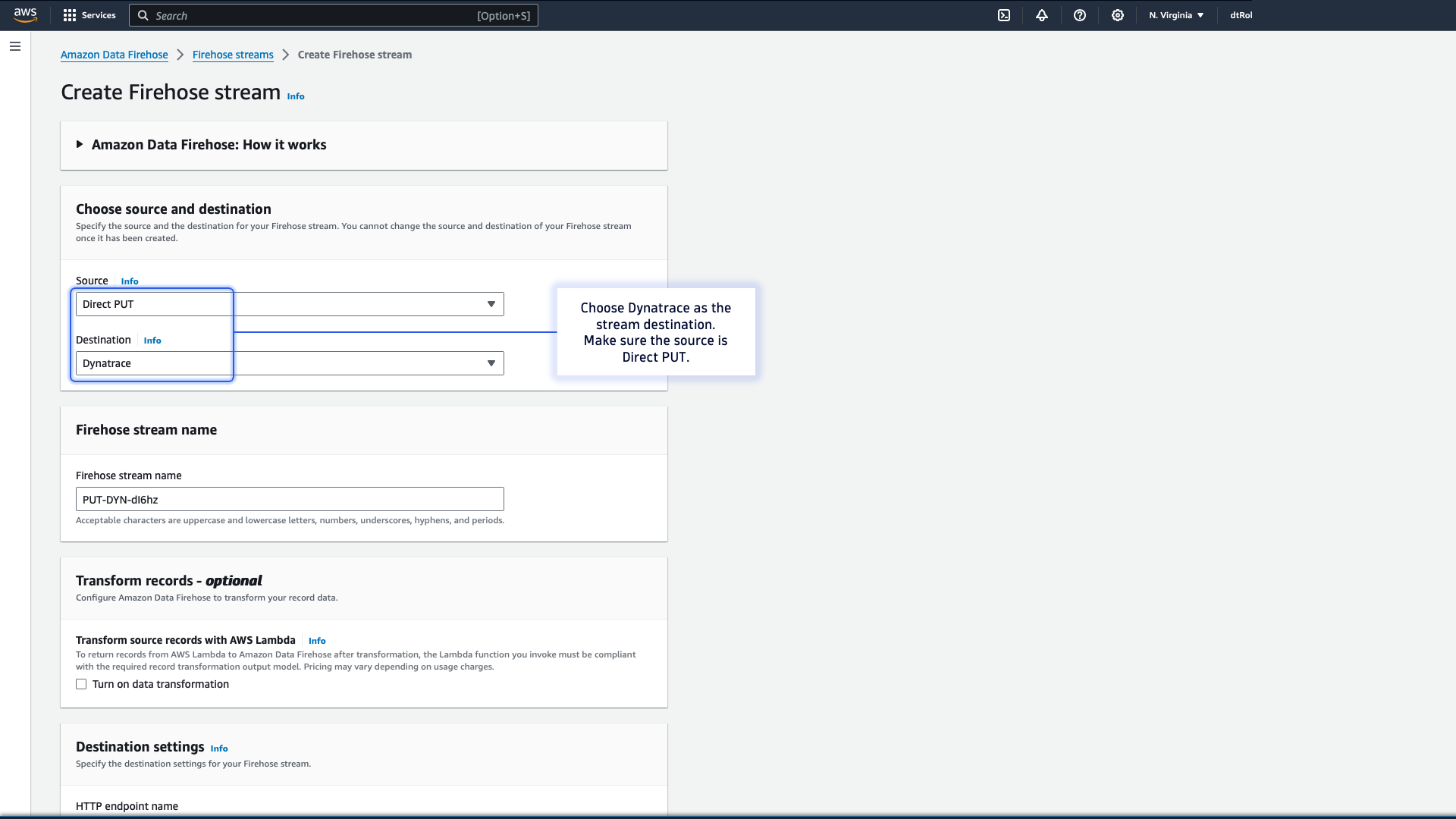
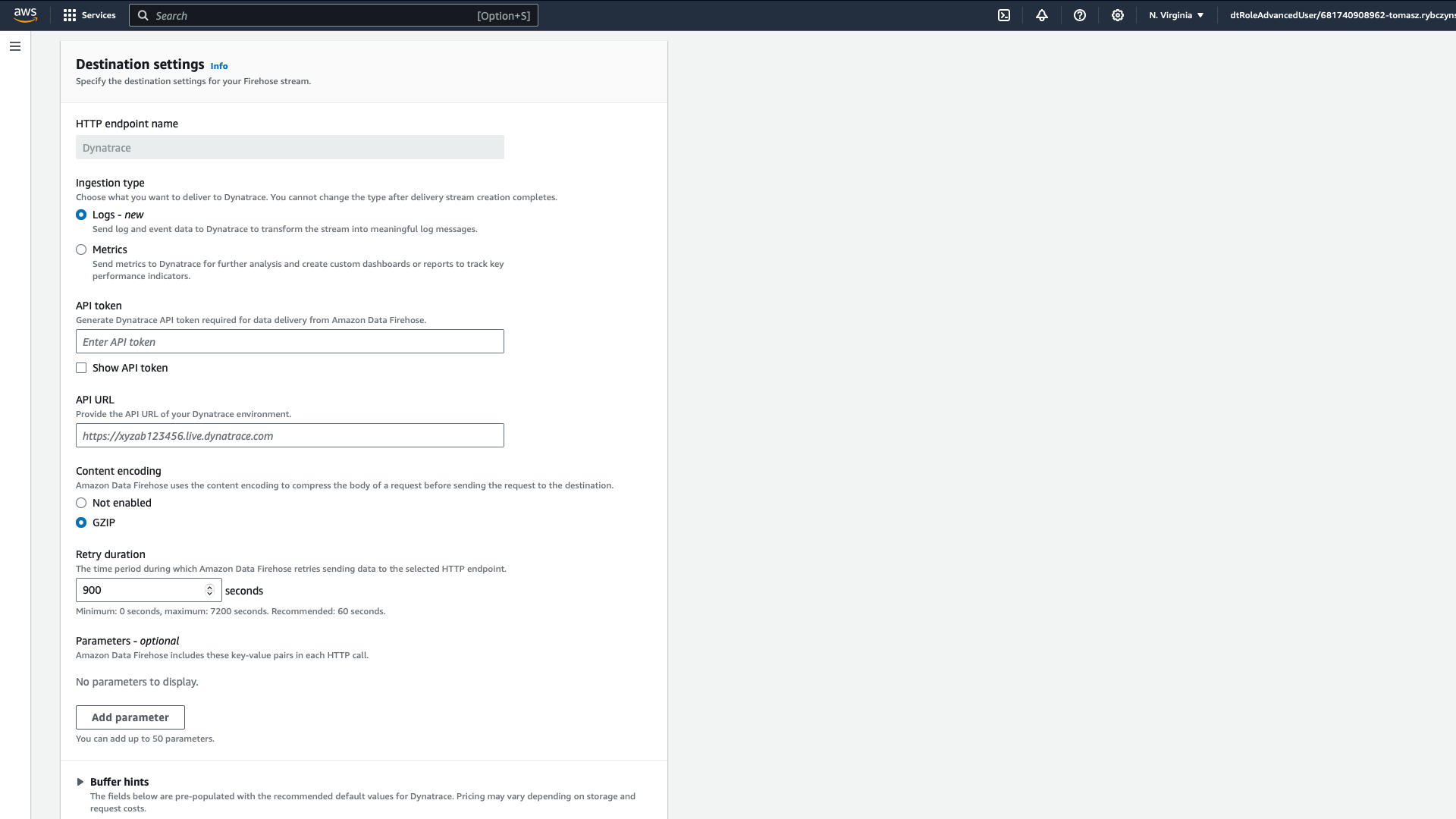
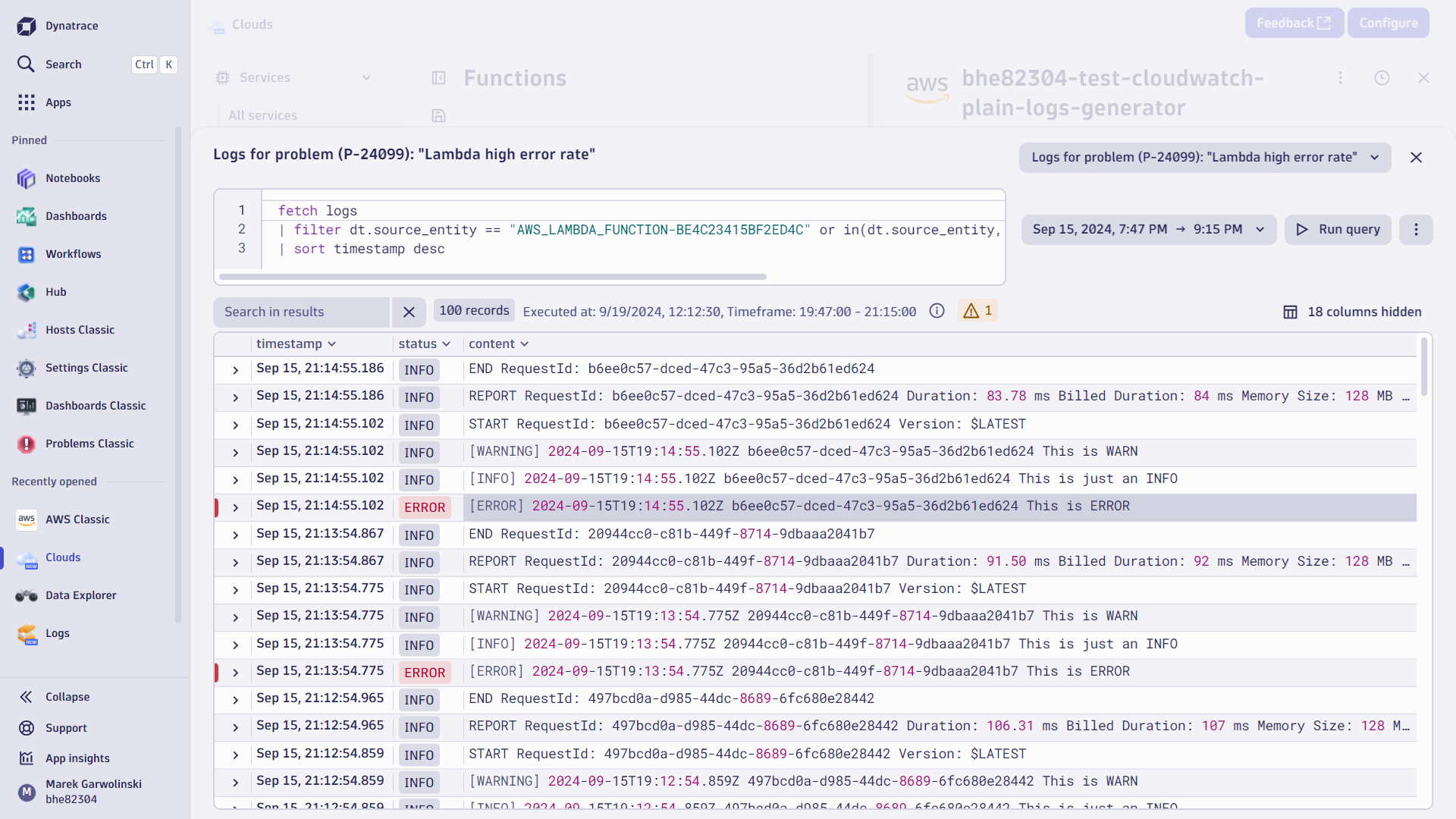
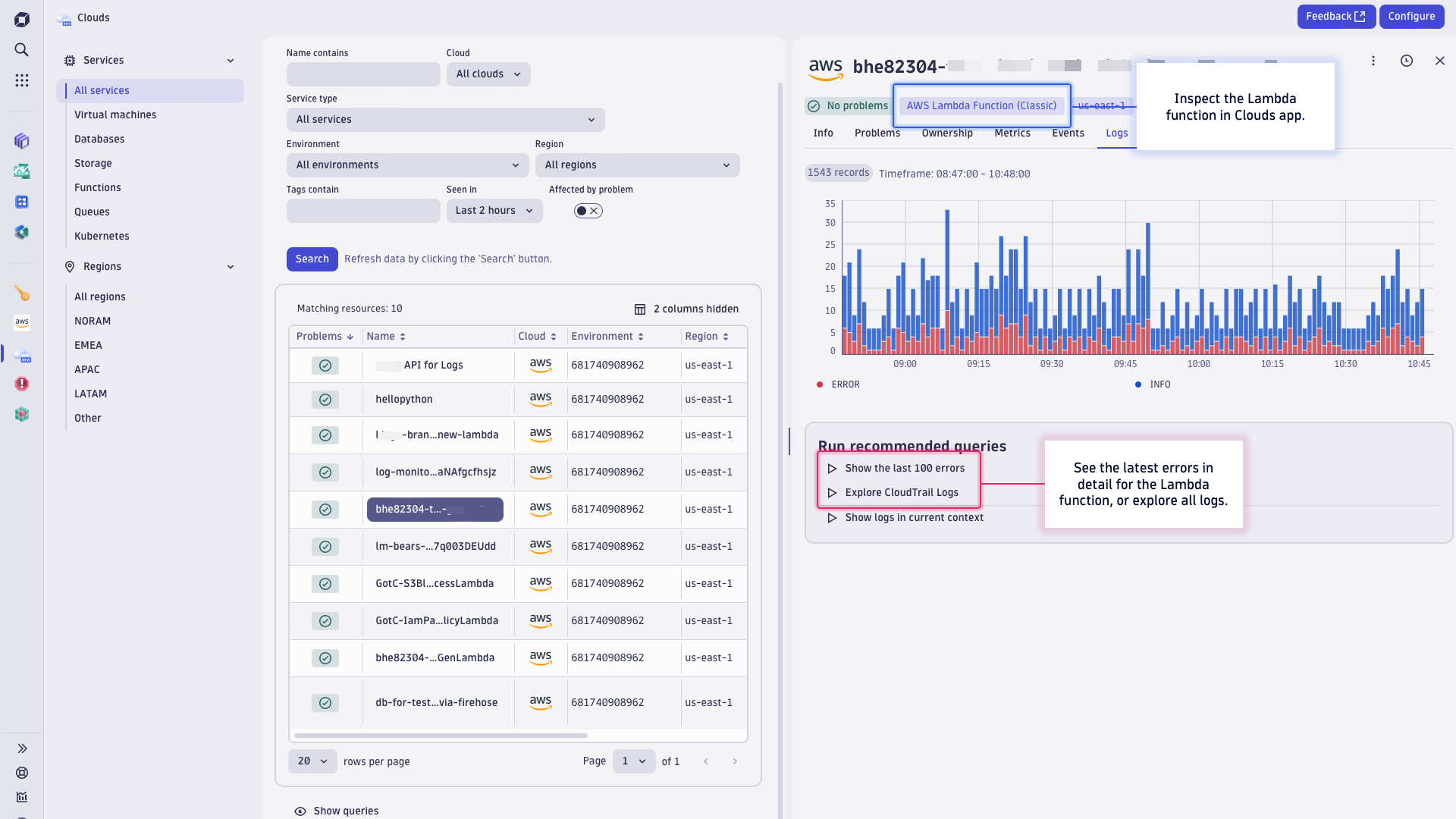
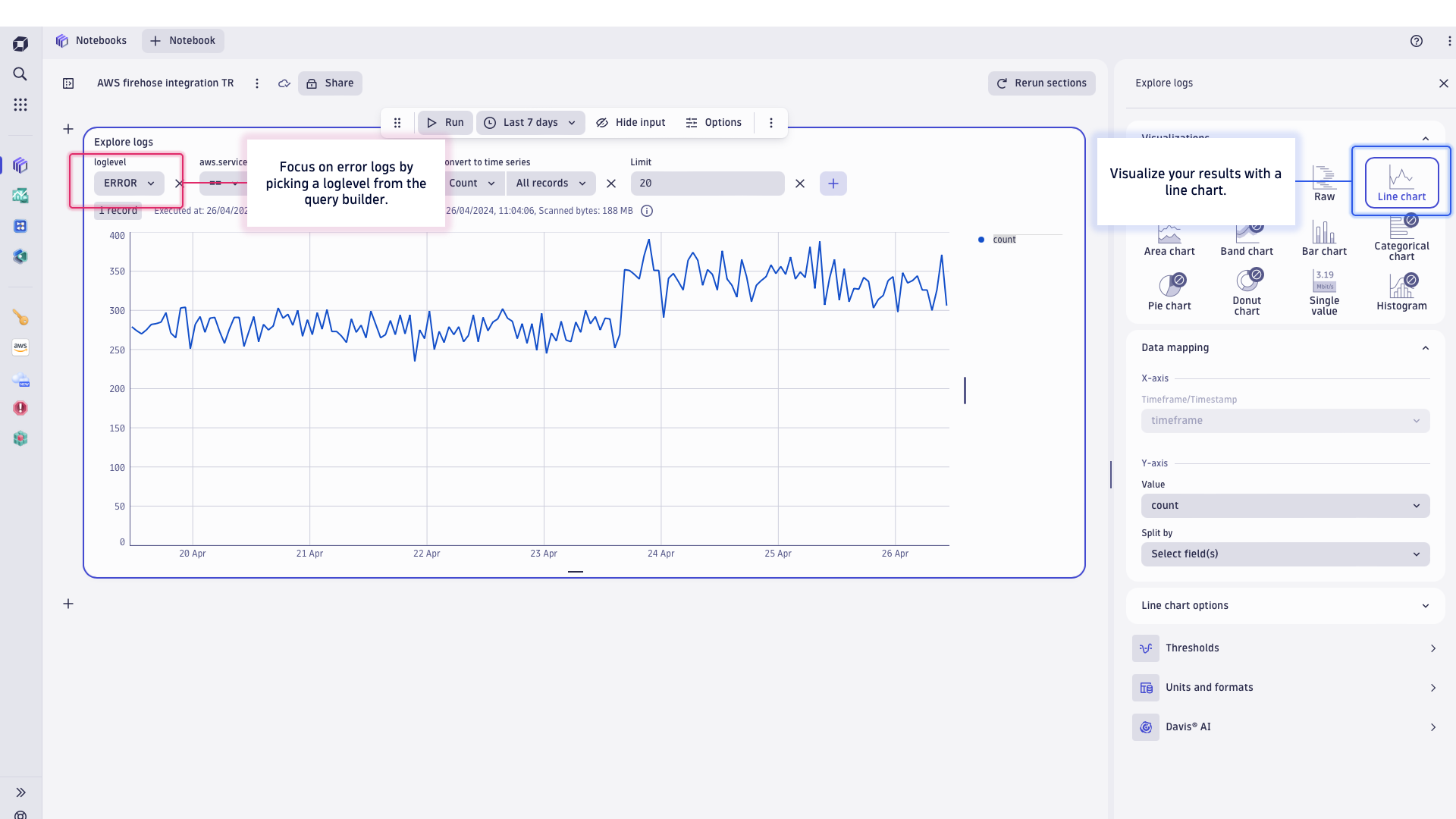
Use Amazon Data Firehose integration for CloudWatch logs, or logs directly from a service.Figure 1: Create Firehose stream - Select source and destinationFigure 2: Create Firehose stream - Destination settingsFigure 3: Logs in context - Logs component in Clouds appFigure 4: Lambda error spike - Problem root cause analysis with logsFigure 5: Easy visualize and share lambda error logs distribution in time with Dynatrace Notebooks
  • Product information

Overview

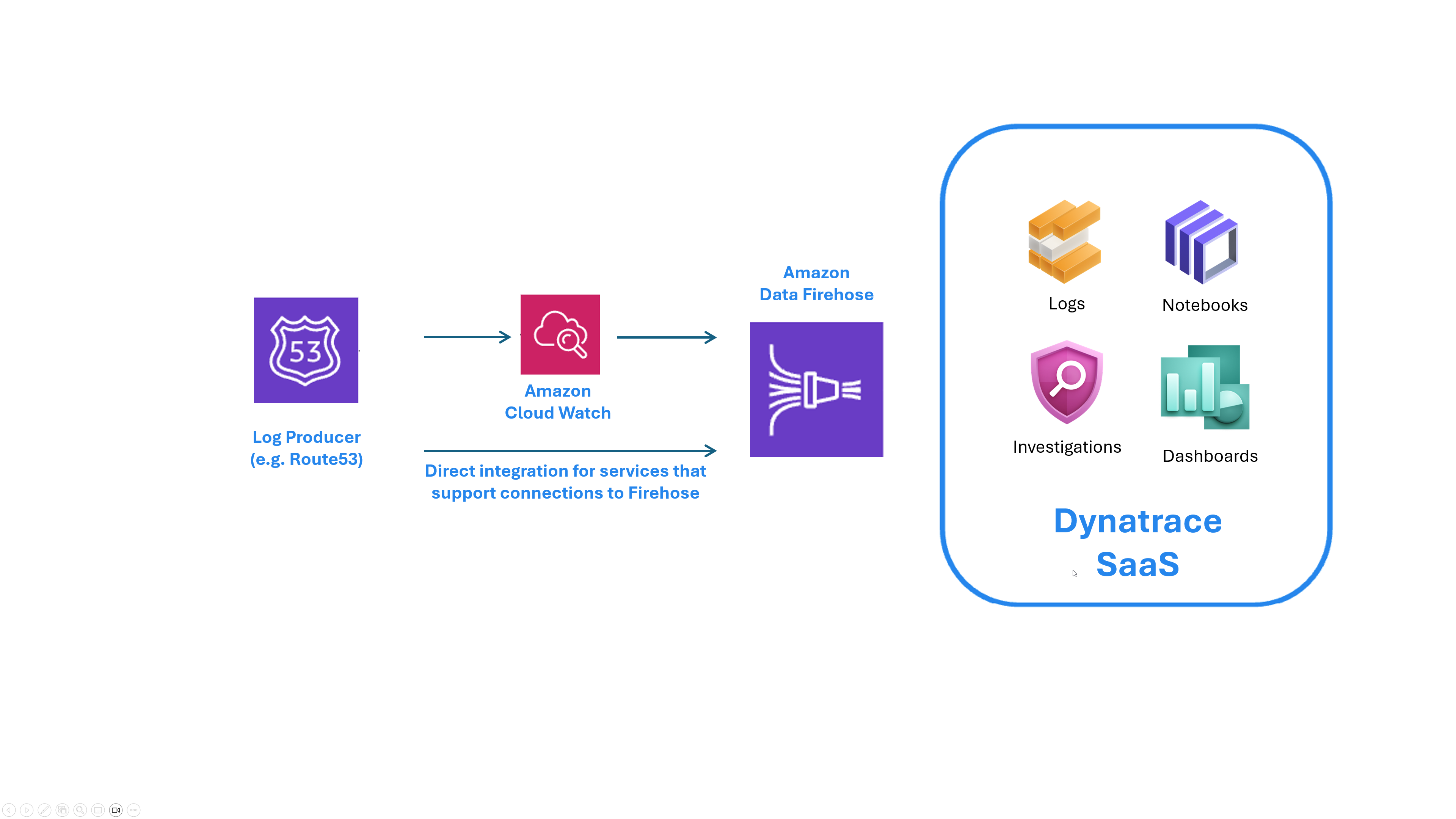
Amazon CloudWatch is the most common method of collecting logs across your AWS footprint. As a native tool, it supports a wide range of AWS resources, applications, and services and is chosen by many enterprises. Amazon Data Firehose is a common solution to stream CloudWatch logs from AWS to an observability platform like Dynatrace. This fully managed native service is indispensable for streaming high-frequency logs collected by CloudWatch.

Developers, SREs, and DevOps engineers need cloud logs in an integrated observability platform to monitor the whole software development lifecycle. Dynatrace comes with the automation for root cause analysis of the SLO violations, ensures visibility on the application landscape to fix problems efficiently, and minimizes production costs by cutting down on errors.

Logs directly from services

In some deployment scenarios, you might skip CloudWatch altogether. Take the example of Amazon Virtual Private Cloud (VPC) flow logs, which provide insights into the IP traffic of your network interfaces. VPC flow logs are the source that enable troubleshooting connectivity issues, security incident investigations, detecting intrusions, or managing access control issues. VPC flow logs can be massive in volume as your cloud deployment footprint grows, and direct streaming these with Amazon Data Firehose can be the most cost-effective method.

Use cases

After a successful Amazon Data Firehose configuration, you can analyse your cloud logs in Dynatrace to fulfill troubleshooting, analytical, and security use cases.

  • Open the Clouds app with integrated logs in the context of your Lambda functions observability and get one-click access to error logs. See Figure 3 for the Cloud app, enabling you to log analysis in context to the Lambda function.
  • Use logs in the automatic detection of a problem with lambda availability. See how logs enable troubleshooting and root cause analysis. See Figure 4 for an example.
  • Use Dynatrace Notebooks to visualize ane and share with your team the lambda error logs distribution in time. See the example in Figure 5.

Get started

Setting up a direct ingest of AWS logs forwarded via Amazon Data Firehose takes just a few simple steps to start log analysis in Dynatrace with topology context.

  • Get API key to ingest logs.

    • Generate new token with Ingest logs scope. Refer to Tokens and authentication documentation for details.
  • Setup Firehose instance.

    • Choose the source and set up the destination.
    • You can use the CloudFormation template or AWS console to configure streaming.
    • Data Firehose stream requires a trust relationship with CloudWatch through an IAM role. Follow instructions available in Dynatrace documentation to create proper access and Firehose configurations.
  • Configure forwarding of data streams defined in CloudWatch log groups.

    • You can use the shell script or AWS console to configure your stream.
  • A number of AWS services (like Amazon VPC flow logs, Route 53 Resolver query logs, API Gateway Access logs, Web Application Firewall logs, and more) can be configured to send logs directly to Amazon Data Firehose. In that case, an additional CloudWatch middle layer component is not required. Check details of possible log integrations in the source documentation of your AWS service and required configurations steps explained in Dynatrace documentation.

Follow instructions on Stream logs via Amazon Data Firehose documentation page to set up integration.

Details

See Figures 1 and 2 for Amazon Firehose streaming configuration.

Dynatrace
Documentation
By Dynatrace
Dynatrace support center
Copy to clipboard

Related to Logs via Amazon Data Firehose

Amazon Kinesis Data Firehose logo

Amazon Kinesis Data Firehose

Fully managed service for delivering real-time streaming data.

Amazon Cloudwatch logo

Amazon Cloudwatch

Monitoring service for AWS cloud resources and the applications you run on AWS.

Amazon CloudWatch Logs logo

Amazon CloudWatch Logs

Monitor, store, and access your log files from instances, AWS CloudTrail, Route 53, and other sources.

ActiveGate logo

ActiveGate

Route traffic, monitor clouds and remote technologies & run Synthetic monitors

AWS logo

AWS

Reliable, scalable, and inexpensive cloud computing services.

Dynatrace Hub
Get data into DynatraceBuild your own app
All (811)Log Management and AnalyticsKubernetesAI and LLM ObservabilityInfrastructure ObservabilitySoftware DeliveryApplication ObservabilityApplication SecurityDigital ExperienceBusiness Observability
Filter
Type
Built and maintained by
Deployment model
SaaS
  • SaaS
  • Managed
Partner FinderBecome a partnerDynatrace Developer

Discover recent additions to Dynatrace

Problems logo

Problems

Analyze abnormal system behavior and performance problems detected by Davis AI.

Logs logo

Logs

Explore all your logs without writing a single query.

Security Investigator logo

Security Investigator

Fast and precise forensics for security and logs on Grail data with DQL queries.

Business Flow logo

Business Flow

Track, analyze, and optimize your critical business processes.

Cost & Carbon Optimization logo

Cost & Carbon Optimization

Track, analyze, and optimize your IT carbon footprint and public cloud costs.

Davis Anomaly Detection logo

Davis Anomaly Detection

Detect anomalies in timeseries using the Davis AI

Analyze your data

Understand your data better with deep insights and clear visualizations.

Notebooks logo

Notebooks

Create powerful, data-driven documents for custom analytics and collaboration.

Dashboards logo

Dashboards

Transform complex data into clear visualizations with custom dashboards.

Automate your processes

Turn data and answers into actions, securely, and at scale.

Workflows logo

Workflows

Automate tasks in your IT landscape, remediate problems, and visualize processes

Jira logo

Jira

Create, query, comment, transition, and resolve Jira tickets within workflows.

Slack logo

Slack

Automate Slack messaging for security incidents, attacks, remediation, and more.

Secure your cloud application

See vulnerabilities and attacks in your environment.

Security Overview logo

Security Overview

Get a comprehensive overview of the security of your applications.

Code-Level Vulnerabilities logo

Code-Level Vulnerabilities

Detect vulnerabilities in your code in real time.

Security Posture Management logo

Security Posture Management

Detect, prioritize, and remediate security and compliance findings with SPM.

Threats & Exploits logo

Threats & Exploits

Understand, triage, and investigate detection findings and alerts.

Are you looking for something different?

We have hundreds of apps, extensions, and other technologies to customize your environment

Leverage our newest innovations of Dynatrace Saas

Kick-start your app creation

Kick-start your app creation

Whether you’re a beginner or a pro, Dynatrace Developer has the tools and support you need to create incredible apps with minimal effort.
Go to Dynatrace Developer

Upgrading from Dynatrace Managed to SaaS

Upgrading from Dynatrace Managed to SaaS

Drive innovation, speed, and agility in your organization by seamlessly and securely upgrading.
Learn More
Log Management and Analytics

Log Management and Analytics

Innovate faster and more efficiently with unified log management and log analytics for actionable insights and automation.
Learn more