
































Kick-start your app creation
Whether you’re a beginner or a pro, Dynatrace Developer has the tools and support you need to create incredible apps with minimal effort.
Go to Dynatrace Developer
 IBM MQ
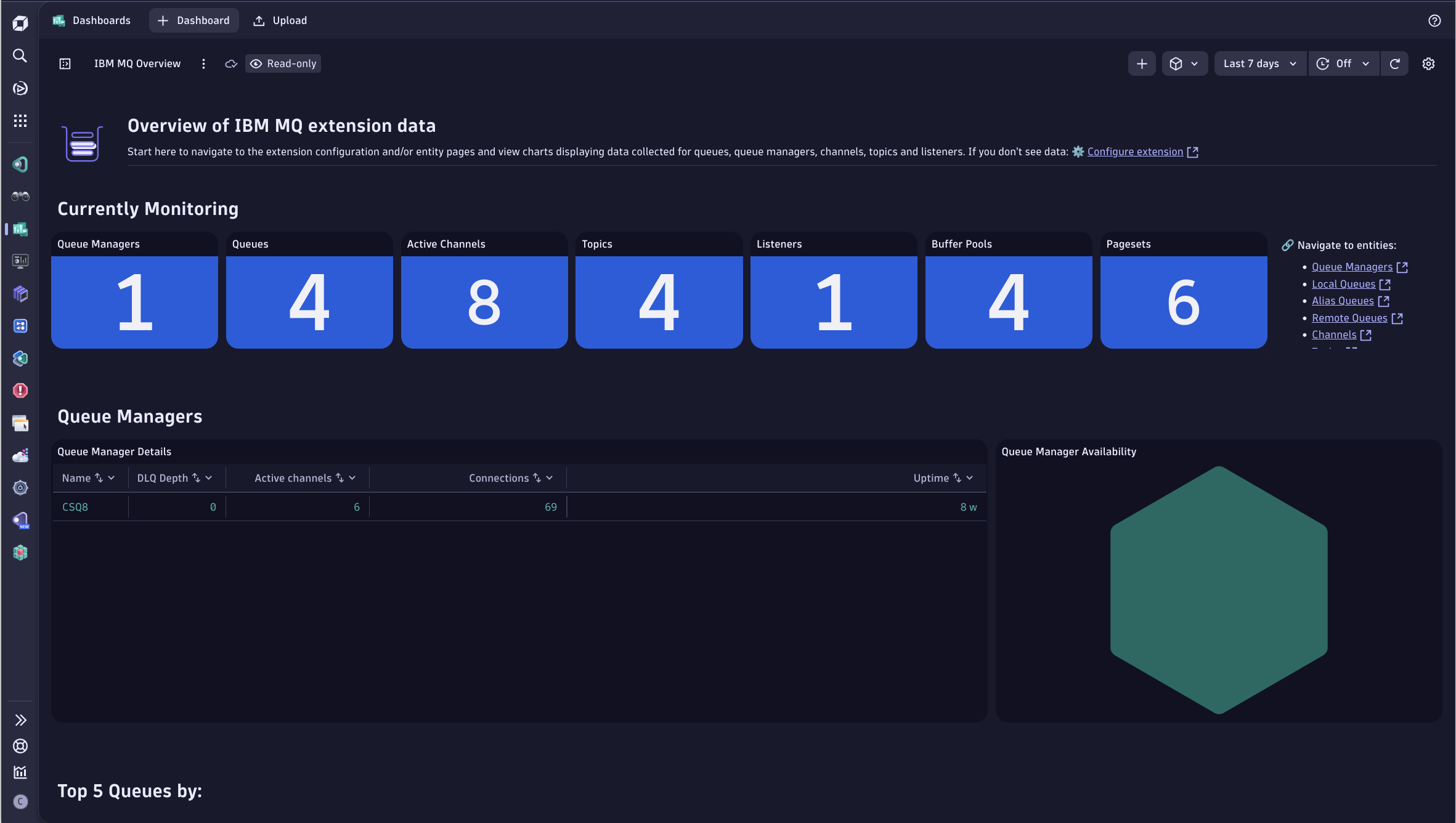
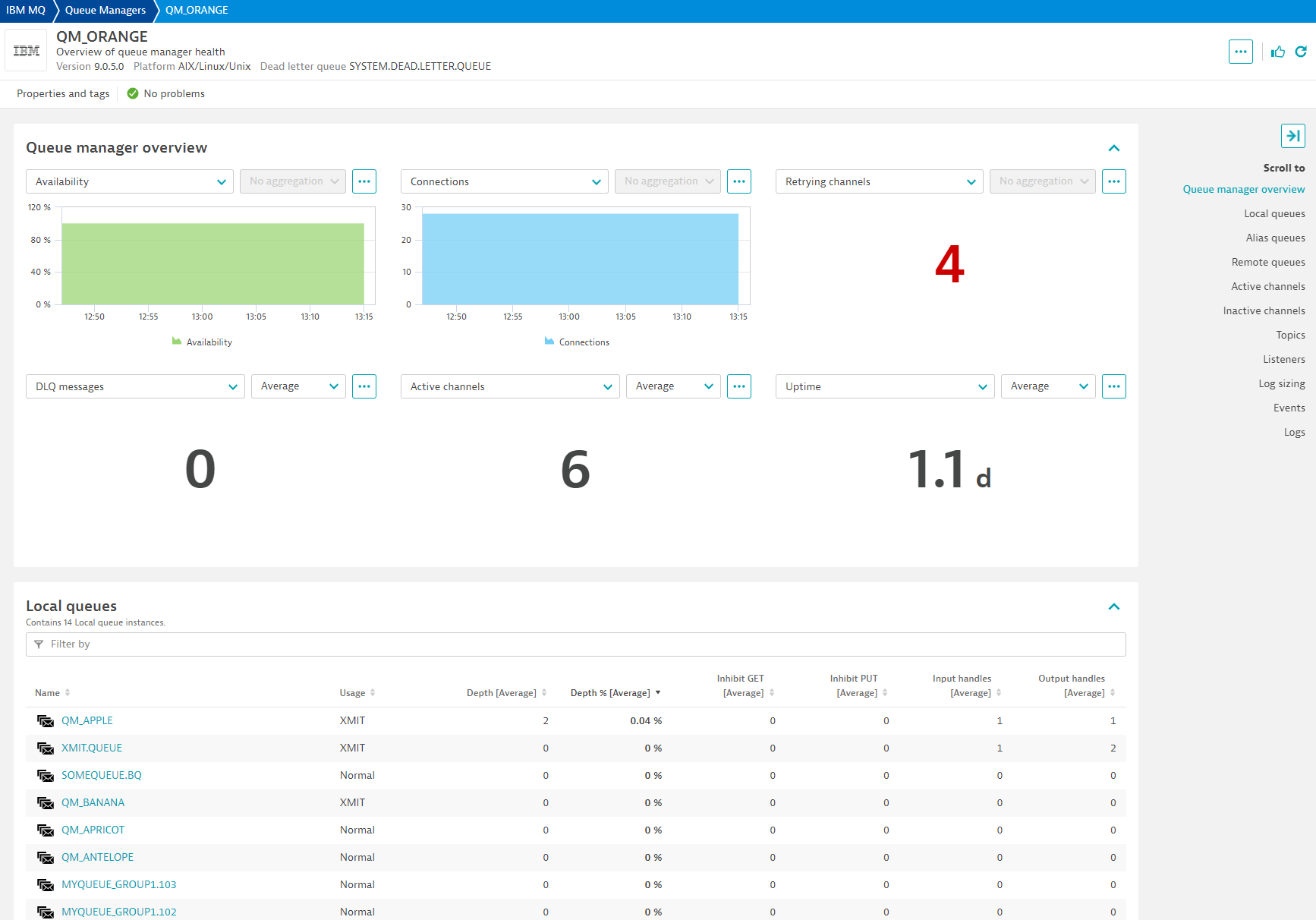
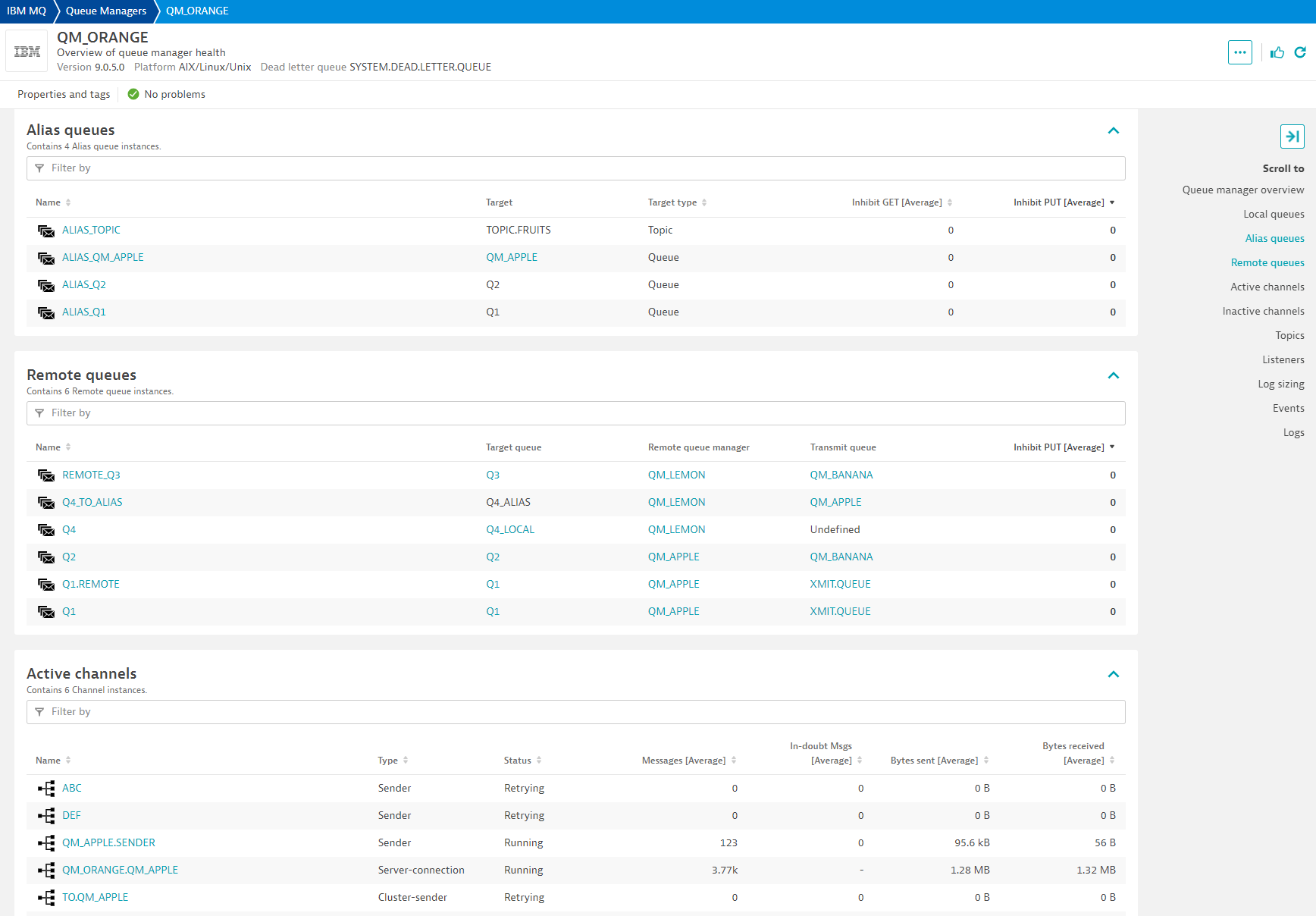
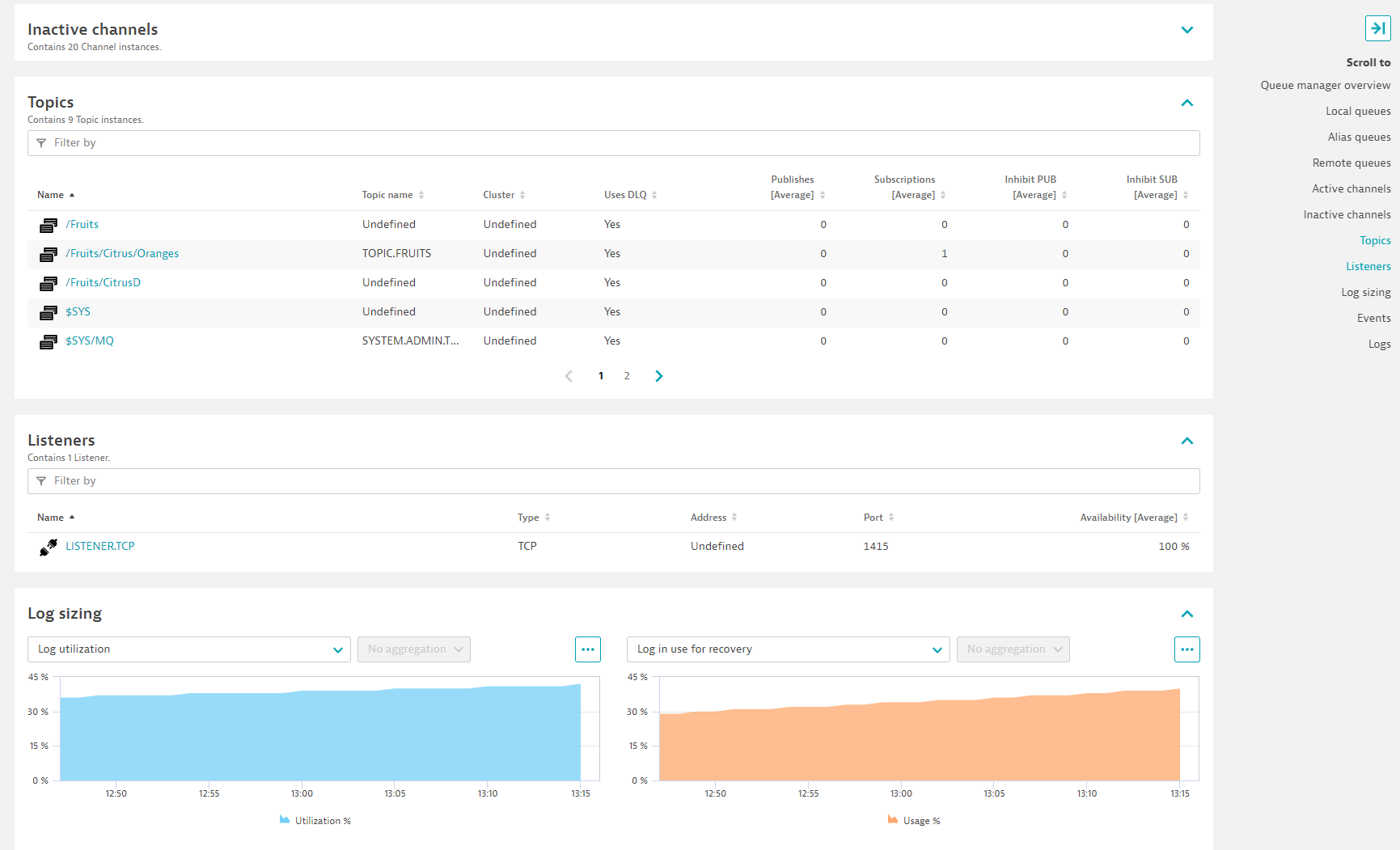
With the Extensions Framework 2.0 release of the IBM MQ extension, collect performance metrics from your queue managers running locally on your OneAgent host or remotely from your ActiveGates.
New metadata and metrics are included in this version.
For more information on the installation and configuration, please see IBM MQ extension in the Dynatrace Documentation.
Reference the Get Started section for more details on compatibility information.
Below is a complete list of the feature sets provided in this version. To ensure a good fit for your needs, individual feature sets can be activated and deactivated by your administrator during configuration.
| Metric name | Metric key | Description | Unit |
|---|---|---|---|
| Bytes sent | ibmmq.channel.bytes_sent | Number of bytes sent | Byte |
| Bytes received | ibmmq.channel.bytes_rcvd | Number of bytes received | Byte |
| Buffers sent | ibmmq.channel.buffers_sent | Number of buffers sent. | Count |
| Buffers received | ibmmq.channel.buffers_rcvd | Number of buffers received. | Count |
| Metric name | Metric key | Description | Unit |
|---|---|---|---|
| Last message sent | ibmmq.channel.last_msg | Time when last message was sent, or MQI call was handled | Second |
| Network time short | ibmmq.channel.nettime_short | Amount of time, in microseconds, to send an end of batch request to the remote end of the channel and receive a response over a short period. | MicroSecond |
| Network time long | ibmmq.channel.nettime_long | Amount of time, in microseconds, to send an end of batch request to the remote end of the channel and receive a response over a longer period. | MicroSecond |
| XMIT queue time short | ibmmq.channel.xmitqtime_short | Time, in microseconds, that messages remained on the transmission queue before being retrieved over a short period. | MicroSecond |
| XMIT queue time long | ibmmq.channel.xmitqtime_long | Time, in microseconds, that messages remained on the transmission queue before being retrieved over a longer period. | MicroSecond |
| Metric name | Metric key | Description | Unit |
|---|---|---|---|
| Availability | ibmmq.listener.availability | Percentage this listener was running and available. | Percent |
| Metric name | Metric key | Description | Unit |
|---|---|---|---|
| Oldest message | ibmmq.queue.oldest_message | Age in seconds of the oldest message on the queue. | Second |
| Uncommitted messages | ibmmq.queue.uncommitted_messages | Number of handles opened by applications for output | Count |
| Last GET | ibmmq.queue.last_get | Time at which the last message was successfully read from the queue. | MilliSecond |
| Last PUT | ibmmq.queue.last_put | Time at which the last message was successfully put in queue. | MilliSecond |
| Short time indicator | ibmmq.queue.time_indicator_short | Amount of time that a message spent on the queue over a short period. | MicroSecond |
| Long time indicator | ibmmq.queue.time_indicator_long | Amount of time that a message spent on the queue over a long period. | MicroSecond |
| Metric name | Metric key | Description | Unit |
|---|---|---|---|
| Inhibit GET | ibmmq.queue.inhibit_get | Whether queue inhibits MQGET | Unspecified |
| Inhibit PUT | ibmmq.queue.inhibit_put | Whether queue inhibits MQPUT | Unspecified |
| Metric name | Metric key | Description | Unit |
|---|---|---|---|
| In-doubt | ibmmq.channel.in_doubt | Whether the channel is currently in doubt. 0 = No. 1 = Yes | Unspecified |
| Metric name | Metric key | Description | Unit |
|---|---|---|---|
| Enqueue count | ibmmq.queue.enqueue_cnt | Number of messages enqueued. This count includes messages that have been put to the queue, but have not yet been committed. Enqueue rate also comes with this metric. | Count |
| Dequeue count | ibmmq.queue.dequeue_cnt | Number of messages dequeued. This count includes messages that have been successfully retrieved (with a nonbrowse MQGET) from the queue, even though the MQGET has not yet been committed. Dequeue rate also comes with this metric. | Count |
| Metric name | Metric key | Description | Unit |
|---|---|---|---|
| Open input handles | ibmmq.queue.open_input_handles | Number of handles opened by applications for input | Count |
| Open output handles | ibmmq.queue.open_output_handles | Number of handles opened by applications for output | Count |
| Metric name | Metric key | Description | Unit |
|---|---|---|---|
| Publish count | ibmmq.topic.pub_cnt | The number of applications currently publishing to the topic. | Count |
| Subcription count | ibmmq.topic.sub_cnt | The number of subscribers for this topic string, including durable subscribers who are not currently connected. | Count |
| Metric name | Metric key | Description | Unit |
|---|---|---|---|
| Depth | ibmmq.queue.depth | Number of messages in queue | Count |
| Depth percentage | ibmmq.queue.depth_percent | Percentage of messages filling up queue | Percent |
| Metric name | Metric key | Description | Unit |
|---|---|---|---|
| Channel status | ibmmq.channel.status | Used to round up channel status counts for alerting and charting purposes | Unspecified |
| Last started time | ibmmq.channel.last_started | Time when this channel was last started | Second |
| Metric name | Metric key | Description | Unit |
|---|---|---|---|
| Log utilization | ibmmq.queue_manager.log_utilization | Percentage estimate of how well the queue manager workload is contained within the primary log space | Percent |
| Log in use | ibmmq.queue_manager.log_in_use | Percentage of the primary log space in use for restart recovery | Percent |
| Log archive size | ibmmq.queue_manager.log_archive_size | Amount of space occupied, in megabytes, by log extents no longer required for restart or media recovery, but waiting to be archived. | MegaByte |
| Log reuse size | ibmmq.queue_manager.log_reuse_size | Amount of space occupied, in megabytes, by log extents available to be reused. | MegaByte |
| z/OS Total log data sets | ibmmq.queue_manager.total_log_data_sets | The total number of active log data sets. | Count |
| z/OS Full log data sets | ibmmq.queue_manager.full_log_data_sets | The total number of full active log data sets that have not yet been archived. | Count |
| Metric name | Metric key | Description | Unit |
|---|---|---|---|
| Availability | ibmmq.queue_manager.availability | Percentage of time queue manager was reachable and available to this extension. While a queue manager sometimes may be up and running, availability is within the context of this extension. | Percent |
| Uptime | ibmmq.queue_manager.uptime | Time in seconds since last time queue manager started | Second |
| Metric name | Metric key | Description | Unit |
|---|---|---|---|
| Long retries left | ibmmq.channel.long_retries_left | Number of long retry attempts remaining | Count |
| Short retries left | ibmmq.channel.short_retries_left | Number of short retry attempts remaining | Count |
| Metric name | Metric key | Description | Unit |
|---|---|---|---|
| Messages | ibmmq.channel.messages | Number of messages sent or received, or number of MQI calls handled. | Count |
| Batches | ibmmq.channel.batches | Number of completed batches | Count |
| In-doubt messages | ibmmq.channel.current_messages | Number of messages in-doubt | Count |
| Metric name | Metric key | Description | Unit |
|---|---|---|---|
| Inhibit publish | ibmmq.topic.inhibit_pub | Whether publishes are not allowed | Unspecified |
| Inhibit subscription | ibmmq.topic.inhibit_sub | Whether subscriptions are not allowed | Unspecified |
| Metric name | Metric key | Description | Unit |
|---|---|---|---|
| Connections | ibmmq.queue_manager.connections | Number of active connections to queue manager | Count |
| Queues count | ibmmq.queue_manager.monitored_queues | Number of monitored queues | Count |
| DLQ depth | ibmmq.queue_manager.dlq_depth | Number of messages in dead letter queue | Count |
| Active channels | ibmmq.queue_manager.active_channels | Number of channels in an active current status | Count |
| Metric name | Metric key | Description | Unit |
|---|---|---|---|
| Channel instances | ibmmq.channel.instances | Number of instances of this channel. This metric is only available to server-connection channels. | Count |
| Total channel instances used | ibmmq.channel.total_instances_pct | Percentage of instances of this channel over its max intances. This metric is only available to server-connection channels. | Percent |
| Current shared conversations | ibmmq.channel.current_sharing_convs | Number of conversations currently active on this channel instance. This parameter is returned only for TCP/IP server-connection channels. | Count |
| Metric name | Metric key | Description | Unit |
|---|---|---|---|
| Total pages | ibmmq.queue_manager.usage.pageset.total_pages | The total number of 4 KB pages in the page set. Available only on z/OS IBM MQ | Count |
| Expand count | ibmmq.queue_manager.usage.pageset.expand_cnt | The number of times the page set has been dynamically expanded since restart. Available only on z/OS IBM MQ | Count |
| Unused pages | ibmmq.queue_manager.usage.pageset.unused_pages | The number of pages that are not used (that is, available page sets). Available only on z/OS IBM MQ | Count |
| Persistent pages | ibmmq.queue_manager.usage.pageset.persistent_data_pages | The number of pages holding persistent data. Available only on z/OS IBM MQ | Count |
| Non-persistent pages | ibmmq.queue_manager.usage.pageset.nonpersistent_data_pages | The number of pages holding nonpersistent data. Available only on z/OS IBM MQ | Count |
| Free buffers | ibmmq.queue_manager.usage.buffer_pool.free_buffers | Number of free buffers in buffer pool. Available only on z/OS IBM MQ | Count |
| Percent of free buffers | ibmmq.queue_manager.usage.buffer_pool.percent_free_buffers | Number of free buffers as a percentage of all buffers in the buffer pool. Available only on z/OS IBM MQ | Percent |
| Total buffers | ibmmq.queue_manager.usage.buffer_pool.total_buffers | The number of buffers defined for specified buffer pool. Available only on z/OS IBM MQ | Count |
ibmmq.channel.total_instances_pct metric that was defaulting to 100%.enablePCFResponseExpiry JVM parameter to work around IBM MQ (APAR IT11161) issue that could leave messages orphaned in Reply queues.This extension version requires minimum Dynatrace cluster version 1.310.
Changes in this version:
Changes in this version:
This version takes filtering rules and evaluates them in sequential order. This allows you to enter more complex filtering rules based on results from the previous step.
For example:
will evaluate them in that specific order.
Same as:
*, -SYSTEM*, SYSTEM.CLUSTER*, -SYSTEM.CLUSTER.TRANSMIT.*
Make sure you review your rules when upgrading to this version to ensure they are ordered in the sequence you want to evaluate them
In case you need to change the order, there is no need to recreate rules. You can drag & drop them using your mouse over the dots next to each rule.
actual_qm_name property is in all entities.Note: All patches are cumulative. For a list of fixes and enhancements, please look at Release notes in previous releases.
In this release:

