

Skip to technology filters Skip to main content
Dynatrace Hub

Extend the platform,
empower your team.

Popular searches:
Home hero bg
Distributed TracingDistributed Tracing
Distributed Tracing

Distributed Tracing

Analyze and slice distributed traces by any attribute and from any source.

App
Try in PlaygroundDocumentation
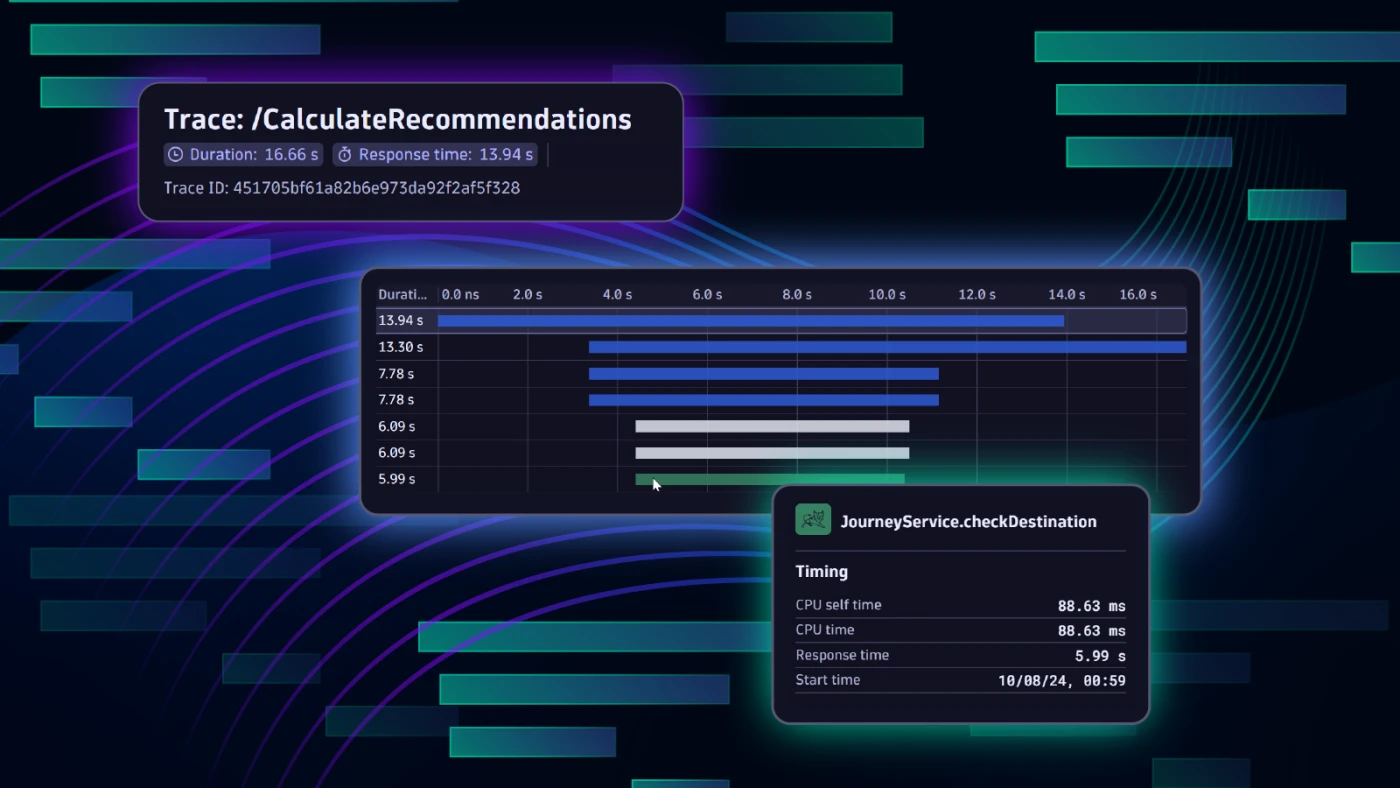
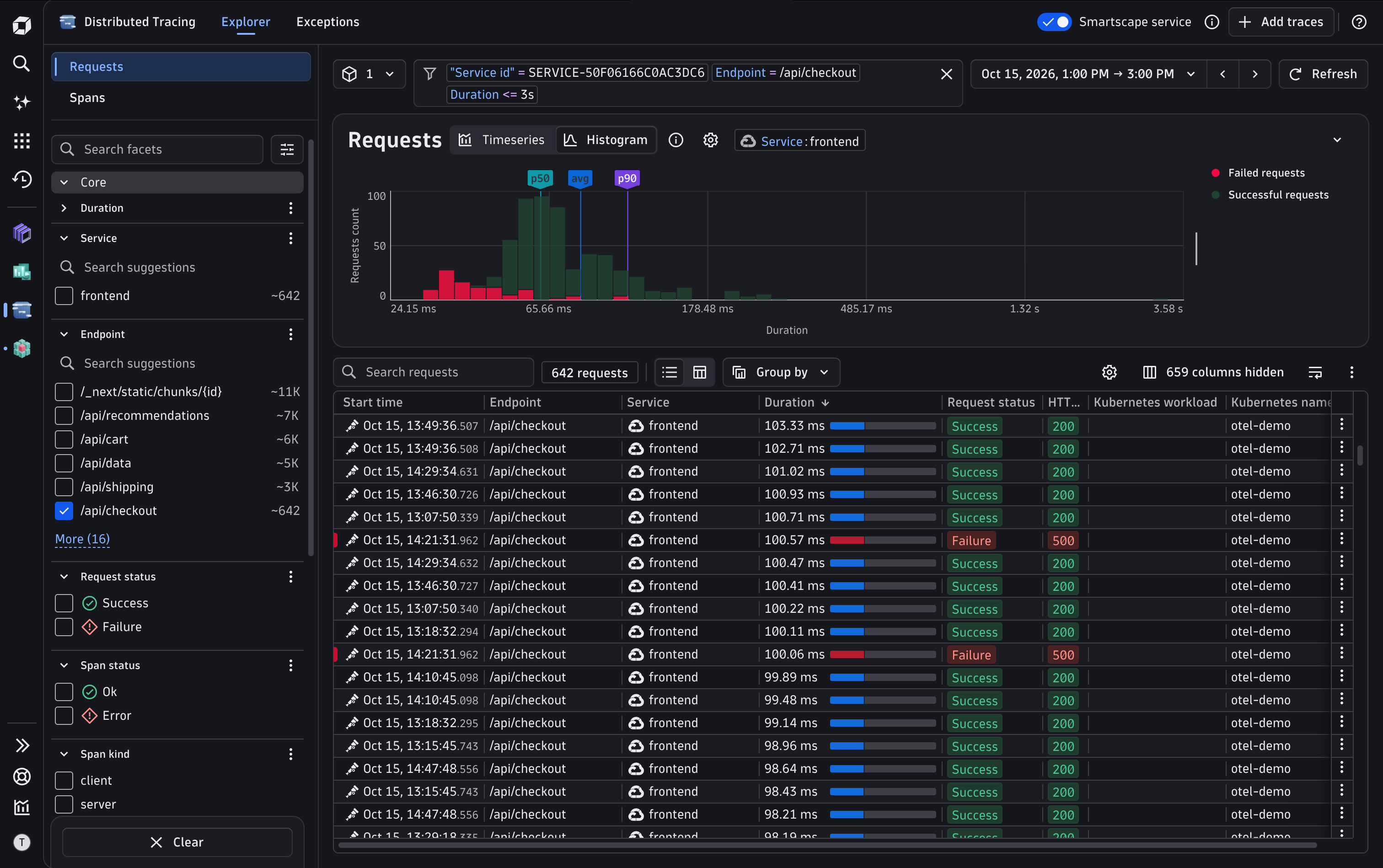
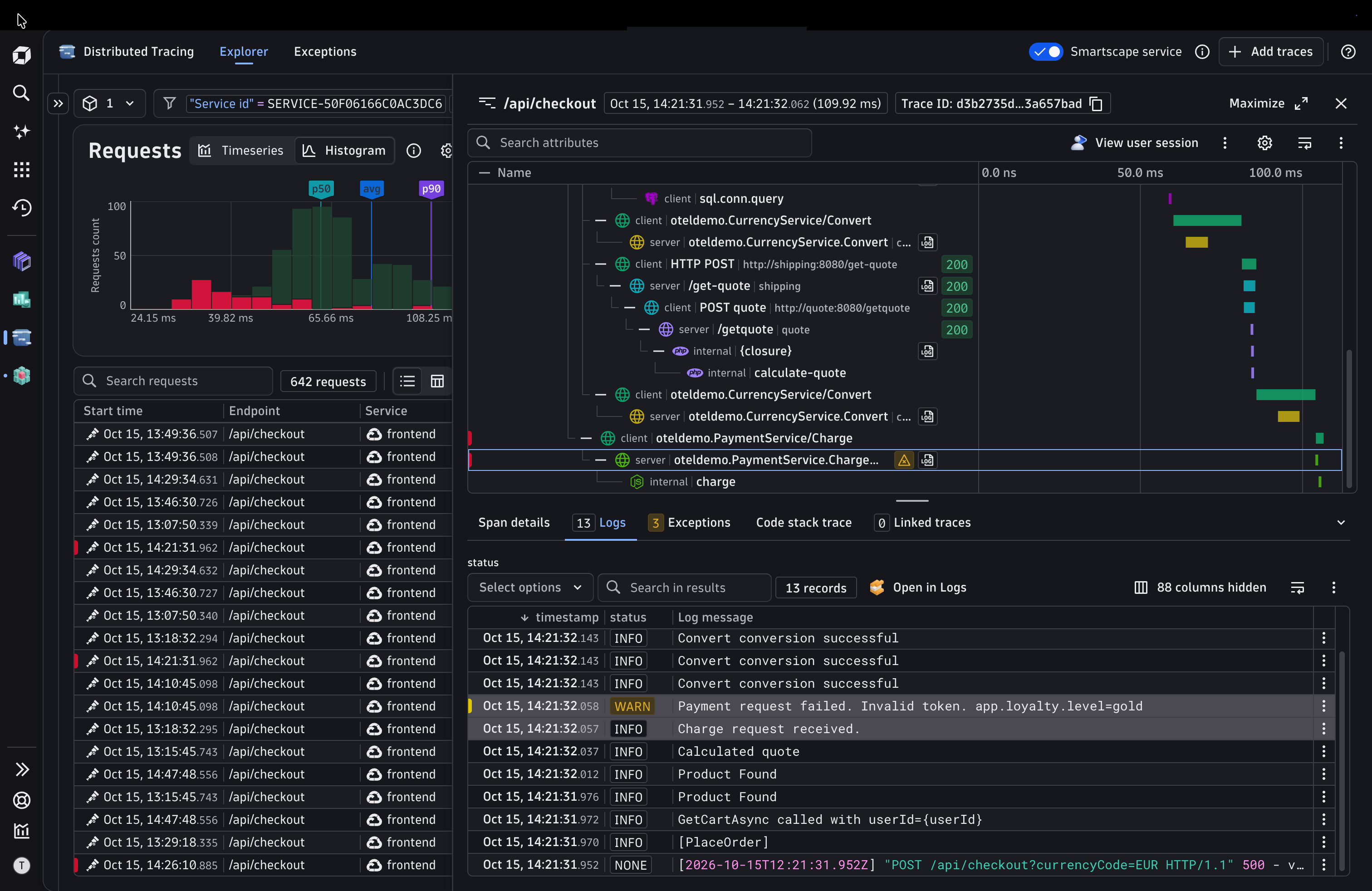
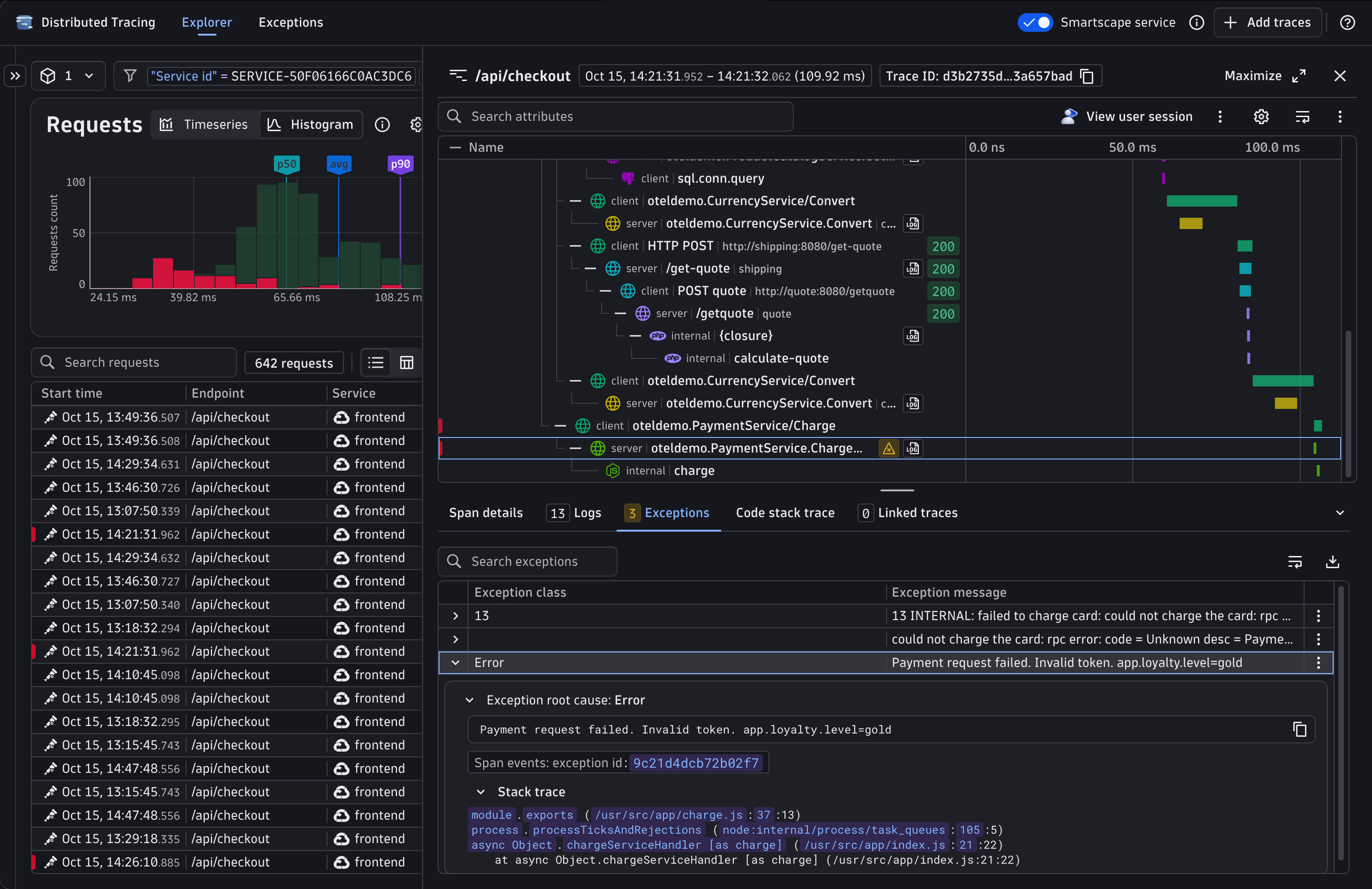
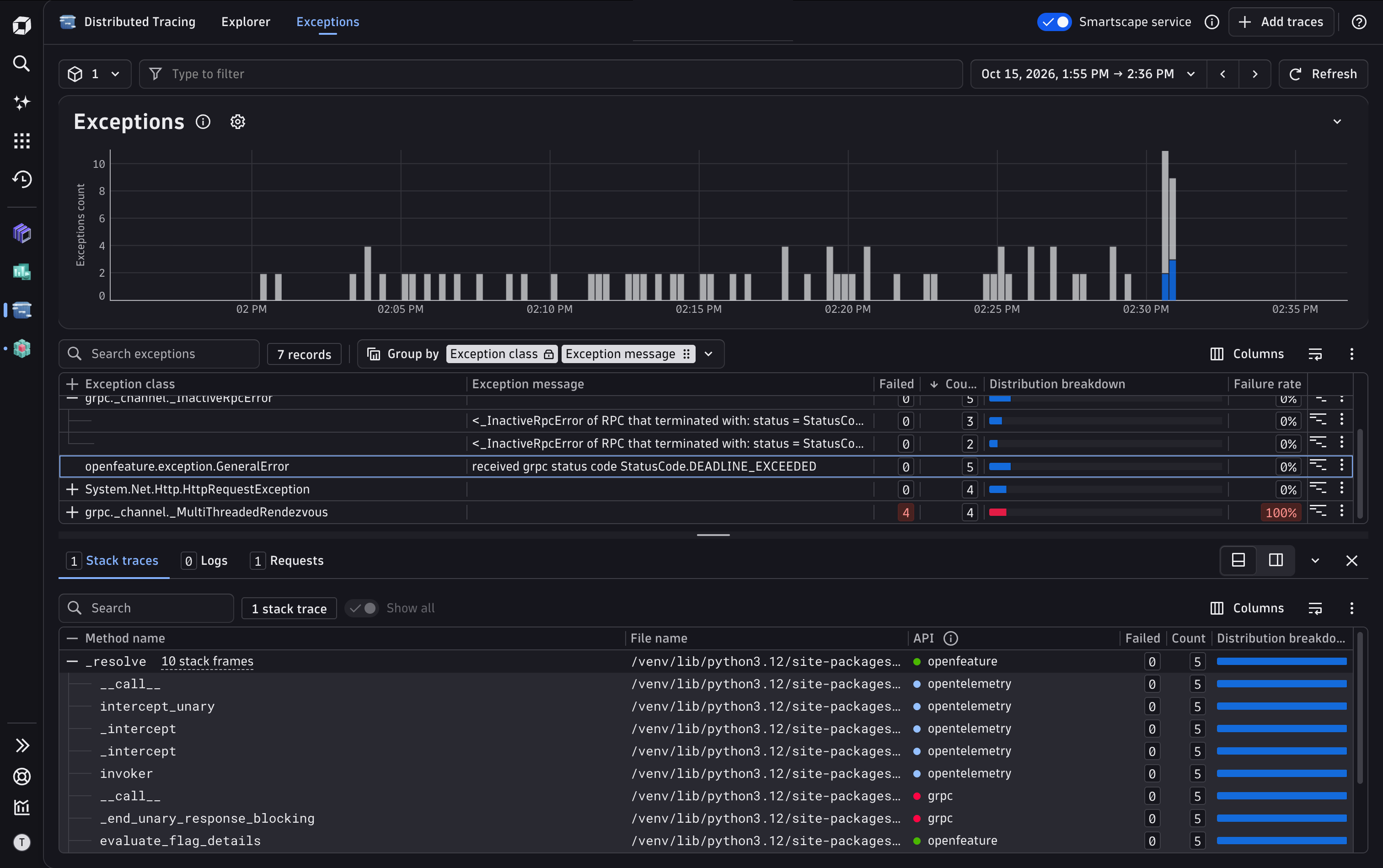
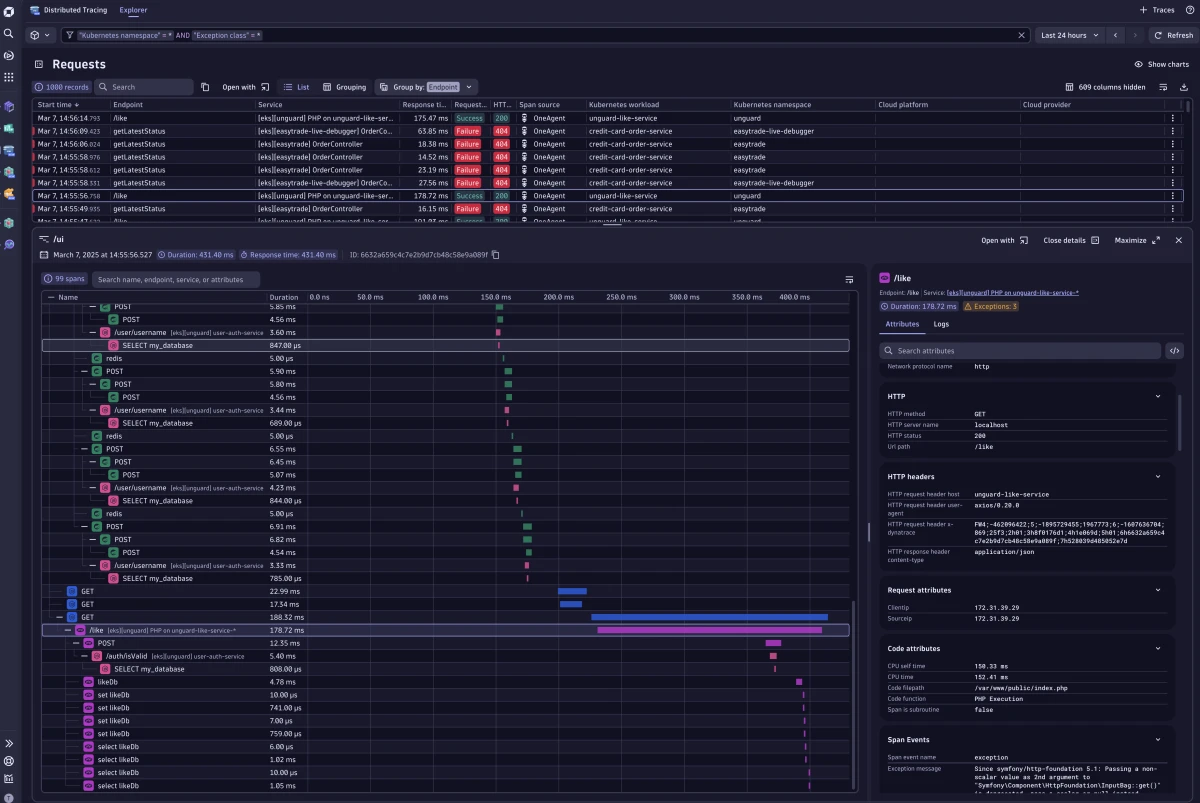
Use the waterfall visualization to instantly understand what is going on along the trace. You can see what is slow and what fails, and the full story behind every trace with correlated logs.Dive into the details of a trace and explore related logs.Dynamically analyze failures and outliers by querying petabytes of trace data in real timeIdentify and focus your analysis on performance outliers to understand why they're slow or failing.
  • Product information
  • Release notes

Overview

Since 2006, Dynatrace has pioneered distributed tracing with patented PurePath® technology, which combines distributed tracing attributes with additional insights like user experience insights, logs, metrics, topology information, metadata, and even code-level profiling information to provide the highest level of data fidelity and granularity. Distributed Tracing seamlessly integrates OpenTelemetry tracing signals with traces that are either automatically captured by OneAgent or ingested via the Trace Ingest API.

Use cases

  • Performance optimization: Pinpoint performance issues and optimize system response times through interactive analysis.
  • Troubleshooting: Monitor and diagnose errors and performance issues in complex distributed software environments.
  • Find the "needle in the haystack."

Get started

Documentation

  • Distributed Tracing

Videos

  • Unleash the Power of Distributed Traces

  • Analyze and filter trace data with Dynatrace

  • Discover the New Distributed Tracing Experience with the Best OpenTelemetry Support

Blogs

  • Logs and traces: Why context is everything for seamless investigations

  • Distributed tracing with Dynatrace just got even better

  • New Distributed Tracing app provides effortless trace insights

  • Logs and traces: Why context is everything for seamless investigations

Compatibility information

Distributed Tracing requires that Traces powered by Grail be available in your environment. For details, see Dynatrace Grail documentation.

Dynatrace
DocumentationMore Information
By Dynatrace
Dynatrace support center
Subscribe to new releases
Copy to clipboard

Related to Distributed Tracing

OneAgent logo

OneAgent

The simplest way to capture all observation signals automatically and in context

OpenTelemetry logo

OpenTelemetry

Ingest and analyze OTel traces & metrics, set health alerts & view in context

More resources

Distributed tracing with Dynatrace just got even better

Distributed tracing with Dynatrace just got even better

Get ready to experience a whole new world of limitless tracing power. With our latest enhancements, we’re transforming the way you work with trace data.
Dive deep

New Distributed Tracing app provides effortless trace insights

New Distributed Tracing app provides effortless trace insights

Distributed tracing provides visibility, allowing you to track and analyze requests across system components. Such insights are invaluable for discovering unknown unknowns, diagnosing issues, and ensuring efficient operations.
Explore more
Logs and traces: Why context is everything for seamless investigations

Logs and traces: Why context is everything for seamless investigations

When alerts fire at 3 AM, you need answers fast. Discover how seamless navigation between logs and traces eliminates context switching and accelerates root cause analysis with real troubleshooting scenarios
Read more

Full version history

ReleaseDate

Full version history

1.21.1

Patch Changes

  • Removed default first row expansion behavior from Grouping table.
  • Showed a banner when the user is filtering for an opaque service.
  • Fixed an issue where a warning toast was incorrectly shown in the trace view.
  • Fixed filter field lagging behind keystrokes when typing fast.
  • Fixed timeframe resetting to 30 mins due to daylight savings time.
  • Added all segment read permissions.

Full version history

1.21.0

Minor Changes

  • Added support for persisting collapsed/expanded state of the bottom panel in the trace view.

Patch Changes

  • Fixed issue where the view mode selector could become out of sync with the applied view mode during rapid switching.
  • Fixed issue regarding the span attribute panel if there is a specific mix of simple and complex attributes.

Full version history

1.20.0

Minor Changes

  • Added bi-directional scrolling to exceptions and waterfall table.
  • Added row actions for the exceptions table in the trace view.

Patch Changes

  • Fixed iterative negation filters not matching for null or empty arrays.
  • Fixed empty warning notification shown in case of duplicate spans when viewing a single trace.

Full version history

1.19.0

Minor Changes

  • Replaced exceptions key-value list with expandable caused-by chain and introduced span/trace mode toggle.
  • Removed view-service intent (view-traces should be used instead).

Patch Changes

  • Fixed filter field being cut off when it displayed multiple lines.
  • Fixed an issue where opening a trace from other apps would not find any spans in the trace view.
  • Fixed an issue where waterfall collapses opened nodes when selecting a log in single trace view.
  • Fixed a crash when opening a span in the trace view with exceptions but without exception ids in the failure detection results field.
  • Fixed missing segments selector proposals by requiring smartscape read permission.

Full version history

1.18.1

Patch Changes

  • Fixed failed count aggregation in grouping mode.
  • Fixed all timeframe formats handling for view-trace intent

1.18.0

Minor Changes

  • Added table settings for toggling visibility of span indicators and gantt chart in the table.

Patch Changes

  • Fixed incorrect missing permissions alert being shown when user had permissions granted conditionally.
  • Fixed Full Stack Monitoring ready-made dashboard deployment.
  • Fixed an issue where selecting filter cell actions for numeric values resulted in string comparison statements in the filter field.

Full version history

1.18.0

Minor Changes

  • Added table settings for toggling visibility of span indicators and Gantt chart in the table.
  • Improved data quality for single trace view.

Patch Changes

  • Fixed incorrect missing permissions alert being shown when user had permissions granted conditionally.
  • Fixed an issue where selecting filter cell actions for numeric values resulted in string comparison statements in the filter field.

Full version history

1.16.3

Patch Changes

  • 65636b7: Fixed Full Stack Monitoring ready-made dashboard deployment.

1.16.2

Patch Changes

  • Added a warning message for missing spans in the waterfall table.
  • Removed view-service-with-timeframe intent (view-traces should be used instead).

1.16.1

Patch Changes

  • Moved exceptions tab to logs panel and make it collapsible.
  • Fixed an issue where timeframes were missing from certain intents.
  • Fixed handling of bigInt and NaN values when copying to clipboard.
  • Changed histogram duration filter behavior to replace values instead of chaining them.

1.16.0

Minor Changes

  • N/A

Full version history

1.16.2

Patch Changes

  • Added a warning message for missing spans in the waterfall table.
  • Removed view-service-with-timeframe intent (view-traces should be used instead).
  • Fixed an issue where timeframes were missing from certain intents.
  • Fixed handling of bigInt and NaN values when copying to clipboard.
  • Changed histogram duration filter behavior to replace values instead of chaining them.

Minor Changes

  • Moved exceptions tab to logs panel and make it collapsible.

Full version history

1.14.0

Minor Changes

  • Kubernetes labels and annotations have been moved to their own groups for quicker filtering.
  • Added Drag and Drop functionality for column reordering.

Patch Changes

  • Fix nested attributes not appearing in rare cases.
  • Improved the search functionality in the grouping mode.
  • Fix capitalization of array valued display names for captured and request attributes.

Full version history

1.13.0

Minor Changes

  • Enabled ordering of aggregation columns in Grouping mode.
  • Moved collapse button for individual sections within groups to the right side in the span details.
  • Changed display name of dt.entity.kubernetes_cluster field to "Entity Kubernetes cluster id".

Patch Changes

  • Fixed potential filter key display name conflicts.
  • Fixed broken wildcard "*" in filter field.
  • Fixed time-series chart height.
  • Fixed outdated display names not being resolved correctly for the filter generation.
  • Improved empty state for logs in context by adding documentation links.
  • Added a toast when storing user's columns configuration.
  • Fixed "in" filter for Span Kind not working with suggested values.

Full version history

1.12.0

Minor Changes

  • Improved layout density of trace view.
  • Intents accept now start_time, timestamp and dt.timeframe to set the timeframe.
  • Introduced gear button for multiplicity mode selection.

Patch Changes

  • Fix intents not applying filters.
  • Made action column in list table sticky.
  • Fixed chart height not being restored when clicking the back button.
  • Improved trace view performance in certain custom link scenarios.
  • Fixed appearance of trace id and other affected attributes in the group by button.
  • Fixed an issue where no logs were shown when segments were selected.
  • Fixed license error page mistakenly claiming that trace query entitlement is required.

Full version history

1.10.3

Patch Changes

  • Fixed missing Intent action on entity values in Single Trace View.
  • Fixed filter field not suggesting UID-based filters.

1.10.2

Patch Changes

  • Added buttons to clear table search to table empty states.

1.10.0

Minor Changes

  • Added automatic scrolling to the currently selected log with the trace view.

Patch Changes

  • Fixed the Span source cell showing incorrect values in the grouping table.
  • Fixed an issue where default column order was not updated when switching view mode.

Full version history

1.10.2

Minor Changes

  • Added Logs in Context into single trace view.
  • Added support for multiple trace IDs to logs query.
  • Added automatic scrolling to the currently selected span within the single trace view.
  • Added automatic scrolling to the currently selected log within the single trace view.
  • Added support for reducing timeframes coming from intents (end time - 7 days) when they are too long.
  • Added a dedicated tab for showing exceptions in the single trace view.
  • Added text coloring for attribute values in single trace view based on type.
  • Added a generic intent which allows setting custom filters, grouping and view mode.
  • Added support for custom links in the single trace view.
  • Added support for grouping values within arrays, e.g. exception class.
  • Added support for segments to outgoing intents.
  • Added explanatory comments to DQL queries and missing links in ready-made dashboard.
  • Added buttons to clear table search to table empty states.
  • Improved facets layout to be more compact and improved search behavior to take group names into account.
  • Improved formatting of the attributes in the single trace view.
  • Improved filter field to show suggestions based on the input value.
  • Improved complex attribute handling.
  • Improved display of long values in the context menus.
  • Improved the default sizing logic of resizable panels.
  • Improved empty state messages in the explorer, span details, facets and segments.
  • Improved single trace span icons, enhanced waterfall table layout and removed duration column.
  • Improved performance of all queries including custom link query used for custom tagging single traces.
  • Increased scan byte limit for grouping table.
  • Replaced usages of deprecated request.id field with the new subtrace.id field.
  • Enhanced context menu actions for the table and span details.

Patch Changes

  • Fixed an issue where clicking the Add traces action would not do anything.
  • Fixed span source column for Span source filter.
  • Fixed long trace name shifting panel controls out of view.
  • Fixed incorrect query limit in single trace view query.
  • Fixed falsy boolean values not showing filter context actions.
  • Fixed grouping columns settings button showing incorrect label when grouping is empty.
  • Fixed suggestions in facets not taking segments into account.
  • Fixed the Span source cell showing incorrect values in the grouping table.
  • Fixed an issue where the default column order was not updated when switching view mode.
  • Renamed "Response time" field to "Duration" in requests view mode and removed duration chip from single trace view.
  • Removed automatic formatting for captured and request attribute names.
  • Changed naming convention of AWS, OTel and FaaS facet groups and attribute values.

Full version history

1.10.1

Patch Changes

  • Fixed Licensing to ensure availability

Full version history

1.10.0

Patch Changes

  • Fixed minor UI glitches

Full version history

1.6.2

Patch Changes

  • Fixed Licensing to ensure availability

Full version history

1.6.0

Patch Changes

  • Fixed minor UI glitches

Full version history

1.5.0

Minor Changes

  • Improved resizable panel integration.
  • Improved readability of charts & list query metadata.
  • Shipped ready-made dashboard.

Patch Changes

  • Fix timeseries chart erroring out when selecting a segment with 2 or more variables.
  • Fixed move group column action not working.
  • Renamed process group instance (id) to process (id).
  • Fixed in filters not working for uids, ips, and timestamps.
  • Fixed the Remove Filter cell action not working for in and not-in filter statements.
  • Fixed span details breaking for old service detection scenarios.
  • Fixed intent processing for Service-related intents.
  • Fixed request attribute filter handling of wildcard symbols.
  • Fixed HTTP status filter not working for negations.
  • Fixed a case where facet configuration modal could be opened with missing permissions.
  • Added intent for Synthetic monitoring.
  • Fixed server.address using wrong display name.

Full version history

1.4.0

Minor Changes

  • Added Endpoint name as a criterion to Requests view mode.
  • Made charts, tables and single trace view resizable.
  • Introduced new Datatable interactions
  • Introduced highlighting of selected span/request in list
  • Improved width calculation for table columns

Patch Changes

  • Improved filter DQL generation.
  • Improved Suggestions to be shown for partial numerical fields.
  • Fixed wrong query provided to intents for list with default columns.
  • Fixed negation filters for coalesced fields not working properly.
  • Fixed wrong sample rate being shown for the list table.
  • Fixed timeframe selector calendar incorrectly handling dd.mm.yyyy format.

Full version history

1.2.1

Minor Changes

  • The filter field now supports using in and not in filters. Example: Endpoint in (query, executeQuery).

  • Improved serialization of segments in URLs.
  • Added support for segment in intents.
  • Added support for alternative span parent id.
  • Added sampling to tracing list.
  • Added more detailed error messages whenever a trace id can not be found.

Patch Changes

  • Updated table links from Classic to the latest Dynatrace apps.
  • Fixed help menu item order.
  • Fixed reload button not working when charts query failed.
  • The facets in the sidebar are now updated automatically with new fields from an opened trace.
  • Fixed "About this app" link in the header menu.
  • Fixed escaping issues for complex filters.
  • Made initial permission check less strict.
  • Added new intent for viewing services which supports 'dt.timeframe'.
  • Improved sampling rate calculation.
  • Changes in the Segment selector now update the page.

Full version history

1.1.4

Patch Changes

  • Removed unnecessary permissions.

1.1.3

Patch Changes

  • Made initial permission check less strict.

1.1.2

Patch Changes

  • Fixed sample rate query by adding segments support.
  • Fixed permission check for spans bucket.
  • Fixed indentation in single trace view when manually making the span name column smaller.
  • Fixed an issue where the span limit for the list did not have any effect.
  • Fixed crash when entity name contains quote.
  • Fixed "Open with" button being shown under wrong conditions.
  • Fixed entity filters breaking when filtering for ~.

1.1.0

Minor Changes

  • Improved handling of timeseries chart for the last 2 minutes.

Patch Changes

  • Added additional properties to intents.
  • Added segments feature support.

Full version history

1.1.3

Patch Changes

  • Made initial permission check less strict.

1.1.2

Patch Changes

  • Fixed sample rate query by adding segments support.
  • Fixed permission check for spans bucket.
  • Fixed indentation in single trace view when manually making the span name column smaller.
  • Fixed an issue where the span limit for the list did not have any effect.
  • Fixed crash when entity name contains quote.
  • Fixed "Open with" button being shown under wrong conditions.
  • Fixed entity filters breaking when filtering for ~.

1.1.0

Minor Changes

  • Improved handling of timeseries chart for the last 2 minutes.

Patch Changes

  • Added additional properties to intents.
  • Added segments feature support.

Full version history

1.1.2

Patch Changes

  • Fixed permission check for spans bucket.
  • Fixed indentation in single trace view when manually making the span name column smaller.
  • Fixed an issue where the span limit for the list did not have any effect.
  • Fixed crash when entity name contains quote.
  • Fixed entity filters breaking when filtering for ~.

Full version history

1.1.1

Patch Changes

  • Fixed "Open with" button being shown under wrong conditions

Full version history

1.1.0

Major

  • Release of the Distributed Tracing app (List + Single trace view)
Dynatrace Hub
Get data into DynatraceBuild your own app
All (811)Log Management and AnalyticsKubernetesAI and LLM ObservabilityInfrastructure ObservabilitySoftware DeliveryApplication ObservabilityApplication SecurityDigital ExperienceBusiness Observability
Filter
Type
Built and maintained by
Deployment model
SaaS
  • SaaS
  • Managed
Partner FinderBecome a partnerDynatrace Developer

Discover recent additions to Dynatrace

Problems logo

Problems

Analyze abnormal system behavior and performance problems detected by Davis AI.

Logs logo

Logs

Explore all your logs without writing a single query.

Security Investigator logo

Security Investigator

Fast and precise forensics for security and logs on Grail data with DQL queries.

Business Flow logo

Business Flow

Track, analyze, and optimize your critical business processes.

Cost & Carbon Optimization logo

Cost & Carbon Optimization

Track, analyze, and optimize your IT carbon footprint and public cloud costs.

Davis Anomaly Detection logo

Davis Anomaly Detection

Detect anomalies in timeseries using the Davis AI

Analyze your data

Understand your data better with deep insights and clear visualizations.

Notebooks logo

Notebooks

Create powerful, data-driven documents for custom analytics and collaboration.

Dashboards logo

Dashboards

Transform complex data into clear visualizations with custom dashboards.

Automate your processes

Turn data and answers into actions, securely, and at scale.

Workflows logo

Workflows

Automate tasks in your IT landscape, remediate problems, and visualize processes

Jira logo

Jira

Create, query, comment, transition, and resolve Jira tickets within workflows.

Slack logo

Slack

Automate Slack messaging for security incidents, attacks, remediation, and more.

Secure your cloud application

See vulnerabilities and attacks in your environment.

Security Overview logo

Security Overview

Get a comprehensive overview of the security of your applications.

Code-Level Vulnerabilities logo

Code-Level Vulnerabilities

Detect vulnerabilities in your code in real time.

Security Posture Management logo

Security Posture Management

Detect, prioritize, and remediate security and compliance findings with SPM.

Threats & Exploits logo

Threats & Exploits

Understand, triage, and investigate detection findings and alerts.

Are you looking for something different?

We have hundreds of apps, extensions, and other technologies to customize your environment

Leverage our newest innovations of Dynatrace Saas

Kick-start your app creation

Kick-start your app creation

Whether you’re a beginner or a pro, Dynatrace Developer has the tools and support you need to create incredible apps with minimal effort.
Go to Dynatrace Developer
Upgrading from Dynatrace Managed to SaaS

Upgrading from Dynatrace Managed to SaaS

Drive innovation, speed, and agility in your organization by seamlessly and securely upgrading.
Learn More
Log Management and Analytics

Log Management and Analytics

Innovate faster and more efficiently with unified log management and log analytics for actionable insights and automation.
Learn more