


























Skip to technology filters Skip to main content
Dynatrace Hub

Extend the platform,
empower your team.

Popular searches:
Home hero bg
SNMP AutodiscoverySNMP Autodiscovery
SNMP Autodiscovery

SNMP Autodiscovery

Scan through your subnets and build an inventory of SNMP-enabled network devices

Extension
Free trialDocumentation
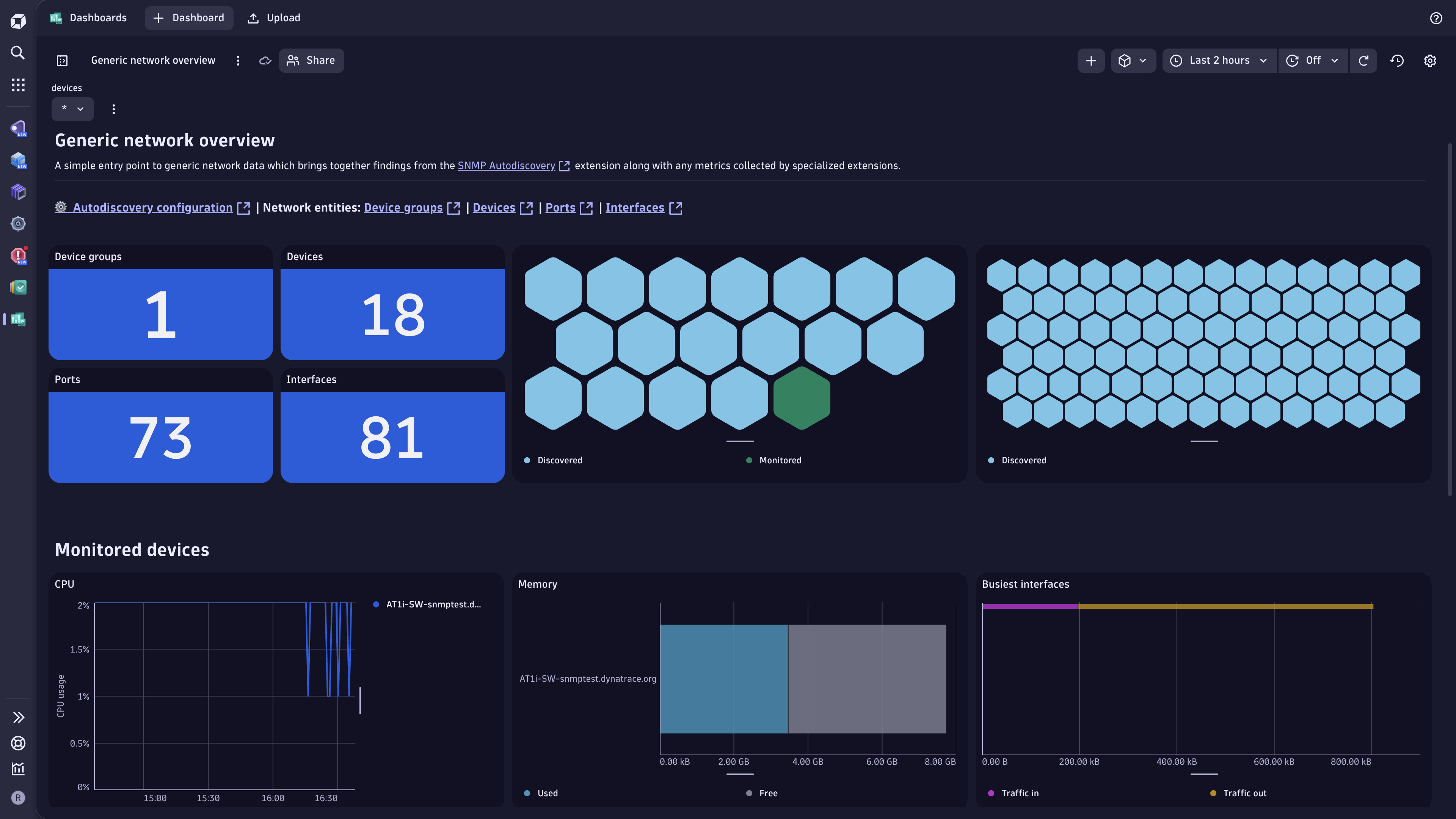
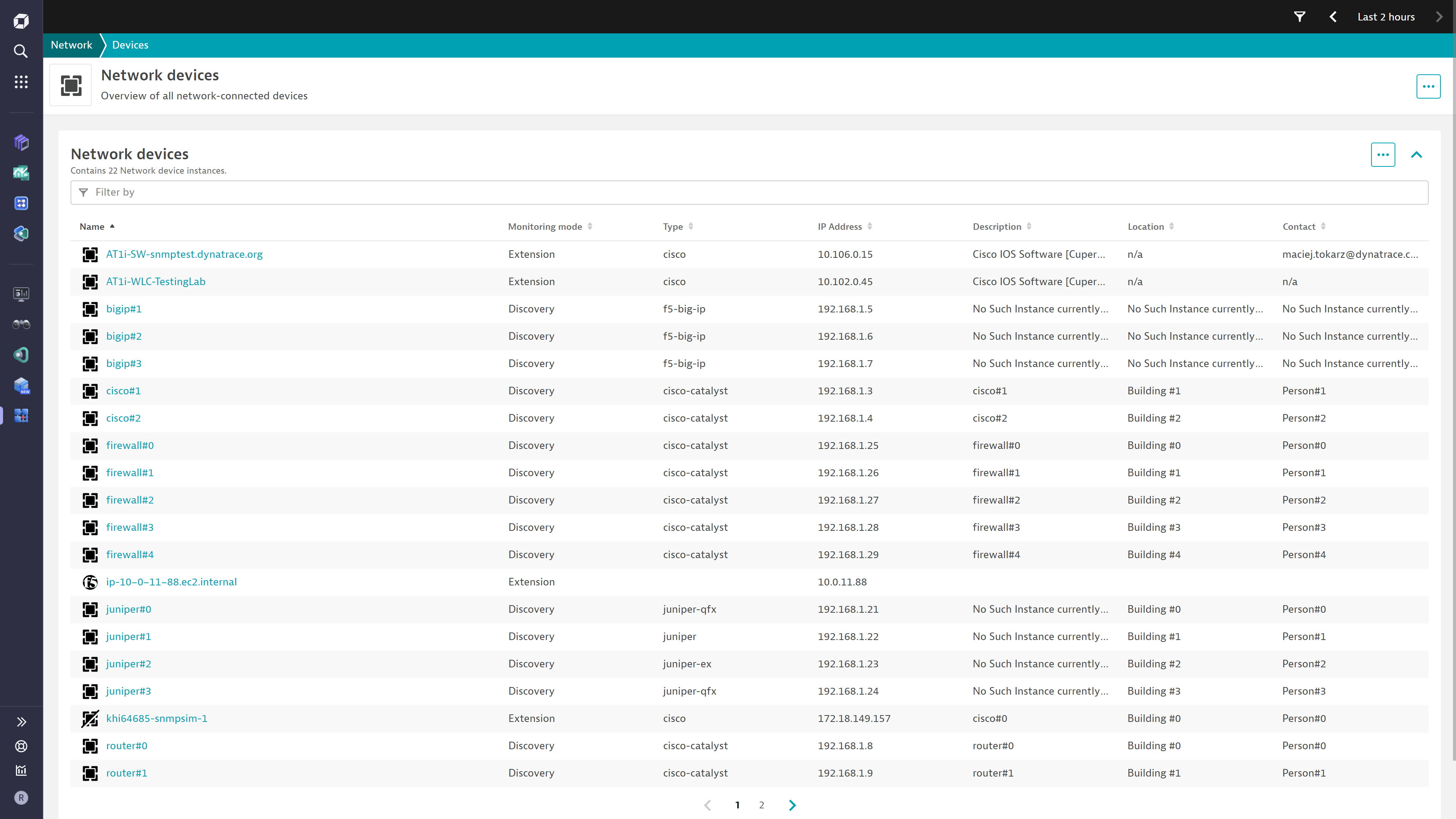
The "Generic network overview" dashboard offers a single pane of glass view over the key extension findings, including the extended network built through neighbor discovery.Build an inventory of all your network devices. Each device recommends a specialized extension that can provide monitoring insights.Reach your data easily through this convenient overview dashboard.
  • Product information
  • Release notes

Overview

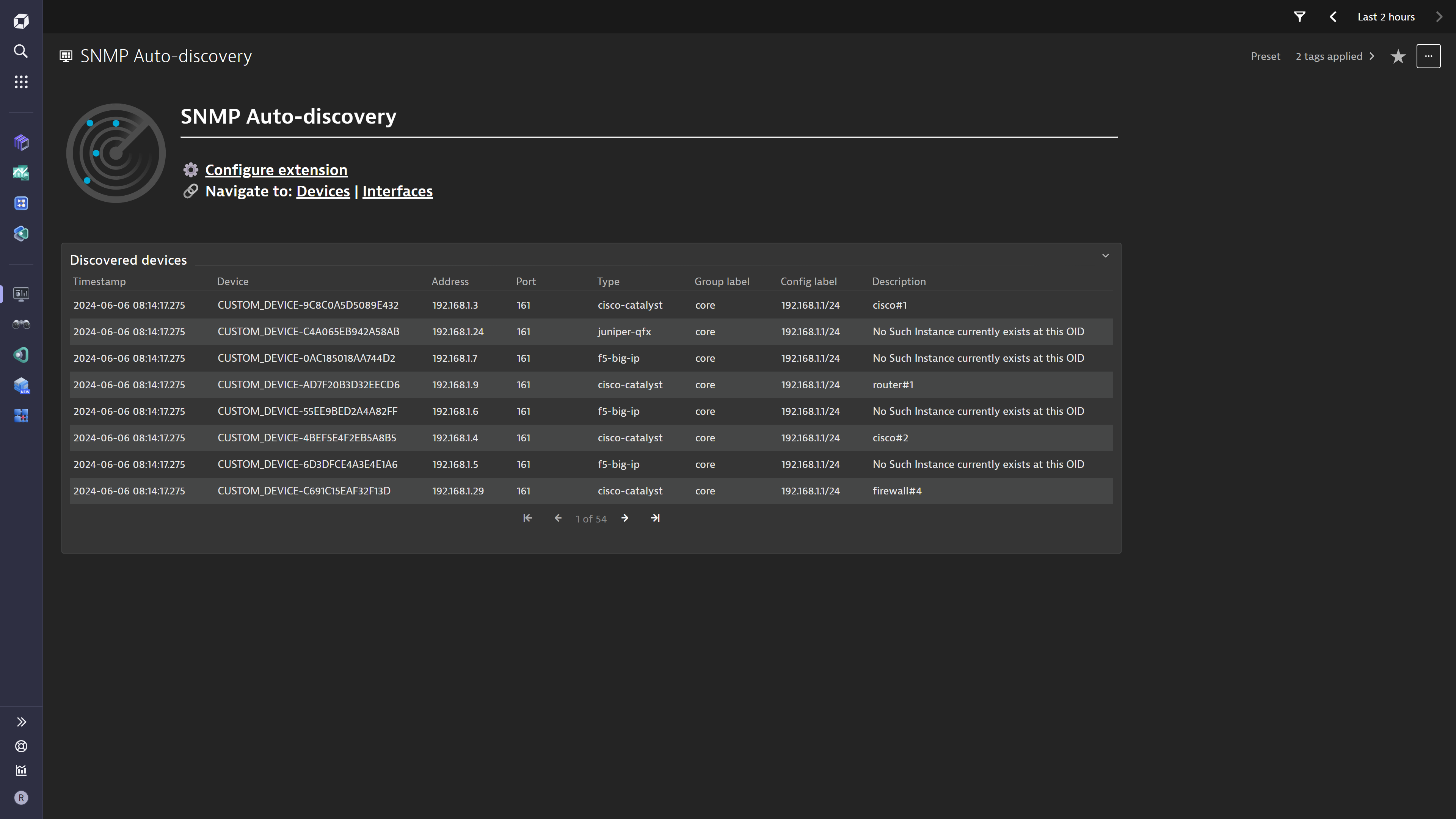
This ActiveGate extension takes subnets and ranges of IP addresses along with SNMP credentials and scans through them to discover SNMP-enabled network devices. The devices are then reported as entities acting as an entry point to specialized extension configurations.

This is intended for users who:

  • Want to simplify the onboarding of network device monitoring in Dynatrace
  • Require a single pane of glass view over all network technologies

This extension enables you to:

  • Get an overview of all network devices, regardless of technology
  • Find out which Dynatrace Extension can best monitor each device
  • Access all extension network data in one place

Use cases

  • Build an inventory of SNMP-enabled network devices
  • Understand which extension Dynatrace recommends for further monitoring & insights
  • Enable the use of the Discovery & Coverage App for automatically setting up network monitors and extension configurations for the discovered devices
  • Understand your extended network in terms of device to device connectivity along with port & interface details

Compatibility information

  • SNMP v2c or v3 (supported parameters are detailed here)
  • Minimum ActiveGate version 1.280
  • Minimum Dynatrace version 1.280
Dynatrace
Documentation
By Dynatrace
Dynatrace support center
Subscribe to new releases
Copy to clipboard

Extension content

Content typeNumber of items included
screen logs cards
1
screen layout
3
screen message cards
2
document dashboard
1
generic relationship
21
list screen layout
2
screen entities lists
2
metric metadata
26
screen chart groups
1
screen actions
4
dashboards
1
generic type
5
screen properties
3

Feature sets

Below is a complete list of the feature sets provided in this version. To ensure a good fit for your needs, individual feature sets can be activated and deactivated by your administrator during configuration.

Feature setsNumber of metrics included
Metric nameMetric keyDescriptionUnit
Devices OKsfm.snmp_autodiscovery.devices_okThe amount of addresses that responded to the scanner query as part of a given configuration.Count
Devices scannedsfm.snmp_autodiscovery.devices_scannedThe total amount of addresses that were scanned by the extension as part of a given configuration.Count
Scan durationsfm.snmp_autodiscovery.scan_durationThe time the extension took to scan through all addresses that are part of a given configuration.NanoSecond

Full version history

To have more information on how to install the downloaded package, please follow the instructions on this page.
ReleaseDate

Full version history

✨ New in this version (3.2.13):

  • Added metric metadata definitions for unicast/multicast/broadcast packet transmission.
  • Added debug log flag in extension configuration for troubleshooting.

🚀 Improved in this version:

  • Improved detection of interface names in LLDP neighbor resolution.
    • Extension will now match detected network interfaces to discovered ports via MAC address and create a relationship.
    • If local(7) subtype is found, it will be treated as interface name.

🪲 Fixed in this version:

  • Corrected treatment of whitelisted devices that could lead to neighbor discovery being stopped.

Full version history

✨ New in this version (3.2.10):

  • Added 2 new metric metadata definitions.

Full version history

Fixed in this version:

  • Network Device entities would be created for every IP Address, even if unresponsive

Full version history

Improvements:

  • Neighbor discovery queries have been optimized for large devices with lots of interfaces
  • Specialized extension recommendations now include the extensions for HP H3C and ICF Switches

Full version history

Fixed in this version:

  • Entities created through neighbor discovery were missing relationships between them

Full version history

Fixed in this version:

  • Syslog data is linked to its own entity which is then linked to network:device to not overcrowd the Infrastructure & Operations App view

  • For neighbor discovery, in some cases, a Physical Port would be wrongly reported as an Interface in the logs & dashboard data.

Full version history

🐛 Bugs fixed in this version:

  • Fixes bug in platform dashboard in which links were referencing the incorrect tenant

Full version history

New in this version:

  • Security Context is applied to all entities. Do not configure this if you would rather control it from one of the specialised SNMP extensions (e.g. F5, Cisco, Juniper, etc.)
  • The metrics metadata was expanded to include Interface Errors (In/Out) and Discards (In/Out)

Improved in this version:

  • An ignore rule was configured for devices whose System Object IDs start with "1.3.6.1.4.1.8072.3.2". These typically identify full linux servers, so they shouldn't be considered as "network devices" to be discovered.

Fixed in this version:

  • The Classic dashboard tile for log records would not fetch any records

Full version history

New in this version

  • Neighbor discovery

    • A new configuration switch has been added to enable Neighbor Discovery.
    • With this feature, every discovered device that is SNMP enabled will also be queried for Network Neighbors. Neighbors are other devices connected to the queried device which advertise themselves via LLDP protocol. It is down to each individual device to have this protocol enabled and accurately configured to broadcast correct data.
  • Platform dashboard

    • A "Generic network overview" dashboard is now available with the extension
    • This visualizes some of the key findings of the extension, along with the new network neighbors data.

Improved in this version

  • Custom timeout

    • A new configuration field allows setting a custom timeout for SNMP operations
    • In cases where the extension is reporting "No SNMP response received before timeout" for device groups you know are SNMP enabled, you may increase the value past the default of 1 second to compensate for network & device latency.
    • ⚠️ Warning this proportionately increases the duration of the scan as every address will be awaited longer.
  • Lower cost from log ingestion

    • The extension now produces a more optimized log record format which is expected to reduce cost especially in situations where multiple configurations are created.

Full version history

Fixed in this version:

  • glibc dependency introduced by cryptography package was lowered to 2.17, allowing more Linux distributions to run the extension.

Full version history

Fixed in this version:

  • Bandwidth property on network:interface corrected to MegaBitPerSecond unit
  • oper.status dimension on some interface metrics was incorrectly labelled as "MAC address"
  • cryptography package explicitly listed as a dependency. This would cause "ciphering services not available" error on some installations.

Full version history

Fixed in this version:

  • Operational & Admin status attributes are missing for network:interface entity

Full version history

Improved in this version:

  • Network devices are discovered even with partial data available
  • Extension log files contain a more detailed breakdown of SNMP errors seen across devices
  • Configuration parameter Performance profile renamed
  • Description & documentation for API Token updated to reflect new scopes required

Full version history

⚠️ Breaking changes introduced:

  • The configuration parameter for Threads has been removed.

  • A new configuration parameter for Performance profile was introduced.

  • Due to these changes, a direct upgrade of your monitoring configurations will not be possible.

    All configurations will have to be recreated.

Improved in this version:

  • The extension can handle 25 times the amount of IPs, in the same amount of time.
  • The extension automatically adjusts processing to stay within ActiveGate performance profile limits.

Fixed in this version:

  • Relationships between network interfaces and network ports would not be correctly identified

Full version history

New in this version:

  • Support for Credential Vault when using SNMP v2 and v3 credentials

Improved in this version:

  • Topology model updated to use sys.name instead of device.name when naming network:device entity instances.

Full version history

New in this version:

  • Network topology model was expanded to include neighbor discovery (LLDP) data
  • Additional routines added for relating network device entities to built-in topology
  • Entity UI was enabled for AppEngine usage

Improved in this version:

  • The network topology rules were enhanced to simplify the changes needed in other extensions to leverage the data
  • Additional rules were added to more reliably collect entity attributes

Fixed in this version:

  • Devices already existing before the first scan would not receive configuration and group labels as entity attributes

Full version history

New in this version:

  • self-monitoring feature set, which includes 3 diagnostic metrics:
    • Scan duration
    • Devices scanned
    • Devices OK

Full version history

First public release.

Dynatrace Hub
Get data into DynatraceBuild your own app
All (811)Log Management and AnalyticsKubernetesAI and LLM ObservabilityInfrastructure ObservabilitySoftware DeliveryApplication ObservabilityApplication SecurityDigital ExperienceBusiness Observability
Filter
Type
Built and maintained by
Deployment model
SaaS
  • SaaS
  • Managed
Partner FinderBecome a partnerDynatrace Developer

Discover recent additions to Dynatrace

Problems logo

Problems

Analyze abnormal system behavior and performance problems detected by Davis AI.

Logs logo

Logs

Explore all your logs without writing a single query.

Security Investigator logo

Security Investigator

Fast and precise forensics for security and logs on Grail data with DQL queries.

Business Flow logo

Business Flow

Track, analyze, and optimize your critical business processes.

Cost & Carbon Optimization logo

Cost & Carbon Optimization

Track, analyze, and optimize your IT carbon footprint and public cloud costs.

Davis Anomaly Detection logo

Davis Anomaly Detection

Detect anomalies in timeseries using the Davis AI

Analyze your data

Understand your data better with deep insights and clear visualizations.

Notebooks logo

Notebooks

Create powerful, data-driven documents for custom analytics and collaboration.

Dashboards logo

Dashboards

Transform complex data into clear visualizations with custom dashboards.

Automate your processes

Turn data and answers into actions, securely, and at scale.

Workflows logo

Workflows

Automate tasks in your IT landscape, remediate problems, and visualize processes

Jira logo

Jira

Create, query, comment, transition, and resolve Jira tickets within workflows.

Slack logo

Slack

Automate Slack messaging for security incidents, attacks, remediation, and more.

Secure your cloud application

See vulnerabilities and attacks in your environment.

Security Overview logo

Security Overview

Get a comprehensive overview of the security of your applications.

Code-Level Vulnerabilities logo

Code-Level Vulnerabilities

Detect vulnerabilities in your code in real time.

Security Posture Management logo

Security Posture Management

Detect, prioritize, and remediate security and compliance findings with SPM.

Threats & Exploits logo

Threats & Exploits

Understand, triage, and investigate detection findings and alerts.

Are you looking for something different?

We have hundreds of apps, extensions, and other technologies to customize your environment

Leverage our newest innovations of Dynatrace Saas

Kick-start your app creation

Kick-start your app creation

Whether you’re a beginner or a pro, Dynatrace Developer has the tools and support you need to create incredible apps with minimal effort.
Go to Dynatrace Developer

Upgrading from Dynatrace Managed to SaaS

Upgrading from Dynatrace Managed to SaaS

Drive innovation, speed, and agility in your organization by seamlessly and securely upgrading.
Learn More
Log Management and Analytics

Log Management and Analytics

Innovate faster and more efficiently with unified log management and log analytics for actionable insights and automation.
Learn more

