Skip to technology filters Skip to main content
Dynatrace Hub

Extend the platform,
empower your team.

Popular searches:
Home hero bg
ProblemsProblems
Problems

Problems

Detect, explain and triage problems automatically using Dynatrace Intelligence.

App
Try in PlaygroundDocumentation
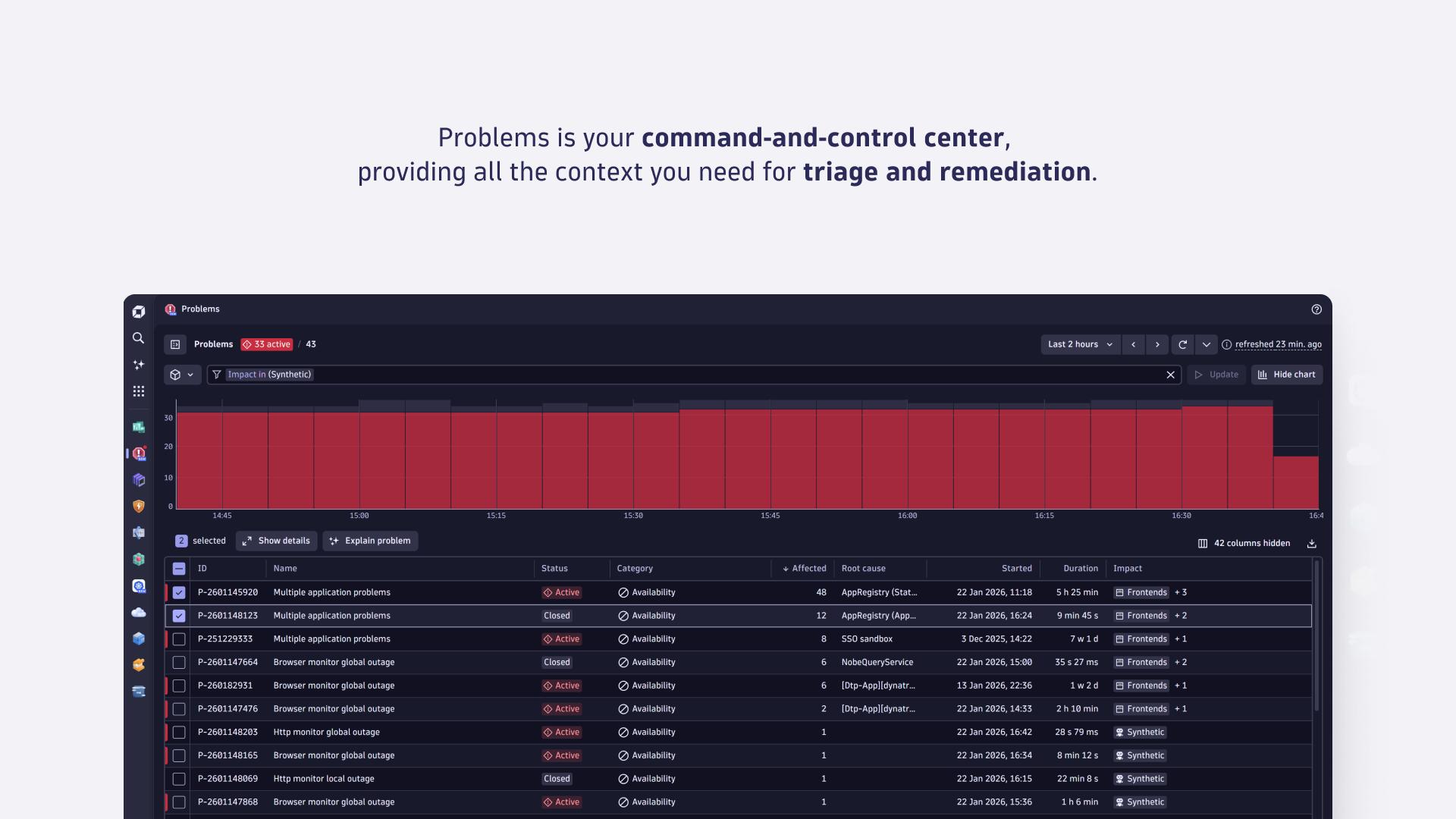
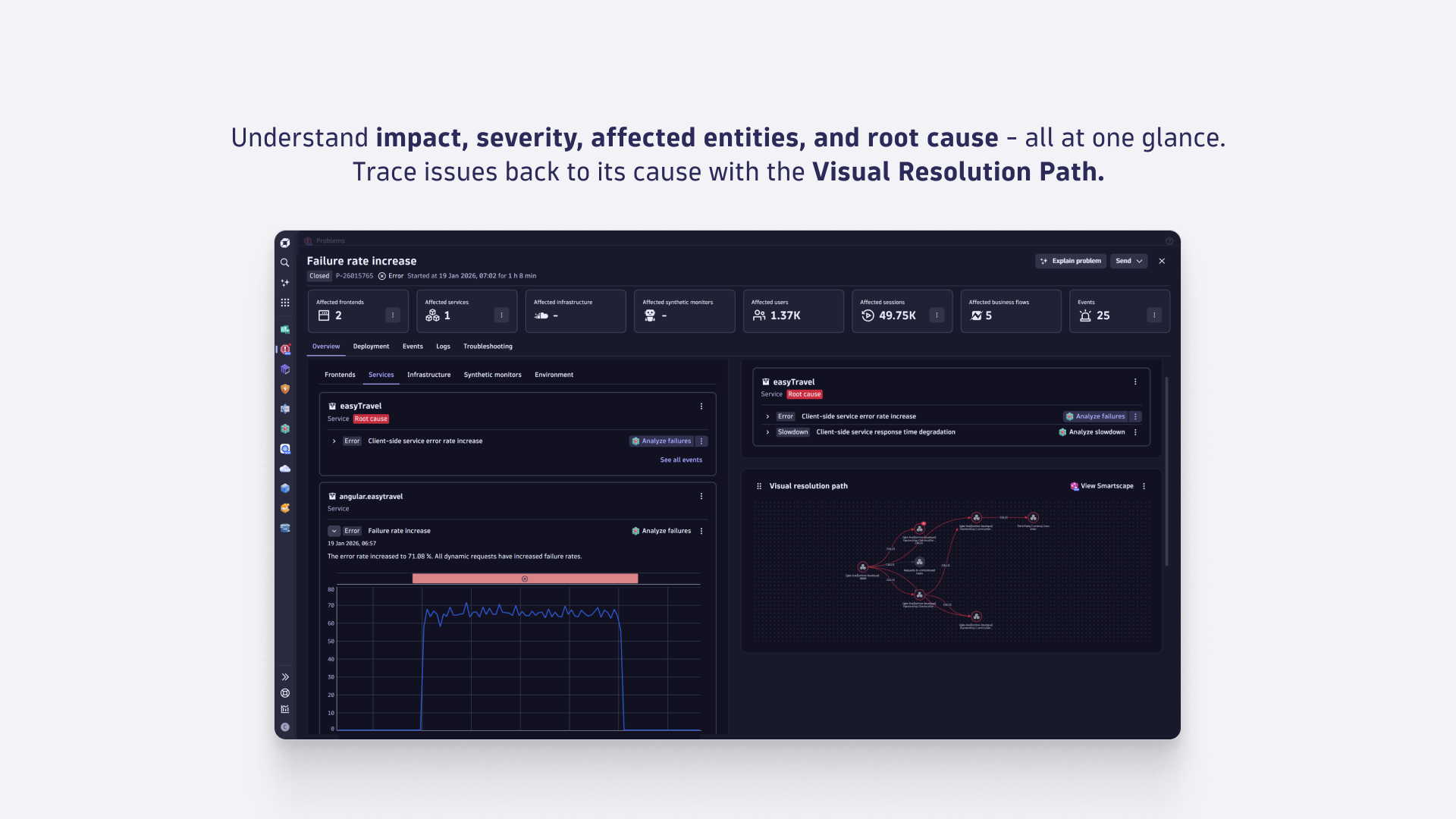
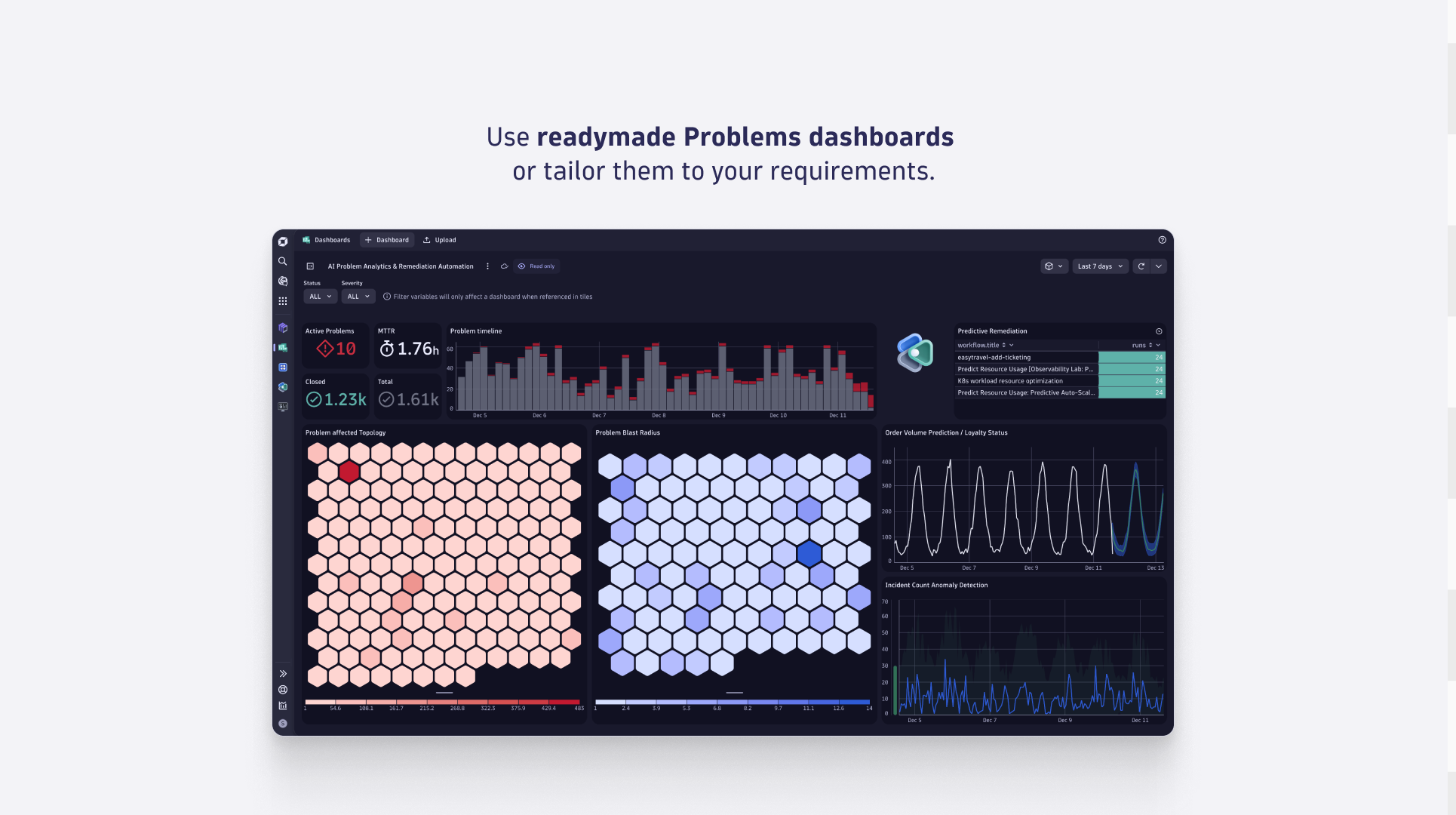
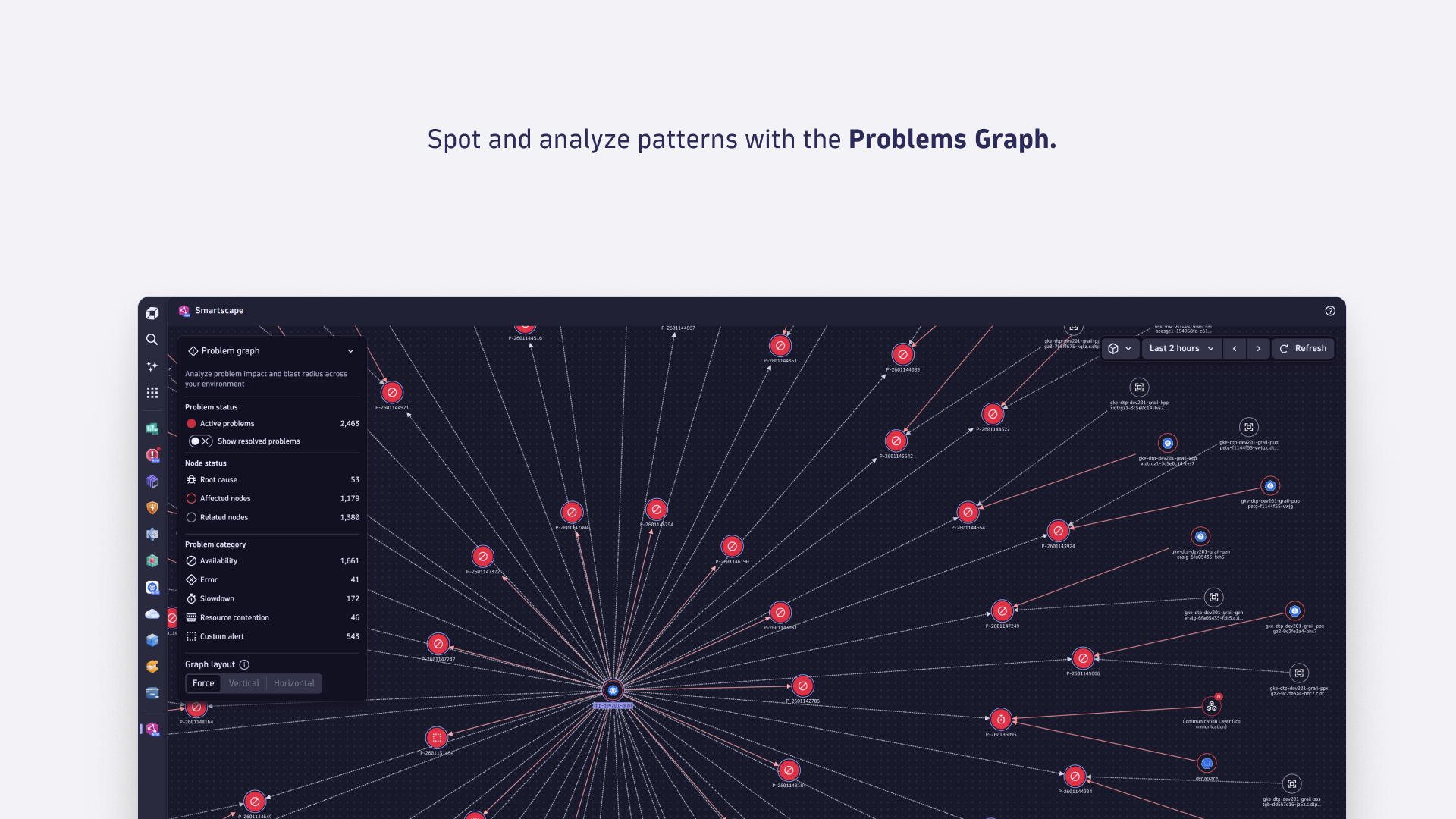
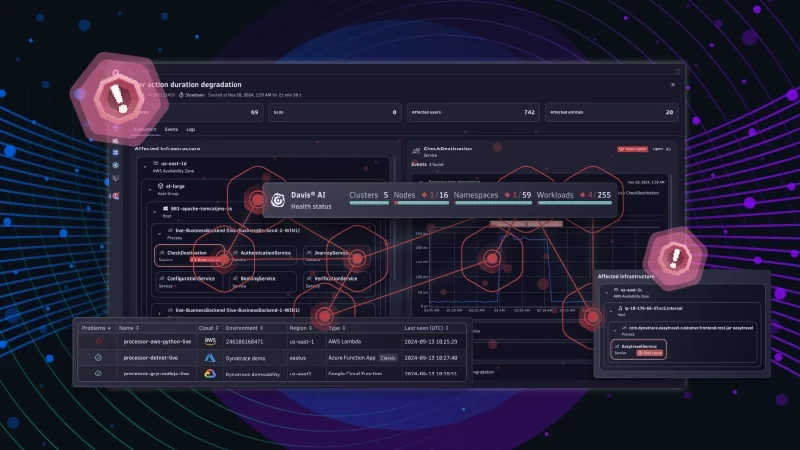
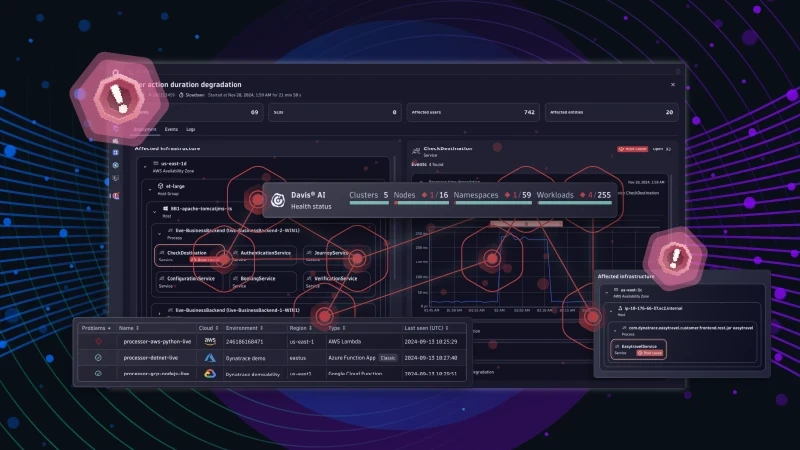
Problems is your command-and-control center, providing all the context you need for triage and remediation.Understand impact, severity, affected entities, and root cause - all at one glance. Trace issues back to its cause with the Visual Resolution Path.Use readymade dashboards or tailor them to your requirements.Spot and analyze patterns with the Problems Graph.
  • Product information
  • Release notes

Overview

Problems is your command and control center for triage and remediation.

Powered by Dynatrace Intelligence, it continuously correlates anomalies across services, infrastructure, and RUM, pinpointing the root cause as a single, actionable problem instead of overwhelming teams with noisy alerts.

Here’s how Problems guides SREs, DevOps, developers, and operations through the full incident lifecycle:

  • Problem detection: Dynatrace Intelligence automatically correlates anomalies across all layers—services, infrastructure, process groups, Kubernetes, RUM, and logs—consolidating them into a single problem with a clearly identified root cause.
  • Alerting: Receive meaningful, actionable notifications, instantly making you understand impact, severity, and affected entities so teams can respond immediately without digging for context.
  • Diagnosis: Access an AI generated incident summary and a visual resolution path that traces causal dependencies end to end, helping teams understand what happened and why within seconds.
  • Triage: Review complete problem details—impacted users, services, infrastructure components, topology context, and evidence—so teams can prioritize based on business impact and determine the right responder.
  • Remediation: Trigger automated workflows and autonomous remediation —from restarts to rollbacks to custom runbooks—with full guardrails and observability.
  • Post incident: Extract learnings and create troubleshooting guides, which are automatically surfaced when similar issues happen.


Use cases

  • DevOps: Quickly identify abnormal behavior, assess impact, and accelerate triage.
  • SREs: Validate likely SLO violations, review impact, and decide on remediation or rollback.
  • Operations: Streamline incident triage with business impact and contextual evidence.
  • Developers: Jump directly from problems to traces and logs for code-level fixes.
  • Cross-Team sharing: Distribute problem summaries and impact context to ITSM, CloudOps, and developer platforms.

Get started

The app has an integrated onboarding flow that helps you become familiar with key functionalities.

  • Open the Problems app to review all the active problems within the problems feed.

  • Use the filters and the timeframe selection to review the history of detected problems.

  • Use multi-select to drill into the details of problems.

  • Review the highlighted root cause of problems.

Dynatrace
DocumentationMore Information
By Dynatrace
Dynatrace support center
Subscribe to new releases
Copy to clipboard

Related to Problems

Workflows logo

Workflows

Automate tasks in your IT landscape and move towards autonomous operations.

More resources

Build trust with Dynatrace AI-driven root cause and impact analysis

Build trust with Dynatrace AI-driven root cause and impact analysis

Read this blog to learn about the new problem summary, our visual resolution path and how impacted entities and showing running remediation workflows help building trust in automated operations and root cause analysis.
Read more
Remediation intelligence: Accelerate MTTR with AI-powered context and knowledge

Remediation intelligence: Accelerate MTTR with AI-powered context and knowledge

Learn about the new troubleshooting guides, helping you to improve your remediation workflow.
Read more
Let the problem guide you: Smart remediation with Dynatrace

Let the problem guide you: Smart remediation with Dynatrace

From problem to root cause - how Dynatrace helps to diagnose and triage issues to investigation and final remediation.
Learn more

Full version history

ReleaseDate

Full version history

1.16.1

Minor Changes

  • 68d5bd9: Support new drilldown actions "View disk", "View network interface", and "View host nic" to navigate to the Infrastructure & Operations app.
  • ba34a1c: Adapt drilldown actions for k8s entities.
  • 499576b: Introduce human-readable log messages in the 'Log message' column of the Logs table.
  • 2dc37dc: Persist filters, timeframes, and segments in the URL.
  • b1f00fb: Support new drilldown action "View Azure service" to navigate to the Clouds app.

Patch Changes

  • f3cea95: Fixed loading state height for filter bar.
  • e9a4318: Update dependencies due to vulnerability fix.
  • 522c63d: Fixed the auto-selection of the problem details tab when using the 'view-problems-add-on' intent.
  • 49fc9e8: Add missing app scope to enable the SegmentSelector to read files from Grail.
  • 8200f36: Remove the suffix icon from the "Explain problem" button.
  • 5dbe5f9: Updated affected sessions and users tile text.
  • 6faeb0d: Set problem chart x-axis extremes based on selected timeframe.
  • f820997: Fixed info tiles not refetching their data when re-opening the same problem.
  • d3bff34: Fixed selecting deployment graph node from add-on intent payload.
  • 28f0739: Fixed markdown formatting issues when showing full content of long event descriptions.
  • 36902ad: Handle errors when copying to clipboard fails.

Full version history

1.15.1

Minor Changes

  • 225e489: Add drilldown action to analyze slowdowns.

Full version history

1.14.1

Minor Changes

  • 18c4dcd: Improve email notifications to trigger once the analysis is complete.
  • e8c7a09: Replace properties table pagination with continuous scrolling.
  • 60fb1d0: Introduce "Send Problem" feature (via email, Jira, Slack, ...) to details view.

Patch Changes

  • 8524caf: Fixed icon for problem category "Monitoring unavailable".
  • 183ddde: Fixed affected entities count by using impact level in overview info tiles.
  • 47cddda: Fixed case insensitivity in quick filters.
  • 009600d: Hide Alerting profiles problem field for new tenants.
  • 9f3f626: Modified "What's New" link to open release information in a modal window.
  • e482e99: Fixed positioning of cell actions in properties table.
  • 2b846c0: By default, hide the SLO info tile behind a feature flag for all tenants.

Full version history

1.13.2

Patch Changes

  • d5755a5: Fixed app crashing when deleted segments are referenced in default filter.

1.13.1

Patch Changes

  • 999ed91: Fixed entity filter for "View traces" drilldown.

1.13.0

Minor Changes

  • c8bb5b8: Introduce "matches phrase" operators for filter bar.
  • 387acae: Introduce "Impact" filter.
  • 8bc2b06: Change filter bar "in" operator to be case-insensitive.
  • 15b63bf: Add drilldown actions for the smartscape app in Problem details intents.
  • d4c2c37: Align empty state messages and visualizations for a consistent experience.
  • bbc3836: Show info tile titles also in case of errors.
  • c76b34e: Announce data refresh for screen readers.

Patch Changes

  • d2e652f: Fixed the timeframe for the "View related logs" drilldown actions for active problems.
  • 3b50afd: Fixed "View Events" drilldown action inadvertently shown even when "Events"-tab is already open.

  • 5861de1: Fixed drilldown action not suggesting notebooks and dashboards intents for further analysis.
  • c0c5f49: Improved missing permission notifications.
  • f85035a: Improved intent button to allow opening in a new tab or window.
  • 9543ad9: Simplified and repositioned the root cause badge.
  • ffa7694: Fixed affected users and sessions shown for point-in-time problem.
  • 80123f6: Adapted column action order in the problem table for a consistent experience.
  • 894407a: Fixed segment selector in filter bar to immediately show any errors when loading a saved filter.
  • d79e4a4: Fixed load errors caused by empty problem filters.
  • 2e76a65: Fixed width of the default filter and save filter buttons to take up their container width.
  • 380363b: Enriched the problem intent payload with the event id.
  • 397cae9: Fixed relative link detection in event description markdown text.
  • d3a0bdc: Aligned Problem fields row actions to be consistent with other apps.
  • 0d7a788: Fixed filters for log queries to lookup related process groups for service entities.
  • 5ad2840: Fixed DQL field name and value escaping for applied filters and notifications.

Full version history

1.13.1

Patch Changes

  • 999ed91: Fixed entity filter for "View traces" drilldown.

1.13.0

Minor Changes

  • c8bb5b8: Introduce "matches phrase" operators for filter bar.
  • 387acae: Introduce "Impact" filter.
  • 8bc2b06: Change filter bar "in" operator to be case-insensitive.
  • 15b63bf: Add drilldown actions for the smartscape app in Problem details intents.
  • d4c2c37: Align empty state messages and visualizations for a consistent experience.
  • bbc3836: Show info tile titles also in case of errors.
  • c76b34e: Announce data refresh for screen readers.

Patch Changes

  • d2e652f: Fixed the timeframe for the "View related logs" drilldown actions for active problems.
  • 3b50afd: Fixed "View Events" drilldown action inadvertently shown even when "Events"-tab is already open.

  • 5861de1: Fixed drilldown action not suggesting notebooks and dashboards intents for further analysis.
  • c0c5f49: Improved missing permission notifications.
  • f85035a: Improved intent button to allow opening in a new tab or window.
  • 9543ad9: Simplified and repositioned the root cause badge.
  • ffa7694: Fixed affected users and sessions shown for point-in-time problem.
  • 80123f6: Adapted column action order in the problem table for a consistent experience.
  • 894407a: Fixed segment selector in filter bar to immediately show any errors when loading a saved filter.
  • d79e4a4: Fixed load errors caused by empty problem filters.
  • 2e76a65: Fixed width of the default filter and save filter buttons to take up their container width.
  • 380363b: Enriched the problem intent payload with the event id.
  • 397cae9: Fixed relative link detection in event description markdown text.
  • d3a0bdc: Aligned Problem fields row actions to be consistent with other apps.
  • 0d7a788: Fixed filters for log queries to lookup related process groups for service entities.
  • 5ad2840: Fixed DQL field name and value escaping for applied filters and notifications.

Full version history

1.13.0

Minor Changes

  • c8bb5b8: Introduce "matches phrase" operators for filter bar.
  • 387acae: Introduce "Impact" filter.
  • 8bc2b06: Change filter bar "in" operator to be case-insensitive.
  • 15b63bf: Add drilldown actions for the smartscape app in Problem details intents.
  • d4c2c37: Align empty state messages and visualizations for a consistent experience.
  • bbc3836: Show info tile titles also in case of errors.
  • c76b34e: Announce data refresh for screen readers.

Patch Changes

  • d2e652f: Fixed the timeframe for the "View related logs" drilldown actions for active problems.
  • 3b50afd: Fixed "View Events" drilldown action inadvertently shown even when "Events"-tab is already open.

  • 5861de1: Fixed drilldown action not suggesting notebooks and dashboards intents for further analysis.
  • c0c5f49: Improved missing permission notifications.
  • f85035a: Improved intent button to allow opening in a new tab or window.
  • 9543ad9: Simplified and repositioned the root cause badge.
  • ffa7694: Fixed affected users and sessions shown for point-in-time problem.
  • 80123f6: Adapted column action order in the problem table for a consistent experience.
  • 894407a: Fixed segment selector in filter bar to immediately show any errors when loading a saved filter.
  • d79e4a4: Fixed load errors caused by empty problem filters.
  • 2e76a65: Fixed width of the default filter and save filter buttons to take up their container width.
  • 380363b: Enriched the problem intent payload with the event id.
  • 397cae9: Fixed relative link detection in event description markdown text.
  • d3a0bdc: Aligned Problem fields row actions to be consistent with other apps.
  • 0d7a788: Fixed filters for log queries to lookup related process groups for service entities.
  • 5ad2840: Fixed DQL field name and value escaping for applied filters and notifications.

Full version history

1.12.0

Minor Changes

  • 7b69989: Support smartscape entity display names.
  • 1147908: Announce problem count and empty state for screen readers.
  • b49a170: Visually group the default filter and save filter buttons.
  • 18dcd5f: Add drilldown actions to property table in problem details.

Patch Changes

  • 13214a6: Improved handling in case of missing permissions.
  • 4e944fc: Improved the empty state message to provide clearer guidance when no results are found.
  • 8669fd5: Fixed problem filter submission of invalid values.
  • ca3c490: Fixed problem filter validation messages not being shown.
  • 62cee9b: Fixed drilldown action to the Services app.
  • ca1c09a: Fixed "View traces" drilldown action.
  • 51a6753: Corrected vertical alignment of owner column in problem fields settings table.
  • 114cf60: Fixed accessibility issues in the problem details.

Full version history

1.11.1

Patch Changes

  • ce4f94c: Fixed view process intent.

1.11.0

Minor Changes

  • a187bf7: Introduce troubleshooting feature.
  • ecf2d9b: Show the category label "Resource contention" in the problems table instead of "Resources shortage" to be consistent.
  • 79c0ebf: Show a "View Events" menu action in the events tile to switch to the events tab if there are any events.
  • 58964af: Use responsive layout for entity header.
  • cb0face: Preselect Kubernetes workload entity instead of pod in deployment graph.

Patch Changes

  • 752674a: Fixed escaping of special characters in the filter field key suggestions.
  • 22d65bf: Properly set the loading state of info tiles in the problem details header.
  • 6b454d9: Handled missing problem start times in the problems table.
  • 99e28eb: Fixed showing the loading state instead of the empty state in the event details.
  • 0026d20: Fixed showing tooltips for truncated info tile headers.

Full version history

1.11.0

Minor Changes

  • a187bf7: Introduce troubleshooting feature.
  • ecf2d9b: Show the category label "Resource contention" in the problems table instead of "Resources shortage" to be consistent.
  • 79c0ebf: Show a "View Events" menu action in the events tile to switch to the events tab if there are any events.
  • 58964af: Use responsive layout for entity header.
  • cb0face: Preselect Kubernetes workload entity instead of pod in deployment graph.

Patch Changes

  • 752674a: Fixed escaping of special characters in the filter field key suggestions.
  • 22d65bf: Properly set the loading state of info tiles in the problem details header.
  • 6b454d9: Handled missing problem start times in the problems table.
  • 99e28eb: Fixed showing the loading state instead of the empty state in the event details.
  • 0026d20: Fixed showing tooltips for truncated info tile headers.

Full version history

1.10.0

Minor Changes

  • 1f0e68e: Introduce affected frontends, services, infrastructure, and synthetic monitors tiles.
  • 6f147e2: Introduce drilldown actions in the problem details.
  • 75ef66c: Introduce event grouping in the problem details.

Patch Changes

  • f7782c7: Enable zebra separation for tables.
  • 5bed357: Fixed handling of escape characters in the filter field.
  • 217e2c9: Improved error description when notification update fails.
  • 2bc7ea3: Fixed timezone for problem feed data fetching.
  • db5258d: Fixed problems table crashes on timeframe change.

Full version history

1.9.2

Patch Changes

  • 6d3b7b6: Fixed invalid filter app state causing app crash.

1.9.1

Patch Changes

  • 7f2c456: Fixed empty state to handle problems without events.

1.9.0

Minor Changes

  • 864bcc9: Improve Kubernetes subtrees on deployment graph.
  • 04d45bc: Introduce view-problems-add-on intent.

Patch Changes

  • 47f58bb: Adapted timeframes for fetching logs in problem details.
  • f1c30be: Fixed filter expression key escaping.
  • 7283c73: Fixed logs tab empty state visible while still loading.

Full version history

1.9.1

Patch Changes

  • 7f2c456: Fixed empty state to handle problems without events.

1.9.0

Minor Changes

  • 864bcc9: Improve Kubernetes subtrees on deployment graph.
  • 04d45bc: Introduce view-problems-add-on intent.

Patch Changes

  • 47f58bb: Adapted timeframes for fetching logs in problem details.
  • f1c30be: Fixed filter expression key escaping.
  • 7283c73: Fixed logs tab empty state visible while still loading.

Full version history

1.9.0

Minor Changes

  • 864bcc9: Improve Kubernetes subtrees on deployment graph.
  • 04d45bc: Introduce view-problems-add-on intent.

Patch Changes

  • 47f58bb: Adapted timeframes for fetching logs in problem details.
  • f1c30be: Fixed filter expression key escaping.
  • 7283c73: Fixed logs tab empty state visible while still loading.

Full version history

1.8.2

Minor Changes

  • f69a960: Add new log section in event details for deployment and events tab.
  • 6a4b5fd: Support relative markdown URLs in events card description.
  • 419fd56: Introduce time shift for timeframe selector.

Patch Changes

  • 046f6f9: Disable link detection in problems table and entity selector.
  • 96ce8da: Fix timeseries chart rendering for sparse data.
  • 548b3eb: Prevent app crash if invalid filter is provided.
  • b63709e: Fix stuck loading state in problem details in rare cases.
  • fc814b8: Fix relative timeframe in problem queries.

Full version history

1.7.3

Patch Changes

  • 2a33641: Fix value suggestions for filtering on numbers.
  • f3ccb9c: Fix invalid empty filter for logs card.
  • c740168: Fix saved filter not updating segment selector.

Full version history

1.7.1

Minor Changes

  • a8126f0: Introduce Problem fields extraction setting in the Settings app for streamlined filtering and notifications.
  • edfdd44: Support custom problem fields in problems feed (based on problem fields extraction setting).
  • 4e88799: Allow custom filter keys in filter bar (based on problem fields extraction setting).
  • 355e612: Added new suggested filters like Entity tags and Alerting profiles.
  • 4dd389f: Introduce column actions for resizing, reordering, hiding and line-wrap.
  • a38ffaf: Support spaces in filter keys.
  • e3aa7d7: Group suggestions in filter field.
  • f54f9fa: Introduce search functionality for event details.
  • 4e75374: Introduce line limit with expanded text for event descriptions.

Patch Changes

  • 15ee300: Fix suggestion of invalid 'in' filters for numerical fields.
  • ff0aea9: Fix suggestion in the filter field after applying quick filters.
  • 4a860c4: Fix notify button reset when setting unsupported filters.
  • 48f2004: Fix segment configuration change not triggering filter update.

Full version history

1.6.0

Minor Changes

  • 5a6ddfc: Introduce deployment view tab in problem details.

Full version history

1.5.2

Minor Changes

  • 167bb17: Support logical operators and grouping in filter bar.
  • 3c423c8: Introduce saved filters and one-click notifications.

Patch Changes

  • 8b091e1: Fix filter conversion to check for missing value.
  • 43189ba: Fix value suggestion for inclusion operator.
  • 4463c54: Fix types of suggestions depending on cursor position.
  • b28c4e6: Fix "empty result" message being displayed instead of loading spinner.

Full version history

1.4.3

Patch Changes

  • 1e2947c: Fix missing user state permissions causing app crashes.
  • 7e7d210: Fix logs ingest configuration link in logs tab.

1.4.2

Minor Changes

  • 6c9631a: Show active problem count in launcher sidebar.
  • d0c0658: Add new filter bar operators (in/not in).
  • 7fa68f2: Set problem timeframe for intents.
  • d2d0367: Show entity type icon and display name in entity details.

Patch Changes

  • 822b031: Fix issue where some active problems did not show matching logs.
  • 31a4c47: Fix issue that causes app crashes when typing quickly into the filter bar.
  • 1c9abc4: Fix failing log query for point-in-time events.
  • 59e67f1: Fix error handling issue that potentially causes app crashes.
  • 71f2a7e: Fix table sorting issue that potentially causes app crashes.
  • 2f5c0e3: Improve wrapping and overflow behavior for event header.
  • ec26498: Improve filter bar value escaping.

Full version history

1.3.1

Minor Changes

  • 63bd910: Introduce new logs view for problem details.
  • 2bb1c10: Show root-cause-badge in event details.

Patch Changes

  • 4523bcd: Fix chart error that can potentially cause app crashes.
  • f3fdbc5: Fix filter validation for wildcards.
  • 06be70a: Validate filter categories.
  • 4e5767b: Improve scroll behavior of details view.

Full version history

1.2.0

Minor Changes

  • a2efe77: Improve select state for affected entity rows.
  • 6c4ead6: Add update button to the filter bar, applying the visible filter like pressing Enter
  • 7670a83: Add catch-all route with "not-found"-page.
  • e8500b0: Add CSV export for problems feed.
  • 4799fcb: Improve event list visualization and querying.
  • 45c05d3: Add copy and copy raw buttons for properties in the event list.
  • aa288ad: Add intent button for entity and settings properties in the event list.

Patch Changes

  • 84f01de: Fix intent redirects to replace browser history.
  • 181a916: Fix auto-pausing refresh on details.
  • b17c374: Increase problem details query timeframe stability.
  • 5b18424: Fix line break for long problem names.

Full version history

1.1.0

Minor Changes

  • 7cb4322: Adapt queries to use new Grail problems view.
  • c9bad7b: Include Problem ID in details URL for easy sharing.

Patch Changes

  • 8beb04f: Relax filter bar validation to allow parentheses in filter values.
  • 032c5c0: Fix jumping quick filter animation on expanding sidebar.
  • 6dca132: Fix problem detail layout widths for long text contents.
  • 2a62fee: Unify category icon mapping.

Full version history

1.0.0

Major Changes

  • Initial release.
Dynatrace Hub
Get data into DynatraceBuild your own app
Dynatrace Intelligence - Agentic Operations SystemAgentic AI ecosystem
All (865)Log Management and AnalyticsKubernetesAI and LLM ObservabilityInfrastructure ObservabilitySoftware DeliveryApplication ObservabilityApplication SecurityBusiness ObservabilityDigital Experience
Filter
Type
Built and maintained by
Deployment model
SaaS
  • SaaS
  • Managed
Partner FinderBecome a partnerDynatrace Developer

Discover recent additions to Dynatrace

Problems logo

Problems

Detect, explain and triage problems automatically using Dynatrace Intelligence.

Logs logo

Logs

Explore all your logs without writing a single query.

Investigations logo

Investigations

Fast and precise incident response on Grail data with DQL queries.

Business Flow logo

Business Flow

Track, analyze, and optimize your critical business processes.

Cost & Carbon Optimization logo

Cost & Carbon Optimization

Track, analyze, and optimize your IT carbon footprint and public cloud costs.

Anomaly Detection logo

Anomaly Detection

Detect and alert on anomalies and custom patterns using any DQL time series.

Analyze your data

Understand your data better with deep insights and clear visualizations.

Notebooks logo

Notebooks

Create powerful, data-driven documents for custom analytics and collaboration.

Dashboards logo

Dashboards

Transform complex data into clear visualizations with custom dashboards.

Automate your processes

Turn data and answers into actions, securely, and at scale.

Workflows logo

Workflows

Automate tasks in your IT landscape and move towards autonomous operations.

Jira logo

Jira

Create, query, comment, transition, and resolve Jira tickets within workflows.

Slack logo

Slack

Automate Slack messaging for security incidents, attacks, remediation, and more.

Secure your cloud application

See vulnerabilities and attacks in your environment.

Security Posture Management logo

Security Posture Management

Detect, prioritize, and remediate security and compliance findings with SPM.

Threats & Exploits logo

Threats & Exploits

Understand, triage, and investigate detection findings and alerts.

More resources

Observability for Developers on Cursor logo

Observability for Developers on Cursor

Get Real time Code-Level data directly to your Cursor IDE

GitHub CoPilot Coding Agent logo

GitHub CoPilot Coding Agent

Automate vulnerability remediation and boost developer productivity

GitHub Copilot Custom Agent logo

GitHub Copilot Custom Agent

Automate your development workflows with specialized agent definitions

Observability for Developer on JetBrains logo

Observability for Developer on JetBrains

Get real-time code-level data directly to your Jetbrains IDE

Pagerduty for Dynatrace Workflows logo

Pagerduty for Dynatrace Workflows

Streamline incident management with automated Pageruty workflows

Cursor IDE logo

Cursor IDE

Boost developer productivity and get real-time, code-level insights into Cursor

Observability for Developers on Windsurf logo

Observability for Developers on Windsurf

Get real-time code-level data directly to your Windsurf IDE

Are you looking for something different?

We have hundreds of apps, extensions, and other technologies to customize your environment

Leverage our newest innovations of Dynatrace Saas

Kick-start your app creation

Kick-start your app creation

Whether you’re a beginner or a pro, Dynatrace Developer has the tools and support you need to create incredible apps with minimal effort.
Go to Dynatrace Developer
Upgrading from Dynatrace Managed to SaaS

Upgrading from Dynatrace Managed to SaaS

Drive innovation, speed, and agility in your organization by seamlessly and securely upgrading.
Learn More
Log Management and Analytics

Log Management and Analytics

Innovate faster and more efficiently with unified log management and log analytics for actionable insights and automation.
Learn more