


























Kick-start your app creation
Whether you’re a beginner or a pro, Dynatrace Developer has the tools and support you need to create incredible apps with minimal effort.
Go to Dynatrace Developer
 Microsoft Active Directory monitoring
Monitor health and performance of the Microsoft Active Directory, all-on-one.
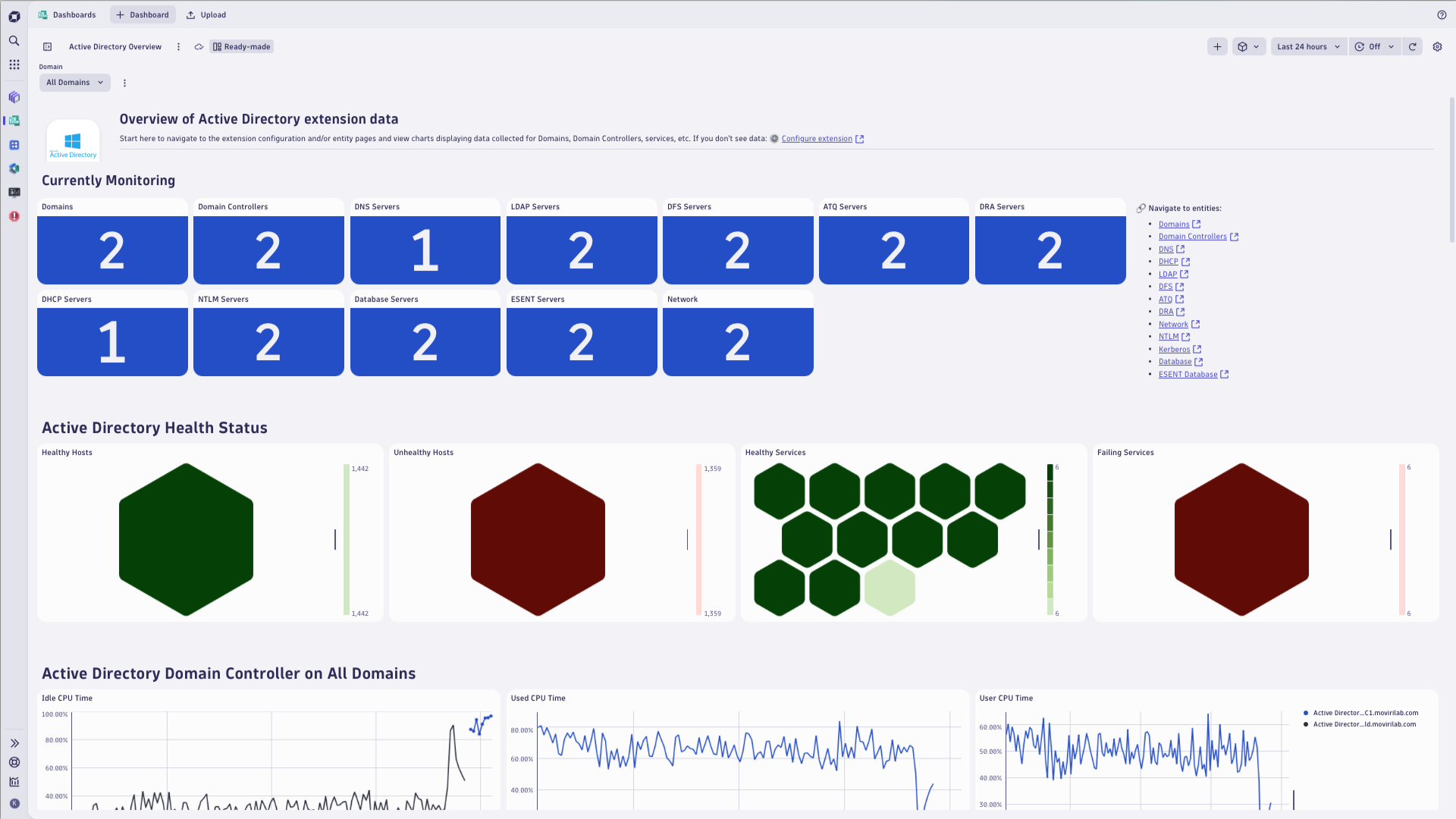
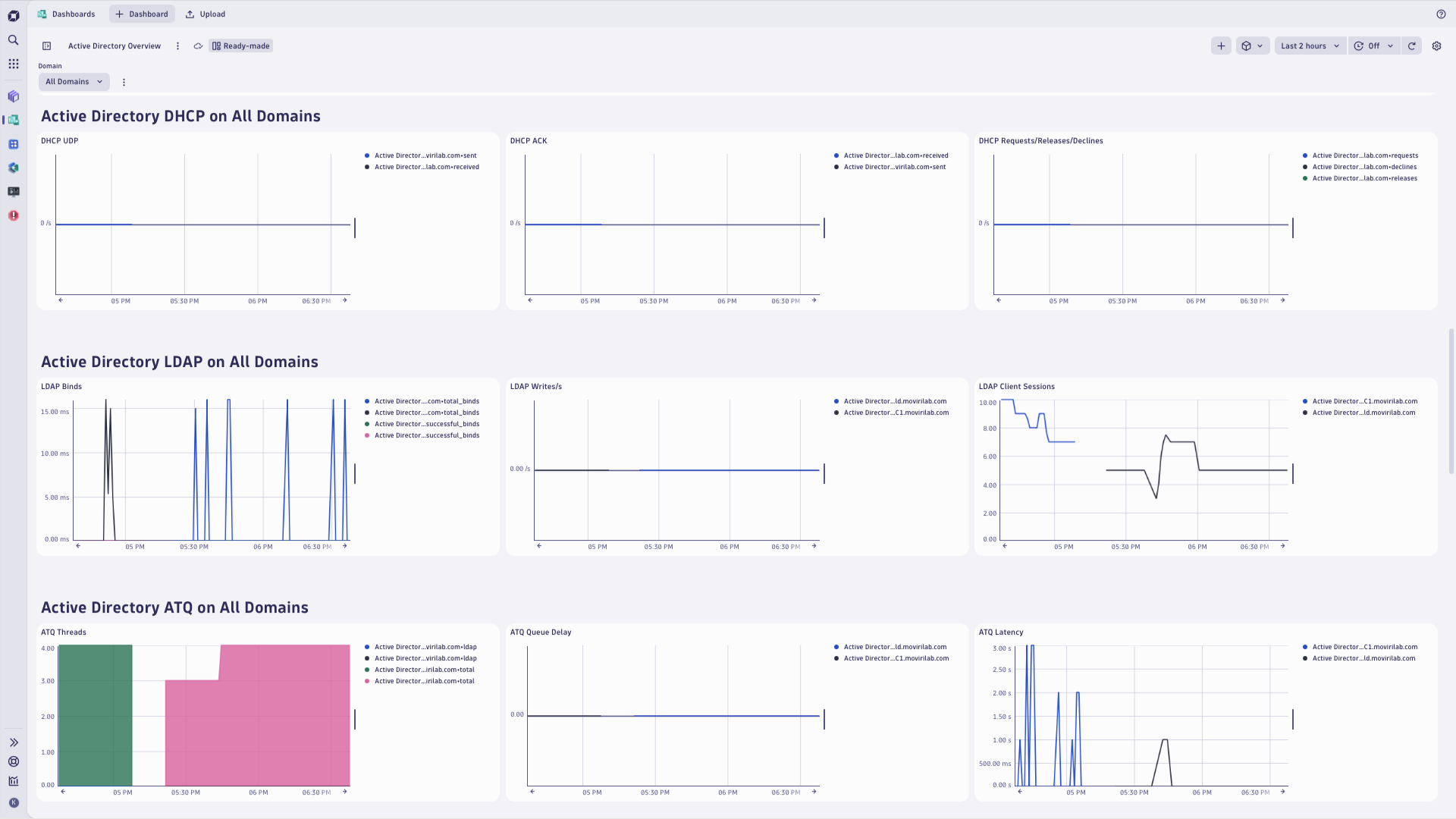
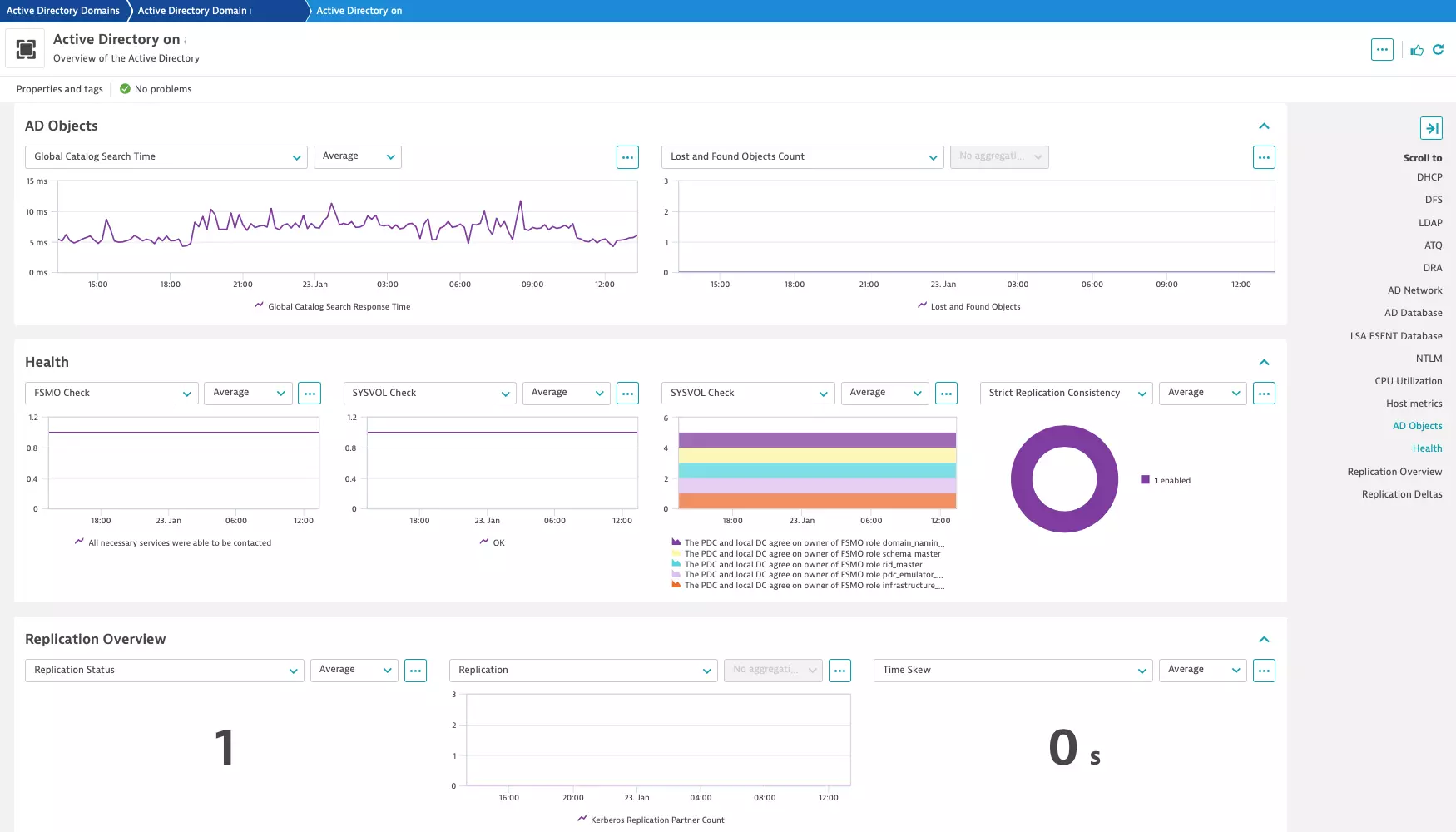
ExtensionGet insights into performance and usage of the Microsoft ActiveDirectory services:
This extension obtains signals through WMI queries and execution of the PowerShell snippets, depending on where is the source of specific metric. It is designed to work on the AD hosts where the OneAgent is already deployed.
This extension replaces previously available Active Directory monitoring extensions** This Dynatrace extension supersedes both Active Directory services and Active Directory extended monitoring extensions.
Note that Entra ID (f.k.a. Azure AD) is not supported by this extension. You can Ingest Microsoft Entra ID sign-in logs straight into Dynatrace.
For more information on the installation and configuration, please see Microsoft Active Directory monitoring extension in the Dynatrace Documentation.
Only on-premises Active Directory deployments are supported
Azure AD is not supported
Activate this extension locally on your AD hosts. Remote AD monitoring is not supported.
Below is a complete list of the feature sets provided in this version. To ensure a good fit for your needs, individual feature sets can be activated and deactivated by your administrator during configuration.
| Metric name | Metric key | Description | Unit |
|---|---|---|---|
| Network Login Profile logons | active-directory.network.login.logons.count | Number of network logons on the network login profile | Count |
| Number of logons | active-directory.network.logons.total.count | Number of network logons | Count |
| Logons per second | active-directory.network.logons.persec.count | Number of network logons per second | PerSecond |
| Metric name | Metric key | Description | Unit |
|---|---|---|---|
| LDAP Binds | active-directory.ldap.server.ldapbindtime.binds.persec | Time spent to complete LDAP bindings | MilliSecond |
| LDAP Successful Binds | active-directory.ldap.server.ldapsuccessfulbinds.persec | Successful binds per second | PerSecond |
| LDAP Writes per second | active-directory.ldap.server.ldapwrites.persec | The rate at which LDAP clients perform write operations | PerSecond |
| LDAP UDP Operations per second | active-directory.ldap.server.ldapudpoperations.persec | The number of User Datagram Protocol (UDP) operations that the LDAP server is processing per second | PerSecond |
| LDAP Active threads total | active-directory.ldap.server.ldapactivethreads.total | The current number of threads in use by the LDAP subsystem of the local directory service | Count |
| LDAP Client Sessions | active-directory.ldap.server.ldapclientsessions.total | The number of sessions of connected LDAP clients | Count |
| LDAP Searches per second | active-directory.ldap.server.ldapsearches.persec | The number of search operations per second performed by LDAP clients | PerSecond |
| LDAP Bind Time | active-directory.ldap.server.bindtime.millis | Time taken to bind to the fsmo role holder using LDAP | MilliSecond |
| LDAP Bind Availability | active-directory.ldap.bind.availability | Whether or not the domain controller can bind to the domain DNS server | Count |
| Metric name | Metric key | Description | Unit |
|---|---|---|---|
| DHCP Scope Addresses Free v6 | active-directory.dhcp.server.v6.scope.addresses.free | Number of DHCPv6 scope addresses free | Count |
| DHCP Scope Addresses Used v6 | active-directory.dhcp.server.v6.scope.addresses.used | Number of DHCPv6 scope addresses used | Count |
| DHCP Scope Addresses Reserved v6 | active-directory.dhcp.server.v6.scope.addresses.reserved | Number of DHCPv6 scope addresses reserved | Count |
| Percent of DHCP Scope Addresses Used v6 | active-directory.dhcp.server.v6.scope.addresses.used.pct | Percent of DHCPv6 scope addresses used | Percent |
| DHCP Scope Pending Advertises v6 | active-directory.dhcp.server.v6.scope.pending.advertises | Number of DHCPv6 scope pending advertises | Count |
| Metric name | Metric key | Description | Unit |
|---|---|---|---|
| Database adds per second | active-directory.database.adds.persec.count | Number of Active Directory Database adds per second | PerSecond |
| Database modifies per second | active-directory.database.modifies.persec.count | Number of Active Directory Database modifies per second | PerSecond |
| Database deletes per second | active-directory.database.deletes.persec.count | Number of Active Directory Database deletes per second | PerSecond |
| Database recycles per second | active-directory.database.recycles.persec.count | Number of Active Directory Database recycles per second | PerSecond |
| Metric name | Metric key | Description | Unit |
|---|---|---|---|
| DFS received bytes/s | active-directory.dfs.server.replicationconnections.bytesreceived.persec | Average number of received bytes per second | BytePerSecond |
| DFS bytes received on connection | active-directory.dfs.server.replicationconnections.bytesreceived.total | Total number of bytes received on the connection | Byte |
| DFS files received on connection | active-directory.dfs.server.replicationconnections.filesreceived.total | Number of files that were received on the connection | Count |
| Metric name | Metric key | Description | Unit |
|---|---|---|---|
| DFS Replication conflict files size | active-directory.dfs.server.replicatedfolders.conflictspaceinuse.bytes.total | Total byte size of DFS replication service of conflict files | Byte |
| DFS Replication deleted files size | active-directory.dfs.server.replicatedfolders.deletedspaceinuse.bytes.total | Total byte size of DFS replication service of the deleted files | Byte |
| DFS Replication staging folder size | active-directory.dfs.server.replicatedfolders.stagingspaceinuse.bytes.total | Total byte size of DFS replication service of staging folder | Byte |
| DFS redundant file replication update records | active-directory.dfs.server.replicatedfolders.updates.dropped | Number of redundant file replication update records | Count |
| DFS retried file installs | active-directory.dfs.server.replicatedfolders.fileinstalls.retried | Number of retried file installs | Count |
| Metric name | Metric key | Description | Unit |
|---|---|---|---|
| DNS dynamic update queued requests | active-directory.dns.server.dynamicupdate.queued.total.count | Total number of dynamic update requests queued by the DNS server | Count |
| DNS caching memory | active-directory.dns.server.caching.memory.total | Total caching memory used by DNS server | Byte |
| DNS database node memory | active-directory.dns.server.databasenode.memory.total | Total database node memory used by DNS server | Byte |
| DNS Nbstat memory | active-directory.dns.server.nbstat.memory.total | Total Nbstat memory used by DNS server | Byte |
| DNS TCP message memory | active-directory.dns.server.tcpmessage.memory.total | Total TCP message memory used by DNS server | Byte |
| DNS dynamic update requests | active-directory.dns.server.dynamicupdate.received.total.count | Total number of dynamic update requests received by the DNS server | Count |
| DNS rejected dynamic updates | active-directory.dns.server.dynamicupdate.rejected.total.count | Total number of dynamic updates rejected by the DNS server | Count |
| DNS dynamic update timeouts | active-directory.dns.server.dynamicupdate.timeouts.total.count | Total number of dynamic update timeouts of the DNS server | Count |
| DNS written dynamic updates | active-directory.dns.server.dynamicupdate.writtentodatabase.total.count | Total number of dynamic updates written to the database by the DNS server | Count |
| DNS empty dynamic update requests/s | active-directory.dns.server.dynamicupdate.nooperation.persec | Average number of No-operation/Empty dynamic update requests per second | PerSecond |
| DNS dynamic update requests/s | active-directory.dns.server.dynamicupdate.received.persec | Average number of dynamic update requests received by the DNS server per second | PerSecond |
| DNS written dynamic updates/s | active-directory.dns.server.dynamicupdate.writtentodatabase.persec | Average number of dynamic updates written to the database by the DNS server per second | PerSecond |
| DNS recursive queries/s | active-directory.dns.server.recursive.queries.persec | Average number of recursive queries received by DNS server per second | PerSecond |
| DNS recursive query failures/s | active-directory.dns.server.recursive.queryfailure.persec | Average number of recursive query failures per second | PerSecond |
| DNS recursive query timeouts/s | active-directory.dns.server.recursive.timeout.persec | Average number of recursive query sending timeouts per second | PerSecond |
| DNS secure update requests | active-directory.dns.server.secureupdate.received.total | Total number of secure update requests received by the DNS server | Count |
| DNS failed secure updates | active-directory.dns.server.secureupdate.failure.total | Total number of secure updates failed of the DNS server | Count |
| DNS secure update requests/s | active-directory.dns.server.secureupdate.received.persec | Average number of secure update requests received by the DNS server per second | PerSecond |
| DNS TCP responses/s | active-directory.dns.server.tcpresponse.sent.persec | Average number of TCP responses sent by DNS server per second | PerSecond |
| DNS queries received/s | active-directory.dns.server.totalquery.received.persec | Average number of queries received by DNS server per second | PerSecond |
| DNS responses sent/s | active-directory.dns.server.totalresponse.sent.persec | Average number of responses sent by DNS server per second | PerSecond |
| DNS UDP queries received/s | active-directory.dns.server.udpquery.received.persec | Average number of UDP queries received by DNS server per second | PerSecond |
| DNS UDP responses sent/s | active-directory.dns.server.udpresponse.sent.persec | Average number of UDP responses sent by DNS server per second | PerSecond |
| DNS unmatched response packets received | active-directory.dns.server.unmatchedresponses.received.total | Total number of response packets received by the DNS server that do not match any outstanding remote query | Count |
| DNS failed zone transfers | active-directory.dns.server.zonetransfer.failure.total | Total number of failed zone transfers of the master DNS server | Count |
| DNS successful zone transfers | active-directory.dns.server.zonetransfer.success.total | Total number of successful zone transfers of the master DNS server | Count |
| Metric name | Metric key | Description | Unit |
|---|---|---|---|
| ESENT Database I/O reads rate (Local Security Authority) | active-directory.lsass.esent.database.io.reads.persec.count | Number of ESENT Database I/O reads per second for the Local Security Authority | PerSecond |
| ESENT Database I/O read latency (Local Security Authority) | active-directory.lsass.esent.database.io.reads.latency.avg.count | ESENT Database I/O read latency for the Local Security Authority | MilliSecond |
| ESENT Database I/O writes rate (Local Security Authority) | active-directory.lsass.esent.database.io.writes.persec.count | Number of ESENT Database I/O writes per second for the Local Security Authority | PerSecond |
| ESENT Database I/O write latency (Local Security Authority) | active-directory.lsass.esent.database.io.writes.latency.avg.count | ESENT Database I/O write latency for the Local Security Authority | MilliSecond |
| ESENT Log I/O reads rate (Local Security Authority) | active-directory.lsass.esent.log.io.reads.persec.count | Number of ESENT Database log I/O reads per second for the Local Security Authority | PerSecond |
| ESENT Log I/O read latency (Local Security Authority) | active-directory.lsass.esent.log.io.reads.latency.avg.count | ESENT Log I/O read latency for the Local Security Authority | MilliSecond |
| ESENT Log I/O writes rate (Local Security Authority) | active-directory.lsass.esent.log.io.writes.persec.count | Number of ESENT Database log I/O writes per second for the Local Security Authority | PerSecond |
| ESENT Log I/O writes latency (Local Security Authorityy) | active-directory.lsass.esent.log.io.writes.latency.avg.count | ESENT Log I/O writes latency for the Local Security Authority | MilliSecond |
| Metric name | Metric key | Description | Unit |
|---|---|---|---|
| Shared Resource Available | active-directory.replication.shared.available | Percentage of replication shared resources that are available | Percent |
| Replication - Destination Delta | active-directory.replication.destination.delta | Replication time delta between this server and the destination server. | Second |
| Replication - Source Delta | active-directory.replication.source.delta | Replication time delta between this server and the source server. | Second |
| Replication - Destination Errors | active-directory.replication.destination.errors | Replication errors between this server and the destination server. | Count |
| Replication - Source Errors | active-directory.replication.source.errors | Replication errors between this server and the source server. | Count |
| Metric name | Metric key | Description | Unit |
|---|---|---|---|
| Empty Feature Set | sfm.active-directory.empty-feature-set | Alerts when no metrics are received from an enabled feature set | Count |
| Metric name | Metric key | Description | Unit |
|---|---|---|---|
| Disk Free Space | active-directory.database.diskfree.total | Free disk space of the disk containing the database file. | Byte |
| Total Disk Space | active-directory.database.disk.total | Total disk space of the disk containing the AD database file. | Byte |
| Disk Free Space Percentage | active-directory.database.diskfree | Percent of free disk space of the disk containing the database file. | Percent |
| Metric name | Metric key | Description | Unit |
|---|---|---|---|
| Used processor time | active-directory.server.host.cpu.time.processor | Percent of used processor time | Percent |
| Idle processor time | active-directory.server.host.cpu.time.idle | Percent of idle processor time | Percent |
| User processor time | active-directory.server.host.cpu.time.user | Percent of user processor time | Percent |
| Number of Logical Processors | active-directory.server.host.cpu.logical.processors | Number of Logical Processors | Count |
| Service processor time | active-directory.service.cpu.time | Percent of processor time spend on a service | Percent |
| Metric name | Metric key | Description | Unit |
|---|---|---|---|
| DNS Zone Expire/Refresh Ratio | active-directory.dns.zone.expire_refresh_ratio | Ratio of the DNS Zone expiry to refresh interval | Count |
| DNS Zone Resolution Test | active-directory.dns.zone.resolution_check | If the DNS Zone was reachable | Count |
| DNS Zone Transfer Status | active-directory.dns.zone.transfer.status | The status of the DNS Zone's last transfer | Count |
| DNS Zone Serial Delta | active-directory.dns.zone.serial.delta | The difference between the secondary and primary zone's serial numbers | Count |
| DNS Zone Age | active-directory.dns.zone.age | The age of the DNS Zone | Count |
| Conditional Forwarder Health | active-directory.dns.forwarder.health | If a conditional forwarder's DNS servers are reachable | Count |
| Metric name | Metric key | Description | Unit |
|---|---|---|---|
| DRA Successful synch requests total | active-directory.dra.server.drasynchrequestssuccessful.total.count | Number of successful DRA synchronization requests | Count |
| DRA Synch requests total | active-directory.dra.server.drasynchrequestsmade.total.count | Number of total DRA synchronization requests made | Count |
| Metric name | Metric key | Description | Unit |
|---|---|---|---|
| NTLM Binds per second | active-directory.lsass.server.ntlm.binds.persec.count | Average NTLM binds per second | PerSecond |
| Metric name | Metric key | Description | Unit |
|---|---|---|---|
| DHCP Scope Delay v4 | active-directory.dhcp.server.scope.delay | DHCP Scope Delay v4 in milliseconds | MilliSecond |
| DHCP Scope Addresses Free v4 | active-directory.dhcp.server.scope.addresses.free | Number of DHCPv4 scope addresses free | Count |
| DHCP Scope Addresses Used v4 | active-directory.dhcp.server.scope.addresses.used | Number of DHCPv4 scope addresses used | Count |
| DHCP Scope Addresses Reserved v4 | active-directory.dhcp.server.scope.addresses.reserved | Number of DHCPv4 scope addresses reserved | Count |
| Percent of DHCP Scope Addresses Used v4 | active-directory.dhcp.server.scope.addresses.used.pct | Percent of DHCPv4 scope addresses used | Percent |
| DHCP Scope Pending Offers v4 | active-directory.dhcp.server.scope.pending.offers | Number of DHCPv4 scope pending offers | Count |
| Metric name | Metric key | Description | Unit |
|---|---|---|---|
| DHCP received requests/s | active-directory.dhcp.server.requests.persec | Rate of DHCP requests received by the DHCP server | PerSecond |
| DHCP received releases/s | active-directory.dhcp.server.releases.persec | Rate of DHCP releases received by the DHCP server | PerSecond |
| DHCP received declines/s | active-directory.dhcp.server.declines.persec | Rate of DHCP declines received by the DHCP server | PerSecond |
| DHCP failover ack messages received/s | active-directory.dhcp.server.failover.bndack.received.persec | Number of DHCP failover Binding Ack messages received | PerSecond |
| DHCP failover ack messages sent/s | active-directory.dhcp.server.failover.bndack.sent.persec | Number of DHCP failover Binding Ack messages sent | PerSecond |
| DHCP binding updates dropped | active-directory.dhcp.server.failover.bndupd.dropped | Number of binding updates dropped | Count |
| DHCP failover update pending messages | active-directory.dhcp.server.failover.bndupd.pendinginoutbound.queue | Number of pending outbound DHCP failover Binding Update messages | Count |
| DHCP failover update messages received/s | active-directory.dhcp.server.failover.bndupd.received.persec | Number of DHCP failover Binding Update messages received | PerSecond |
| DHCP failover update messages sent/s | active-directory.dhcp.server.failover.bndupd.sent.persec | Number of DHCP failover Binding Update messages sent | PerSecond |
| Metric name | Metric key | Description | Unit |
|---|---|---|---|
| ATQ Outstanding queued requests total | active-directory.atq.server.atqoutstandingqueuedrequests.total | Current number of requests in the queue | Count |
| ATQ Estimated queue delay | active-directory.atq.server.atqestimatedqueuedelay.persec | How long a request has to wait in the queue | Second |
| ATQ Request latency | active-directory.atq.server.atqrequestlatency.persec | Time it takes to produce a request | Second |
| ATQ Threads LDAP total | active-directory.atq.server.atqthreadsldap.total | The number of threads used by the LDAP server as determined by LDAP policy | Count |
| ATQ Threads Other total | active-directory.atq.server.atqthreadsother.total | The number of threads used by the other services | Count |
| ATQ Threads total | active-directory.atq.server.atqthreadstotal.total | All Threads currently allocated | Count |
| ATQ Average Thread Usage | active-directory.atq.server.average.thread.usage | Average usage of threads in Domain Controller ATQ | Percent |
| Metric name | Metric key | Description | Unit |
|---|---|---|---|
| Good Network Adapter Count | active-directory.network.goodadapter.total | The number of enabled network adapters that can ping the Domain DNS Server. | Count |
| Bad Network Adapter Count | active-directory.network.badadapter.total | The number of enabled network adapters that cannot ping the Domain DNS Server. | Count |
| Total Network Adapter Count | active-directory.network.adapter.total | The total number of enabled network adapters. | Count |
| Metric name | Metric key | Description | Unit |
|---|---|---|---|
| DHCP received renews/s v6 | active-directory.dhcp.server.v6.renews.persec | Rate of DHCP renews received by the DHCP Server v6 | PerSecond |
| DHCP received releases/s v6 | active-directory.dhcp.server.v6.releases.persec | Rate of DHCP releases received by the DHCP Server v6 | PerSecond |
| DHCP received declines/s v6 | active-directory.dhcp.server.v6.declines.persec | Rate of DHCP declines recevied by the DHCP Server v6 | PerSecond |
| DHCP received requests/s v6 | active-directory.dhcp.server.v6.requests.persec | Rate of DHCP requests received by the DHCP Server v6 | PerSecond |
| DHCP received solicits/s v6 | active-directory.dhcp.server.v6.solicits.persec | Rate of DHCP solicits received by the DHCP Server v6 | PerSecond |
| DHCP received rebinds/s v6 | active-directory.dhcp.server.v6.rebinds.persec | Rate of DHCP rebinds received by the DHCP Server v6 | PerSecond |
| Metric name | Metric key | Description | Unit |
|---|---|---|---|
| Kerberos Replication Partner Count | active-directory.replication.partner.count.total | Kerberos replication partners count in Active Directory domain | Count |
| Replication Queue Count | active-directory.replication.queue.count.total | Count of items in replication queue by Active Directory Domain Controller monitor | Count |
| Global Catalog Search Response Time | active-directory.globalcatalog.searchtime.millis | Global catalog search response time of Domain Controller | MilliSecond |
| Replication Consistency Status | active-directory.replication.consistency.status | Whether or not strict replication consistency is enabled | Count |
| Time Skew in seconds | active-directory.timeskew.secs | Time difference between the local domain controller and a target domain controller | Second |
| Lost and Found Objects | active-directory.lostandfound.object.count.total | Count of lost and found objects by Active Directory Domain monitor | Count |
| FSMO Role Holder Consistency | active-directory.fsmoroleholder.consistency | Whether or not the domain controllers agree on who the FSMO role holders are | Count |
| FSMO Check | active-directory.fsmo.check | Contains a 'message' dimension about whether or not the correct services can be found from the domain controller | Count |
| FSMO Role Schema Master | active-directory.fsmo.role.schema | Enabled if the host has the Schema Master role, disabled otherwise | Count |
| FSMO Role Domain Naming Master | active-directory.fsmo.role.domainnaming | Enabled if the host has the Domain Naming Master role, disabled otherwise | Count |
| FSMO Role RID Master | active-directory.fsmo.role.rid | Enabled if the host has the RID Master role, disabled otherwise | Count |
| FSMO Role PDC Emulator Master | active-directory.fsmo.role.pdc | Enabled if the host has the PDC Emulator Master role, disabled otherwise | Count |
| FSMO Role Infrastructure Master | active-directory.fsmo.role.infrastructure | Enabled if the host has the Infrastructure Master role, disabled otherwise | Count |
| SYSVOL Health | active-directory.sysvol.health | The SYSVOL share's health | Count |
Update the certifi dependency to address CVE-2026-111943
⚠️ Note: if you are upgrading straight from 5.x release, please have a look the version 6.0 release notes. Significant changes have been introduced in version 6.0.
active-directory.dns.server.unmatchedresponses.received.count to active-directory.dns.server.unmatchedresponses.received.total. If you created dashboards or alerts that reference this metric key - please update them.Published Fri Nov 28 2025
⚠️BREKAING CHANGE in this release.
Published Tue Oct 28 2025
Published Fri Oct 03 2025
Published Tue Sep 23 2025
Published Tue Sep 02 2025
Published Fri Aug 15 2025
⚠️IMPORTANT CHANGE: This extension release requires Dynatrace cluster version 1.313 or later.
Published Mon Jul 28 2025
Published Fri Jul 11 2025
Published Thu Jun 12 2025
⚠️IMPORTANT CHANGE: This extension release requires Dynatrace cluster version 1.310 or later.
Published Tue May 27 2025

