


























Kick-start your app creation
Whether you’re a beginner or a pro, Dynatrace Developer has the tools and support you need to create incredible apps with minimal effort.
Go to Dynatrace Developer
 Microsoft 365, Office 365
Monitor Microsoft 365 (Office 365) performance, usage and availability.
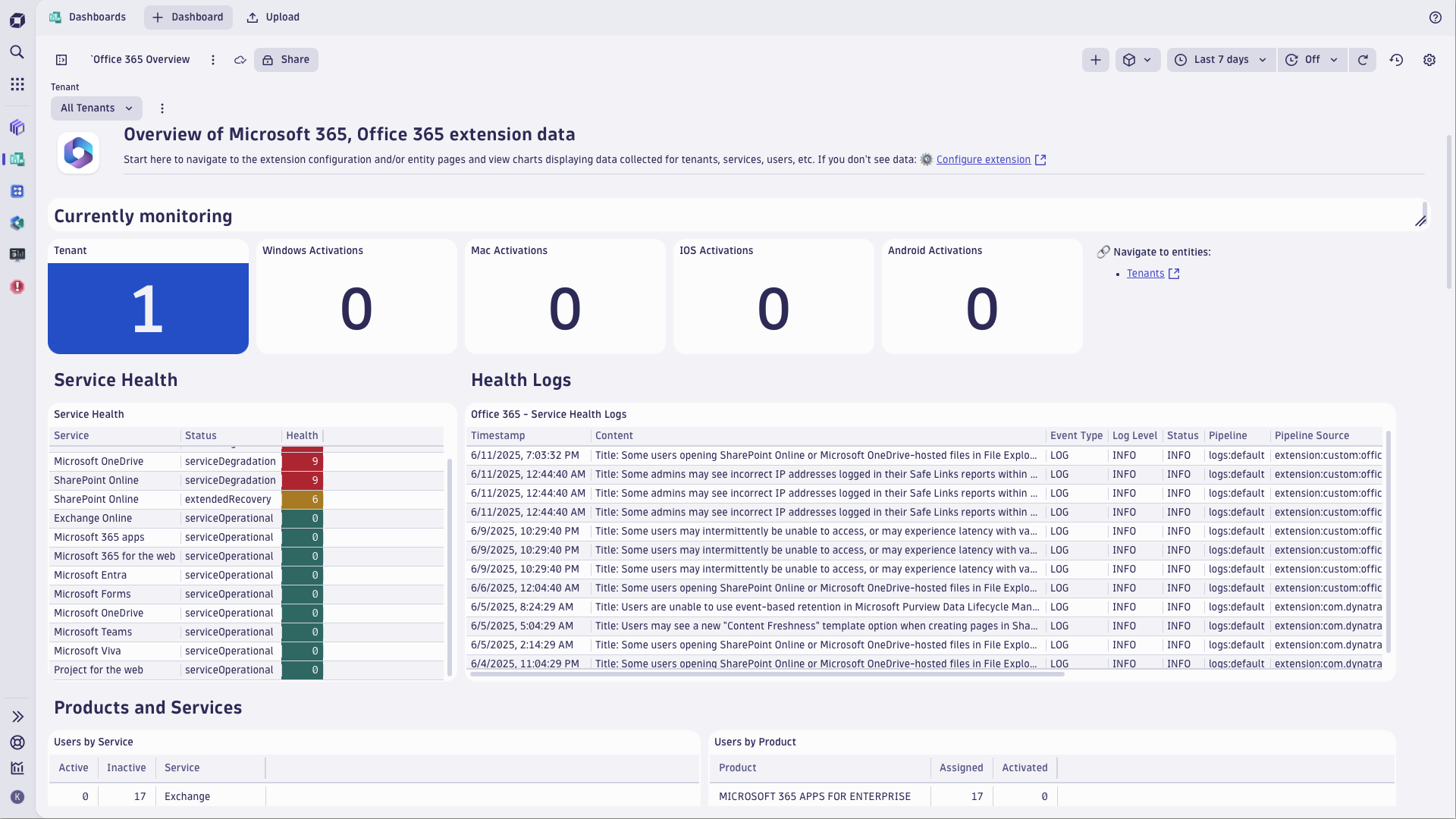
ExtensionGet insights into your Microsoft Office 365 tenant services status, usage, performance and service availability. Understand service usage patterns over time for Mail, OneDrive, Teams, SharePoint, ActiveDirectory, watch licenses consumption and activations. One-stop, at-a-glance overview of Office 365 status keeps you informed - you always know first if any service level quality degradations are mounting, so you can react before serious business impact.
This extension is intended for users, who:
This extension enables you to:
For more information on the installation and configuration, please see Microsoft 365, Office 365 extension in the Dynatrace Documentation.
Below is a complete list of the feature sets provided in this version. To ensure a good fit for your needs, individual feature sets can be activated and deactivated by your administrator during configuration.
| Metric name | Metric key | Description | Unit |
|---|---|---|---|
| Windows Activations | office365.tenant.activation.counts.windows | Activation count for all windows devices across the organization. Note: 1-day resolution and data typically available within 48 hours. | Count |
| Mac Activations | office365.tenant.activation.counts.mac | Activation count for all mac devices across the organization. Note: 1-day resolution and data typically available within 48 hours. | Count |
| Android Activations | office365.tenant.activation.counts.android | Activation count for all android devices across the organization. Note: 1-day resolution and data typically available within 48 hours. | Count |
| IOS Activations | office365.tenant.activation.counts.ios | Activation count for all ios devices across the organization. Note: 1-day resolution and data typically available within 48 hours. | Count |
| Windows Mobile Activations | office365.tenant.activation.counts.windows.mobile | Activation count for all window mobile devices across the organization. Note: 1-day resolution and data typically available within 48 hours. | Count |
| Service Users | office365.tenant.services.user.counts | User count across services by activity type. Note: 1-day resolution and data typically available within 48 hours. | Count |
| Assigned Users | office365.tenant.activated.enabled.assigned | Number of users that have been assigned the subscription. Note: 1-day resolution and data typically available within 48 hours. | Count |
| Activated Users | office365.tenant.activated.enabled.activated | Number of users that have activated the subscription. Note: 1-day resolution and data typically available within 48 hours. | Count |
| Shared Activation Users | office365.tenant.activated.enabled.shared.activation | Number of users that have a shared computer activation of the subscription. Note: 1-day resolution and data typically available within 48 hours. | Count |
| Sku Consumed Units | office365.tenant.sku_consumed | Count of Sku consumed units | Count |
| Sku Prepaid Units | office365.tenant.sku_prepaid | Count of Sku prepaid units | Count |
| Metric name | Metric key | Description | Unit |
|---|---|---|---|
| Teams Activities | office365.teams.activity.counts | Total number of Teams activities. | Count |
| Teams Users | office365.teams.user.counts | Total number of active Teams users. | Count |
| Metric name | Metric key | Description | Unit |
|---|---|---|---|
| Active Users | office365.outlook.users | Number of unique users who are performing email activities. | Count |
| Active Mailboxes | office365.outlook.mailbox.used | Count of active user mailboxes in the organization. Note: 1-day resolution and data typically available within 48 hours. | Count |
| Active Mailboxes Percent | office365.outlook.mailbox.used.pct | Percentage of user mailboxes that are active. Note: 1-day resolution and data typically available within 48 hours. | Percentage |
| Mailbox Storage | office365.outlook.mailbox.storage | Amount of mailbox storage (in bytes) used by the organization. Note: 1-day resolution and data typically available within 48 hours. | KibiByte |
| Under Limit Status | office365.outlook.quota.status.under.limit | Quota under limit status count of all mailboxes of the organization. Note: 1-day resolution and data typically available within 48 hours. | Count |
| Warning Issued Status | office365.outlook.quota.status.warning.issued | Quota warning issued status count of all mailboxes of the organization. Note: 1-day resolution and data typically available within 48 hours. | Count |
| Send Prohibited Status | office365.outlook.quota.status.send.prohibited | Quota send prohibited status count of all mailboxes of the organization. Note: 1-day resolution and data typically available within 48 hours. | Count |
| Send Receive Prohibited Status | office365.outlook.quota.status.send.receive.prohibited | Quota send receive prohibited status count of all mailboxes of the organization. Note: 1-day resolution and data typically available within 48 hours. | Count |
| Indeterminate Status | office365.outlook.quota.status.indeterminate | Quota indeterminate status count of all mailboxes of the organization. Note: 1-day resolution and data typically available within 48 hours. | Count |
| Email Activity | office365.outlook.email.activity | Count of all email activity for Outlook. Note: data may be delayed up to 24 hours. | Count |
| Metric name | Metric key | Description | Unit |
|---|---|---|---|
| Subscription URI Count | office365.sfm.subscription.uri.count | The number of URIs returned by the subscription API that the extension will use to collect data from. Can be split by the subscription dimension. | Count |
| Subscription API Status Code | office365.sfm.subscription.http.status | The status codes of the subscription API calls. 0 means the calls were successful while 1 means they failed. Can be split by the status code dimension. | Count |
| Subscription API Request Timeouts | office365.sfm.subscription.request.timeout | The amount of request timeouts for the subscription API endpoints. | Count |
| Metric name | Metric key | Description | Unit |
|---|---|---|---|
| AD Logins | office365.ad.logins | Count of total AD logins. | Count |
| AD Logins Failed | office365.ad.logins.failed | Count of failed AD logins. | Count |
| Metric name | Metric key | Description | Unit |
|---|---|---|---|
| Active Files | office365.onedrive.file.count.active | Total number of active files in OneDrive. | Count |
| Total Files | office365.onedrive.file.count.total | Total number of files in OneDrive. Note: 1-day resolution and data typically available within 48 hours. | Count |
| Storage | office365.onedrive.storage | Total storage in bytes used by OneDrive. Note: 1-day resolution and data typically available within 48 hours. | KibiByte |
| Viewed or Edited | office365.onedrive.active.users.viewed.or.edited | Counts the times that OneDrive active users viewed or edited a file. Note: 1-day resolution and data typically available within 48 hours. | Count |
| Synced | office365.onedrive.active.users.synced | Counts the times that OneDrive active users synced a file. Note: 1-day resolution and data typically available within 48 hours. | Count |
| Shared Internally | office365.onedrive.active.users.shared.internally | Counts the times that OneDrive active users shared a file internally. Note: 1-day resolution and data typically available within 48 hours. | Count |
| Shared Externally | office365.onedrive.active.users.shared.externally | Counts the times that OneDrive active users shared a file externally. Note: 1-day resolution and data typically available within 48 hours. | Count |
| Metric name | Metric key | Description | Unit |
|---|---|---|---|
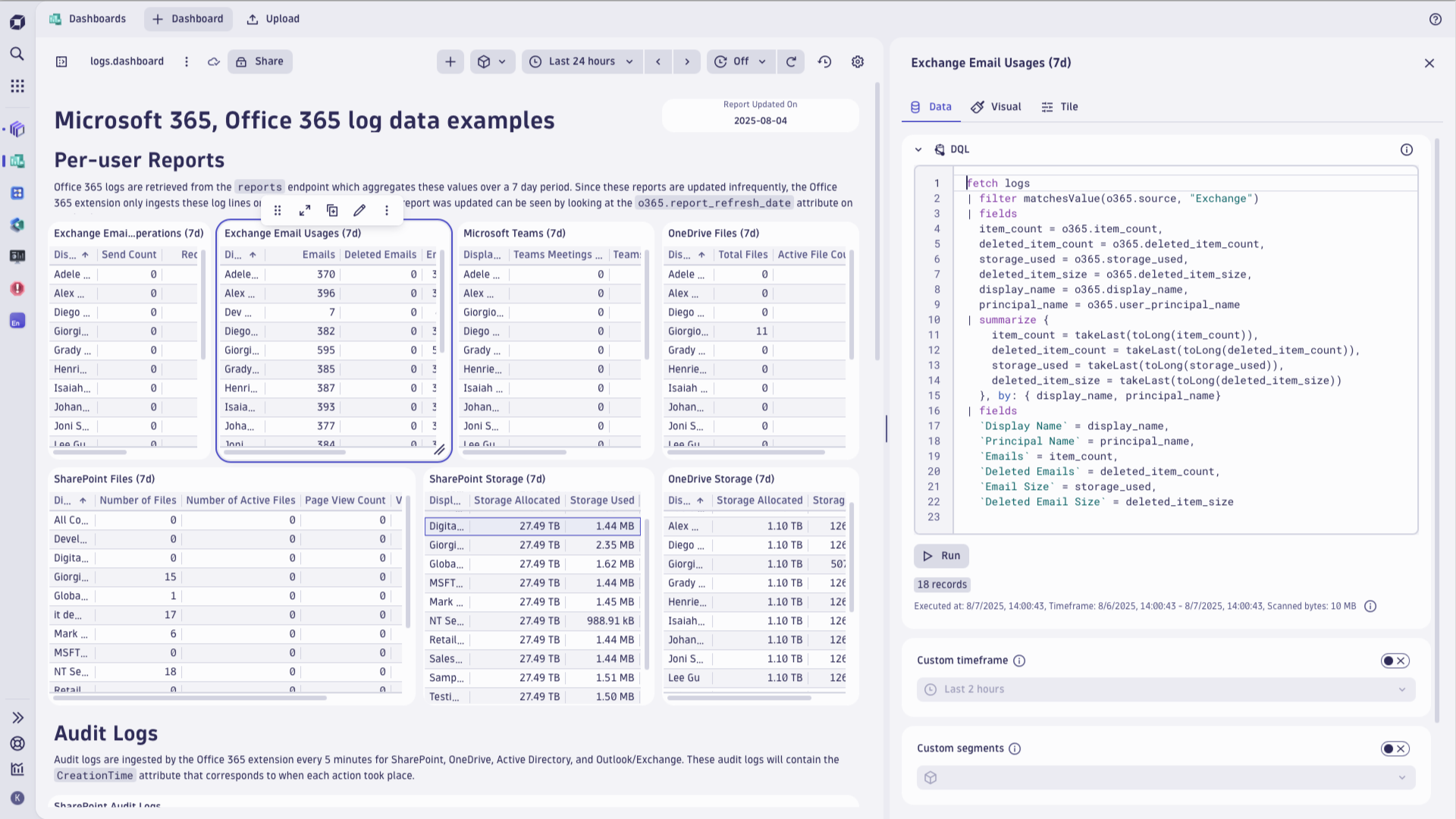
| Exchange Emails Sent Count | log.o365_send_count | The amount of emails sent. Updated every 7D | Count |
| Exchange Emails Received Count | log.o365_receive_count | The amount of emails received. Updated every 7D | Count |
| Exchange Emails Read Count | log.o365_read_count | The amount of emails read. Updated every 7D | Count |
| Teams Meetings Created | log.o365_meeting_created_count | The amount of teams meetings that were created. Updated every 7D | Count |
| Teams Meetings Interacted With | log.o365_meeting_interacted_count | The amount of teams meetings that have been interacted with. Updated every 7D | Count |
| Exchange Emails Stored | log.o365_email_item_count | The amount of emails stored. Updated every 7D | Count |
| Exchange Emails Size | log.o365_email_storage_used | The size of stored emails. Updated every 7D | Byte |
| Email Warning Quota | log.o365_email_issue_warning_quota | The quota that once reached will warn users. Updated every 7D | Byte |
| Email Prohibit Quota | log.o365_email_prohibit_send_quota | The quota that once reached will prohibit users from sending emails. Updated every 7D | Byte |
| Email Send/Receive Quota | log.o365_email_prohibit_send_receive_quota | The maximum size a users inbox can be before preventing them from sending or receiving emails. Updated every 7D | Byte |
| Emails Deleted | log.o365_email_deleted_item_count | Number of emails deleted. Updated every 7D | Count |
| Deleted Emails Size | log.o365_email_deleted_item_size | The size of deleted emails. Updated every 7D | Byte |
| Deleted Emails Quota | log.o365_email_deleted_item_quota | The quota that once reached will stop allowing users to recover deleted emails. Updated every 7D | Byte |
| SharePoint Pages Viewed | log.o365_sharepoint_page_view_count | The number of SharePoint pages viewed. Updated every 7D | Count |
| SharePoint Pages Visited | log.o365_sharepoint_visited_page_count | The number of SharePoint pages visited. Updated every 7D | Count |
| SharePoint Storage Usage | log.o365_sharepoint_storage_used | The usage in bytes of the root SharePoint folder. Updated every 7D | Byte |
| SharePoint Storage Allocated | log.o365_sharepoint_storage_allocated | Maximum amount of bytes that can be stored in SharePoint. Updated every 7D | Byte |
| OneDrive Storage Allocated | log.o365_onedrive_storage_used | Maximum amount of bytes that can be stored in OneDrive. Updated every 7D | Byte |
| OneDrive Storage Allocated | log.o365_onedrive_storage_allocated | Maximum amount of bytes that can be stored in OneDrive. Updated every 7D | Byte |
| Metric name | Metric key | Description | Unit |
|---|---|---|---|
| Service Health Status | office365.tenant.service.health | Gets the enumerated health of the service. serviceOperational=0, falsePositive=1, serviceRestored=2, postIncidentReviewPublished=3, verifyingService=4, restoringService=5, extendedRecovery=6, investigating=7, investigationSuspended=8, serviceDegradation=9, serviceInterruption=10. | Count |
New features:
Patch level changes
Patch level changes:
Patch level changes:
per-user-report metrics feature set that has always been ingesting logs regardless of being disabled or enabled⚠️IMPORTANT CHANGE: This extension release requires Dynatrace cluster version 1.313 or later.
New features:
dt.security_context attribute is now propagated to all entities created by the extension. When enabling entity access control based on dt.security_context ensure you set the Grail security context destination property to dt.security_contextper-user-reports feature set to record a log of the service usage per each user. See the hub tile text for more details.⚠️IMPORTANT CHANGE: This extension release requires Dynatrace cluster version 1.310 or later.
New features:
Patch level changes
Changed metric unit of the Mailbox, OneDrive and Sharepoint Storage metrics, from kilobyte to kibibyte, to precisely reflect specifics of the numbers reported by Microsoft APIs.
⚠️Note: due to this change, past values for this metric (prior to the extension update) will now show up 1000x too large. However, current values remain correct and future values from now on will also correctly reflect specifics of how Microsoft 365 APIs report storage numbers. This change affects this release and previous release 2.0.6 as well.
⚠️IMPORTANT CHANGE: This extension release requires Dynatrace cluster version 1.310 or later.
New features:
Patch level changes:
Patch level changes
Breaking change:
New features:
Patch level changes:
New features:
Patch level changes:

