


























Skip to technology filters Skip to main content
Dynatrace Hub

Extend the platform,
empower your team.

Popular searches:
Home hero bg
GitHubGitHub
GitHub

GitHub

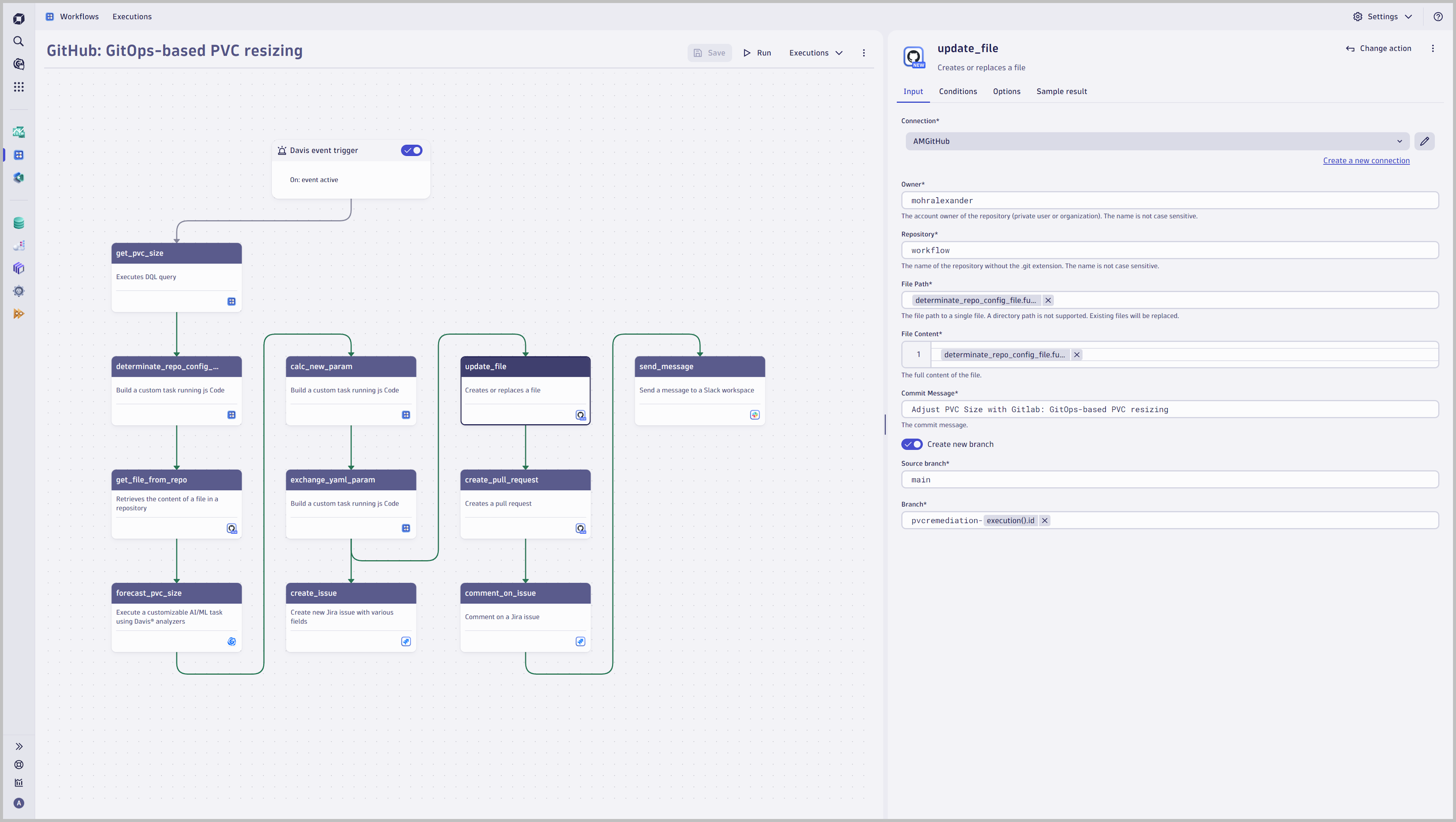
Amend files in GitHub repositories for GitOps-based remediation

App
Free trialDocumentation
- Follow a GitOps-compliant approach and amend configuration files in the underlying state repository 
- Retrieve files from a GitHub repository
- Use David Analyzer to predict the required PVC size
- Update a configuration file and create a pull request
  • Product information
  • Release notes

Overview

Integrate your Dynatrace environment with GitHub for GitOps-compliant automation and remediation: retrieve files from repositories, update files in a state repository, and create pull requests.

Use cases

This enables you to:

  • Perform GitOps-compliant automation and remediation scenarios, for example, rightsizing a PVC by amending the configuration in the underlying state repository

Get started

Follow the instructions detailed in Dynatrace Documentation.

Ensure that you have installed GitHub, that outbound connections are configured, and that the connection to GitHub is authorized.

Details

GitHub enables users to amend files in state repositories to follow a GitOps-compliant approach for automation and remediation:

Define various incident triggers:

  • Use the power of DQL and leverage events to react to any problem, security incident, or attack to trigger a pipeline run
  • Use SDLC events as a trigger to react on extended events like a deployment event, failed release validation with Site Reliability Guardian, specific log messages, or external system events
  • Define a scheduler for periodic tasks

Repository Management

  • Get File content
  • Create a new file, replace or delete an existing file in your repository
  • Create a pull request, list pull requests, or merge an existing pull request
Dynatrace
DocumentationMore Information
By Dynatrace
Dynatrace support center
Subscribe to new releases
Copy to clipboard

Related to GitHub

Workflows logo

Workflows

Automate tasks in your IT landscape, remediate problems, and visualize processes

Live Debugger logo

Live Debugger

Get real-time debug data from production or any remote environment

Full version history

ReleaseDate

Full version history

  • Fixed scroll bars in create/edit connection dialogs
  • Improved error messages for connectors management
  • Changed the styling of the table in the connection overview
  • Updated dependencies
  • Updated internationalization

Full version history

  • Improved internationalization
  • Changed the legacy hint text in the connection overview
  • Updated dependencies

Full version history

  • Added history revision for connection settings
  • Fixed wrong background color in light theme
  • Reworked message containers design and hint texts in the modal, intent and connection overview

Full version history

  • Fixed bug where the connection settings form stayed open after editing a connection
  • Updated dependencies
  • Increased schema version
  • Improved error handling of GitHub server-side issues
  • Added expression validation
  • Adjusted height in create and edit connection intent
  • Added further validation to the create/edit connection form to deny connection names that begin or end with whitespaces

Full version history

  • Migrated to owner based access control

Full version history

  • Updated dependencies

Full version history

  • Improved user facing error message if a directory path is provided instead of a file path.
  • Updated dependencies

Full version history

1.4.2

  • Renamed app to "GitHub" (former "GitHub for Workflows")

1.4.1

  • Group related input fields by headers
  • Updated dependencies
  • Fixed unnecessary scrollbar in ConnectionOverview by updating dependencies

1.4.0

  • Added query parameters when creating or editing a connection
  • Grouped related input-fields visually
  • Updated dependencies

1.3.0

  • Added expression support for connection picker
  • Made app headless

Full version history

1.2.1

  • Updated dependencies

1.2.0

  • Added confirmation modal for closing unsaved connection settings
  • Updated dependencies and resolved deprecation warnings

Full version history

1.1.0

  • Aligned footer and use case text in connection overview
  • Hint text improvements
  • Updated app icon

Full version history

1.0.1

  • Fixed missing scroll bar in dropdowns for Chrome versions 129.0.6668.xx or higher

1.0.0

  • Introduce a new, streamlined connection management experience with a modernized interface. This update makes adding and editing connections directly within workflows easier and provides connection control and convenience in one place.

Full version history

0.8.0

  • Added connector management overview
  • Added create and edit connection intents
Dynatrace Hub
Get data into DynatraceBuild your own app
All (811)Log Management and AnalyticsKubernetesAI and LLM ObservabilityInfrastructure ObservabilitySoftware DeliveryApplication ObservabilityApplication SecurityDigital ExperienceBusiness Observability
Filter
Type
Built and maintained by
Deployment model
SaaS
  • SaaS
  • Managed
Partner FinderBecome a partnerDynatrace Developer

Discover recent additions to Dynatrace

Problems logo

Problems

Analyze abnormal system behavior and performance problems detected by Davis AI.

Logs logo

Logs

Explore all your logs without writing a single query.

Security Investigator logo

Security Investigator

Fast and precise forensics for security and logs on Grail data with DQL queries.

Business Flow logo

Business Flow

Track, analyze, and optimize your critical business processes.

Cost & Carbon Optimization logo

Cost & Carbon Optimization

Track, analyze, and optimize your IT carbon footprint and public cloud costs.

Davis Anomaly Detection logo

Davis Anomaly Detection

Detect anomalies in timeseries using the Davis AI

Analyze your data

Understand your data better with deep insights and clear visualizations.

Notebooks logo

Notebooks

Create powerful, data-driven documents for custom analytics and collaboration.

Dashboards logo

Dashboards

Transform complex data into clear visualizations with custom dashboards.

Automate your processes

Turn data and answers into actions, securely, and at scale.

Workflows logo

Workflows

Automate tasks in your IT landscape, remediate problems, and visualize processes

Jira logo

Jira

Create, query, comment, transition, and resolve Jira tickets within workflows.

Slack logo

Slack

Automate Slack messaging for security incidents, attacks, remediation, and more.

Secure your cloud application

See vulnerabilities and attacks in your environment.

Security Overview logo

Security Overview

Get a comprehensive overview of the security of your applications.

Code-Level Vulnerabilities logo

Code-Level Vulnerabilities

Detect vulnerabilities in your code in real time.

Security Posture Management logo

Security Posture Management

Detect, prioritize, and remediate security and compliance findings with SPM.

Threats & Exploits logo

Threats & Exploits

Understand, triage, and investigate detection findings and alerts.

Are you looking for something different?

We have hundreds of apps, extensions, and other technologies to customize your environment

Leverage our newest innovations of Dynatrace Saas

Kick-start your app creation

Kick-start your app creation

Whether you’re a beginner or a pro, Dynatrace Developer has the tools and support you need to create incredible apps with minimal effort.
Go to Dynatrace Developer

Upgrading from Dynatrace Managed to SaaS

Upgrading from Dynatrace Managed to SaaS

Drive innovation, speed, and agility in your organization by seamlessly and securely upgrading.
Learn More
Log Management and Analytics

Log Management and Analytics

Innovate faster and more efficiently with unified log management and log analytics for actionable insights and automation.
Learn more

