





















Skip to technology filters Skip to main content
Dynatrace Hub

Extend the platform,
empower your team.

Popular searches:
Home hero bg
Windows scheduled tasksWindows scheduled tasks
Windows scheduled tasks

Windows scheduled tasks

Monitor your Windows scheduled tasks and alert on execution issues.

Extension
Free trialDocumentation
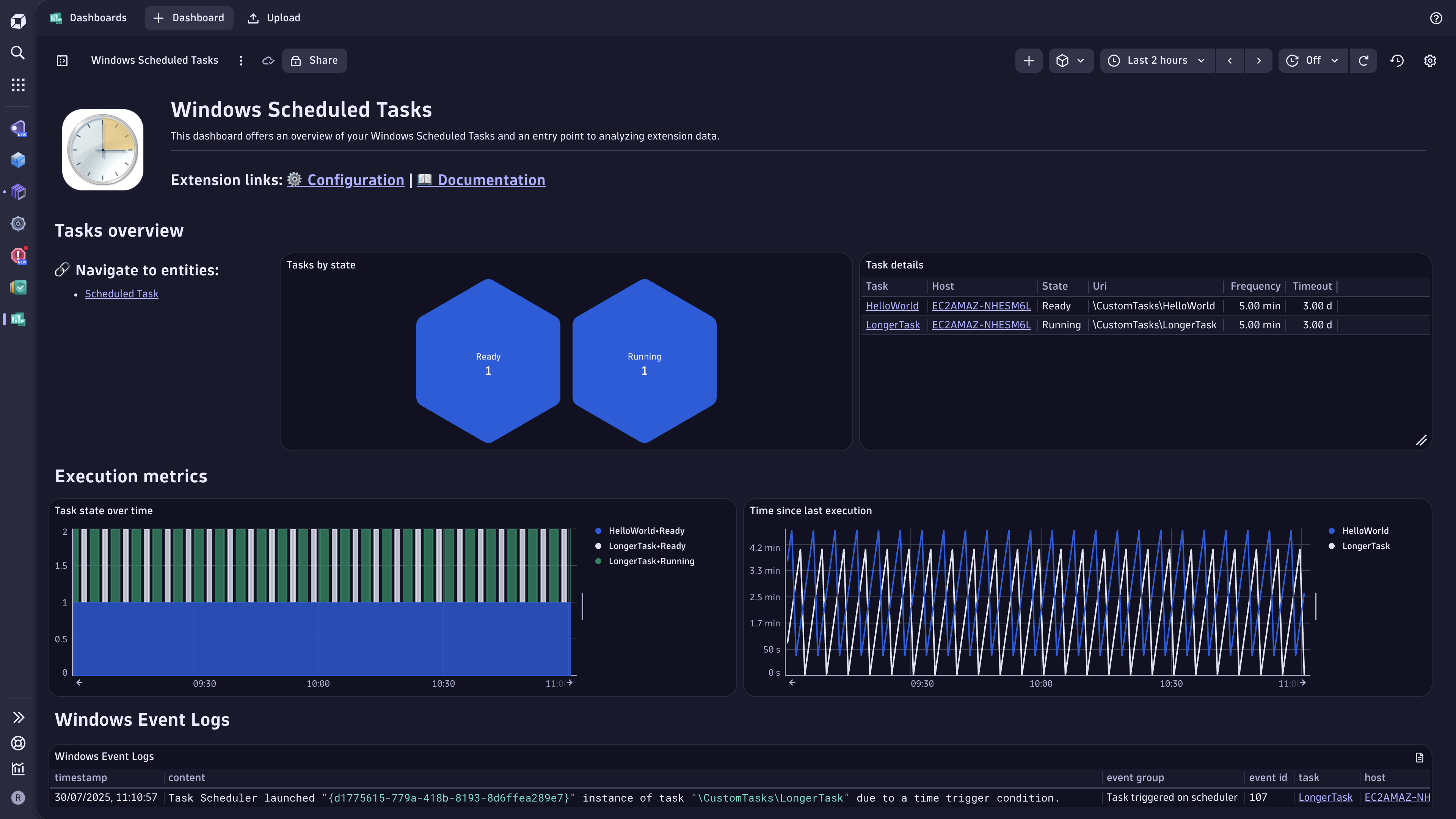
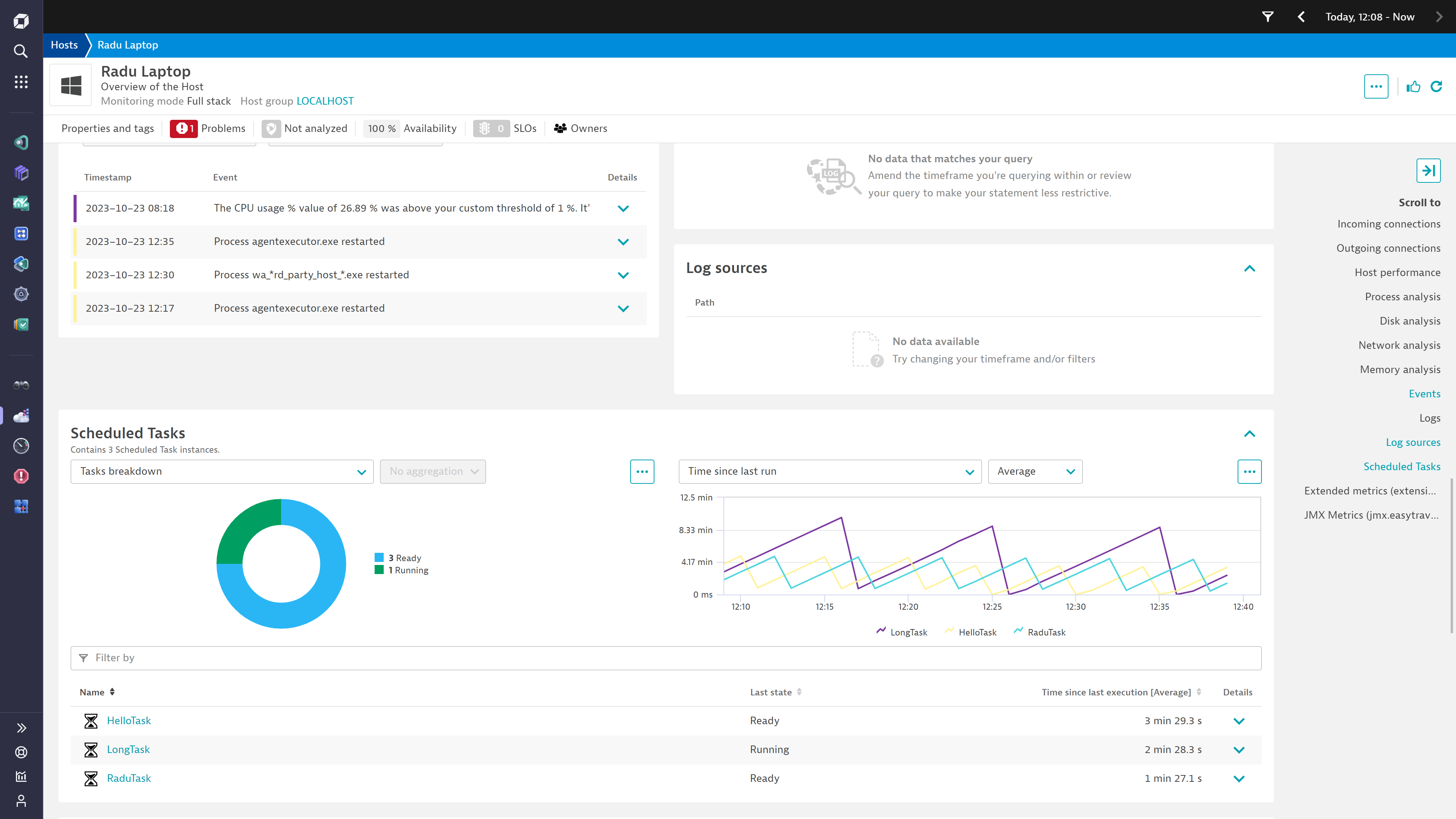
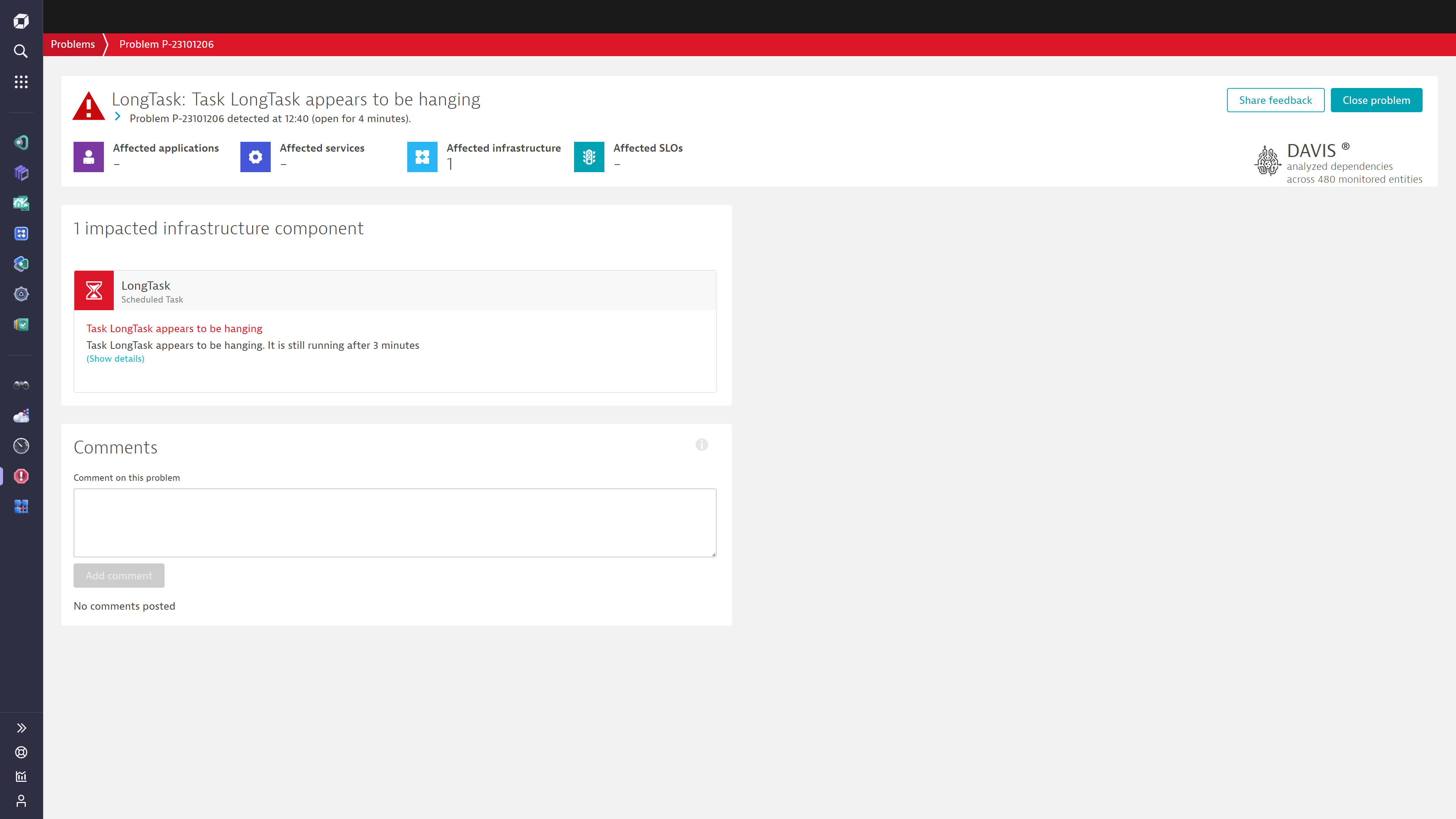
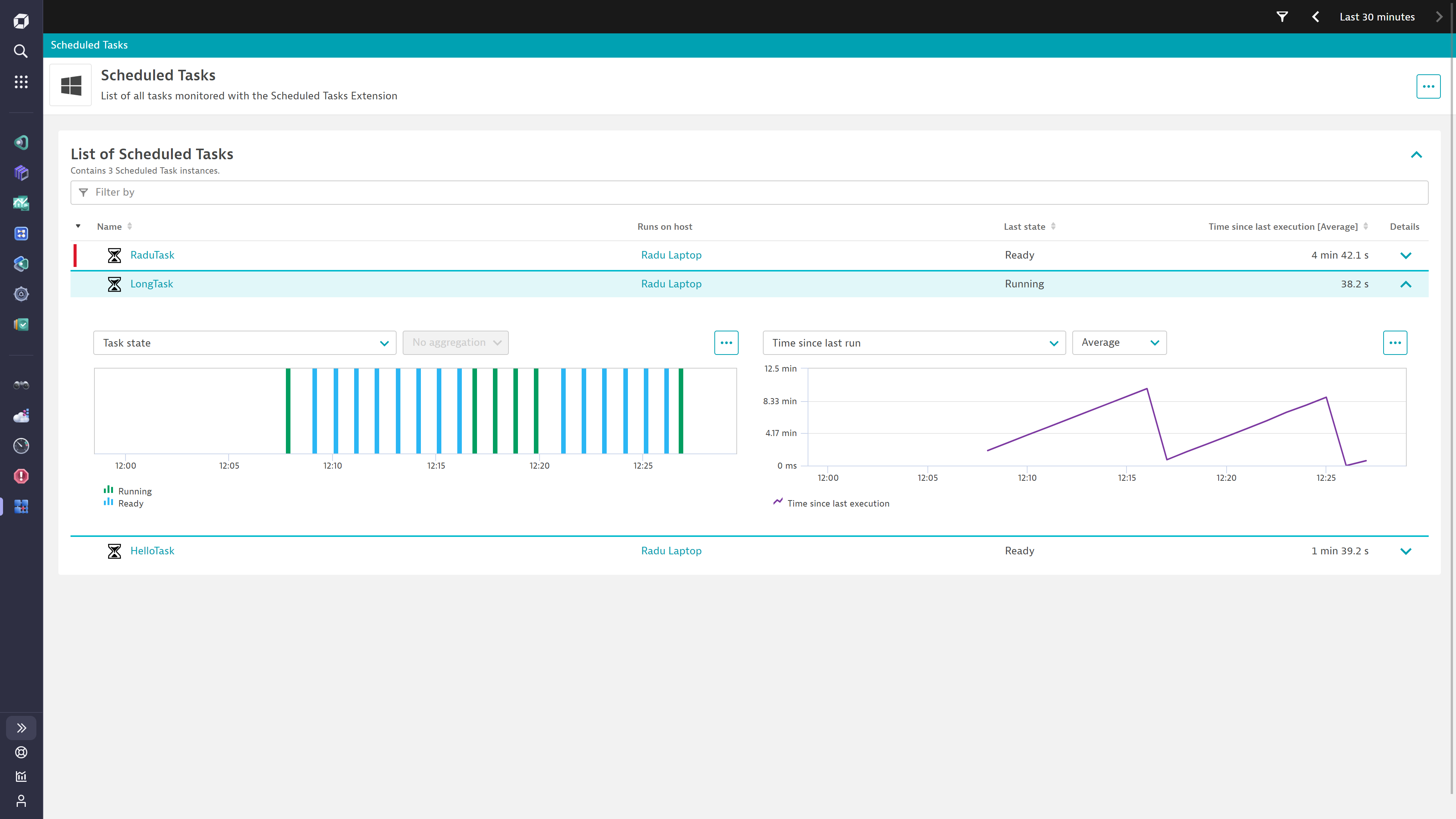
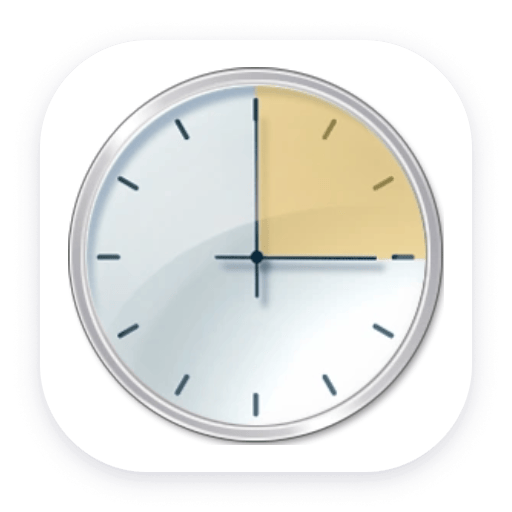
See all your monitored Scheduled Tasks on this overview dashboard, alongside Windows Event Logs.Open any of your configured hosts to view the scheduled tasks running on it. Use the drilldowns provided to explore each task in more detail.The Davis AI will automatically open a Problem when a task has not completed successfully. You can also enable alerts for hanging tasks and missed executions.Make use of the Unified Analysis screens to explore all scheduled tasks in your environment.Ingesting events from the Windows Event log gives a complete picture into the execution stages and issues encountered by the task scheduler
  • Product information
  • Release notes

Overview

This is a OneAgent extension running on Windows servers. Every minute, the extension interrogates the system for details about your configured scheduled tasks and sends Dynatrace the current state each task is in along with the time that passed since their last executions.

A problem is created automatically for any task which registered an operational failure (failed to launch, execute, or complete). Additionally, problems can also be enabled for tasks which are taking longer than expected to complete or ones which have missed their expected scheduled execution.

Use cases

  • Track the state of scheduled tasks
  • Alert on failed executions, hanging tasks, and missed runs

Compatibility information

  • Microsoft Windows 2012 R12 and newer.
  • Minimum OneAgent version 1.275.0
Dynatrace
Documentation
By Dynatrace
Dynatrace support center
Subscribe to new releases
Copy to clipboard

Extension content

Content typeNumber of items included
screen injections
3
screen logs cards
2
screen properties
2
screen layout
2
document dashboard
1
list screen layout
2
screen chart groups
3
metric metadata
2
screen entities lists
3
generic relationship
1
screen actions
4
screen dql table
1
dashboards
1
generic type
1

Related to Windows scheduled tasks

OneAgent logo

OneAgent

The simplest way to capture all observation signals automatically and in context

Windows logo

Windows

Windows server performance with real-time metrics and automated issue detection

Full version history

To have more information on how to install the downloaded package, please follow the instructions on this page.
ReleaseDate

Full version history

⚠️IMPORTANT CHANGE

  • Dynatrace minimum EEC version requirement has been increased to 1.318.0

Fixed in this version

  • task.state now displays the correct state when available instead of Unknown in logs.

Full version history

Fixed in this version

  • Metric metadata for 'Time since execution' metric now indicates "seconds" as its unit

New in this version

  • An overview dashboard for the latest platform
  • UI visualization that is compatible with AppEngine
  • Security Context is now extracted as entity attribute

Full version history

Fixed in this version:

  • Incorrect time conversions would cause wrong alerting behaviour for custom timeouts & frequencies

Full version history

Fixed in this version:

  • Only the final error event would open a Problem. Now all failure-indicating events open problems.

Full version history

Fixed in this version:

  • Problem details would not be fully parsed resulting in less problems open
  • Metrics were not linked to tasks found in root location (\)

Full version history

Fixed in this version:

  • Tasks would not be recognized correctly on French locale systems

Improved in this version:

  • A larger timeframe with buffer are employed to work around any potential delays from Windows Log Event writing
  • The Event ID is included in any problems triggered from a Task Scheduler Event

Full version history

New in this version:

  • A configuration parameter to allow supressing alerts from certain Windows Events. This allows modifying the default list of events for which the extension would open a Problem.

Full version history

Fixed in this version

  • In very rare cases some events might be skipped due to event log delays

Full version history

🪲 Fixed in this version:

  • Tasks with similar names would sometimes be conflated in Dynatrace.

Full version history

✨ New in this version:

  • Added the option to auto-discover scheduled tasks.
  • Added an overview dashboard.

🪲 Fixed in this version:

  • The custom task frequency setting was being incorrectly interpreted as hours instead of minutes. ⚠️If you were previously using custom task frequency, this fix may lead to a higher number of problems being raised as the value is now properly interpreted.⚠️

  • Tasks with timeout PT0S (no timeout) were being incorrectly classified as having a 0 second timeout.

Full version history

🪲 Fixed in this version:

  • Checking missed runs would error due to variable reference before assignment
  • Extension signature was updated to the new Dynatrace certificate

Full version history

🪲 Fixed in this version:

  • Task 'name' reference would cause errors when checking timeouts

Full version history

🪲 Fixed in this version:

  • Time since execution metric not always being reported

🚀 Improved in this version:

  • Logging is more detailed, giving information about the extension activity

Full version history

🪲 Fixed in this version:

  • Missing import would cause datasource restart

Full version history

🪲 Fixed in this version:

  • Extension crashes if the task definition file doesn't declare a URI

Full version history

⚠️ Breaking changes:

  • As the extension has been redeveloped to remove the dependency on Powershell, the extension configuration options have also changed
  • This means existing configurations cannot be migrated and must be recreated
  • The manual data collection mode is no longer available

✨ New in this version:

  • All task events (from Windows Event Log) can be ingested in Dynatrace
  • Task frequency and timeout can be auto-detected for alerts
  • Logs ingested are displayed on the Task page
  • Problem details provide more detailed information about the error code

🚀 Improved in this version:

  • Tasks monitoring no longer relies on Powershell for gathering the data
  • Task information is read from the Windows event log

Full version history

🪲 Fixed in this version:

  • Failed status "1" (0x1) not handled by the extension

Full version history

No release notes

Dynatrace Hub
Get data into DynatraceBuild your own app
All (811)Log Management and AnalyticsKubernetesAI and LLM ObservabilityInfrastructure ObservabilitySoftware DeliveryApplication ObservabilityApplication SecurityDigital ExperienceBusiness Observability
Filter
Type
Built and maintained by
Deployment model
SaaS
  • SaaS
  • Managed
Partner FinderBecome a partnerDynatrace Developer

Discover recent additions to Dynatrace

Problems logo

Problems

Analyze abnormal system behavior and performance problems detected by Davis AI.

Logs logo

Logs

Explore all your logs without writing a single query.

Security Investigator logo

Security Investigator

Fast and precise forensics for security and logs on Grail data with DQL queries.

Business Flow logo

Business Flow

Track, analyze, and optimize your critical business processes.

Cost & Carbon Optimization logo

Cost & Carbon Optimization

Track, analyze, and optimize your IT carbon footprint and public cloud costs.

Davis Anomaly Detection logo

Davis Anomaly Detection

Detect anomalies in timeseries using the Davis AI

Analyze your data

Understand your data better with deep insights and clear visualizations.

Notebooks logo

Notebooks

Create powerful, data-driven documents for custom analytics and collaboration.

Dashboards logo

Dashboards

Transform complex data into clear visualizations with custom dashboards.

Automate your processes

Turn data and answers into actions, securely, and at scale.

Workflows logo

Workflows

Automate tasks in your IT landscape, remediate problems, and visualize processes

Jira logo

Jira

Create, query, comment, transition, and resolve Jira tickets within workflows.

Slack logo

Slack

Automate Slack messaging for security incidents, attacks, remediation, and more.

Secure your cloud application

See vulnerabilities and attacks in your environment.

Security Overview logo

Security Overview

Get a comprehensive overview of the security of your applications.

Code-Level Vulnerabilities logo

Code-Level Vulnerabilities

Detect vulnerabilities in your code in real time.

Security Posture Management logo

Security Posture Management

Detect, prioritize, and remediate security and compliance findings with SPM.

Threats & Exploits logo

Threats & Exploits

Understand, triage, and investigate detection findings and alerts.

Are you looking for something different?

We have hundreds of apps, extensions, and other technologies to customize your environment

Leverage our newest innovations of Dynatrace Saas

Kick-start your app creation

Kick-start your app creation

Whether you’re a beginner or a pro, Dynatrace Developer has the tools and support you need to create incredible apps with minimal effort.
Go to Dynatrace Developer
Upgrading from Dynatrace Managed to SaaS

Upgrading from Dynatrace Managed to SaaS

Drive innovation, speed, and agility in your organization by seamlessly and securely upgrading.
Learn More
Log Management and Analytics

Log Management and Analytics

Innovate faster and more efficiently with unified log management and log analytics for actionable insights and automation.
Learn more

