























Kick-start your app creation
Whether you’re a beginner or a pro, Dynatrace Developer has the tools and support you need to create incredible apps with minimal effort.
Go to Dynatrace Developer
 Stonebranch Universal Automation Center
Monitor Stonebranch Universal Automation Center (UAC) via OpenTelemetry
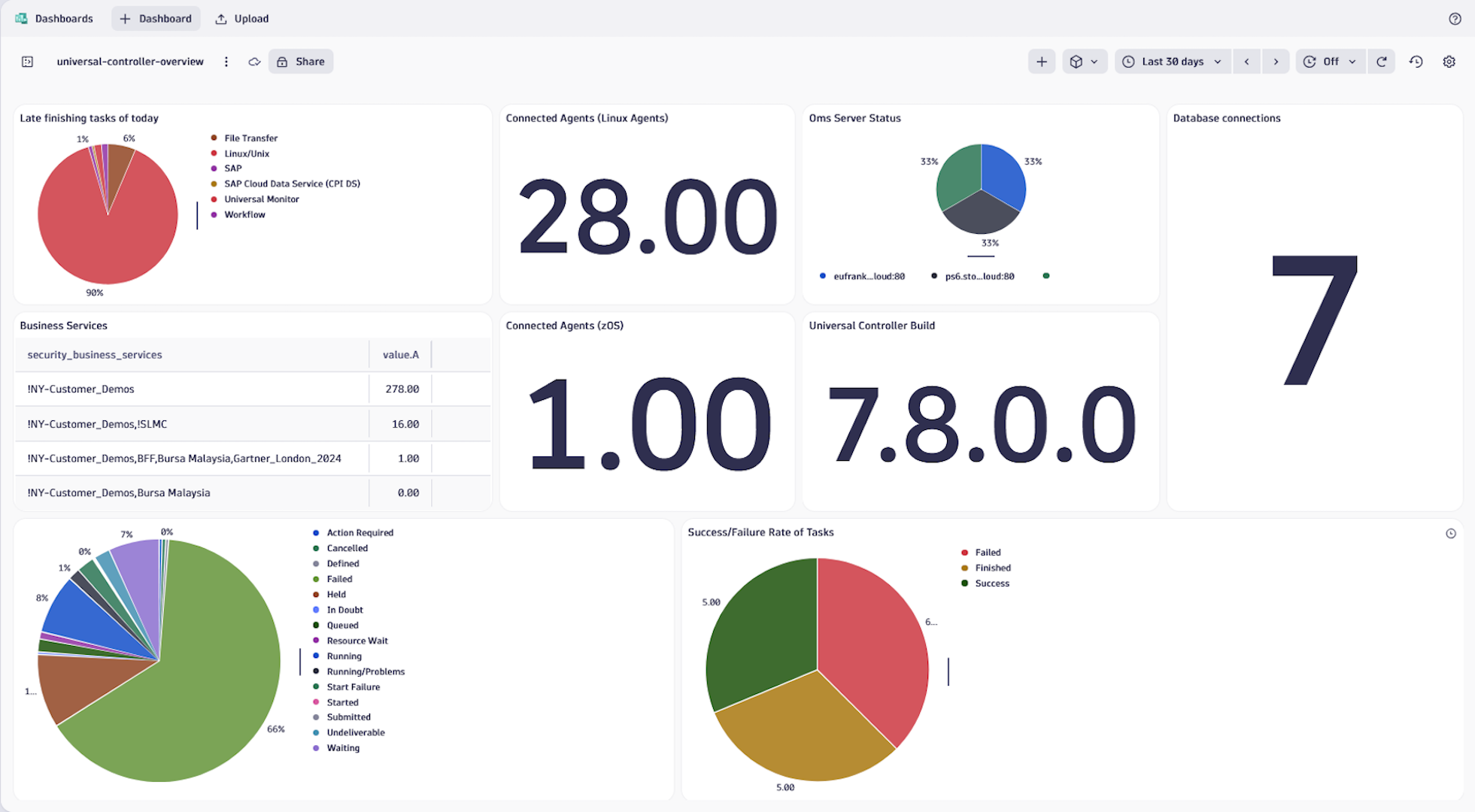
ExtensionThis extension collects UAC metrics via Dynatrace ActiveGate and turns them into a UC-aware view inside Dynatrace. It discovers Universal Controllers, OMS servers, Universal Agents, workflows, and business services from metric labels and maps them into a topology with dedicated Unified Analysis Screens and example dashboards.
IT Ops, SREs, and platform teams can use this extension to:
All of this is done through metric scraping---no custom scripting is required.
Overview of your entire UAC environment: Get an overview of one or more Universal Controllers with an all-in-one view inside of Dynatrace.
Controller and OMS health monitoring: Detect controller node or OMS issues early using status and connection metrics.
Automation workload visibility: Monitor execution counts, active instances, and outcome distributions across workflows and task types.
License and capacity management: Track usage of agents, nodes, executions, and tasks against license quotas to avoid overages.
Workflow- and agent-centric views: Use workflow and Universal Agent entity screens to understand where tasks run, how they perform, and which business services they belong to.
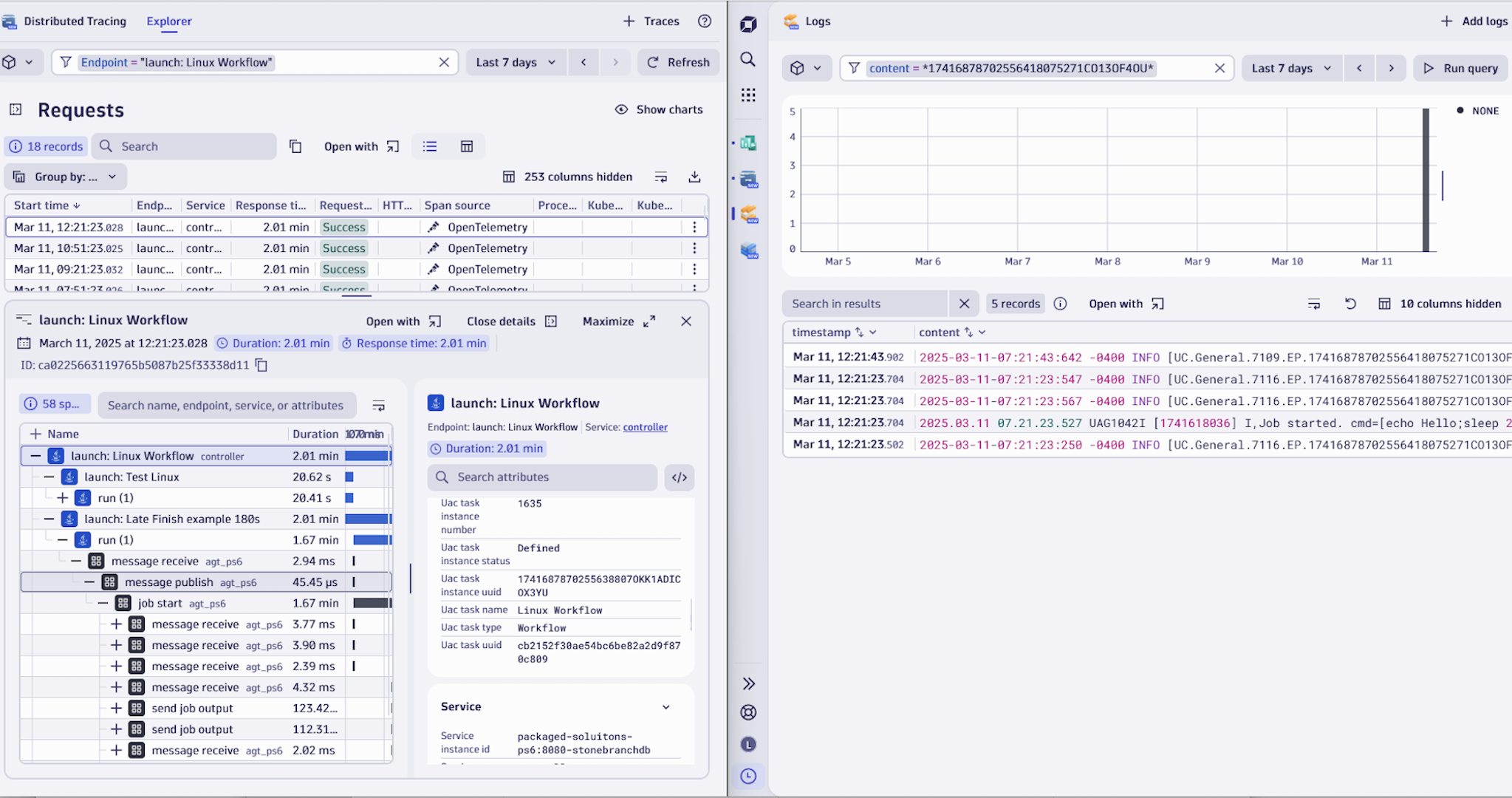
Integrated troubleshooting inside Dynatrace: Use dashboards, entity screens, and alerts to quickly isolate whether a problem is in the automation logic, the controller, the agents, or the underlying infrastructure.
For more information on the installation and configuration, please see Stonebranch Universal Automation Center extension in the Dynatrace Documentation.
Below is a complete list of the feature sets provided in this version. To ensure a good fit for your needs, individual feature sets can be activated and deactivated by your administrator during configuration.
| Metric name | Metric key | Description | Unit |
|---|---|---|---|
| UC License Agents Distributed Used | uc_license_agents_distributed_used | Number of distributed agents currently used under license | Count |
| UC License Agents Distributed Max | uc_license_agents_distributed_max | Maximum number of distributed agents allowed by license | Count |
| UC License Agents z/OS Used | uc_license_agents_zos_used | Number of z/OS agents currently used under license | Count |
| UC License Agents z/OS Max | uc_license_agents_zos_max | Maximum number of z/OS agents allowed by license | Count |
| UC License Cluster Nodes Used | uc_license_cluster_nodes_used | Number of cluster nodes currently used under license | Count |
| UC License Cluster Nodes Max | uc_license_cluster_nodes_max | Maximum number of cluster nodes allowed by license | Count |
| UC License Monthly Executions Used | uc_license_monthly_executions_used | Number of monthly executions currently used under license | Count |
| UC License Monthly Executions Max | uc_license_monthly_executions_max | Maximum number of monthly executions allowed by license | Count |
| UC License Task Definitions Used | uc_license_task_definitions_used | Number of task definitions currently used under license | Count |
| UC License Task Definitions Max | uc_license_task_definitions_max | Maximum number of task definitions allowed by license | Count |
| UC Monthly Executions | uc_monthly_executions | Number of UC executions in the current month | Count |
| Metric name | Metric key | Description | Unit |
|---|---|---|---|
| UC Agent Status | uc_agent_status | Current status of the Universal Controller agent | Count |
| UC OMS Server Last Connection Time Seconds | uc_oms_server_last_connected_time_seconds | Timestamp of the last connection to OMS server since epoch in seconds | Seconds |
| UC OMS Server Status | uc_oms_server_status | Current status of the UC OMS server | Count |
| UC OMS Server Session Status | uc_oms_server_session_status | Current session status on the UC OMS server | Count |
| Metric name | Metric key | Description | Unit |
|---|---|---|---|
| UC History Total | uc_history_total.count | Total number of Universal Controller history events | Count |
| UC Build Info | uc_build_info | Universal Controller Version information | None |
| UC Task Instance Active | uc_task_instance_active | Number of currently active UC task instances | Count |
| UC Task Instance Launch Total | uc_task_instance_launch_total.count | Total number of UC task instance launches | Count |
| UC Task Instance Late Finish Total | uc_task_instance_late_finish_total.count | Total number of UC task instances that finished late | Count |
| UC Task Instance Late Start Total | uc_task_instance_late_start_total.count | Total number of UC task instances that started late | Count |
| UC Task Instance Early Finish Total | uc_task_instance_early_finish_total.count | Total number of UC task instances that finished early | Count |
| UC Task Instance Duration Seconds | uc_task_instance_duration_seconds | Duration of UC task instances in seconds | Seconds |
| UC Universal Event Total | uc_universal_event_total.count | Total number of universal events processed by UC | Count |
| UC Database Connection Pool Active | uc_database_connection_pool_active | Current number of active connections in the UC database pool | Count |
| UC Database Connection Pool Idle | uc_database_connection_pool_idle | Current number of idle connections in the UC database pool | Count |
| UC Database Connection Pool Idle Min | uc_database_connection_pool_idle_min | Minimum idle connections allowed in the UC database pool | Count |
| UC Database Connection Pool Idle Max | uc_database_connection_pool_idle_max | Maximum idle connections allowed in the UC database pool | Count |
| UC Database Connection Pool Allocated | uc_database_connection_pool_allocated | Total number of allocated connections in the UC database pool | Count |
| UC Database Connection Pool Max | uc_database_connection_pool_max | Maximum allowed connections in the UC database pool | Count |
| Metric name | Metric key | Description | Unit |
|---|---|---|---|
| Process CPU Seconds Total | stonebranch.process_cpu_seconds_total.count | Total CPU time consumed by the process in seconds | Seconds |
| Process Virtual Memory Bytes | stonebranch.process_virtual_memory_bytes | Size of virtual memory used by the process in bytes | Bytes |
| Process Resident Memory Bytes | stonebranch.process_resident_memory_bytes | Resident set size of memory used by the process in bytes | Bytes |
| Process Start Time Seconds | stonebranch.process_start_time_seconds | Start time of the process since epoch in seconds | Seconds |
| Process Open FDs | stonebranch.process_open_fds | Number of open file descriptors by the process | Count |
| Process Max FDs | stonebranch.process_max_fds | Maximum file descriptor limit for the process | Count |
| Metric name | Metric key | Description | Unit |
|---|---|---|---|
| JVM Memory Objects Pending Finalization | stonebranch.jvm_memory_objects_pending_finalization | Number of Java objects awaiting finalization | Count |
| JVM Memory Used Bytes | stonebranch.jvm_memory_used_bytes | Amount of memory currently used by the JVM in bytes | Bytes |
| JVM Memory Committed Bytes | stonebranch.jvm_memory_committed_bytes | Amount of memory guaranteed to be available to the JVM in bytes | Bytes |
| JVM Memory Max Bytes | stonebranch.jvm_memory_max_bytes | Maximum memory that can be used by the JVM in bytes | Bytes |
| JVM Memory Init Bytes | stonebranch.jvm_memory_init_bytes | Initial memory allocation for the JVM in bytes | Bytes |
| JVM Memory Pool Bytes Used | stonebranch.jvm_memory_pool_bytes_used_bytes | Memory used by the JVM memory pool in bytes | Bytes |
| JVM Memory Pool Bytes Committed | stonebranch.jvm_memory_pool_bytes_committed_bytes | Memory committed for the JVM memory pool in bytes | Bytes |
| JVM Memory Pool Bytes Max | stonebranch.jvm_memory_pool_bytes_max_bytes | Maximum memory for the JVM memory pool in bytes | Bytes |
| JVM Memory Pool Init Bytes | stonebranch.jvm_memory_pool_init_bytes | Initial memory for the JVM memory pool in bytes | Bytes |
| JVM Memory Pool Collection Used Bytes | stonebranch.jvm_memory_pool_collection_used_bytes | Memory used by the JVM memory pool collection in bytes | Bytes |
| JVM Memory Pool Collection Committed Bytes | stonebranch.jvm_memory_pool_collection_committed_bytes | Memory committed for the JVM memory pool collection in bytes | Bytes |
| JVM Memory Pool Collection Max Bytes | stonebranch.jvm_memory_pool_collection_max_bytes | Maximum memory for the JVM memory pool collection in bytes | Bytes |
| JVM Memory Pool Collection Init Bytes | stonebranch.jvm_memory_pool_collection_init_bytes | Initial memory for the JVM memory pool collection in bytes | Bytes |
| JVM Memory Pool Allocated Bytes Total | stonebranch.jvm_memory_pool_allocated_bytes_total.count | Total bytes allocated by the JVM memory pool | Bytes |
| JVM Buffer Pool Used Bytes | stonebranch.jvm_buffer_pool_used_bytes | Bytes used by the JVM buffer pool | Bytes |
| JVM Buffer Pool Capacity Bytes | stonebranch.jvm_buffer_pool_capacity_bytes | Capacity of the JVM buffer pool in bytes | Bytes |
| JVM Buffer Pool Used Buffers | stonebranch.jvm_buffer_pool_used_buffers | Number of buffers used in the JVM buffer pool | Count |
| JVM GC Collection Seconds | stonebranch.jvm_gc_collection_seconds | Time spent in JVM garbage collection in seconds | Seconds |
| JVM Threads Current | stonebranch.jvm_threads_current | Current number of live threads in the JVM | Count |
| JVM Threads Daemon | stonebranch.jvm_threads_daemon | Number of daemon threads in the JVM | Count |
| JVM Threads Peak | stonebranch.jvm_threads_peak | Peak live thread count since JVM start | Count |
| JVM Threads Started Total | stonebranch.jvm_threads_started_total.count | Total threads started since JVM start | Count |
| JVM Threads Deadlocked | stonebranch.jvm_threads_deadlocked | Number of threads currently deadlocked | Count |
| JVM Threads Deadlocked Monitor | stonebranch.jvm_threads_deadlocked_monitor | Number of threads deadlocked waiting for monitor | Count |
| JVM Threads State | stonebranch.jvm_threads_state | Gauge measure of threads per state in the JVM | Count |
| JVM Classes Currently Loaded | stonebranch.jvm_classes_currently_loaded | Number of classes currently loaded in the JVM | Count |
| JVM Classes Loaded Total | stonebranch.jvm_classes_loaded_total.count | Total number of classes loaded since JVM start | Count |
| JVM Classes Unloaded Total | stonebranch.jvm_classes_unloaded_total.count | Total number of classes unloaded since JVM start | Count |
| JVM Runtime Info | stonebranch.jvm_runtime_info | Gauge of JVM runtime info (e.g., version, vendor) | Count |
This is the first release of the Stonebranch extension. Refer to the documentation for instructions. Read Stonebranch Dynatrace Observability for UAC – Implementation Guide for more information

