



















Skip to technology filters Skip to main content
Dynatrace Hub

Extend the platform,
empower your team.

Popular searches:
Home hero bg
SSL Certificate MonitorSSL Certificate Monitor
SSL Certificate Monitor

SSL Certificate Monitor

Discover, view and log SSL certificates. Raise configurable expiration alerts.

Extension
Free trialDocumentation
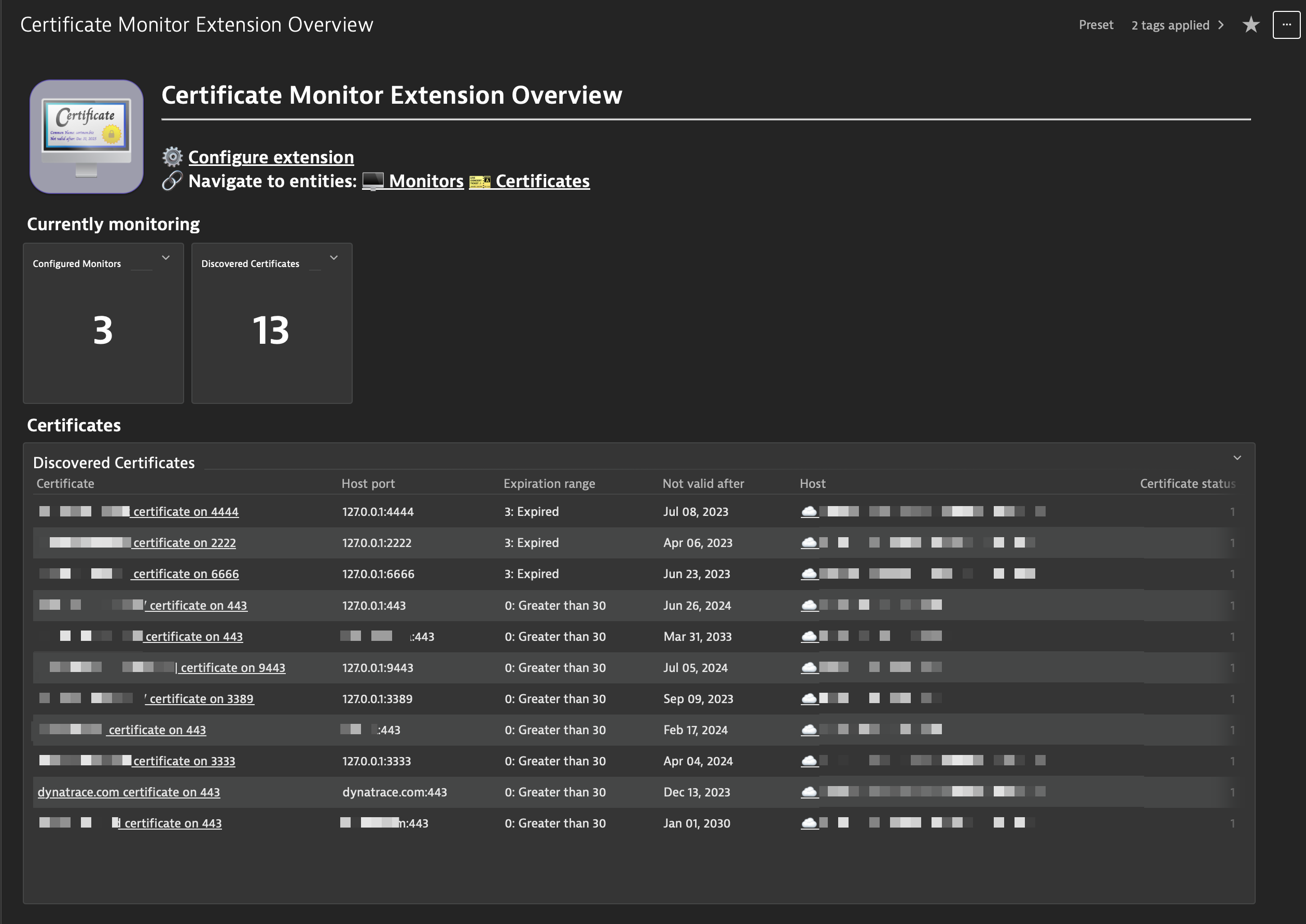
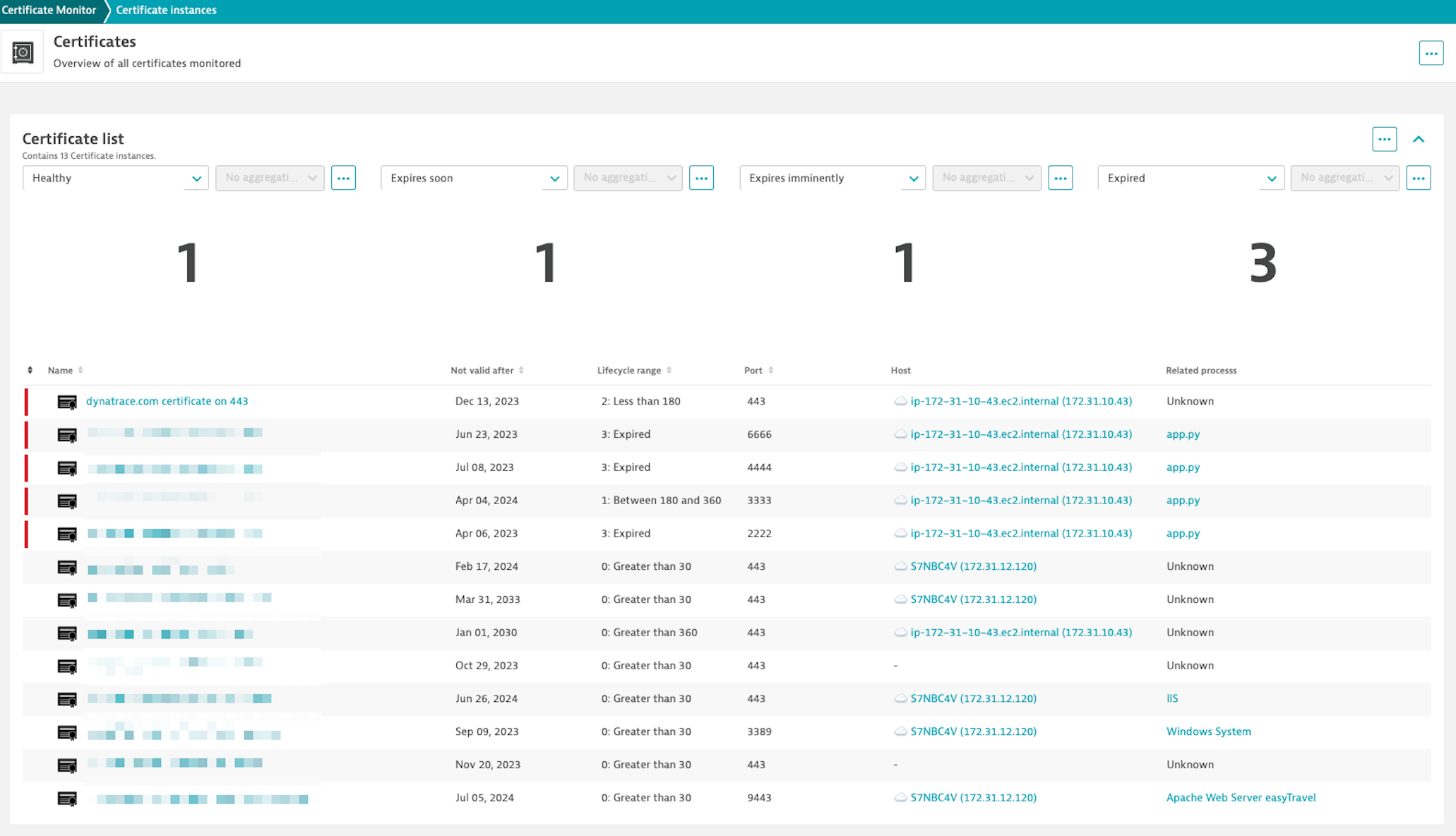
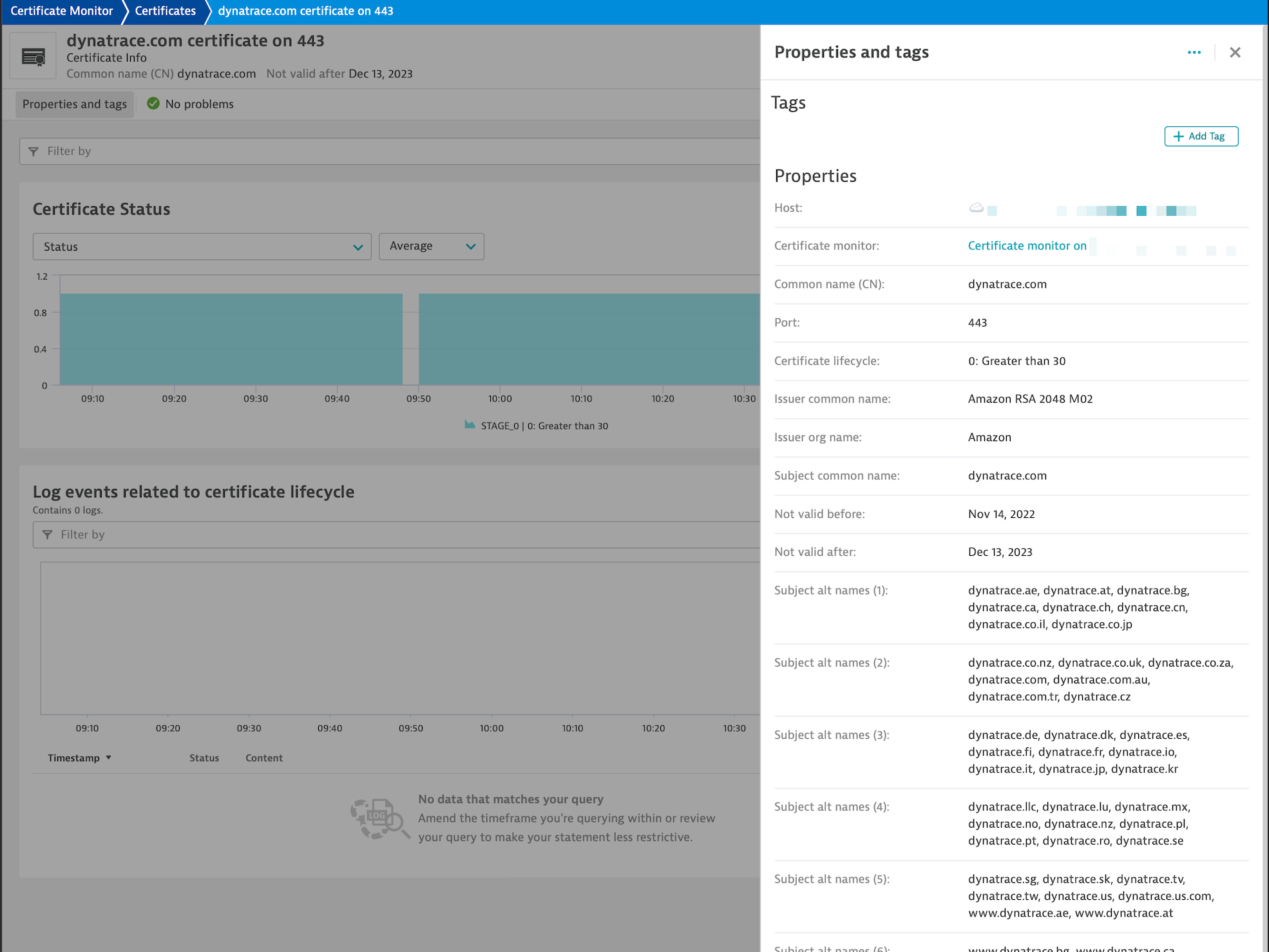
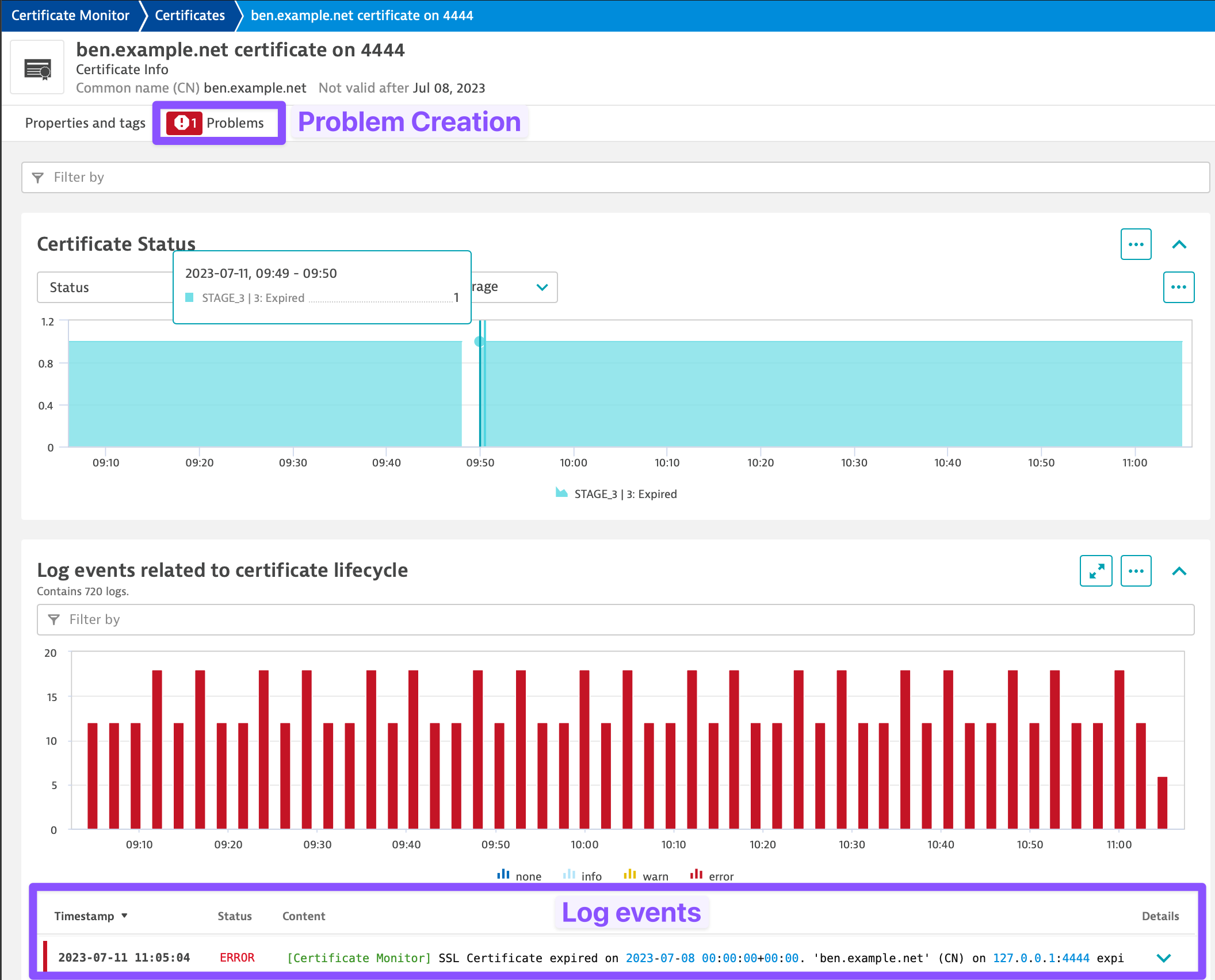
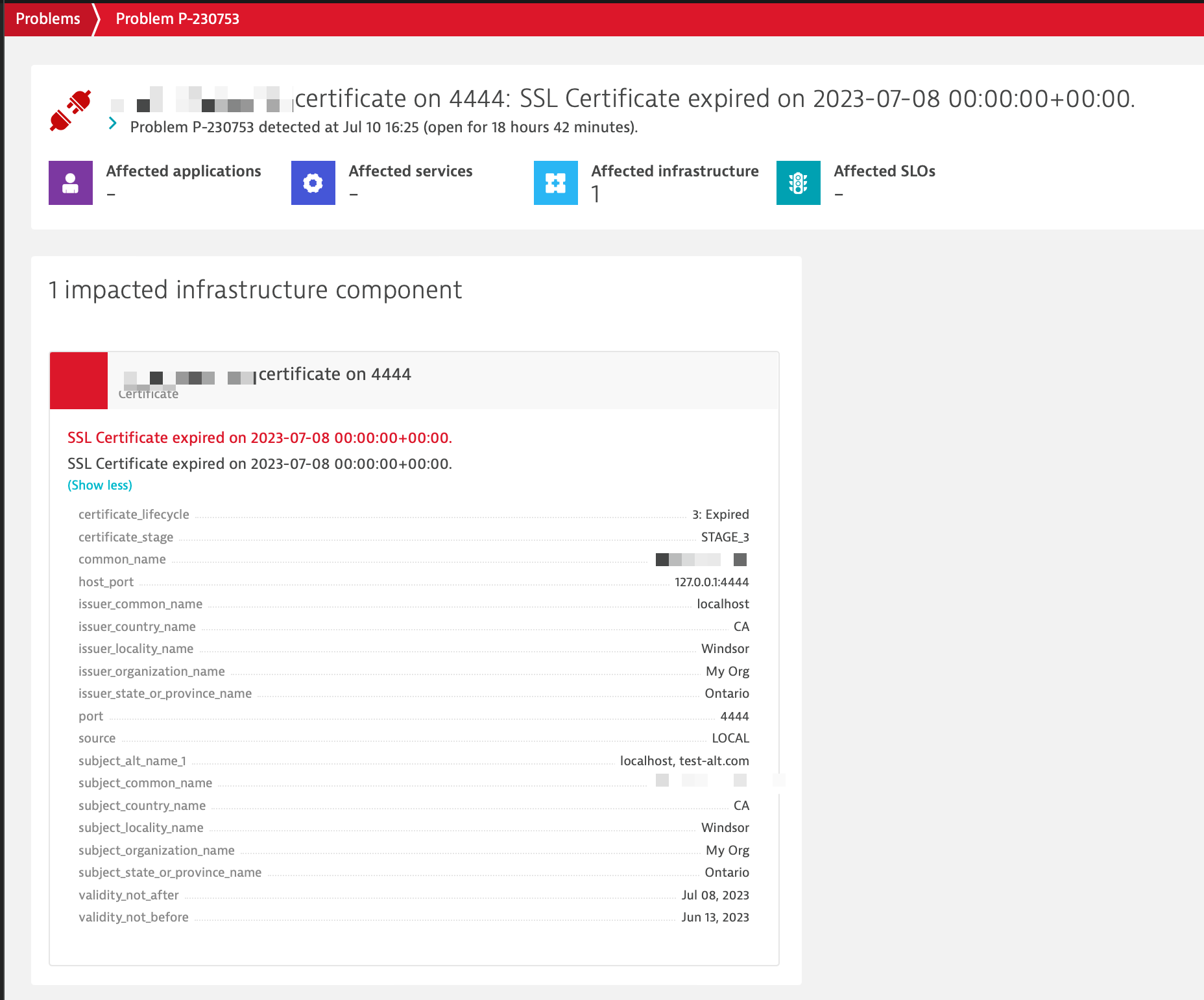
Overview dashboardCertificate listCertificate detail screenCertificate problem and loggingProblem creationHighly configurable
  • Product information
  • Release notes

Overview

The SSL Certificate Monitor extension can be deployed on an ActiveGate or on any host with the OneAgent installed.

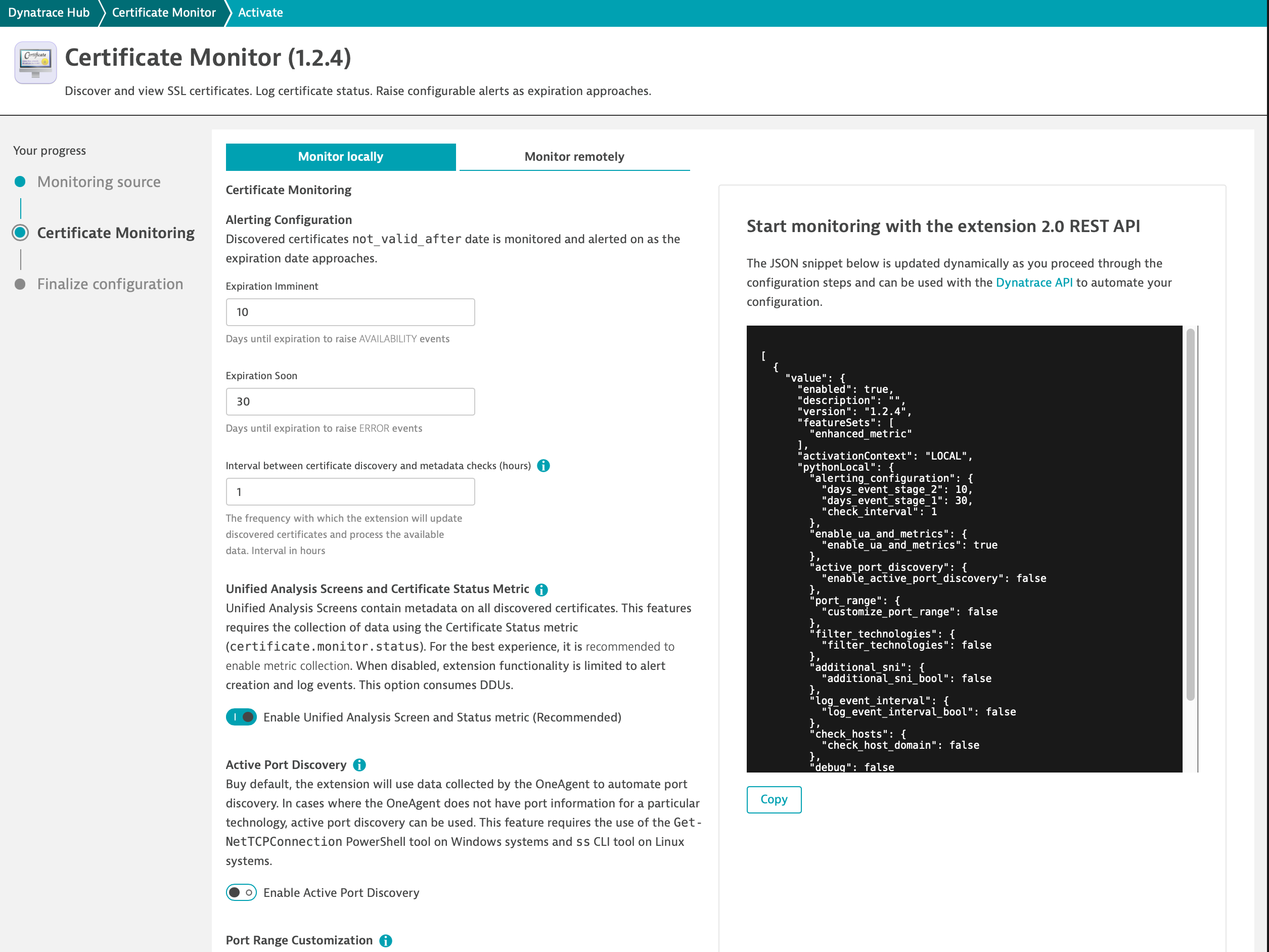
Both deployments types have configurable alerting intervals, allowing the raising of low severity problems for certificates in a user defined renewal window as well as a high severity alerts for imminently approaching expiration dates.

When deployed on an ActiveGate, the extension can be configured to perform certificate checks by specifying specific domains to check.

When deployed on an OneAgent, the extension will attempt certificate auto-discovery using data provided by the OneAgent.

Use cases

  • Discover and monitor certificates on OneAgent-installed hosts.
  • Certificates can also be monitored remotely using domain based monitoring on an ActiveGate.
  • Configure alerting for certificates that are expiring soon, so action can be taken before expiration.
Dynatrace
Documentation
By Dynatrace
Dynatrace support center
Subscribe to new releases
Copy to clipboard

Extension content

Content typeNumber of items included
screen logs cards
4
screen properties
2
screen layout
4
screen entities lists
5
document dashboard
2
metric metadata
2
list screen layout
2
screen chart groups
4
screen injections
4
screen metric tables
1
generic relationship
4
screen actions
4
dashboards
1
generic type
2
screen dql table
4

Feature sets

Below is a complete list of the feature sets provided in this version. To ensure a good fit for your needs, individual feature sets can be activated and deactivated by your administrator during configuration.

Feature setsNumber of metrics included
Metric nameMetric keyDescriptionUnit
Certificate statuscertificate.monitor.statusThe status of detected certificatesCount

Full version history

To have more information on how to install the downloaded package, please follow the instructions on this page.
ReleaseDate

Full version history

v1.10.13

  • Remove incorrectly duplicated assets
  • Fix for the "Related certificate" screen in the Infrastructure and Operations app

This version requires EEC version 1.270+ and cluster version 1.309+.

v.1.10.11

New and improved in this version

  • Fixed an issue with "Add log entry for healthy certificates" caused by a mismatch between timezone aware and unaware dates. This patch ensures that all uses of datetime in the extension are timezone aware.

v1.10.10

New Feature: Legacy TLS Certificate Collection Support

Background

In environments with older hosts that do not support modern TLS protocols, certificate collection can fail due to protocol mismatches. Previously, these hosts were effectively unreachable for certificate inspection, limiting visibility into legacy systems.

What's Changed

This version introduces fallback support for TLSv1 ciphers during certificate collection. This fallback is only used when the target server does not support higher TLS versions and is confined strictly to certificate gathering operations. We've also added support for DEC error codes, improved handling of certificates missing common_name or alt_name, and introduced a delay mechanism to ensure entities are created before problems are triggered. Support for 3rd generation UA cards has been enhanced, and the dt.security_context field has been added for improved security context tracking. Impact These changes improve compatibility with legacy systems, improve alerting for certificates that are first detected in a problem state and enhance certificate parsing.

New and Improved in This Version

  • Fallback to TLSv1 ciphers for certificate collection on legacy hosts.
  • Added DEC error codes for improved diagnostics.
  • 5-minute delay before problem events are pushed to cluster to ensure entity creation has completed before the problem has pushed.
  • Improved support for 3rd gen UA cards.
  • Added dt.security_context field.
  • Fix for certificates missing common_name or alt_name.

Full version history

v1.10.0

New feature: Automatic Port Blocklisting

Background

When the extension is deployed locally (on a host with the OneAgent), the extension uses data collected by the OneAgent to collect a list of processes that have listening ports bound to them. Using this information, the extension attempts to establish a connection on that port and load any certificates that are present. Many of these detected port bindings do not have certificates bound to them and, as a result, no certificate is returned. In previous versions of the extension these ports would be checked for a certificate at each monitoring interval if no manual exclusion filters were set.

What's Changed

This version introduces automatic port blocklisting. When the extension fails to extract a certificate from a port, the port is automatically added to a persistent cache and removed from future certificate scans. This cache is specific to each monitoring configuration and is retained across extension restarts and configuration updates.

Impact

Some processes do not react well to unexpected TLS connections. Port blocklisting ensures that these ports are not continuously queried for certificates, reducing unnecessary network activity and potential side effects.

New and improved in this version

  • Automatic blocking of port bindings discovered via the OneAgent that do not return a certificate.
  • Add property for TLS version used during certificate collection
  • Improved handling of configuration loading and validation.
  • More robust and readable code for filtering, event creation, and port discovery.
  • Improved summary charts on certificate manager screens
  • Greatly expanded testing
  • Improvement to certificate source determination. We are now tracking PortBinding PID. If a binding has a PID, it is a local certificate.
  • Improved support for certificates without a subject common name. In these cases, the first available subject alternative name will be used as the primary identifier of the certificate.
  • Added 3rd gen UA screen support
  • Pre-check prevents preliminary WCS code from running on non-Windows systems
  • Refinements to logging. INFO logging will now contain all required information for most use cases. DEBUG logging should now only be needed during advanced troubleshooting.
  • Update Active Port discovery with latest PortBinding and additional command to collect process name
  • Add device.address dimension

Full version history

v1.9.3

Improved Handling of Windows Certificate Stores

Background

The Windows Certificate Store is composed of multiple "sub-stores," such as CurrentUser:Root, LocalMachine:Root, and others. It's common for identical certificates to exist in multiple sub-stores simultaneously.

What Changed

This release introduces a fix that correctly identifies and distinguishes each instance of a certificate based on the specific sub-store it resides in. As a result:

  • Each certificate copy is now treated as a unique entity, even if the certificate content is identical.
  • The certificate store location is now explicitly tracked, allowing for more accurate monitoring and management.

Impact

  • Users may observe an increase in the number of monitored certificates, as duplicates across sub-stores are now individually recognized. This will not affect license consumption as the amount of data ingested is unchanged.
  • Previously, certificate properties could oscillate depending on which instance was processed first, leading to inconsistencies in problem detection and entity matching.
  • With this fix, each certificate is uniquely identified, ensuring consistent behavior and accurate problem association.

Why This Matters

This change aligns with real-world use cases. When a certificate expires and is replaced, it must be updated in location where it exists. By treating each instance separately, the system now mirrors this operational reality, improving reliability and clarity for administrators.

🐞 Fixed in this version

  • Certificates detected via the Windows Certificate Store will now correctly identify which sub-store they are stored in. This will resolve issues with problems related to these certificates that opened and closed unexpectedly.
  • Fixed references to the alerting level that will be raised as a certificate approaches expiration.

✨ New in this version

  • Ability to set certificate check timeout
  • Use ThreadPoolExecutor context manager
  • Add option to alert on domain and OneAgent connection errors. These options are useful for testing and diagnosing issues.

Full version history

v1.8.47

  • Fixed an issue with alerts not being generated on expired certificates that are being monitored as part of a monitoring configuration with commas (",") in the description name.

Full version history

v1.8.45

  • Fix for loading of configuration object on remote deployments.

Full version history

  • Check metric line length before posting and trim data as necessary to fit within limit
  • Ability to filter Windows Certificate Store by terms in common name
  • Fix for UnicodeDecodeError when loading malformed process snapshots
  • Fix an issue when decoding invalid bytes

Full version history

Version 1.8.13

  • Fix an issue decoding certificates with invalid characters

Full version history

v1.8.12

  • Added verbose debug logging
  • Enhanced logging to aid in supporting a wider variety of certificate types
  • Fix to "Extension settings" button on unified analysis screens

Full version history

v1.8.0

  • ✨ Raised limit on dashboard tiles to display more certificates.
  • ✨ Added an option to suppress alerts for certificates that have expired more than x days ago.
  • ✨ Added an option to suppress all alert creation for certificates
  • ✨ Added the certificate serial number as a certificate property
  • 🐛 Improved handling for monitoring configuration names that contain punctuation.
  • 🐛 The extension will now automatically renew events before before the mandatory 6 hour problem timeout is reached. This is to fix an issue where some problems would regularly close and reopen.

Full version history

v1.7.80

  • 🐛 Fixed a bug where only having one certificate in the Windows Certificate Store would cause the extension to throw an error.
  • 🐛 Improved handling of non-UTF-8 characters in Windows Certificate Store certificates.
  • 🐛 Fixed an issue where certificate properties with certain special characters would prevent the certificate data from being ingested
  • 🐛 Fixed an issue where some problems would fail to be created when the extension was deployed remotely
  • ✏️ Fixed a typo in the monitoring configuration screen.

Full version history

v1.7.50

  • ✨ Added option to include or exclude specific processes by name using the new "Filter processes by process name" feature.
  • ✨ Added option to "Scan Windows Certificate Stores" (Windows Hosts only). The extension will scan the Windows Certificate store for certificates.
  • ✨ Expanded the list of available process types available to the "Filter processes by technology type" feature.
  • 🐛 Improved handling of process snapshots
  • 🐛 Fixed crash if Active Port Monitoring (Windows Only) is enabled on a Linux host.
  • 🐛 Removed forced recheck if there was a detected change in the port bindings. Previously, the extension would force a recheck if port bindings change. Port checks will now strictly follow the configured schedule. Changes to certificates will not be detected until the next check interval.

Full version history

v1.6.0

This version is a combined bug fix and feature update. Changes include:

  • ✨ Technology filter can now be set to only include the selected technologies or exclude the selected technologies from monitoring
  • ✨ Certificate list view can now be filtered
  • ✨ Related certificates now injected on Host page
  • 🐛 Additional checks to limit long metric length
  • 🐛 Suppression for duplicate metric lines
  • 💄 Change dates to YYYY-MM-DD format to make them sortable
  • 🏷️ Improved type checking

Full version history

NOTE: This version requires that monitoring configurations be recreated. We apologize for this inconvenience but it is required to take advantage of new features. This extension is evolving rapidly and seeking to cover a wider array of use cases. As such, it may see other breaking changes before the end of the year.

v1.3.2

  • Breaking change on upgrades for <v1.3. This requires the recreation of monitoring configurations.
  • ✨ [WINDOWS ONLY] Add support for Active port discovery on Windows. The extension will attempt to actively identify listening ports on a local host and check certificates on those ports. Note: this option will likely introduce many more port checks. It is recommended to use this in conjunction with port range filters.
  • 🐛 Fixes premature problem closure
  • 🧵 Improved handling of multi-threaded port checking. Eliminates long running threads.
  • 🐛 Fixes scenario where check interval timer was being ignored
  • 🐛 Fixes issue where domain based checks list grows unexpectedly
  • ♻️ Refactor code to improve consistency across port info sources (Remote domains, OneAgent, Active port discovery)

Full version history

  • ✨ Domain checks can now supply a port to be checked via the domain.com:9999 syntax. Previously, all domains were checked on port 443
  • 🐛 Improved parsing of domains when using the domain check feature
  • 🐛 Fix for multiple instance of domains checks being added
  • 💄 Improvements to Unified Analysis screens
  • 🥅 Improved error handling when detecting alt_names
  • 📝 Documentation updates
Dynatrace Hub
Get data into DynatraceBuild your own app
All (811)Log Management and AnalyticsKubernetesAI and LLM ObservabilityInfrastructure ObservabilitySoftware DeliveryApplication ObservabilityApplication SecurityDigital ExperienceBusiness Observability
Filter
Type
Built and maintained by
Deployment model
SaaS
  • SaaS
  • Managed
Partner FinderBecome a partnerDynatrace Developer

Discover recent additions to Dynatrace

Problems logo

Problems

Analyze abnormal system behavior and performance problems detected by Davis AI.

Logs logo

Logs

Explore all your logs without writing a single query.

Security Investigator logo

Security Investigator

Fast and precise forensics for security and logs on Grail data with DQL queries.

Business Flow logo

Business Flow

Track, analyze, and optimize your critical business processes.

Cost & Carbon Optimization logo

Cost & Carbon Optimization

Track, analyze, and optimize your IT carbon footprint and public cloud costs.

Davis Anomaly Detection logo

Davis Anomaly Detection

Detect anomalies in timeseries using the Davis AI

Analyze your data

Understand your data better with deep insights and clear visualizations.

Notebooks logo

Notebooks

Create powerful, data-driven documents for custom analytics and collaboration.

Dashboards logo

Dashboards

Transform complex data into clear visualizations with custom dashboards.

Automate your processes

Turn data and answers into actions, securely, and at scale.

Workflows logo

Workflows

Automate tasks in your IT landscape, remediate problems, and visualize processes

Jira logo

Jira

Create, query, comment, transition, and resolve Jira tickets within workflows.

Slack logo

Slack

Automate Slack messaging for security incidents, attacks, remediation, and more.

Secure your cloud application

See vulnerabilities and attacks in your environment.

Security Overview logo

Security Overview

Get a comprehensive overview of the security of your applications.

Code-Level Vulnerabilities logo

Code-Level Vulnerabilities

Detect vulnerabilities in your code in real time.

Security Posture Management logo

Security Posture Management

Detect, prioritize, and remediate security and compliance findings with SPM.

Threats & Exploits logo

Threats & Exploits

Understand, triage, and investigate detection findings and alerts.

Are you looking for something different?

We have hundreds of apps, extensions, and other technologies to customize your environment

Leverage our newest innovations of Dynatrace Saas

Kick-start your app creation

Kick-start your app creation

Whether you’re a beginner or a pro, Dynatrace Developer has the tools and support you need to create incredible apps with minimal effort.
Go to Dynatrace Developer

Upgrading from Dynatrace Managed to SaaS

Upgrading from Dynatrace Managed to SaaS

Drive innovation, speed, and agility in your organization by seamlessly and securely upgrading.
Learn More
Log Management and Analytics

Log Management and Analytics

Innovate faster and more efficiently with unified log management and log analytics for actionable insights and automation.
Learn more

