























Kick-start your app creation
Whether you’re a beginner or a pro, Dynatrace Developer has the tools and support you need to create incredible apps with minimal effort.
Go to Dynatrace Developer
 Radware Alteon Load Balancer
Monitor your Radware Alteon Network Load Balancers through SNMP
ExtensionMonitor your Radware Alteon Network Load Balancer devices and interfaces through SNMP. This extension collects infrastructure metrics to monitor the health and performance of your devices. Metrics are collected via SNMP protocol.
Simply activate the extension in your environment using the in-product Hub, provide the necessary device configuration and you’re all set up. Read more in the SNMP extension data source documentation
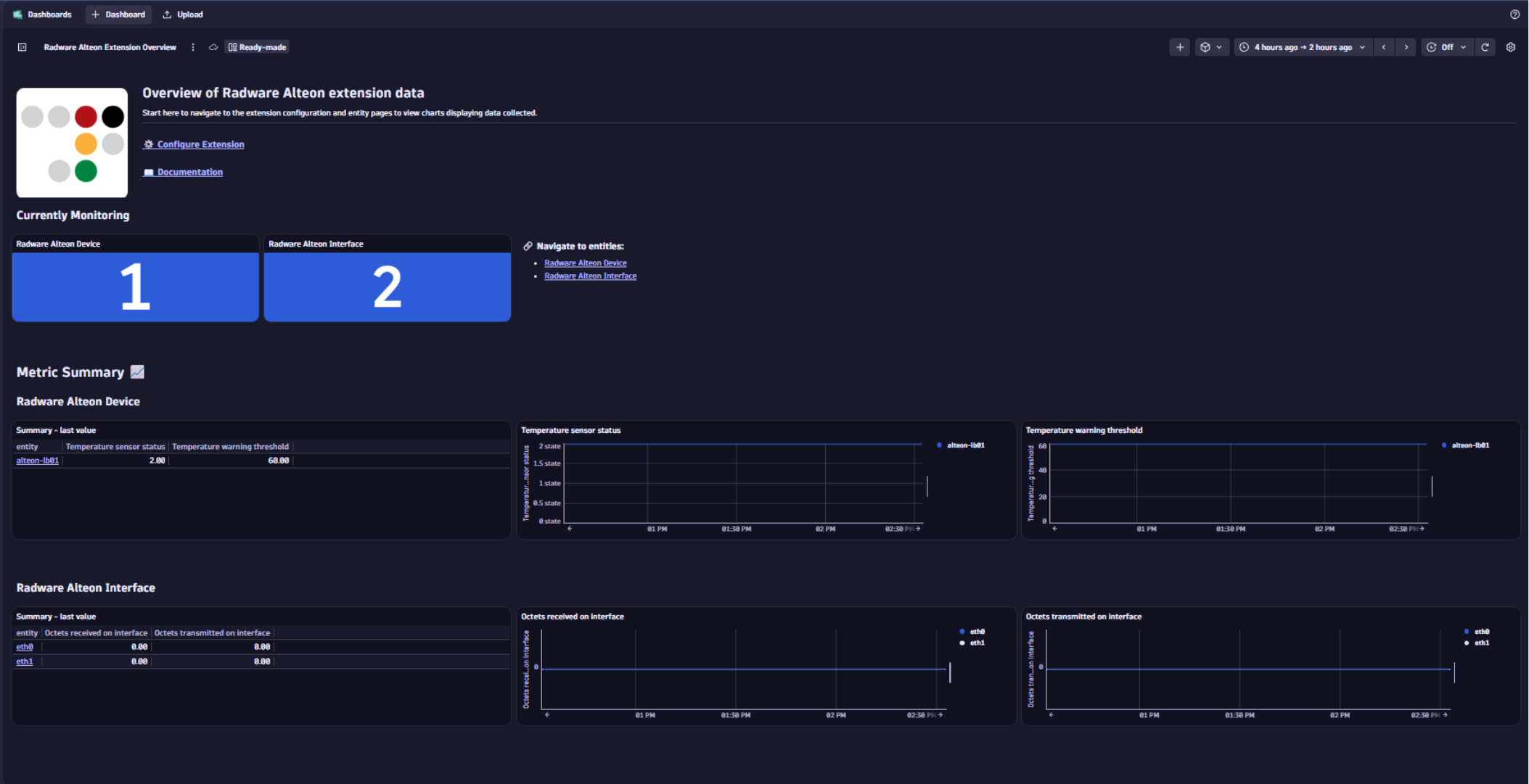
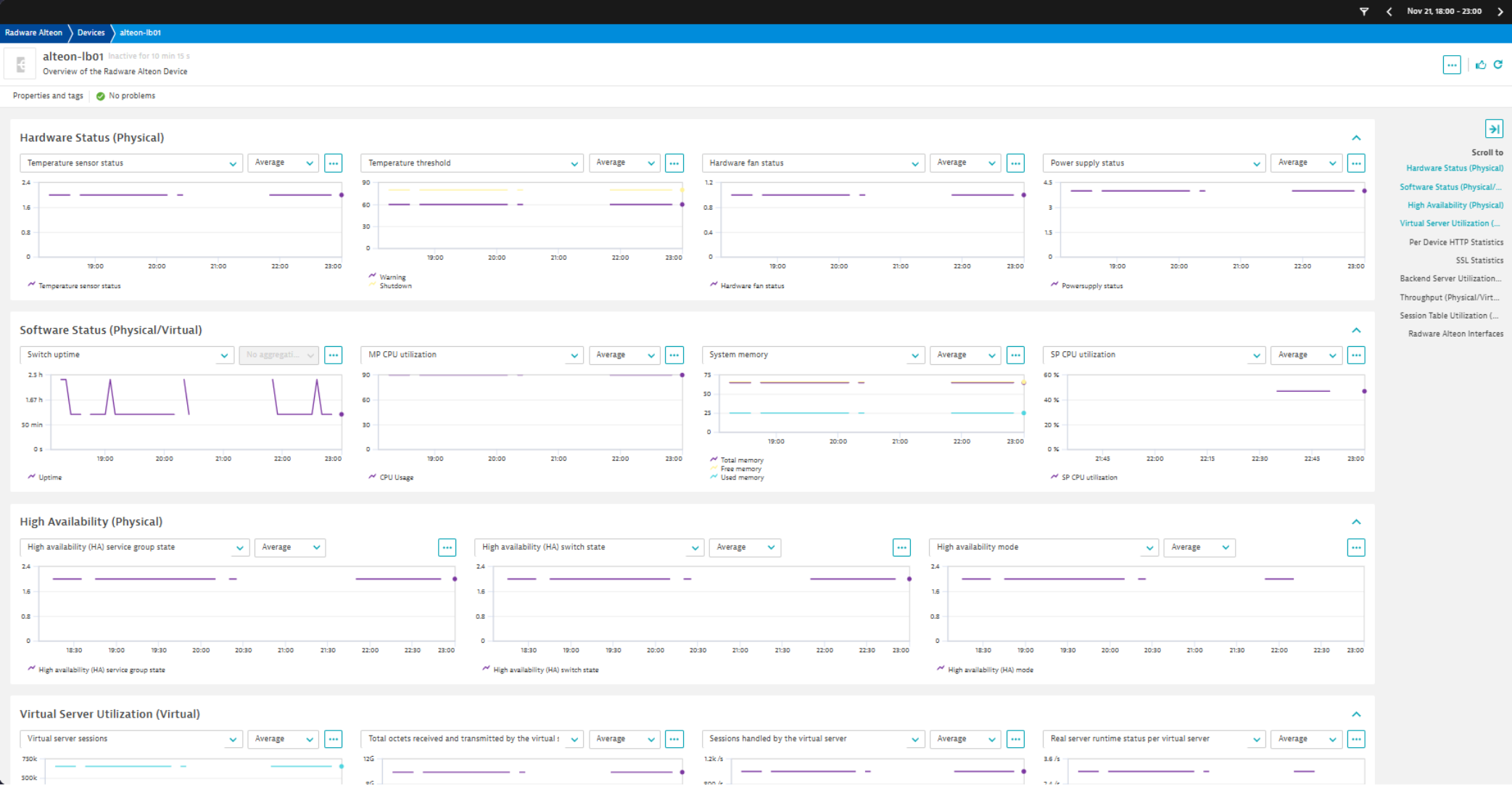
The extension package contains:
Below is a complete list of the feature sets provided in this version. To ensure a good fit for your needs, individual feature sets can be activated and deactivated by your administrator during configuration.
| Metric name | Metric key | Description | Unit |
|---|---|---|---|
| - | com.dynatrace.extension.network_device.sysuptime | - | - |
| - | com.dynatrace.extension.network_device.cpu_usage | - | - |
| - | com.dynatrace.extension.network_device.memory_total | - | - |
| - | com.dynatrace.extension.network_device.memory_free | - | - |
| - | com.dynatrace.extension.network_device.memory_used | - | - |
| - | com.dynatrace.extension.network_device.if.status | - | - |
| - | com.dynatrace.extension.network_device.if.bytes_in.count | - | - |
| - | com.dynatrace.extension.network_device.if.bytes_out.count | - | - |
| - | com.dynatrace.extension.network_device.if.in.discards.count | - | - |
| - | com.dynatrace.extension.network_device.if.out.discards.count | - | - |
| - | com.dynatrace.extension.network_device.if.in.errors.count | - | - |
| - | com.dynatrace.extension.network_device.if.out.errors.count | - | - |
| Metric name | Metric key | Description | Unit |
|---|---|---|---|
| HTTP 2.0 connection count | radware_alteon.httpstatsumm.http20connection.count | HTTP 2.0 connection count. | Count |
| HTTP 1.1 connection count | radware_alteon.httpstatsumm.http11connection.count | HTTP 1.1 connection count. | Count |
| HTTP 1.0 connection count | radware_alteon.httpstatsumm.http10connection.count | HTTP 1.0 connection count. | Count |
| HTTP 2.0 connection peak count | radware_alteon.httpstatsumm.http20connection.peak.count | HTTP 2.0 connection peak count. | Count |
| HTTP 1.1 connection peak count | radware_alteon.httpstatsumm.http11connection.peak.count | HTTP 1.1 connection peak count. | Count |
| HTTP 1.0 connection peak count | radware_alteon.httpstatsumm.http10connection.peak.count | HTTP 1.0 connection peak count. | Count |
| HTTP 2.0 request count | radware_alteon.httpstatsumm.http20connection.request.count | HTTP 2.0 request count. | Count |
| HTTP 1.1 request count | radware_alteon.httpstatsumm.http11connection.request.count | HTTP 1.1 request count. | Count |
| HTTP 1.0 request count | radware_alteon.httpstatsumm.http10connection.request.count | HTTP 1.0 request count. | Count |
| HTTP transactions per second | radware_alteon.httptranssumm.trans.rate | HTTP transactions per second. | Count |
| Metric name | Metric key | Description | Unit |
|---|---|---|---|
| Session table maximum entries | radware_alteon.slbstat.maint.maximumsessions | The maximum number entries in the session table. | Count |
| Ipv6 session count | radware_alteon.slbstat.maint.ip6currsessions.count | The number of sessions for ipv6. | Count |
| Curent sessions in session table | radware_alteon.slbstat.maint.curbindings | The current number of sessions in the session table. | Count |
| Metric name | Metric key | Description | Unit |
|---|---|---|---|
| Virtual server current sessions | radware_alteon.slbstat.enh.vserver.currsessions | The number of sessions that are currently handled by the virtual server. | Count |
| Virtual server total sessions | radware_alteon.slbstat.enh.vserver.totalsessions | The total number of sessions that are handled by the virtual server. | Count |
| Virtual server highest sessions handled | radware_alteon.slbstat.enh.vserver.highestsessions | The highest number of sessions that have been handled by the virtual server. | Count |
| Total octets received and transmitted by the virtual server | radware_alteon.slbstat.enh.vserver.hc.octets | The total octets received and transmitted by the virtual server. | Count |
| Sessions handled by the virtual server | radware_alteon.slbstat.enh.vserver.sessions | Number of Sessions handled by the virtual server per second. | PerSecond |
| Real server runtime status per virtual server | radware_alteon.slbstat.enh.vserver.real.status | The runtime Real Server Status per Virtual service. (0)Up, (1)Down, (2)Admin-Down, (3)Warning, (4)Shutdown, (5)Error | PerSecond |
| Backend server concurrent connections for virtual service | radware_alteon.commng.enh.perservstats.servconn | The number of concurrent backend server connections for virtual service. | Count |
| Virtual service client requests passed to AX | radware_alteon.commng.enh.perservstats.clireq | Number of client requests passed to AX for virtual service. | Count |
| Virtual service security policy peak bandwidth (secPolPerServBwPeak) | radware_alteon.secpol.perserv.bw.peak | Virtual service security policy stats - Bandwidth peak value. | Count |
| Virtual service security policy bandwidth ( secPolPerServBwCurVal) | radware_alteon.secpol.perserv.bw.curval | Virtual service security policy stats - Bandwidth current value. | Count |
| Virtual service security policy PPS current (secPolPerServPPSCurVal) | radware_alteon.secpol.perserv.pps.curval | Virtual service security policy stats - PPS current value. | Count |
| Virtual service security policy PPS peak (secPolPerServPPSPeak) | radware_alteon.secpol.perserv.pps.peak | Virtual service security policy stats - PPS peak value. | Count |
| Virtual service security policy CPS current (secPolPerServCPSCurVal) | radware_alteon.secpol.perserv.cps.curval | Virtual service security policy stats - CPS current value. | Count |
| Virtual service security policy CPS peak (secPolPerServCPSPeak) | radware_alteon.secpol.perserv.cps.peak | Virtual service security policy stats - CPS peak value. | Count |
| Virtual service security policy latency current (secPolPerServLatencyCurVal) | radware_alteon.secpol.perserv.latency.curval | Virtual service security policy stats - latency current value. | Count |
| Virtual service security policy latency peak (secPolPerServLatencyPeak) | radware_alteon.secpol.perserv.latency.peak | Virtual service security policy stats - latency peak value. | Count |
| Metric name | Metric key | Description | Unit |
|---|---|---|---|
| Real-server current sessions | radware_alteon.slbstat.enh.rserver.currsessions | Real-server current sessions. | Count |
| Real-server total sessions | radware_alteon.slbstat.enh.rserver.totalsessions | Real-server total sessions. | Count |
| Real-server highest sessions | radware_alteon.slbstat.enh.rserver.highestsessions | Real-server highest sessions. | Count |
| Real-server total rx/tx octets | radware_alteon.slbstat.enh.rserver.hc.octets | Real-server total rx/tx octets. | Count |
| Real server max concurrent connections | radware_alteon.slbcur.cfg.realserver.maxconns | The Maximum allowed number of concurrent connections per real server in the configuration. | Count |
| SP current memory | radware_alteon.spmemusagestats.currentmemory | The current memory of SP in kilobytes. | KiloByte |
| Real-server group current sessions | radware_alteon.slbstat.enh.group.currsessions | The number of sessions that are currently handled by the real server group. | Count |
| Real-server group total sessions | radware_alteon.slbstat.enh.group.totalsessions | The total number of sessions that have been handled by the real server group. | Count |
| Real-server group highest sessions | radware_alteon.slbstat.enh.group.highestsessions | The highest sessions that have been handled by the real server group. | Count |
| Metric name | Metric key | Description | Unit |
|---|---|---|---|
| - | com.dynatrace.extension.network_device.if.lastchange | - | - |
| Metric name | Metric key | Description | Unit |
|---|---|---|---|
| High availability (HA) service group state | radware_alteon.ha.group.state | High availability (HA) service group state | State |
| High availability (HA) switch state | radware_alteon.ha.switch.state | High availability (HA) switch state | State |
| High availability (HA) mode | radware_alteon.ha.curcfg.mode | High availability (HA) mode | State |
| Metric name | Metric key | Description | Unit |
|---|---|---|---|
| SP CPU utilization | com.dynatrace.extension.network_device.sp.cpu_usage | SP CPU utilization | Percent |
| Metric name | Metric key | Description | Unit |
|---|---|---|---|
| TCP sessions using SSL service | radware_alteon.sslslbstat.cursessions | The current number of different TCP sessions using SSL service. | Count |
| Total TCP sessions using SSL service | radware_alteon.sslslbstat.totalsessions.count | The total number of different TCP sessions using SSL service. | Count |
| TCP sessions using SSL service high water mark | radware_alteon.sslslbstat.highestsessions.count | The high water mark of current sessions of different TCP sessions using SSL service. | Count |
| SSL handshakes between clients and AAS per second | radware_alteon.ssloff.newhandShake | New SSL handshakes between clients and AAS per second. | PerSecond |
| New SSL handshakes between Clients and AAS per second (sslOffPerEnhServNewhandShake) | radware_alteon.ssloffper.enh.serv.newhandshake | Number of New SSL handshakes between Clients and AAS per second for this virtual service. | PerSecond |
| Number of expired SSL certificates per second for virtual service (sslOffPerEnhServExpiredCertificates) | radware_alteon.ssloffper.enh.serv.expiredcertificates | Number of expired SSL certificates per second for virtual service. | PerSecond |
| Metric name | Metric key | Description | Unit |
|---|---|---|---|
| Temperature sensor status | radware_alteon.temperature.status | The status of the temperature sensor. ok(1), exceed(2) | State |
| Temperature warning threshold | radware_alteon.temperature.threshold.warning | The temperature warning threshold | Unspecified |
| Temperature shutdown threshold | radware_alteon.temperature.threshold.shutdown | The temperature shutdown threshold | Unspecified |
| Hardware fan status | radware_alteon.fan.status | Hardware fan status. ok(1), fail(2), unplug(3) | State |
| Powersupply status | radware_alteon.powersupply.status | Powersupply status. singlePowerSupplyOk(1), firstPowerSupplyFailed(2), secondPowerSupplyFailed(3), doublePowerSupplyOk(4), unknownPowerSupplyFailed(5) | State |
| Metric name | Metric key | Description | Unit |
|---|---|---|---|
| Peak throughput of ports | radware_alteon.peakthroughputusage.count | Peak throughput of ports in bits per second. | BitPerSecond |
| Current throughput of ports | radware_alteon.curthroughputusage.count | Current throughput of ports in bits per second. | BitPerSecond |
✨ New in this version:
Initial release including: device and interface metrics, classic & platform dashboards, screens

