


















Skip to technology filters Skip to main content
Dynatrace Hub

Extend the platform,
empower your team.

Popular searches:
Home hero bg
OpenPipelineOpenPipeline
OpenPipeline

OpenPipeline

Configure ingest, processing, and persistence of data sent to Grail.

App
Free trialDocumentation
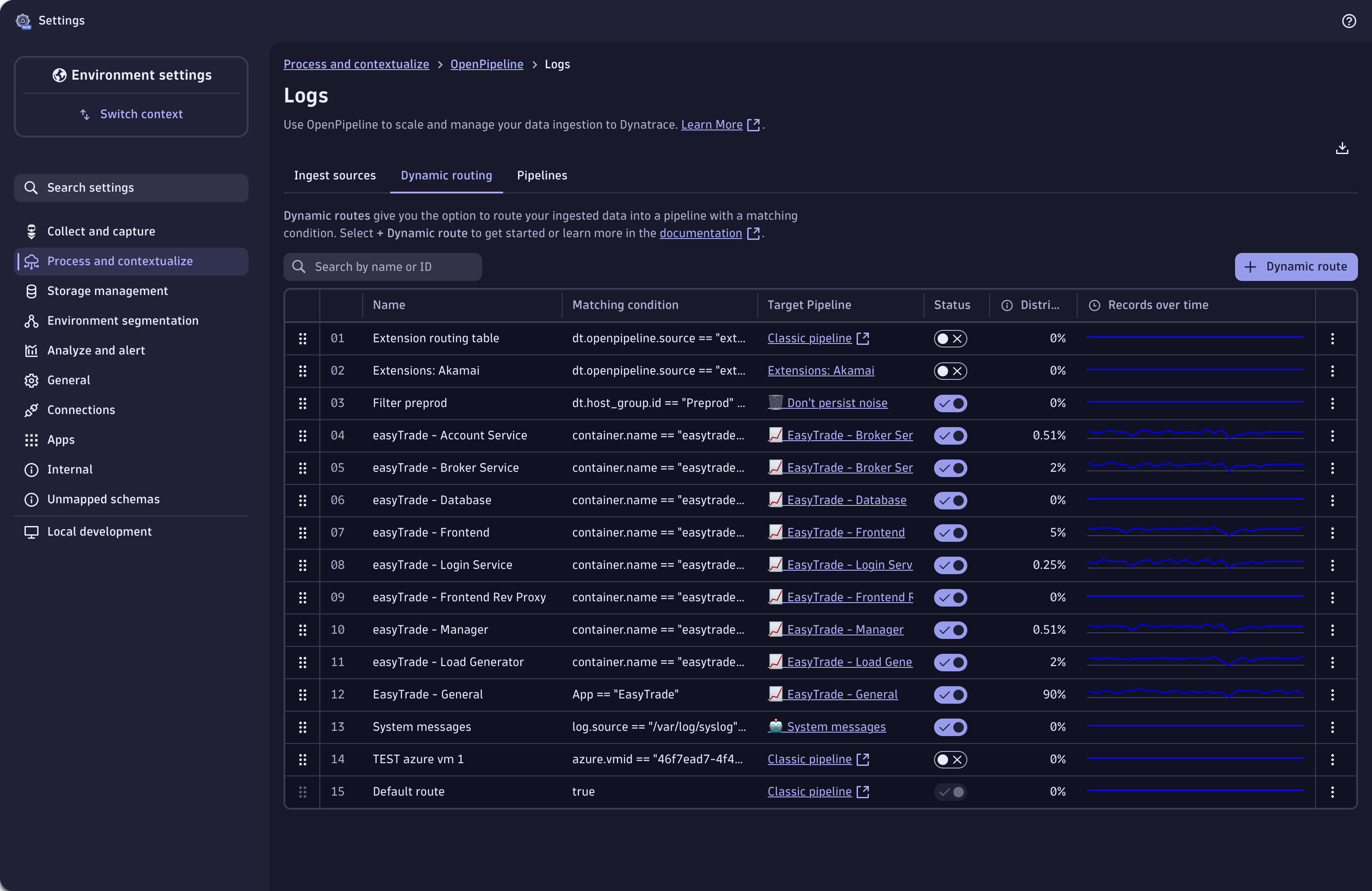
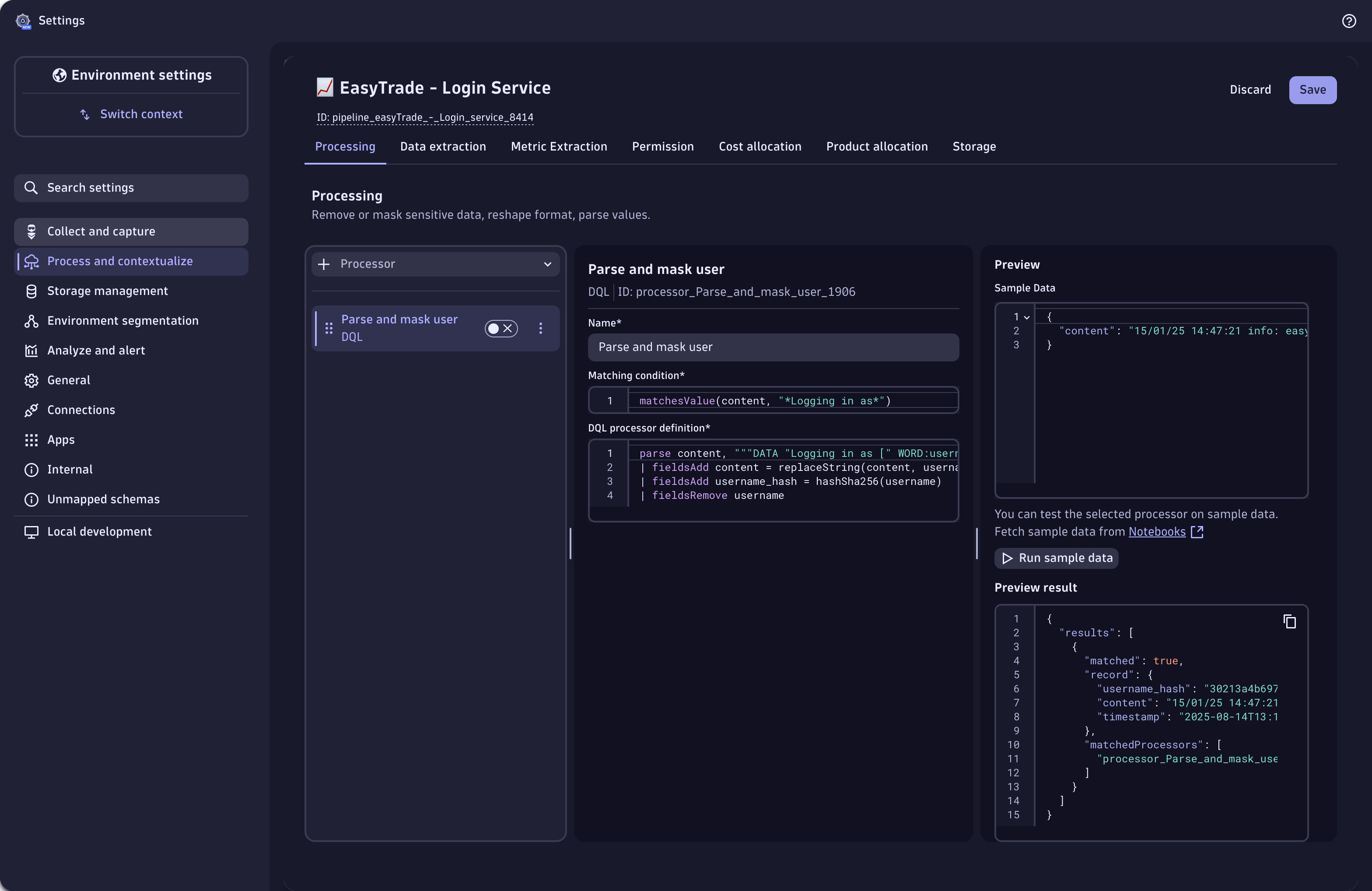
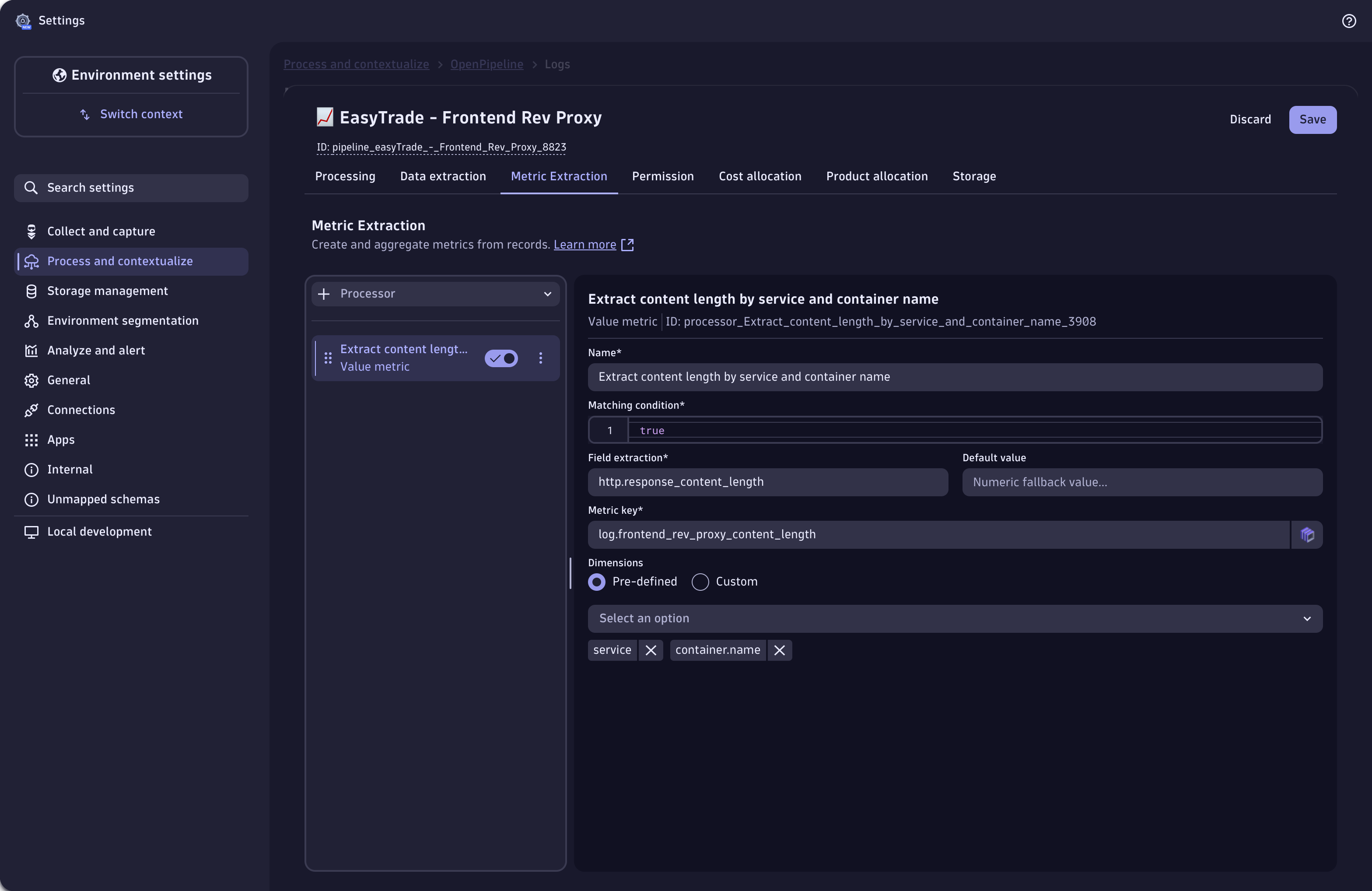
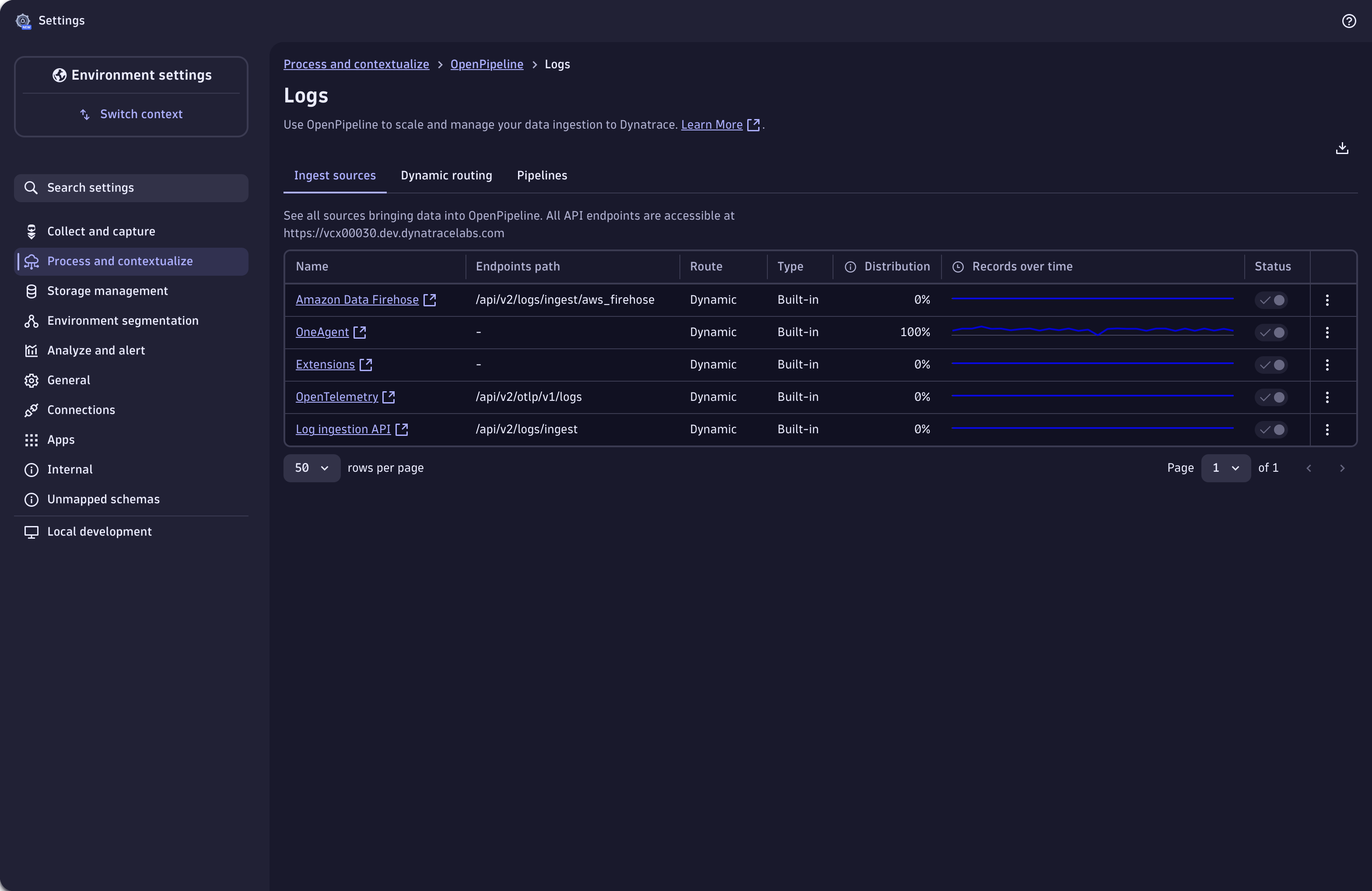
Use dynamic routing to route incoming records into pipelines.Log record processing: parsing and masking fields from log data.Extract metrics from your log record.Define ingest sources of log data.
  • Product information
  • Release notes

Overview

OpenPipeline is part of the unified Settings experience, inside the built-in Settings app.

With OpenPipeline, you can configure all aspects of ingesting, processing, and persisting streaming data into Dynatrace. It is designed to meet the high-throughput and processing demands of cloud- and AI-native companies and ...

  • Ensures compliant, secure ingestion across diverse data sources
  • Improve data quality through normalization, enrichment, and validation
  • Allows to extract other data types from logs, spans or events.
  • Simplifies pipeline setup, governance, and management

Use cases

With OpenPipeline you can:

  • Mask and filter records to remove sensitive data and comply with security and privacy requirements
  • Parse, add, remove, and rename fields to reshape or normalize the data format
  • Aggregate metrics from records for easier and faster query and dashboard display
  • convert a record to a different data type for domain-specific usage (eg create a business event out of a log record)
  • Set security-specific meta-data for defining record-based permissions
  • Assign data to Grail buckets to comply with proper retention time

Get started

OpenPipeline comes preinstalled with all Dynatrace SaaS environments.

  • Navigate to Settings > Process and contextualize > OpenPipeline
  • Create a new pipeline or open an existing one
  • Use one of the built-in parsing rules or create your own
  • Add further processing or data extraction steps directly on ingest before the record is stored in Grail

Today, OpenPipelines supports logs, spans, metrics, security / softwardevelopment lifecycle, Davis and generic events, and business data with more data types to come soon.

Dynatrace
DocumentationMore Information
By Dynatrace
Dynatrace support center
Subscribe to new releases
Copy to clipboard

Related to OpenPipeline

Grail logo

Grail

Dynatrace's data lakehouse providing unified storage for any type of data.

OneAgent logo

OneAgent

The simplest way to capture all observation signals automatically and in context

Storage Management logo

Storage Management

Organize your data and define retention times with custom Grail buckets.

OpenTelemetry logo

OpenTelemetry

Ingest and analyze OTel traces & metrics, set health alerts & view in context

Full version history

ReleaseDate

Full version history

  • Fixed ingest source duplicate issue for migrated schemas

Full version history

  • Added revision history
  • Updated list of disallowed event buckets
  • Updated ready-made dashboard OpenPipeline Usage Overview
  • Added refresh ingest sources and pipelines table after ownership is transferred
  • Added translations to OpenPipeline

Full version history

  • Removed histogram metric processor from UI when its not enabled on backend

Full version history

  • Fixed app crashing due to metrics not loaded
  • Reworked metric-dimension validations
  • Added deep linking capability
  • Added warning for matching-condition true on all necessary processors

Full version history

Patch Changes

  • Fixed incorrect bucket error message showing up when viewing an ingest source

Full version history

2.1.5

  • Fixed validation violations in sampling aware metric extraction processors for datatype spans

Full version history

  • Initial release with support for new migrated schemas
  • Updated dependencies
  • Fixed dynamic routes sheet form reset for avoiding triggering the dirty handler

Full version history

  • Fixed metric extraction processor when entering 'duration' in field extraction

Full version history

Major Changes

  • The stand-alone OpenPipeline app has been removed to streamline the user experience for your contextualizing and processing workload (from now on, you can access OpenPipeline as part of Settings. You can find it in Settings > Process and contextualize > OpenPipeline)

Minor Changes

  • Added sampling aware metric extraction processors for spans
  • Added default value for metric extraction processors
  • Added "View in Notebooks" button when editing metric extraction processor
  • Hid divider in widget header
  • Adapted chart filtering to support pipeline ID and ingest source unique identifier
  • Added handling for configuration disabled state
  • Modified message for OpenPipeline not fully enabled state
  • Improved pipelines select for Dynamic routes and Ingest Sources
  • Improved "Sample data preview" section
  • Marked Davis events and Davis problems configurations with label "New"
  • Added warning to matching conditions to make user aware that certain values shouldn't be used
  • Fixed search in Pipelines tab for default pipeline
  • Added one retry to our queries to minimize logs
  • Added check for backticks for dimension name

Full version history

  • Fixed editing first route in dynamic routes
  • Fixed status column display when filtering dynamic routes

Full version history

  • Fix interactions (edit, delete) with dynamic routes when filtering table

Full version history

  • Enabled OpenPipeline in Settings
  • Hid chart columns in ingest sources for metrics, events, security, business events, system events, and security events
  • Added default dimensions to metric extraction processors
  • Disabled row-ordering for dynamic routes in read-only mode
  • Unified help menu options

Full version history

  • Fixed move-to-end function in processors list

Full version history

  • Fixed edit of undefined on filtered dynamic routes

Full version history

  • Fixed Davis Event extraction processor error

Full version history

  • Added missing mandatory items to the Help dropdown menu
  • Made selection of Buckets clearable
  • Added traffic over time chart to the dynamic routes table
  • Added distribution column for Dynamic Routes
  • Improved UI elements for better user experience

Full version history

  • Aligned OpenPipeline with guidelines
  • Added open in Notebooks action for pipelines
  • Added a warning support from /matcher/verify endpoint while user edits matching condition
  • Added intents for viewing pipelines and ingest sources on a new tab
  • Added traffic distributions cells to pipelines
  • Added search by pipeline ID
  • Improved behavior of technology bundle search
  • Removed config scope prefix from metric extraction UI

Full version history

  • Fixed download for Mozilla and improved download for Safari
  • Added new open in Notebooks option
  • Added technology processor to ingest sources sheet for SDLC configuration
  • Added distribution for ingest sources in new column
  • Added sparkline charts for ingest sources

Full version history

  • Provided ready-made dashboard for OpenPipeline
  • Added discard modal on new dynamic routes and disabled tabs when unsaved changes on ingest-sources
  • Added intent to open a dynamic route on a new tab

Full version history

  • Fixed issue with undefined object

Full version history

  • Added extracted metric dimension naming
  • Added special handling for version conflict case when adding a new pipeline
  • Added metric extraction processors for spans
  • Added download configuration option

Full version history

  • Added link to builtin and default dynamic routes in the used by column
  • Added more information to bucket select option
  • Added flexible matching condition for technology processor
  • Fixed matcher behavior in modal

Full version history

  • Added sample data field to technology
  • Added readonly mode
  • Added link to open Storage Management inside of Settings
  • Added default-bucket to storage step in pipeline
  • Added validation for dimensions in metric extraction processors
  • Added functionality to enable or disable an ingest source
  • Refactored pipeline name input component
  • Fixed bug that would close pipeline sheet without showing discard-modal first
  • Fixed rename fields processor not properly processing data.

Full version history

  • Added modal for choosing a technology processor
  • Added tooltip to chips component
  • Added list to 'Used by' column in ingest sources and pipelines
  • Added sliders to resize the page size in the processor menu
  • Changed minor UI inconsistencies and improve UX
  • Fixed validation issue for business event processor
  • Fixed delete processor issue
  • Fixed safari onBlur behaviour

Full version history

  • Added Permission stage to "Spans" config scope

Full version history

  • Added "Technology" processor to Logs
  • Added "Drop record" processor
  • Added "Software Development Lifecycle" config scope
  • Added Third option for "Security Context" processor - static array (combined with 1.304+)
  • Fixed style issues for smaller screens

Full version history

  • Updated dependencies

Full version history

  • Added System Events to OpenPipeline (available from version 302)
  • Added length constraint to sample data preview
  • Added a feedback button

Full version history

  • Added autocomplete for Matching Condition and DQL processor
  • Added error state for sample data preview
  • Added tab-navigation
  • Dynamic route highlighted when navigating from Pipelines
  • Added "Copy endpoint" as a cell action

Full version history

  • Adapted minor wording things and improve UX
  • Added link from classic pipelines to Settings screen
  • Fixed responsiveness-issues of the app
  • Added Pipeline ID and Processor ID in UI
  • Added scrollbar to processor-menu
  • Added metric key validation
  • Updated message when OpenPipeline is not fully enabled

Full version history

  • Changed sidebar menu component
  • Renamed "AppSec" sidebar label and title to "Security events"
  • Updated columns for ingest sources table
  • Added onboarding banner
  • Handled non-existing link

Full version history

  • Initial release of OpenPipeline App
Dynatrace Hub
Get data into DynatraceBuild your own app
All (811)Log Management and AnalyticsKubernetesAI and LLM ObservabilityInfrastructure ObservabilitySoftware DeliveryApplication ObservabilityApplication SecurityDigital ExperienceBusiness Observability
Filter
Type
Built and maintained by
Deployment model
SaaS
  • SaaS
  • Managed
Partner FinderBecome a partnerDynatrace Developer

Discover recent additions to Dynatrace

Problems logo

Problems

Analyze abnormal system behavior and performance problems detected by Davis AI.

Logs logo

Logs

Explore all your logs without writing a single query.

Security Investigator logo

Security Investigator

Fast and precise forensics for security and logs on Grail data with DQL queries.

Business Flow logo

Business Flow

Track, analyze, and optimize your critical business processes.

Cost & Carbon Optimization logo

Cost & Carbon Optimization

Track, analyze, and optimize your IT carbon footprint and public cloud costs.

Davis Anomaly Detection logo

Davis Anomaly Detection

Detect anomalies in timeseries using the Davis AI

Analyze your data

Understand your data better with deep insights and clear visualizations.

Notebooks logo

Notebooks

Create powerful, data-driven documents for custom analytics and collaboration.

Dashboards logo

Dashboards

Transform complex data into clear visualizations with custom dashboards.

Automate your processes

Turn data and answers into actions, securely, and at scale.

Workflows logo

Workflows

Automate tasks in your IT landscape, remediate problems, and visualize processes

Jira logo

Jira

Create, query, comment, transition, and resolve Jira tickets within workflows.

Slack logo

Slack

Automate Slack messaging for security incidents, attacks, remediation, and more.

Secure your cloud application

See vulnerabilities and attacks in your environment.

Security Overview logo

Security Overview

Get a comprehensive overview of the security of your applications.

Code-Level Vulnerabilities logo

Code-Level Vulnerabilities

Detect vulnerabilities in your code in real time.

Security Posture Management logo

Security Posture Management

Detect, prioritize, and remediate security and compliance findings with SPM.

Threats & Exploits logo

Threats & Exploits

Understand, triage, and investigate detection findings and alerts.

Are you looking for something different?

We have hundreds of apps, extensions, and other technologies to customize your environment

Leverage our newest innovations of Dynatrace Saas

Kick-start your app creation

Kick-start your app creation

Whether you’re a beginner or a pro, Dynatrace Developer has the tools and support you need to create incredible apps with minimal effort.
Go to Dynatrace Developer
Upgrading from Dynatrace Managed to SaaS

Upgrading from Dynatrace Managed to SaaS

Drive innovation, speed, and agility in your organization by seamlessly and securely upgrading.
Learn More
Log Management and Analytics

Log Management and Analytics

Innovate faster and more efficiently with unified log management and log analytics for actionable insights and automation.
Learn more