




















Skip to technology filters Skip to main content
Dynatrace Hub

Extend the platform,
empower your team.

Popular searches:
Home hero bg
DevCycle by DynatraceDevCycle by Dynatrace
DevCycle by Dynatrace

DevCycle by Dynatrace

Rollout, manage and experiment on features with DevCycle by Dynatrace.

Technology
Free trialDocumentation
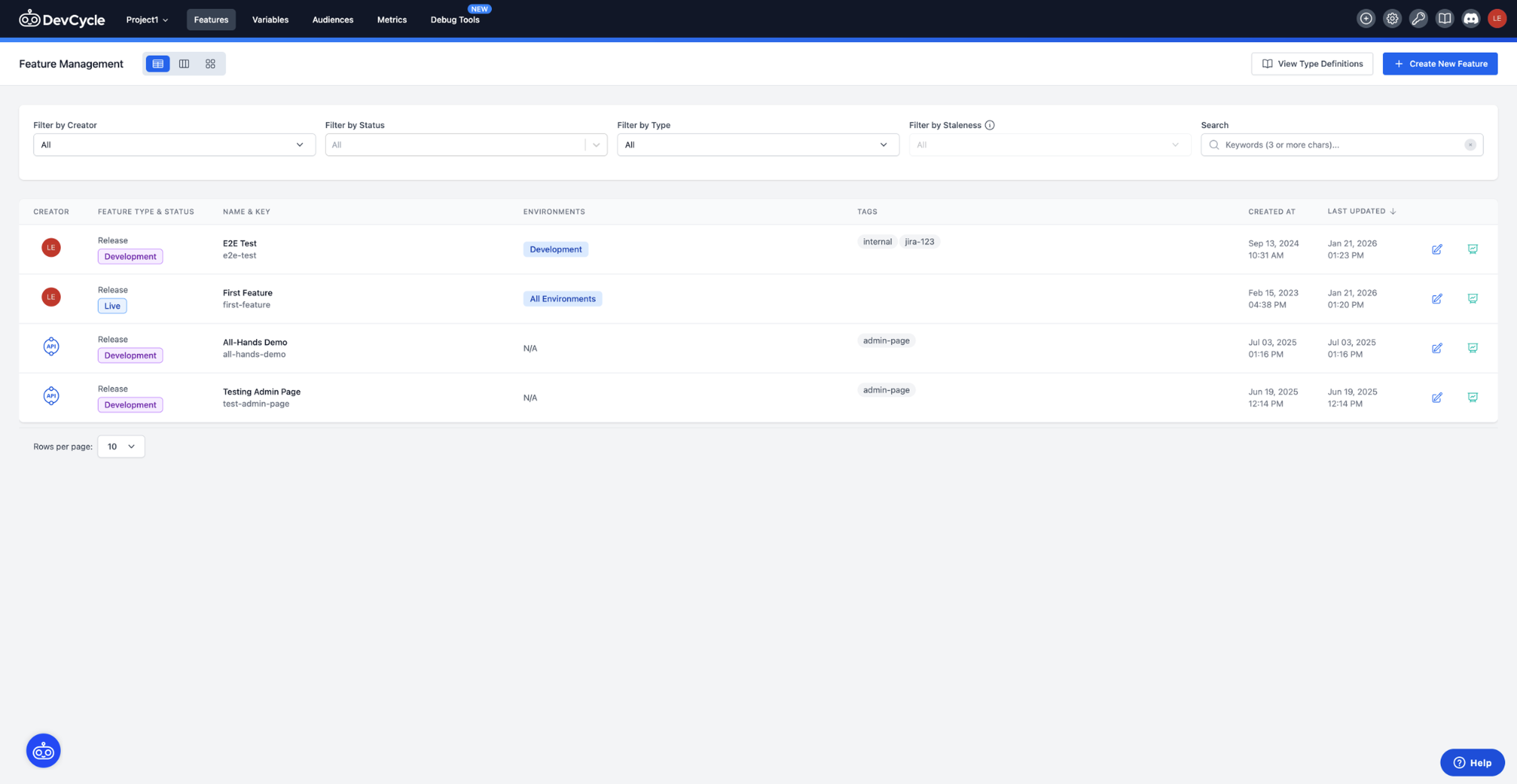
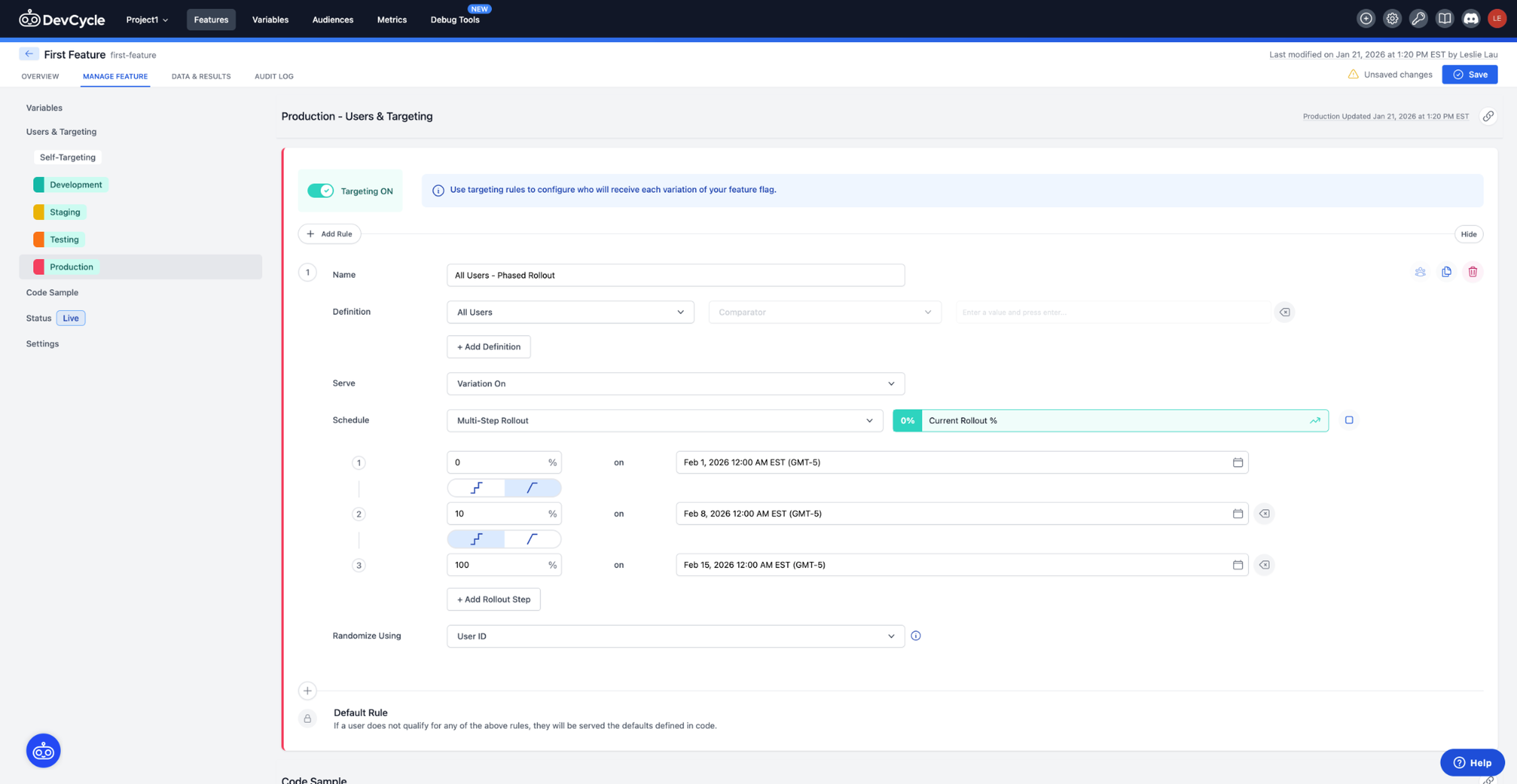
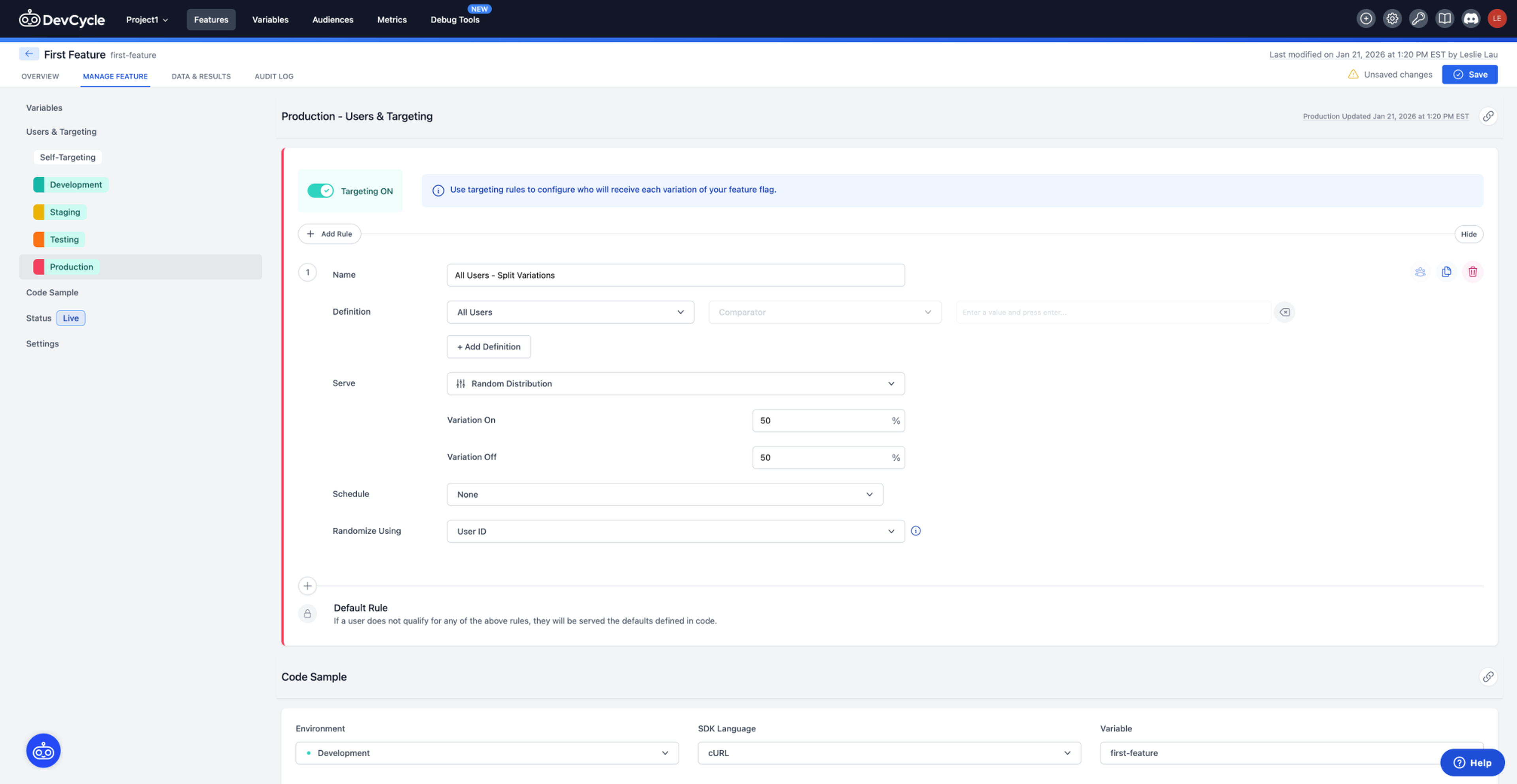
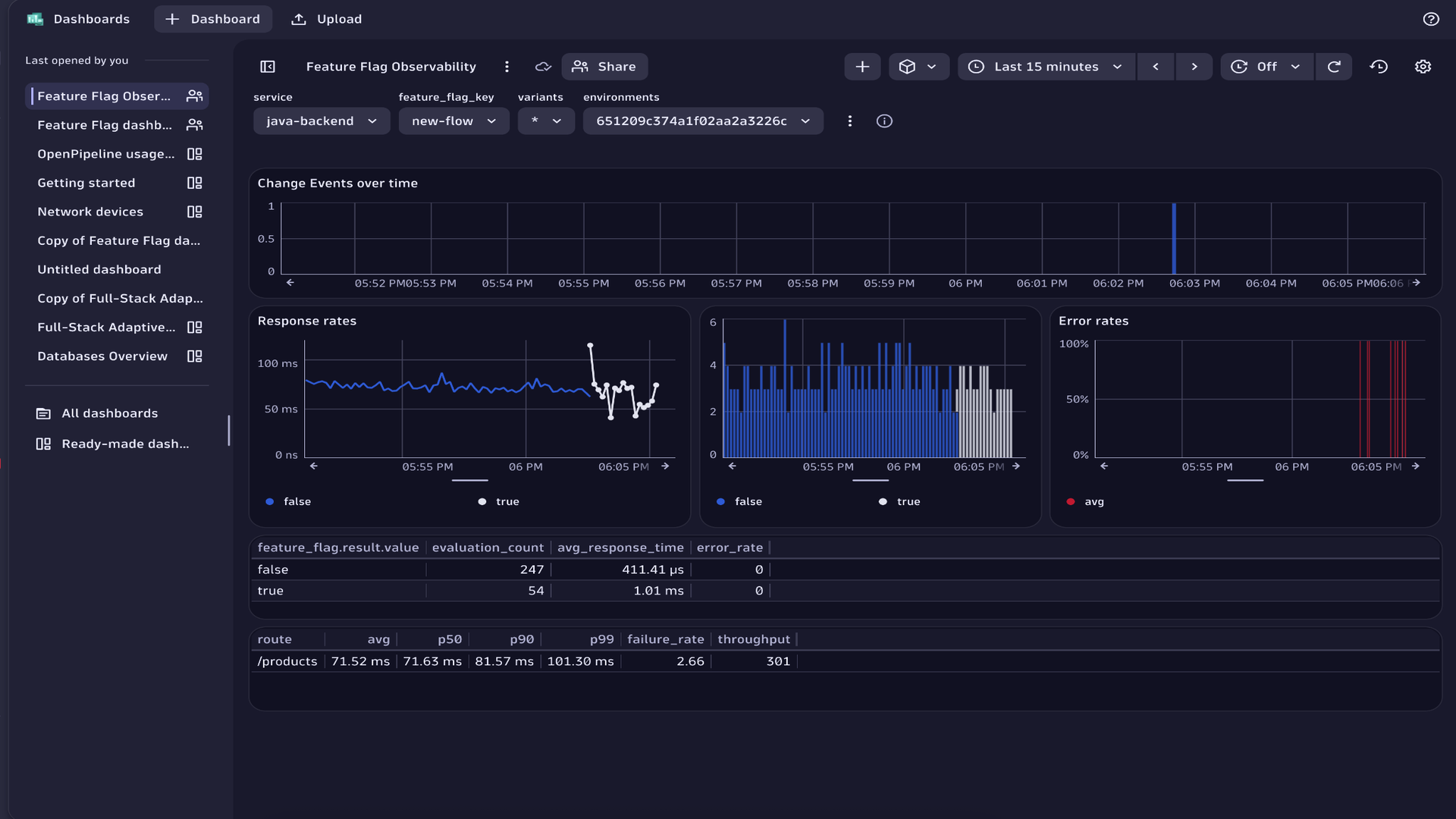
DevCycle dashboard showing a list of feature flags, their status, environments, and rollout information.DevCycle targeting rules interface showing rule definitions, audience conditions, and rollout configuration.DevCycle feature targeting view showing rules, variations, and rollout configuration in the Hub console.Dynatrace dashboard displaying service performance metrics over time with feature flag evaluation events highlighted.
  • Product information

Overview

DevCycle by Dynatrace is a progressive delivery platform that provides feature management and experimentation capabilities, helping you ship faster with less risk. You use feature flags as a safe control layer to progressively roll out changes, compare variants in production, and protect users when something goes wrong.

With DevCycle, engineering, SRE, product, and release teams can:

  • Practice progressive delivery with incremental exposure through rollout percentages, allowing features to be rolled out or rolled back to a specific percentage of users.
  • Run real traffic experiments (A/B tests and feature comparisons) and measure latency, errors, and business metrics in one place.
  • Target features to specific user groups such as internal users, beta testers, or custom cohorts, using documented targeting rules.
  • Deploy continuously and enable features only when ready, using feature flags to ship code without impacting users until the feature is intentionally activated.

The DevCycle Dynatrace integration streams flag-evaluation events into Dynatrace so you can clearly see which feature change is behind a spike in errors, latency, or conversions, without digging through commits.

Use cases

  • Gradually roll out new functionalities: Control exposure safely using percentage-based rollout rules to introduce or withdraw features for a specific portion of users without redeploying.

  • Target releases to the right users: Deliver features only to selected groups, such as internal users, beta testers, or specific customer cohorts, to gather feedback or reduce risk.

  • Test and compare feature variants: Use DevCycle's experimentation capabilities to evaluate alternative feature versions or configurations with real production traffic.

  • Reduce deployment risk in CI/CD workflows: Deploy code continuously while keeping new behavior hidden until ready, using feature flags to separate deploy from release. Gain granular control over release behavior that CI/CD alone can't provide: decide exactly which users, environments, or services receive new functionality. (for example, selectively enable backend logic, toggle third‑party integrations, or restrict new workflows to internal groups for early validation.)

  • Coordinate time-based feature launches: Use scheduled releases to automatically turn features on or off at specific times, ensuring aligned launches across environments.

Get started

Sign in and create your first project

Start by creating a project in DevCycle and setting up your environments (for example, development, staging, production).

Quickstart

Install your DevCycle SDK

Add the appropriate SDK to your application so it can evaluate feature flags. DevCycle supports a wide range of platforms and languages.

Get started (SDK section)

Create a feature flag

Define your feature within DevCycle. You can add variables or configuration options depending on what you want to control.

Targeting overview

Set targeting rules or rollout percentages

Choose who should receive the feature: internal users, beta testers, or custom cohorts, or adjust percentage-based rollout rules to control exposure.

Targeting rules

Targeting overview
Rollouts

Deploy your code and enable the feature when ready

Use feature flags to keep new code paths inactive until you explicitly enable them, promoting safe CI/CD workflows.

CI/CD best practices

Connect DevCycle to Dynatrace

Stream feature flag evaluation events into Dynatrace to correlate feature exposure with behavior, performance, or error trends.

Integration docs

Dynatrace
DocumentationMore Information
By Dynatrace
Dynatrace support center
Copy to clipboard
Dynatrace Hub
Get data into DynatraceBuild your own app
Dynatrace Intelligence - Agentic Operations SystemThe Dynatrace Agentic AI ecosystem
All (872)Log Management and AnalyticsKubernetesAI and LLM ObservabilityInfrastructure ObservabilitySoftware DeliveryApplication ObservabilityApplication SecurityBusiness ObservabilityDigital Experience
Filter
Type
Built and maintained by
Deployment model
SaaS
  • SaaS
  • Managed
Partner FinderBecome a partnerDynatrace Developer

Discover recent additions to Dynatrace

Problems logo

Problems

Detect, explain and triage problems automatically using Dynatrace Intelligence.

Logs logo

Logs

Explore all your logs without writing a single query.

Investigations logo

Investigations

Fast and precise incident response on Grail data with DQL queries.

Business Flow logo

Business Flow

Track, analyze, and optimize your critical business processes.

Cost & Carbon Optimization logo

Cost & Carbon Optimization

Track, analyze, and optimize your IT carbon footprint and public cloud costs.

Anomaly Detection logo

Anomaly Detection

Detect and alert on anomalies and custom patterns using any DQL time series.

Analyze your data

Understand your data better with deep insights and clear visualizations.

Notebooks logo

Notebooks

Create powerful, data-driven documents for custom analytics and collaboration.

Dashboards logo

Dashboards

Transform complex data into clear visualizations with custom dashboards.

Automate your processes

Turn data and answers into actions, securely, and at scale.

Workflows logo

Workflows

Automate tasks in your IT landscape and move towards autonomous operations.

Jira logo

Jira

Create, query, comment, transition, and resolve Jira tickets within workflows.

Slack logo

Slack

Automate Slack messaging for security incidents, attacks, remediation, and more.

Secure your cloud application

See vulnerabilities and attacks in your environment.

Security Posture Management logo

Security Posture Management

Detect, prioritize, and remediate security and compliance findings with SPM.

Threats & Exploits logo

Threats & Exploits

Understand, triage, and investigate detection findings and alerts.

More resources

Observability for Developers on Cursor logo

Observability for Developers on Cursor

Get Real time Code-Level data directly to your Cursor IDE

GitHub Copilot Coding Agent logo

GitHub Copilot Coding Agent

Automate vulnerability remediation and boost developer productivity

GitHub Copilot Custom Agent logo

GitHub Copilot Custom Agent

Automate your development workflows with specialized agent definitions

Observability for Developer on JetBrains logo

Observability for Developer on JetBrains

Get real-time code-level data directly to your Jetbrains IDE

Pagerduty for Dynatrace Workflows logo

Pagerduty for Dynatrace Workflows

Streamline incident management with automated Pageruty workflows

Cursor IDE logo

Cursor IDE

Boost developer productivity and get real-time, code-level insights into Cursor

Observability for Developers on Windsurf logo

Observability for Developers on Windsurf

Get real-time code-level data directly to your Windsurf IDE

Are you looking for something different?

We have hundreds of apps, extensions, and other technologies to customize your environment

Leverage our newest innovations of Dynatrace Saas

Kick-start your app creation

Kick-start your app creation

Whether you’re a beginner or a pro, Dynatrace Developer has the tools and support you need to create incredible apps with minimal effort.
Go to Dynatrace Developer
Upgrading from Dynatrace Managed to SaaS

Upgrading from Dynatrace Managed to SaaS

Drive innovation, speed, and agility in your organization by seamlessly and securely upgrading.
Learn More
Log Management and Analytics

Log Management and Analytics

Innovate faster and more efficiently with unified log management and log analytics for actionable insights and automation.
Learn more

