

























Kick-start your app creation
Whether you’re a beginner or a pro, Dynatrace Developer has the tools and support you need to create incredible apps with minimal effort.
Go to Dynatrace Developer
 Dell EMC PowerMax
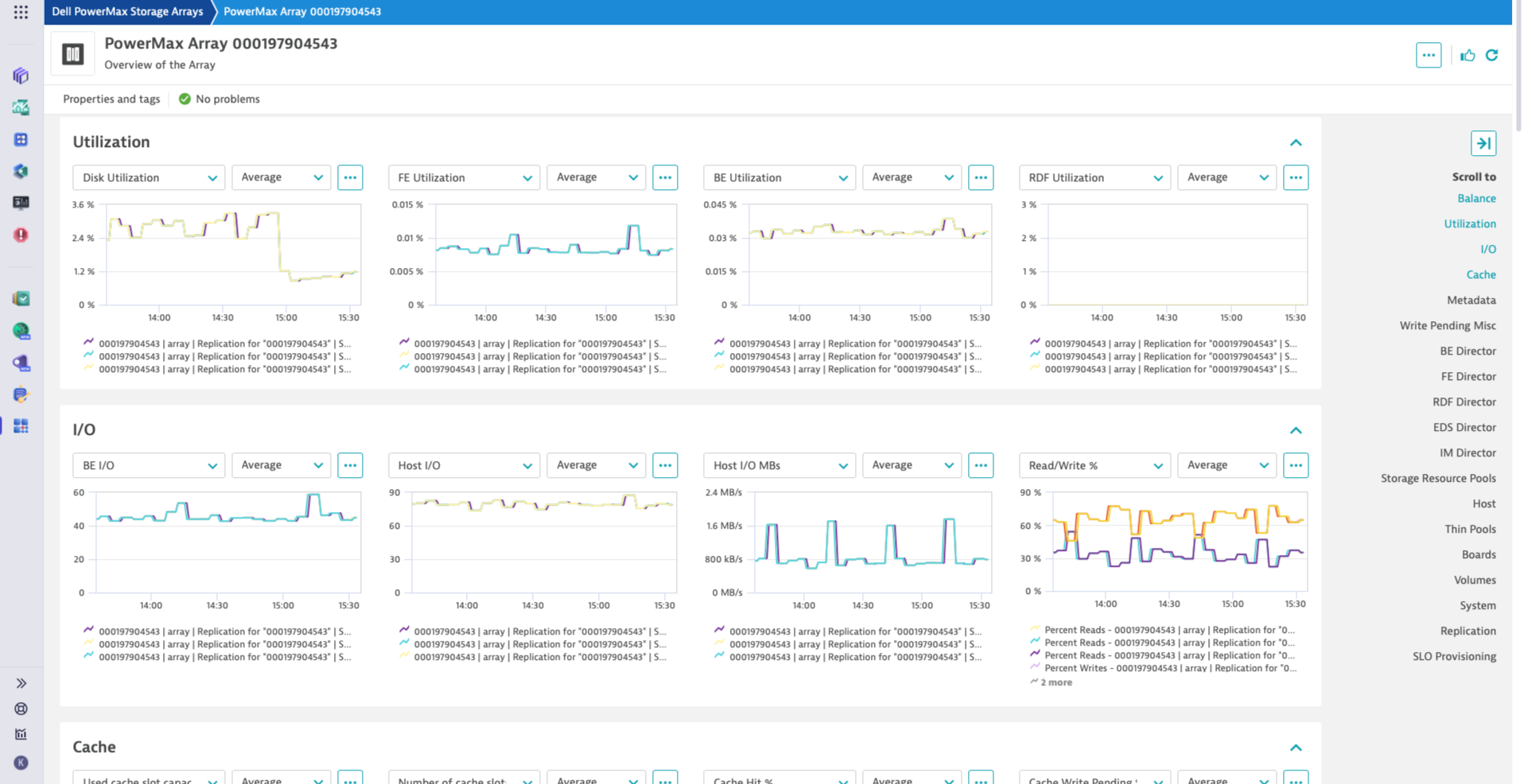
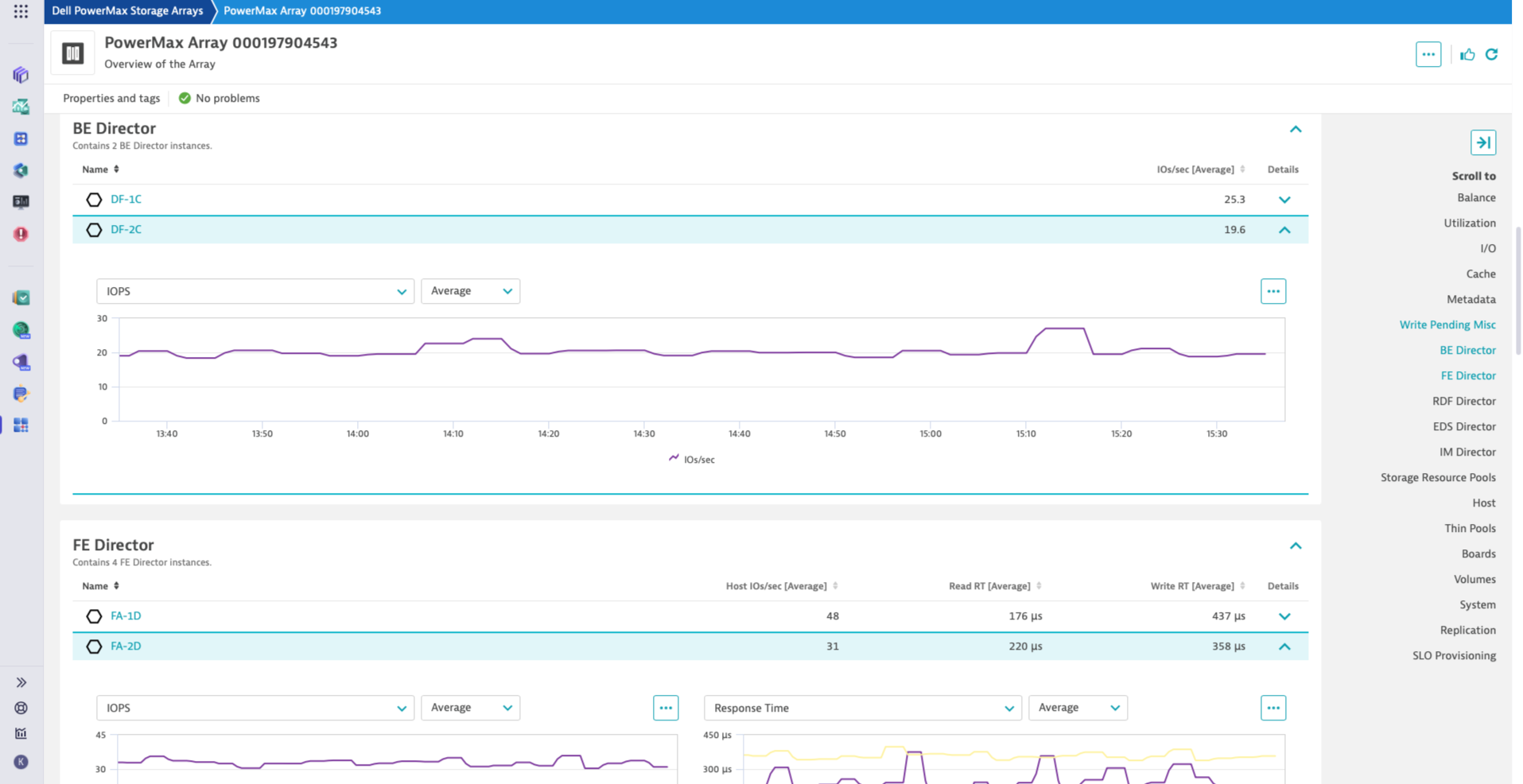
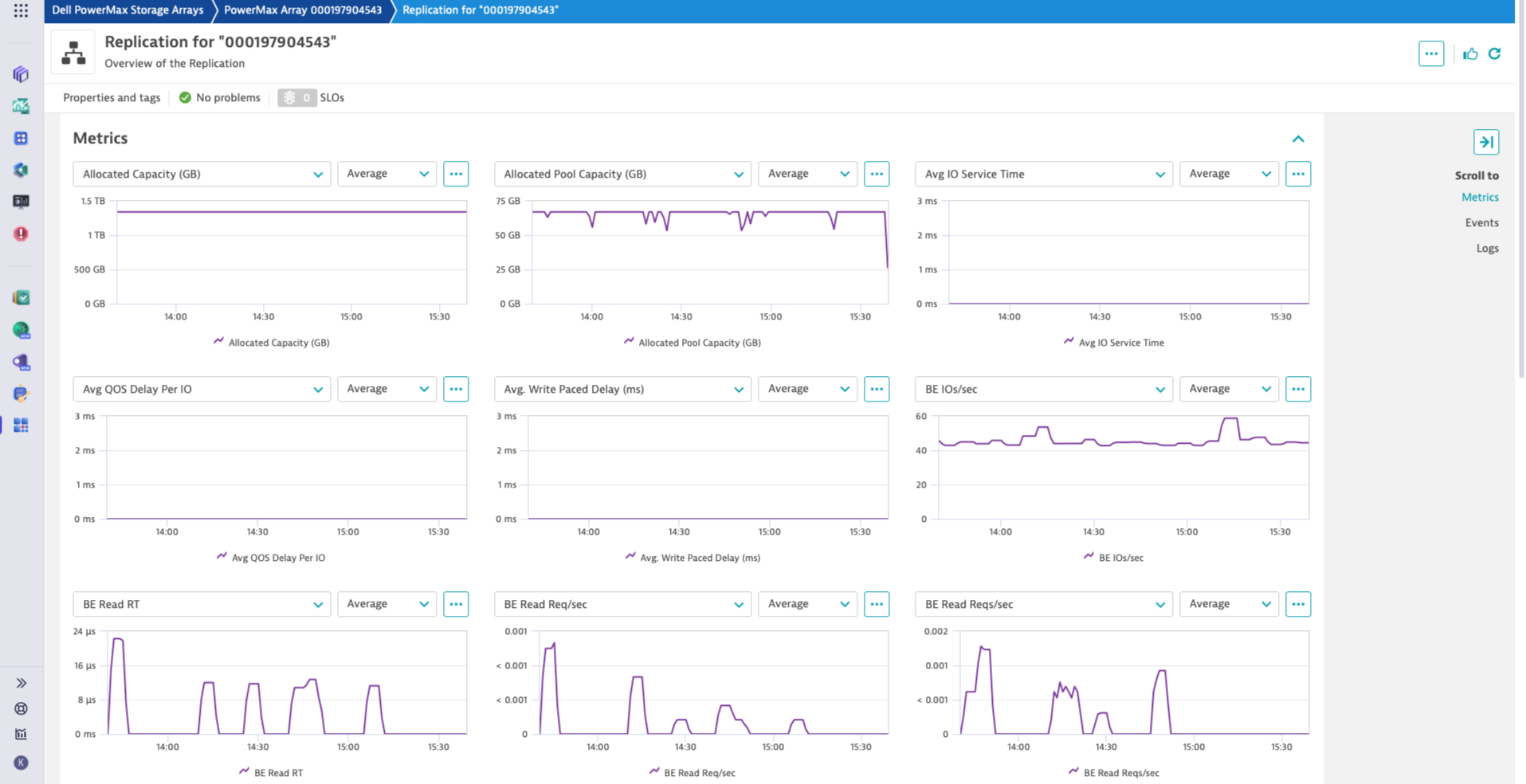
Monitor PowerMax Arrays for performance and health, with Dell Unisphere API.
ExtensionSimplify monitoring of your PowerMax infrastructure. Focus on essential insights into your PowerMax arrays.
This extension is intended for users, who:
This extension enables you to:
For more information on the installation and configuration, please see Dell EMC PowerMax extension in the Dynatrace Documentation.
Below is a complete list of the feature sets provided in this version. To ensure a good fit for your needs, individual feature sets can be activated and deactivated by your administrator during configuration.
| Metric name | Metric key | Description | Unit |
|---|---|---|---|
| Avg IO Service Time | storage.dell.powermax.rdfdirector.AvgIOServiceTime | - | MilliSecond |
| Copy IOs/sec | storage.dell.powermax.rdfdirector.CopyIOs | - | Count |
| Copy Throughput | storage.dell.powermax.rdfdirector.CopyMBs | - | MegaBytePerSecond |
| IOs/sec | storage.dell.powermax.rdfdirector.IOs | - | Count |
| Throughput Received | storage.dell.powermax.rdfdirector.MBRead | - | MegaBytePerSecond |
| Throughput Sent and Received | storage.dell.powermax.rdfdirector.MBSentAndReceived | - | MegaBytePerSecond |
| Throughput Sent | storage.dell.powermax.rdfdirector.MBWritten | - | MegaBytePerSecond |
| Percent Busy | storage.dell.powermax.rdfdirector.PercentBusy | - | Percent |
| Write Reqs/sec | storage.dell.powermax.rdfdirector.WriteReqs | - | Count |
| Metric name | Metric key | Description | Unit |
|---|---|---|---|
| IOs/sec | storage.dell.powermax.bedirector.IOs | - | Count |
| Throughput Read | storage.dell.powermax.bedirector.MBRead | - | MegaBytePerSecond |
| Throughput Written | storage.dell.powermax.bedirector.MBWritten | - | MegaBytePerSecond |
| Throughput | storage.dell.powermax.bedirector.MBs | - | MegaBytePerSecond |
| Percent Busy | storage.dell.powermax.bedirector.PercentBusy | - | Percent |
| Read Reqs/sec | storage.dell.powermax.bedirector.ReadReqs | - | Count |
| Reqs/sec | storage.dell.powermax.bedirector.Reqs | - | Count |
| Syscall Count/sec | storage.dell.powermax.bedirector.SyscallCount | - | Count |
| Write Reqs/sec | storage.dell.powermax.bedirector.WriteReqs | - | Count |
| Metric name | Metric key | Description | Unit |
|---|---|---|---|
| - | storage.dell.powermax | - | - |
| Metric name | Metric key | Description | Unit |
|---|---|---|---|
| RDFA WP Count | storage.dell.powermax.rdfa.RDFA_WPCount | - | Count |
| Metric name | Metric key | Description | Unit |
|---|---|---|---|
| Memory Page Fall thru Time | storage.dell.powermax.imdirector.MemoryPageFallThruTime | - | MicroSecond |
| Memory Page Usage | storage.dell.powermax.imdirector.MemoryPageUsage | - | Count |
| Percent Busy | storage.dell.powermax.imdirector.PercentBusy | - | Percent |
| Metric name | Metric key | Description | Unit |
|---|---|---|---|
| Percent Busy | storage.dell.powermax.edsdirector.PercentBusy | - | Percent |
| Metric name | Metric key | Description | Unit |
|---|---|---|---|
| Disk Capacity | storage.dell.powermax.disk.capacity | - | GigaByte |
| Failed Disks Count | storage.dell.powermax.health.num_failed_disks | - | Count |
| Overall Health | storage.dell.powermax.health.overall | - | Count |
| Health Capacity | storage.dell.powermax.health.capacity | - | Count |
| Health Configuration | storage.dell.powermax.health.configuration | - | Count |
| Health Performance HS | storage.dell.powermax.health.performance_hs | - | Count |
| Health Data Protection HS | storage.dell.powermax.health.data_protection_hs | - | Count |
| Director Port Status | storage.dell.powermax.director.port_status | - | Count |
| Director Capacity | storage.dell.powermax.director.capacity | - | Count |
| Metric name | Metric key | Description | Unit |
|---|---|---|---|
| Reads/sec | storage.dell.powermax.diskgroup.DiskReads | - | Count |
| Writes/sec | storage.dell.powermax.diskgroup.DiskWrites | - | Count |
| IO Density | storage.dell.powermax.diskgroup.IODensity | - | Unspecified |
| IOs/sec | storage.dell.powermax.diskgroup.IOs | - | Count |
| Throughput Read | storage.dell.powermax.diskgroup.MBReads | - | MegaBytePerSecond |
| Throughput Written | storage.dell.powermax.diskgroup.MBWritten | - | MegaBytePerSecond |
| Throughput | storage.dell.powermax.diskgroup.MBs | - | MegaBytePerSecond |
| Percent Busy | storage.dell.powermax.diskgroup.PercentBusy | - | Percent |
| Percent Free Capacity | storage.dell.powermax.diskgroup.PercentCapacityFree | - | Percent |
| Percent Used Capacity | storage.dell.powermax.diskgroup.PercentCapacityUsed | - | Percent |
| Read RT | storage.dell.powermax.diskgroup.ReadResponseTime | - | MilliSecond |
| Response Time | storage.dell.powermax.diskgroup.ResponseTime | - | MilliSecond |
| Total Capacity | storage.dell.powermax.diskgroup.TotalCapacity | - | GigaByte |
| Used Capacity | storage.dell.powermax.diskgroup.UsedCapacity | - | GigaByte |
| Write RT | storage.dell.powermax.diskgroup.WriteResponseTime | - | MilliSecond |
| Metric name | Metric key | Description | Unit |
|---|---|---|---|
| Volume Capacity | storage.dell.powermax.volume.cap_mb | - | MegaByte |
| Volume Effective Used Capacity | storage.dell.powermax.volume.effective_used_capacity_gb | - | GigaByte |
| Volume Snapshots | storage.dell.powermax.volume.num_of_snapshots | - | Count |
| Volume Clones | storage.dell.powermax.volume.num_of_clones | - | Count |
| Metric name | Metric key | Description | Unit |
|---|---|---|---|
| Host IO Limit IOs/sec | storage.dell.powermax.fedirector.HostIOLimitIOs | - | Count |
| Host IO Limit Throughput | storage.dell.powermax.fedirector.HostIOLimitMBs | - | MegaBytePerSecond |
| Host IOs/sec | storage.dell.powermax.fedirector.HostIOs | - | Count |
| Host Throughput | storage.dell.powermax.fedirector.HostMBs | - | MegaBytePerSecond |
| Percent Busy | storage.dell.powermax.fedirector.PercentBusy | - | Percent |
| Queue Depth Utilization | storage.dell.powermax.fedirector.QueueDepthUtilization | - | Percent |
| Read RT | storage.dell.powermax.fedirector.ReadResponseTime | - | MilliSecond |
| Syscall Count/sec | storage.dell.powermax.fedirector.SyscallCount | - | Count |
| Syscall Time/sec | storage.dell.powermax.fedirector.SyscallTimePerSec | - | MilliSecond |
| Write RT | storage.dell.powermax.fedirector.WriteResponseTime | - | MilliSecond |
| Metric name | Metric key | Description | Unit |
|---|---|---|---|
| Inbound Throughput | storage.dell.powermax.board.InboundMBs | - | MegaBytePerSecond |
| Utilization | storage.dell.powermax.board.InterConnect | - | Percent |
| Max Speed | storage.dell.powermax.board.MaxSpeedMBs | - | MegaBytePerSecond |
| Outbound Throughput | storage.dell.powermax.board.OutboundMBs | - | MegaBytePerSecond |
| Metric name | Metric key | Description | Unit |
|---|---|---|---|
| Host IOs/sec | storage.dell.powermax.host.HostIOs | - | Count |
| Host Throughput Read | storage.dell.powermax.host.HostMBReads | - | MegaBytePerSecond |
| Host Throughput Written | storage.dell.powermax.host.HostMBWrites | - | MegaBytePerSecond |
| Host Throughput | storage.dell.powermax.host.MBs | - | MegaBytePerSecond |
| Read RT | storage.dell.powermax.host.ReadResponseTime | - | MilliSecond |
| Host Reads/sec | storage.dell.powermax.host.Reads | - | Count |
| Response Time | storage.dell.powermax.host.ResponseTime | - | MilliSecond |
| Syscall Count/sec | storage.dell.powermax.host.SyscallCount | - | Count |
| Write RT | storage.dell.powermax.host.WriteResponseTime | - | MilliSecond |
| Host Writes/sec | storage.dell.powermax.host.Writes | - | Count |
| Metric name | Metric key | Description | Unit |
|---|---|---|---|
| Allocated Capacity (GB) | storage.dell.powermax.array.AllocatedCapacity | - | GigaByte |
| BE IOs/sec | storage.dell.powermax.array.BEIOs | - | Count |
| BE Utilization | storage.dell.powermax.array.BEUtilization | - | Percent |
| Cache Balance | storage.dell.powermax.array.Cache_Balance | - | Percent |
| Capacity of R1 Cache Slots in Use | storage.dell.powermax.array.CapacityR1CacheSlotsInUse | - | KiloByte |
| Capacity of R2 Cache Slots in Use | storage.dell.powermax.array.CapacityR2CacheSlotsInUse | - | KiloByte |
| DA Balance | storage.dell.powermax.array.DA_Balance | - | Percent |
| DX Balance | storage.dell.powermax.array.DX_Balance | - | Percent |
| Data Reduction Ratio on Reducible | storage.dell.powermax.array.DataReductionRatioOnReducible | - | Count |
| Percent Disk Busy | storage.dell.powermax.array.DiskUtilization | - | Percent |
| EFD Balance | storage.dell.powermax.array.EFD_Balance | - | Percent |
| FC Balance | storage.dell.powermax.array.FC_Balance | - | Percent |
| FE Utilization | storage.dell.powermax.array.FEUtilization | - | Percent |
| FE Balance | storage.dell.powermax.array.FE_Balance | - | Percent |
| Host IOs/sec | storage.dell.powermax.array.HostIOs | - | Count |
| Host Throughput | storage.dell.powermax.array.HostMBs | - | MegaBytePerSecond |
| Local WP Count | storage.dell.powermax.array.LocalWPCount | - | Count |
| Local WP Used Capacity | storage.dell.powermax.array.LocalWPUsedCapacity | - | MegaByte |
| Number of R1 Cache Slots in Use | storage.dell.powermax.array.NumberR1CacheSlotsInUse | - | Count |
| Number of R2 Cache Slots in Use | storage.dell.powermax.array.NumberR2CacheSlotsInUse | - | Count |
| Data Reduction Ratio | storage.dell.powermax.array.OverallCompressionRatio | - | Count |
| Percent Cache WP | storage.dell.powermax.array.PercentCacheWP | - | Percent |
| Percent Hit | storage.dell.powermax.array.PercentHit | - | Percent |
| Percent Meta Data Backend Used | storage.dell.powermax.array.PercentMetaBEUsed | - | Percent |
| Percent Meta Data Frontend Used | storage.dell.powermax.array.PercentMetaFEUsed | - | Percent |
| Percent Meta Data Replication Used | storage.dell.powermax.array.PercentMetaRepUsed | - | Percent |
| Percent Meta Data System Used | storage.dell.powermax.array.PercentMetaSystemUsed | - | Percent |
| Percent Reads | storage.dell.powermax.array.PercentReads | - | Percent |
| Percent Writes | storage.dell.powermax.array.PercentWrites | - | Percent |
| RDFA WP Count | storage.dell.powermax.array.RDFA_WPCount | - | Count |
| RDF Utilization | storage.dell.powermax.array.RDFUtilization | - | Percent |
| RDF Balance | storage.dell.powermax.array.RDF_Balance | - | Percent |
| Read RT | storage.dell.powermax.array.ReadResponseTime | - | MilliSecond |
| SATA Balance | storage.dell.powermax.array.SATA_Balance | - | Percent |
| SCM Balance | storage.dell.powermax.array.SCM_Balance | - | Percent |
| System Max WP Limit Capacity | storage.dell.powermax.array.SystemMaxWPLimitCapacity | - | MegaByte |
| System Max WP Limit | storage.dell.powermax.array.SystemMaxWPLimit | - | Count |
| System WP Events/sec | storage.dell.powermax.array.SystemWPEvents | - | Count |
| System WP Count | storage.dell.powermax.array.WPCount | - | Count |
| System WP Used Capacity | storage.dell.powermax.array.WPUsedCapacity | - | MegaByte |
| Write RT | storage.dell.powermax.array.WriteResponseTime | - | MilliSecond |
| Metric name | Metric key | Description | Unit |
|---|---|---|---|
| Avg QOS Delay Per IO | storage.dell.powermax.storagegroup.AvgQOSDelayPerIO | - | MilliSecond |
| Avg. Write Paced Delay (ms) | storage.dell.powermax.storagegroup.AvgWritePacedDelay | - | MilliSecond |
| BE Read Reqs/sec | storage.dell.powermax.storagegroup.BEReadReqs | - | Count |
| BE Reqs/sec | storage.dell.powermax.storagegroup.BEReqs | - | Count |
| BE Write Reqs/sec | storage.dell.powermax.storagegroup.BEWriteReqs | - | Count |
| Host Hits/sec | storage.dell.powermax.storagegroup.HostHits | - | Count |
| Host IO Limit Percent Time Exceeded | storage.dell.powermax.storagegroup.HostIOLimitPercentTimeExceeded | - | Percent |
| Host IOs/sec | storage.dell.powermax.storagegroup.HostIOs | - | Count |
| Host Throughput Read | storage.dell.powermax.storagegroup.HostMBReads | - | MegaBytePerSecond |
| Host Throughput Written | storage.dell.powermax.storagegroup.HostMBWritten | - | MegaBytePerSecond |
| Host Throughput | storage.dell.powermax.storagegroup.HostMBs | - | MegaBytePerSecond |
| Host Misses/sec | storage.dell.powermax.storagegroup.HostMisses | - | Count |
| Host Reads/sec | storage.dell.powermax.storagegroup.HostReads | - | Count |
| Host Writes/sec | storage.dell.powermax.storagegroup.HostWrites | - | Count |
| Percent Hit | storage.dell.powermax.storagegroup.PercentHit | - | Percent |
| Percent Miss | storage.dell.powermax.storagegroup.PercentMisses | - | Percent |
| Percent Reads | storage.dell.powermax.storagegroup.PercentRead | - | Percent |
| Percent Writes | storage.dell.powermax.storagegroup.PercentWrite | - | Percent |
| RDF/S Write RT | storage.dell.powermax.storagegroup.RDFS_WriteResponseTime | - | MilliSecond |
| RDF Response Time | storage.dell.powermax.storagegroup.RdfResponseTime | - | MilliSecond |
| Read RT | storage.dell.powermax.storagegroup.ReadResponseTime | - | MilliSecond |
| Response Time | storage.dell.powermax.storagegroup.ResponseTime | - | MilliSecond |
| VAAI Total Command Count | storage.dell.powermax.storagegroup.VAAITotalCommandCount | - | Count |
| WP Count | storage.dell.powermax.storagegroup.WPCount | - | Count |
| Write paced delay | storage.dell.powermax.storagegroup.WritePacedDelay | - | MilliSecond |
| Write RT | storage.dell.powermax.storagegroup.WriteResponseTime | - | MilliSecond |
| Metric name | Metric key | Description | Unit |
|---|---|---|---|
| BE Throughput Transferred | storage.dell.powermax.srp.BEMBTransferred | - | MegaBytePerSecond |
| BE Reqs/sec | storage.dell.powermax.srp.BEReqs | - | Count |
| Host IOs/sec | storage.dell.powermax.srp.HostIOs | - | Count |
| Host Throughput | storage.dell.powermax.srp.HostMBs | - | MegaBytePerSecond |
| Physical Used Capacity | storage.dell.powermax.srp.PhysicalUsedCapacity | - | Count |
| Physical Used Percent | storage.dell.powermax.srp.PhysicalUsedPercent | - | Percent |
| Response Time | storage.dell.powermax.srp.ResponseTime | - | MilliSecond |
| Total Storage Resource Pool Capacity | storage.dell.powermax.srp.TotalSRPCapacity | - | Count |
| Metric name | Metric key | Description | Unit |
|---|---|---|---|
| - | storage.dell.powermax | - | - |
| Metric name | Metric key | Description | Unit |
|---|---|---|---|
| Percent Busy | storage.dell.powermax.emdirector.PercentBusy | - | Percent |
⚠️IMPORTANT CHANGE: This extension release requires Dynatrace cluster version 1.313 or later.
New features:
dt.security_context attribute is now propagated to all entities created by the extension. When enabling entity access control based on dt.security_context ensure you set the Grail security context destination property to dt.security_contextNew features:
Note: ⚠️IMPORTANT CHANGE: This extension release requires Unisphere 10.2. If you didn't upgrade your Unisphere yet, temporarily use previous release 2.0.8 instead. Consider upgrading Unisphere to 10.2, as it improves API performance and thus this extension performance as well.
New features:
⚠️IMPORTANT CHANGE: This extension release requires Dynatrace cluster version 1.310 or later.
New features:
New features:
Patch level changes
Breaking change notice:
New features
Patch level changes
This is the first Generally Available release of the Dell PowerMax monitoring extension. See hub tile text for details on content and activation instructions.

