























Kick-start your app creation
Whether you’re a beginner or a pro, Dynatrace Developer has the tools and support you need to create incredible apps with minimal effort.
Go to Dynatrace Developer
 Ceph storage
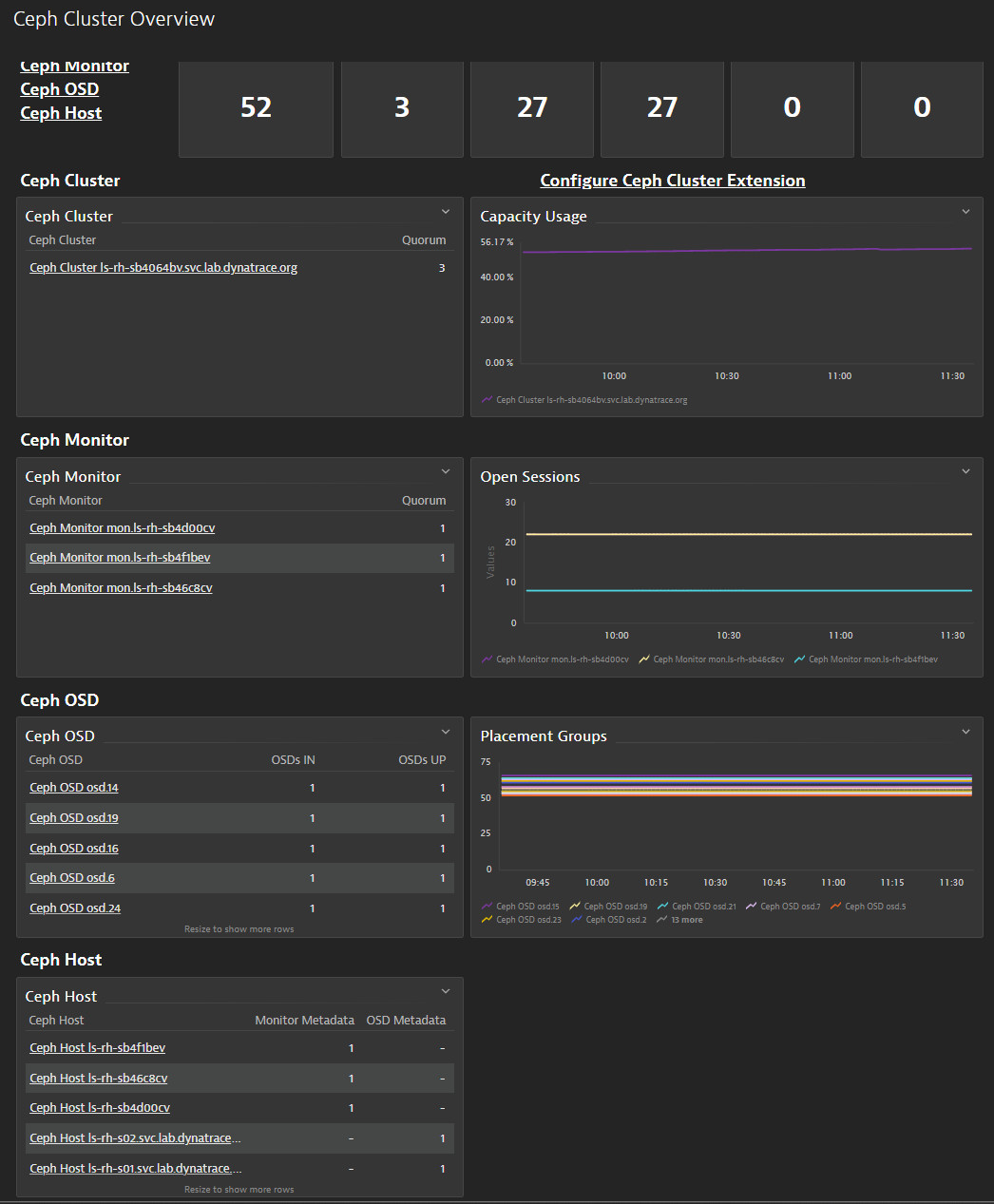
Monitor usage of Ceph storage system at both client side and host level.
ExtensionThis is intended for users, who:
Would like to monitor usage and performance of their Ceph platform.
Require constant ability to have live information about host resources and data flow.
Aim to shorten analysis time, required to find out root cause of possible system failures, to the minimum.
This enables you to:
Monitor host resources usage and its capacity levels.
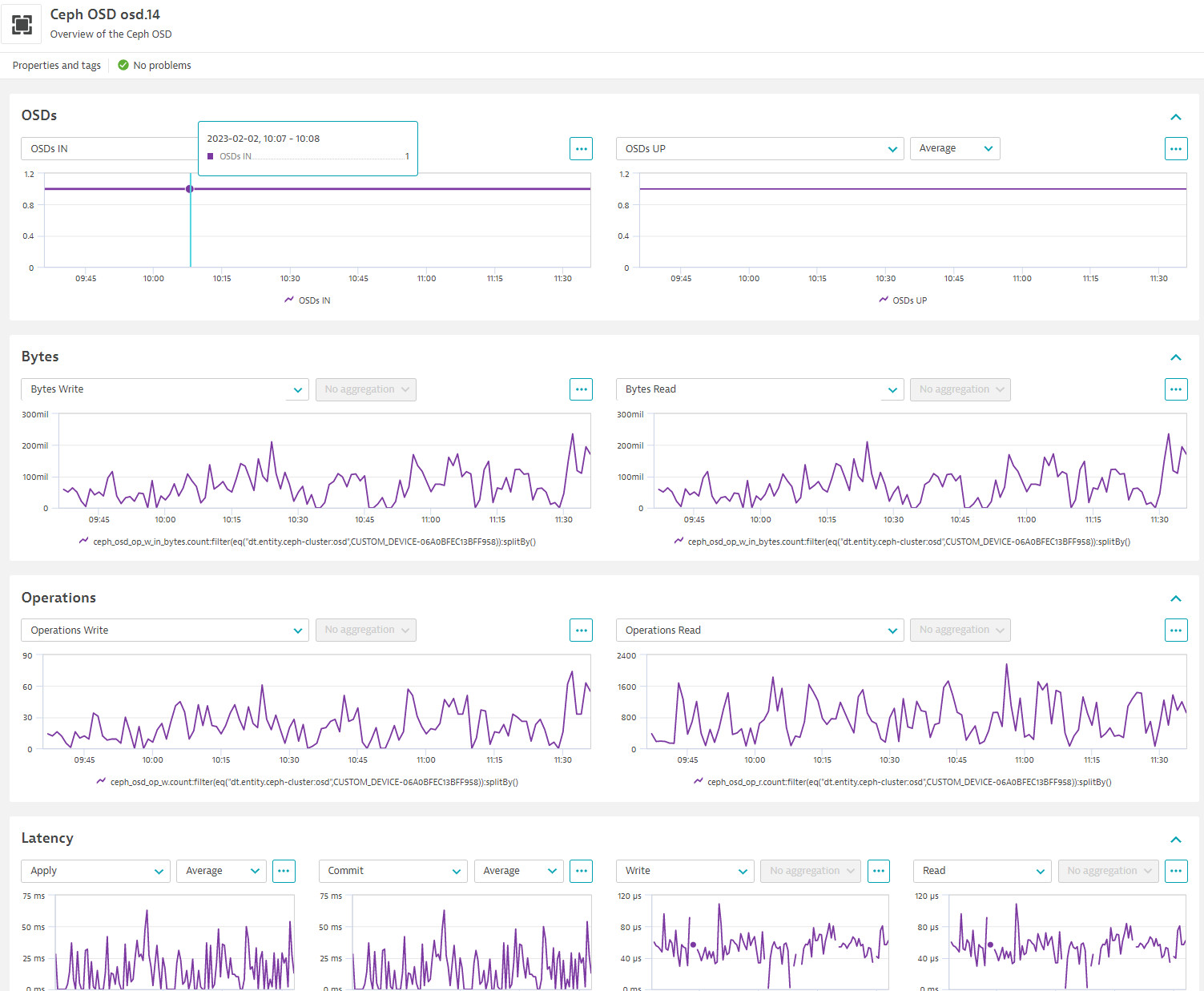
Collect data regarding active and inactive Ceph object storage daemons.
Observe system data flow in terms of write/read operations, for the cluster as a whole, and for the osd's in particular.
Environment with Ceph storage deployed
Below is a complete list of the feature sets provided in this version. To ensure a good fit for your needs, individual feature sets can be activated and deactivated by your administrator during configuration.
| Metric name | Metric key | Description | Unit |
|---|---|---|---|
| Total Capacity | ceph_cluster_total_bytes | Total cluster capacity in bytes | Byte |
| Used Capacity | ceph_cluster_total_used_bytes | Used cluster capacity in bytes | Byte |
| Monitor Metadata | ceph_mon_metadata | Placeholder metric to get monitor metadata dimensions from exporter | Count |
| OSD Metadata | ceph_osd_metadata | Placeholder metric to get OSD metadata dimensions from exporter | Count |
| Metric name | Metric key | Description | Unit |
|---|---|---|---|
| PG Active | ceph_pg_active | Placement group active per pool | Count |
| PG Down | ceph_pg_down | Placement group down per pool | Count |
| PG Clean | ceph_pg_clean | Placement group clean per pool | Count |
| PG Backfill Too Full | ceph_pg_backfill_toofull | Placement group backfill_toofull per pool | Count |
| PG Degraded | ceph_pg_degraded | Placement group degraded per pool | Count |
| PG Failed Repair | ceph_pg_failed_repair | Placement group failed repair per pool | Count |
| PG Incomplete | ceph_pg_incomplete | Placement group incomplete per pool | Count |
| PG Stale | ceph_pg_stale | Placement group stale per pool | Count |
| PG Inconsistent | ceph_pg_inconsistent | Placement group inconsistent per pool | Count |
| Metric name | Metric key | Description | Unit |
|---|---|---|---|
| OSDs IN | ceph_osd_in | Storage daemons in the cluster | Count |
| OSDs UP | ceph_osd_up | Storage daemons running | Count |
| Placement groups | ceph_osd_numpg | Placement groups | Count |
| Metric name | Metric key | Description | Unit |
|---|---|---|---|
| Health Status | ceph_health_status | Health status of the Cluster | Unspecified |
| Slow OPs | ceph_healthcheck_slow_ops | OSD or Monitor requests taking a long time to process | Unspecified |
| Metric name | Metric key | Description | Unit |
|---|---|---|---|
| OSD Apply Latency | ceph_osd_apply_latency_ms | Latency of the "commit" operation on the OSD | MilliSecond |
| OSD Commit Latency | ceph_osd_commit_latency_ms | Latency of the "commit" operation on the OSD | MilliSecond |
| Total OSD Write Latency | ceph_osd_op_w_latency_sum | Total latency of the "write" operations on the OSD | MilliSecond |
| Total OSD Read Latency | ceph_osd_op_r_latency_sum | Total latency of the "read" operations on the OSD | MilliSecond |
| Metric name | Metric key | Description | Unit |
|---|---|---|---|
| Bytes Written | ceph_osd_op_w_in_bytes | Total sum of bytes written to OSD | Byte |
| Bytes Read | ceph_osd_op_r_out_bytes | Total sum of bytes read from OSD | Byte |
| Write Operations | ceph_osd_op_w | Total sum of write operations performed on OSD | Count |
| Read Operations | ceph_osd_op_r | Total sum of read operation performed on OSD | Count |
| Recovery Operations | ceph_osd_recovery_ops | Number of recovery operations in OSD | Count |
| Metric name | Metric key | Description | Unit |
|---|---|---|---|
| Objects Count | ceph_pool_objects | Number of objects in pool | Count |
| Objects Recovered | ceph_pool_num_objects_recovered | Number of recovered objects in pool | Count |
| Bytes Recovered | ceph_pool_num_bytes_recovered | Number of recovered bytes in pool | Byte |
| Pool Objects Quota | ceph_pool_quota_objects | Object quota set for pool | Count |
| Pool Bytes Quota | ceph_pool_quota_bytes | Byte quota set for pool | Count |
| Metric name | Metric key | Description | Unit |
|---|---|---|---|
| Open Sessions | ceph_mon_num_sessions | Number of open monitor sessions | Count |
| Quorum | ceph_mon_quorum_status | Monitor daemons in quorum | Count |
1.318health feature set with 2 metrics
ceph_health_statusceph_healthcheck_slow_opsAdded additional placement group metrics
Fixed ceph-cluster:cluster entity rules to work with local monitoring configurations.
No release notes

