





















Skip to technology filters Skip to main content
Dynatrace Hub

Extend the platform,
empower your team.

Popular searches:
Home hero bg
Microsoft Entra IDMicrosoft Entra ID
Microsoft Entra ID

Microsoft Entra ID

Fetch groups from Microsoft Entra ID (formerly Azure Active Directory).

App
Free trialDocumentation
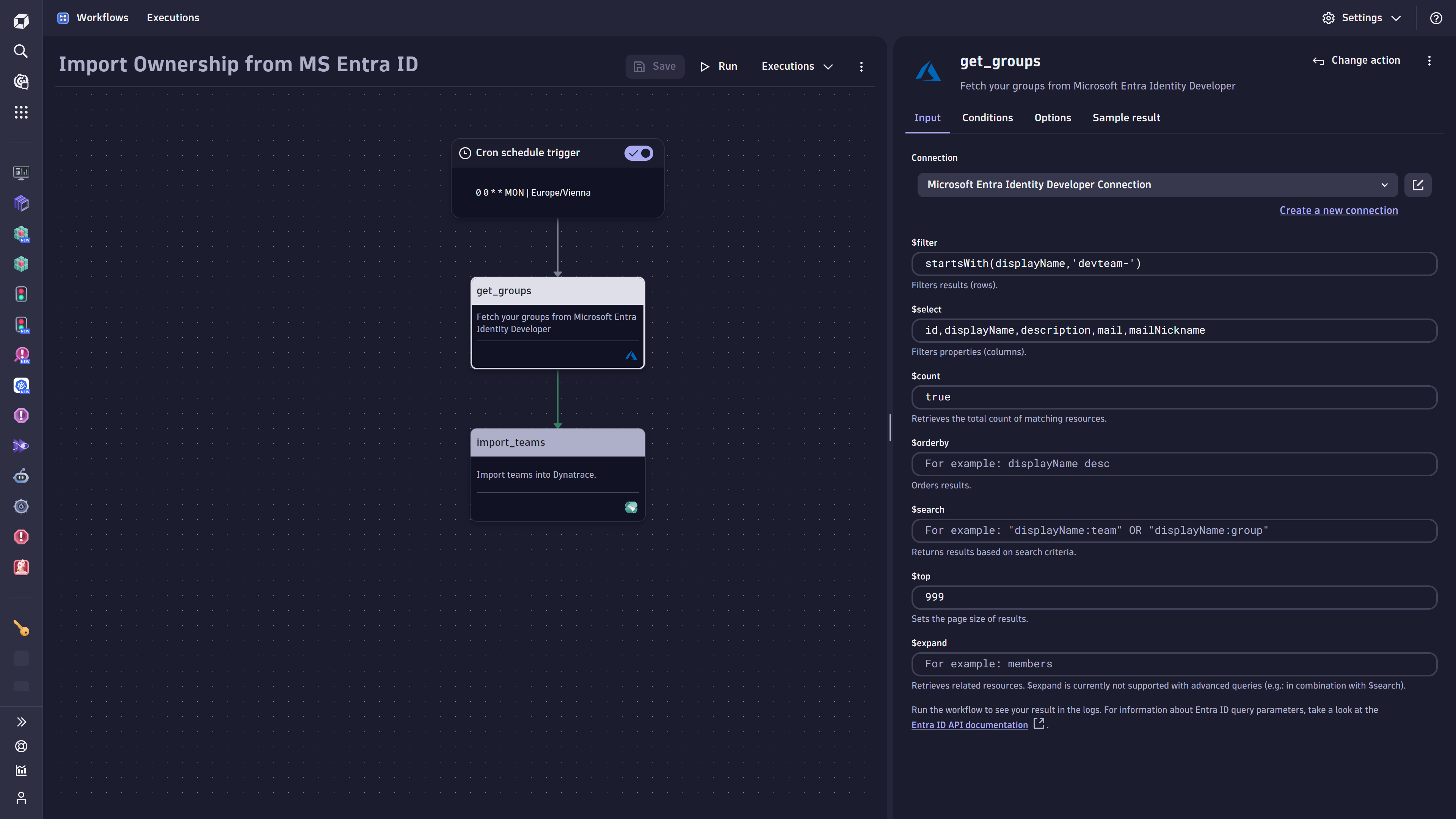
The "get_groups" workflow action fetches selected groups/teams from an existing Microsoft Entra ID (former Azure Active Directory) connection.
The workflow can be used from within the workflow application.
Combined with the "import_teams" action from the ownership application, the fetched groups can be automatically stored as ownership-teams within Dynatrace.
  • Product information
  • Release notes

Overview

Microsoft Entra ID Connector provides an entry point and description to guide the user in establishing a connection between Microsoft Azure and Dynatrace.

Additionally, it contains a dedicated workflow action for querying groups from Microsoft Entra ID to import and store it as ownership information.

In a subsequent step, the imported groups can be stored as ownership-teams settings objects using the import-teams workflow action (Requires the ownership application to be installed).

The whole process can be automated by applying regularly scheduled workflow executions, for example, once a week. This ensures keeping the ownership information in Dynatrace up-to-date while reducing the maintenance effort, as the source of truth stays Microsoft Entra ID.

Once imported, the ownership teams can be associated with selected entities within the environment to increase transparency and simplify collaboration while enabling sending automated and targeted notifications.

Use cases

  • Keeping ownership teams' details (incl. contact information) up-to-date via importing selected groups (teams) from the source-of-truth Entra ID (former Azure Active Directory) and reducing the manual effort of keeping the data in sync.
  • The import can be scheduled automatically and regularly to ensure the latest ownership teams (groups) information is available and accessible

Get started

  • Set up a valid connection (in Settings) between Microsoft Entra ID and Dynatrace.
  • Go to Workflows and create a first workflow using "get_groups" to import Azure Active Directory Groups (Recommendation: Set a scheduled trigger condition for executing the workflow automatically regularly)
  • Enter a query filter to reduce the imported information to the minimum you need. If the selected filter works as desired, store the groups as ownership teams in Dynatrace (requires an additional workflow action provided by the ownership application)
  • Set up a regular schedule for keeping your ownership team data up-to-date based on your Entra ID groups

Details

  • Workflow actions can be used within the Workflows application --> triggered on-demand, event based or scheduled regularly

  • Selected Entra ID (former Azure Active Directory) groups can be synchronized automatically, i.e., outdated information can be overwritten and new groups imported.

Dynatrace
Documentation
By Dynatrace
Dynatrace support center
Subscribe to new releases
Copy to clipboard

Related to Microsoft Entra ID

Workflows logo

Workflows

Automate tasks in your IT landscape, remediate problems, and visualize processes

Ownership logo

Ownership

Enables the import of and access to ownership information of entities.

Full version history

ReleaseDate

Full version history

  • Various improvements and dependency updates.

Full version history

  • Bugfix for Action Widget - Fixed an issue that could cause the action widget to crash when provided with an invalid connection ID.

Full version history

  • Minor improvements - This release includes a fix for a documentation link.

Full version history

  • Bugfix for Connection Overview - The name of the Settings object owner is now displayed properly.

Full version history

  • Bugfix for Connection Settings Form - Resolved an issue where the connection settings form remained open after editing a connection.

Full version history

  • Various improvements and dependency updates.

Full version history

  • App Renamed to Microsoft Entra ID - The app has been renamed from "Azure" to "Microsoft Entra ID" to better reflect its functionalities focused on Entra ID.
  • Access Control for Connectors Management - Added fine-grained access control for connections, enabling only specific users to have access to connection settings.
  • Grouped input fields - Improved the user experience by grouping related input fields, making navigation and usage easier.

Full version history

  • Bugfix: Minor bugfixes and dependency update

Full version history

Connection Management - All connections of the App can now be managed via the newly released Settings App. To manage your connections got to Settings > Connections > Microsoft Entra ID.

Full version history

  • New Connectors Management - Introduce a new, streamlined connection management experience with a modernized interface. This update makes adding and editing connections directly within workflows easier and provides connection control and convenience in one place.
  • App renamed to "Azure" - Streamlined the app name by removing the suffix “for Workflows”.

Full version history

  • Bugfix: Fixed an issue with dropdowns breaking in Chrome 129

Full version history

1.0.1

  • Major release: The App is now officially released, we removed the "(Preview)" postfix.
  • Microsoft Entra ID Connection: The limit for Microsoft Entra ID connections has been increased. Previously, there was a limit of 3 entries, which has now been expanded to allow more connections.

Full version history

0.2.3

Patch Changes

  • Improve internal tooling
  • Dependencies update

0.2.2

Patch Changes

  • Dependencies update

0.2.1

Patch Changes

  • Added sample results for get-groups action

0.2.0

Patch Changes

  • Application renamed to Azure for Workflows
  • Dependencies updated

Full version history

0.2.2

Patch Changes

  • Dependencies update

0.2.1

Patch Changes

  • Added sample results for get-groups action

0.2.0

Patch Changes

  • Application renamed to Azure for Workflows
  • Dependencies updated

Full version history

0.2.1

Patch Changes

  • Added sample results for get-groups action

Full version history

0.2.0

Patch Changes

  • Application renamed to Azure for Workflows
  • Dependencies updated

Full version history

0.1.4

Patch Changes

  • Dependencies update
  • Improved wording

Full version history

0.1.3

Patch Changes

  • baea70d: Added backend function for get groups from Azure
  • 389845b: Added get_groups widget
Dynatrace Hub
Get data into DynatraceBuild your own app
All (811)Log Management and AnalyticsKubernetesAI and LLM ObservabilityInfrastructure ObservabilitySoftware DeliveryApplication ObservabilityApplication SecurityDigital ExperienceBusiness Observability
Filter
Type
Built and maintained by
Deployment model
SaaS
  • SaaS
  • Managed
Partner FinderBecome a partnerDynatrace Developer

Discover recent additions to Dynatrace

Problems logo

Problems

Analyze abnormal system behavior and performance problems detected by Davis AI.

Logs logo

Logs

Explore all your logs without writing a single query.

Security Investigator logo

Security Investigator

Fast and precise forensics for security and logs on Grail data with DQL queries.

Business Flow logo

Business Flow

Track, analyze, and optimize your critical business processes.

Cost & Carbon Optimization logo

Cost & Carbon Optimization

Track, analyze, and optimize your IT carbon footprint and public cloud costs.

Davis Anomaly Detection logo

Davis Anomaly Detection

Detect anomalies in timeseries using the Davis AI

Analyze your data

Understand your data better with deep insights and clear visualizations.

Notebooks logo

Notebooks

Create powerful, data-driven documents for custom analytics and collaboration.

Dashboards logo

Dashboards

Transform complex data into clear visualizations with custom dashboards.

Automate your processes

Turn data and answers into actions, securely, and at scale.

Workflows logo

Workflows

Automate tasks in your IT landscape, remediate problems, and visualize processes

Jira logo

Jira

Create, query, comment, transition, and resolve Jira tickets within workflows.

Slack logo

Slack

Automate Slack messaging for security incidents, attacks, remediation, and more.

Secure your cloud application

See vulnerabilities and attacks in your environment.

Security Overview logo

Security Overview

Get a comprehensive overview of the security of your applications.

Code-Level Vulnerabilities logo

Code-Level Vulnerabilities

Detect vulnerabilities in your code in real time.

Security Posture Management logo

Security Posture Management

Detect, prioritize, and remediate security and compliance findings with SPM.

Threats & Exploits logo

Threats & Exploits

Understand, triage, and investigate detection findings and alerts.

Are you looking for something different?

We have hundreds of apps, extensions, and other technologies to customize your environment

Leverage our newest innovations of Dynatrace Saas

Kick-start your app creation

Kick-start your app creation

Whether you’re a beginner or a pro, Dynatrace Developer has the tools and support you need to create incredible apps with minimal effort.
Go to Dynatrace Developer
Upgrading from Dynatrace Managed to SaaS

Upgrading from Dynatrace Managed to SaaS

Drive innovation, speed, and agility in your organization by seamlessly and securely upgrading.
Learn More
Log Management and Analytics

Log Management and Analytics

Innovate faster and more efficiently with unified log management and log analytics for actionable insights and automation.
Learn more

