




















Skip to technology filters Skip to main content
Dynatrace Hub

Extend the platform,
empower your team.

Popular searches:
Home hero bg
Application audit logs via AWS AppFabricApplication audit logs via AWS AppFabric
Application audit logs via AWS AppFabric

Application audit logs via AWS AppFabric

Oversee security and monitor audit logs of SaaS applications with Dynatrace

Technology
Free trial
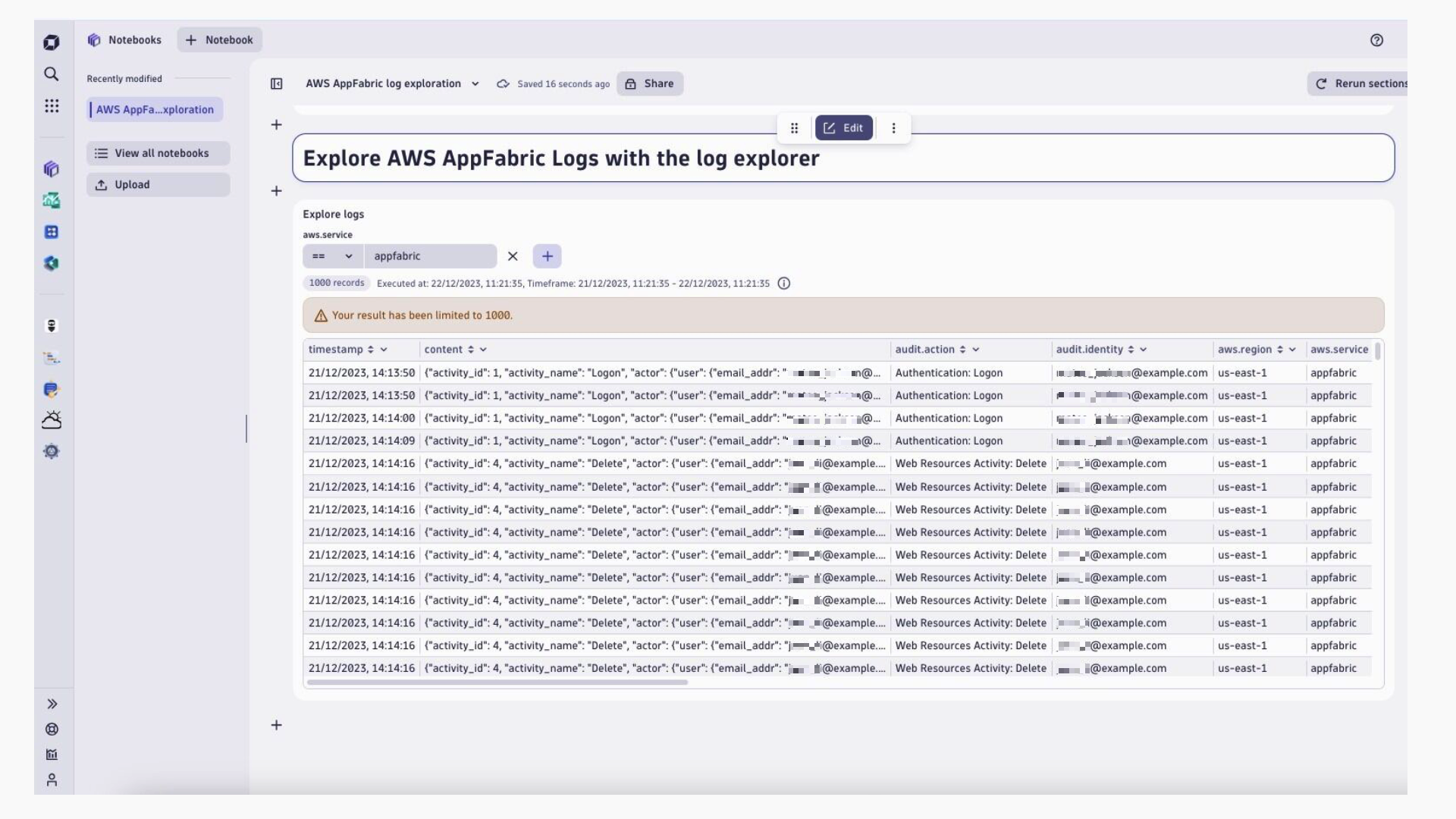
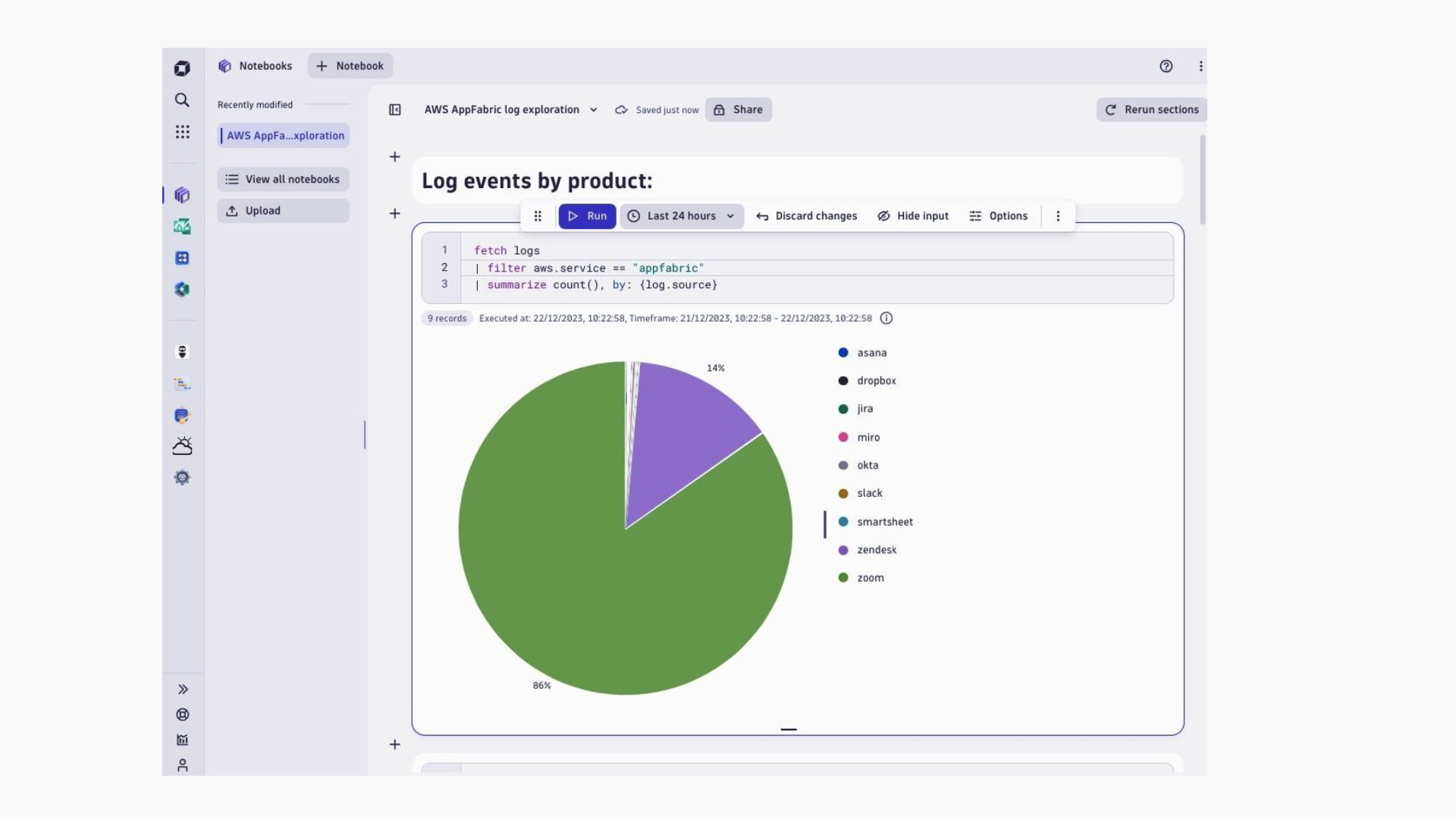
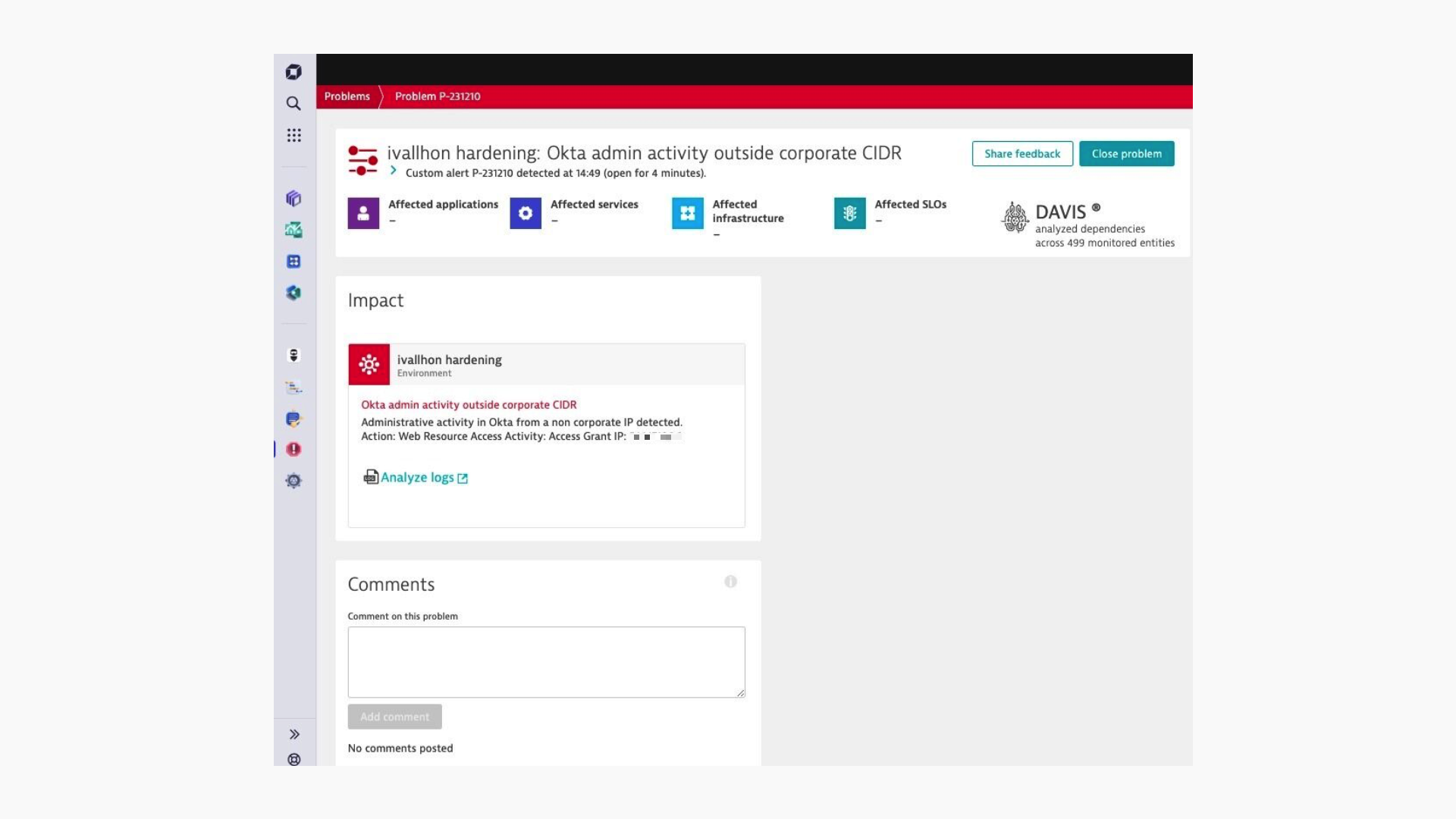
Figure 1: Dynatrace Notebooks filtered to AWS AppFabricFigure 2: Dynatrace Notebook pie chart visualization of SaaS log events per applicationsFigure 3: Example of Dynatrace problem raised based on audit logs
  • Product information

Overview

AWS AppFabric, is an AWS service that quickly connects SaaS applications across an organization for enhanced security and employee productivity. The AWS AppFabric for security feature fully manages the integrations with over 25 applications so customers can get started in just a few clicks – no coding required. Once connected, AppFabric automatically normalizes SaaS audit logs into the Open Cybersecurity Schema Framework (OCSF), which allows customers to use common queries for audit logs and track user activity across all their SaaS applications.

Get control and oversee the security of your Enterprise SaaS security landscape with Dynatrace and AWS AppFabric. Ingest and monitor audit logs of popular SaaS applications including Atlassian Jira, Microsoft 365, GitHub, Zendesk and many more.

Use Cases for AppFabric:

  • Quickly connect your SaaS applications. AppFabric natively connects top SaaS productivity and security applications to each other, providing a fully managed SaaS interoperability solution.
  • Elevate your security posture. Application data is automatically normalized, so administrators can set common policies, standardize security alerts, and easily manage user access across multiple applications.

Get started

To connect your SaaS applications to AppFabric, follow the getting started documentation. When setting up the audit log ingestions, select Amazon S3 as the destination and OCSF-JSON on the Schema & Format configuration for the Dynatrace AWS S3 Log Forwarder to automatically recognize and enrich logs.

Follow the instructions to deploy the Dynatrace AWS S3 Log Forwarder on your AWS Account. Note that AWS AppFabric is available in the US East (N. Virginia), Europe (Ireland), and Asia Pacific (Tokyo) regions, so the Amazon S3 buckets where the logs are delivered need to be created in the same region where AWS AppFabric is configured. If you normally use a different AWS region and want to deploy the Dynatrace AWS S3 Log Forwarder on it, instead of the region where you configure AppFabric, follow the instructions to configure cross-region log forwarding.

Details

Analyzing AWS AppFabric logs with Notebooks and the Dynatrace Query Language (DQL)

When AWS AppFabric logs are ingested into Dynatrace AWS S3 Log Forwarder, log entries are enriched with a set of attributes that enable security analysts to easily query them for anomalous behavior. All AWS AppFabric SaaS audit log entries are automatically detected and enriched with the following attributes:

  • aws.service: appfabric
  • log.source: {saas_product_name}
  • audit.identity: {email_address_of_the_user_performing_the_action}
  • audit.action: {ocsf_normalized_action_category}

Dynatrace offers Notebooks, enabling organizations to create powerful, data-driven documents for custom analytics of logs, events, and metrics. Notebooks helps users understand and perform an in-depth analysis of AppFabric logs using Dynatrace’s query language called DQL.

After connecting your SaaS applications to AppFabric and choosing Dynatrace as your destination, you can analyze logs by adding a log explorer to Dynatrace’s Notebook. From the Dynatrace Notebook application, click on the + button and then select Explore logs. Then, customize the filters key to aws.service and the value to appfabric showing in figure 1.

With AppFabric now surfacing normalized logs in a Dynatrace Notebook, apply quantitative analysis to better understand the log data and events. Dynatrace Notebooks enable users to format the output in tables and graphs to visualize data at a glance. Configure the filters to:

fetch logs
| filter aws.service == "appfabric"
| summarize count(), by: {log.source}

In figure 2, a pie chart shows log events per SaaS application.

Set up alerts for suspicious user activity

AppFabric customers often ask for alerts if suspicious activity occurs across their SaaS applications. With AppFabric integration with Dynatrace Log Management analytics, customers can set up alerts based on the occurrence of specific log events.

In figure 3, example shows Dynatrace problem raised based on audit logs

Dynatrace
More Information
By Dynatrace
Dynatrace support center
Copy to clipboard
Dynatrace Hub
Get data into DynatraceBuild your own app
All (811)Log Management and AnalyticsKubernetesAI and LLM ObservabilityInfrastructure ObservabilitySoftware DeliveryApplication ObservabilityApplication SecurityDigital ExperienceBusiness Observability
Filter
Type
Built and maintained by
Deployment model
SaaS
  • SaaS
  • Managed
Partner FinderBecome a partnerDynatrace Developer

Discover recent additions to Dynatrace

Problems logo

Problems

Analyze abnormal system behavior and performance problems detected by Davis AI.

Logs logo

Logs

Explore all your logs without writing a single query.

Security Investigator logo

Security Investigator

Fast and precise forensics for security and logs on Grail data with DQL queries.

Business Flow logo

Business Flow

Track, analyze, and optimize your critical business processes.

Cost & Carbon Optimization logo

Cost & Carbon Optimization

Track, analyze, and optimize your IT carbon footprint and public cloud costs.

Davis Anomaly Detection logo

Davis Anomaly Detection

Detect anomalies in timeseries using the Davis AI

Analyze your data

Understand your data better with deep insights and clear visualizations.

Notebooks logo

Notebooks

Create powerful, data-driven documents for custom analytics and collaboration.

Dashboards logo

Dashboards

Transform complex data into clear visualizations with custom dashboards.

Automate your processes

Turn data and answers into actions, securely, and at scale.

Workflows logo

Workflows

Automate tasks in your IT landscape, remediate problems, and visualize processes

Jira logo

Jira

Create, query, comment, transition, and resolve Jira tickets within workflows.

Slack logo

Slack

Automate Slack messaging for security incidents, attacks, remediation, and more.

Secure your cloud application

See vulnerabilities and attacks in your environment.

Security Overview logo

Security Overview

Get a comprehensive overview of the security of your applications.

Code-Level Vulnerabilities logo

Code-Level Vulnerabilities

Detect vulnerabilities in your code in real time.

Security Posture Management logo

Security Posture Management

Detect, prioritize, and remediate security and compliance findings with SPM.

Threats & Exploits logo

Threats & Exploits

Understand, triage, and investigate detection findings and alerts.

Are you looking for something different?

We have hundreds of apps, extensions, and other technologies to customize your environment

Leverage our newest innovations of Dynatrace Saas

Kick-start your app creation

Kick-start your app creation

Whether you’re a beginner or a pro, Dynatrace Developer has the tools and support you need to create incredible apps with minimal effort.
Go to Dynatrace Developer

Upgrading from Dynatrace Managed to SaaS

Upgrading from Dynatrace Managed to SaaS

Drive innovation, speed, and agility in your organization by seamlessly and securely upgrading.
Learn More
Log Management and Analytics

Log Management and Analytics

Innovate faster and more efficiently with unified log management and log analytics for actionable insights and automation.
Learn more

