























Kick-start your app creation
Whether you’re a beginner or a pro, Dynatrace Developer has the tools and support you need to create incredible apps with minimal effort.
Go to Dynatrace Developer
 Site Reliability Guardian
SRG: Automated change impact analysis for your deployment and release processes
AppThe Site Reliability Guardian provides an automated change impact analysis to validate service availability, performance, and capacity objectives across various systems. This enables DevOps platform engineers to make the right release decisions for new versions and empowers SREs to apply Service-Level Objectives (SLOs) for their critical services.
DevOps can automate safe and secure releases by applying a gating mechanism that identifies release issues quickly and prevents poor-quality code from being promoted to production.
SREs can leverage on-demand reliability validation by comparing observability data such as service-level objectives against a dedicated release version from the past, or as part of progressive delivery.
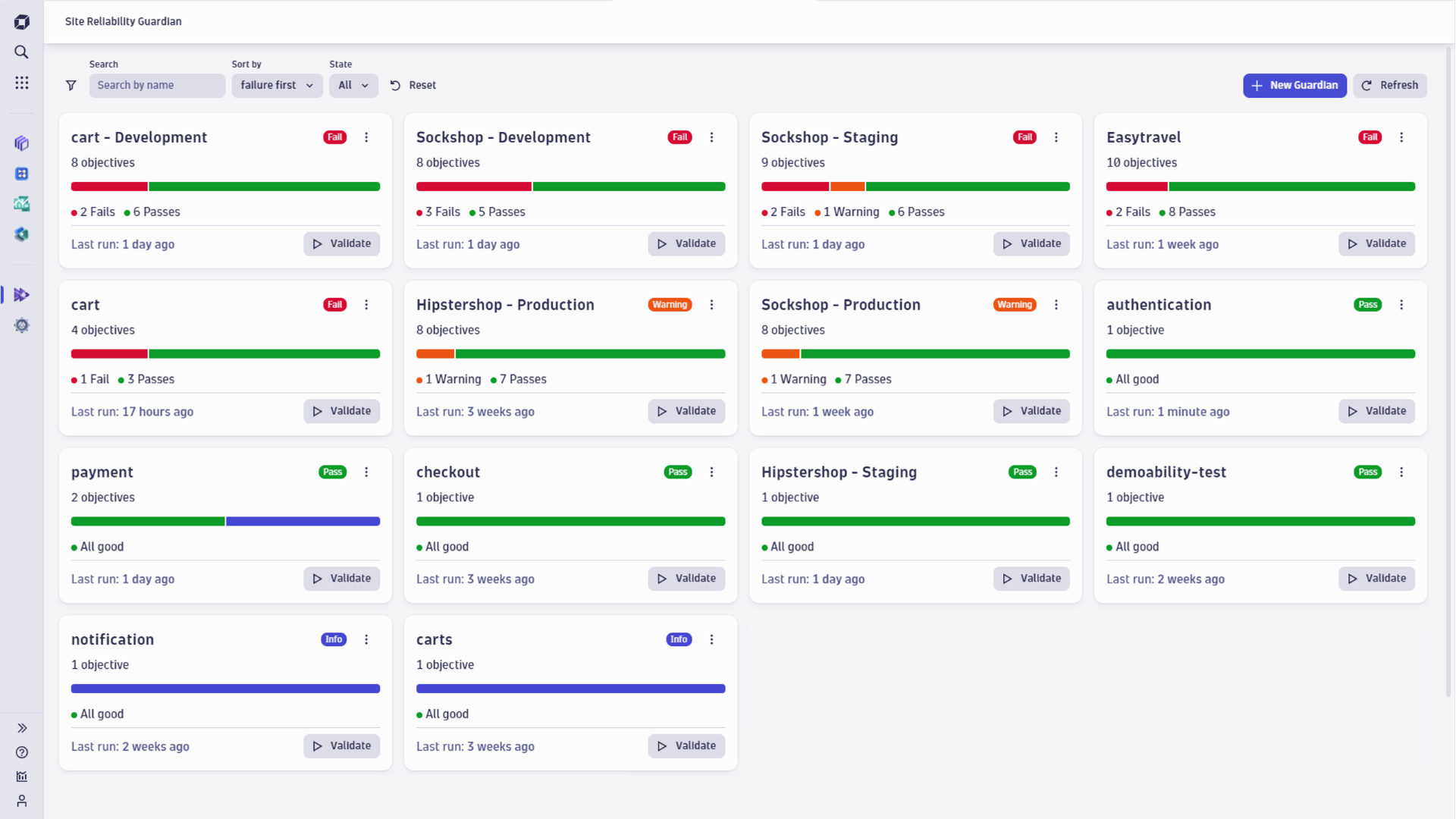
Open the Site Reliability Guardian to create a new guardian.
Specify objectives you would like to validate automatically.
Create a workflow to automate the change impacts analysis.
Trigger a validation on demand or by sending an event to Dynatrace.
Leverage the validation result to enrich your release process.
Allows you to define service or application objectives that are validated at specific events or on-demand to detect regressions.
Leverages Workflows to execute a customizable default workflow for your automation requirements.
Links to a notebook for a detailed root cause analysis of a failed validation.
This release introduces validation insights for objectives, allowing you to add links that provide contextual information and resources for each objective. This enhancement improves the ability to share relevant documentation and analysis directly within your Guardian configuration, to simplify the analysis of failed objectives.
The validation history has been improved to support ISO datetime formats with offsets. Additionally, the user interface has been enhanced to prevent the feature highlight banner from interfering with guardian template popups.
This release enhances the objective creation experience by automatically opening the objective form when adding an objective to a guardian through intents, providing a more streamlined workflow. The user interface has been improved to better communicate errors when an SLO is missing or has been deleted.
This release improves the workflow creation experience by providing better suggested filter queries when creating a new workflow from a guardian. Additionally, the application's visual consistency has been enhanced by aligning primary buttons and colors throughout the interface.
This maintenance release enhances validation robustness by ensuring platform errors are properly propagated and handled in edge cases.
This release improves the automation experience by adapting event triggers to your guardian type. When using the Automate feature, business guardians now use event triggers based on business events, while lifecycle guardians use event triggers based on SDLC events, ensuring more relevant and accurate automation for your specific use case.
The user interface has been enhanced with improved cursor feedback on objective cards and more concise template descriptions, making it easier to navigate and understand available options.
This release improves the clarity of permission descriptions in the app manifest, making it easier to understand access requirements. The validation timeline has been enhanced for better usability and displays the most recent validation information more accurately.
This release resolves reported issues and improves the overall stability and performance of the Site Reliability Guardian by ensuring accurate validation information and correct sorting order.
This release improves the accuracy of validation information and enhances permissions for managing guardians in table view.
This release introduces the ability to create new objectives from other apps, providing greater flexibility in objective management. It also enhances user experience with improved error messages and displays the number of deleted guardians in notification toasts.
This release improves the clarity of permission descriptions in the app manifest, making it easier to understand access requirements. The validation timeline has been enhanced for better usability and displays the most recent validation information more accurately.
This release resolves reported issues and improves the overall stability and performance of the Site Reliability Guardian by ensuring accurate validation information and correct sorting order.
This release improves the accuracy of validation information and enhances permissions for managing guardians in table view.
This release introduces the ability to create new objectives from other apps, providing greater flexibility in objective management. It also enhances user experience with improved error messages and displays the number of deleted guardians in notification toasts.
This release resolves reported issues and improves the overall stability and performance of the Site Reliability Guardian by ensuring accurate validation information and correct sorting order.
This release improves the accuracy of validation information and enhances permissions for managing guardians in table view.
This release introduces the ability to create new objectives from other apps, providing greater flexibility in objective management. It also enhances user experience with improved error messages and displays the number of deleted guardians in notification toasts.
This release introduces the ability to create new objectives from other apps, providing greater flexibility in objective management. It also enhances user experience with improved error messages and displays the number of deleted guardians in notification toasts.
This release introduces lifecycle guardians, enabling you to store and analyze validation results within the Software Development Life Cycle context. You can now create guardians that ingest validations into SDLC events, providing enhanced traceability and integration with your development workflows.
This update improves the guardian creation experience with a clearer interface for selecting between business guardians and lifecycle guardians. You will now find an option in the guardian creation and editing screens that allow you to easily switch between event types, with lifecycle guardians set as the default option for new guardians.
The analysis capabilities have been enhanced with SDLC events integration throughout the application. The overview page now retrieves and displays SDLC event data, while the analysis page provides comprehensive visualization and drilling capabilities into notebooks. Auto-adaptive thresholds now support SDLC events and take failed validations into account for more accurate threshold calculations.
This release increases the robustness and usability of validations.
This maintenance release is bundled with some minor quality of life improvements.
We have reverted the new DQL variable behavior for now as it could interfere with some existing DQL statements in some edge cases.
This update introduces enhanced flexibility for DQL variables, which now support quotation behaviors such as $var:backtick, allowing for more precise query construction.
We’ve also added a tabular view with support for bulk operations, making it easier to manage and interact with large sets of data.
Additionally, guardians that have not yet run any validations will no longer display an “Info” state, providing a clearer and more accurate representation of their status.
This maintenance release is bundled with some minor quality of life improvements.
We have reverted the new DQL variable behavior for now as it could interfere with some existing DQL statements in some edge cases.
This update introduces enhanced flexibility for DQL variables, which now support quotation behaviors such as $var:backtick, allowing for more precise query construction.
We’ve also added a tabular view with support for bulk operations, making it easier to manage and interact with large sets of data.
Additionally, guardians that have not yet run any validations will no longer display an “Info” state, providing a clearer and more accurate representation of their status.
This release updates the Security Gate template to leverage the new Security Events stored in Grail, enabling more precise and scalable security validations.
We've also made several usability improvements across the Site Reliability Guardian, including clearer button labels, better handling of unsaved changes, and a more intuitive experience when creating or managing guardians.
In addition, this release further enhances the reliability of validations under heavy load, ensuring smoother performance in high-demand environments.
This update improves usability and performance across key areas. DQL error messages now match other Dynatrace Apps for easier troubleshooting. Workflow validation for long-running queries is more robust, and the usage of Segments has been revamped. The settings menu is now cleaner with the removal of the permission model.
This release introduces Segments to the Site Reliability Guardian, enhancing the granularity of your data queries for your validations.
You can now customize the event timeline for guardian validations, providing greater flexibility and precision when analyzing validation results.
Additionally, this release includes minor improvements to integrations with Notebooks, ensuring smoother and more efficient interactions.
This release improves how units are being suggested while creating a guardian objective.
Integrations with Notebooks have also been improved.
We are excited to announce the latest updates to the Site Reliability Guardian. This release includes several key improvements designed to enhance your experience and ensure greater reliability and performance.
Key Improvements:
We are excited to announce the latest updates to the Site Reliability Guardian. This release includes several key improvements designed to enhance your experience and ensure greater reliability and performance.
Key Improvements:
We have addressed an issue where validations can sometimes fail during heavy load.
This release allows you to have control over what units your objectives will use. In this initial version, we support units based on duration, percentages, data and data rate, as well as cores.
You can now also use the Site Reliability Guardian’s validations in Simple Workflows to enhance flexibility and efficiency for lean validation scenarios.
In situations where many validations occur simultaneously, the Site Reliability Guardian will now have better timed validation to avoid issuing too many requests to Grail at once. This improves the reliability of your validations even during heavy workloads.
Lastly, this release brings minor visual improvements for a better user experience, updated Japanese language support, and includes further accessibility support.
This release allows you to have control over what units your objectives will use. In this initial version, we support units based on duration, percentages, data and data rate, as well as cores.
You can now also use the Site Reliability Guardian’s validations in Simple Workflows to enhance flexibility and efficiency for lean validation scenarios.
In situations where many validations occur simultaneously, the Site Reliability Guardian will now have better timed validation to avoid issuing too many requests to Grail at once. This improves the reliability of your validations even during heavy workloads.
Lastly, this release brings minor visual improvements for a better user experience, updated Japanese language support, and includes further accessibility support.
This release improves guidance to identify when permissions cannot be performed due to a lack of permissions.
Furthermore, this release improves handling of larger amounts of validations for a specific guardian.
This release increases the length limit of DQL to 4000 characters to enable more complex use cases. In addition, error messages from missing permissions or unexpected results have been made more visible.
This release includes some minor visual improvements.
This release further refines the concurrency of objective validations. In addition, some templates have been improved to work better with multiple services.
This is a minor performance improvement of the validation functionality.
In addition, we have addressed an issue with "Drilldown in Notebooks".
This release further refines the concurrency of objective validations. In addition, some templates have been improved to work better with multiple services.
This is a minor performance improvement of the validation functionality.
In addition, we have addressed an issue with "Drilldown in Notebooks".
This is a minor performance improvement of the validation functionality.
In addition, we have addressed an issue with "Drilldown in Notebooks".
This release improves the stability of the Site Reliability Guardian. Furthermore, it is more resilient when using time expressions for metrics.
This release improves the stability of the Site Reliability Guardian.
This release improves the performance of a guardian validation when objectives with auto-adaptive thresholds are validated.
In addition, the “Get started with Automation” guide, which can be opened via a Notebook, has been fixed.
This release improves the stability of the Site Reliability Guardian.
This release improves the performance of a guardian validation when objectives with auto-adaptive thresholds are validated.
In addition, the “Get started with Automation” guide, which can be opened via a Notebook, has been fixed.
This release improves the performance of a guardian validation when objectives with auto-adaptive thresholds are validated.
In addition, the “Get started with Automation” guide, which can be opened via a Notebook, has been fixed.
This maintenance release is bundled with some minor quality of life improvements. It is now easier to set up a guardian from a template for a specific entity. Additionally, the objective name column can now be resized.
This maintenance release aims to improve the user experience. Links in your descriptions and tags can now be clicked on. This version also brings slightly adapted templates that simplify DQL queries to leverage the improved unit conversion introduced in the last version.
This release improves the objective visualization by automatically adapting the unit of the measured value. As a result, the unit of large numbers changes to reduce the number of digits shown. This change is easily visible for objectives with a duration unit.
In addition, the current user's time zone is now considered when executing DQL queries for a given timespan.
This maintenance release aims to improve the user experience. Links in your descriptions and tags can now be clicked on. This version also brings slightly adapted templates that simplify DQL queries to leverage the improved unit conversion introduced in the last version.
This release improves the objective visualization by automatically adapting the unit of the measured value. As a result, the unit of large numbers changes to reduce the number of digits shown. This change is easily visible for objectives with a duration unit.
In addition, the current user's time zone is now considered when executing DQL queries for a given timespan.
This release improves the objective visualization by automatically adapting the unit of the measured value. As a result, the unit of large numbers changes to reduce the number of digits shown. This change is easily visible for objectives with a duration unit.
In addition, the current user's time zone is now considered when executing DQL queries for a given timespan.
This release introduces a template for the Four Golden Signals according to Google's Site Reliability Engineering practices for user-facing services. The template checks four important parameters:
Many of the objectives also make use of auto-adaptive thresholds to better identify sudden deviations in your service.
This release improves the stability of the Site Reliability Guardian.
This release improves the stability of the Site Reliability Guardian.
Mitigation of an issue where previous changes to the Settings schema impeded creating guardians via the API.
This release of the Site Reliability Guardian delivers the following new capabilities and main improvements regarding user experience:
While you previously set your objective thresholds manually, you can now leverage the power of Davis AI to derive the threshold automatically. This is known as auto-adaptive thresholds that help you to protect your quality and security improvements by baselining the thresholds based on previous validation results. You can seamlessly switch between static to an auto-adaptive threshold for existing guardians. Given this new capability it allows you to stay focused on delivering your successful product without concerning of proper objective thresholds.
In addition, this release enhances the Workflow validation action by returning details of the individual objectives. This enables you to immediately use the objective details as part of the workflow execution.
Finally, the Site Reliability Guardian logo has evolved to come with a new appearance but without losing its core values. In addition to the new logo, the release improves the user experience regarding accessibility and with more information in context.
Mitigation of an issue where previous changes to the Settings schema impeded creating guardians via the API.
This release of the Site Reliability Guardian delivers the following new capabilities and main improvements regarding user experience:
While you previously set your objective thresholds manually, you can now leverage the power of Davis AI to derive the threshold automatically. This is known as auto-adaptive thresholds that help you to protect your quality and security improvements by baselining the thresholds based on previous validation results. You can seamlessly switch between static to an auto-adaptive threshold for existing guardians. Given this new capability it allows you to stay focused on delivering your successful product without concerning of proper objective thresholds.
In addition, this release enhances the Workflow validation action by returning details of the individual objectives. This enables you to immediately use the objective details as part of the workflow execution.
Finally, the Site Reliability Guardian logo has evolved to come with a new appearance but without losing its core values. In addition to the new logo, the release improves the user experience regarding accessibility and with more information in context.
This release improves the stability of the Site Reliability Guardian.
This release improves the stability of the Site Reliability Guardian.
This release improves the stability of the Site Reliability Guardian.
Kubernetes templates have been adapted to use the K8s container metrics. Previously, workload metrics were used, which are no longer available.
It is now possible to add 50 objectives to a single guardian.
Additionally, some objectives show their corresponding unit if Grail returns the unit.
This release improves the stability of the Site Reliability Guardian.
This release improves the stability of the Site Reliability Guardian.
Kubernetes templates have been adapted to use the K8s container metrics. Previously, workload metrics were used, which are no longer available.
It is now possible to add 50 objectives to a single guardian.
Additionally, some objectives show their corresponding unit if Grail returns the unit.
This release improves the stability of the Site Reliability Guardian.
Kubernetes templates have been adapted to use the K8s container metrics. Previously, workload metrics were used, which are no longer available.
It is now possible to add 50 objectives to a single guardian.
Additionally, some objectives show their corresponding unit if Grail returns the unit.
Kubernetes templates have been adapted to use the K8s container metrics. Previously, workload metrics were used, which are no longer available.
It is now possible to add 50 objectives to a single guardian.
Additionally, some objectives show their corresponding unit if Grail returns the unit.
The ability to use Jinja expressions to select a guardian has been added to maximize the efficiency of your workflows. It can be used to execute several guardians in the same action, or choose guardians in a workflow based on a previous task or triggering event dynamically.
New guidance in the form of sample results has been added. This makes it easier to reference the results of a validation in subsequent workflow steps.
Internal release for Perform'24.
This release resolves reported issues and improves the overall stability and performance. The bundled templates have also been improved slightly.
This release resolves reported issues and improves the overall stability and performance.
This release resolves reported issues and improves the overall stability and performance.
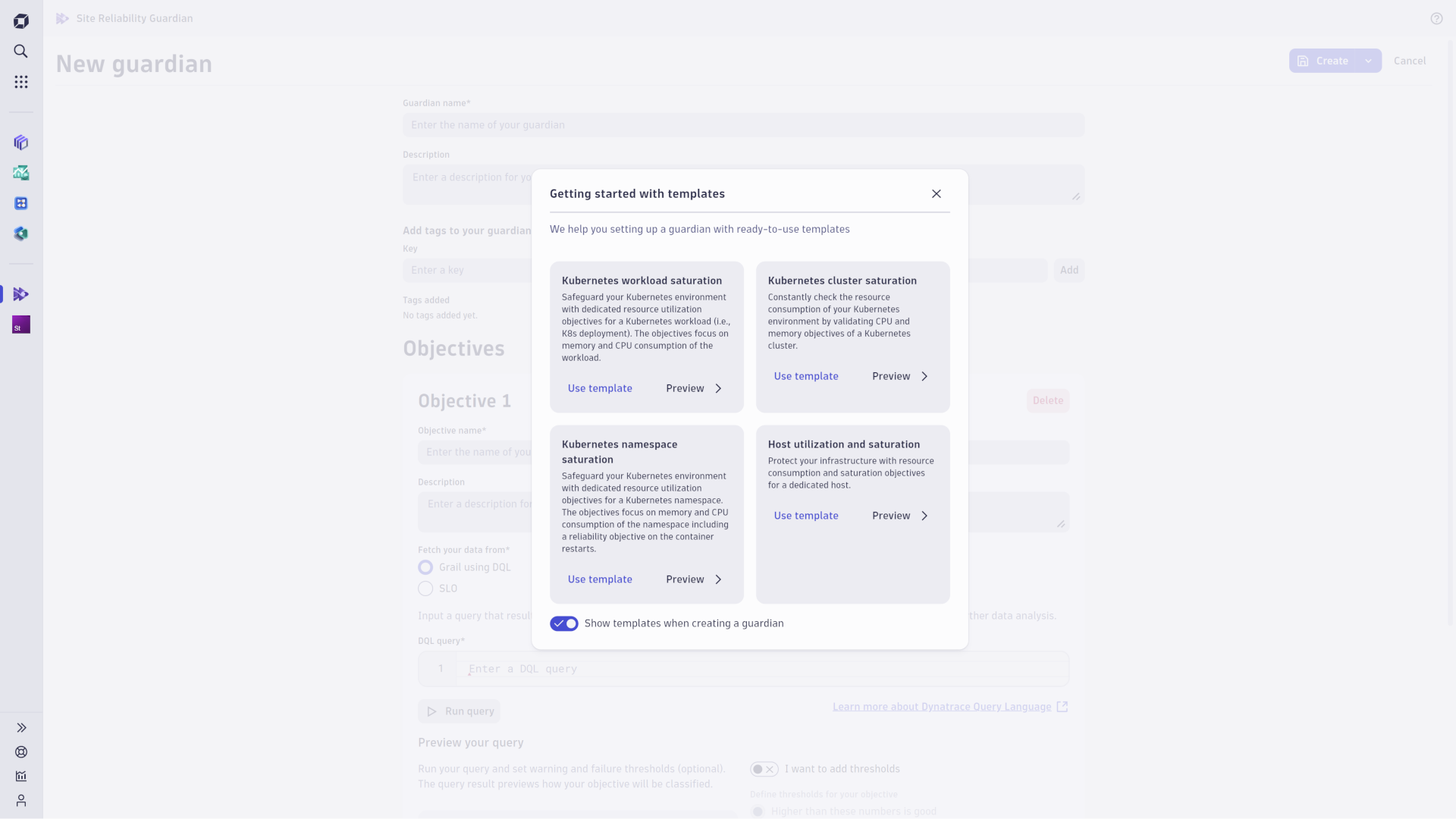
This release extends the guardian creation with templates by an entity selection as part of that process and introduces variables in objective queries.
When picking a template to create a new guardian, entities that the guardian shall reference can be selected. Consequently, the provided objectives of the template will be adjusted referring to the selected entities.
With the support of variables in objective queries, guardian validations can be parameterized.
To use this new feature, a variable starting with the $ prefix can be defined in the DQL query of an objective.
While a default value must be provided, this default value can be overridden when performing the guardian validation.
Consequently, these variables retrieve their value when triggering a manual validation, or from the execution of the automation workflow.
When reviewing an executed validation, variables are substituted by the provided values reflecting the context in which the objectives were checked.
This release resolves reported issues and improves the overall stability and performance. The bundled templates have also been improved slightly.
This release resolves reported issues and improves the overall stability and performance.
This release resolves reported issues and improves the overall stability and performance.
This release extends the guardian creation with templates by an entity selection as part of that process and introduces variables in objective queries.
When picking a template to create a new guardian, entities that the guardian shall reference can be selected. Consequently, the provided objectives of the template will be adjusted referring to the selected entities.
With the support of variables in objective queries, guardian validations can be parameterized.
To use this new feature, a variable starting with the $ prefix can be defined in the DQL query of an objective.
While a default value must be provided, this default value can be overridden when performing the guardian validation.
Consequently, these variables retrieve their value when triggering a manual validation, or from the execution of the automation workflow.
When reviewing an executed validation, variables are substituted by the provided values reflecting the context in which the objectives were checked.
This release resolves reported issues and improves the overall stability and performance.
This release extends the guardian creation with templates by an entity selection as part of that process and introduces variables in objective queries.
When picking a template to create a new guardian, entities that the guardian shall reference can be selected. Consequently, the provided objectives of the template will be adjusted referring to the selected entities.
With the support of variables in objective queries, guardian validations can be parameterized.
To use this new feature, a variable starting with the $ prefix can be defined in the DQL query of an objective.
While a default value must be provided, this default value can be overridden when performing the guardian validation.
Consequently, these variables retrieve their value when triggering a manual validation, or from the execution of the automation workflow.
When reviewing an executed validation, variables are substituted by the provided values reflecting the context in which the objectives were checked.
This release extends the guardian creation with templates by an entity selection as part of that process and introduces variables in objective queries.
When picking a template to create a new guardian, entities that the guardian shall reference can be selected. Consequently, the provided objectives of the template will be adjusted referring to the selected entities.
With the support of variables in objective queries, guardian validations can be parameterized. To use this new feature, a variable starting with the $ prefix can be defined in the DQL query of an objective. While a default value must be provided, this default value can be overridden when performing the guardian validation. Consequently, these variables retrieve their value when triggering a manual validation, or from the execution of the automation workflow. When reviewing an executed validation, variables are substituted by the provided values reflecting the context in which the objectives were checked.
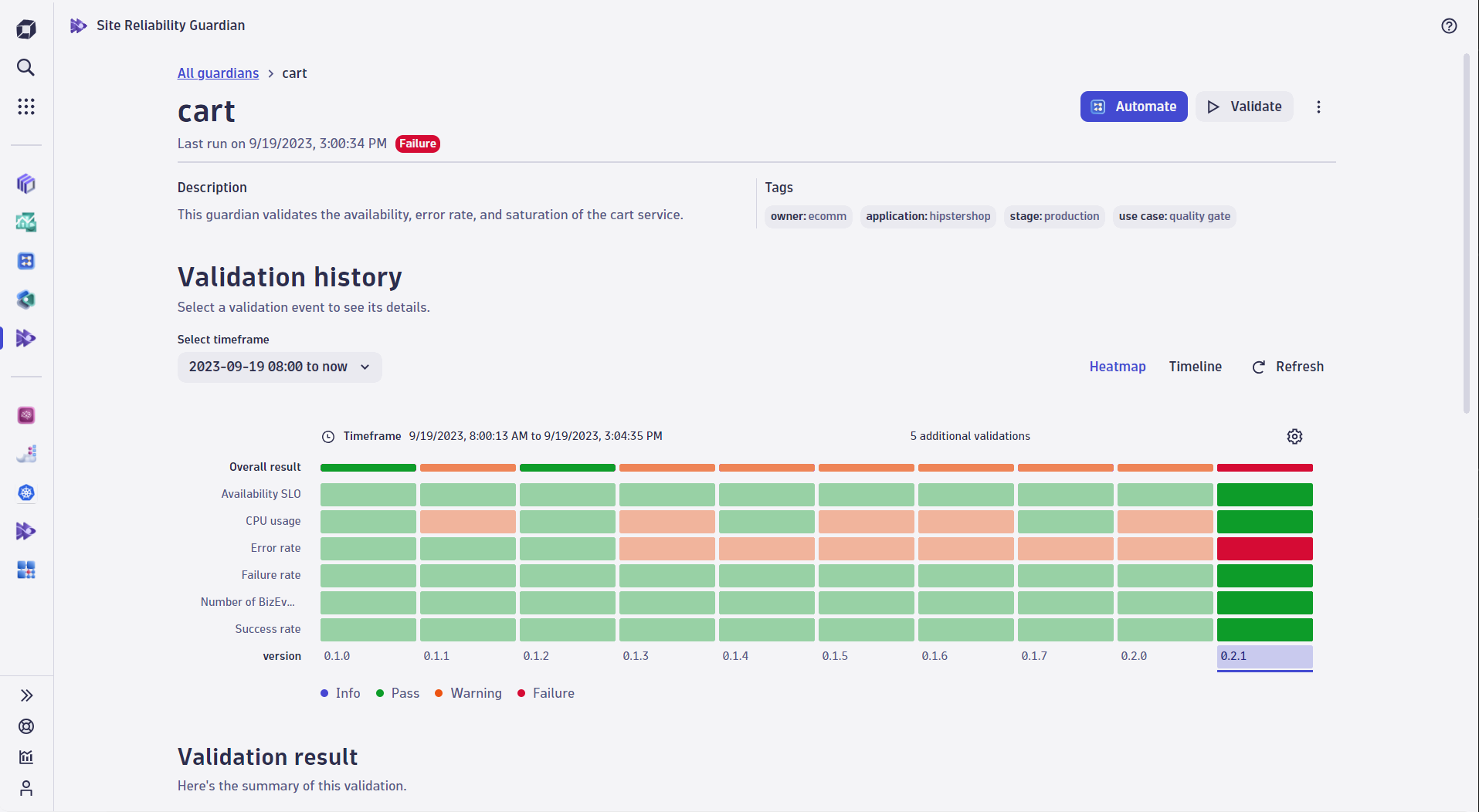
You now have an easy way to look at and compare recent validations leveraging a heatmap view. While the validation timeline is still available, the heatmap is visible as default and provides the same navigation features as the timeline. If the timeline is still the preferred way to investigate recent validations, click on "Timeline" to switch the view.
Furthermore, we have revamped the create guardian journey with a new layout for the create/edit screen. This new layout shows all objectives of the guardian on the left side with the individual configuration on the right side. Consequently, an improved overview of objectives is provided in the edit mode with more convenience in navigating through them.
You will now find that it uses space much more efficiently. Let us know what you think!
Please note that we are still improving the experience for narrow viewports.
There was a minor change in the "Security Gate" template to indicate its early adopter status.
This is a maintenance release that addresses some issues that we have observed.
In this version, we have added the ability to view validation execution properties when viewing a validation. This allows you to leverage workflows to include additional metadata related to a specific validation, such as the version number or deployment environment.
We have also incorporated some feedback provided to us by adopters. Specifically, guardians can now have an "info" state. Previously, a guardian consisting only of objectives would have been considered a "pass". This has been changed to avoid any confusion.
In this version, we have added the ability to view validation execution properties when viewing a validation. This allows you to leverage workflows to include additional metadata related to a specific validation, such as the version number or deployment environment.
We have also incorporated some feedback provided to us by adopters. Specifically, guardians can now have an "info" state. Previously, a guardian consisting only of objectives would have been considered a "pass". This has been changed to avoid any confusion.
In this version, we have added the ability to view validation execution properties when viewing a validation. This allows you to leverage workflows to include additional metadata related to a specific validation, such as the version number or deployment environment.
We have also incorporated some feedback provided to us by adopters. Specifically, guardians can now have an "info" state. Previously, a guardian consisting only of objectives would have been considered a "pass". This has been changed to avoid any confusion.
This is a maintenance release aimed at incorporating some feedback that we have received from early adopters, or improved some behavior in situations where we noticed room for improvement in production.
This is probably the last maintenance release for 1.1.x, and we are already planning to follow up with a minor feature-level release in the very near future.
There are a small number of changes that harmonize the UI/UX aspect of the application.

