




Skip to technology filters Skip to main content
Dynatrace Hub

Extend the platform,
empower your team.

Popular searches:
Home hero bg
SegmentsSegments
Segments

Segments

Segments help to logically structure and conveniently filter observability data.

App
Try in PlaygroundDocumentation
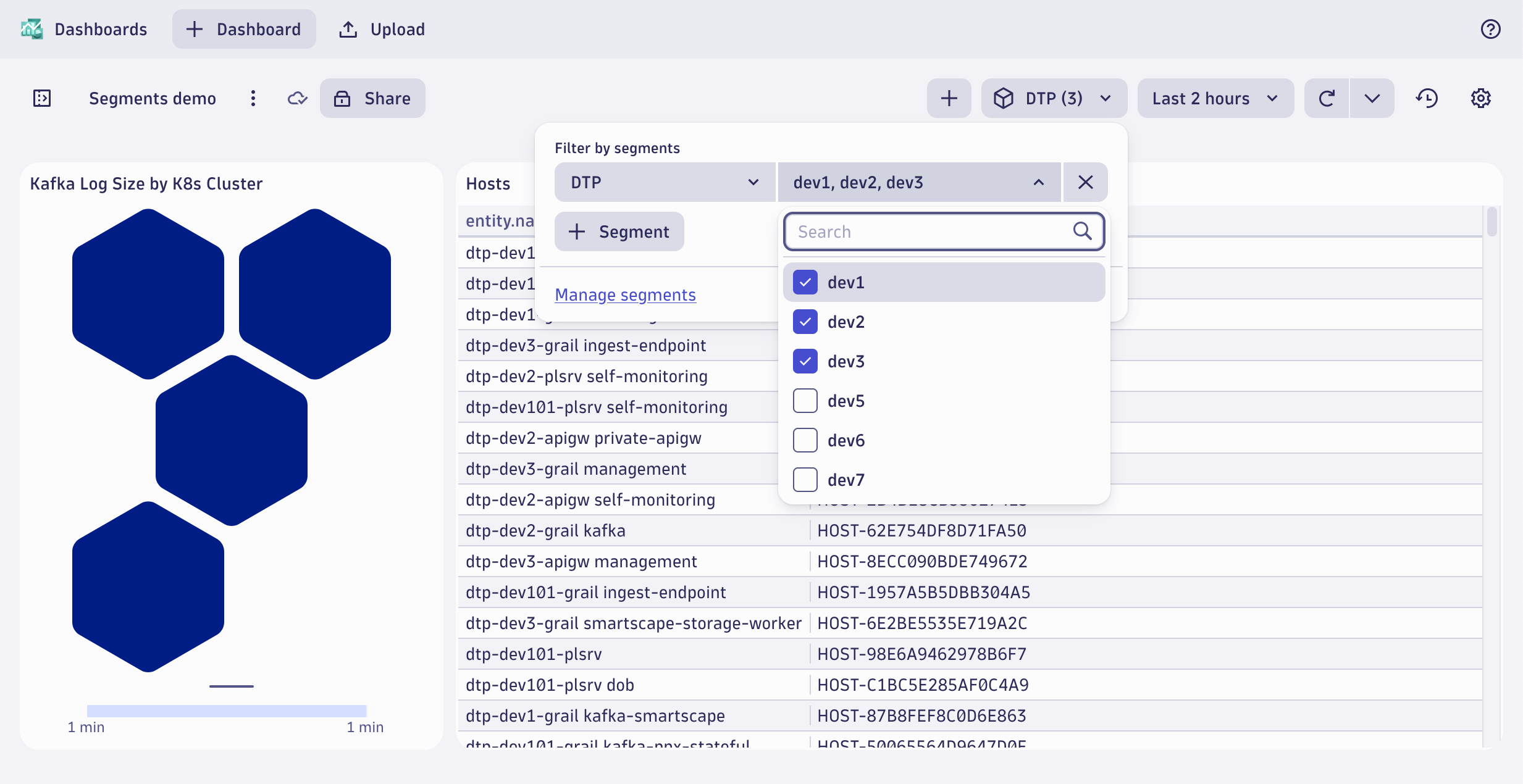
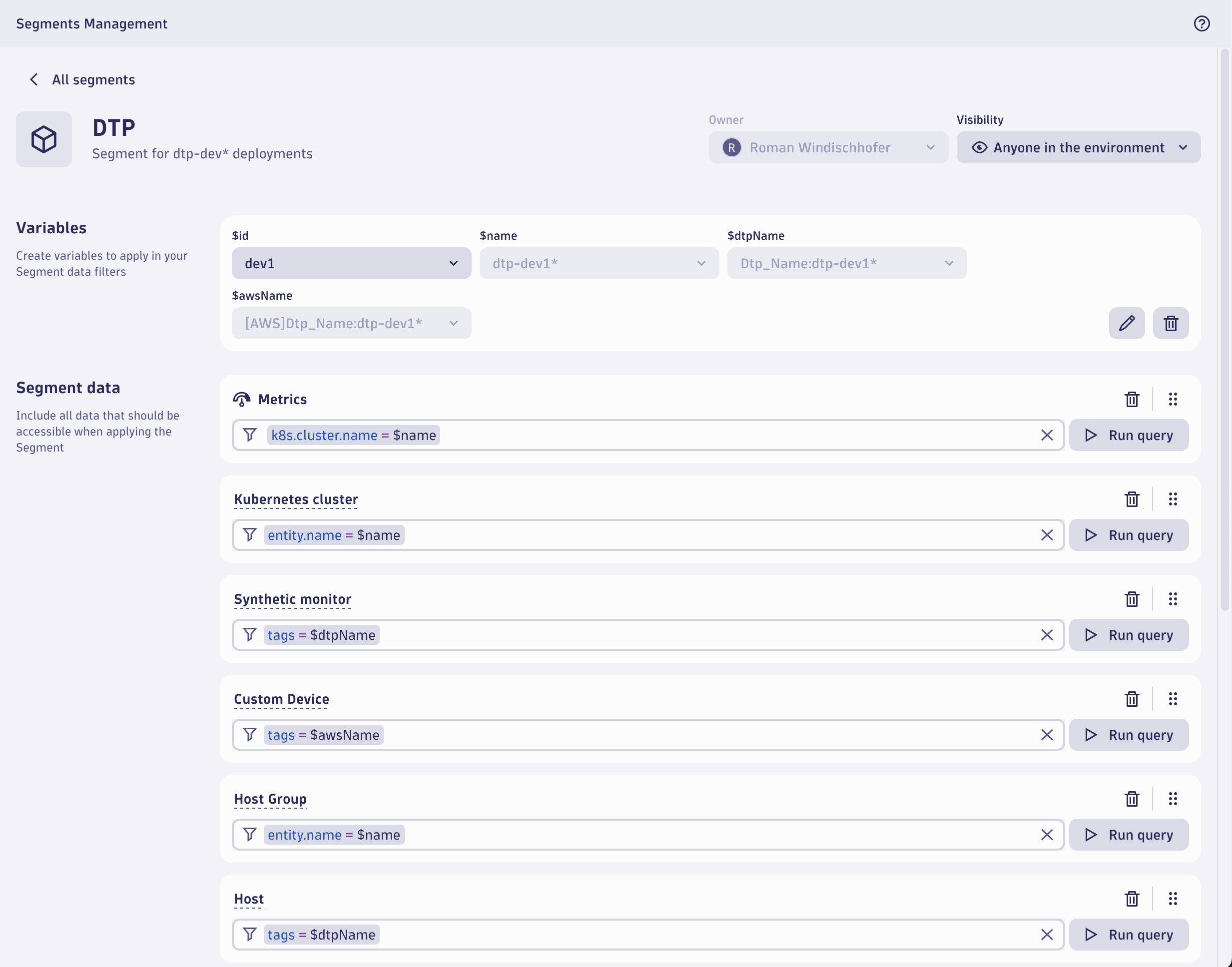
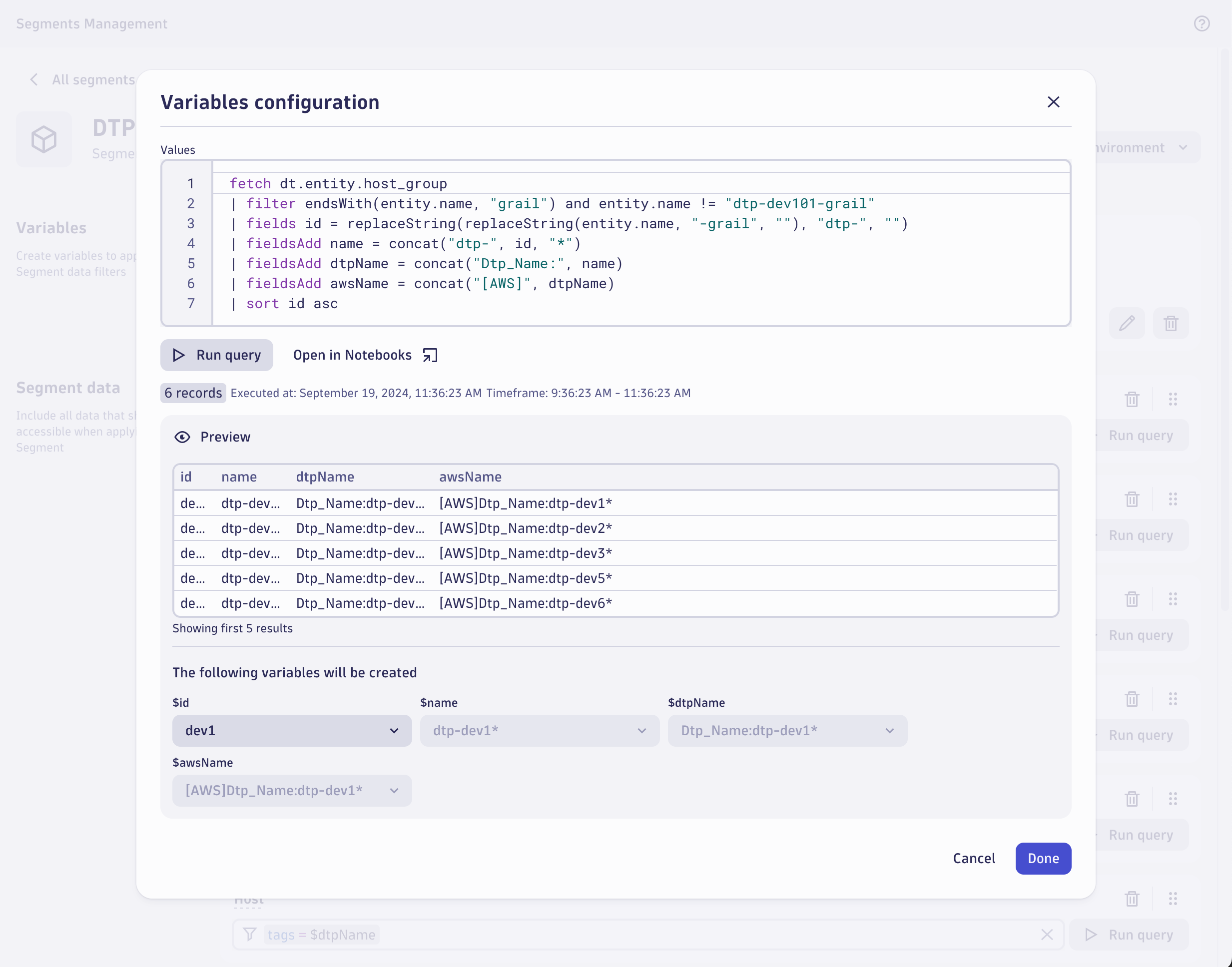
Segments filtering data on a dashboardConfigure segment to span multiple domainsUse dynamic variables to deduplicate required segments
  • Product information
  • Release notes

Overview

Segments are designed to “block out noise”, allowing to select and look at a defined set of data only.

As Dynatrace spans multiple observability domains, segments also allow for necessary abstraction to map end-user domain language onto data in Dynatrace.

Users can simply select from their commonly understood terms and principles and don't need to be experts on how certain data is shaped.

Use cases

Segments would typically be modeled to allow filtering monitored entities, logs, metrics, events, and other types of data about the following dimensions:

  • Business applications operated by the customer
  • Organizational units, to understand responsibility and ownership
  • Infrastructural components, to understand and plan the allocation of resources

Using segments as a natural extension to access control through IAM policies results in the required flexibility for navigating observability data across domains in Dynatrace.

Dynatrace
Documentation
By Dynatrace
Dynatrace support center
Subscribe to new releases
Copy to clipboard

Related to Segments

Grail logo

Grail

Dynatrace's data lakehouse providing unified storage for any type of data.

Dashboards logo

Dashboards

Transform complex data into clear visualizations with custom dashboards.

More resources

Segments empower centralized teams to dynamically organize data at petabyte-scale

Segments empower centralized teams to dynamically organize data at petabyte-scale

Decoupling backend data organization from frontend data utilization
Read more
Cut through the noise with segments: simple, powerful, and dynamic data filtering

Cut through the noise with segments: simple, powerful, and dynamic data filtering

Work smarter in Dynatrace with segments
Read more

Full version history

ReleaseDate

Full version history

2.333.0 - February 2026

🌟 Improvements

  • Usability improvements across the action buttons inside the Variables definition modal
  • Increased coverage of Japanese translation

🐛 Bug fixes

  • Removed initial validation error when applying a segment data filter suggestion via chip items
  • Fixed duplications of primary fields suggestions

Full version history

2.332.1

🌟 Improvements

  • More strict limits for Grail queries used in Segments Management app
  • Primary tags as the first suggestion in the filter field and a chip list item
  • Improved rendering of segment data boxes with variable queries by using skeletons instead of locking the UI
  • Stabilized support for changing operators between startsWith, contains, and endsWith in the filter field
  • Added user event tracking to the Segments application

Full version history

2.331.1

🌟 Improvements

  • More strict limits for Grail queries used in Segments Management app

Full version history

2.331.0 - January 2026

🌟 Improvements

  • Make it possible to create variables directly from the filter field
  • Support for the startsWith, contains and endsWith operators in the filter field
  • Improvements for the Preview button: always enabled, loading state when fetching new data, cancel running preview request(s)
  • Automated Classic Entities preview results tab selection if all others are empty

Full version history

2.330.0 - December 2025

🌟 Improvements

  • Implemented new layout for variables modal
  • Added validation to ensure the first variable column does not return an array
  • Implemented "Create variable" preview table action
  • Case-insensitive value suggestions lookup

🐛 Bug fixes

  • Fixed empty owner value after segment cloning and uploading
  • Fixed classic entities selection in Data (All types)
  • Removed automatically applied equals operators from suggestions

Full version history

2.329.0 - November 2025

🌟 Improvements

  • Improved loading speed for types and signals by switching to faster asynchronous processing
  • Display warning message in Classic Entities preview when filter contains wildcards and query is not allowed
  • Prevent unnecessary filter field updates caused by spacing changes
  • Removed redundant conditions for segments allowed operations
  • Updated Equal Cell action logic to handle cases where the filter field is empty

🐛 Bug fixes

  • Show warning if no data in variables for read only mode
  • Fix missing key suggestions for Entities data type

Full version history

2.328.0 - November 2025

🌟 Improvements

  • Preview statistics — Added support for array variables.
  • DQL queries — Improved support for array variable values.
  • Value suggestions — Array values are now expanded into multiple records in suggestion queries.
  • Removed classic entities from the list of available segment data types.

🐛 Bug fixes

  • Fixed a false negative validation error.
  • Removed duplicate entries from the autocomplete suggestions in the segment data filter.
  • Value suggestions are now hidden when the current operator is not supported.
  • Variable template chips are no longer displayed in read-only mode.

Full version history

2.327.0

🌟 Improvements

  • Using primary grail fields from the semantic dictionary in the "Data (all types)" suggestions
  • New filter creation suggestions chips list for "Data (all types)" filter basing on the primary grail fields
  • Making the preview buttons encourage user to use it when the preview data is not up-to-date with latest filter changes
  • Automated reload of all previews in the segment definition that were created using filter with the variable when we change selected variable value

🐛 Bug fixes

  • Making sure the application does not allow to edit ready-made segments leading to the API operation reject

Full version history

2.326.0

🆕 New features

  • Added classic entities preview results view to the "Data (all types)" and "Entities" databoxes
  • Ready-made dql templates in the Variables configuration modal
  • New self-explaining empty state it the "Data (all types)" databox

🌟 Improvements

  • Support for CMD+Enter / Ctrl+Enter shortcuts in the filter field to trigger the preview action

🐛 Bug fixes

  • Fixed scenarios leading to the no "Data (all types)" box in the segment creation form

Full version history

2.325.1 — October 2025

🌟 Improvements

  • Filter Field — Improved values suggestion mechanism for the initial step of defining a segment filter condition

Full version history

2.324.0 — September 2025

🆕 New features

  • Introduced automated segment results matching preview

🌟 Improvements

  • Improved autocomplete list fetching mechanism
  • Improved empty segment results preview panel

🐛 Bug fixes

  • Show default suggestions for parent classic entities when not having custom ones defined
  • More precise validation messages for uploaded Segment files

Full version history

2.323.1 — September 2025

🐛 Bug fixes

  • Classic entities — Fixed classic entities filter values suggestions

2.323.0 — September 2025

🆕 New features

  • Segments moved to Settings — Centralizes configuration by removing the dedicated Segments app and moving segment configuration into Settings; structural change only, no functional impact.

🌟 Improvements

  • Collapsible preview panel — Adds a collapsible preview panel so you can show or hide results for faster navigation.
  • Chip icons added — Adds chip icons that indicate data types in collapsed preview results for quicker recognition.
  • Validation for operators — Improves validation for contains and endsWith to reduce invalid queries and improve rule accuracy.
  • Query stats moved — Moves detailed preview query statistics above the results table so performance metrics are visible at a glance.

🐛 Bug Fixes

  • Numeric suggestions quoted — Numeric filter suggestions are now automatically wrapped in double quotes to prevent parsing errors.
  • Preview expands results — Clicking Preview consistently expands the results table so results are visible after preview.

Full version history

1.322.1 - August 2025

🌟 Improvements

  • Data box actions: Cleaner interface, displaying Delete and Drag actions only when we have multiple data boxes to interact with.
  • Placeholder for variables: Added an example to guide users in defining variable queries.
  • Improved auto-suggestions: Updated sorting and loading for values to boost relevance and efficiency.
  • Better filter validation: Empty filter fields are now validated on save instead of blur for more intuitive behavior.
  • Refined suggestion list: Suggestions are now sorted alphabetically, and backticks are omitted for clarity.
  • Support for nested keys: We support filtering by fields of type object with special characters, like tags[`Component:Subfield`]="XYZ"

🐛 Bug Fixes

  • Enhanced tooltips: Added and adjusted tooltips to improve visibility and user guidance.
  • Responsive tabs: Enhanced the All Data section with improved tab responsiveness.
  • Smoother table scrolling: Fixed horizontal scrolling issues in the preview table for a more seamless experience.
  • User permissions handling: Respect disabled app-state:write permission

Full version history

1.321.1 - August 2025

🆕 New features

  • New query operators: We've introduced support for ends-with and contains operators, enhancing your querying capabilities.

🌟 Improvements

  • Design System refresh: A cleaner, lighter look with updated colors across the platform.
  • Microguide for variables: Learn when and how to use variables with the new "When to use variables?" microguide.
  • Enhanced auto-suggestions: Improved sorting and relevance for All Data suggestions.
  • Preview results: Preview chips now display more accurate information and reduce unnecessary "Results are limited to 50 items" warnings.

🐛 Bug fixes

  • Improved text guidance: Updated phrasing to "Add filter conditions to include data" for better clarity.
  • Filter clearing issue resolved: Fixed a bug preventing users from clearing filters in existing segments.
  • Header display fix: Resolved an issue where the app header incorrectly appeared in the settings app after creating a new segment.
  • Padding adjustments: Corrected padding inconsistencies around information when moving segments to Settings.

Full version history

1.320.1

🌟 Improvements

  • New information banner: Added an explanatory banner to provide clarity about the segments.
  • Unified Tabs component: Updated all data signal databoxes to use the Tabs component for a consistent user experience.

🐛 Bug fixes

  • Keyboard accessibility: Resolved an issue where the filter couldn't be cleared using the keyboard.
  • Validation message update: Better describe the list of allowed operators in the segment filter definition.

Full version history

1.319.0

New features

  • Added actions menu in the segment view and edit mode with options to duplicate, download, and delete segments
  • Enabled security events signal by default

🌟 Improvements

  • Adjustments in the application help menu items to keep it consistent between all Dynatrace apps
  • Showing migration to Settings banner on the main segments app page
  • Adjusted list of "Recommended" suggestions for All data types

🐛 Bug fixes

  • Resolved blinking issue in the Delete Segment modal
  • Disabled DQL preview button when parent entity has errors

Full version history

1.318.0

New features

  • New segment data preview tables cell action Equal = to filter field integration
  • Enabled Smartscape Entities support in Segments by default
  • Enabled Security events support in Segments by default

🌟 Improvements

  • Add groups for recommended and other suggestions in All data types

Full version history

1.317.0

New features

  • Combine signals and entities on single searchable dropdown to add more data

🌟 Improvements

  • Improved loading state of the variables box on the edit and create pages
  • Loading state reflected in the FilterField autosuggestions
  • Dynamic entities name loading phase UI improvement

🐛 Bug fixes

  • Fixed possibility to use preview in a custom entity types that contains ':' in name

Full version history

1.316.0

🌟 Improvements

  • Using dynamic entities model in segments based on classic entities and their relations
  • Adjusted application header in widget mode

Full version history

1.315.0

New features

  • Newly created segment has All data section by default
  • All data supports autosuggestions for predefined fields
  • All data supports autosuggestions for values based on known metrics
  • Support new Grail data types: user sessions and user events

🌟 Improvements

  • Display only relevant data types based on license and permissions

🐛 Bug fixes

  • Searching for variables received stability improvements
  • Gracefully handle null values in variable records

Technical

  • Increased type-safety configurations
  • Minor performance improvements for several components

Full version history

1.314.0

Improvements

  • Improved preview dql query tables for complex data types

Bug fixes

  • Unified visibility icons in the segment list and details pages
  • Adjusted layout in the modal view of the application

Full version history

1.313.0

Improvements

  • Improved presenting of complex object data types in the preview tables
  • Disable line wrapping in the Name and Description columns by default
  • Make segments list columns resizable
  • Cleaner header cells: Sorting indicators and column action indicators are shown on hover or on sorted columns.
  • Adjusted filter field validators

Bug fixes

  • Improved application stability for users without all signal types access permissions
  • Respect complex filter field auto suggestions structure
  • Reduce filter suggestions for the fields that does not help in user experience

Full version history

1.312.0

Major Changes

  • Extended DQL and filtering results preview tables to include row, column and cell interactions
  • Support startsWith operator in filter definition for all properties and variables combination

Minor Changes

  • Added information panel when uploading a segment with variables query that results in no values
  • Improved variables definition modal usability by protecting against unintentional closing and losing defined query
  • Changed selection of the signal types to dropdown in wide screens
  • Improved variable selector layout and added search option
  • Adjustment in the segments list spacing layout
  • Unified internal DQL of the preview filter results mechanism when working with variables and wildcards in the filter condition

Patch Changes

  • Gracefully handling failed date and time formatting for the preview tables

Full version history

1.311.0

Minor Changes

  • Hide span groups for the environment without DPS license

Patch Changes

  • Improved uploading a segment with variables query that results in no values
  • Fixed mobile layout issues related to interaction with segment filter

Full version history

1.310.2

Patch Changes

  • Fixed preview DQL tables stability issues with complex data values

1.310.1

Patch Changes

  • Fixed preview DQL tables layout problems

1.310.0

Minor Changes

  • Improved handling of a no permission scenario with dedicated screen

Patch Changes

  • Adjusted layout of segments application when loaded as a part of setting
  • Updated DQL preview table layout in UI
  • Improved segment filter suggestions mechanism

Full version history

1.309.0

Minor Changes

  • List of entity data types sorted alphabetically

Patch Changes

  • Improved structure validation when importing segment definition from JSON
  • Fix fetching and deleting variables after uploading a new segment from file

Full version history

1.308.1

Patch Changes

  • Improved the stability of the filter field suggestion mechanism to support multi-value fields.

1.308.0

Patch Changes

  • Variables preview query limit aligned with other apps.
  • Updated design system dependency to include the latest Filter Field adjustments.
  • Adjusted the user avatar layout.

Full version history

1.307.2

Patch Changes

  • Fixed issues related to segment sharing and admin permissions in the UI components.

1.307.1

Patch Changes

  • Fixed the suggestions and preview mechanism for Metrics and all data types in segment data definition.

1.307.0

Major Changes

  • Respect storage:filter-segments:share and storage:filter-segments:admin policies.

Minor Changes

  • Quick way to duplicate segment form list of all segments.
  • Extended segment filtering suggestions to use live GRAIL values.
  • Updated the list of options available in the entity relations attributes.

Patch Changes

  • Added a tooltip for segment visibility restrictions.
  • Extended validation of wildcard usage with variables.
  • Improved API error handling.
  • Adjusted the layout for widget and add-on segments application modes.
  • Enhanced the look and feel of desktop, tablet, and mobile views.
  • Usability UI adjustments.

Full version history

1.306.0

Minor Changes

  • Added intent for opening a list with specified filters.
  • Added intent for opening a specific segment.
  • Added the possibility to download a segment as JSON.
  • Added the possibility to upload a segment from JSON.

Patch Changes

  • Improved user list loading stability.
  • Always display the owner name (if available) for my segments instead of the user ID.
  • Adjusted the default and mobile layouts for the segment edit view.
  • Updated segment filter validation rules:
    • Allow nested conditions by using brackets.
    • Do not allow startsWith with variables and quoted string values.
    • Do not allow negation used with comparison operators.
    • Do not allow wildcards in combination with variables.

1.305.0

Patch Changes

  • Improved owner name resolving mechanism for the segments list.
  • Fixed adding browser navigation history on each segment filter modification.
  • Fixed parsing issues with empty segment filter conditions.
  • Fixed preview table for entities that could be related to multiple parent types.
  • Brackets in filter conditions are disallowed only for entity types.
  • Fixed logic of restrictions on duplicated entity types used as the main datatype when they are also in a relationship as a child.

Full version history

1.304.2

Patch Changes

  • Fixed preview table for entities that could be related to multiple parent types.

1.304.1

Patch Changes

  • Fix parsing issues with empty segment filter conditions

Full version history

1.304.0

Major Changes

  • Support for configuring entity relations.

Minor Changes

  • Fine-tune autocompletion for Kubernetes entities.
  • Improve preview for entity relations by combining them with parent entity filtering.
  • New constraint: No more than 20 includes within one segment.
  • New constraint: Segments can only support filtering by entity field from specific suggestions.

Patch Changes

  • Fix navigation issues for Firefox.
  • Unify UI elements’ colors and alignment.
Dynatrace Hub
Get data into DynatraceBuild your own app
Dynatrace Intelligence - Agentic Operations SystemThe Dynatrace Agentic AI ecosystem
All (872)Log Management and AnalyticsKubernetesAI and LLM ObservabilityInfrastructure ObservabilitySoftware DeliveryApplication ObservabilityApplication SecurityBusiness ObservabilityDigital Experience
Filter
Type
Built and maintained by
Deployment model
SaaS
  • SaaS
  • Managed
Partner FinderBecome a partnerDynatrace Developer

Discover recent additions to Dynatrace

Problems logo

Problems

Detect, explain and triage problems automatically using Dynatrace Intelligence.

Logs logo

Logs

Explore all your logs without writing a single query.

Investigations logo

Investigations

Fast and precise incident response on Grail data with DQL queries.

Business Flow logo

Business Flow

Track, analyze, and optimize your critical business processes.

Cost & Carbon Optimization logo

Cost & Carbon Optimization

Track, analyze, and optimize your IT carbon footprint and public cloud costs.

Anomaly Detection logo

Anomaly Detection

Detect and alert on anomalies and custom patterns using any DQL time series.

Analyze your data

Understand your data better with deep insights and clear visualizations.

Notebooks logo

Notebooks

Create powerful, data-driven documents for custom analytics and collaboration.

Dashboards logo

Dashboards

Transform complex data into clear visualizations with custom dashboards.

Automate your processes

Turn data and answers into actions, securely, and at scale.

Workflows logo

Workflows

Automate tasks in your IT landscape and move towards autonomous operations.

Jira logo

Jira

Create, query, comment, transition, and resolve Jira tickets within workflows.

Slack logo

Slack

Automate Slack messaging for security incidents, attacks, remediation, and more.

Secure your cloud application

See vulnerabilities and attacks in your environment.

Security Posture Management logo

Security Posture Management

Detect, prioritize, and remediate security and compliance findings with SPM.

Threats & Exploits logo

Threats & Exploits

Understand, triage, and investigate detection findings and alerts.

More resources

Observability for Developers on Cursor logo

Observability for Developers on Cursor

Get Real time Code-Level data directly to your Cursor IDE

GitHub Copilot Coding Agent logo

GitHub Copilot Coding Agent

Automate vulnerability remediation and boost developer productivity

GitHub Copilot Custom Agent logo

GitHub Copilot Custom Agent

Automate your development workflows with specialized agent definitions

Observability for Developer on JetBrains logo

Observability for Developer on JetBrains

Get real-time code-level data directly to your Jetbrains IDE

Pagerduty for Dynatrace Workflows logo

Pagerduty for Dynatrace Workflows

Streamline incident management with automated Pageruty workflows

Cursor IDE logo

Cursor IDE

Boost developer productivity and get real-time, code-level insights into Cursor

Observability for Developers on Windsurf logo

Observability for Developers on Windsurf

Get real-time code-level data directly to your Windsurf IDE

Are you looking for something different?

We have hundreds of apps, extensions, and other technologies to customize your environment

Leverage our newest innovations of Dynatrace Saas

Kick-start your app creation

Kick-start your app creation

Whether you’re a beginner or a pro, Dynatrace Developer has the tools and support you need to create incredible apps with minimal effort.
Go to Dynatrace Developer
Upgrading from Dynatrace Managed to SaaS

Upgrading from Dynatrace Managed to SaaS

Drive innovation, speed, and agility in your organization by seamlessly and securely upgrading.
Learn More
Log Management and Analytics

Log Management and Analytics

Innovate faster and more efficiently with unified log management and log analytics for actionable insights and automation.
Learn more


















