


























Skip to technology filters Skip to main content
Dynatrace Hub

Extend the platform,
empower your team.

Popular searches:
Home hero bg
LogsLogs
Logs

Logs

Explore all your logs without writing a single query.

App
Try in PlaygroundDocumentation
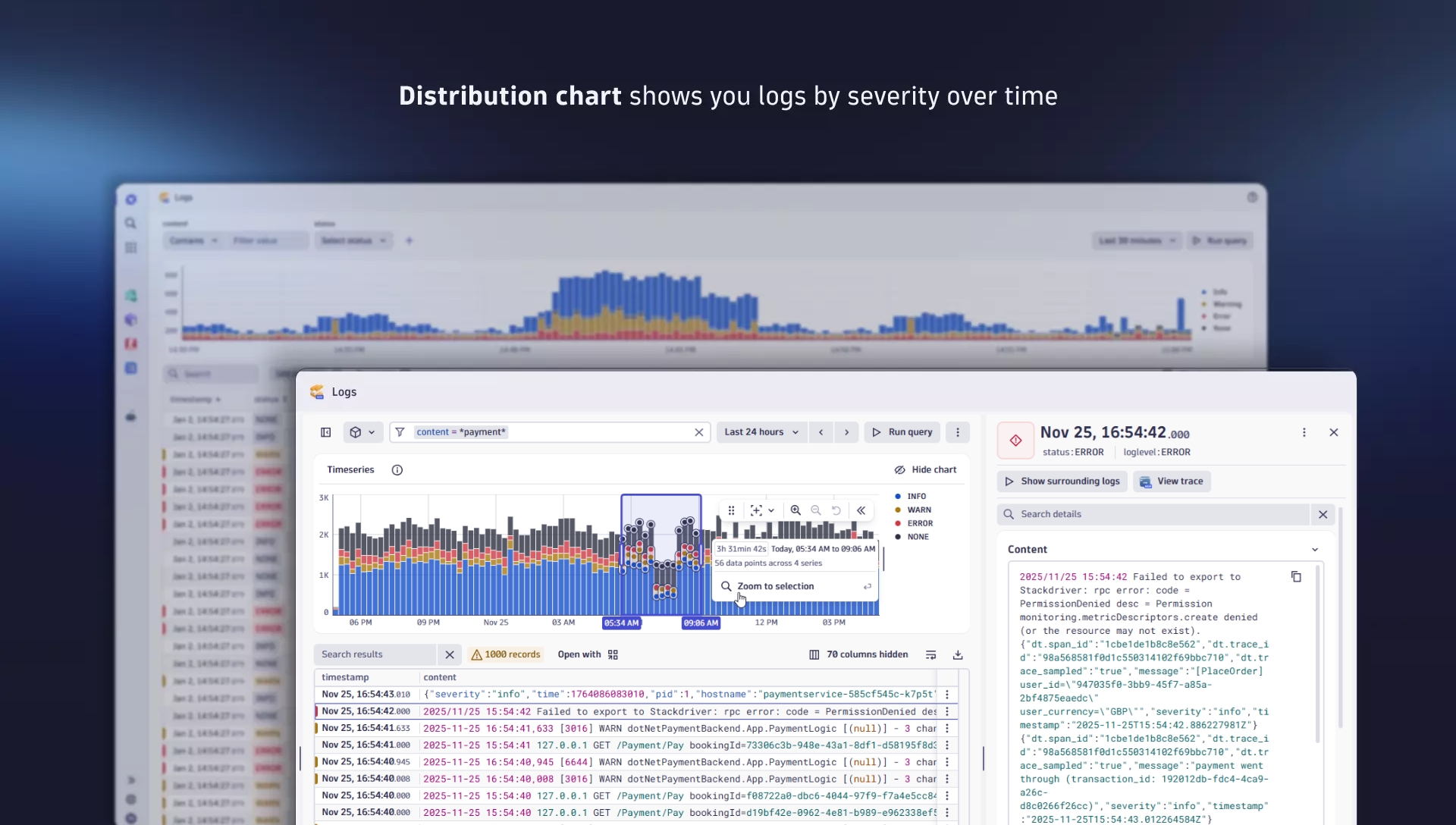
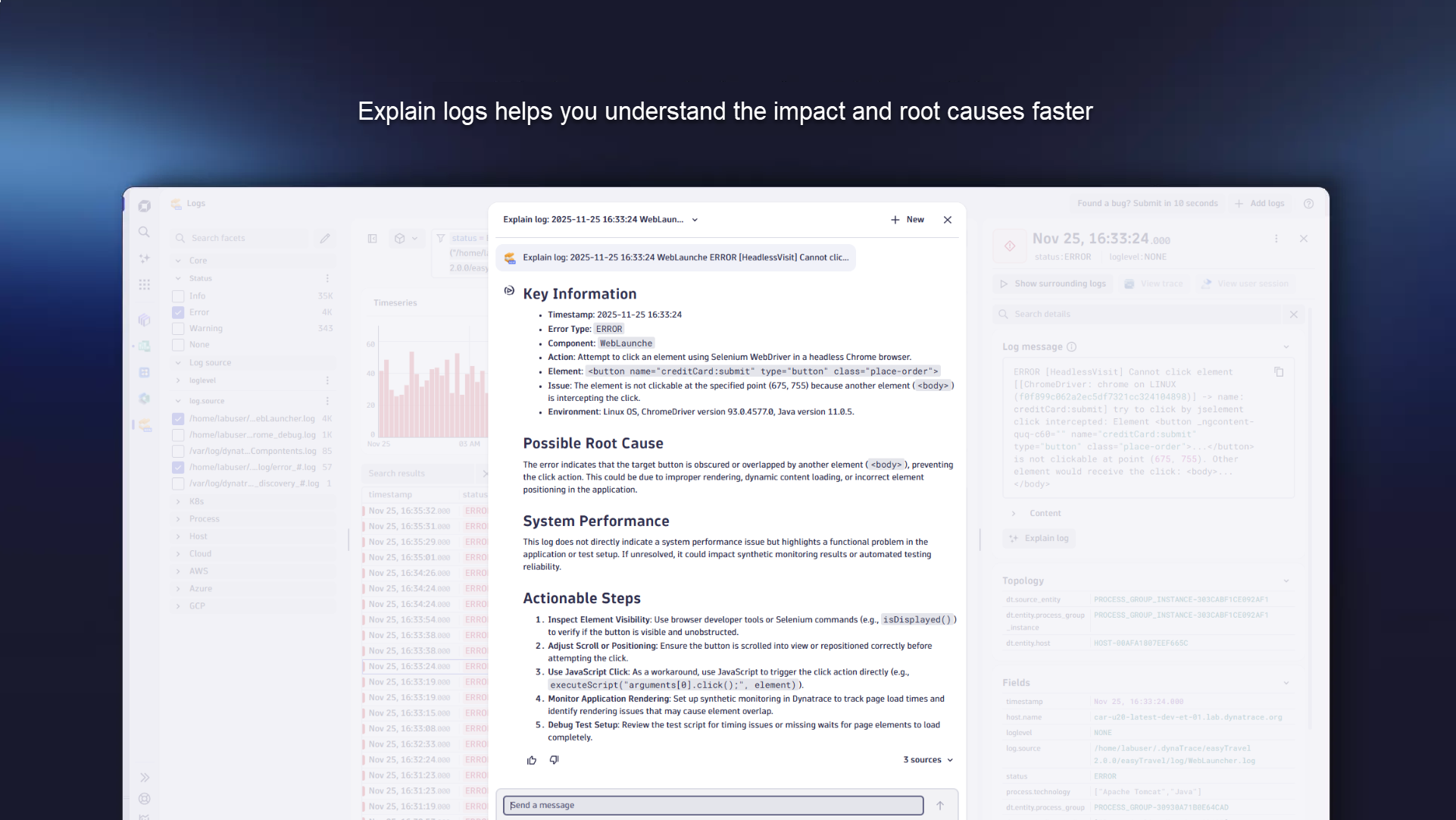
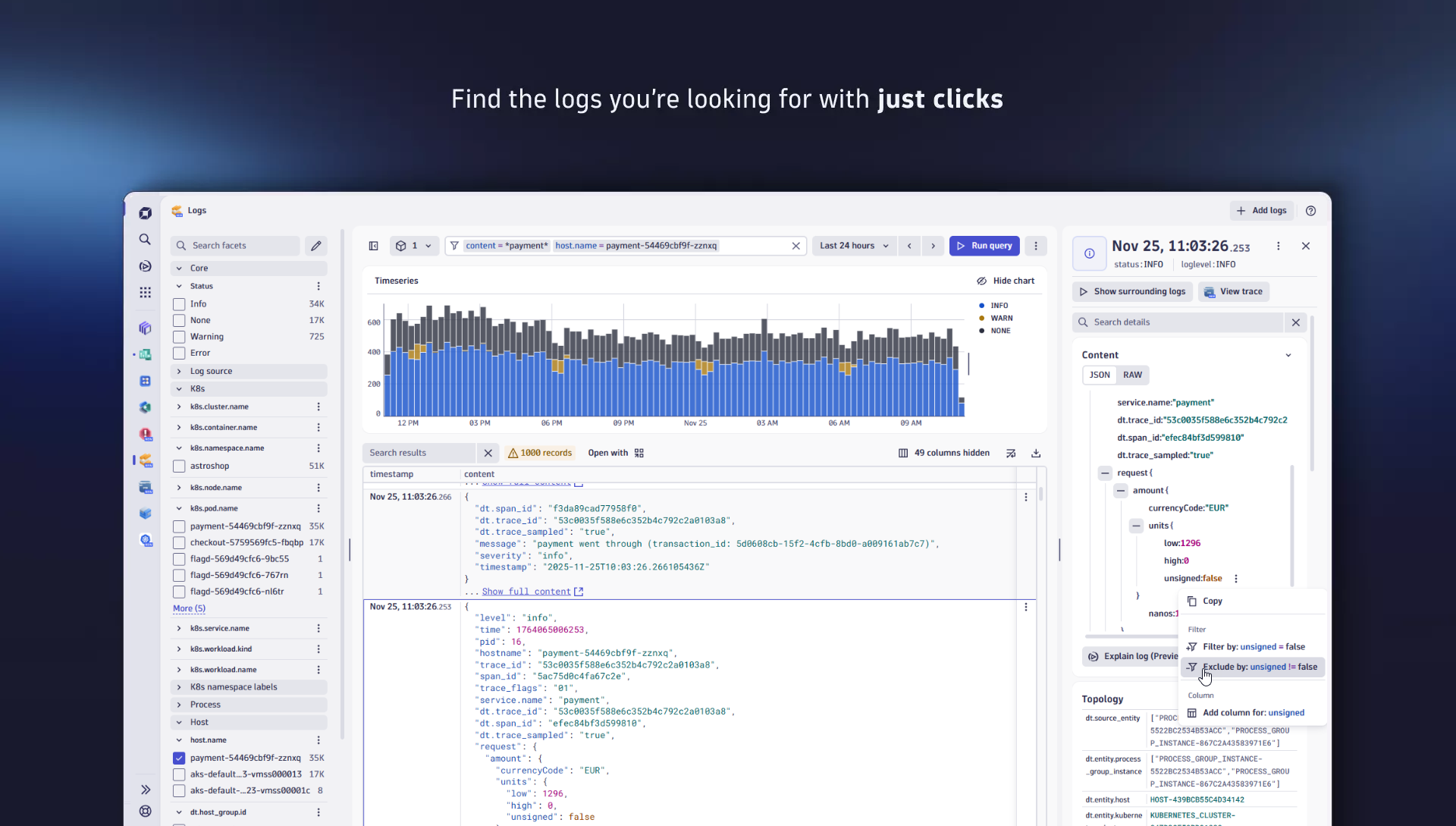
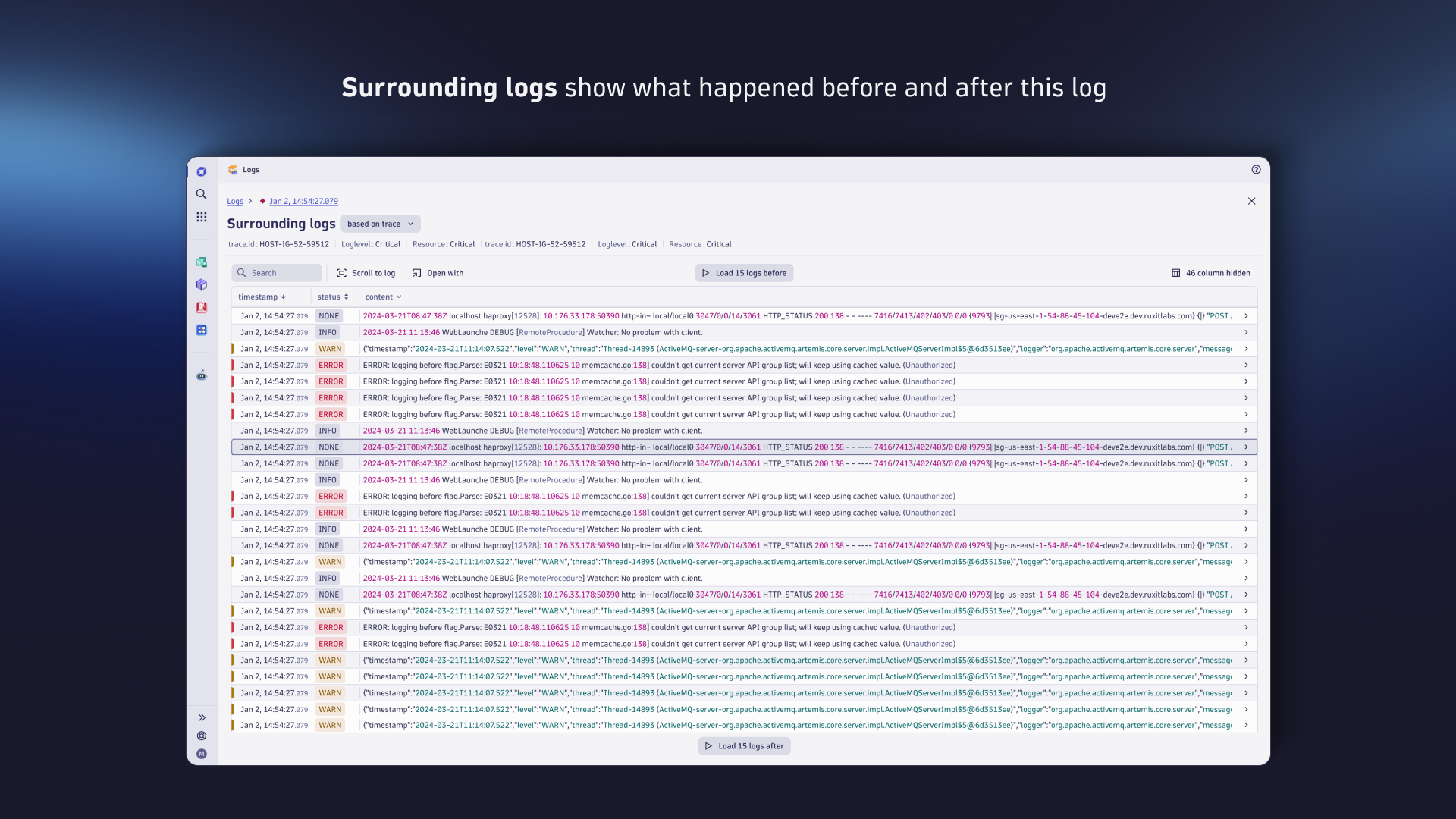
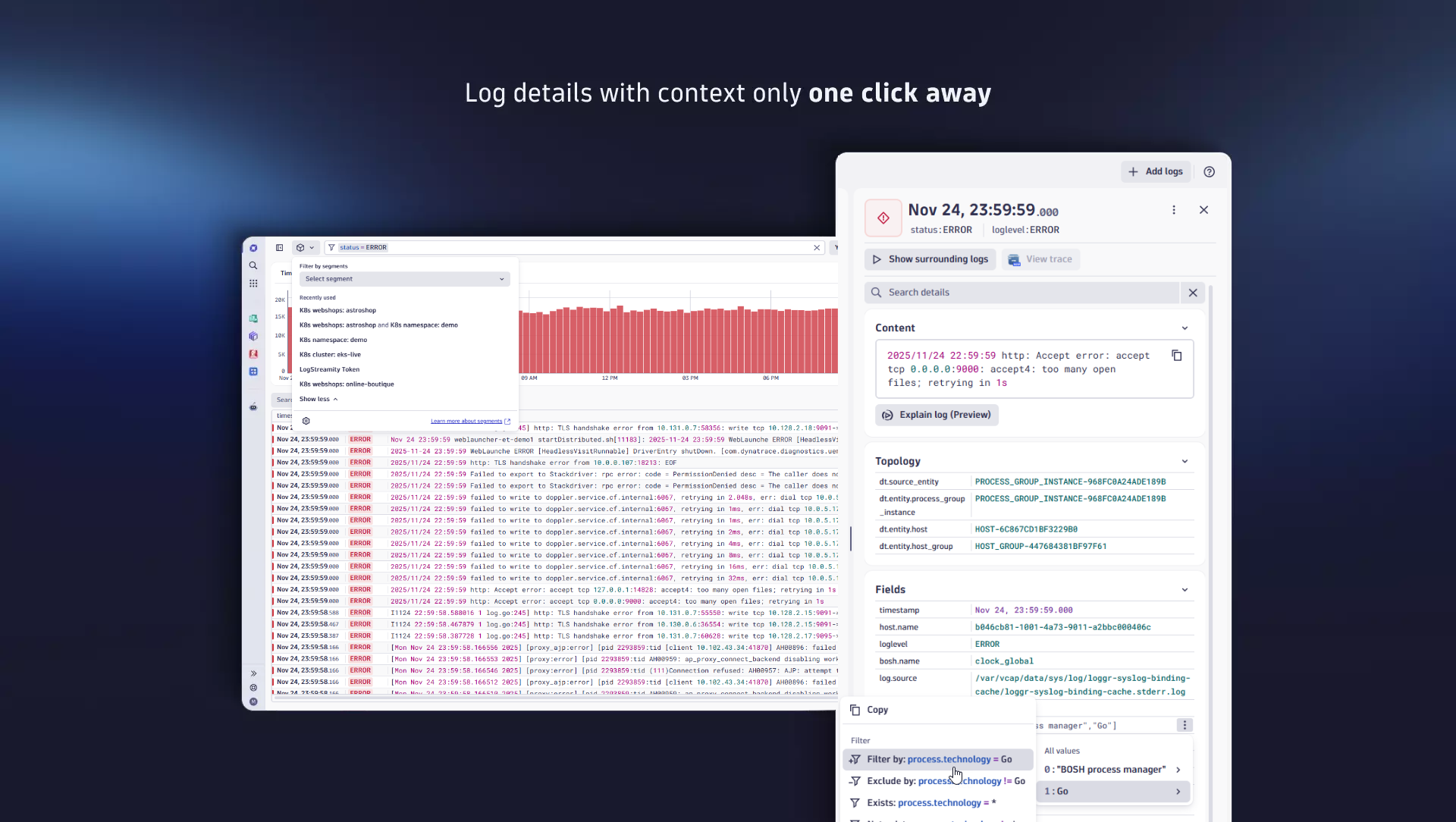
The dynamic histogram chart with intuitive point-and-click filter provide unique experience for simplified and timely exploration of logs.The "Explain Logs" feature provides actionable steps and insights to cut your root cause analysis and time to action, enabling you to resolve faster.Clear, stacked severity trends with swift and intuitive filtering options help to explore JSON-structured and other logs easily.Cut MTTR by turning raw logs into guided insights - In context of your trace, or surrounding topology entities.Log details surface rich context in one click - access to linked traces, topology, and more. Instant filters turn insights into precise searches.
  • Product information
  • Release notes

Overview

The Logs app is the fastest place to explore relevant log records without writing queries. Use intuitive facets, severity trends, and context links to traces, topology, and surrounding entities to investigate and drive preventive operations. The "Explain Logs" feature distills log records into insightful key facts, including the likely root cause, impact, and actionable steps, thereby reducing the time to resolution. Deep-links and app integrations let you easily share findings and continue analysis in Dashboards, Notebooks, Distributed Tracing, and many other Dynatrace apps.

Use cases

  • Find the logs you’re looking for. Easily filter your logs without writing DQL, and find the logs you need.
  • Proactive investigation. Uncover problems and insights by investigating log distribution chart over time.
  • Discover the root cause of issues from context. Investigate the surrounding logs of interest to understand the context and root cause of errors:
    • Find the root cause and check if a log is only a symptom of issues
    • Based on traces: show transaction details in a distributed environment
    • Based on source: analyze select record in the context of a single component
  • Expand your analysis. Quickly navigate between log details and related hosts, Kubernetes clusters, traces, or other entities. This helps you understand the impact of a single record in the context of related metrics and traces
  • Share your findings. Continue your journey with logs in Notebooks, Dashboards, Security Investigator, or automate with Workflows.

Details

Get Started

  1. Start ingesting logs via your preferred technology or using the log onboarding wizard.
  2. All your logs will appear in Dynatrace Grail and the Logs app!

You plan to analyze and ingest log data from your Kubernetes environment? Then have a look at our Log Monitoring for Kubernetes, which offers a fully automated log streaming solution.

Get Started

  1. Explore log ingest solutions in the Hub and start ingesting data
  2. All your logs will appear in Logs app!

You plan to analyze and ingest log data from your Kubernetes environment? Then have a look at our Log Monitoring for Kubernetes, which offers a fully automated log streaming solution.

Dynatrace
DocumentationMore Information
By Dynatrace
Dynatrace support center
Subscribe to new releases
Copy to clipboard

Related to Logs

Security Investigator logo

Security Investigator

Fast and precise forensics for security and logs on Grail data with DQL queries.

Log Monitoring for Kubernetes logo

Log Monitoring for Kubernetes

Easily and seamlessly stream logs to Dynatrace via the Kubernetes Log Module.

Full version history

ReleaseDate

Full version history

1.17.5

Patch Changes

  • 3386b58: Fixes issue where log have trace sampled but the information is not stored in logs and view trace button is disabled (APPOBS-30233)

1.17.4

Patch Changes

  • Fixes interaction issue (up/down keyboard navigation) in the FilterField component
  • Fix user was getting blocked to enter logs app when query for checking log ingest was taking too long
  • Fix logs app is crashed on Safari when manipulating facets

1.17.3

Patch Changes

  • Fixes the application crash when user opens SegmentSelector without a permission to fetch segments

1.17.2

Patch Changes

  • 3c174bd: Fix segments missing scopes
  • a3be06b: Update of strato components preview to 2.7.4

1.17.1

Patch Changes

  • c7082d6: Fix view trace button to be enabled when trace sampled attribute is string

1.17.0

Minor Changes

  • 0e4a9b8: Show the display name in FilterField details
  • f58eaf7: Wrap string value suggestions in Filter Field with quotes
  • 6b3d5a6: Update of strato components preview to new major version
  • d2807f8: Added log message feature highlight
  • fc57be2: Removes FilterField intent support between Logs and Notebooks. "Open with" now opens the query in DQL Editor mode in Notebook.
  • f97a56d: Display auto suggestion "Use {something} as value"
  • 81d4285: Add tooltip with information of Log message source
  • dc6dabe: Enable recent and pinned filters under FF
  • 350823b: Log details action are always visible, but disabled when log does not meet criteria

Patch Changes

  • f6b22f0: Improve 'log message' field tooltip message in detail view
  • 7651f8c: Fix hiding facets panel when opening sourrounding logs
  • f7a5e6f: The timeseries chart will take the records from the table if they are not limited
  • c6d3b3b: Always show 'Show full content' when content is truncated
  • e951e96: Remove unused scope definitions to meet security requirements
  • 93e30f2: Migrate to log-components without open feature dependencies
  • db52629: Add resolvers for classic logs app URLs
  • 87ca8e9: update the behavior of relevant key suggestions in the FilterField
  • 20e78ab: Smart suggestions when user starts typing
  • c4d877e: Provide link for log message documentation
  • beffd6e: Fix disabling already added filters in context menu for names with special characters
  • e2f3d7e: Fixed Log message feature highlight z-index
  • 61fd824: Fix issue with filter field link opening dql editor
  • bc9113b: Fix network zone dropdown issue in Logs Onboarding
  • d5220db: Fix height of the timeseries chart
  • 6ce8826: Change enforcing query consumption limit parameter to adjust it to DQL client
  • c039aea: Move explain button out of collapsed accordion in details view
  • 7e888b6: Updated permission storage:smartscape:read
  • 82fb67f: Fix filtering by JSON fields where keys that are numbers
  • 173f156: Always show 'Log message' in Surrounding logs
  • 7b8684e: Fetch user events only if there is record with correct payload and avoid spamming
  • c14011c: Remove parsing of json in the end of query when adding filters
  • f7bcc00: Fixed log message linewrap
  • 3244698: Wrap log message query with comment
  • 8176171: Added missing support for 'starts-with' and 'not-starts-with' filters
  • 1e658b7: Add storage:fieldsets:read scope for Logs App
  • bbbc069: Hide user settings behind feature flag
  • e021564: Enhance operators suggestions
  • 90519c8: Fix duplicated status field when run query from Timeseries Chart

Full version history

1.17.4

Patch Changes

  • Fixes interaction issue (up/down keyboard navigation) in the FilterField component
  • Fixes user was getting blocked from entering the logs app when querying for checking log ingestion was taking too long
  • Fixes the crashes on Safari when manipulating facets

1.17.3

Patch Changes

  • Fixes the application crash when user opens SegmentSelector without a permission to fetch segments

1.17.2

Patch Changes

  • 3c174bd: Fix segments missing scopes
  • a3be06b: Update of strato components preview to 2.7.4

1.17.1

Patch Changes

  • c7082d6: Fix view trace button to be enabled when trace sampled attribute is string

1.17.0

Minor Changes

  • 0e4a9b8: Show the display name in FilterField details
  • f58eaf7: Wrap string value suggestions in Filter Field with quotes
  • 6b3d5a6: Update of strato components preview to new major version
  • d2807f8: Added log message feature highlight
  • fc57be2: Removes FilterField intent support between Logs and Notebooks. "Open with" now opens the query in DQL Editor mode in Notebook.
  • f97a56d: Display auto suggestion "Use {something} as value"
  • 81d4285: Add tooltip with information of Log message source
  • dc6dabe: Enable recent and pinned filters under FF
  • 350823b: Log details action are always visible, but disabled when log does not meet criteria

Patch Changes

  • f6b22f0: Improve 'log message' field tooltip message in detail view
  • 7651f8c: Fix hiding facets panel when opening sourrounding logs
  • f7a5e6f: The timeseries chart will take the records from the table if they are not limited
  • c6d3b3b: Always show 'Show full content' when content is truncated
  • e951e96: Remove unused scope definitions to meet security requirements
  • 93e30f2: Migrate to log-components without open feature dependencies
  • db52629: Add resolvers for classic logs app URLs
  • 87ca8e9: update the behavior of relevant key suggestions in the FilterField
  • 20e78ab: Smart suggestions when user starts typing
  • c4d877e: Provide link for log message documentation
  • beffd6e: Fix disabling already added filters in context menu for names with special characters
  • e2f3d7e: Fixed Log message feature highlight z-index
  • 61fd824: Fix issue with filter field link opening dql editor
  • bc9113b: Fix network zone dropdown issue in Logs Onboarding
  • d5220db: Fix height of the timeseries chart
  • 6ce8826: Change enforcing query consumption limit parameter to adjust it to DQL client
  • c039aea: Move explain button out of collapsed accordion in details view
  • 7e888b6: Updated permission storage:smartscape:read
  • 82fb67f: Fix filtering by JSON fields where keys that are numbers
  • 173f156: Always show 'Log message' in Surrounding logs
  • 7b8684e: Fetch user events only if there is record with correct payload and avoid spamming
  • c14011c: Remove parsing of json in the end of query when adding filters
  • f7bcc00: Fixed log message linewrap
  • 3244698: Wrap log message query with comment
  • 8176171: Added missing support for 'starts-with' and 'not-starts-with' filters
  • 1e658b7: Add storage:fieldsets:read scope for Logs App
  • bbbc069: Hide user settings behind feature flag
  • e021564: Enhance operators suggestions
  • 90519c8: Fix duplicated status field when run query from Timeseries Chart

Full version history

1.17.3

Patch Changes

  • Fixes the application crash when user opens SegmentSelector without a permission to fetch segments

1.17.2

Patch Changes

  • 3c174bd: Fix segments missing scopes
  • a3be06b: Update of strato components preview to 2.7.4

1.17.1

Patch Changes

  • c7082d6: Fix view trace button to be enabled when trace sampled attribute is string

1.17.0

Minor Changes

  • 0e4a9b8: Show the display name in FilterField details
  • f58eaf7: Wrap string value suggestions in Filter Field with quotes
  • 6b3d5a6: Update of strato components preview to new major version
  • d2807f8: Added log message feature highlight
  • fc57be2: Removes FilterField intent support between Logs and Notebooks. "Open with" now opens the query in DQL Editor mode in Notebook.
  • f97a56d: Display auto suggestion "Use {something} as value"
  • 81d4285: Add tooltip with information of Log message source
  • dc6dabe: Enable recent and pinned filters under FF
  • 350823b: Log details action are always visible, but disabled when log does not meet criteria

Patch Changes

  • f6b22f0: Improve 'log message' field tooltip message in detail view
  • 7651f8c: Fix hiding facets panel when opening sourrounding logs
  • f7a5e6f: The timeseries chart will take the records from the table if they are not limited
  • c6d3b3b: Always show 'Show full content' when content is truncated
  • e951e96: Remove unused scope definitions to meet security requirements
  • 93e30f2: Migrate to log-components without open feature dependencies
  • db52629: Add resolvers for classic logs app URLs
  • 87ca8e9: update the behavior of relevant key suggestions in the FilterField
  • 20e78ab: Smart suggestions when user starts typing
  • c4d877e: Provide link for log message documentation
  • beffd6e: Fix disabling already added filters in context menu for names with special characters
  • e2f3d7e: Fixed Log message feature highlight z-index
  • 61fd824: Fix issue with filter field link opening dql editor
  • bc9113b: Fix network zone dropdown issue in Logs Onboarding
  • d5220db: Fix height of the timeseries chart
  • 6ce8826: Change enforcing query consumption limit parameter to adjust it to DQL client
  • c039aea: Move explain button out of collapsed accordion in details view
  • 7e888b6: Updated permission storage:smartscape:read
  • 82fb67f: Fix filtering by JSON fields where keys that are numbers
  • 173f156: Always show 'Log message' in Surrounding logs
  • 7b8684e: Fetch user events only if there is record with correct payload and avoid spamming
  • c14011c: Remove parsing of json in the end of query when adding filters
  • f7bcc00: Fixed log message linewrap
  • 3244698: Wrap log message query with comment
  • 8176171: Added missing support for 'starts-with' and 'not-starts-with' filters
  • 1e658b7: Add storage:fieldsets:read scope for Logs App
  • bbbc069: Hide user settings behind feature flag
  • e021564: Enhance operators suggestions
  • 90519c8: Fix duplicated status field when run query from Timeseries Chart

Full version history

Improvements

  • Enhanced the filtering experience with friendly-sorted suggestions and smart shortcuts, allowing users to quickly access the most relevant fields at the top of the list without manual searching.
  • FilterField operator suggestions are now dynamically displayed based on the attribute type, improving usability and precision during query construction.
  • Improved histogram accuracy by introducing confidence-level-based calculations.

Bug fixes

  • Fixed an issue where Kubernetes labels containing slashes (for example, kubernetes.io/metadata.name) did not display values in the facet view (APPOBS-28914)
  • Resolved a bug where long JSON log records were truncated without showing the “Show full content” link in the raw view (APPOBS-28878)
  • Addressed a crash in the Logs app triggered by specific queries with filters applied (APPOBS-28866)
  • Fixed a permissions-related issue preventing users from viewing values for system segments (APPOBS-10826)

Full version history

1.16.2

Patch Changes

  • b4a23ea: Internal: API dependencies update

1.16.1

Patch Changes

  • d916b81: Fixed executed timeframe
  • efc771c: Hide user settings behind feature flag

1.16.0

Minor Changes

  • 00802a9: Change amount of retries for autocomplete
  • db92c2f: Introduce user settings panel in logs app
  • 98c3c48: Update logs query usage dashboards
  • 06a0185: Show default values for status and loglevel in facets

Patch Changes

  • 336072b: Always show default values for loglevel and status
  • aa0de6d: Improve accessibility in Logs app
  • 59af02d: Fix Run query button is "active" after query is run
  • db92c2f: Add user settings for max results record

Full version history

1.16.1

Bug fixes

  • Addressed inconsistencies in log results when changing the selected timeframe to ensure accurate data reflection (APPOBS-10393)

1.16.0

New features

  • Introduced support for custom Kubernetes labels and annotations in the Logs app, with two new facet groups—Kubernetes Labels and Kubernetes Annotations—based on keys from settings, enabling more precise filtering

Improvements to existing features

  • Improved facet visibility for key attributes - facets now consistently display all possible values for the status and loglevel attributes, even when sampling limits data visibility. If count data is unavailable, the count indicator will be hidden to avoid confusion.
  • Accessibility improvements - added informative alternative text to images for better screen reader support, ensured all user input fields include clear visual labels or instructions, improved hover-triggered content behavior so it remains visible when hovered over with a pointer.

Bug fixes

  • Resolved an issue where rapid typing in the filter bar caused some characters to be dropped. The input now reliably captures all keystrokes, regardless of typing speed (APPOBS-9288)
  • Fixed issue where the "Run Query" button remained active after execution without query changes; it now resets to its pristine state (APPOBS-9835)
  • Reduced delay in opening the intent modal from the context menu next to the "Run Query" button for a more responsive experience (APPOBS-10054)

Full version history

1.15.1

Bug fixes

  • Fixed timeframe value in query result
  • Fixed log onboarding widget

Full version history

1.15.0

Improvements to existing features

  • Added new options to the row actions context menu: View Record, Show Surrounding Logs, Open Record With, Open Trace, and Explain Log (Preview) for enhanced log exploration and traceability.

Bug fixes

  • Fixed an issue where wildcard filtering in facets did not work correctly, ensuring expected behavior during search.

  • Resolved a problem where custom typed values in facets were not visible when the section was expanded.

  • Fixed an issue with duplicated values in facets.

Full version history

1.14.1

New Features

  • The welcome page now provides better guidance to help users explore their logs, including a check for log ingestion using raw data queries instead of metrics.

Bug fixes

  • Fixed a crash caused by treating JSON-parsed content as a string when it was actually an object (APPOBS-9153)
  • Added a visual indicator to show when content has been trimmed in the key-value display (APPOBS-8773)
  • Resolved an issue where the app crashed when opening the content attribute menu for large base64-encoded data (APPOBS-8761)
  • Fixed infinite loading in LogsExplorer when the initial segment or query from the URL had no matching records (APPOBS-8555)

Full version history

1.13.0

Improvements to existing features

  • Applied a new design to the log details view, enhancing readability and making information more concise for quicker insights.
  • Enhanced log app accessibility by improving support for assistive technologies.

Bug fixes

  • Fixed an issue where the details view remained open after navigating to the Welcome page and returning.
  • Fixed an issue where offline search did not trigger scrolling to the first highlighted row in the table and in some cases could cause application error page (APPOBS-7934)
  • Fixed a responsiveness issue in the filtering section to ensure proper layout across different screen sizes.
  • Fixed an issue where the filter input missed characters when typing quickly.

Full version history

1.12.2

New Features

  • Added faceted filtering in the Logs app sidebar, allowing quick filtering by common attributes with approximate log counts. Works alongside Segments and Filter Field.

Improvements to existing features

Enhanced context menu options

  • Added support for 'exists' and 'not exists' filter options in the context menu for cells with undefined values.

  • For values exceeding 250 characters, the context menu now includes 'starts with' and 'not starts with' filter options.

  • Introduced filtering options 'greater than' and 'less than' for numeric cell values directly from the context menu.

  • Introduced an option to quickly remove all filters applied to a specific field.

Bug fixes

  • Resolved an issue where switching from DQLEditor with an invalid query to DQLBuilder would reset the query but leave the 'Run query' button disabled, even when the query became valid (APPOBS-6975).
  • Resolved an issue with invalid query generated for Windows log files when using autofill for log source (APPOBS-8270)

Full version history

1.11.0

Improvements to existing features

  • Added interaction with individual values within multi-value attributes in table. Context actions like filtering are now available directly from each value.
  • Improved empty state messaging to clearly indicate query issues and guide users with relevant suggestions.

Bug fixes

  • Fixed an issue with filtering on fields with special characters directly from the data table (APPOBS-6695)
  • Fixed an issue where newly added JSON attributes in the Logs app did not automatically appear as visible columns. Now added fields are immediately shown in the table view (APPOBS-6692)
  • Fixed and issue with crashing while retrieving suggestions for trace_sampled attribute (APPOBS-7391)

Full version history

1.10.0

Improvements to existing features

  • The "Run Query" button and Keyboard shortcut for running query is now enabled only when the query is valid.

Bug fixes

  • Improved app stability when handling log data with timestamp of unexpected type (APPOBS-6540)

Full version history

1.9.0

New features

  • The welcome page is shown when opening the application for the first time

Bug fixes

  • Fix going back from Logs to a previous application

Full version history

1.8.1

Improvements to existing features

  • Improvement in displaying query statistics and notifications

Bug fixes

  • Fix displaying complex logs data in table
  • Fix surrounding logs functionality
  • DQLBuilder support backslash and colon

Full version history

1.7.2

Patch Changes

  • Surrounding logs now supports logs with too many fields

Full version history

Improvements to existing features

  • Move log components and Logs app to data table v2
    • Improvements in DQL Builder
    • Support spaces in suggestions with wildcards
    • Show OR as the default operator
    • Remove contain-like suggestions for status/loglevel
    • Suggest '=' at the first position for all fields beside 'content’
  • Allow downloading the single log from the details
  • Improvements in chart component:
    • Allow hide/show
    • Provide a message regarding sampling
  • Improvements in timeframe selector
    • Prevent selecting more than 1h in the future

Bug fixes

  • Respected the column order for queries with the field command
  • Removed filter options from the context menu in JSON viewer in surrounding logs mode
  • Fixed issue with segments behavior when clicking the Back button
  • Preserved the chosen view (raw of JSON) while switching between JSON and non-JSON logs
  • Considered the segments filter for the initial chart query
  • Added the 'Field exists' and 'Field doesn't exist' support for columns with array values
  • Allow to toggle sections in log details during the search
  • Fixed issue with missing characters when typing in the Filter field
  • Enable adding a column from details with JSON log after resetting filters
  • Fixed performance issues with opening log details in Firefox
  • Show table loading state without delay
  • Removed blinking while opening the Details section

Full version history

1.6.2

Patch Changes

  • Upgrade suggestions mechanism in filter bar

Full version history

1.6.1

Patch Changes

  • Fix production compatible library versions

Full version history

1.4.0

Minor Changes

  • Introduce initial version of segments in the logs app (available under a feature flag)
  • Upgrade log-components dependencies to 4.13.0

Full version history

1.3.0

Minor Changes

  • Bump log-components to 4.12.0
  • Expose page tokens to logs app with pre-opened onboarding with desired technology

Patch Changes

  • Display error page for FE issues

Full version history

1.2.0

Minor Changes

  • Upgrade log-components to 4.11.0
  • Persisted table config in URL

Full version history

1.1.0

Minor Changes

  • Expose set up log ingestion button to header
  • Bumping log-components to 4.10.0
  • Provided a description to app dashboards

Patch Changes

  • Fixed overwriting query in dql editor

Full version history

1.0.0

Major Changes

  • Stable version of logs app for global availability

Minor Changes

  • Support for dql-editor
  • LogsApp is available for intents with "fetch logs" query
  • Expose logs onboarding as intent
  • Expose multiple onboarding intents for entity.type/cloud.provider/technology based recommendations
  • Dashboard documents available

Patch Changes

  • Rename app from Logs Preview to Logs

Full version history

0.7.0

Minor Changes

  • Upgrade log-components to 4.5.0

Full version history

0.6.0

Minor Changes

  • Bumping log-components to 4.4.0

Full version history

0.5.0

Minor Changes

  • Bumping log-components to 4.2.0 and strato to 0.115.13

Full version history

0.4.0

Minor Changes

  • Bumping log-components to 4.2.0
  • Renaming app and new Header with Feedback, About this app and Documentation links

Patch Changes

  • Remove background color in menu header and updating name app with Preview in uppercase
  • returning errors from DQL for histogram
Dynatrace Hub
Get data into DynatraceBuild your own app
All (811)Log Management and AnalyticsKubernetesAI and LLM ObservabilityInfrastructure ObservabilitySoftware DeliveryApplication ObservabilityApplication SecurityDigital ExperienceBusiness Observability
Filter
Type
Built and maintained by
Deployment model
SaaS
  • SaaS
  • Managed
Partner FinderBecome a partnerDynatrace Developer

Discover recent additions to Dynatrace

Problems logo

Problems

Analyze abnormal system behavior and performance problems detected by Davis AI.

Logs logo

Logs

Explore all your logs without writing a single query.

Security Investigator logo

Security Investigator

Fast and precise forensics for security and logs on Grail data with DQL queries.

Business Flow logo

Business Flow

Track, analyze, and optimize your critical business processes.

Cost & Carbon Optimization logo

Cost & Carbon Optimization

Track, analyze, and optimize your IT carbon footprint and public cloud costs.

Davis Anomaly Detection logo

Davis Anomaly Detection

Detect anomalies in timeseries using the Davis AI

Analyze your data

Understand your data better with deep insights and clear visualizations.

Notebooks logo

Notebooks

Create powerful, data-driven documents for custom analytics and collaboration.

Dashboards logo

Dashboards

Transform complex data into clear visualizations with custom dashboards.

Automate your processes

Turn data and answers into actions, securely, and at scale.

Workflows logo

Workflows

Automate tasks in your IT landscape, remediate problems, and visualize processes

Jira logo

Jira

Create, query, comment, transition, and resolve Jira tickets within workflows.

Slack logo

Slack

Automate Slack messaging for security incidents, attacks, remediation, and more.

Secure your cloud application

See vulnerabilities and attacks in your environment.

Security Overview logo

Security Overview

Get a comprehensive overview of the security of your applications.

Code-Level Vulnerabilities logo

Code-Level Vulnerabilities

Detect vulnerabilities in your code in real time.

Security Posture Management logo

Security Posture Management

Detect, prioritize, and remediate security and compliance findings with SPM.

Threats & Exploits logo

Threats & Exploits

Understand, triage, and investigate detection findings and alerts.

Are you looking for something different?

We have hundreds of apps, extensions, and other technologies to customize your environment

Leverage our newest innovations of Dynatrace Saas

Kick-start your app creation

Kick-start your app creation

Whether you’re a beginner or a pro, Dynatrace Developer has the tools and support you need to create incredible apps with minimal effort.
Go to Dynatrace Developer
Upgrading from Dynatrace Managed to SaaS

Upgrading from Dynatrace Managed to SaaS

Drive innovation, speed, and agility in your organization by seamlessly and securely upgrading.
Learn More
Log Management and Analytics

Log Management and Analytics

Innovate faster and more efficiently with unified log management and log analytics for actionable insights and automation.
Learn more

