


Let’s say you have a nightly account update batch job that processes user transactions, recalculates balances, and synchronizes data across services in a financial application. If it fails or gets stuck and consumes so many resources that your service degrades, you’ll suffer significant business impact. Every second of such an incident can lead to customer frustration, SLA breaches, and lost revenue.
In our previous blog, we demonstrated how you can use Dynatrace to observe batch jobs and how and why to treat them as first-class citizens in your monitoring strategy. We demonstrated how to uncover performance trends, pinpoint failures, and reveal bottlenecks. But detection isn’t enough.
This blog post takes you to the next level. We’re no longer just talking about detecting problems—we’re talking about fixing them automatically with the help of Dynatrace Davis® AI, Workflows, EdgeConnect, and ServiceNow integration.
We’ll walk you through the automated process of determining root cause, creating an incident in ServiceNow, and automatically remediating the problem.
Architecture overview: A modern, cloud-native setup
Our example environment is a Kubernetes-based architecture that mirrors many modern cloud-native enterprise deployments.
Here’s what the setup looks like:
- A Kubernetes cluster orchestrating all workloads
- A public-facing NGINX proxy handling incoming traffic
- A React front-end delivering the user interface
- A Java-based broker service responsible for backend processing and database interaction
- A persistent database service for storing and retrieving application data
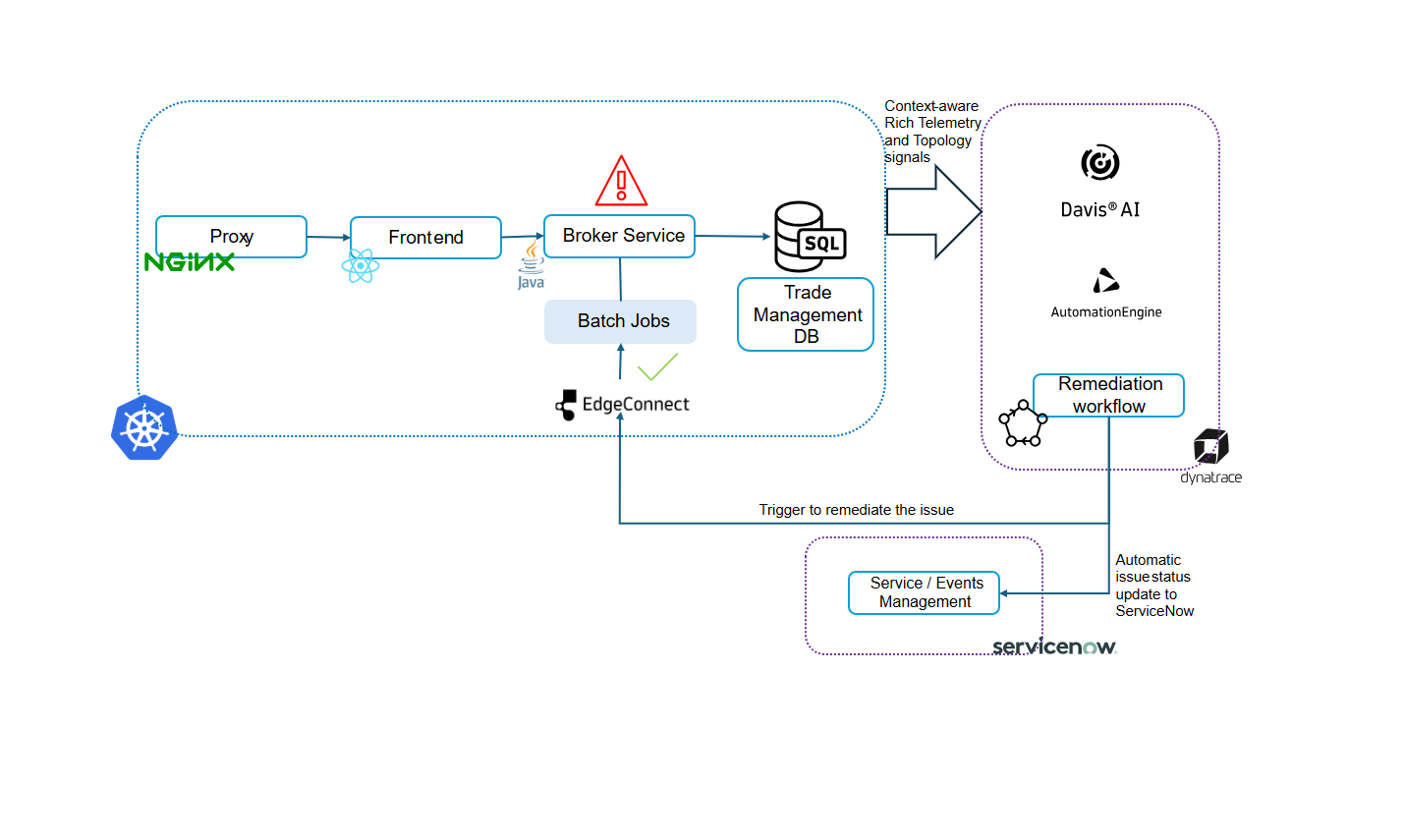
This is automatically instrumented using the Dynatrace Kubernetes Operator, which injects monitoring capabilities directly into the cluster without manual configuration. This provides end-to-end visibility across services, infrastructure, and dependencies with no code changes or changes to existing containers.
Enhancing AI context: Tracking batch job events in Dynatrace
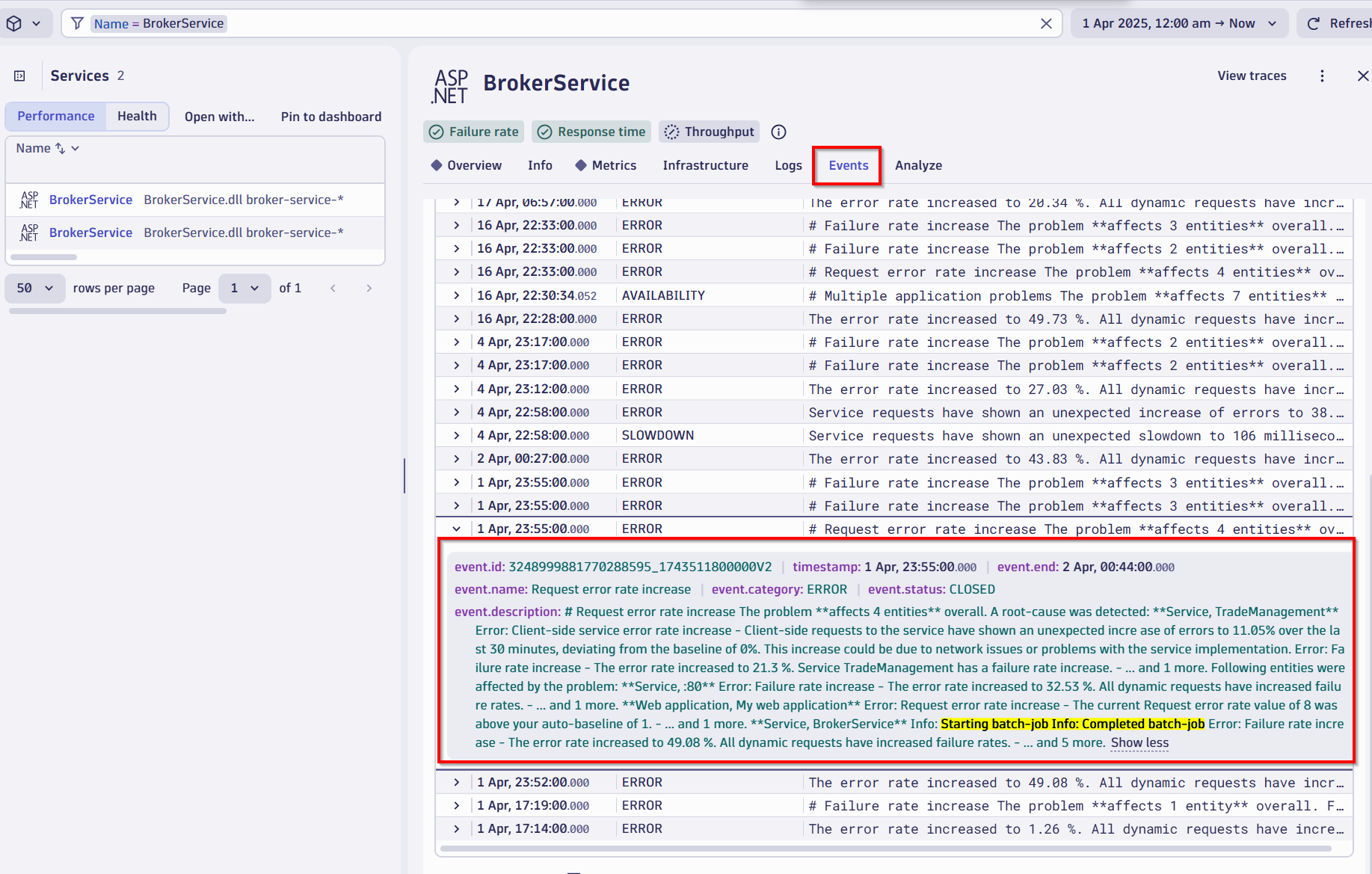
For custom use cases and unique business scenarios, Davis® AI needs to be made aware of specific events through custom approaches. While traditional monitoring captures standard metrics, enabling intelligent reasoning around specific workflows—like batch jobs—means providing targeted event tracking. This ensures Davis AI has full visibility into these activities, allowing it to understand and respond to them effectively.
Contextual events, such as the start of the batch job, could be sent to Dynatrace. This functionality allows you to maintain a clear timeline of all activities, including initiating and completing batch jobs, enhancing visibility and control over critical processes.
In our case, we use an HTTP call that follows this pattern, which utilizes the Dynatrace event types documented here:
An example Event API Payload for attaching batch job information to services:
{
  "entitySelector": "type(\"SERVICE\"),tag(service:broker-service
  "eventType": "CUSTOM_INFO",
  "properties": {
    "batch-job-name": "update-account",
    "process-id": "%s",
    "workload-name": "account-updater",
    "namespace": "easytrade"
  },
  "title": "%s update-account batch-job"
}
This payload attaches batch job information to services matching the entitySelector criteria. The event will appear in the timeline of services tagged with broker-service linking batch job execution data to the relevant services.
Davis AI in action: Instant root cause analysis
In this real-world example, the application team noticed latency spikes and increased error rates reported by end users. But before anyone raised a ticket or sent an alert, Dynatrace Davis AI had already detected the anomaly.
Here’s what Davis AI surfaced immediately:
- Problem severity and duration
- Number of users affected
- Which services were degraded, and which business transactions were impacted
- And most importantly: the root cause
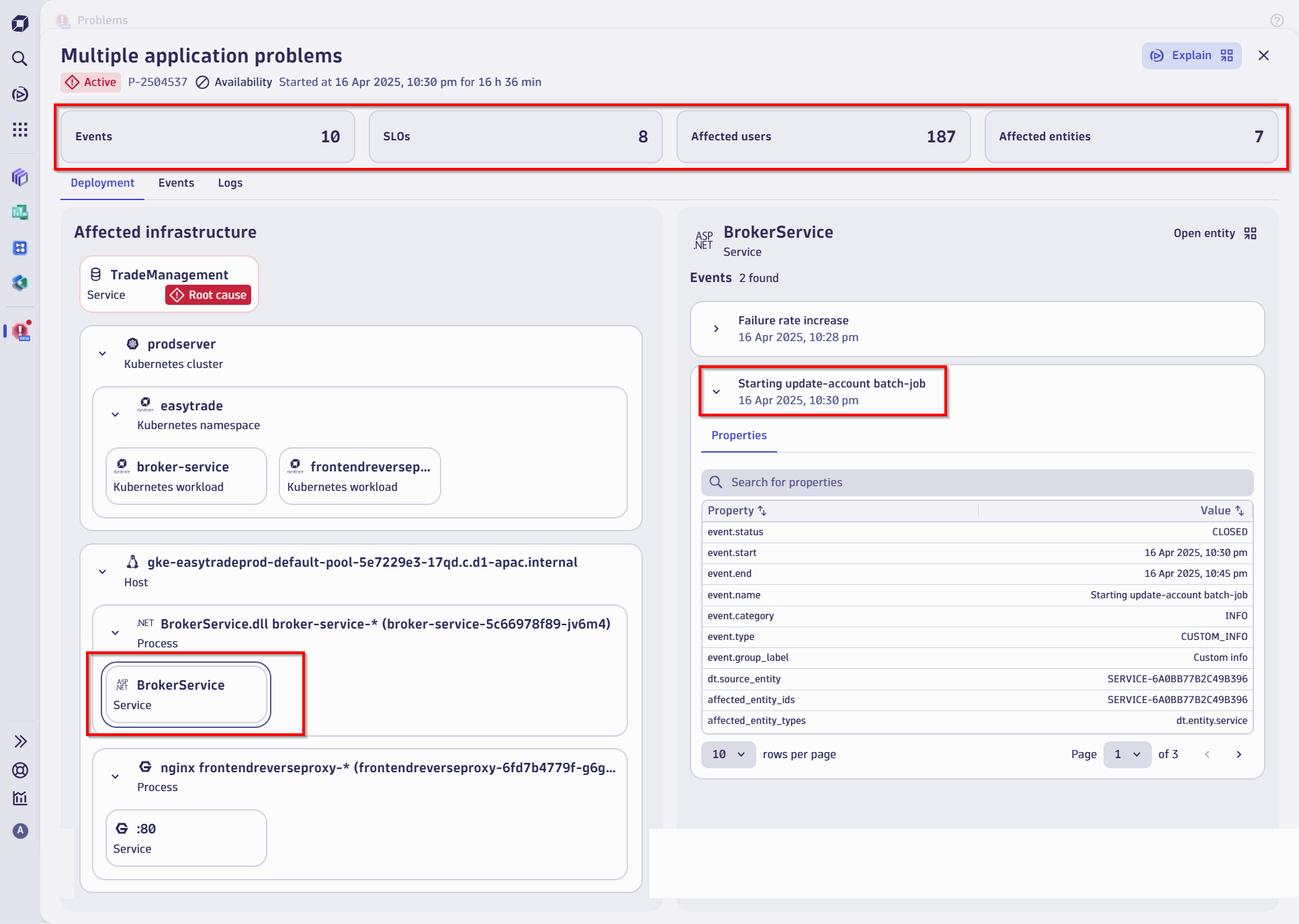
In this case, the root cause was traced to a batch job that had started consuming excessive resources—CPU, memory, and I/O—all of which starved the Java broker service and caused downstream failures.
Without AI, isolating this root cause across layers could have taken hours. With Davis, it was done in minutes.
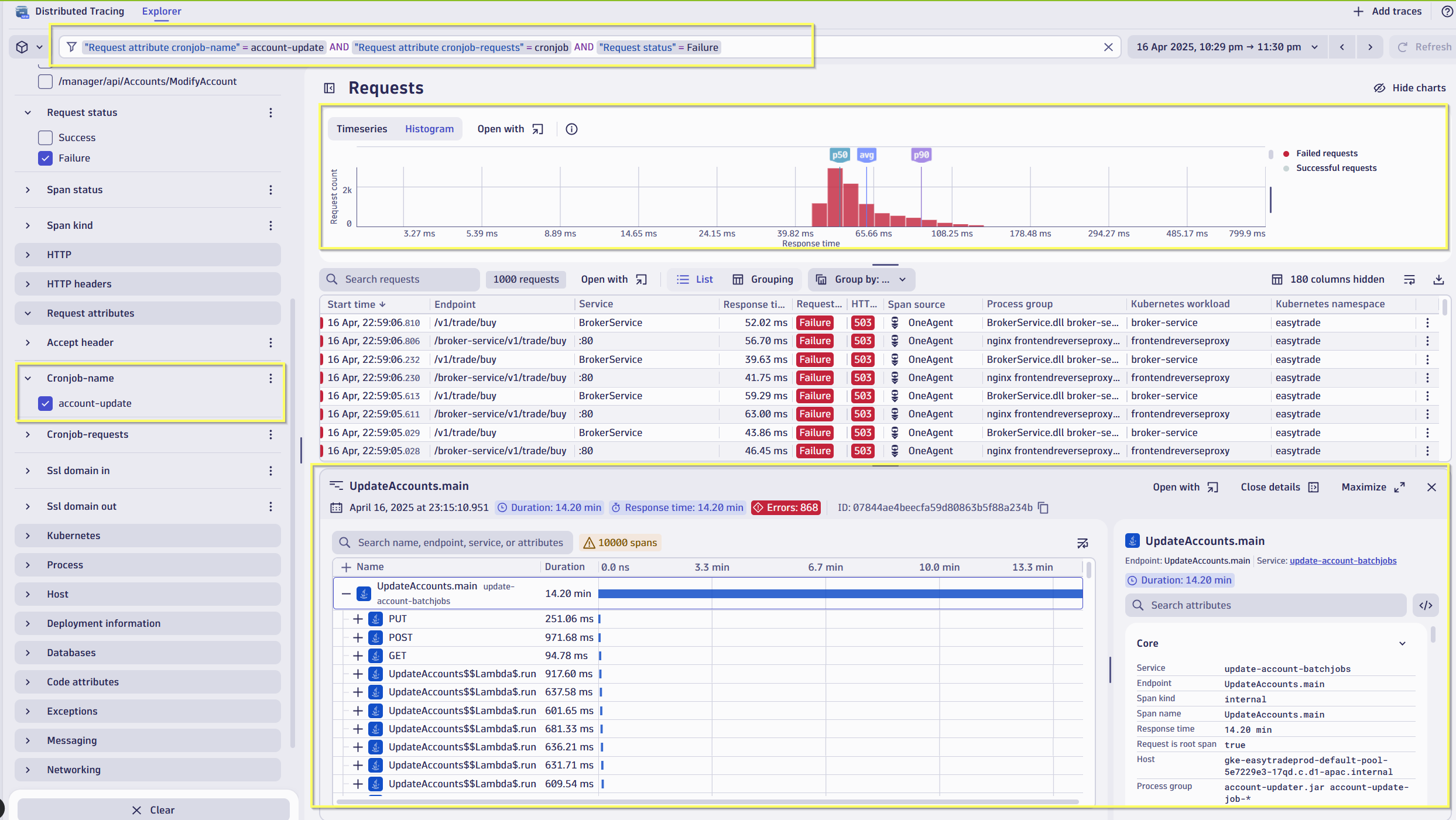
Identifying service failures due to batch job failures
The screenshot below displays distributed traces filtered to show batch job-related activity and reported failures. It reveals issues in other services, such as BrokerService, where failures from stuck batch jobs are impacting downstream services.
Tapping ServiceNow for instant remediation while Davis gave us the diagnosis, we still need a solution. This is where our integrations with ServiceNow come in. Dynatrace Workflows identifies the issue and checks ServiceNow for an existing ticket. If none exists, it leverages Dynatrace EdgeConnect to execute a Kubernetes API, suspending the affected batch job for remediation. If a ticket is already open, the Workflow adds comments to ServiceNow and follows the same remediation process.
Orchestrating recovery: Dynatrace Workflows
We created a custom Dynatrace Workflow specifically for this batch job scenario. It’s designed to react to Davis AI-detected problems that match a particular pattern—resource-intensive jobs degrading core services.
Here’s how the workflow functions:
- Trigger. Once the problem is detected and Davis confirms the root cause, the workflow is automatically triggered.
- ServiceNow integration. Without manual input, it instantly opens a ServiceNow incident with all contexts—affected services, severity, root cause.
- Live updates. As the situation evolves, the ticket is updated in real time, ensuring that both engineering and service management teams are in sync.
- Conditional logic. The workflow checks for remediation eligibility—e.g., is it safe to pause or reschedule the batch job?
- Remediation. The workflow now initiates the remediation by EdgeConnect by executing a Kubernetes API to suspend or delete the job
- Validation and closure. The causal AI validates successful remediation by confirming the batch job suspension, then automatically closes the problem ticket. Optionally, EdgeConnect can perform additional verification to ensure the root cause has been eliminated and system stability is restored.
All of this happens without anyone needing to log into a dashboard.
Closing the loop: Secure remediation with Dynatrace EdgeConnect
Now, let’s talk about the actual fix.
With the root cause identified and the ServiceNow ticket tracking the issue, the final step is to initiate remediation safely and securely inside the Kubernetes cluster.
This is achieved using Dynatrace EdgeConnect, a lightweight, secure connector that allows Dynatrace to command and interact with your private infrastructure; in this case, Kubernetes.
In our case, EdgeConnect was configured to:
- Connect securely to the Kubernetes API
- Execute a custom remediation action, such as scaling down the batch job, adjusting its priority, or rescheduling it to an off-peak window
- Verify the effect of the remediation and confirm resolution back in Dynatrace and ServiceNow
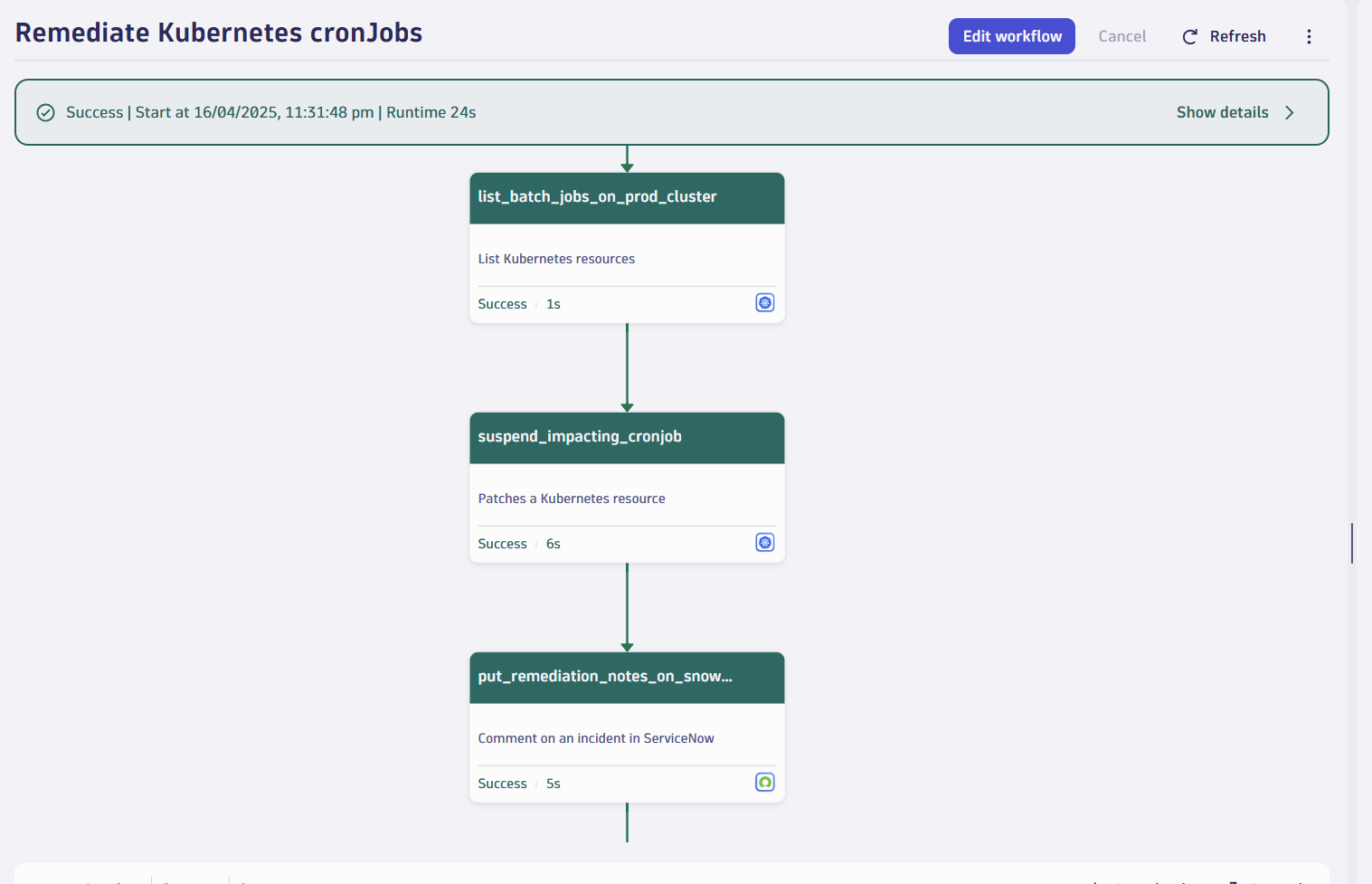
All of this occurred without breaking security boundaries, using EdgeConnect’s outbound-only architecture.
Instant notifications with Slack integration
SysAdmins, DevOps, and SRE teams need to stay informed in real time to ensure system reliability. The Dynatrace integration with Slack delivers instant notifications for critical events, such as batch job failures or system errors, directly to your team’s Slack channels.
In this case, they are simply notified as all the action has already been taken care of by intelligent automation.
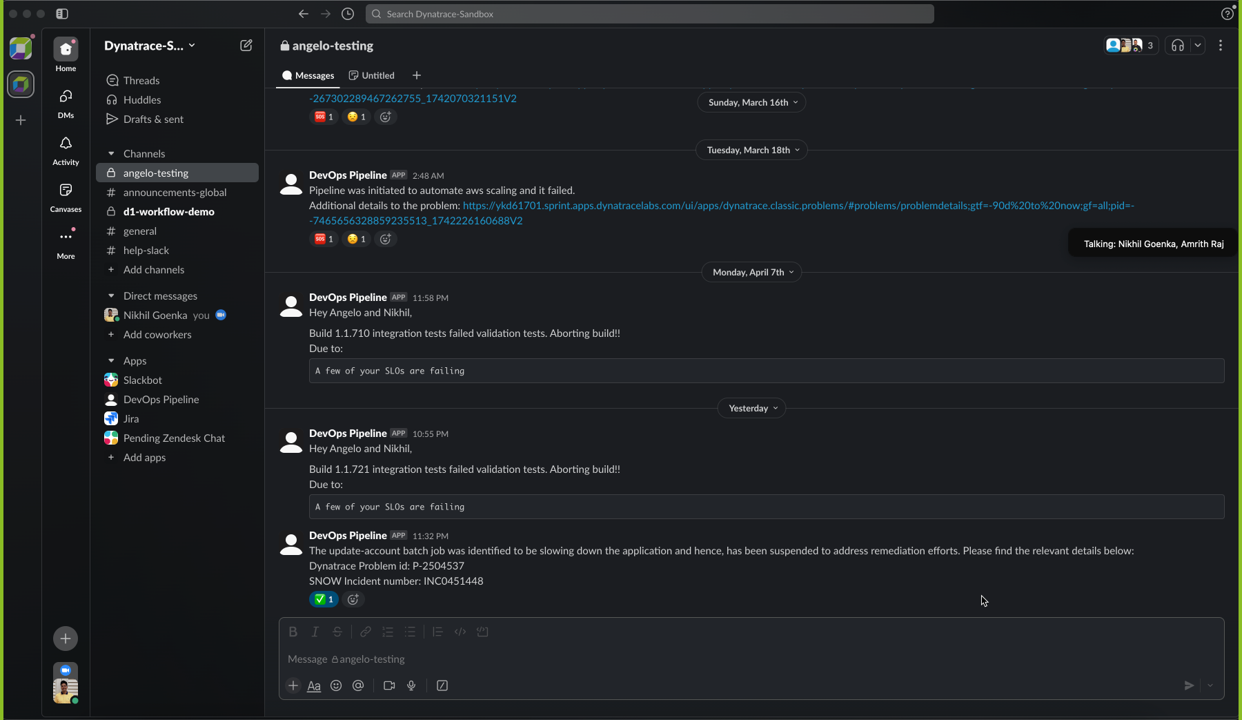
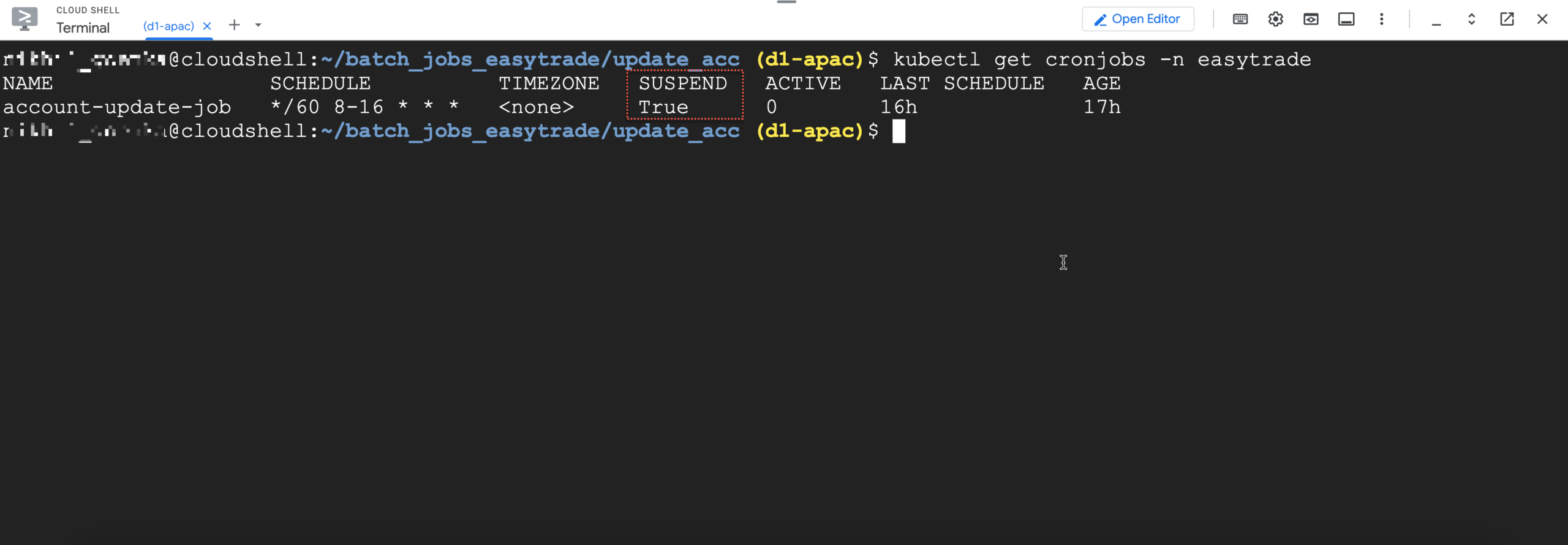
In this example, we conducted remediation by automatically suspending the batch job, as confirmed by running a relevant command to check the job status. Note that remediation approaches and use cases may vary, and we recommend tailoring solutions to your specific environment and requirements.
From reactive to proactive with AI-driven automation
Batch jobs have long been a blind spot in observability—often managed outside core APM tooling or considered too niche for automated handling.
But today, Dynatrace brings batch job management into the mainstream of modern observability and automation.
- With Davis AI, you get root cause detection in real time.
- With Workflows, you turn those insights into action.
- With EdgeConnect, you push changes securely to production environments.
- And with ServiceNow integration, you keep ITSM workflows up to date without lifting a finger.
This is a new era of autonomous cloud operations—where custom, complex issues like batch job failures are no longer exceptional cases, but standard parts of your AI-driven automation strategy.
How to get started
It’s considered best practice to send custom events to Dynatrace to enhance monitoring capabilities. These events help keep Dynatrace informed about key activities or changes in your environment.
If any of these events correlate with issues in the landscape, Davis AI automatically analyzes them and identifies the root cause. This insight can then be used to trigger Workflows that help remediate potential problems proactively.

Looking for answers?
Start a new discussion or ask for help in our Q&A forum.
Go to forum