


Skip to technology filters Skip to main content
Dynatrace Hub

Extend the platform,
empower your team.

Popular searches:
Home hero bg
Syslog (Dynatrace OTel Collector)Syslog (Dynatrace OTel Collector)
Syslog (Dynatrace OTel Collector)

Syslog (Dynatrace OTel Collector)

Stream Syslog data via Dynatrace OpenTelemetry Collector Distribution.

Technology
Free trial
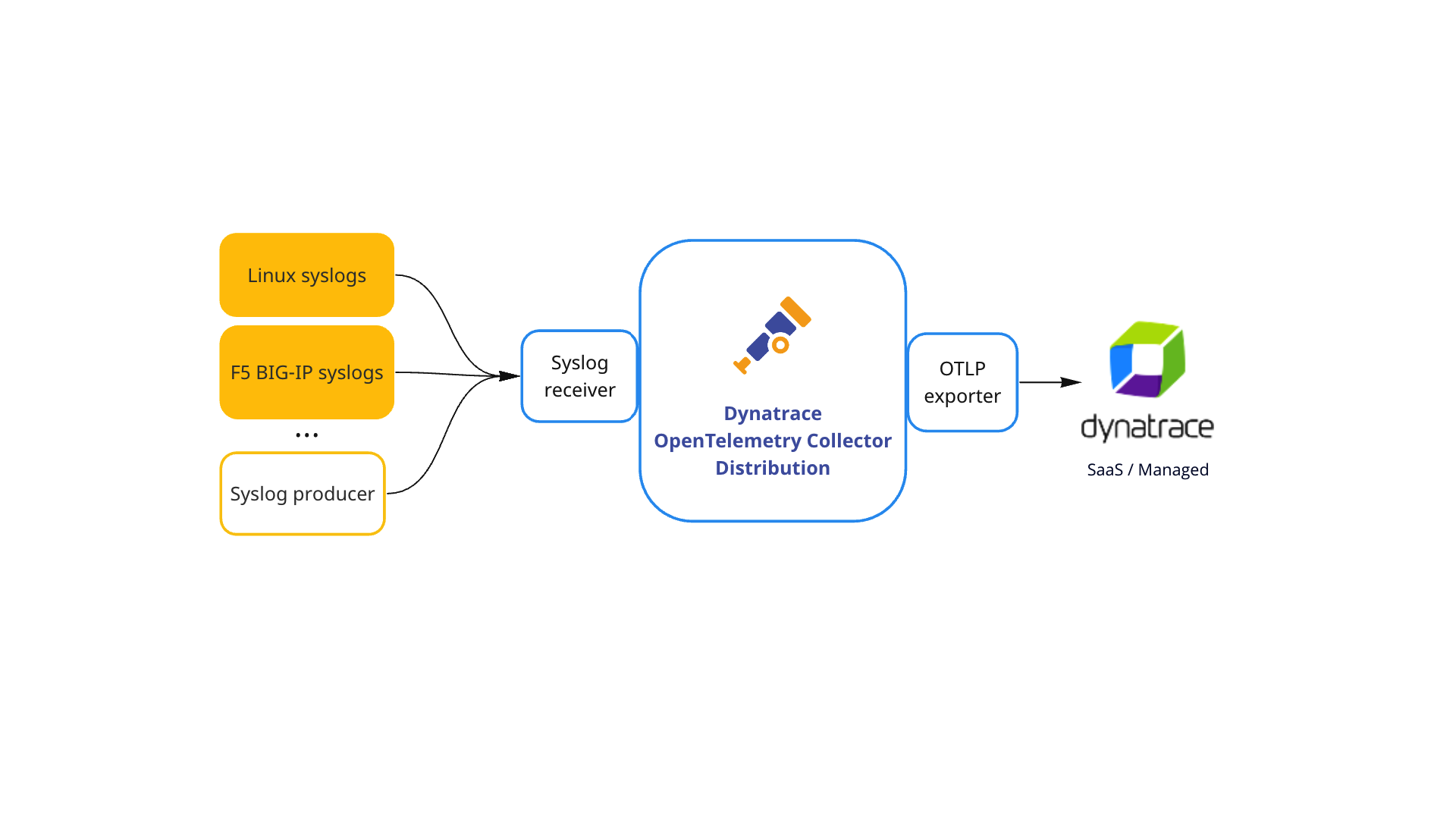
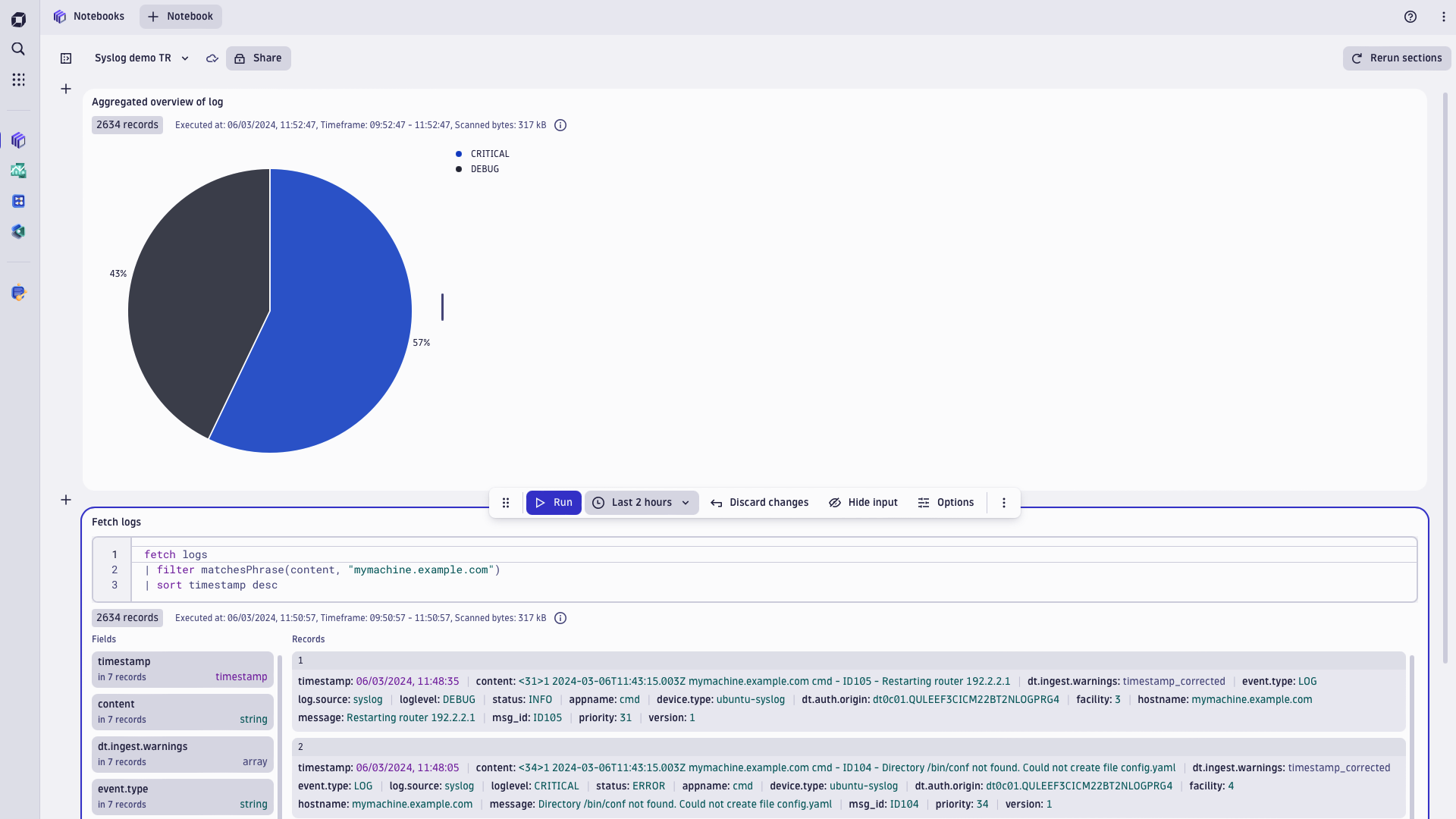
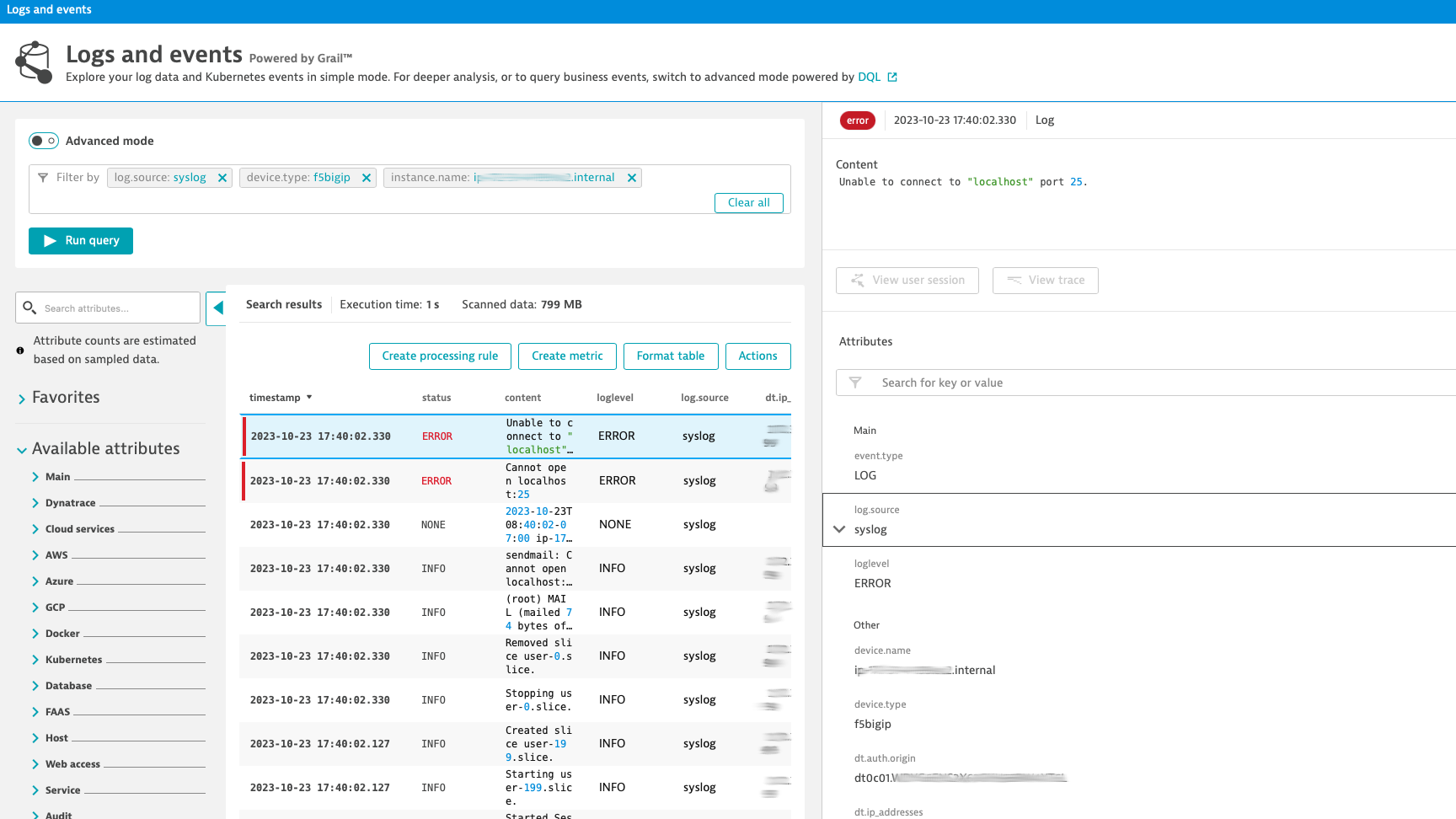
Dynatrace integration diagram: Syslog via OpenTelemetry collectorSyslog analysis and visualisation in Dynatrace NotebooksTroubleshooting use case: Error syslogs from f5 BIG-IP instance
  • Product information

Overview

Syslog is a standard protocol for message logging and system logs management. Devices like routers, firewalls, hosts, switches, and many other devices across many platforms use the Syslog standard to log users' activity, system/software life-cycle events, status, or diagnostics.

In network monitoring, the Syslog protocol is very useful because of its client-server architecture, where the remote Syslog server listens to the client's log messages. Such consolidation of logging data in a central repository allows taking advantage of unified Dynatrace Log Management and Analytics Powered by Grail for actionable insights and automation.

OpenTelemetry collector is an open source vendor-agnostic way to receive, process and export telemetry data. Log processor and forwarding capabilities allow you to collect data/logs from different sources, unify and send them to multiple destinations

With the Dynatrace OpenTelemetry Collector Distribiution we are providing a streamlined and supported way to collect logs over syslog protocol. This makes it hassle-free to stream syslog to Grail data lakehouse that integrates logs with other observability data.

Stream syslog via OpenTelemetry Collector if you already collect logs with it or if a specific use case requires an additional component (e.g., forwarding logs to different targets). If you want to benefit from a secure, trusted edge component with enterprise support and life-cycle management, please refer to Syslog ingest via Dynatrace ActiveGate.

In the case where Linux system syslog observability is the main focus, we recommend deploying OneAgent, which autodiscovers host syslog data, preserves topology context, and requires minimal configuration and maintenance.

This is intended for users who want to: Complement observability data in Dynatrace, extend the Davis AI engine and enable App Owners, DevOps, and SRE teams to analyze all syslog data centrally.

This enables you to: Leverage the OpenTelemetry standards to get syslogs from your devices into Dynatrace where you can immediately benefit from Dynatrace AI-driven root cause analysis.

Use cases

Once setup is finished you can preview your logs in Dynatrace Notebooks for deep analysis and share your findings with the team, Logs and events viewer for quick analysis and dashboard or fuel Dynatrace automation engine to automate BizDevSecOps workflows.

Get started

Set up the logs integration from Syslog producer over OpenTelemetry Collector to Dynatrace with the following steps:

  1. Get a Dynatrace API token with the logs.ingest (Ingest Logs) scope

  2. Deploy Dynatrace OpenTelemetry Collector Distribution

  3. OpenTelemetry Collector settings

  • Syslog receiver configuration.

    • You can expose a required number of Syslog endpoints for a number of device types or instances existing in your environment. This depends on the desired granularity for log stream differentiations.
    • For example, if syslogs from your infrastructure don't include a proper differentiation factor in the log message you can send them to different endpoints to decorate logs with desired attributes on the OpenTelemetry collector. This could be an IP address or device.type attribute.
    • UDP and TCP protocols are supported
  • Transform your data (optional)

    • Transforming telemetry basics
    • Logs Transform Processor
    • Transform Processor
    • OpenTelemetry Transformation Language
  • Derive metrics from logs with count connector (optional)

    • It allows to count the number of log records that satisfy a specified filter condition, and they can also be aggregated based on their attributes. Examples:
      • Count logs with a severity of ERROR or higher.
      • Count logs with a severity of ERROR or higher. Maintain a separate count for each environment.
  • OTLP/HTTP Exporter configuration

    • Destination: Set Dynatrace OTLP logs API url with tenant id: https://{your-tenant}.live.dynatrace.com/api/v2/otlp
    • Destination alternative: You can set OTLP logs API url available on Environmental Active Gate.
    • Authorisation: Set Dynatrace API token in the header
  1. Transform your data with Dynatrace processing (optional)

    • If you send logs to Dynatrace with alternative methods at the same time (OneAgent, cloud log forwarders or other log Ingest API integrations) you may want to maintain a single log processing rule for all ingest channels.
  2. Point your devices to send syslogs to OpenTelemetry Collector

Details

Send syslogs to remote endpoint

Example 1: Configure Rsyslog on Linux Ubuntu to forward syslogs to a remote server.

Add the following line to the syslog daemon configuration file /etc/rsyslog.conf (UDP protocol):

*.* @<OpenTelemetry Collector host IP>:54527

*.* - instructs the daemon to forward all messages to the specified OpenTelemetry Collector instance listening on port 54527 and <OpenTelemetry Collector host IP> needs to point to the IP address of OpenTelemetry Collector.

@@ - if you are using TCP, type two @ symbols

Example 2: Configuring the F5 BIG-IP system to log to a remote syslog server (11.x - 17.x)

Refer to F5 BIG-IP documentation for instructions regarding remote Syslog configuration.

Decorate syslogs with meaningful attributes

The Dynatrace software intelligence platform and its Davis AI engine depend on context-rich, high-quality data. You can provide the context for your data ingested via Generic log ingest API that supports a set of keys and semantic attributes. You can also provide custom attributes that don't require indexing in Dynatrace Grail data lakehouse.

Apply syslog template to your f5 BIG_IP to always include host and IP

This option can be used as an alternative to OpenTelemetry collector receiver configurations described in Example 3.

modify syslog {
    include "
    options {
        proto-template(t_isostamp);
        long_hostnames(yes); use_dns(no); use_fqdn(no);
    };

    template t_isostamp {
        template(\"$ISODATE $HOST 1xx.xx.xx.xx9 $MSGHDR$MSG\\n\");
    };

    destination remote_server {
        tcp(\"1xx.xx.xx.xx1\"
            port (54526)
            template(t_isostamp)
            persist-name(r1)
        );
    };

    filter f_alllogs {
        level (debug...emerg);
    };

    log {
        source(s_syslog_pipe);
        filter(f_alllogs);
        destination(remote_server);
    };
"
}

Example 3: OpenTelemetry Collector configuration:

  • To successfully configure your Collector instance, you must configure each component (receiver, optional processor, and exporter) individually in a YAML file and enable them via pipelines. Follow below examples or Dynatrace documentation

Receiver configuration

receivers:
  syslog/f5:
    tcp:
      listen_address: "0.0.0.0:54526"
    protocol: rfc5424
    operators:
      - type: add
        field: attributes.log.source
        value: syslog
      - type: add
        field: attributes.dt.ip_addresses
        value: "1xx.xx.xx.xx1"
      - type: add
        field: attributes.instance.name
        value: "ip-1xx-xx-x-xx9.ec2.internal"
      - type: add
        field: attributes.device.type
        value: "f5bigip"
  syslog/host:
    tcp:
      listen_address: "0.0.0.0:54527"
    protocol: rfc5424
    operators:
      - type: add
        field: attributes.log.source
        value: syslog
      - type: add
        field: attributes.device.type
        value: "ubuntu-syslog"

Exporter configuration:

exporters:
  logging:
    verbosity: detailed

  otlphttp/tenant_1:
    endpoint: "https://{your-tenant}.live.dynatrace.com/api/v2/otlp"
    headers:
      Authorization: "Api-Token {your-api-token}"

Processor configuration

processors:
  batch:

Service configuration

service:
  pipelines:
    logs:
      receivers: [syslog/f5, syslog/host]
      processors: [batch]
      exporters: [logging, otlphttp/tenant_1]
  • Dynatrace log processing - parse syslogs ingested to Dynatrace to improve readability

Example 4: Dynatrace processing: Syslog attributes extraction:

In the above configuration yaml file /etc/otelcol-contrib/config.yamlwe explicitly added `attributes.instance.name' attribute that can add additional configuration effort in case of change. If syslog message contains instance name it can be extracted automatically. In this example we assume hostname is always available and added after timestamp. Refer to F5 BIG-IP documentation for template instructions on how to include FQDN of the system by default to all syslogs.

Log sample

{
  "content":"2023-10-18T06:55:01-07:00-07:00 ip-1xx-xx-x-xx9.ec2.internal 1xx.xx.x.xx9 info systemd[1]: Removed slice user-0.slice.",
  "device.type": "f5bigip"
}

Add log processing rule

  1. In Dynatrace UI go to Settings>Log Monitoring>Processing and select Add rule
  2. Name a new rule
  3. Add matcher: device.type == "f5bigip"
  4. Add processor definition: PARSE(content,"NSPACE SPACE NSPACE:instance.name")

Test result:

{
  "content": "2023-10-18T06:55:01-07:00-07:00 ip-1xx-xx-x-xx9.ec2.internal 1xx.xx.x.xx9 info systemd[1]: Removed slice user-0.slice.",
  "device.type": "f5bigip",
  "instance.name": "ip-1xx-xx-x-xx9.ec2.internal"
}
Dynatrace
By Dynatrace
Dynatrace support center
Copy to clipboard
Dynatrace Hub
Hub HomeGet data into DynatraceBuild your own app
Log Management and AnalyticsKubernetesAI and LLM ObservabilityInfrastructure ObservabilitySoftware DeliveryApplication ObservabilityApplication SecurityDigital ExperienceBusiness Observability
Filter
Type
Built and maintained by
Deployment model
SaaS
  • SaaS
  • Managed
Partner FinderBecome a partnerDynatrace Developer

All

769 Results filtered by:

Chroma logo

Chroma

Gain insights into the health of your vector and embedding databases from Chroma

Technology

Amazon Kinesis Video Streams logo

Amazon Kinesis Video Streams

Provides you SDKs to install on your devices to make it easy to stream media.

Technology

Fluentd logo

Fluentd

Stream log data to Dynatrace via Fluentd for analysis.

Technology

Palo Alto firewalls logo

Palo Alto firewalls

Palo Alto extension for problems detection

Extension

AWS Elastic Beanstalk logo

AWS Elastic Beanstalk

Quickly deploy and manage applications in the AWS Cloud without having to learn about the infrastructure beneath.

Technology

Workflows logo

Workflows

Automate tasks in your IT landscape, remediate problems, and visualize processes

App
Security Posture Management logo

Security Posture Management

Detect, prioritize, and remediate security and compliance findings with SPM.

App

Amazon Route 53 logo

Amazon Route 53

Effectively connects user requests to infrastructure running in AWS.

Technology

Amazon Inspector logo

Amazon Inspector

Tests the network accessibility of your EC2 instances and the security state of your applications that run on those instances.

Technology

NGINX Plus logo

NGINX Plus

All‑in‑one web server, load balancer, content cache, and media streaming.

Technology

Databases logo

Databases

Easily monitor, troubleshoot, and optimize your entire database fleets.

App
Amazon DocumentDB logo

Amazon DocumentDB

Amazon DocumentDB (with MongoDB compatibility) is a fast, reliable, and fully managed database service.

Technology

Dynatrace MCP Server logo

Dynatrace MCP Server

Fuel your AI agents with high quality data and real-time production insights

Technology
IBM IMS SOAP Gateway logo

IBM IMS SOAP Gateway

Intelligently monitor your transactions end-to-end and analyze the performance of your IMS SOAP Gateway.

Technology

Amazon Keyspaces for Apache Cassandra logo

Amazon Keyspaces for Apache Cassandra

Scalable, highly available, and managed Apache Cassandra–compatible database service.

Technology

Apache Camel logo

Apache Camel

Intelligently monitor, analyze, and optimize your integration framework and all applications deployed in your stack.

Technology

Amazon Elastic Kubernetes Service (EKS) logo

Amazon Elastic Kubernetes Service (EKS)

Harness automation and AI to simplify Kubernetes observability at scale.

Technology

WordPress logo

WordPress

Content management system written in PHP and paired with a MySQL or MariaDB database.

Technology

Azure Cosmos DB logo

Azure Cosmos DB

Fully managed and serverless distributed database supporting open-source PostgreSQL, MongoDB, and Apache Cassandra.

Technology
AWS Glue logo

AWS Glue

Fully managed extract, transform, and load (ETL) service.

Technology

Azure Event Hub Clusters logo

Azure Event Hub Clusters

Big data streaming platform and event ingestion service. It can receive and process millions of events per second.

Technology

Confluent Cloud (Kafka) logo

Confluent Cloud (Kafka)

Remotely monitor your Confluent Cloud Kafka Clusters and other resources!

Extension
Kong - Prometheus logo

Kong - Prometheus

Monitor Prometheus metrics exposed by Kong and proxied upstream services

Extension

BOSH bpm logo

BOSH bpm

Automated monitoring of platform processes running in BOSH bpm containers.

Technology

Prometheus in Kubernetes logo

Prometheus in Kubernetes

Collect metrics from Prometheus exporters in Kubernetes for Dynatrace analytics

Technology

Nutanix Clusters logo

Nutanix Clusters

Monitor Nutanix clusters' performance, usage and availability, with Nutanix API.

Extension
Azure Service-Fabric logo

Azure Service-Fabric

Intelligent end-to-end observability for serverless and hybrid environments using Azure Service Fabric.

Technology

Luna Network HSM Device logo

Luna Network HSM Device

Monitor your Luna Network Hardware Security Module (HSM) Devices through SNMP.

Extension

Consul Service Mesh (StatsD) logo

Consul Service Mesh (StatsD)

Extend visibility into your Consul Service Mesh instances to monitor health and improve performance.

Extension
Azure Relays logo

Azure Relays

Enables you to securely expose services that run in your corporate network to the public cloud.

Technology

Microsoft IIS logo

Microsoft IIS

Flexible and secure web server for hosting with Windows Server.

Extension

Kubernetes Monitoring Statistics logo

Kubernetes Monitoring Statistics

Troubleshoot your Dynatrace Kubernetes monitoring and Prometheus integration.

Extension
Google Cloud logo

Google Cloud

Meet your business challenges head on with cloud computing services from Google.

Technology
Snyk logo

Snyk

Ingest Snyk vulnerability findings, scans, and audit logs.

Extension
Amazon EventBridge logo

Amazon EventBridge

Serverless event bus to connect applications together using data from your own applications, integrated SaaS applications, and AWS services.

Technology

Ruby logo

Ruby

Dynatrace monitors your Ruby applications and services on the process level.

Technology

Apache OpenEJB logo

Apache OpenEJB

Automatically and intelligently monitor, analyze and optimize your applications based on Apache OpenEJB.

Technology
Log ingestion API logo

Log ingestion API

Stream your logs and log records to Dynatrace via the log ingest API

Technology
Citrix DaaS & Virtual Apps and Desktops logo

Citrix DaaS & Virtual Apps and Desktops

Gain insight into your Citrix DaaS & Virtual Apps and Desktops environments

Extension
Azure Device Provisioning Service logo

Azure Device Provisioning Service

Helper service for IoT Hub that enables just-in-time provisioning to the right IoT hub without human intervention.

Technology

Milvus logo

Milvus

Gain insights about vector database resource utilization and cache behavior

Technology
Google Memorystore logo

Google Memorystore

Get insights into Google Memorystore service metrics collected from the Google Operations API to ensure health of your cloud infrastructure.

Extension

Azul Platform Core (Zulu) logo

Azul Platform Core (Zulu)

Automatically and intelligently monitor, analyze, and optimize the performance of your virtual machine.

Technology

VirusTotal logo

VirusTotal

Enrich observables with threat intelligence from VirusTotal.

App

AWS Outposts logo

AWS Outposts

Fully managed service extending AWS infrastructure, services, APIs and more.

Technology

Databricks Workspace logo

Databricks Workspace

Remotely monitor your Databricks Workspaces!

Extension

LlamaIndex logo

LlamaIndex

Monitor your LLM-powered agents and workflows built with LlamaIndex framework.

Technology
UPS Device logo

UPS Device

Monitor your Uninterruptible Power Supplies (UPS) over SNMP

Extension

TensorFlow Keras logo

TensorFlow Keras

Observe the training progress of TensorFlow Keras AI models

Technology
Amazon Elastic Container Service (ECS) logo

Amazon Elastic Container Service (ECS)

Fully managed container orchestration service.

Technology