

Open source supply chains face a growing number of security threats, from CI/CD pipeline vulnerabilities to malicious pull requests to phishing attacks to self-propagating malware. To stay ahead, teams need clear visibility into which components are actually running in production. That’s the key to spotting compromised packages before they cause damage. When you combine that visibility with automated alerts for malicious code, you empower your organization to react quickly to major threats like the recent NPM supply chain compromises (s1ingularity, Qix, Shai Hulud).
When supply chain incidents occur within the open-source ecosystem, organizations must immediately determine their exposure. The critical question becomes: “How can we determine whether a malicious package has been incorporated into our applications?” And, more fundamentally: “Do we even know what is actually deployed and executing in our runtime environments?”
Dynatrace provides powerful capabilities to help you not only answer those questions, but respond rapidly to security threats.
- Smartscape entities provide real-time representation of your complete environment, including all deployed software components and their versions. By using the Dynatrace Query Language (DQL) you can retrieve the software components in use and cross-reference them with a list of known malicious packages. This allows you to manually check for specific packages and quickly shows you where these are used.
- Runtime Vulnerability Analytics (RVA) does all of this automatically and continuously for you. Additionally, it uses data about network and code reachability, risk scoring metrics, and other properties to enable environment specific risk prioritization for vulnerable or malicious components.
- Automated workflows enable you to respond to findings created in the context of RVA, notify responsible teams, open tickets, and orchestrate response actions.
This automated and integrated approach can deliver the following measurable outcomes:
- Reduced Mean Time to Detect (MTTD) through continuously updated threat intelligence combined with automated monitoring.
- Reduced Mean Time to Acknowledge (MTTA) by directly engaging responsible stakeholders using established ownership data.
- Reduced Mean Time to Investigate (MTTI) by providing comprehensive details on malicious package deployment locations, supplemented with logs and traces that enable observation of potential post-compromise activity.
- Minimized risk of successful adversary persistence by intercepting and disrupting attack chains at the initial compromise stage.
Get started with RVA and automated workflows
First, we have a look at the manual approach and then we’ll dive into what RVA and workflows can do for you.
Searching for malicious packages you’ve read about is as easy as executing a DQL query like the following:
fetch dt.entity.software_component
| filter contains(softwareComponentShortName, "debug")
| fieldsAdd softwareComponentType, packageName, softwareComponentVersion
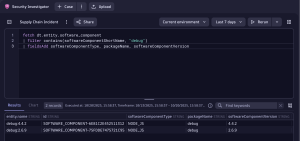
The ability to manually search software components and filter for potentially malicious packages represents a valuable capability that can accelerate incident response. However, this approach requires maintaining extensive lists of suspicious packages and continuously updating search queries, making it well-suited for exploratory or investigative work but suboptimal for automated supply chain compromise detection.
RVA eliminates this operational burden by delivering a comprehensive, ready-to-use inventory of security issues within your environment. Its runtime-based approach inherently generates minimal false positives, leveraging the same characteristic that enhances vulnerability management to detect malicious package infiltration. RVA surfaces vulnerabilities only when packages are actively loaded into memory and therefore represent genuine threats, ensuring high-fidelity detection with actionable results.
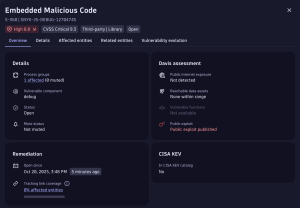
To improve performance as described earlier, we need to link the detection of harmful packages with fast and efficient ways to fix them. This means using automated systems that alert the right teams as soon as a harmful component is found in their clusters or namespaces, so they can take action quickly.
You can implement an event trigger using the Dynatrace Workflow app such as the following to automatically initiate the workflow whenever a new finding based on a malicious package is created:
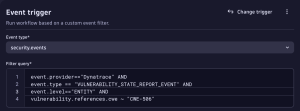
CWE-506 refers to the Common Weakness Enumeration ID 506: Embedded Malicious Code. Also, we filter in our trigger on new findings so people don’t get notified over and over again on already acknowledged events.
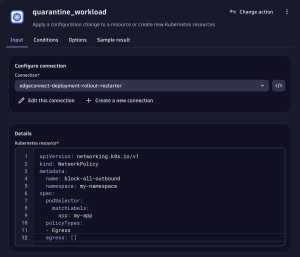
Now you can use the full extent of workflows to retrieve ownership information and notify teams using Slack, Teams, Jira or other methods. You could also automatically start collecting forensic evidence or deploy resources like network policies to mitigate the ongoing threat.
What’s next?
To be able to further investigate supply chain security incidents, Dynatrace recommends ingesting audit logs of cloud service providers like Amazon CloudTrail, Google Cloud Audit Logs, etc. as well as audit logs from your SCM platforms of choice like GitHub, GitLab, etc. Check out the Security Investigator app to collaboratively resolve incidents fast.



Looking for answers?
Start a new discussion or ask for help in our Q&A forum.
Go to forum