

Dynatrace integrates with AWS Security Hub to unify, visualize, and automate security findings across tools and environments. Adding Dynatrace runtime context to security findings allows smarter prioritization, helps reduce the noise from alerts, and focuses your DevSecOps teams on efficient remediation of the critical issues that affect your production environments and applications.
About AWS Security Hub
AWS Security Hub prioritizes your most critical security issues and helps you respond at scale. It detects critical issues by correlating and enriching signals, for example, from threat detection and vulnerability management. This allows you to surface and prioritize active risks in your cloud environment. AWS Security Hub transforms security signals into actionable insights and offers intuitive visualizations and natural language summaries, enabling you to make more informed security decisions quickly. Security Hub also provides automated response workflows to streamline remediation at scale. As a result, you can reduce security risks, improve your team’s productivity, and minimize potential operational disruptions. Security Hub provides enhanced visibility into your security posture to protect your cloud environment.
Security findings in AWS Security Hub
AWS Security Hub provides a great way of aggregating security findings, especially those related to cloud infrastructure. The main categories are detections, vulnerabilities, and compliance misconfigurations. Third-party findings can be explored alongside AWS-native security findings with AWS Security Hub CSPM.
Findings from various stages of the Software Development Lifecycle (SDLC) are included: code scans, build scans, and runtime context. This helps you connect the dots to see the unified picture and understand the actual impact.
Our customers have asked for a better way to construct a full view of their security exposures when analyzing security findings across various environments and cloud infrastructures.
Findings can come from various types of environments: development, testing, and production. This increases the number of findings to prioritize. The amount of notifications generated also rises, along with the probability of missing critical issues.
Additional context is required to efficiently filter out the less important findings and focus attention on the real critical issues that directly impact your production applications.
Add context to AWS Security Hub findings
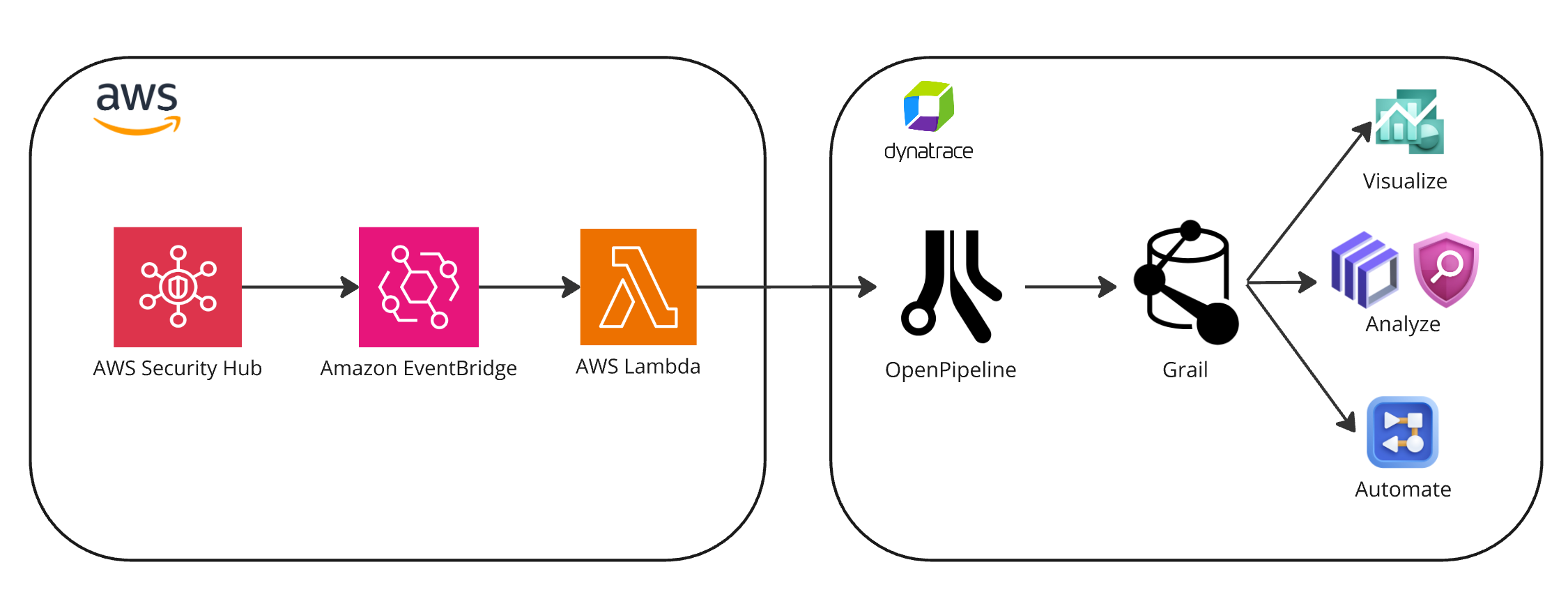
The Dynatrace® platform, powered by OpenPipeline®, provides unified security event ingestion and analysis across tools and cloud environments. Findings are mapped to Dynatrace semantic conventions and stored in Grail® data lakehouse, allowing you to uniformly access and analyze your ingested data.
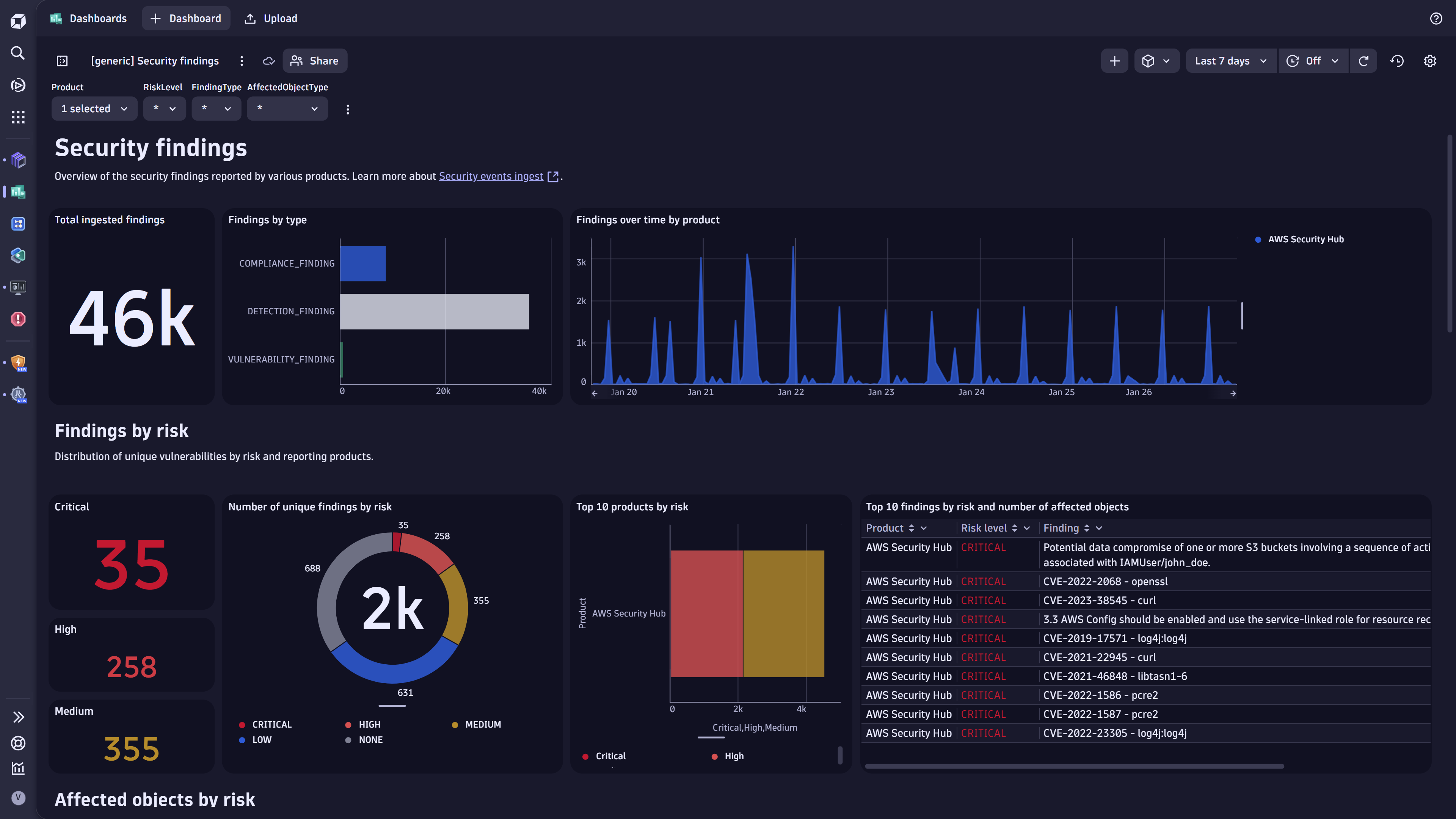
The Dashboards, Notebooks, and Security Investigator apps help you visualize the security findings. Dynatrace Workflows serves as your automation engine to efficiently process and triage the security findings, create working tickets for your DevSecOps teams, and send notifications to the relevant stakeholders.
Supported findings can be mapped to the monitored runtime entities, allowing you to assess the risks and impact of the findings within the context of your business-critical services and applications. This is the key to smarter prioritization and noise reduction.
In addition to the unified analysis and prioritization of security findings, you gain insight into your security product coverage, identify gaps, and assess the effectiveness of your security tooling. Dynatrace helps answer questions such as: Which tools cover what parts of my environment? Where do I have security assessment gaps? And, which tools generate the most value?
How it works
AWS Security Hub integration leverages Amazon EventBridge as the transit point for forwarding the various security findings to Dynatrace in either ASFF for AWS Security Hub CSPM or OCSF for the enhanced version of AWS Security Hub.
Dynatrace supports both the OCSF and ASSF formats out of the box, processing and mapping the three security finding types (detections, vulnerabilities, and compliance) to the Dynatrace Semantic Dictionary and storing them in Grail as security events.
You can consume the ingested events via native Dynatrace® Apps, such as Dashboards, Notebooks, Workflows, and more.
The AWS Security Hub integration app provides easy-to-follow steps to set up the integration and monitoring capabilities to ensure the integration runs properly.
We also provide you with several ready-made documents to serve as a starting point for your analysis and automation:
- Sample dashboards to visualize the security findings and assess the coverage in Dashboards.
- Sample workflows to automate the orchestration of critical findings by creating notifications and tickets in Workflows.
What´s next
Read more about how to Ingest and enrich security findings delivered by Amazon EventBridge with Dynatrace, as well as how to Enrich Amazon ECR vulnerability findings with runtime context.
Also, visit Dynatrace Documentation to set up your integration and explore sample use cases.




Looking for answers?
Start a new discussion or ask for help in our Q&A forum.
Go to forum