


The Dynatrace plugin is now available in the Anthropic marketplace. One install connects Claude Code, the AI coding assistant, to your environment through the Dynatrace MCP server while loading 30 Dynatrace skills alongside it. That puts production context where you already create code, so you can query logs, traces, and problems in minutes, conduct live debugging from your terminal, and validate AI-first workflows against real data.
Model Context Protocol (MCP) is the standard for connecting AI assistants to live tools and data. The Dynatrace MCP server brings relevant observability and security context from your Dynatrace environment into Claude sessions. This can mean fewer context switches, less time hunting through dashboards, and answers that are better grounded in what’s actually happening in your environment.
One install covers both halves of the integration. The MCP server gives the Claude Code agent access to your live environment, and the 30 bundled Dynatrace skills carry the knowledge of how Dynatrace is organized, so queries target fields that exist in your environment. Skills load only when a task calls for them, so installing all 30 doesn’t crowd the context window.
The set includes dt-dql-essentials for DQL syntax and query patterns, dt-app-dashboards and dt-app-notebooks for building platform assets, and dt-alerting for anomaly detector setup. These are the same skills we released as Dynatrace for AI, now packaged for a one-click install.
The plugin connects Claude Code through a hosted MCP server, so there is nothing to run or maintain locally. If you connected Claude Code to Dynatrace before using the local MCP server, installing the plugin moves you onto the supported path going forward. The local MCP server has been deprecated.
How to connect Claude Code with Dynatrace
Open a terminal and run Claude plugin install dynatrace@claude-plugins-official, or from inside Claude Code run /plugin and use Discover to find it in the Anthropic marketplace. For environment and token setup, see the documentation.
Skills that write to the platform, such as managing dashboards, triggering workflows, or executing DQL, need dtctl installed alongside the plugin.
How Dynatrace MCP Server and Claude give you visibility into your production data
Whether you’re investigating a production issue, reviewing a deployment, or working through a security vulnerability, you can ask Claude in plain language and get responses informed by data available from your Dynatrace environment. This is not just documentation summaries or generic guidance, but production context Claude can use while you investigate.
Troubleshoot without leaving Claude Code
Let’s say you receive a Jira ticket with details of an error. Instead of switching to dashboards and digging through logs to find out what went wrong, you can now ask Claude. Claude can use Dynatrace MCP Server to pull available root-cause information, related logs, metrics, traces, and CPU and memory profiling data from your production environment directly into the session. You can query these details by impact, filter by service, and request remediation suggestions, all without knowing in advance where to look or how to write the DQL query.
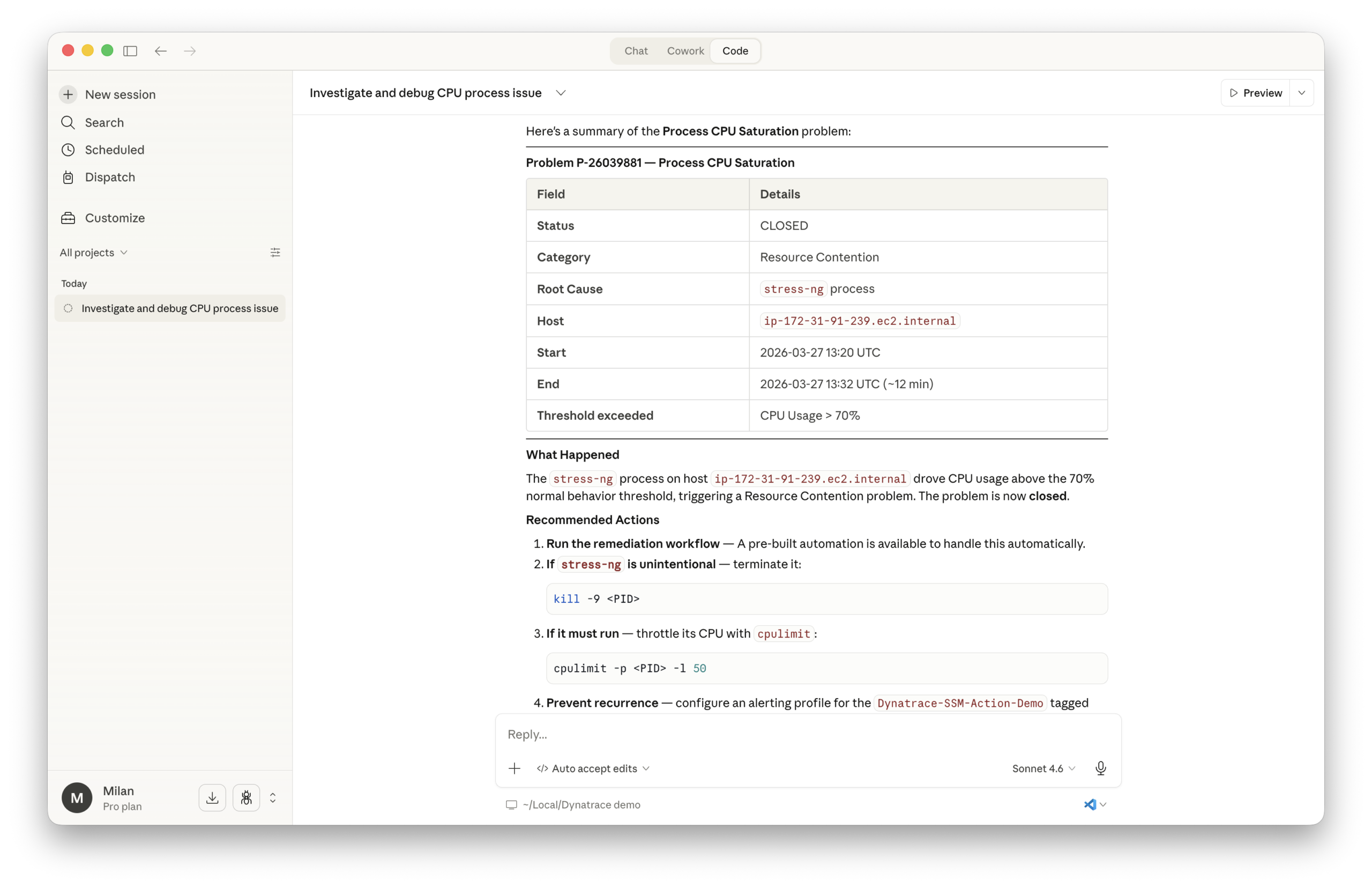
This same workflow can support investigations into vulnerabilities in your running workloads, help assess whether a recent deployment introduced regressions, or identify potential performance issues before they hit production.
You can also use dtctl, the open-source CLI for the Dynatrace platform, in Claude Code alongside the Dynatrace MCP server to manage dashboards, run workflows, and execute DQL from your terminal.
Ready to get started? Install Dynatrace MCP Server in Claude Code today.




Looking for answers?
Start a new discussion or ask for help in our Q&A forum.
Go to forum