

Cloud SRE Agents is a Dynatrace app that orchestrates AWS®, Azure®, and Google® AI agents for automated investigation and resolution assistance for incidents across multicloud environments. Cloud SRE Agents routes identified issues based on configurable rules, centralizes its findings, and provides a single audit trail for autonomous operations.
Organizations are evolving from human-driven operations to supervised autonomous operations, where AI investigates, recommends, and remediates, and humans stay in control of what matters most. A big part of delivering on that vision is working with the agents that customers already run in their cloud environments.
Harness the power of hyperscale agents
Each hyperscaler has AI agents that automatically investigate and help resolve production incidents using native cloud telemetry and tools. They act like embedded site reliability engineers, analyzing issues and recommending or executing remediation steps without waiting for a human to start the process.
AWS DevOps Agent provides investigation and remediation in AWS using native tooling. An Azure SRE Agent specializes in investigating and remediating Azure issues. And Google Gemini Cloud Assist is for incident analysis across Google Cloud Platform (GCP).
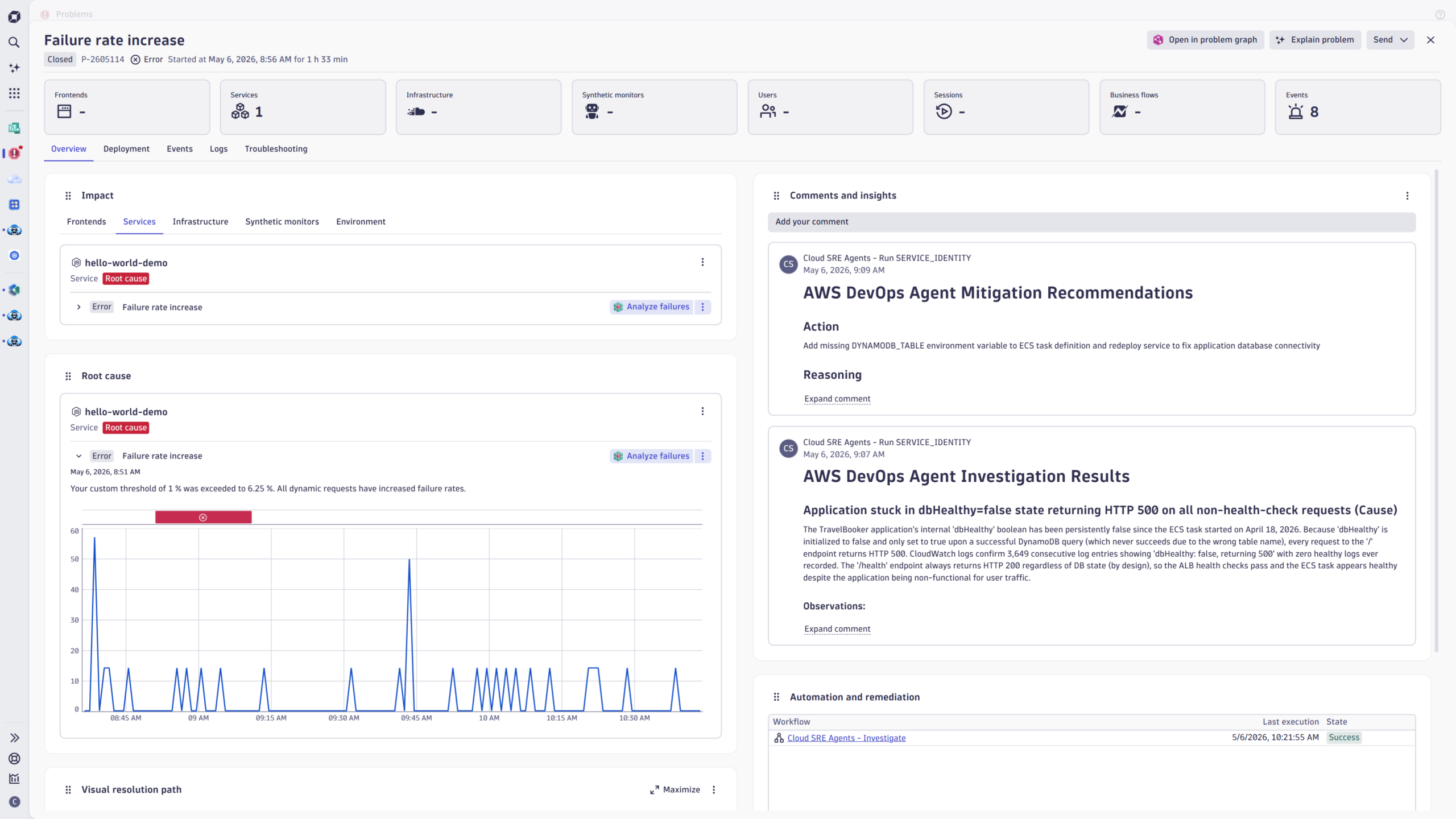
Over the past year, we’ve published how Dynatrace supercharges each of these cloud agents individually. When an issue occurs, Dynatrace Intelligence combines causal, predictive, and agentic AI using the Smartscape dependency graph to automatically link related symptoms and root causes across the environment into one unified problem card.
When Dynatrace integrates with the AWS DevOps Agent, dependency-aware root cause analysis combines with AWS frontier-agent capabilities, and joint customers report up to 70% reductions in mean time to resolution. When Azure SRE Agent connects with Dynatrace, deterministic, causation-based AI flows directly into Azure-native remediation workflows, cutting the back-and-forth between teams. And with Google Gemini Cloud Assist, Dynatrace delivers the same production context layer to GCP-hosted incidents: precise root cause, full topology, real business impact.
From integrations to intelligent orchestration
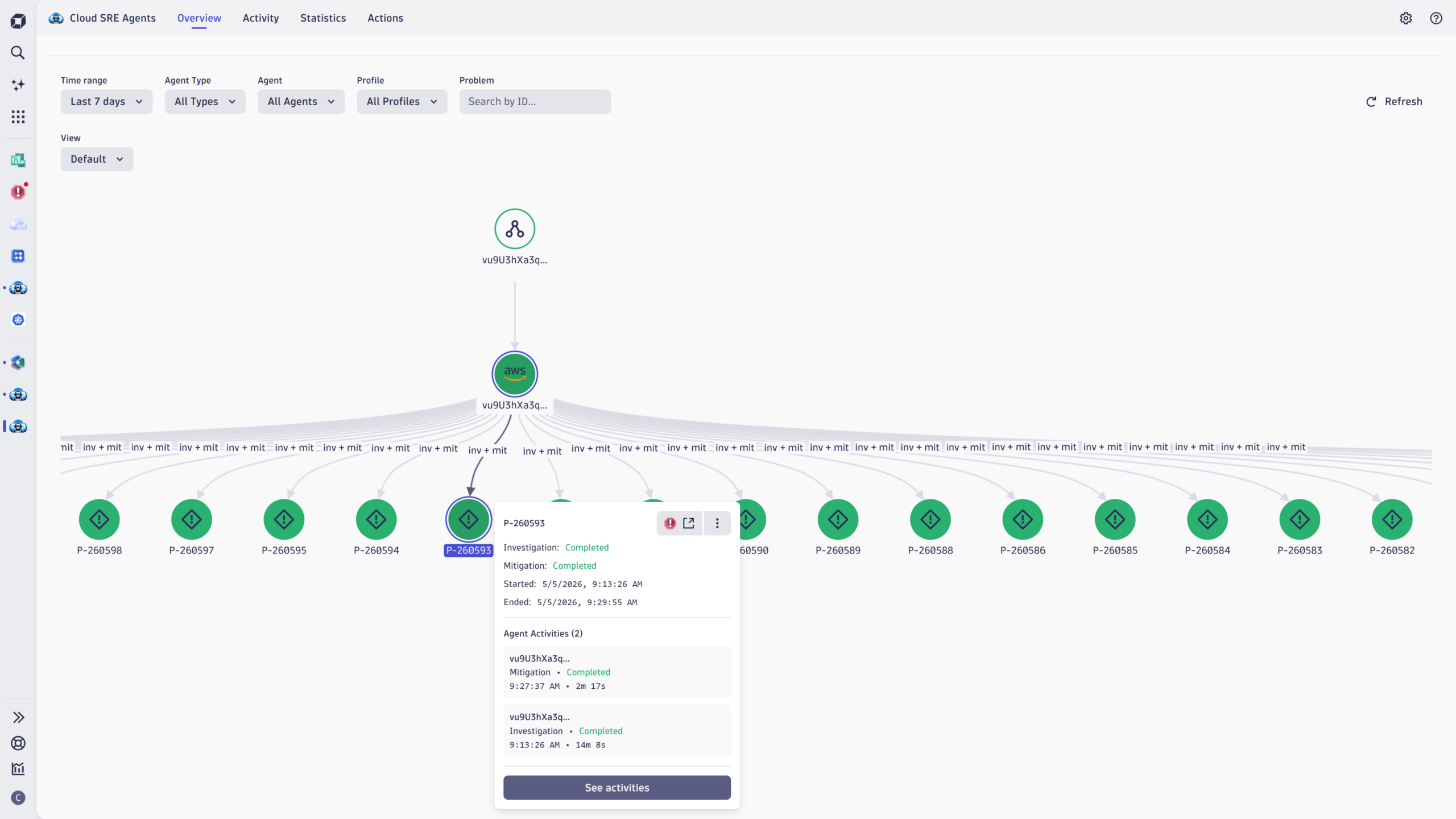
Many enterprises run workloads across AWS, Azure, and Google Cloud simultaneously, and managing three separate integrations with separate routing logic and separate cost controls is its own operational tax. Cloud SRE Agents provides a single orchestration layer that routes problems to specific hyperscaler agents based on configurable profiles to see everything happening across all three cloud agents.
The Cloud SRE Agents app writes findings back to Dynatrace, and provides your team with measurable visibility into autonomous actions.
How Cloud SRE Agents works
When Dynatrace Intelligence detects a problem and identifies the root cause, Cloud SRE Agents calls dedicated cloud-native agents from AWS, Azure, and Google Cloud to retrieve deeper insights from the sources that only they can reach: CloudTrail history, Azure subscription policy, GCP project IAM, recent deployments, and native runbooks. These agents run in parallel, gathering evidence as soon as the problem is detected. Their findings, and, where applicable, the recommended remediation path, are displayed in the same Dynatrace problem view that the on-call SRE is already using in their day-to-day workflow.
One view. No tab-switching. The work starts without you.
Three workflows do the orchestration in the background:
- Investigate evaluates your Interaction Profiles and dispatches matching problems to the right agents in parallel.
- Periodic Tasks polls each cloud provider for completion, detects stalled or timed-out investigations, and writes findings back as problem annotations.
- Event Handlers normalize the cloud-provider event stream so every action correlates back to its originating problem, end to end.
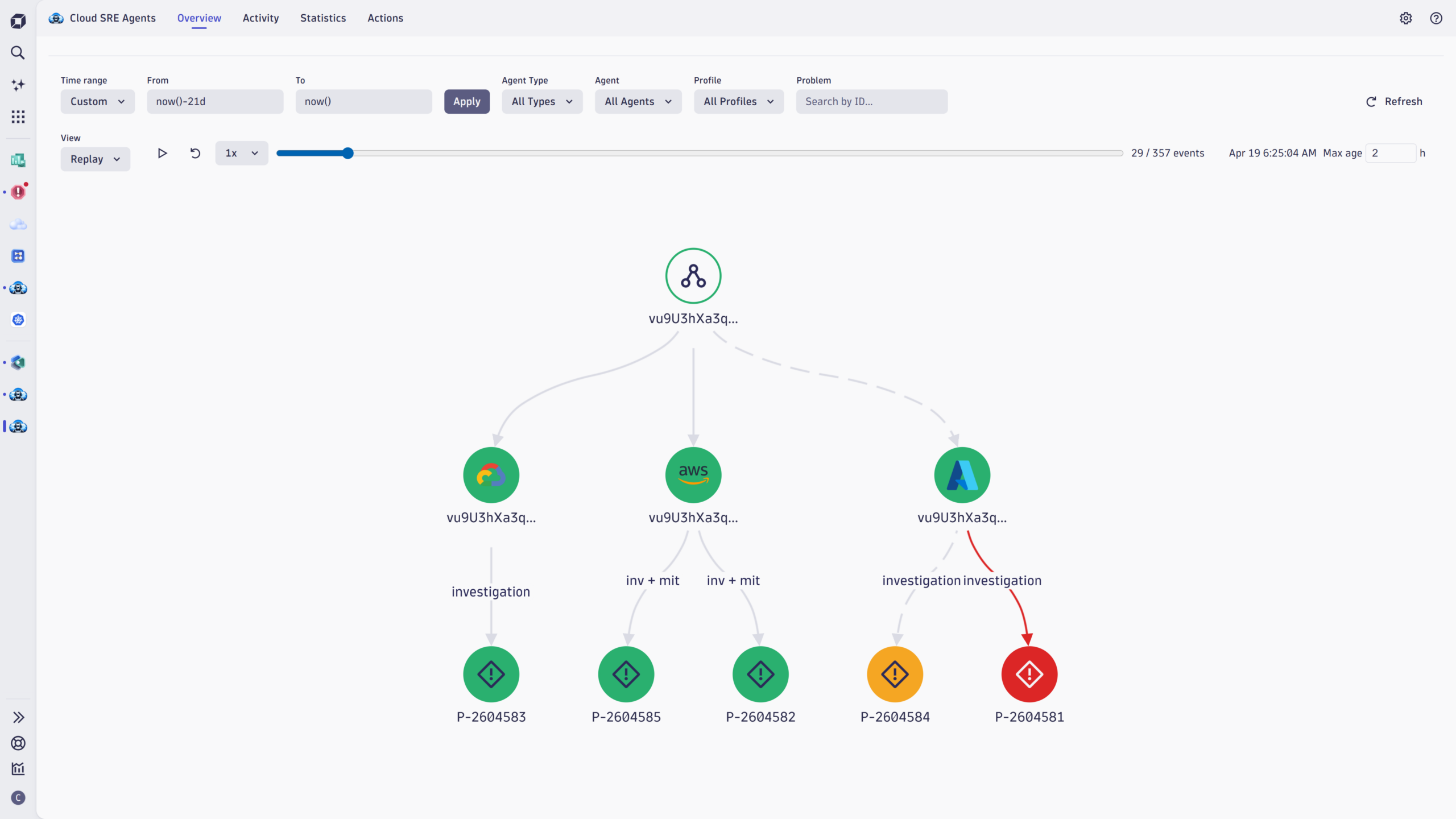
Cloud SRE Agents has the insights and intelligence to decide which agent gets which problem, tracks each run to completion, and brings the answers back together in a single view. The Overview tab provides a real-time, interactive network graph of problems, agents, and activities. The replay view allows the user to step back in time and get an overview of what has happened when, as well as the status of each investigation.
Intelligent routing with Interaction Profiles
In agentic operations, routing rules make the difference between turning autonomous systems loose on every alert and pointing them precisely where they earn their keep. Interaction Profiles are how you express routing judgment in Cloud SRE Agents. Each profile pairs a set of conditions with the agent or agents that should handle the problems flagged by the profile, and evaluates the conditions whenever Dynatrace Intelligence detects a problem.
The conditions you can write are deliberately broad. You can route by the cloud account, subscription, or project an incident touches; by problem category (availability, error, slowdown, resource contention); by affected entity type (a Kubernetes cluster, a database, a Lambda function); by tag, label, or any custom attribute carried in the problem record. Conditions combine with AND/OR logic and nest as deeply as you need, keeping real production routing policy inside the app rather than spilling into custom workflows or scripts.
Three ways teams put it to work
Route problems to the right cloud, automatically
A spike in Lambda error rates belongs to AWS DevOps Agent. An Azure App Service degradation calls for Azure SRE Agent. A Pub/Sub latency issue lands with Gemini Cloud Assist. In a multicloud estate, none of those decisions should fall to a human at 2:00 AM. A profile filtered by AWS Account ID, Azure Subscription ID, or GCP Project ID, then narrowed by resource type or tag, settles the routing question once. Every matching problem is automatically routed to the right specialist with the right cloud-native context.
Optimize spend with budget-aware routing
Cloud AI agents do work, and that work has a cost. Cloud SRE Agents lets you set a Monthly Duration Budget per agent and gate dispatch on it via a Has Available Budget filter: once the budget is exhausted, new investigations either stop (in strict enforcement mode) or proceed with a logged warning. The duration figure itself is a proxy, derived from Dynatrace event timestamps rather than the cloud provider’s clock, which makes it useful as a circuit breaker and directional signal, not a substitute for AWS, Azure, or GCP usage reports. The governance value is what matters: you decide how much autonomous investigation you’re willing to underwrite each month, and the system holds the line.
Tier autonomous investigation by problem type and entity
Not every Dynatrace problem warrants an autonomous investigation. Problem Category filters let you dispatch agents only to the problem categories that warrant it, for example, availability or error problems that require immediate action, rather than slowdowns or custom alerts where human triage might still be the right call. Layer on Entity Type filters, and you can further focus on specific infrastructure tiers (hosts, services, process groups, Kubernetes clusters). The result is a tiered model: high-severity issues receive immediate autonomous investigation, lower-severity signals queue for human review, and your team controls the threshold.
Governance that makes autonomous work measurable
Agentic operations earn trust when teams can see what the agents did, why, and whether it worked. Cloud SRE Agents treats that as a first-class concern, with two views built for the two audiences who care about it.
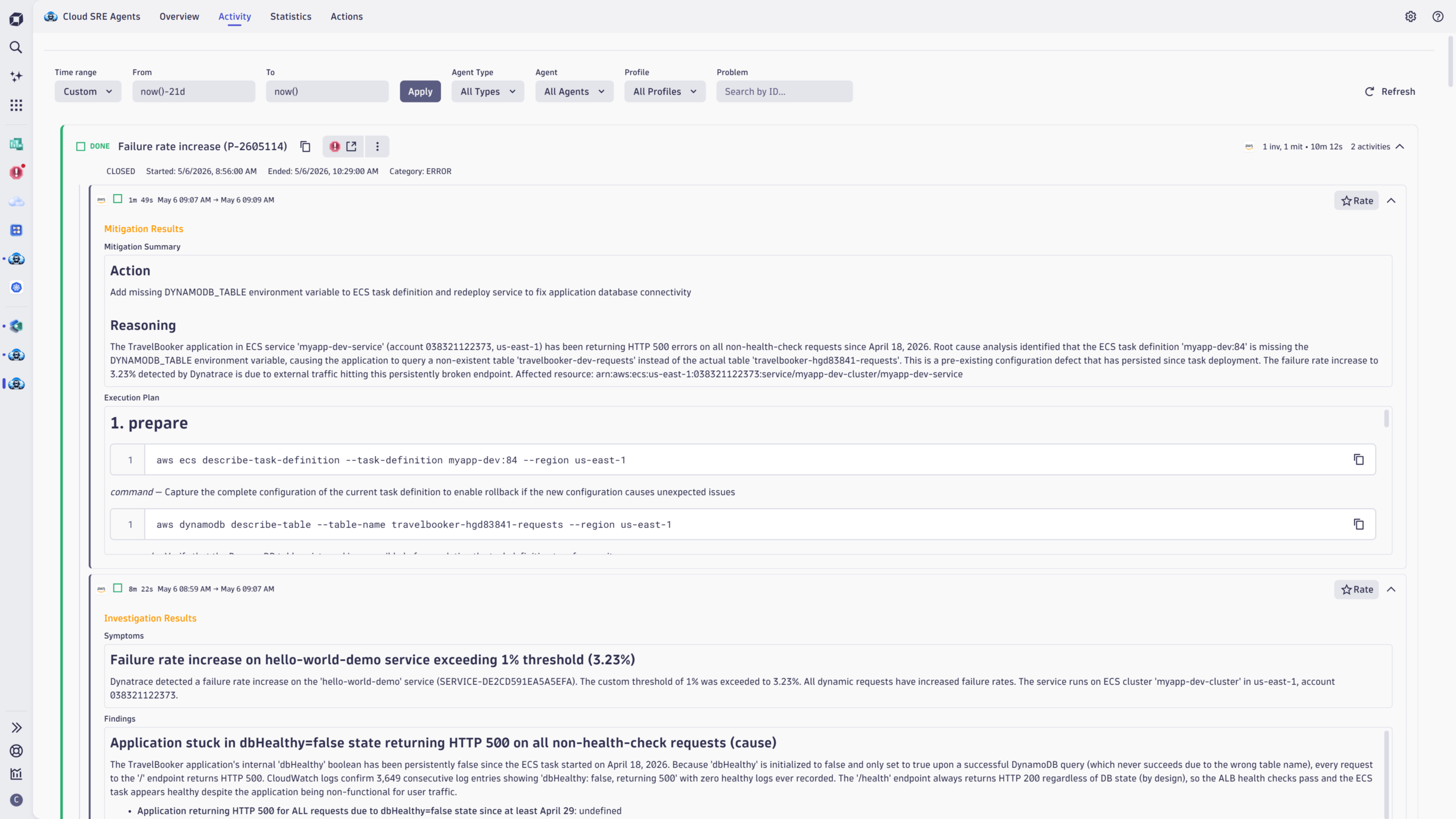
The Activity tab is the audit trail. Every investigation and mitigation appears as a card on a unified timeline; expand any card to see the agent’s full findings, the evidence it pulled, and the action it took or recommended. Each response can be rated Good, OK, or Bad, building a quality signal grounded in what your team actually saw rather than what the system predicted. When a single problem triggers work across multiple agents, those activities roll up to a single status (in progress, done, or stalled), so you always know where things stand without having to reconstruct the run from individual records.
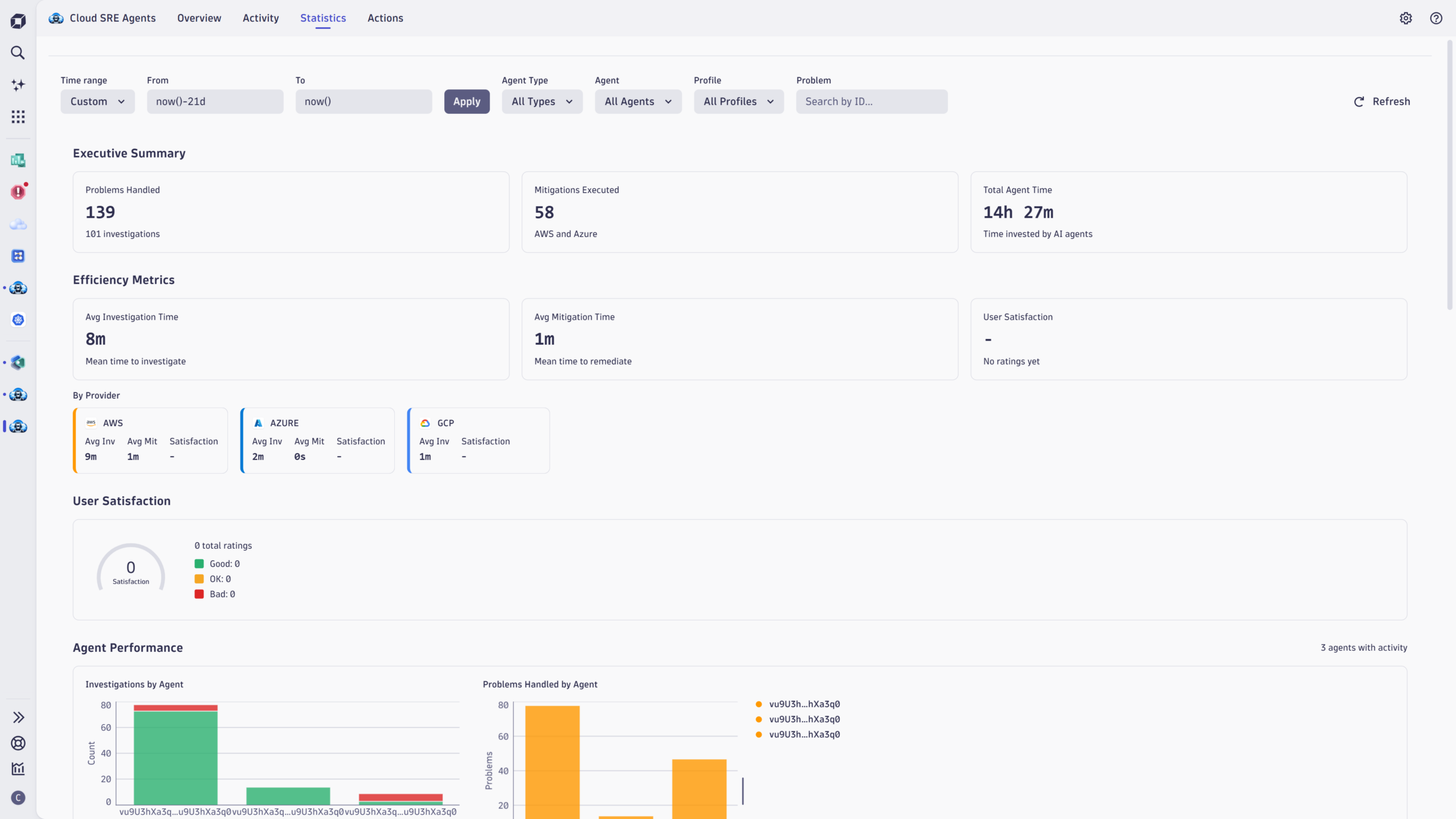
The Statistics tab is where autonomous operations become a number you can show to a leadership team: problems handled, mitigations executed, average investigation time, MTTR and MTTI trends, success rates, and satisfaction scores broken down by agent. The same view doubles as a directional cost lens, since agent working time is the dominant driver on the cloud side of the bill. Treat the number as a trend signal and a circuit-breaker input, not a billing record (reconcile against AWS, Azure, and GCP usage reports for exact spend), and it makes the case for expanding agentic coverage with evidence rather than anecdote.
Why production context multiplies the value
What changes Cloud SRE Agents from a smart dispatcher into something more is what Dynatrace Intelligence contributes before an agent ever begins its analysis. Dynatrace delivers deterministic, causation-based root cause analysis grounded in Dynatrace’s Smartscape real-time dependency mapping, alongside business impact assessment and correlated telemetry. That context shapes the entire direction of the investigation. A cloud agent arriving with that foundation starts from “this specific service on this specific host is the root cause, and here’s the customer impact” rather than “something is wrong somewhere in this account.”
The numbers reflect it. According to AWS, organizations using the AWS DevOps Agent with Dynatrace see up to a 75% reduction in mean time to resolution.
Western Governors University, which runs a fully online learning environment for 200,000 students, uses AWS DevOps Agent with Dynatrace to automate cross-system correlation that previously required manual effort across multiple tools. At a larger scale, United Airlines transports more than 500,000 passengers daily across a hybrid environment that includes more than 500 AWS accounts, 20,000 Lambda functions, and 38,000 OneAgent deployments.
The team’s description of the before and after status is direct: previously, multiple tools with overlapping functions created gaps and black boxes during troubleshooting. With AWS DevOps Agent and Dynatrace, Dynatrace identifies the responsible layer, the agent investigates and provides resolution steps, and everything surfaces in a single Dynatrace view. No 3:00 AM tool-switching required.
Get started
For a closer look at the individual integrations, read the posts on AWS DevOps Agent and Dynatrace and Azure SRE Agent and Dynatrace, or see how Dynatrace Intelligence powers autonomous operations. To put your cloud agents to work today, install Cloud SRE Agents from the Dynatrace Hub. Cloud SRE Agents is currently available as a community-supported app.
Harness the power of your hyperscaler agents

Looking for answers?
Start a new discussion or ask for help in our Q&A forum.
Go to forum