

Skip to technology filters Skip to main content
Dynatrace Hub

Extend the platform,
empower your team.

Popular searches:
Home hero bg
Palo Alto firewallsPalo Alto firewalls
Palo Alto firewalls

Palo Alto firewalls

Palo Alto extension for problems detection

Extension
Free trialDocumentation
  • Product information
  • Release notes

Overview

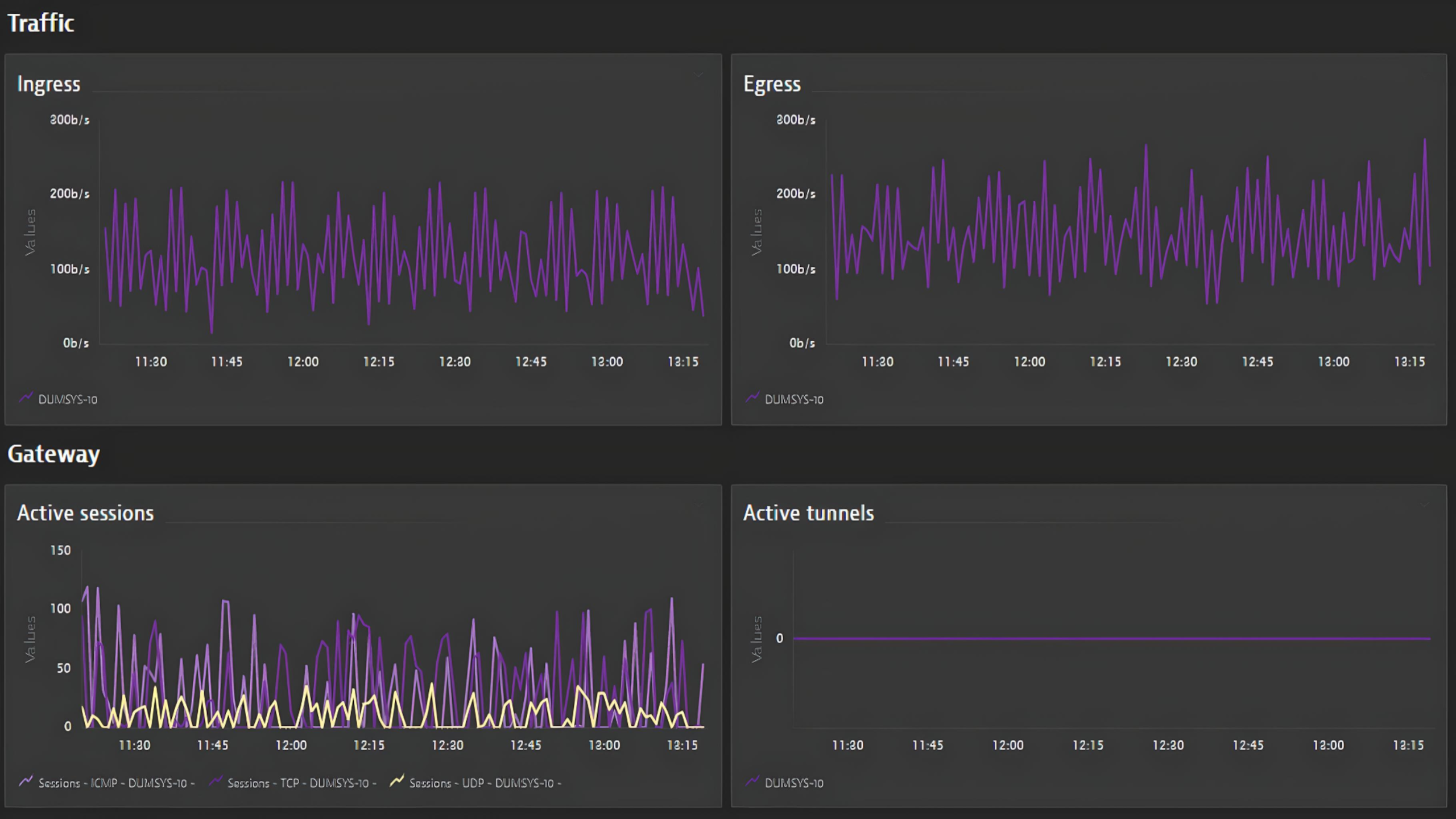
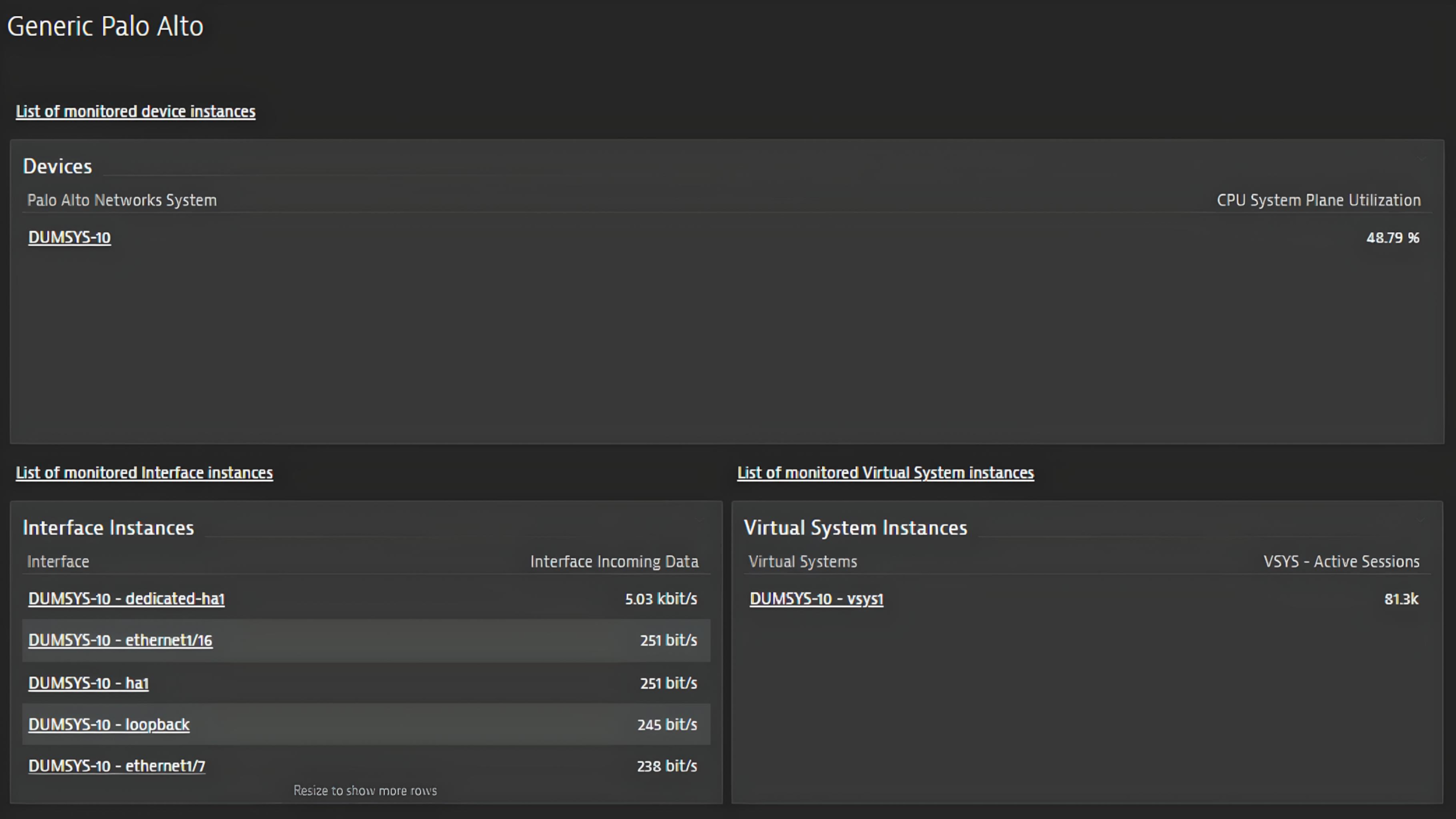
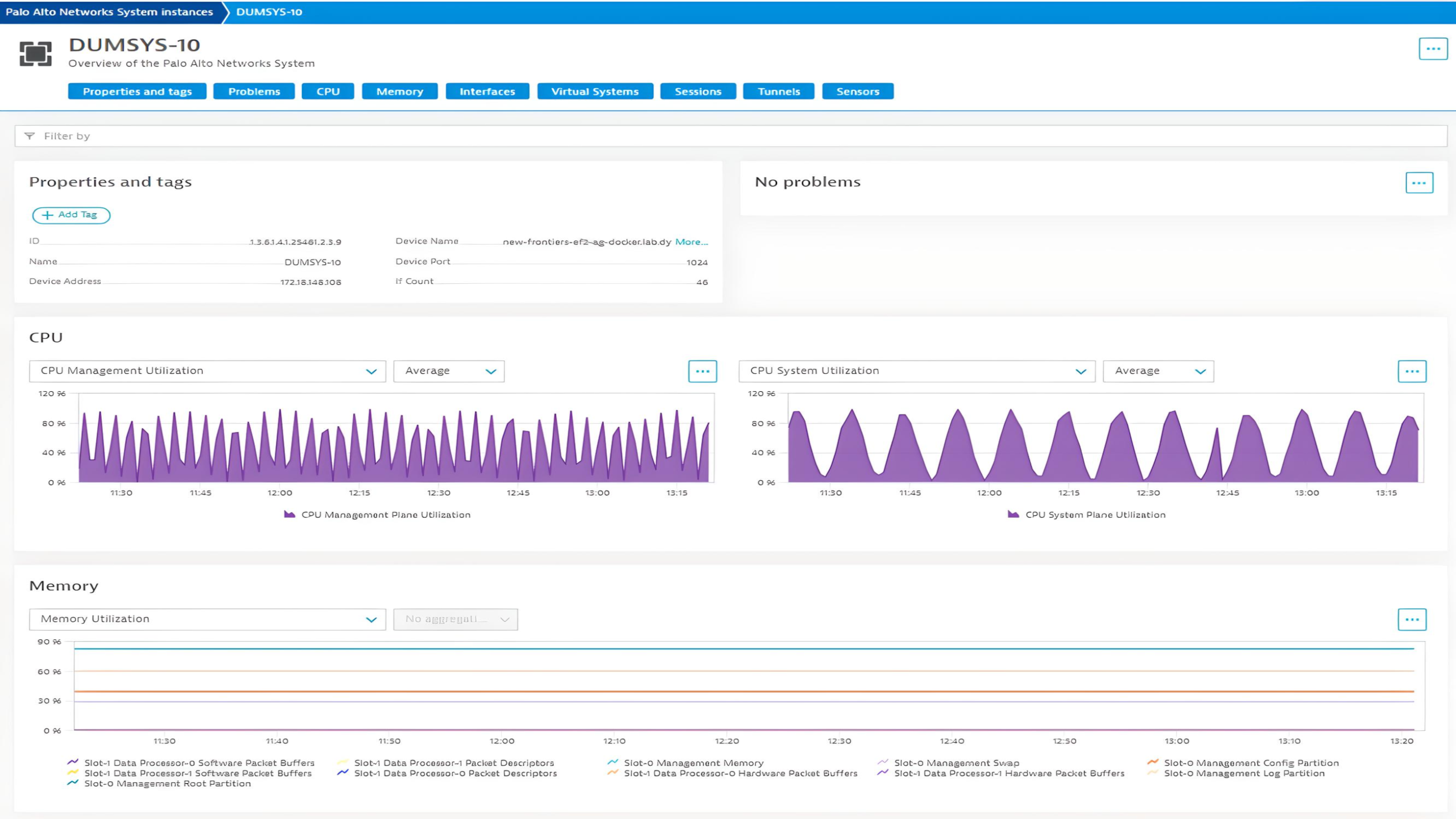
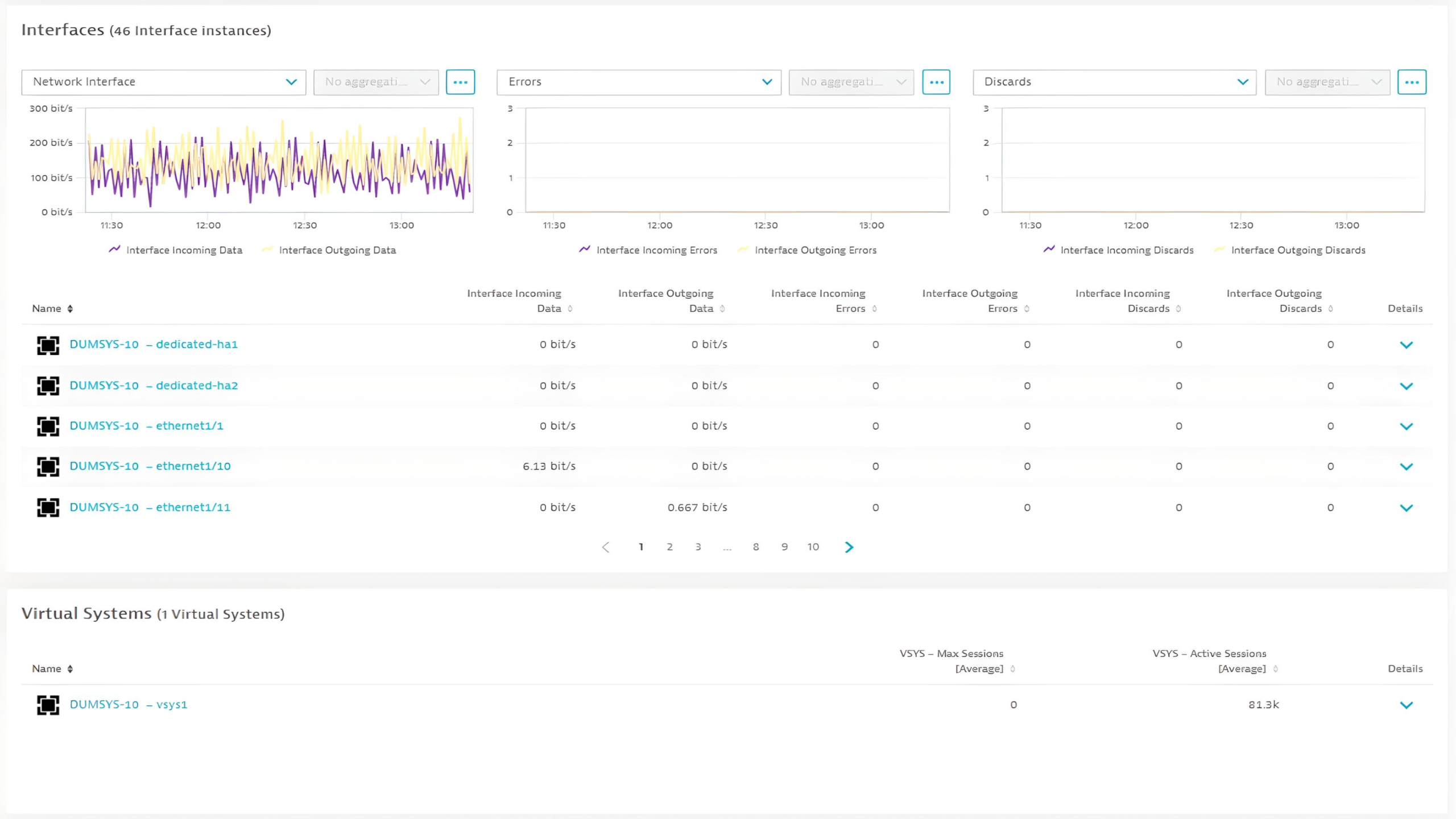
This extension leverages the SNMP protocol to provide a complete solution to monitor your Palo Alto Firewalls. The complete configuration is provided out-of-the-box.

This is intended for users, who:

  • Would like to monitor health state and performance of their Palo Alto Firewalls and provide unified analysis for Ops, DevOps and IT Admins.

This enables you to:

  • Monitor health and performance of your Palo Alto Firewalls
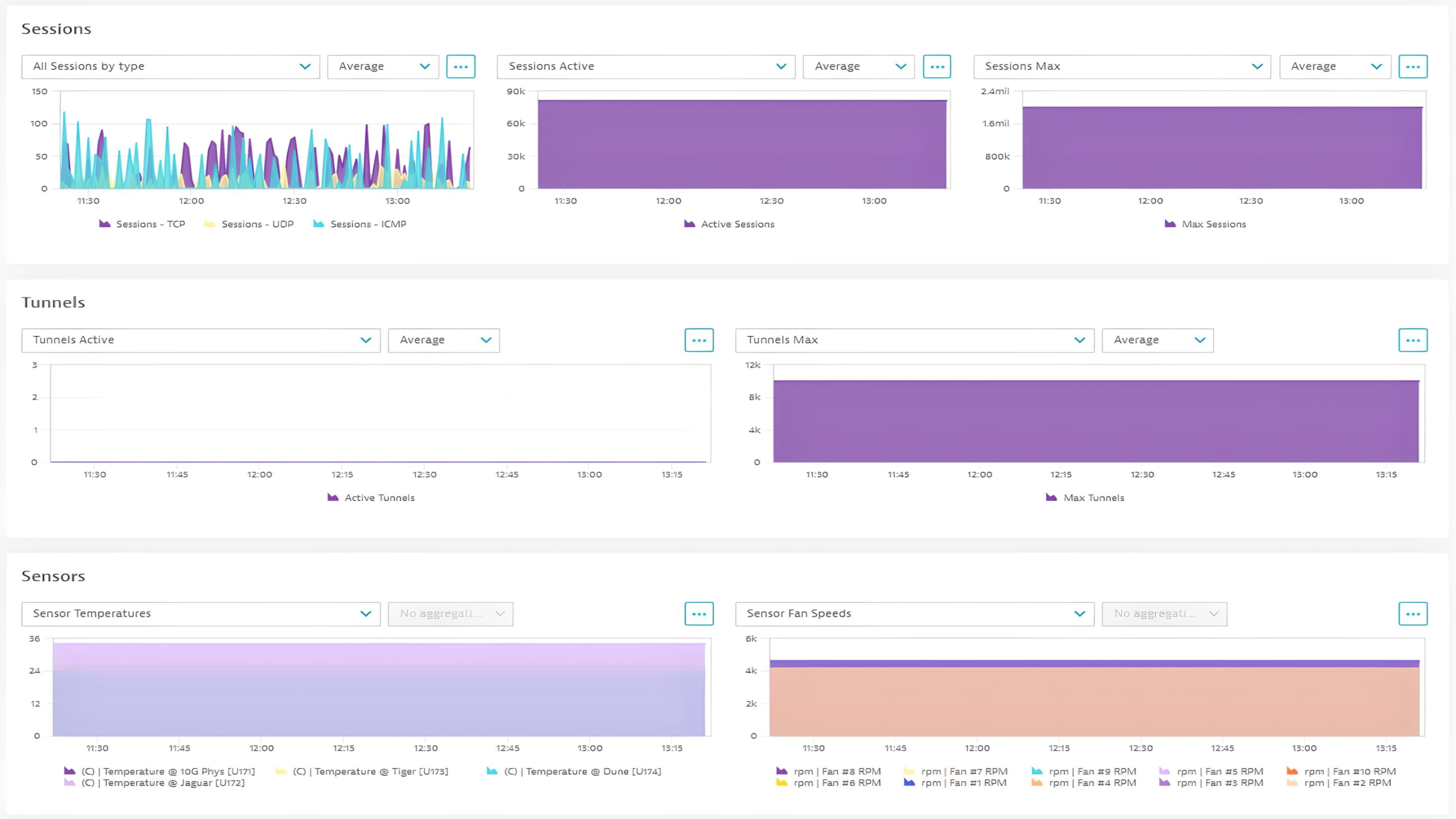
  • Use included alerts for fan speed, as well as temperature.

Use cases

Monitor health state and performance of your Palo Alto firewalls and provide unified analysis for Ops, DevOps and IT Admins.

Compatibility information

  • This extension is to be used with Palo Alto Firewalls only.
  • SNMPv2c and SNMPv3 supported only.
Dynatrace
DocumentationMore Information
By Dynatrace
Dynatrace support center
Subscribe to new releases
Copy to clipboard

Extension content

Content typeNumber of items included
alerts
2
screen injections
3
screen layout
6
screen chart groups
18
document dashboard
1
screen entities lists
3
generic type
7
metric metadata
48
dashboards
1
generic relationship
5
screen properties
4
metric query
3
screen dql table
3

Feature sets

Below is a complete list of the feature sets provided in this version. To ensure a good fit for your needs, individual feature sets can be activated and deactivated by your administrator during configuration.

Feature setsNumber of metrics included
Metric nameMetric keyDescriptionUnit
-com.dynatrace.extension.network_device.if.bytes_in.count--
-com.dynatrace.extension.network_device.if.bytes_out.count--
-com.dynatrace.extension.network_device.if.in.errors.count--
-com.dynatrace.extension.network_device.if.out.errors.count--
-com.dynatrace.extension.network_device.if.in.discards.count--
-com.dynatrace.extension.network_device.if.out.discards.count--
-com.dynatrace.extension.network_device.if.status--
-com.dynatrace.extension.network_device.sysuptime--
-com.dynatrace.extension.network_device.cpu_usage--
-com.dynatrace.extension.network_device.memory_total--
-com.dynatrace.extension.network_device.memory_used--
Metric nameMetric keyDescriptionUnit
-com.dynatrace.extension.palo-alto.generic.if.entity--
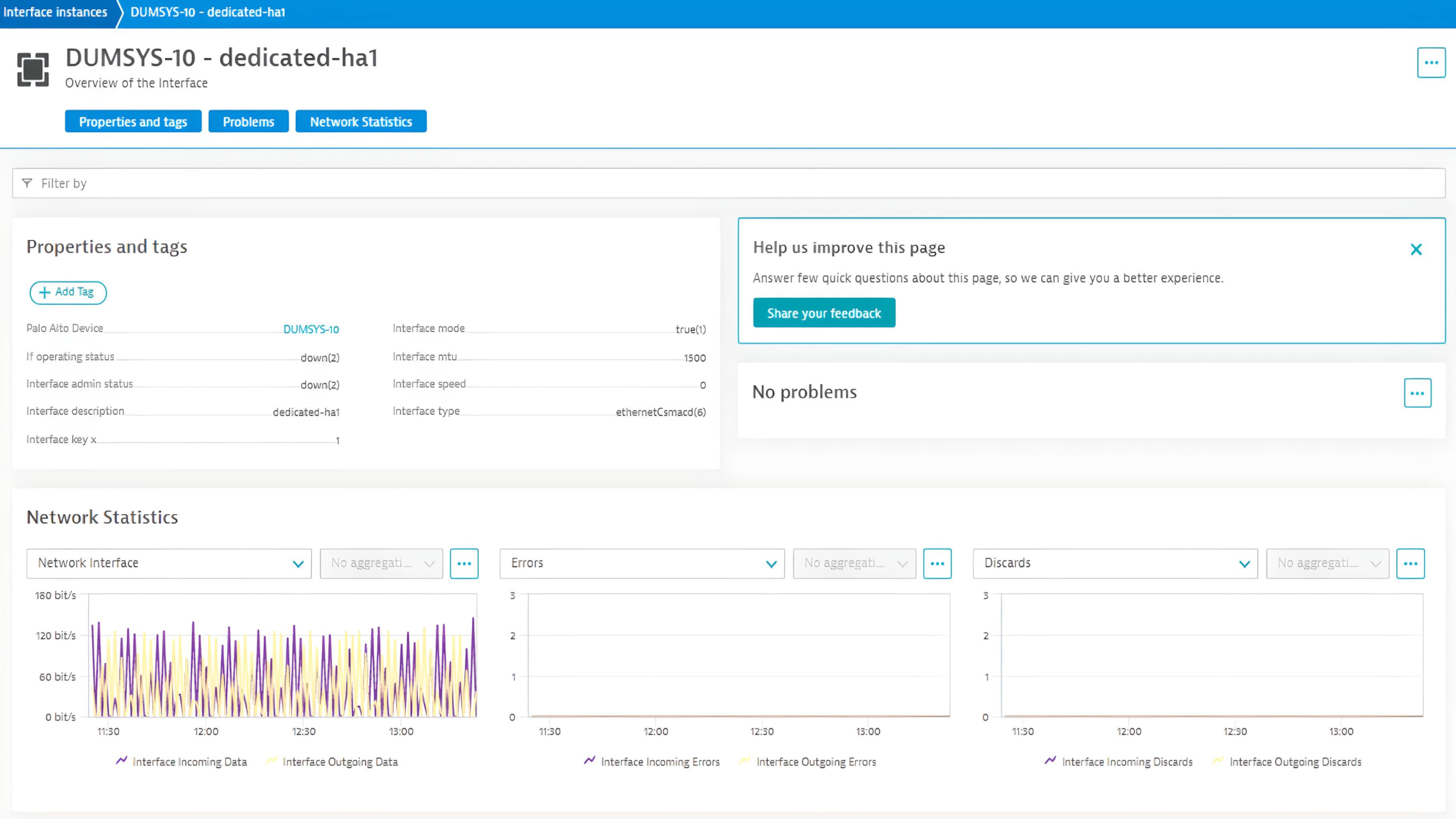
Interface Incoming Octets Countcom.dynatrace.extension.palo-alto.generic.if.in.octets.count-Count
Interface Incoming Ucast Packets Countcom.dynatrace.extension.palo-alto.generic.if.in.ucast.packets.count-Count
Interface Outgoing Octets Countcom.dynatrace.extension.palo-alto.generic.if.out.octets.count-Count
Interface Outgoing Packets Countcom.dynatrace.extension.palo-alto.generic.if.out.ucast.packets.count-Count
Interface Incoming Errorscom.dynatrace.extension.palo-alto.generic.if.in.err.count-Count
Interface Outgoing Errorscom.dynatrace.extension.palo-alto.generic.if.out.err.count-Count
Interface Incoming Discardscom.dynatrace.extension.palo-alto.generic.if.in.discards.count-Count
Interface Outgoing Discardscom.dynatrace.extension.palo-alto.generic.if.out.discards.count-Count
Metric nameMetric keyDescriptionUnit
Incoming log ratecom.dynatrace.extension.palo-alto.generic.pandeviceincominglograteThe incoming rate in logs/s on the Device. PAN-COMMON-MIBPerSecond
Write log ratecom.dynatrace.extension.palo-alto.generic.pandevicewritelograteThe write rate in logs/s on the Device. PAN-COMMON-MIBPerSecond
Metric nameMetric keyDescriptionUnit
Zone active TCP connections per secondcom.dynatrace.extension.palo-alto.generic.zone.active.tcp.cpsNumber of active TCP connections per second for this zone. panZoneActiveTcpCps - PAN-COMMON-MIBPerSecond
Zone active UDP connections per secondcom.dynatrace.extension.palo-alto.generic.zone.active.udp.cpsNumber of active UDP connections per second for this zone. panZoneActiveUdpCps - PAN-COMMON-MIBPerSecond
Zone Other IP connections per secondcom.dynatrace.extension.palo-alto.generic.zone.active.otherip.cpsNumber of active Other IP connections per second for this zone. panZoneActiveOtherIpCps - PAN-COMMON-MIBPerSecond
Metric nameMetric keyDescriptionUnit
VSYS - Max Sessionscom.dynatrace.extension.palo-alto.generic.vsys.sessions.max-Count
VSYS - Active Sessionscom.dynatrace.extension.palo-alto.generic.vsys.sessions.active-Count
VSYS - Session Utilizationcom.dynatrace.extension.palo-alto.generic.vsys.sessions.utilization-Percent
Metric nameMetric keyDescriptionUnit
System Userscom.dynatrace.extension.palo-alto.generic.sys.host.num_usersThe number of user sessions for which this host is storing state information. hrSystemNumUsersCount
System Processescom.dynatrace.extension.palo-alto.generic.sys.host.num_processesThe number of process contexts currently loaded or running on this system. hrSystemProcessesCount
System Max Processescom.dynatrace.extension.palo-alto.generic.sys.host.max_processesThe maximum number of process contexts this system can support. hrSystemMaxProcessesCount
Load Average 1mincom.dynatrace.extension.palo-alto.generic.sys.host.load_averageThe 1 minute load average. laLoadCount
Metric nameMetric keyDescriptionUnit
-com.dynatrace.extension.network_device.if.in.multicast_pkts.count--
-com.dynatrace.extension.network_device.if.out.multicast_pkts.count--
-com.dynatrace.extension.network_device.if.in.broadcast_pkts.count--
-com.dynatrace.extension.network_device.if.out.broadcast_pkts.count--
-com.dynatrace.extension.network_device.if.in.ucast_pkts.count--
-com.dynatrace.extension.network_device.if.out.ucast_pkts.count--
-com.dynatrace.extension.network_device.if.lastchange--
Metric nameMetric keyDescriptionUnit
PAN LC Log Ratecom.dynatrace.extension.palo-alto.generic.lc.log_rateThe write rate in logs/s on the Log Collection.PerSecond
PAN LC Disk Usagecom.dynatrace.extension.palo-alto.generic.lc.disk_usageThe Log disk usage for logical disks on the Log CollectorMegaByte
PAN LC Log Durationcom.dynatrace.extension.palo-alto.generic.lc.log_durationThe Log duration (in days) for the logs on the Log CollectorDay
Metric nameMetric keyDescriptionUnit
Sys release date infocom.dynatrace.extension.palo-alto.generic.sys.release.datesDimensions: panSysSwVersion panSysAppVersion, panSysAppReleaseDate, panSysThreatVersion, panSysThreatReleaseDate, panSysAvVersion, panSysAvReleaseDate, panSysWildfireVersion, panSysWfReleaseDate, panSysUrlFilteringVersion, panSysHAState, panSysHAPeerState, chassis.type . PAN-COMMON-MIBPerSecond
Metric nameMetric keyDescriptionUnit
Active Tunnelscom.dynatrace.extension.palo-alto.generic.tunnels.active-Count
Max Tunnelscom.dynatrace.extension.palo-alto.generic.tunnels.max-Count
Gateway Utilization %com.dynatrace.extension.palo-alto.generic.gateway.utilization-Percent
Active Sessionscom.dynatrace.extension.palo-alto.generic.sessions.active-Count
Session utilizationcom.dynatrace.extension.palo-alto.generic.sessions.utilizationSession table utilization percentage.Percent
Max Sessionscom.dynatrace.extension.palo-alto.generic.sessions.max-Count
Sessions - TCPcom.dynatrace.extension.palo-alto.generic.sessions.tcp-Count
Sessions - UDPcom.dynatrace.extension.palo-alto.generic.sessions.udp-Count
Sessions - ICMPcom.dynatrace.extension.palo-alto.generic.sessions.icmp-Count
Sessions - SSL Proxycom.dynatrace.extension.palo-alto.generic.sessions.proxy-Count
Session SSL proxy utilizationcom.dynatrace.extension.palo-alto.generic.sessions.proxy.utilSSL proxy Session utilization percentage. panSessionSslProxyUtilization PAN-COMMON-MIBPercent
Metric nameMetric keyDescriptionUnit
Total Power Available (Watts)com.dynatrace.extension.palo-alto.generic.power.available-Count
Total Power Used (Watts)com.dynatrace.extension.palo-alto.generic.power.used-Count
Sensor Valuecom.dynatrace.extension.palo-alto.generic.sensor.valueentPhySensorValue objects, represent fan speed and temperature.Unspecified
Metric nameMetric keyDescriptionUnit
System uptimecom.dynatrace.extension.palo-alto.generic.sys.uptime-MilliSecond
CPU Management Plane Utilizationcom.dynatrace.extension.palo-alto.generic.cpu.management.utilization-Percent
CPU System Plane Utilizationcom.dynatrace.extension.palo-alto.generic.cpu.system.utilization-Percent
Memory Allocation Unitscom.dynatrace.extension.palo-alto.generic.mem.allocation.unitsThe size in bytes of the data objects allocated from this pool.Byte
Memory Sizecom.dynatrace.extension.palo-alto.generic.mem.size-Byte
Memory Usedcom.dynatrace.extension.palo-alto.generic.mem.used-Byte
Memory Allocation Failurescom.dynatrace.extension.palo-alto.generic.mem.allocation.failures.countThe number of requests for storage represented by this entry that could not be honored due to not enough storage.Count

Full version history

To have more information on how to install the downloaded package, please follow the instructions on this page.
ReleaseDate

Full version history

✨ New in this version (3.1.0):

  • Added the following new metrics to the Advanced interfaces feature set:
    • com.dynatrace.extension.network_device.if.in.multicast_pkts.count
    • com.dynatrace.extension.network_device.if.out.multicast_pkts.count
    • com.dynatrace.extension.network_device.if.in.broadcast_pkts.count
    • com.dynatrace.extension.network_device.if.out.broadcast_pkts.count
    • com.dynatrace.extension.network_device.if.in.ucast_pkts.count
    • com.dynatrace.extension.network_device.if.out.ucast_pkts.count
    • com.dynatrace.extension.network_device.if.lastchange

Full version history

🪲 Fixed in this version:

  • Removed generic entities from the built-in dashboard to align with other network extensions.

ℹ️ This version requires ActiveGate version 1.313.0 or higher.

Full version history

✨ New in this version (3.0.1):

  • The following metrics from the default feature set were regrouped into a new control-plane feature set:
  • com.dynatrace.extension.palo-alto.generic.sys.uptime
  • com.dynatrace.extension.palo-alto.generic.cpu.management.utilization
  • com.dynatrace.extension.palo-alto.generic.cpu.system.utilization
  • com.dynatrace.extension.palo-alto.generic.mem.allocation.units
  • com.dynatrace.extension.palo-alto.generic.mem.size
  • com.dynatrace.extension.palo-alto.generic.mem.used
  • com.dynatrace.extension.palo-alto.generic.mem.allocation.failures.count

⚠️ WARNING: if you want to keep monitoring these metrics, you must manually toggle on the new feature set in the updated extension configuration.

🚀 Improved in this version:

  • Corrected key of interface errors metric for proper display in the Infrastructure & Operations app, from if.in/out.err.count to if.in/out.errors.count.
  • Removed redundant com.dynatrace.extension.palo-alto.generic.device.entity metric to align with our standards.

⚠️ WARNING: you will have to manually change any dashboard, alert, or other dependent configuration that uses the old metric keys.

🪲 Fixed in this version:

  • Assigned correct OID to the com.dynatrace.extension.palo-alto.generic.cpu.system.utilization metric.
  • Cleaned up duplicate attributes in the Infrastructure & Operations app.

Full version history

✨ New in this version:

  • To align with other network extensions, the following metrics were added default feature set:

    • com.dynatrace.extension.network_device.if.bytes_in.count
    • com.dynatrace.extension.network_device.if.bytes_out.count
    • com.dynatrace.extension.network_device.if.in.err.count
    • com.dynatrace.extension.network_device.if.out.err.count
    • com.dynatrace.extension.network_device.if.in.discards.count
    • com.dynatrace.extension.network_device.if.out.discards.count
    • com.dynatrace.extension.network_device.if.status

    This means that interfaces will now be monitored as part of the default feature set. It is still possible to disable interface monitoring by using the filter $eq() in the Pattern to filter capturing of Interfaces by Name field of the monitoring configuration.

  • Added out-of-the-box Platform dashboard.

  • The dt.security_context property will now be propagated to all entities created by this extension.

ℹ️ This version requires ActiveGate version 1.313.0 or higher.

Full version history

Version 2.9.7 (09 May 2025)

✨ New in this version:

  • Added dimensions sw.version and chassis.type to the metric com.dynatrace.extension.palo-alto.generic.sys.release.dates.
  • These dimension values will now show as attributes of the Palo Alto Device entity.

ℹ️ This version requires ActiveGate version 1.290.0 or higher.

Full version history

✨ New in this version:

  • Added dimensions ha.peerstate, app.version, threat.version, av.version, wf.version and urlfiltering.version to the metric com.dynatrace.extension.palo-alto.generic.sys.release.dates. These dimension values will now show as attributes of the Palo Alto Device entity.
  • Added charts for logging metrics to the Palo Alto Device entity screen.

🚀 Improved in this version:

  • The com.dynatrace.extension.network_device.sysuptime and com.dynatrace.extension.palo-alto.generic.sys.uptime now represent the time since the device was started (OID 1.3.6.1.2.1.25.1.1.0) as opposed to the time since the SNMP service was started (OID 1.3.6.1.2.1.1.3.0).

ℹ️ This version requires ActiveGate version 1.290.0 or higher.

Full version history

🚀 Improved in this version:

  • To better control licensing costs the following changes have been made to the extension's feature sets:
    • The generic interface metrics were moved from the default feature set to interface.
    • Added new feature set hardware to which the power consumption and sensor metrics were moved.
      • ⚠️ When automatically upgrading existing configurations, the new feature set will be disabled by default. To continue monitoring power consumption and sensor metrics you will need to manually update each monitoring configuration and enable the new feature set after upgrading. ⚠️
  • Added a status dimension to the com.dynatrace.extension.palo-alto.generic.cpu.system.utilization and com.dynatrace.extension.palo-alto.generic.cpu.management.utilization metrics corresponding to OID 1.3.6.1.2.1.25.3.2.1.5.

🪲 Fixed in this version:

  • Fixed bug where interface attributes would sometimes not be populated.

ℹ️ This version requires ActiveGate version 1.290.0 or higher.

Full version history

✨ New in this version:

  • Added power usage metrics com.dynatrace.extension.palo-alto.generic.power.available and com.dynatrace.extension.palo-alto.generic.power.used and corresponding charts as part of the general feature set.
  • Added metrics com.dynatrace.extension.palo-alto.generic.gateway.utilization, com.dynatrace.extension.palo-alto.generic.sessions.utilization, com.dynatrace.extension.palo-alto.generic.sessions.proxy as part of the gateway feature set.
  • Added interface packet metrics com.dynatrace.extension.palo-alto.generic.if.in.ucast.packets.count and com.dynatrace.extension.palo-alto.generic.if.out.ucast.packets.count and corresponding charts as part of the interface feature set.
  • Added metrics com.dynatrace.extension.palo-alto.generic.mem.allocation.units and com.dynatrace.extension.palo-alto.generic.mem.allocation.failures.count as part of the memory feature set.
  • Added a new feature set zone with metrics com.dynatrace.extension.palo-alto.generic.zone.active.tcp.cps, com.dynatrace.extension.palo-alto.generic.zone.active.udp.cps and com.dynatrace.extension.palo-alto.generic.zone.active.otherip.cps.
  • Added a new feature set device-logging with metrics com.dynatrace.extension.palo-alto.generic.pandeviceincominglograte and com.dynatrace.extension.palo-alto.generic.pandevicewritelograte.
  • Added a new feature set pan-sys with the metric com.dynatrace.extension.palo-alto.generic.sys.release.dates.
  • New entities and metrics were added to represent Palo Alto as a network device

🚀 Improved in this version:

  • Changed the interface speed dimension to use the ifHighSpeed OID 1.3.6.1.2.1.31.1.1.1.15 instead of 1.3.6.1.2.1.2.2.1.5.

Full version history

Fixed bug where metrics weren't being picked up in management zones with Palo Alto entities.

Full version history

Breaking changes

Dropped support for 32-bit counter octet in/out interface metrics. Only 64-bit counters are now supported. Only devices with Firewall PAN-OS version earlier than 8.1 will be affected.

The interface_high_capacity feature set was dropped as those metrics are now in the interface feature set. Before being able to upgrade your monitoring configurations you will need to manually disable the interface-high-capacity on those configurations (if enabled).

Full version history

Breaking changes

The following metrics of the interface_high_capacity feature set are renamed

  • com.dynatrace.extension.palo-alto.generic.if.in.octets to com.dynatrace.extension.palo-alto.generic.if.hc.in.octets
  • com.dynatrace.extension.palo-alto.generic.if.out.octets to com.dynatrace.extension.palo-alto.generic.if.hc.out.octets
  • com.dynatrace.extension.palo-alto.generic.if.in.err to com.dynatrace.extension.palo-alto.generic.if.hc.in.err
  • com.dynatrace.extension.palo-alto.generic.if.out.err to com.dynatrace.extension.palo-alto.generic.if.hc.out.err
  • com.dynatrace.extension.palo-alto.generic.if.in.discards to com.dynatrace.extension.palo-alto.generic.if.hc.in.discards
  • com.dynatrace.extension.palo-alto.generic.if.out.discards to com.dynatrace.extension.palo-alto.generic.if.hc.out.discards

Any dashboards or metric events relying on these metrics will need to be reconfigured.

Customers not using the interface_high_capacity feature set are not affected.

Description

Renamed high capacity interface metrics, to fix a bug where having both the interface and interface_high_capacity feature sets enabled at the same time would cause inaccurate metrics to be ingested.

Full version history

No release notes

Full version history

No release notes

Full version history

Fix for dashboard to be compatible with feature flags

Full version history

  • bugfix: added missing chartCards
  • bugfix: added featureSet with high capacity interface metrics to fix data discrepancy

Full version history

v0.4.0

  • Added ability to use filters for Interface Name, Admin and Operational Status

Full version history

Substract of suffix ".count" in metric com.dynatrace.extension.palo-alto.generic.sys.uptime and changed it type to gauge

Full version history

  1. New calculated metrics:

    • func:com.dynatrace.extension.palo-alto.generic.if.in.octets.bitpersec
    • func:com.dynatrace.extension.palo-alto.generic.if.out.octets.bitpersec
    • func:com.dynatrace.extension.palo-alto.generic.mem.utilization
  2. Corrected oid for dimension: if.keyx

  3. New dimension if.descr for subgroup interface

  4. Added topology, relationships and screens

Full version history

Version 0.1.15 (initial):

  • SNMP DataSource configuration
  • dashboard template
Dynatrace Hub
Hub HomeGet data into DynatraceBuild your own app
Log Management and AnalyticsKubernetesAI and LLM ObservabilityInfrastructure ObservabilitySoftware DeliveryApplication ObservabilityApplication SecurityDigital ExperienceBusiness Observability
Filter
Type
Built and maintained by
Deployment model
SaaS
  • SaaS
  • Managed
Partner FinderBecome a partnerDynatrace Developer

All

769 Results filtered by:

Chroma logo

Chroma

Gain insights into the health of your vector and embedding databases from Chroma

Technology

Amazon Kinesis Video Streams logo

Amazon Kinesis Video Streams

Provides you SDKs to install on your devices to make it easy to stream media.

Technology

Fluentd logo

Fluentd

Stream log data to Dynatrace via Fluentd for analysis.

Technology

Palo Alto firewalls logo

Palo Alto firewalls

Palo Alto extension for problems detection

Extension

AWS Elastic Beanstalk logo

AWS Elastic Beanstalk

Quickly deploy and manage applications in the AWS Cloud without having to learn about the infrastructure beneath.

Technology

Workflows logo

Workflows

Automate tasks in your IT landscape, remediate problems, and visualize processes

App
Security Posture Management logo

Security Posture Management

Detect, prioritize, and remediate security and compliance findings with SPM.

App

Amazon Route 53 logo

Amazon Route 53

Effectively connects user requests to infrastructure running in AWS.

Technology

Amazon Inspector logo

Amazon Inspector

Tests the network accessibility of your EC2 instances and the security state of your applications that run on those instances.

Technology

NGINX Plus logo

NGINX Plus

All‑in‑one web server, load balancer, content cache, and media streaming.

Technology

Databases logo

Databases

Easily monitor, troubleshoot, and optimize your entire database fleets.

App

Amazon DocumentDB logo

Amazon DocumentDB

Amazon DocumentDB (with MongoDB compatibility) is a fast, reliable, and fully managed database service.

Technology

Dynatrace MCP Server logo

Dynatrace MCP Server

Fuel your AI agents with high quality data and real-time production insights

Technology

IBM IMS SOAP Gateway logo

IBM IMS SOAP Gateway

Intelligently monitor your transactions end-to-end and analyze the performance of your IMS SOAP Gateway.

Technology

Amazon Keyspaces for Apache Cassandra logo

Amazon Keyspaces for Apache Cassandra

Scalable, highly available, and managed Apache Cassandra–compatible database service.

Technology

Apache Camel logo

Apache Camel

Intelligently monitor, analyze, and optimize your integration framework and all applications deployed in your stack.

Technology

Amazon Elastic Kubernetes Service (EKS) logo

Amazon Elastic Kubernetes Service (EKS)

Harness automation and AI to simplify Kubernetes observability at scale.

Technology

WordPress logo

WordPress

Content management system written in PHP and paired with a MySQL or MariaDB database.

Technology

Azure Cosmos DB logo

Azure Cosmos DB

Fully managed and serverless distributed database supporting open-source PostgreSQL, MongoDB, and Apache Cassandra.

Technology

AWS Glue logo

AWS Glue

Fully managed extract, transform, and load (ETL) service.

Technology

Azure Event Hub Clusters logo

Azure Event Hub Clusters

Big data streaming platform and event ingestion service. It can receive and process millions of events per second.

Technology

Confluent Cloud (Kafka) logo

Confluent Cloud (Kafka)

Remotely monitor your Confluent Cloud Kafka Clusters and other resources!

Extension
Kong - Prometheus logo

Kong - Prometheus

Monitor Prometheus metrics exposed by Kong and proxied upstream services

Extension

BOSH bpm logo

BOSH bpm

Automated monitoring of platform processes running in BOSH bpm containers.

Technology

Prometheus in Kubernetes logo

Prometheus in Kubernetes

Collect metrics from Prometheus exporters in Kubernetes for Dynatrace analytics

Technology

Nutanix Clusters logo

Nutanix Clusters

Monitor Nutanix clusters' performance, usage and availability, with Nutanix API.

Extension

Azure Service-Fabric logo

Azure Service-Fabric

Intelligent end-to-end observability for serverless and hybrid environments using Azure Service Fabric.

Technology

Luna Network HSM Device logo

Luna Network HSM Device

Monitor your Luna Network Hardware Security Module (HSM) Devices through SNMP.

Extension

Consul Service Mesh (StatsD) logo

Consul Service Mesh (StatsD)

Extend visibility into your Consul Service Mesh instances to monitor health and improve performance.

Extension

Azure Relays logo

Azure Relays

Enables you to securely expose services that run in your corporate network to the public cloud.

Technology

Microsoft IIS logo

Microsoft IIS

Flexible and secure web server for hosting with Windows Server.

Extension

Kubernetes Monitoring Statistics logo

Kubernetes Monitoring Statistics

Troubleshoot your Dynatrace Kubernetes monitoring and Prometheus integration.

Extension
Google Cloud logo

Google Cloud

Meet your business challenges head on with cloud computing services from Google.

Technology
Snyk logo

Snyk

Ingest Snyk vulnerability findings, scans, and audit logs.

Extension

Amazon EventBridge logo

Amazon EventBridge

Serverless event bus to connect applications together using data from your own applications, integrated SaaS applications, and AWS services.

Technology

Ruby logo

Ruby

Dynatrace monitors your Ruby applications and services on the process level.

Technology

Apache OpenEJB logo

Apache OpenEJB

Automatically and intelligently monitor, analyze and optimize your applications based on Apache OpenEJB.

Technology

Log ingestion API logo

Log ingestion API

Stream your logs and log records to Dynatrace via the log ingest API

Technology

Citrix DaaS & Virtual Apps and Desktops logo

Citrix DaaS & Virtual Apps and Desktops

Gain insight into your Citrix DaaS & Virtual Apps and Desktops environments

Extension

Azure Device Provisioning Service logo

Azure Device Provisioning Service

Helper service for IoT Hub that enables just-in-time provisioning to the right IoT hub without human intervention.

Technology

Milvus logo

Milvus

Gain insights about vector database resource utilization and cache behavior

Technology

Google Memorystore logo

Google Memorystore

Get insights into Google Memorystore service metrics collected from the Google Operations API to ensure health of your cloud infrastructure.

Extension

Azul Platform Core (Zulu) logo

Azul Platform Core (Zulu)

Automatically and intelligently monitor, analyze, and optimize the performance of your virtual machine.

Technology

VirusTotal logo

VirusTotal

Enrich observables with threat intelligence from VirusTotal.

App

AWS Outposts logo

AWS Outposts

Fully managed service extending AWS infrastructure, services, APIs and more.

Technology

Databricks Workspace logo

Databricks Workspace

Remotely monitor your Databricks Workspaces!

Extension

LlamaIndex logo

LlamaIndex

Monitor your LLM-powered agents and workflows built with LlamaIndex framework.

Technology
UPS Device logo

UPS Device

Monitor your Uninterruptible Power Supplies (UPS) over SNMP

Extension

TensorFlow Keras logo

TensorFlow Keras

Observe the training progress of TensorFlow Keras AI models

Technology

Amazon Elastic Container Service (ECS) logo

Amazon Elastic Container Service (ECS)

Fully managed container orchestration service.

Technology