

Skip to technology filters Skip to main content
Dynatrace Hub

Extend the platform,
empower your team.

Popular searches:
Home hero bg
LinkerdLinkerd
Linkerd

Linkerd

LInkerd service mesh provides runtime debugging, observability, reliability, and security with zero code changes.

Extension
Free trialDocumentation
  • Product information
  • Release notes

Overview

Configurations to enable dashboards and alerts for Linkerd service mesh metrics coming in through the Prometheus exporter integration. It requires metrics already ingested into Dynatrace via Prometheus integration. Follow the steps described in the Setup section for proper installation.

Use cases

  • Monitor Linkerd control plane performance and sidecar proxies performance
  • Alert on anomalies leading to performance issues
  • Visualize service mesh component status and performance on dashboards
  • Leverage Kubernetes Prometheus exporter integration to obtain all necessary telemetry data.

Details

Setup

1. Enable Prometheus monitoring in Dynatrace

In your Dynatrace environment, go to Settings > Cloud and virtualization > Kubernetes and turn on Enable monitoring and Monitor Prometheus exporters. For more information see our official documentation.

2. Annotate resources to begin collecting metrics

Annotations can either be set on the services (requires ActiveGate or Dynatrace Operator 1.215+) or on the pods. If you annotate the pods directly the annotations will go away when they are destroyed so be sure to add the annotations in the pod template at the deployment or replica set level. But do not annotate the deployments themselves as this will have no effect.

Refer to documentation for annotation best practices.

Start ingesting Linkerd (control plane) metrics

Controller

This component has been removed in the latest Kubernetes releases of Linkerd, so can be skipped if you do not see a linkerd-controller service.

metrics.dynatrace.com/port: "9995"
metrics.dynatrace.com/scrape: "true"
metrics.dynatrace.com/filter: |
  {
    "mode": "include",
    "names": [
      "http_client_requests_total",
      "http_server_requests_total"
    ]
  }

Proxy injector

This is the linkerd-proxy-injector service and deployment.

metrics.dynatrace.com/port: "9995"
metrics.dynatrace.com/scrape: "true"
metrics.dynatrace.com/filter: |
  {
    "mode": "include",
    "names": [
      "http_client_requests_total",
      "proxy_inject_admission_requests_total",
      "proxy_inject_admission_responses_total"
    ]
  }

Identity

This is the linkerd-identity service and deployment.

metrics.dynatrace.com/port: "9990"
metrics.dynatrace.com/scrape: "true"
metrics.dynatrace.com/filter: |
  {
    "mode": "include",
    "names": [
      "grpc_server_handled_total",
      "grpc_server_msg_received_total",
      "grpc_server_msg_sent_total",
      "grpc_server_started_total",
      "http_client_requests_total"
    ]
  }

Destination

This may either be linkerd-destination or linkerd-dst in the latest versions.

metrics.dynatrace.com/port: "9996"
metrics.dynatrace.com/scrape: "true"
metrics.dynatrace.com/filter: |
  {
    "mode": "include",
    "names": [
      "grpc_server_handled_total",
      "grpc_server_msg_received_total",
      "grpc_server_msg_sent_total",
      "grpc_server_started_total",
      "http_client_requests_total"
    ]
  }

Service profile validator

This is the linkerd-sp-validator service and deployment. If you see a service for this component but no deployments/pods, this functionality was moved to the linkerd-destination component in the latest releases so you do not need to add annotations for this.

metrics.dynatrace.com/port: "9997"
metrics.dynatrace.com/scrape: "true"
metrics.dynatrace.com/filter: |
  {
    "mode": "include",
    "names": [
      "http_client_requests_total"
    ]
  }

Start ingesting Linkerd (data plane) metrics

Set the below annotations on on either the services in front of the pods or in the pod templates for the pods that you would like to collect Linkerd metrics for. The pods must have the sidecar proxy injected into them for the metrics to be available.

metrics.dynatrace.com/port: "4191"
metrics.dynatrace.com/scrape: "true"
metrics.dynatrace.com/filter: |
  {
    "mode": "include",
    "names": [
      "response_total",
      "request_total",
      "tcp_close_total",
      "tcp_open_total",
      "tcp_read_bytes_total",
      "tcp_write_bytes_total"
    ]
  }

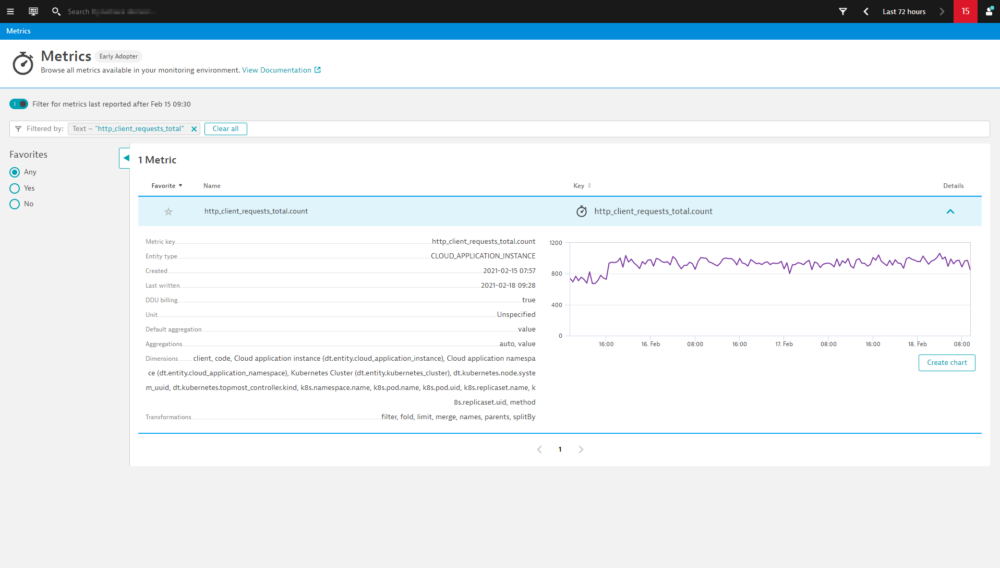
After some minutes, you can verify if everything works as expected by finding Linkerd related metrics using the Dynatrace metrics browser. The metric keys included in our filter annotations will be the best to look for.

For troubleshooting and further annotation methods, see Monitor Prometheus metrics in Dynatrace documentation.

4. Add extension to environment

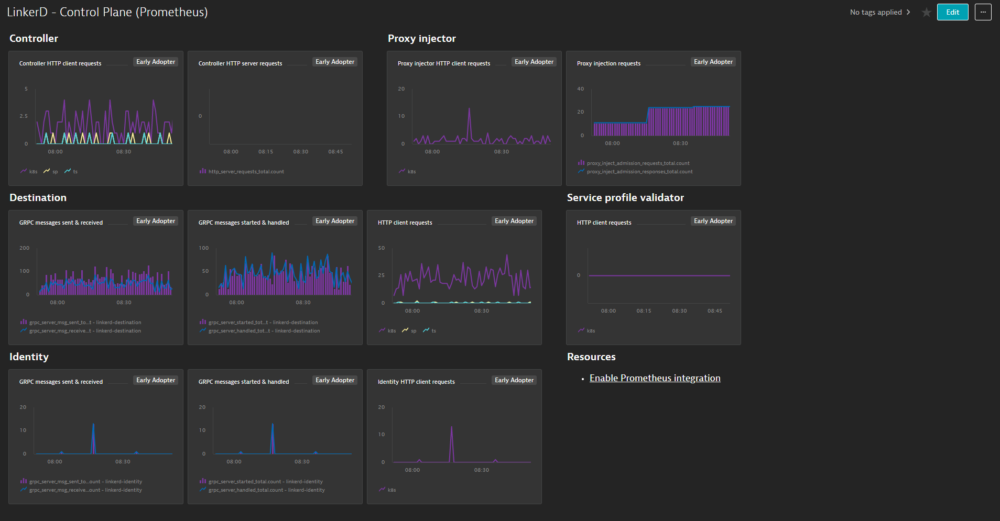
To add this extension to your environment click Add to environment on the page of this extension in the Dynatrace Hub. After activating the extension, select Dashboards in Dynatrace. You should now find out of the box dashboards for Linkerd - Control Plane and Linkerd - Data Plane.

5. Activate metric events for alerting

Additionally, the extension comes with a pre-configured metric event for alerting. To activate it:

  1. From the Dynatrace navigation menu, select Settings > Anomaly detection > Custom events for alerting.

  2. Find the following event

    • Linkerd - Large number of failure responses: notifies you if more than 10 failure responses are detected in 3 minutes in any 5 minute period.
  3. If necessary, select the Edit button to customize the event conditions.

  4. Move the switch next an event to the On position to activate it.

Compatibility information

Requires metrics already ingested into Dynatrace via Prometheus integration. See Kubernetes Prometheus exporter integration documentation for details.

Dynatrace
DocumentationMore Information
By Dynatrace
Dynatrace support center
Subscribe to new releases
Copy to clipboard

Extension content

Content typeNumber of items included
alerts
1
dashboards
2

Full version history

To have more information on how to install the downloaded package, please follow the instructions on this page.
ReleaseDate

Full version history

No release notes

Dynatrace Hub
Hub HomeGet data into DynatraceBuild your own app
Log Management and AnalyticsKubernetesAI and LLM ObservabilityInfrastructure ObservabilitySoftware DeliveryApplication ObservabilityApplication SecurityDigital ExperienceBusiness Observability
Filter
Type
Built and maintained by
Deployment model
SaaS
  • SaaS
  • Managed
Partner FinderBecome a partnerDynatrace Developer

All

769 Results filtered by:

Chroma logo

Chroma

Gain insights into the health of your vector and embedding databases from Chroma

Technology

Amazon Kinesis Video Streams logo

Amazon Kinesis Video Streams

Provides you SDKs to install on your devices to make it easy to stream media.

Technology

Fluentd logo

Fluentd

Stream log data to Dynatrace via Fluentd for analysis.

Technology

Palo Alto firewalls logo

Palo Alto firewalls

Palo Alto extension for problems detection

Extension

AWS Elastic Beanstalk logo

AWS Elastic Beanstalk

Quickly deploy and manage applications in the AWS Cloud without having to learn about the infrastructure beneath.

Technology

Workflows logo

Workflows

Automate tasks in your IT landscape, remediate problems, and visualize processes

App
Security Posture Management logo

Security Posture Management

Detect, prioritize, and remediate security and compliance findings with SPM.

App

Amazon Route 53 logo

Amazon Route 53

Effectively connects user requests to infrastructure running in AWS.

Technology

Amazon Inspector logo

Amazon Inspector

Tests the network accessibility of your EC2 instances and the security state of your applications that run on those instances.

Technology

NGINX Plus logo

NGINX Plus

All‑in‑one web server, load balancer, content cache, and media streaming.

Technology

Databases logo

Databases

Easily monitor, troubleshoot, and optimize your entire database fleets.

App

Amazon DocumentDB logo

Amazon DocumentDB

Amazon DocumentDB (with MongoDB compatibility) is a fast, reliable, and fully managed database service.

Technology

Dynatrace MCP Server logo

Dynatrace MCP Server

Fuel your AI agents with high quality data and real-time production insights

Technology
IBM IMS SOAP Gateway logo

IBM IMS SOAP Gateway

Intelligently monitor your transactions end-to-end and analyze the performance of your IMS SOAP Gateway.

Technology

Amazon Keyspaces for Apache Cassandra logo

Amazon Keyspaces for Apache Cassandra

Scalable, highly available, and managed Apache Cassandra–compatible database service.

Technology

Apache Camel logo

Apache Camel

Intelligently monitor, analyze, and optimize your integration framework and all applications deployed in your stack.

Technology

Amazon Elastic Kubernetes Service (EKS) logo

Amazon Elastic Kubernetes Service (EKS)

Harness automation and AI to simplify Kubernetes observability at scale.

Technology

WordPress logo

WordPress

Content management system written in PHP and paired with a MySQL or MariaDB database.

Technology

Azure Cosmos DB logo

Azure Cosmos DB

Fully managed and serverless distributed database supporting open-source PostgreSQL, MongoDB, and Apache Cassandra.

Technology

AWS Glue logo

AWS Glue

Fully managed extract, transform, and load (ETL) service.

Technology

Azure Event Hub Clusters logo

Azure Event Hub Clusters

Big data streaming platform and event ingestion service. It can receive and process millions of events per second.

Technology

Confluent Cloud (Kafka) logo

Confluent Cloud (Kafka)

Remotely monitor your Confluent Cloud Kafka Clusters and other resources!

Extension
Kong - Prometheus logo

Kong - Prometheus

Monitor Prometheus metrics exposed by Kong and proxied upstream services

Extension

BOSH bpm logo

BOSH bpm

Automated monitoring of platform processes running in BOSH bpm containers.

Technology

Prometheus in Kubernetes logo

Prometheus in Kubernetes

Collect metrics from Prometheus exporters in Kubernetes for Dynatrace analytics

Technology

Nutanix Clusters logo

Nutanix Clusters

Monitor Nutanix clusters' performance, usage and availability, with Nutanix API.

Extension
Azure Service-Fabric logo

Azure Service-Fabric

Intelligent end-to-end observability for serverless and hybrid environments using Azure Service Fabric.

Technology

Luna Network HSM Device logo

Luna Network HSM Device

Monitor your Luna Network Hardware Security Module (HSM) Devices through SNMP.

Extension

Consul Service Mesh (StatsD) logo

Consul Service Mesh (StatsD)

Extend visibility into your Consul Service Mesh instances to monitor health and improve performance.

Extension

Azure Relays logo

Azure Relays

Enables you to securely expose services that run in your corporate network to the public cloud.

Technology

Microsoft IIS logo

Microsoft IIS

Flexible and secure web server for hosting with Windows Server.

Extension

Kubernetes Monitoring Statistics logo

Kubernetes Monitoring Statistics

Troubleshoot your Dynatrace Kubernetes monitoring and Prometheus integration.

Extension
Google Cloud logo

Google Cloud

Meet your business challenges head on with cloud computing services from Google.

Technology
Snyk logo

Snyk

Ingest Snyk vulnerability findings, scans, and audit logs.

Extension

Amazon EventBridge logo

Amazon EventBridge

Serverless event bus to connect applications together using data from your own applications, integrated SaaS applications, and AWS services.

Technology

Ruby logo

Ruby

Dynatrace monitors your Ruby applications and services on the process level.

Technology

Apache OpenEJB logo

Apache OpenEJB

Automatically and intelligently monitor, analyze and optimize your applications based on Apache OpenEJB.

Technology
Log ingestion API logo

Log ingestion API

Stream your logs and log records to Dynatrace via the log ingest API

Technology
Citrix DaaS & Virtual Apps and Desktops logo

Citrix DaaS & Virtual Apps and Desktops

Gain insight into your Citrix DaaS & Virtual Apps and Desktops environments

Extension

Azure Device Provisioning Service logo

Azure Device Provisioning Service

Helper service for IoT Hub that enables just-in-time provisioning to the right IoT hub without human intervention.

Technology

Milvus logo

Milvus

Gain insights about vector database resource utilization and cache behavior

Technology
Google Memorystore logo

Google Memorystore

Get insights into Google Memorystore service metrics collected from the Google Operations API to ensure health of your cloud infrastructure.

Extension

Azul Platform Core (Zulu) logo

Azul Platform Core (Zulu)

Automatically and intelligently monitor, analyze, and optimize the performance of your virtual machine.

Technology

VirusTotal logo

VirusTotal

Enrich observables with threat intelligence from VirusTotal.

App

AWS Outposts logo

AWS Outposts

Fully managed service extending AWS infrastructure, services, APIs and more.

Technology

Databricks Workspace logo

Databricks Workspace

Remotely monitor your Databricks Workspaces!

Extension

LlamaIndex logo

LlamaIndex

Monitor your LLM-powered agents and workflows built with LlamaIndex framework.

Technology
UPS Device logo

UPS Device

Monitor your Uninterruptible Power Supplies (UPS) over SNMP

Extension

TensorFlow Keras logo

TensorFlow Keras

Observe the training progress of TensorFlow Keras AI models

Technology

Amazon Elastic Container Service (ECS) logo

Amazon Elastic Container Service (ECS)

Fully managed container orchestration service.

Technology