




Skip to technology filters Skip to main content
Dynatrace Hub

Extend the platform,
empower your team.

Popular searches:
Home hero bg
Generic Cisco DeviceGeneric Cisco Device
Generic Cisco Device

Generic Cisco Device

Monitor Cisco devices using SNMP to feed Dynatrace with metrics and alerts.

Extension
Free trialDocumentation
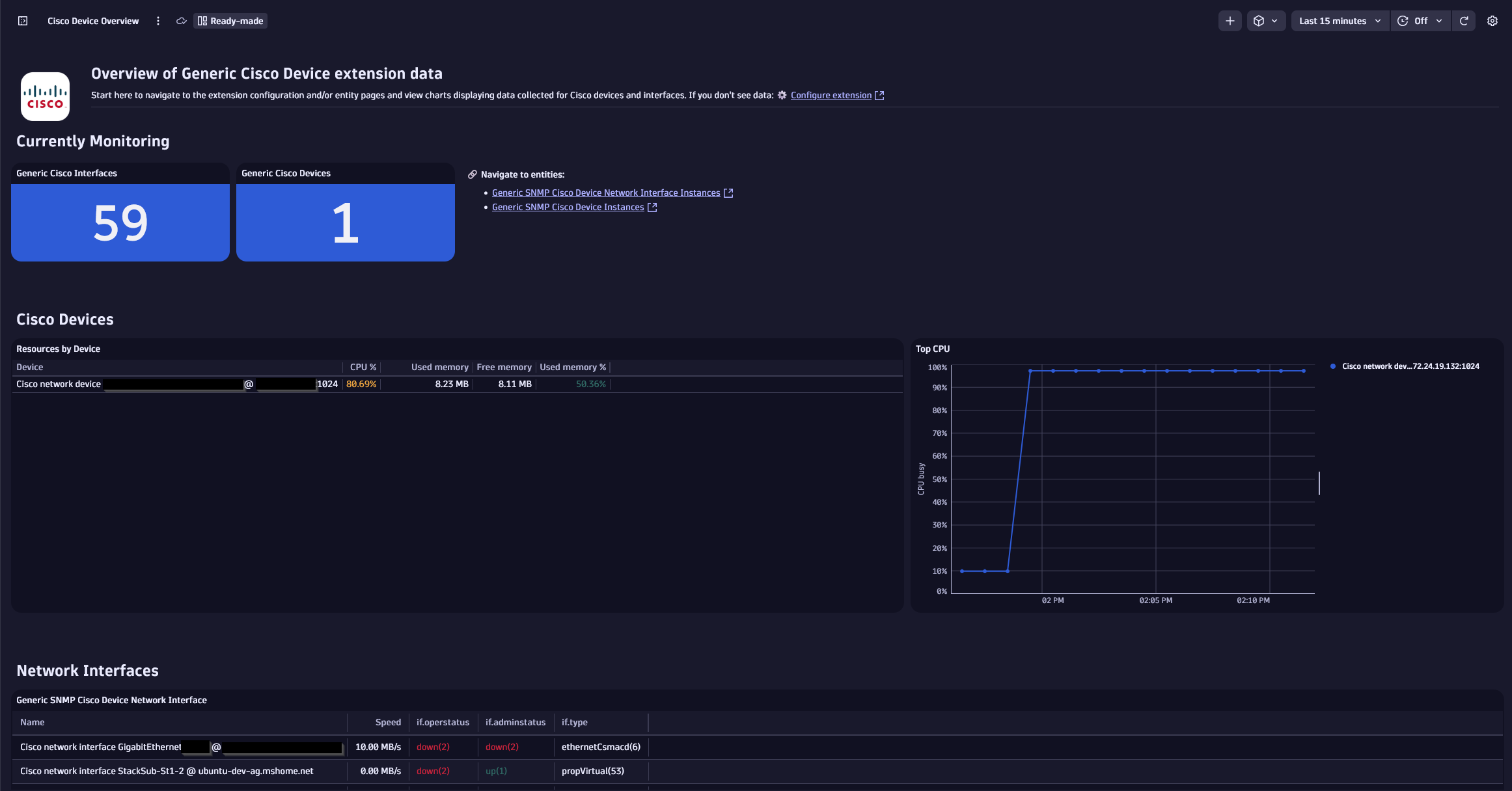
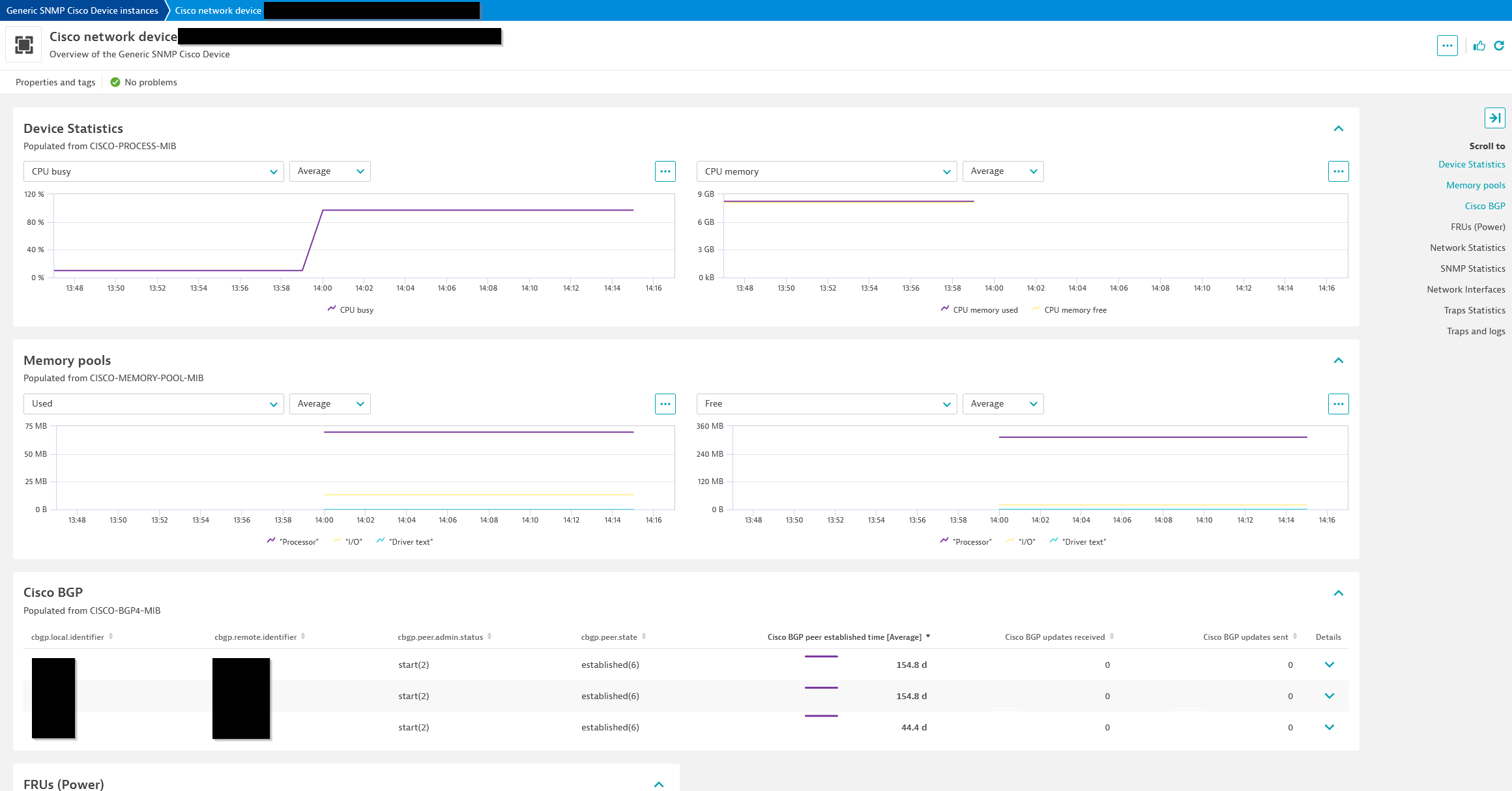
Overview dashboard.Cisco device entity screen.
  • Product information
  • Release notes

Overview

Cisco devices are a critical component in your network infrastructure. The Generic Cisco Device monitoring extension allows for remote monitoring of your Cisco network devices via the Simple Network Management Protocol (SNMP).

Use cases

  • Monitor resource usage of network components
  • Detect and alert on issues with critical protocols such as BGP
  • Identify problems with network interfaces

Compatibility information

This extension is designed to generically provide visibility into a wide variety of Cisco network devices. Only products still supported by Cisco will be officially supported but it can be used to monitor any devices that meet the requirements for SNMP connectivity and support the MIBs and OIDs used.

Dynatrace
DocumentationMore Information
By Dynatrace
Dynatrace support center
Subscribe to new releases
Copy to clipboard

Extension content

Content typeNumber of items included
alerts
2
screen logs cards
2
metric query
11
screen message cards
3
screen layout
4
document dashboard
1
screen entities lists
2
screen injections
4
screen dql table
7
generic relationship
4
screen metric tables
6
dashboards
1
generic type
4
screen properties
3
metric metadata
78
screen chart groups
24

Feature sets

Below is a complete list of the feature sets provided in this version. To ensure a good fit for your needs, individual feature sets can be activated and deactivated by your administrator during configuration.

Feature setsNumber of metrics included
Metric nameMetric keyDescriptionUnit
Device entity attributescom.dynatrace.extension.snmp-generic-cisco-device.entity_attributesConstant value of 1 used for reporting entity attributes at a lower frequencyUnspecified
Physical component statecom.dynatrace.extension.snmp-generic-cisco-device.component.stateA state metric representing the details of physical components. This is used to collect details about the Cisco device stack. Value is always 1; use the dimensions to view details.NotApplicable
-com.dynatrace.extension.network_device.sysuptime--
-com.dynatrace.extension.network_device.cpu_usage--
-com.dynatrace.extension.network_device.memory_used--
-com.dynatrace.extension.network_device.memory_free--
-com.dynatrace.extension.network_device.if.bytes_in.count--
-com.dynatrace.extension.network_device.if.bytes_out.count--
-com.dynatrace.extension.network_device.if.in.errors.count--
-com.dynatrace.extension.network_device.if.in.discards.count--
-com.dynatrace.extension.network_device.if.out.errors.count--
-com.dynatrace.extension.network_device.if.out.discards.count--
-com.dynatrace.extension.network_device.if.status--
Metric nameMetric keyDescriptionUnit
Cisco BGP peer established timecom.dynatrace.extension.snmp-generic-cisco-device.cbgp.established_timeThis timer indicates how long (in seconds) this peer has been in the established state or how long since this peer was last in the established state.Second
Cisco BGP updates receivedcom.dynatrace.extension.snmp-generic-cisco-device.cbgp.updates_received_countThe number of BGP UPDATE messages received on the connection with the peer.Count
Cisco BGP updates sentcom.dynatrace.extension.snmp-generic-cisco-device.cbgp.updates_sent_countThe number of BGP UPDATE messages sent on the connection with the peer.Count
Cisco BGP peer statecom.dynatrace.extension.snmp-generic-cisco-device.cbgp.peer.stateThe BGP peer connection state.State
Cisco BGP peer admin statuscom.dynatrace.extension.snmp-generic-cisco-device.cbgp.peer.admin.statusThe desired state of the BGP connection. stop(1), start(2). CISCO-BGP4-MIB.State
Metric nameMetric keyDescriptionUnit
Time since the last re-startcom.dynatrace.extension.snmp-generic-cisco-device.sys.uptimeThe time (in hundredths of a second) since the network management portion of the system was last re-initializedUnspecified
CPU busycom.dynatrace.extension.snmp-generic-cisco-device.cpm.cpu.total.1min.revOverall CPU busy percentage in the last 1 min.Percent
CPU loadcom.dynatrace.extension.snmp-generic-cisco-device.cpm.cpu.loadavg.1minOverall CPU load average in the last 1 min.Count
CPU memory usedcom.dynatrace.extension.snmp-generic-cisco-device.cpm.cpu.memory.hc.usedOverall CPU wide sys mem currently under useKiloByte
CPU memory freecom.dynatrace.extension.snmp-generic-cisco-device.cpm.cpu.memory.hc.freeOverall CPU wide sys mem freeKiloByte
CPU memory usedcom.dynatrace.extension.snmp-generic-cisco-device.cpm.cpu.memory.usedOverall CPU wide sys mem currently under use (legacy 32-bit value)KiloByte
CPU memory freecom.dynatrace.extension.snmp-generic-cisco-device.cpm.cpu.memory.freeOverall CPU wide sys mem free (legacy 32-bit value)KiloByte
Metric nameMetric keyDescriptionUnit
Fan statecom.dynatrace.extension.snmp-generic-cisco-device.envmon.fan.stateCurrent state of the fan instrumentedUnspecified
Fan temperaturecom.dynatrace.extension.snmp-generic-cisco-device.envmon.temperature.status.valueCurrent temperature of the fan instrumentedUnspecified
Metric nameMetric keyDescriptionUnit
Power supply statecom.dynatrace.extension.snmp-generic-cisco-device.power_supply.stateA state metric representing the details of power supplies on the device. Value is always 1; use the dimensions to understand the status.NotApplicable
Metric nameMetric keyDescriptionUnit
-com.dynatrace.extension.network_device.if.in.multicast_pkts.count--
-com.dynatrace.extension.network_device.if.out.multicast_pkts.count--
-com.dynatrace.extension.network_device.if.in.broadcast_pkts.count--
-com.dynatrace.extension.network_device.if.out.broadcast_pkts.count--
-com.dynatrace.extension.network_device.if.in.ucast_pkts.count--
-com.dynatrace.extension.network_device.if.out.ucast_pkts.count--
-com.dynatrace.extension.network_device.if.in.crc_errors.count--
-com.dynatrace.extension.network_device.if.lastchange--
Metric nameMetric keyDescriptionUnit
CRC errorscom.dynatrace.extension.snmp-generic-cisco-device.if.in.crc_errors.countNumber of input packets which had cyclic redundancy checksum errorsCount
Last interface status changecom.dynatrace.extension.snmp-generic-cisco-device.if.lastchangeValue of 'sysUpTime' when the interface entered its current stateCount
Interface speedcom.dynatrace.extension.snmp-generic-cisco-device.if.highspeedSpeed of the network interface in MegaBits per second.MegaBitPerSecond
Inbound errorscom.dynatrace.extension.snmp-generic-cisco-device.if.in.errors.countNumber of inbound packets/transmission units with errorsCount
Inbound discardscom.dynatrace.extension.snmp-generic-cisco-device.if.in.discards.countNumber of inbound packets discardedCount
Outbound errorscom.dynatrace.extension.snmp-generic-cisco-device.if.out.errors.countNumber of outbound packets/transmission units with errorsCount
Outbound discardscom.dynatrace.extension.snmp-generic-cisco-device.if.out.discards.countNumber of outbound packets discardedCount
Metric nameMetric keyDescriptionUnit
Sensor valuecom.dynatrace.extension.snmp-generic-cisco-device.sensor.valueThe value of sensors as reported in the Cisco entity sensor MIB. The type/unit of the value (e.g. rpm, hertz, celcius) depends on the type of sensor (sensor.type dimension). The sensor.status dimension reports the operational status of the sensor.Unspecified
Metric nameMetric keyDescriptionUnit
BGP peer connection statecom.dynatrace.extension.snmp-generic-cisco-device.bgp4.peer.stateThe BGP peer connection state. idle(1), connect(2), active(3), opensent(4), openconfirm(5), established(6). BGP4-MIB.State
BGP peer admin statuscom.dynatrace.extension.snmp-generic-cisco-device.bgp4.peer.admin.statusThe desired state of the BGP connection. stop(1), start(2). BGP4-MIB.State
BGP peer established timecom.dynatrace.extension.snmp-generic-cisco-device.bgp4.established_timeThis timer indicates how long (in seconds) this peer has been in the established state or how long since this peer was last in the established state.Second
Metric nameMetric keyDescriptionUnit
OSPF neighbor statecom.dynatrace.extension.snmp-generic-cisco-device.ospf.nbr.stateThe state of the relationship with this neighbor. down (1), attempt (2), init (3), twoWay (4), exchangeStart (5), exchange (6), loading (7), full (8). OSPF-MIB.Count
Metric nameMetric keyDescriptionUnit
Octets receivedcom.dynatrace.extension.snmp-generic-cisco-device.if.in.octets.countThe total number of octets received on the interface including framing charactersCount
Octets transmittedcom.dynatrace.extension.snmp-generic-cisco-device.if.out.octets.countThe total number of octets transmitted out of the interface including framing charactersCount
Metric nameMetric keyDescriptionUnit
FRU power operational statuscom.dynatrace.extension.snmp-generic-cisco-device.fru.power_oper_statusThe FRU power operational statusState
FRU fan tray operational statuscom.dynatrace.extension.snmp-generic-cisco-device.fru.fan_tray_oper_statusThe operational state of the fan or fan trayState
Metric nameMetric keyDescriptionUnit
Messages deliveredcom.dynatrace.extension.snmp-generic-cisco-device.snmp.in.pkts.countTotal number of messages delivered from the transport serviceCount
Silently dropped PDUscom.dynatrace.extension.snmp-generic-cisco-device.snmp.silentdrops.countNumber of silently dropped PDUs due to the large reply sizeCount
Unsupported SNMP version messagescom.dynatrace.extension.snmp-generic-cisco-device.snmp.in.bad.versions.countTotal number of messages delivered with an unsupported SNMP versionCount
Messages with bad community namescom.dynatrace.extension.snmp-generic-cisco-device.snmp.in.bad.community.names.countNumber of messages with an unknown SNMP communityCount
Messages not allowed in communitycom.dynatrace.extension.snmp-generic-cisco-device.snmp.in.bad.community.uses.countNumber of messages not allowed for the used SNMP communityCount
'noSuchName' errorscom.dynatrace.extension.snmp-generic-cisco-device.snmp.in.nosuchnames.countNumber of PDUs delivered with 'noSuchName' errorCount
'badValue' errorscom.dynatrace.extension.snmp-generic-cisco-device.snmp.in.bad.values.countNumber of PDUs delivered with 'badValue' errorCount
Metric nameMetric keyDescriptionUnit
TCP active openscom.dynatrace.extension.snmp-generic-cisco-device.tcp.activeopens.countNumber of transitions of TCP connections from CLOSED to SYN-SENTCount
TCP passive openscom.dynatrace.extension.snmp-generic-cisco-device.tcp.passiveopens.countNumber of transitions of TCP connections from CLOSED to SYN-RCVDCount
TCP failed attemptscom.dynatrace.extension.snmp-generic-cisco-device.tcp.attemptfails.countNumber of transitions of TCP connections from SYN-SENT/SYN-RCVD to CLOSED and from SYN-RCVD to LISTENCount
TCP resetscom.dynatrace.extension.snmp-generic-cisco-device.tcp.estab.resets.countNumber of transitions of TCP connections from ESTABLISHED/CLOSE-WAIT to CLOSEDCount
TCP connectionscom.dynatrace.extension.snmp-generic-cisco-device.tcp.curr.estabNumber of TCP connections in the ESTABLISHED/CLOSE-WAIT stateCount
TCP segments receivedcom.dynatrace.extension.snmp-generic-cisco-device.tcp.hc.in.segs.countTotal number of segments received (including errors)Count
TCP segments sentcom.dynatrace.extension.snmp-generic-cisco-device.tcp.hc.out.segs.countTotal number of segments sent (excluding retransmissions)Count
TCP segments retransmittedcom.dynatrace.extension.snmp-generic-cisco-device.tcp.retrans.segs.countTotal number of segments retransmittedCount
TCP segment errorscom.dynatrace.extension.snmp-generic-cisco-device.tcp.in.errs.countTotal number of segments received in errorCount
TCP segment resetscom.dynatrace.extension.snmp-generic-cisco-device.tcp.out.rsts.countNumber of TCP segments sent containing the RST flagCount
UDP datagrams deliveredcom.dynatrace.extension.snmp-generic-cisco-device.udp.hc.in.datagrams.countTotal number of UDP datagrams deliveredCount
UDP datagrams received without portcom.dynatrace.extension.snmp-generic-cisco-device.udp.noports.countNumber of received UDP datagrams (no application at the destination port)Count
UDP datagram errorscom.dynatrace.extension.snmp-generic-cisco-device.udp.in.errors.countNumber of received and not delivered UDP datagrams (other than no application at the destination port)Count
UDP datagrams sentcom.dynatrace.extension.snmp-generic-cisco-device.udp.hc.out.datagrams.countTotal number of UDP datagrams sentCount
Metric nameMetric keyDescriptionUnit
-com.dynatrace.extension.network_device.lldp_neighbor--
Metric nameMetric keyDescriptionUnit
Octets received (high capacity)com.dynatrace.extension.snmp-generic-cisco-device.if.hc.in.octets.countThe total number of octets received on the interface including framing characters. This metric uses 64 bit counter and should be used for highspeed devices.Count
Octets transmitted (high capacity)com.dynatrace.extension.snmp-generic-cisco-device.if.hc.out.octets.countThe total number of octets transmitted out of the interface including framing characters. This metric uses 64 bit counter and should be used for highspeed devices.Count
Metric nameMetric keyDescriptionUnit
EIGRP peer smooth round trip timecom.dynatrace.extension.snmp-generic-cisco-device.eigrp.peer.srttThe computed smooth round trip time for packets to and from the peer (milliseconds). CISCO-EIGRP-MIB.MilliSecond
Metric nameMetric keyDescriptionUnit
Memory pool used (32 bit)com.dynatrace.extension.snmp-generic-cisco-device.memory_pool.usedThe number of bytes from the memory pool that are currently in use.Byte
Memory pool free (32 bit)com.dynatrace.extension.snmp-generic-cisco-device.memory_pool.freeThe number of bytes from the memory pool that are currently unused.Byte
Memory pool used (64 bit)com.dynatrace.extension.snmp-generic-cisco-device.enhanced.memory_pool.usedThe number of bytes from the enhanced memory pool that are currently in use.Byte
Memory pool free (64 bit)com.dynatrace.extension.snmp-generic-cisco-device.enhanced.memory_pool.freeThe number of bytes from the enhanced memory pool that are currently unused.Byte
Metric nameMetric keyDescriptionUnit
Active supervisor CPU utilizationcom.dynatrace.extension.snmp-generic-cisco-device.ha.active_supervisor.cpu_utilizationThe average utilization of CPU on the active supervisor.Percent
Active supervisor memory utilizationcom.dynatrace.extension.snmp-generic-cisco-device.ha.active_supervisor.memory_utilizationThe average utilization of memory on the active supervisor.Percent
Synchronization statecom.dynatrace.extension.snmp-generic-cisco-device.ha.synchronization.enabledThe state of the auto synchronization of images between the active and standby supervisor.State
Auto synchronization statuscom.dynatrace.extension.snmp-generic-cisco-device.ha.synchronization.stateThe status of the current auto synchronization process, or if no such process is in progress, then the state of the most recent one.State

Related to Generic Cisco Device

Generic network device logo

Generic network device

Gain insights into the performance of your network devices.

SNMP Traps logo

SNMP Traps

Supplement network monitoring with event-based data reported via SNMP Traps.

Full version history

To have more information on how to install the downloaded package, please follow the instructions on this page.
ReleaseDate

Full version history

✨ New in this version (3.4.0):

  • Added the following new metrics to the Advanced interfaces feature set
    • com.dynatrace.extension.network_device.if.in.multicast_pkts.count
    • com.dynatrace.extension.network_device.if.out.multicast_pkts.count
    • com.dynatrace.extension.network_device.if.in.broadcast_pkts.count
    • com.dynatrace.extension.network_device.if.out.broadcast_pkts.count
    • com.dynatrace.extension.network_device.if.in.ucast_pkts.count
    • com.dynatrace.extension.network_device.if.out.ucast_pkts.count

Full version history

Changed in this version

  • network:interface entities created by the extension are named after the ifName (name) OID instead of ifDescr (description) OID. This resolves an issue with Network Neighbors not correctly related at interface level

⚠️ Note: any settings/configuration based on the names of network:interface entities may need adjusting due to the above change

Full version history

✨ New in this version (3.3.0):

  • Added the following metrics to the new Advanced interfaces feature set:
    • com.dynatrace.extension.network_device.if.lastchange
    • com.dynatrace.extension.network_device.if.in.crc_errors

Full version history

  • Removes the below metrics from the default feature set and moves them to a new Control plane feature set
    • com.dynatrace.extension.snmp-generic-cisco-device.sys.uptime
    • com.dynatrace.extension.snmp-generic-cisco-device.cpm.cpu.total.1min.rev
    • com.dynatrace.extension.snmp-generic-cisco-device.cpm.cpu.loadavg.1min
    • com.dynatrace.extension.snmp-generic-cisco-device.cpm.cpu.memory.hc.used
    • com.dynatrace.extension.snmp-generic-cisco-device.cpm.cpu.memory.hc.free
    • com.dynatrace.extension.snmp-generic-cisco-device.cpm.cpu.memory.used
    • com.dynatrace.extension.snmp-generic-cisco-device.cpm.cpu.memory.free

Full version history

Minimum Dynatrace version: 1.310

Minimum ActiveGate version: 1.307

Changes

  • Adds BGP peer connection established time to "BGP" feature set

Full version history

⚠️ IMPORTANT CHANGE:

Metrics in "default" feature set will always be enabled and cannot be disabled. These metrics are mandatory. Take extra caution configuring devices and interfaces for which you are collecting data. Make use of Interface filters to limit the number of interfaces, otherwise, all interfaces on the device will be collected by default. In case you do not wish to collect interfaces on your device, enter $eq(!) in the "Interface Name" filter field on the Feature Sets screen during configuration.

These metrics introduced into the "default" feature set are per interface and cannot be disabled but can be filtered.

  • com.dynatrace.extension.network_device.if.bytes_in.count
  • com.dynatrace.extension.network_device.if.bytes_out.count
  • com.dynatrace.extension.network_device.if.in.errors.count
  • com.dynatrace.extension.network_device.if.in.discards.count
  • com.dynatrace.extension.network_device.if.out.errors.count
  • com.dynatrace.extension.network_device.if.out.discards.count

✨ New in this version:

  • Adds dt.security_context to network:device, network:interface, snmp:com_dynatrace_extension_snmp_generic_cisco_device, and snmp:com_dynatrace_extension_snmp_generic_cisco_network_interface entities

Full version history

Notice:

  • If upgrading to this version from version 2.x.x, please read the release notes for version 3.1.0 first, before upgrading.

🪲 Fixed in this version:

  • Removed duplicate cards on Unified Analysis screens related to FRU feature set.

Full version history

Major version update - please review release notes fully

Breaking changes

  • In order to support some BGP data that comes from the non-Cisco BGP MIB, the existing BGP feature set was renamed to "Cisco BGP" and the new data is under "BGP". Configurations will be able to be updated without re-creation, but if you were using the BGP feature set you must enable the Cisco BGP feature set in order to keep collecting that data.

New features

  • Several new feature sets for network peer metrics (feature sets named accordingly)
    • BGP (BGP4-MIB)
    • OSPF (OSPF-MIB)
    • EIGRP (CISCO-EIGRP-MIB)
  • New FRUs (Field Replaceable Units) feature set
    • Fan and PSU statuses
    • From CISCO-ENTITY-FRU-CONTROL-MIB
  • CRC (Cyclic Redundancy Checksum) Errors metric is added to the Interfaces feature set
  • Advanced sensors
    • New feature set that can report the 'raw' sensor values and statuses for sensors available in CISCO-ENTITY-SENSOR-MIB
    • Because all sensor types are reported via the same OID, there is no way to properly set metadata
    • Use the available dimensions to properly filter and make use of the values for the needed use cases
  • New gen3 dashboard added

Full version history

Fixed in this version:

  • Minimum schema requirement correctly enforced

New in this version:

  • Network neighbor discovery through LLDP
  • UI is compatible with AppEngine use

Full version history

Fixed in this version:

  • Recently introduced metrics for device and interface now apply the existing feature sets and filters to reduce license consumption.

Full version history

  • New entities and metrics were added to represent Cisco as a network device for the SNMP Autodiscovery Extension
  • Ability to filter interfaces by their alias and type
  • Several new feature-sets for new capabilities:
    • Memory pools
    • BGP
    • High availability status
  • Change to use '1 min' load values instead of '5 min' to align with extension frequency
  • Non-high capacity memory values collected for cases when high-capacity OIDs not available

Full version history

🪲 Fixed in this version:

  • Network interface charts would not display due to incorrect splitting

Full version history

✨ New in this version:

  • Cisco Stack model and serial number reported as device attributes
  • Device software revision (version) reported as attribute
  • Power supply status available via new feature set

Full version history

🚀 Improved in this version:

  • Configuration fields for filtering now support up to 5000 characters

Full version history

  • Fixed: Cisco Network Interface metrics not visible in a Management Zone.

Full version history

  • High capacity interface traffic metrics extracted to "Interfaces 64-bit" feature set.
  • Default interface traffic metrics extracted to "Interfaces 32-bit" feature set.
Check distribution of metrics in the new feature sets to avoid gaps in the data

Full version history

Changes:

  • removed a rule for creating an entity from snmp traps. Now traps source entity is connected to cisco device entity only with SAME_AS relation.

Full version history

v1.9.0

  • Added 4 new metrics:
    • Octets received (high capacity)
    • Octets transmitted (high capacity)
    • Interface outgoing traffic (high capacity)
    • Interface incoming traffic (high capacity)
  • Bandwidth utilization is now calculated using above metrics

Full version history

  • Added: Injection Cards to Cisco Entities, allows others to inject cards into these entities

Full version history

  • Added: inject message with back-link into the screen of corresponding snmptraps source.

Full version history

v1.6.0

  • Added relationships to SNMP Traps Extension & Trap Visualizations on Device Screen
  • Added ability to use filters for Interface Name, Admin and Operational Status

Full version history

Fix the problem with metadata for count metrics that are not selected properly.

Full version history

Fix the problem with validation of screen definition.

Full version history

  • added traffic metrics that shows traffic in bits per seconds
  • added a metric with interface speed
  • added a metrics that calculate bandwidth utilization
  • added definition of UA screen for network interface
  • added alert definition for bandwidth utilization.
  • new metrics has been used on both screens
  • dashboard has been improved

Requires Dynatrace v. 1.238.

Full version history

5min interval changed to 1min.

Full version history

Dashboard improvements - tile with errors contains a links to device screens.

Full version history

No release notes

Full version history

No release notes

Full version history

Version 1.2.3 allows to run the extension on previous ActiveGate release (1.227)

Dynatrace Hub
Hub HomeGet data into DynatraceBuild your own app
Log Management and AnalyticsKubernetesAI and LLM ObservabilityInfrastructure ObservabilitySoftware DeliveryApplication ObservabilityApplication SecurityDigital ExperienceBusiness Observability
Filter
Type
Built and maintained by
Deployment model
SaaS
  • SaaS
  • Managed
Partner FinderBecome a partnerDynatrace Developer

All

769 Results filtered by:

Chroma logo

Chroma

Gain insights into the health of your vector and embedding databases from Chroma

Technology

Amazon Kinesis Video Streams logo

Amazon Kinesis Video Streams

Provides you SDKs to install on your devices to make it easy to stream media.

Technology

Fluentd logo

Fluentd

Stream log data to Dynatrace via Fluentd for analysis.

Technology

Palo Alto firewalls logo

Palo Alto firewalls

Palo Alto extension for problems detection

Extension

AWS Elastic Beanstalk logo

AWS Elastic Beanstalk

Quickly deploy and manage applications in the AWS Cloud without having to learn about the infrastructure beneath.

Technology

Workflows logo

Workflows

Automate tasks in your IT landscape, remediate problems, and visualize processes

App
Security Posture Management logo

Security Posture Management

Detect, prioritize, and remediate security and compliance findings with SPM.

App

Amazon Route 53 logo

Amazon Route 53

Effectively connects user requests to infrastructure running in AWS.

Technology

Amazon Inspector logo

Amazon Inspector

Tests the network accessibility of your EC2 instances and the security state of your applications that run on those instances.

Technology

NGINX Plus logo

NGINX Plus

All‑in‑one web server, load balancer, content cache, and media streaming.

Technology

Databases logo

Databases

Easily monitor, troubleshoot, and optimize your entire database fleets.

App

Amazon DocumentDB logo

Amazon DocumentDB

Amazon DocumentDB (with MongoDB compatibility) is a fast, reliable, and fully managed database service.

Technology

Dynatrace MCP Server logo

Dynatrace MCP Server

Fuel your AI agents with high quality data and real-time production insights

Technology

IBM IMS SOAP Gateway logo

IBM IMS SOAP Gateway

Intelligently monitor your transactions end-to-end and analyze the performance of your IMS SOAP Gateway.

Technology

Amazon Keyspaces for Apache Cassandra logo

Amazon Keyspaces for Apache Cassandra

Scalable, highly available, and managed Apache Cassandra–compatible database service.

Technology

Apache Camel logo

Apache Camel

Intelligently monitor, analyze, and optimize your integration framework and all applications deployed in your stack.

Technology

Amazon Elastic Kubernetes Service (EKS) logo

Amazon Elastic Kubernetes Service (EKS)

Harness automation and AI to simplify Kubernetes observability at scale.

Technology

WordPress logo

WordPress

Content management system written in PHP and paired with a MySQL or MariaDB database.

Technology

Azure Cosmos DB logo

Azure Cosmos DB

Fully managed and serverless distributed database supporting open-source PostgreSQL, MongoDB, and Apache Cassandra.

Technology

AWS Glue logo

AWS Glue

Fully managed extract, transform, and load (ETL) service.

Technology

Azure Event Hub Clusters logo

Azure Event Hub Clusters

Big data streaming platform and event ingestion service. It can receive and process millions of events per second.

Technology

Confluent Cloud (Kafka) logo

Confluent Cloud (Kafka)

Remotely monitor your Confluent Cloud Kafka Clusters and other resources!

Extension
Kong - Prometheus logo

Kong - Prometheus

Monitor Prometheus metrics exposed by Kong and proxied upstream services

Extension

BOSH bpm logo

BOSH bpm

Automated monitoring of platform processes running in BOSH bpm containers.

Technology

Prometheus in Kubernetes logo

Prometheus in Kubernetes

Collect metrics from Prometheus exporters in Kubernetes for Dynatrace analytics

Technology

Nutanix Clusters logo

Nutanix Clusters

Monitor Nutanix clusters' performance, usage and availability, with Nutanix API.

Extension

Azure Service-Fabric logo

Azure Service-Fabric

Intelligent end-to-end observability for serverless and hybrid environments using Azure Service Fabric.

Technology

Luna Network HSM Device logo

Luna Network HSM Device

Monitor your Luna Network Hardware Security Module (HSM) Devices through SNMP.

Extension

Consul Service Mesh (StatsD) logo

Consul Service Mesh (StatsD)

Extend visibility into your Consul Service Mesh instances to monitor health and improve performance.

Extension

Azure Relays logo

Azure Relays

Enables you to securely expose services that run in your corporate network to the public cloud.

Technology

Microsoft IIS logo

Microsoft IIS

Flexible and secure web server for hosting with Windows Server.

Extension

Kubernetes Monitoring Statistics logo

Kubernetes Monitoring Statistics

Troubleshoot your Dynatrace Kubernetes monitoring and Prometheus integration.

Extension
Google Cloud logo

Google Cloud

Meet your business challenges head on with cloud computing services from Google.

Technology
Snyk logo

Snyk

Ingest Snyk vulnerability findings, scans, and audit logs.

Extension

Amazon EventBridge logo

Amazon EventBridge

Serverless event bus to connect applications together using data from your own applications, integrated SaaS applications, and AWS services.

Technology

Ruby logo

Ruby

Dynatrace monitors your Ruby applications and services on the process level.

Technology

Apache OpenEJB logo

Apache OpenEJB

Automatically and intelligently monitor, analyze and optimize your applications based on Apache OpenEJB.

Technology

Log ingestion API logo

Log ingestion API

Stream your logs and log records to Dynatrace via the log ingest API

Technology

Citrix DaaS & Virtual Apps and Desktops logo

Citrix DaaS & Virtual Apps and Desktops

Gain insight into your Citrix DaaS & Virtual Apps and Desktops environments

Extension

Azure Device Provisioning Service logo

Azure Device Provisioning Service

Helper service for IoT Hub that enables just-in-time provisioning to the right IoT hub without human intervention.

Technology

Milvus logo

Milvus

Gain insights about vector database resource utilization and cache behavior

Technology

Google Memorystore logo

Google Memorystore

Get insights into Google Memorystore service metrics collected from the Google Operations API to ensure health of your cloud infrastructure.

Extension

Azul Platform Core (Zulu) logo

Azul Platform Core (Zulu)

Automatically and intelligently monitor, analyze, and optimize the performance of your virtual machine.

Technology

VirusTotal logo

VirusTotal

Enrich observables with threat intelligence from VirusTotal.

App

AWS Outposts logo

AWS Outposts

Fully managed service extending AWS infrastructure, services, APIs and more.

Technology

Databricks Workspace logo

Databricks Workspace

Remotely monitor your Databricks Workspaces!

Extension

LlamaIndex logo

LlamaIndex

Monitor your LLM-powered agents and workflows built with LlamaIndex framework.

Technology
UPS Device logo

UPS Device

Monitor your Uninterruptible Power Supplies (UPS) over SNMP

Extension

TensorFlow Keras logo

TensorFlow Keras

Observe the training progress of TensorFlow Keras AI models

Technology

Amazon Elastic Container Service (ECS) logo

Amazon Elastic Container Service (ECS)

Fully managed container orchestration service.

Technology