

Cloud misconfigurations are a persistent challenge for Site Reliability Engineers (SREs). The sheer volume of high and critical alerts can overwhelm teams, making it difficult to prioritize and remediate effectively.
At Dynatrace, we believe you shouldn’t have to fix every cloud misconfiguration—rather, we believe you should focus on the ones that matter to your production environments. That’s why we’ve integrated Dynatrace with AWS Security Hub and Kiro CLI to streamline triaging and remediation of critical findings, focusing efforts where they count most.
The challenge in managing complex cloud environments
Modern cloud environments are complex with many moving parts and constant change. Whether initially misconfigured or affected by configuration drift, these environments pose a compliance issue and a significant security threat if exploited by malicious actors. Depending on the scale and composition of your environments, you may end up with thousands of misconfigurations that need to be addressed. Or do they?
AWS provides native services, such as AWS Security Hub, that help detect misconfigurations in your cloud environments. Such misconfigurations are often referred to as compliance findings. Many of the findings might not pose an immediate threat to production systems. AWS Security Hub’s latest capabilities, such as Exposure findings, already help a lot in distilling the most critical findings.
Is it possible to get additional validation of findings with deeper context into your production services and applications? That would help you understand which findings affect your crown jewels and prioritize their remediation over other issues.
And is it possible to automate this process, thereby reducing human intervention and the required deep understanding of the complex environments?
This is a modern dilemma for SREs and security teams: how to prioritize remediation without compromising operational integrity or wasting valuable resources on non-critical issues.
Context-aware remediation with Dynatrace and Kiro CLI
The Dynatrace® AI-powered observability platform monitors your applications and has all the runtime insights required to help organizations navigate through thousands of compliance findings and use the runtime context to prioritize them. Dynatrace’s Model Context Protocol (MCP) server exposes this deep runtime context to automation and agentic AI-driven workflows.
The Kiro CLI allows interaction with specialized AI agents and AWS native capabilities using MCP servers. It serves as the SRE assistant, possessing knowledge of all connected products and the ability to remediate issues.
To further streamline and connect the dots, Dynatrace integrates with AWS Security Hub, supporting the latest OCSF (Open Cybersecurity Schema Format). This allows SREs to fine-tune the triaging and enrichment to their particular needs, leveraging Dynatrace Workflows as the automation engine.
In the next section, we present a use case with two scenarios that demonstrate how detection, triage, and remediation of cloud misconfiguration were made more efficient using Dynatrace and the latest AWS advances in automation and AI domains.
Intelligent triage in action
This use case starts with compliance findings, detected by AWS Security Hub. In the first scenario, an SRE retrieves critical findings using the Kiro CLI and verifies them with Dynatrace using the Dynatrace remote MCP server, which is connected to a dedicated Kiro custom agent.
In the second scenario, the initial validation is automated with Dynatrace Workflows and supported by the AWS Security Hub integration. The validated findings are then sent to a Jira ticket, which can be picked up later by the SRE directly from the Kiro CLI.
By combining Dynatrace deep observability with Kiro CLI intelligent automation, teams gain the ability to triage findings based on actual runtime impact. Instead of treating every misconfiguration as equally urgent, this solution helps prioritize those misconfigurations that pose real risks to business-critical applications. This not only reduces alert fatigue but also ensures that remediation efforts are focused, efficient, and aligned with operational priorities.
The result? A streamlined security posture that’s proactive rather than reactive. Teams can move faster, reduce manual overhead, and maintain a higher level of confidence in their cloud infrastructure while keeping production safe and stable.
Scenario 1: Kiro CLI-driven validation with Dynatrace MCP
In this scenario, an SRE interacts with Kiro CLI to perform validation and remediation actions with the help of Dynatrace MCP.
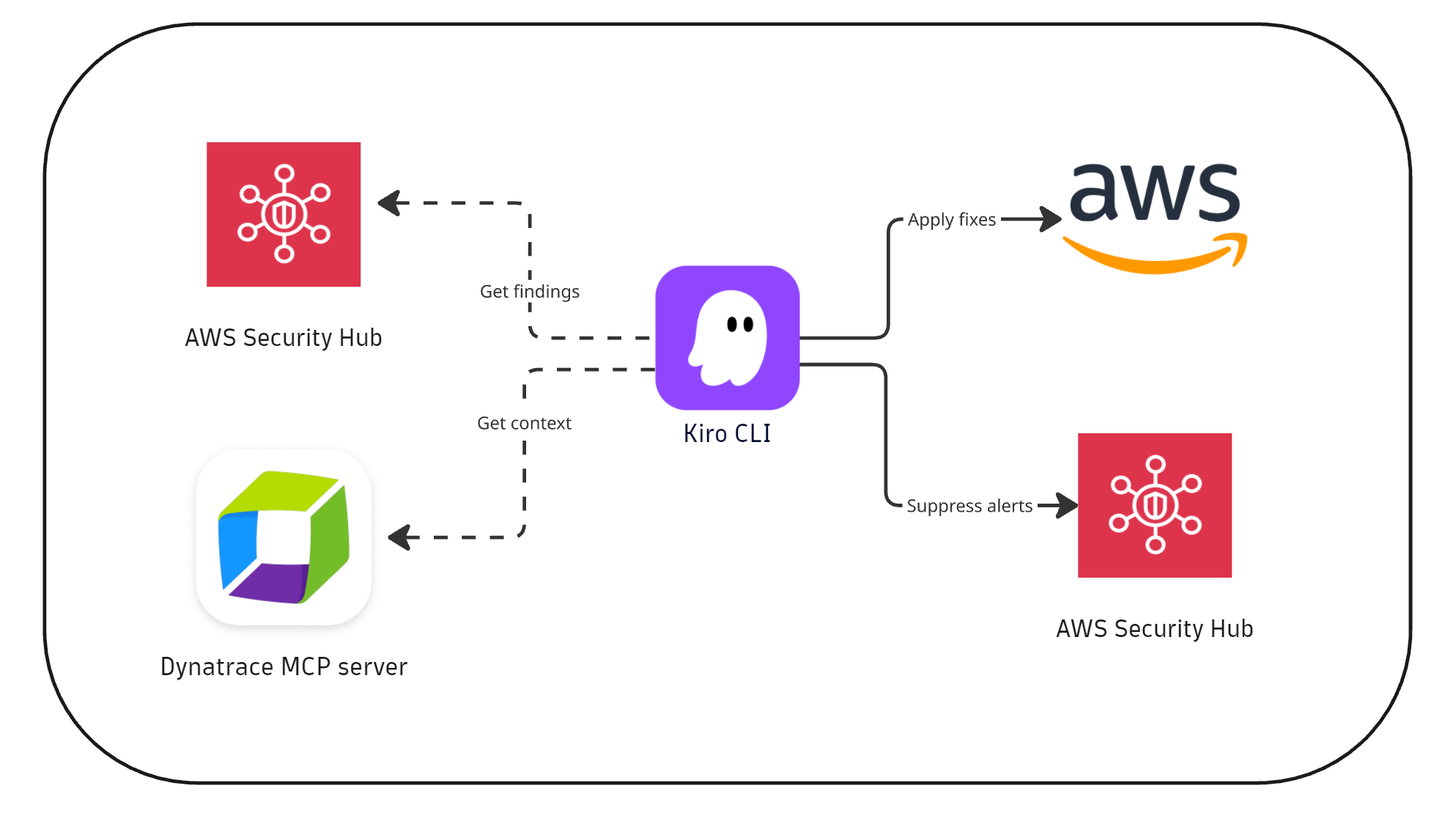
- Detection: AWS Security Hub identifies cloud misconfigurations.
- Verification
- An SRE interacts with the Kiro CLI to extract top findings.
- The Dynatrace agent, invoked by the Kiro CLI, utilizes the Dynatrace MCP server to verify whether these findings impact production applications.
- Remediation
- SRE remediates confirmed findings via Kiro CLI; others are suppressed.
- Findings are resolved and verified in AWS Security Hub.
Scenario 2: Dynatrace-driven automated triaging and Kiro CLI remediation
In this scenario, initial validation and triage are automated in Dynatrace Workflows, and the SRE then acts on the Jira tickets to perform assisted remediation using the Kiro CLI.
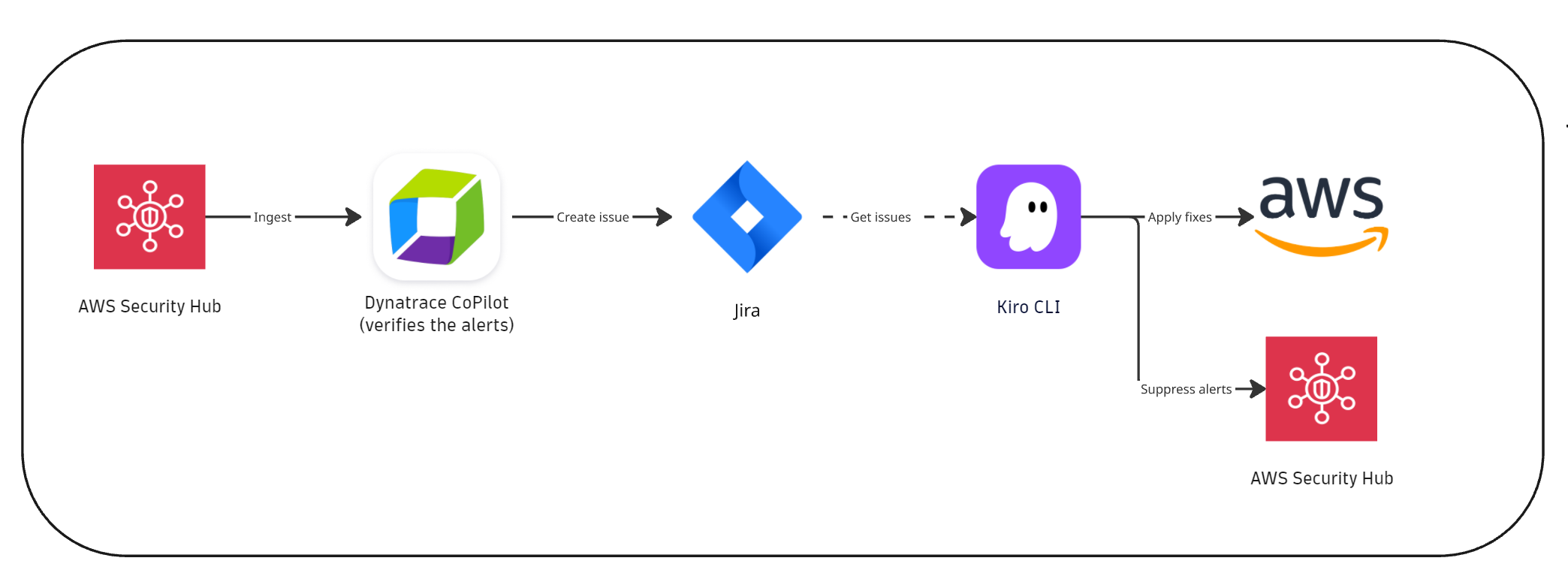
- Detection: AWS Security Hub identifies cloud misconfigurations.
- Verification
- AWS Security Hub integration ingests findings into Dynatrace.
- A Dynatrace workflow analyzes new critical/high-risk findings and performs the automated verification using the Davis CoPilot® workflow action.
- Remediation:
- A Jira ticket is created automatically with the summary of the verification results.
- An SRE uses Kiro CLI to act on the Jira findings. Confirmed findings are remediated, while the unconfirmed findings can be suppressed.
- Findings are resolved in AWS Security Hub and are no longer in the top findings dashboard in Dynatrace.
What’s next
As AI footprint growth and capabilities evolve, the collaboration between AWS and Dynatrace will extend to additional use cases for agentic AI workflows and observability-context-supported issue remediation. One such example is covered in this recent blog post.
In this blog post, we demonstrated how the Dynatrace remote MCP server can be integrated with Kiro CLI for SRE use cases. Stay tuned as the collaboration extends to additional use cases that help development teams remediate vulnerabilities and performance issues directly from their IDEs.
Get started
To get started, learn more about Dynatrace MCP and sign up for the preview to experience how real-time production context makes your organization more efficient.
For details on how to set this up, refer to Dynatrace documentation.

Looking for answers?
Start a new discussion or ask for help in our Q&A forum.
Go to forum