

Modern organizations are often overwhelmed by security alerts, making it nearly impossible for them to determine what to prioritize and how to identify an issue’s root cause. That’s why the Dynatrace® AI-powered observability platform integrates with Microsoft Defender for Cloud to centralize security findings from across an organization’s tools and environments.
This unified view allows automated workflows and clearer visualization of security issues. Dynatrace enriches security findings with application runtime context, helping DevSecOps teams cut through alert noise and focus on fixing the issues that actually affect production.
Prioritize and focus on critical security findings
Microsoft Defender for Cloud is a cloud native application protection platform (CNAPP) that includes security measures and practices designed to protect cloud-based applications from various cyber threats and vulnerabilities.
It offers multiple security capabilities, including container image scanning, workload protection, and posture management. While Microsoft Defender for Cloud integrates with other cloud platforms, its focus and expertise remain within the Microsoft ecosystem.
Analyzing security findings in a multicloud environment poses a core challenge: how to gain a centralized view and prioritize findings from numerous tools and across different cloud platforms. This complexity is amplified in environments with mixed findings from development, testing, and production, increasing the risk of critical issues being overlooked.
To overcome this, organizations need more than just a centralized platform for security findings; runtime context is essential to identifying and focusing on critical issues affecting sensitive services and applications.
Add runtime context to Microsoft Defender for Cloud findings
The future of multicloud security lies in context-driven protection that automatically correlates findings across cloud platforms while applying runtime intelligence to prioritize threats based on actual business impact. The question isn’t whether to consolidate security operations; it’s how quickly organizations can transform fragmented alerts into actionable intelligence before threats move seamlessly across their hybrid infrastructure.
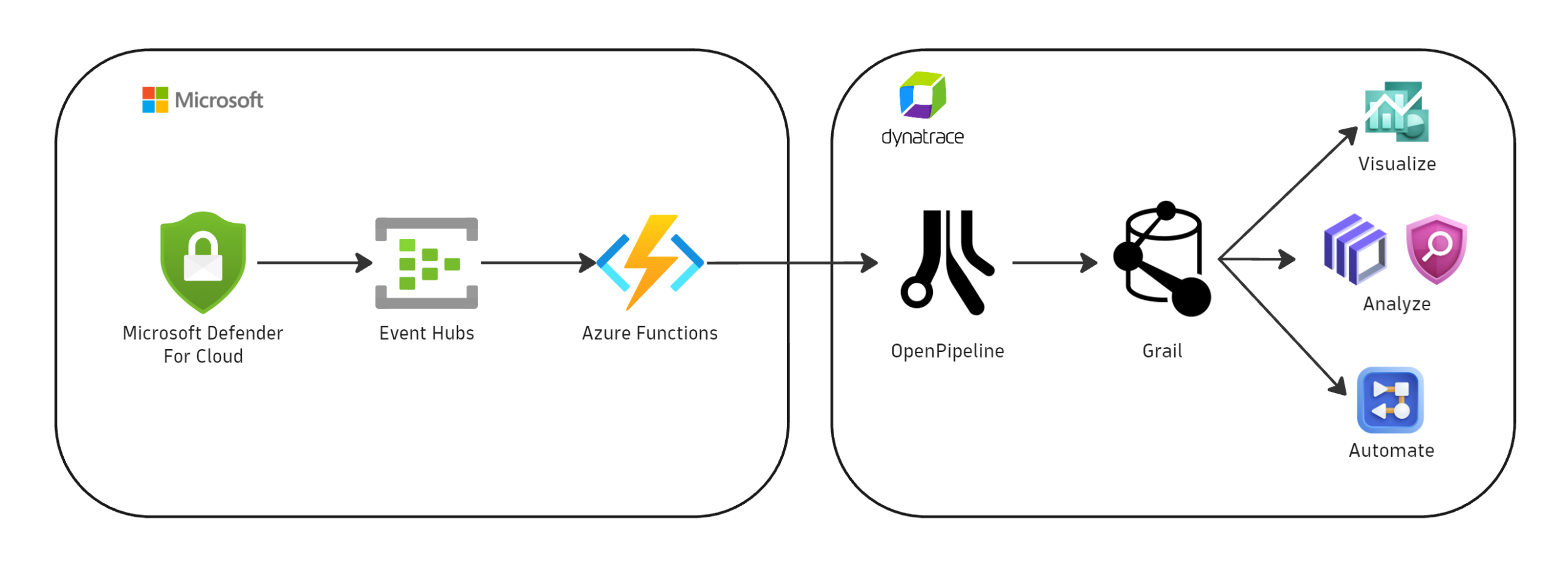
The Dynatrace AI-powered observability platform integrates with Microsoft Defender for Cloud, ingesting critical security findings—including vulnerability detections and security alerts—into the Dynatrace Grail® data lakehouse. This integration leverages OpenPipeline® to process and map these diverse security findings into a unified data format, thereby enabling consistent analysis across all tools and cloud environments.
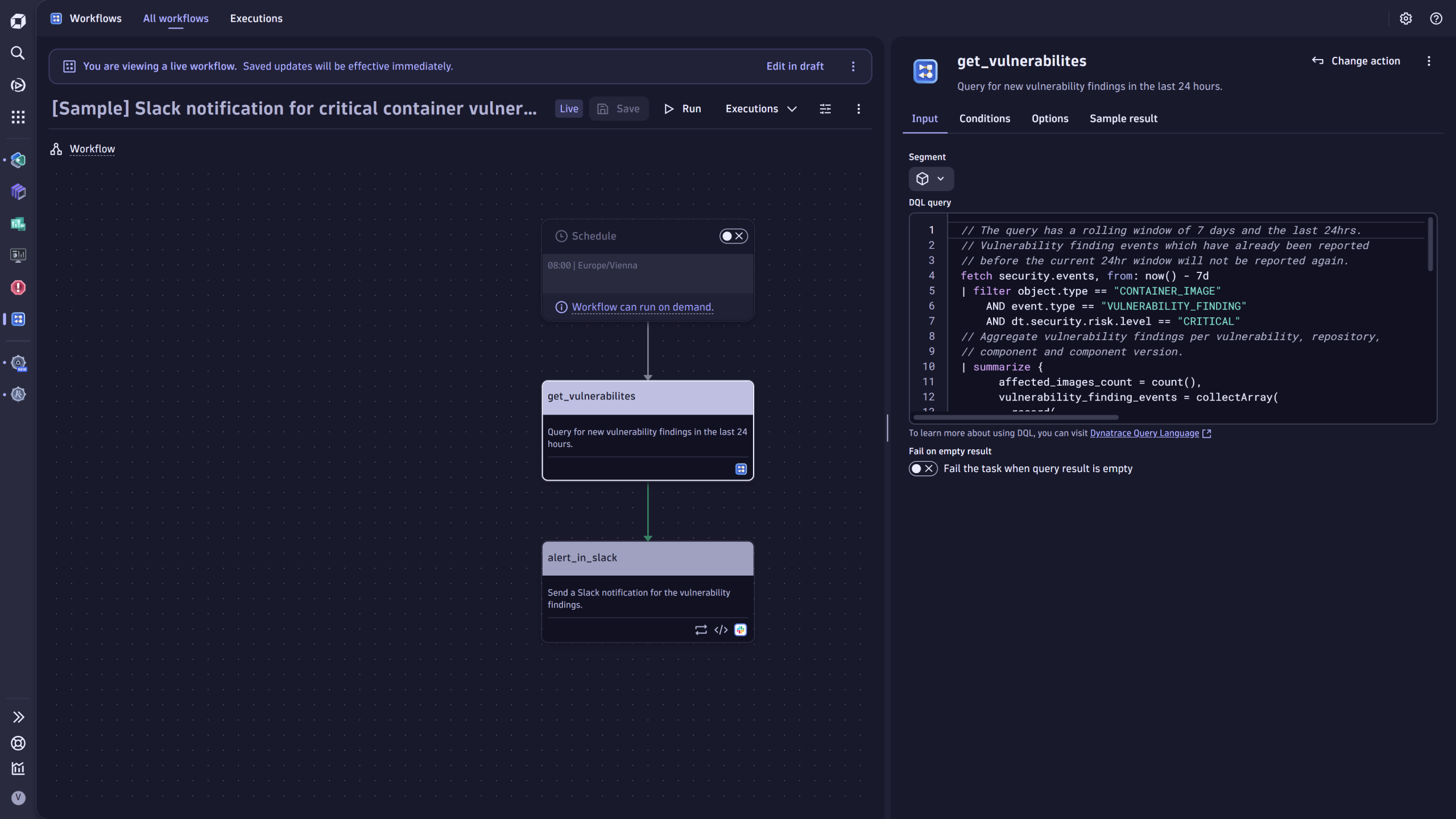
Once in Dynatrace, platform-native applications like Dashboards, Notebooks, and Security Investigator provide powerful visualization and analysis capabilities. Furthermore, the Workflows app automates the triaging of findings, streamlines ticket creation for DevSecOps teams, and ensures timely stakeholder notifications.
Crucially, Dynatrace enhances these capabilities by allowing teams to enrich security findings with runtime context. This additional layer of context is instrumental in refining filters for incoming findings, which dramatically reduces the noise for security teams. Ultimately, this empowers them to concentrate their efforts on the issues that pose a genuine threat to their critical services and applications.
How the integration works
The Microsoft Defender for Cloud integration leverages Azure Event Hubs and Azure Functions as transit points for forwarding the various security findings to Dynatrace. The ingested events are processed in OpenPipeline, mapped to Dynatrace semantic conventions, and stored in Grail in a unified security event data model.
Integrating Dynatrace with Microsoft Defender for Cloud is easy, with step-by-step directions. You even get in-depth monitoring capabilities to ensure the integration runs properly.
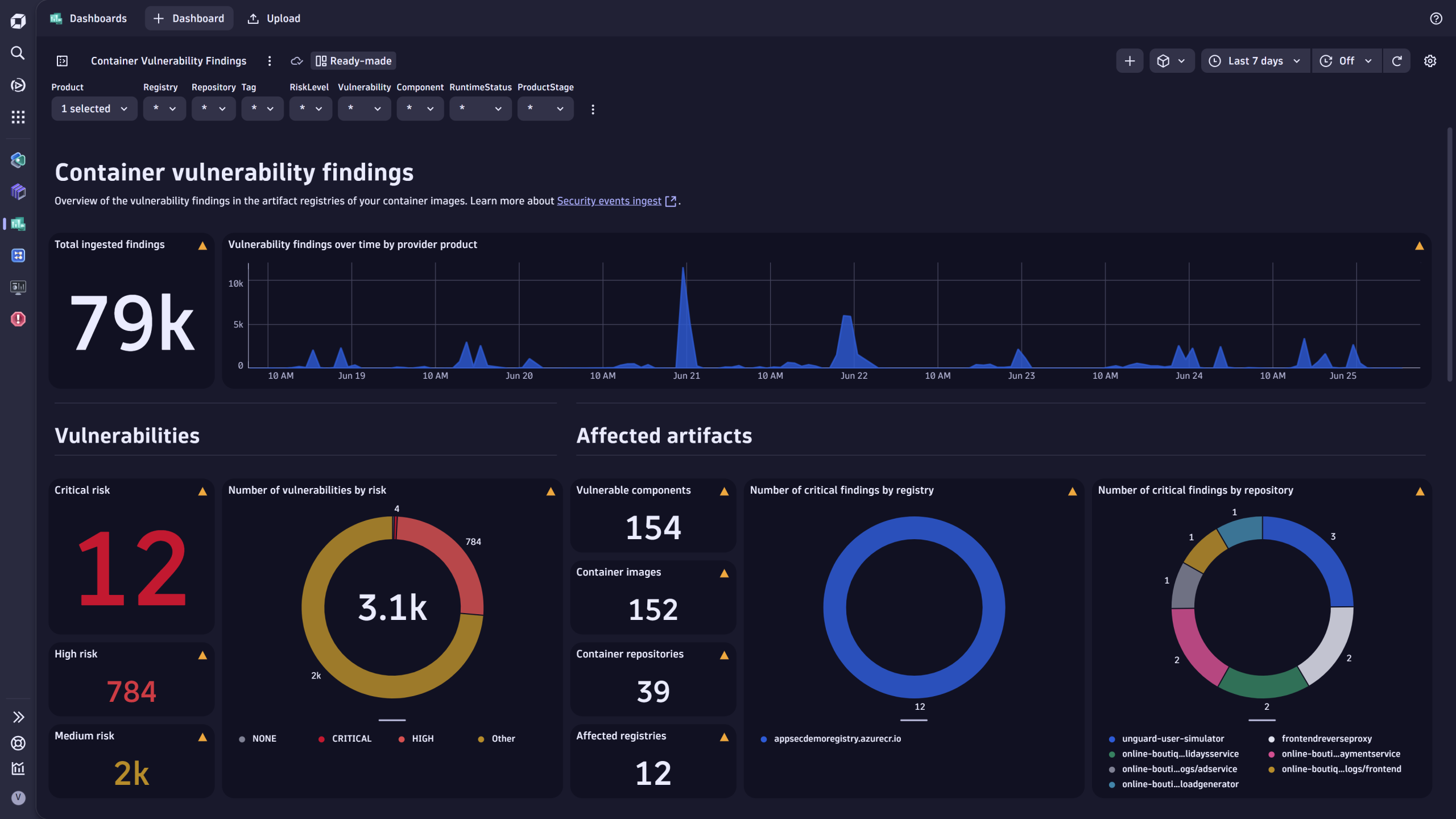
Once the integration is set up and running, teams can easily access security findings using various Dynatrace platform-native apps, such as Dashboards, Notebooks, Security Investigator, Workflows, and more.
Additionally, Dynatrace provides several ready-made artifacts to serve as your analysis and automation starting point:
- Access sample dashboards to visualize security findings and assess the coverage.
- Use sample workflows to automate the orchestration of critical findings by creating notifications and tickets.
Take Microsoft Defender for Cloud findings to the next level with Dynatrace
The Microsoft Defender for Cloud integration represents a significant step forward in unifying security and observability data on the Dynatrace platform. As this integration continues to evolve, expanding support for vulnerability detection and compliance findings, you’ll gain unprecedented visibility into your security posture alongside metrics for application performance.
By ingesting and enriching Microsoft Defender data within Dynatrace, alongside many other security data ingests, teams can break down traditional silos between security and operations, enabling faster incident response and more informed decision-making. The centralized view of both security events and performance data creates opportunities for correlation that were previously difficult to achieve using disparate toolsets.
For detailed setup instructions, read how to Ingest Microsoft Defender for Cloud security events.


Looking for answers?
Start a new discussion or ask for help in our Q&A forum.
Go to forum