

Discover how to transform AI-generated code and Coding Agents from unpredictable contributors into reliable engineering work by combining prompt engineering, structured planning, skills, and a runtime feedback loop powered by observability.
By closing the loop between AI assistants, agents, and production telemetry, organizations can better support a disciplined AI engineering workflow.
AI is now part of how software gets built, no matter how you work. Some developers lean on copilots and inline suggestions inside the IDE. Some are building AI-powered features and applications. Others are orchestrating agents that scaffold services and open pull requests with little human input. The level of autonomy differs, but code generation gets faster than ever, and understanding how that code behaves in a real system is the new bottleneck.
According to research from CodeRabbit, AI-generated pull requests were reported to contain higher rates of certain defects than human-written pull requests.
Bugs are inevitable. The key is to identify them quickly and learn from them. The traditional software lifecycle, plan, code, deploy, test, observe, has historically been a one-way street, with humans transporting insights from the “observe” stage back to “plan.” With the right tools, AI can travel that loop itself. The cycle becomes:
Plan → Code → Deploy → Test → Observe → and feed those observations back into the next plan.
To enable this loop, Agents need access to tools (for deployment, testing and observability). Modern coding agents are performing well in shell environments, which is one of the reasons why custom CLIs are emerging as a standard for Agents to access external systems. For live observability data, the Agent will use dtctl, which is an open-source CLI for accessing the Dynatrace platform, inspired by kubectl while the Agent can run deployments using the AWS CLI.
Observability can be a key enabler for moving from code generation toward scalable software engineering practices.
A typical AI teammate’s first commit
Consider a simple ask: “Write a function to fetch orders for a batch of users.” Whether the code comes from an inline copilot or autonomous coding agent, the result often looks like this:
async def get_user_orders(user_ids: list[str]) -> list[dict]:
    """Fetch orders for a batch of users."""
    async with httpx.AsyncClient() as client:
        tasks = [
            client.get(f"https://api.internal/orders?user_id={uid}")
            for uid in user_ids
        ]
        responses = await asyncio.gather(*tasks)

    orders = []
    for response in responses:
        if response.status_code == 200:
            orders.extend(response.json())

    return orders
On the surface, this is good work. There are no syntax or logic errors, and the method’s purpose is documented. But the gaps are obvious to anyone who has run a service in production:
- No error handling
- No rate limiting
- No observability
This is the default behavior of AI that hasn’t been told what “production quality” means at your organization. It made dozens of architectural decisions, HTTP client choice, error handling strategy, connection management, retry logic, timeouts – silently, and shipped them without telling you what or why.
The four layers of a reliable AI-generated code
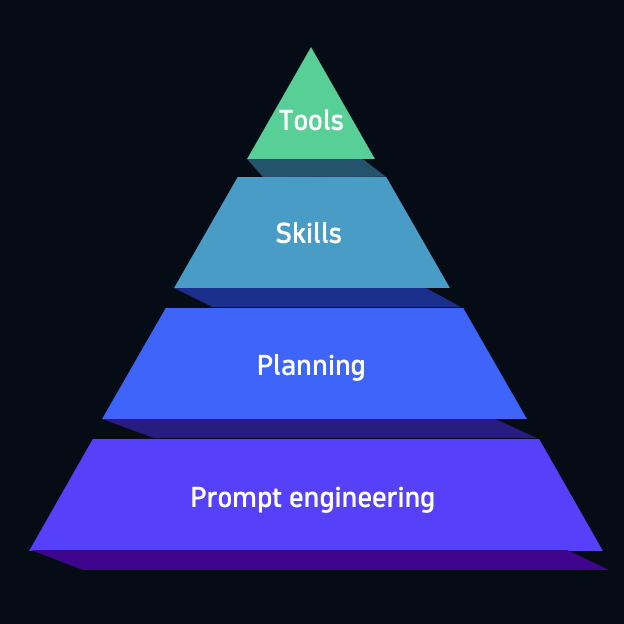
Prompting alone rarely gets you to production-quality code. A more reliable pattern is to make AI pause and explain its approach before it writes anything: what it is building, which systems it will touch, where it might fail, and how the result should be observed once it runs. That step doesn’t need to be elaborate, but it should force the reasoning before code generation.
This is also where lightweight skills or reusable instructions help. Instead of restating the same expectations in every prompt, teams can give agents and copilots a compact set of standards for things like error handling, logging, tracing, rate limits, and deployment conventions. Planning gives the agent a chance to think; skills make that thinking consistent with how your organization builds and operates software.
Together, those two practices move away from guessing and toward design. They won’t catch every runtime issue, but they dramatically improve the odds that the first version reflects your architectural assumptions, operational standards, and definition of production-ready code.
Preventing this requires layering guardrails on top of the agent:
- Prompt engineering: Be clear and direct, add context, use examples, use XML tags, and define output format.
- Planning: Make the AI “think” before writing code, optionally in a dedicated plan mode.
- Skills: Extend what AI knows and how it works through instructions, knowledge, and scripts.
- Tools: Give AI the access to external systems through MCP servers or CLIs (observability platforms, databases, APIs).
Each layer compounds the value of the one below it. Prompt engineering alone is fragile. Add planning, and AI reasons before acting. Add skills, and reasoning is grounded in your standards. Add tools, and AI can verify its work against reality. These layers scale with you, from accepting a single suggestion to running a fleet of agents.
Observability as a skill
Observability is one of the highest-value domains to encode as a skill, because it’s the area where AI defaults to nothing at all. A good observability skill provides guidance on:
- Instrumentation conventions: Logging format and severity levels, what gets logged where, how errors are recorded; This is a skill you should create on your own based on team or organizational standards.
- OpenTelemetry patterns: Auto-instrumentation versus manual spans, setup for each language you use, and how to link the three signals (metrics, traces, and logs) so they’re automatically correlated at query time.
With planning and the right skills loaded, the same “fetch orders” request produces dramatically different code. Now the agent respects downstream rate limits with a semaphore, follows your instrumentation standard with two layers of spans (one per fetch, one for the batch), emits structured logs with trace correlation, and uses a single async HTTP client for connection pooling across the batch. That’s a service you can actually operate.
The catch: Unpredictable bugs in production
Our function looks much better, but when you ship it you start seeing this in your observability data:

The downstream service paginates at 50 orders. The function returns the first page only and silently drops the rest. No test or review caught it. No skill covered it.
This is the class of bug that lives outside your codebase and outside your team’s documented knowledge. It only exists in the runtime behavior of the system. But what if the AI could verify its code against runtime information?
The new software development loop
This is where the new loop comes into play: Plan → Code → Deploy → Test → Observe → and feed those observations back into the next plan.
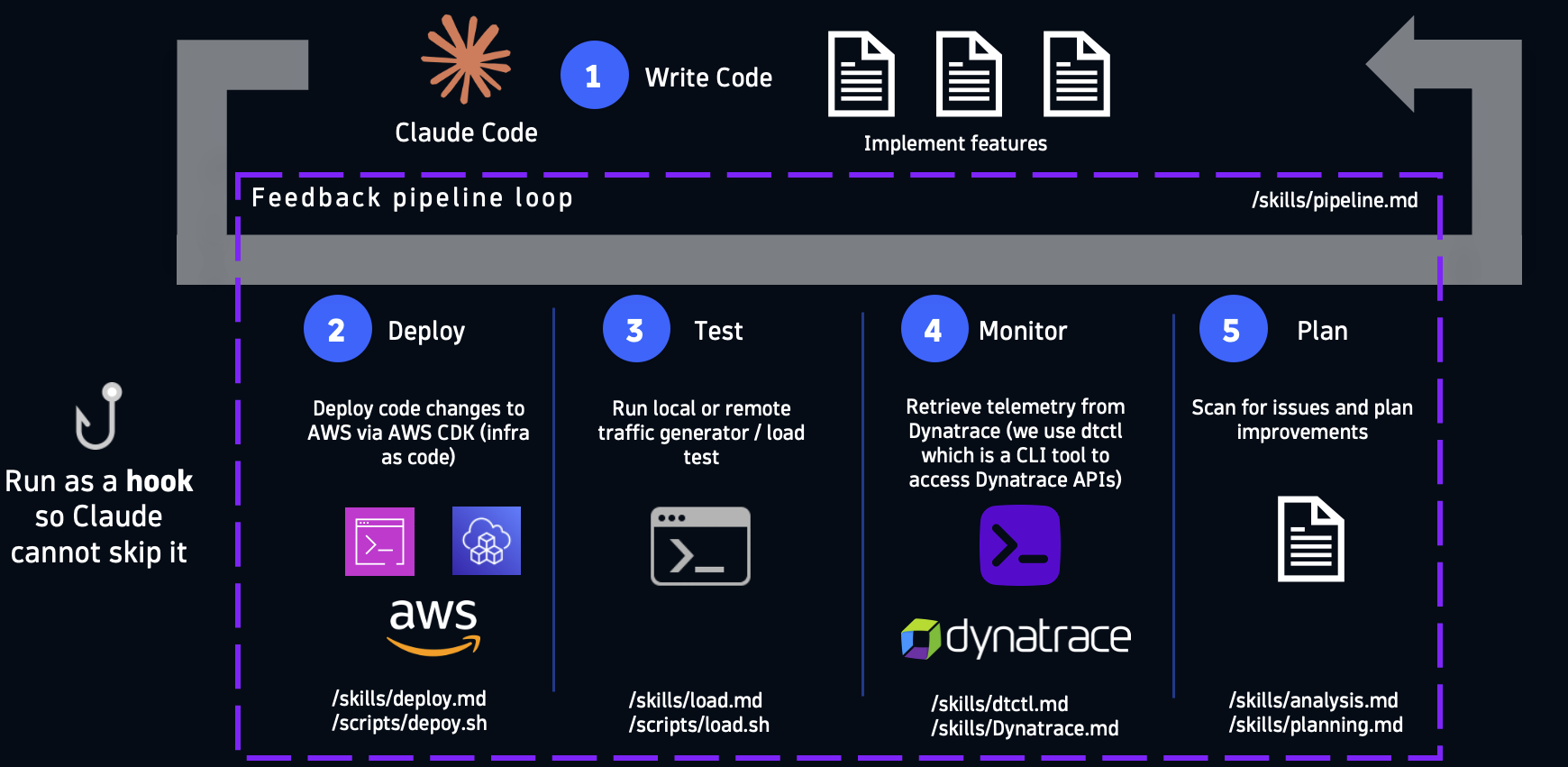
When agents and copilots can see how its code behaves in a running environment, the pagination bug above may become a feedback signal that helps guide future iterations. How much of the loop the AI runs on it own is up to you. An AI-assisted developer might use telemetry to inform the next prompt by hand. An agent-led approach might wire the whole loop to run unattended. The principle holds either way.
In practice, building this loop means giving the agent a small set of CLIs, tools, and skills, each scoped to one stage of the cycle. In a Dynatrace environment, that can include dtwiz to get telemetry flowing quickly and dtctl to work with Dynatrace APIs once the code is running:
- Write code: A coding agent, such as Claude Code, with your project skills loaded, implements features per the plan.
- Deploy: A deploy.md skill and deploy.sh script push code changes to your cloud provider via the infrastructure-as-code tool of your choice. For a new service or environment, a setup step can use dtwiz to analyze the system, recommend the right observability path, and help get telemetry flowing without hand-building collector configuration first.
- Test: Run synthetic load or trigger load test environments if running in a development or staging environment.
- Observe: A dtctl.md skill paired with dtctl, the CLI for working with Dynatrace APIs, retrieves the traces, metrics, logs, events, or entity data the deployed code just emitted.
- Plan: An analysis.md and planning.md skill instructs the agent to scan the telemetry for issues and plan improvements before the next iteration.
The critical detail: for automated workflows, this feedback pipeline should run as a hook, not an optional step that gets skipped. Hooks let you enforce that every code change passes through deploy-test-monitor-analyze before it’s considered “done.” Even when a humans stays in the loop, making the gate a habit is what turns a vibe coding session into engineering.
Building reliable AI engineering workflows with Dynatrace
Interested in going deeper on AI-assisted development with observability in the loop? Check out these resources:
- Browse and install community skills at skills.sh
- Add the Dynatrace AI skills bundle: npx skills add dynatrace/dynatrace-for-ai
- Learn more about Dynatrace MCP for connecting agents and copilots to real-time observability data
- Evaluate LLM and agent quality with dt-evals, an open source CLI for scoring real GenAI traces and sending evaluation results back to Dynatrace AI Observability.

Looking for answers?
Start a new discussion or ask for help in our Q&A forum.
Go to forum