


AI is changing the way we work, from boosting our efficiency and executing tasks on our behalf. As AI enters the agentic era, Dynatrace Assist is your trusted partner for working smarter with Dynatrace. Powered by Dynatrace Intelligence, it helps you solve problems faster and brings AI into your daily workflow.
Today, we’re announcing Dynatrace Assist, our next-generation AI chat that goes far beyond answering questions. It lives where you work, understands your environment, and helps you get real work done with the full power of Dynatrace Intelligence behind every interaction.
Dynatrace Assist is the evolution of Davis CoPilot®, but make no mistake: this is much more than a rebranding. It’s a paradigm shift in capability, outcome, and value.
Your agentic partner helps you gather insights
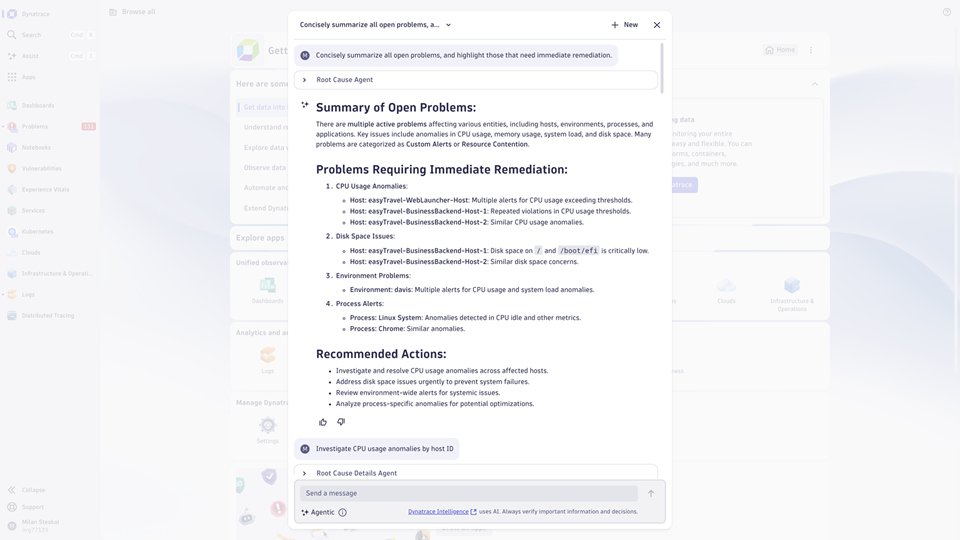
Dynatrace Assist is where the full power of Dynatrace Intelligence, the new Dynatrace agentic operations system, is available at your fingertips. Instead of moving between dashboards, queries, and tools, you can simply start with the conversational interface: ask a question and let Dynatrace Intelligence do the work.
Dynatrace Intelligence interprets your prompt using generative, causal, and predictive AI capabilities to understand what you’re trying to achieve. Like a member of your team, Assist pulls together context from Grail, maps relationships utilizing Smartscape’s dependency graph, and collaborates in real time with Dynatrace agents. As the conversation unfolds, you move from understanding to exploration—following suggested drill-downs, refining your analysis, and understanding the next steps. This allows for a single, seamless flow from question to insight to execution.
Multi-step reasoning that understands your environment
Assist doesn’t just do what you ask—it thinks several steps ahead. It helps you understand the why, decide what to do, and see what comes next. And all of this is fully transparent, showing you exactly which data backs each decision, so you can trust the recommendations and proceed decisively and confidently.
Under the hood, Assist combines Grail’s unified data lakehouse with Smartscape’s dependency graph, layered with our causal and predictive AI. By leveraging the same tools that are hosted on the Dynatrace MCP Server, Assist can pull insights from any part of your environment and kick off deeper analysis when needed.
From incident to remediation in a single flow
AI on its own is meaningless. AI needs context and data to deliver real value, and you need intelligence that understands your environment and helps you move faster with confidence. Dynatrace Assist is built for exactly that. It works alongside you, sharpening decisions, removing friction from investigations, and accelerating the steps that typically slow teams down.
Let’s look at the following example: when a production issue arises, teams waste precious minutes jumping between dashboards, logs, and alerts to reconstruct what went wrong and determine the next steps.
Investigations start with a simple question like “Summarize all open problems and highlight those that need remediation.” Assist immediately pulls together the evidence. It connects Grail data, Smartscape relationships, and real-time signals from Dynatrace agents to piece together a clear explanation of the issue. Instead of scattered clues, Assist collaboratively guides you in selecting a problem to focus on and recommends how to remediate it. This continuous flow compresses investigation time, reduces MTTR, and gives teams a controlled way to move from insight to remediation without breaking focus.

Explain raw data with actionable insights
Logs, signals, and low‑level data points often require deep domain knowledge to interpret. In large digital environments, that knowledge is spread across different teams, which means understanding what a particular message means, how serious it is, and whether it requires action can easily slow teams down.
When you select a log entry (or another signal in Dynatrace) and ask Dynatrace Assist to explain it, it responds like an expert colleague with the necessary domain knowledge and an understanding of the system’s inner workings. It interprets the data in context, highlights what is important, clarifies the potential impact, and outlines likely causes or sensible next steps. Instead of searching for error codes elsewhere or waiting for someone with deeper expertise, teams get immediate clarity. This turns raw, technical signals into practical guidance and shortens the path from confusion to confident action.

Identify and respond to critical vulnerabilities
Vulnerabilities in your system significantly increase the risk of critical incidents, such as data loss or unauthorized access. When a new vulnerability alert appears, teams need immediate clarity about what it means, which services are exposed, and what actions they should take.
With a series of simple prompts, such as described below, Assist pulls in security findings, maps the impacted components across Smartscape, and identifies the root cause. It guides you through the decision-making process, including proposing a fix to the identified problem. All without leaving Dynatrace or switching between tabs, applications, or tools. This tight loop gives teams a faster understanding, more consistent responses, and a significantly reduced risk window.
Prompts used in this use case:
- Are there any open threats I need to be aware of?
- Investigate the SQL injection vulnerabilities and provide more details.
- Show me input for <<add your vulnerability>>.
- Give me a fixed query.

Dynatrace Assist is here, and it’s just the beginning
Dynatrace Assist doesn’t replace your expertise; it amplifies it, so you can resolve issues sooner, uncover insights more naturally, and move from intention to outcome with far less effort. It is your gateway to Dynatrace Intelligence, which makes you and your teams more productive, accelerates your operations, and uses the full Dynatrace platform to deliver real outcomes.
Ask. Analyze. Act.
And start today with Dynatrace Assist.




Looking for answers?
Start a new discussion or ask for help in our Q&A forum.
Go to forum