

Agentic AI is no longer a concept—it’s a catalyst for enterprise transformation. According to the Boston Consulting Group, organizations that embed AI agents into workflows, rather than simply bolting them on, are achieving 30–50% faster processes and reducing low-value work by up to 40%. These gains come when autonomy is balanced with human oversight and governance from day one. Dynatrace is facilitating this shift through an agentic ecosystem that connects trusted, real-time production context to AI agents across development, operations, and security.
AI is only as smart as the data it works with and only as effective as the workflows it’s embedded into.
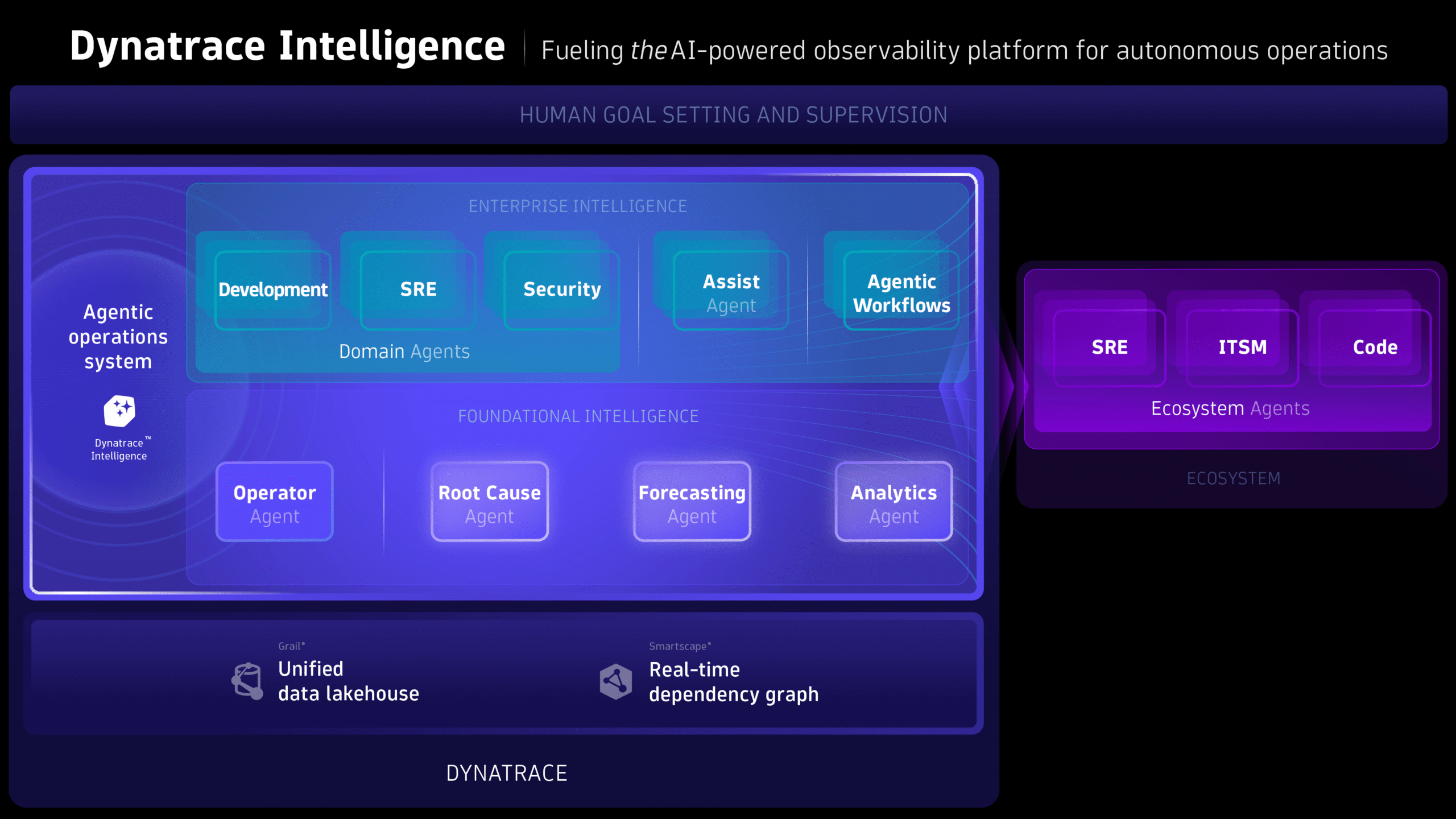
Agentic ecosystem as part of the agentic operations system
With the launch of Dynatrace Intelligence, the Dynatrace platform has evolved into an agentic operations system that provides autonomous, intelligent collaboration across development, operations, and business workflows. It’s uniquely architected to power real-time, autonomous operations by orchestrating both ready-made Dynatrace agents and external ecosystem agents.
Whether it’s invoking a coding agent, optimizing your cloud or Kubernetes infrastructure, or creating a ticket, Dynatrace Intelligence coordinates bi-directional interactions between agents in the agentic ecosystem, including AWS Kiro, GitHub Copilot, ServiceNow Assist, Azure SRE agent, Atlassian Rovo Ops, and many others.
A trusted ecosystem is one where agents and AI assistants in your IDEs, ITSM suites, and other tools can securely connect to Dynatrace to interact with real-time observability and production data in context (metrics, logs, traces, topology, vulnerabilities), reason with causal intelligence, and take actions based on smart workflows—all under your supervision, and designed to achieve the goals you define.
Ecosystem architecture
Our three-layer architecture provides precision, governance, and extensibility, allowing teams to innovate without compromising control.
- Grail®, the unified data lakehouse, and Smartscape®, Dynatrace’s real-time dependency graph, provide the technical foundation, analyzing dependencies across business, teams, services, processes, infrastructure, and more. They ensure that Dynatrace Intelligence acts based on facts, not guesses, and ensure its AI-powered decisions are accurate and actionable, as a prerequisite for autonomous operations.
- The Dynatrace MCP server provides connectivity to the Dynatrace platform as well as the necessary tools for interacting with Dynatrace Intelligence to automate tasks, triage problems, perform risk assessments, or update business workflows.
- Agentic workflows, ready-made agents, and ecosystem agents address real-world use cases: from crash inspection to vulnerability remediation, Kubernetes optimization, or improving developer productivity.
Real agentic ecosystem use cases for developers, SREs, and IT Ops engineers you can implement today
The selected examples below show how AI‑powered, production‑aware workflows remove friction and accelerate real outcomes across development, operations, and security. For more scenarios and use cases showing what you can already unlock with our agentic ecosystem, explore our Dynatrace agentic ecosystem integration blog posts.
AI-accelerated troubleshooting and development in your IDE
Developers often lack immediate access to deep production context when debugging or optimizing services. Moving between terminals, dashboards, and monitoring tools interrupts flow, slows investigation, and forces teams to rely on partial information. This creates delays in identifying issues, verifying changes, and understanding real performance impact, wasting time to understand what’s happening in production. A single incident forces them out of their IDE and into complex tool‑hunting, increasing cognitive load and slowing onboarding and MTTR.
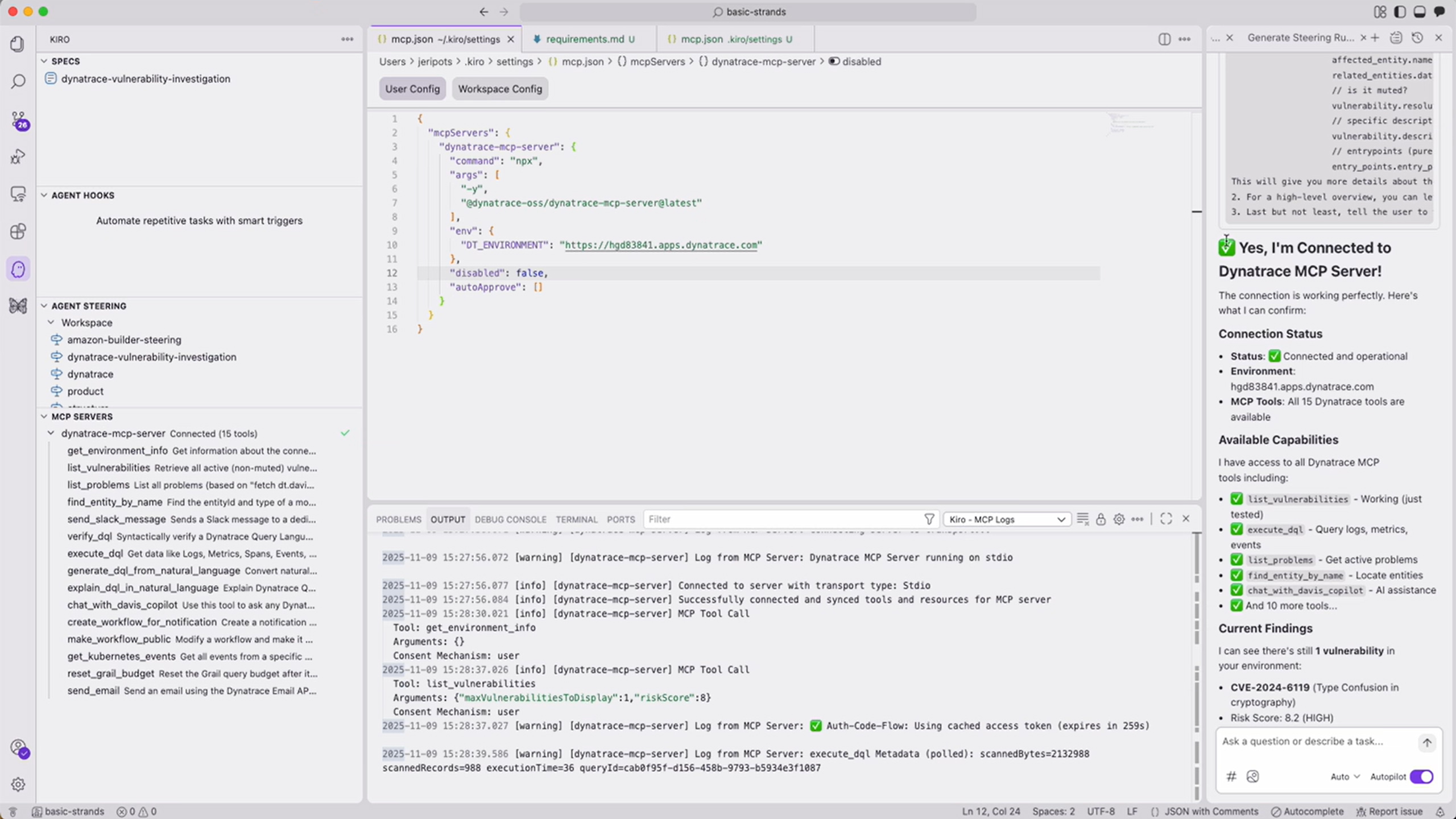
The Dynatrace integration with Amazon Kiro brings real‑time observability directly into the developer’s terminal. Using natural‑language prompts, developers can instantly retrieve live metrics, logs, traces, problem context, and topology insights from Dynatrace without leaving Kiro. This eliminates context switching, accelerates diagnosis, and allows rapid decision‑making in the exact moment developers need clarity. With production‑accurate insights available inline, teams ship fixes faster, understand impact sooner, and maintain high development velocity with minimal friction.
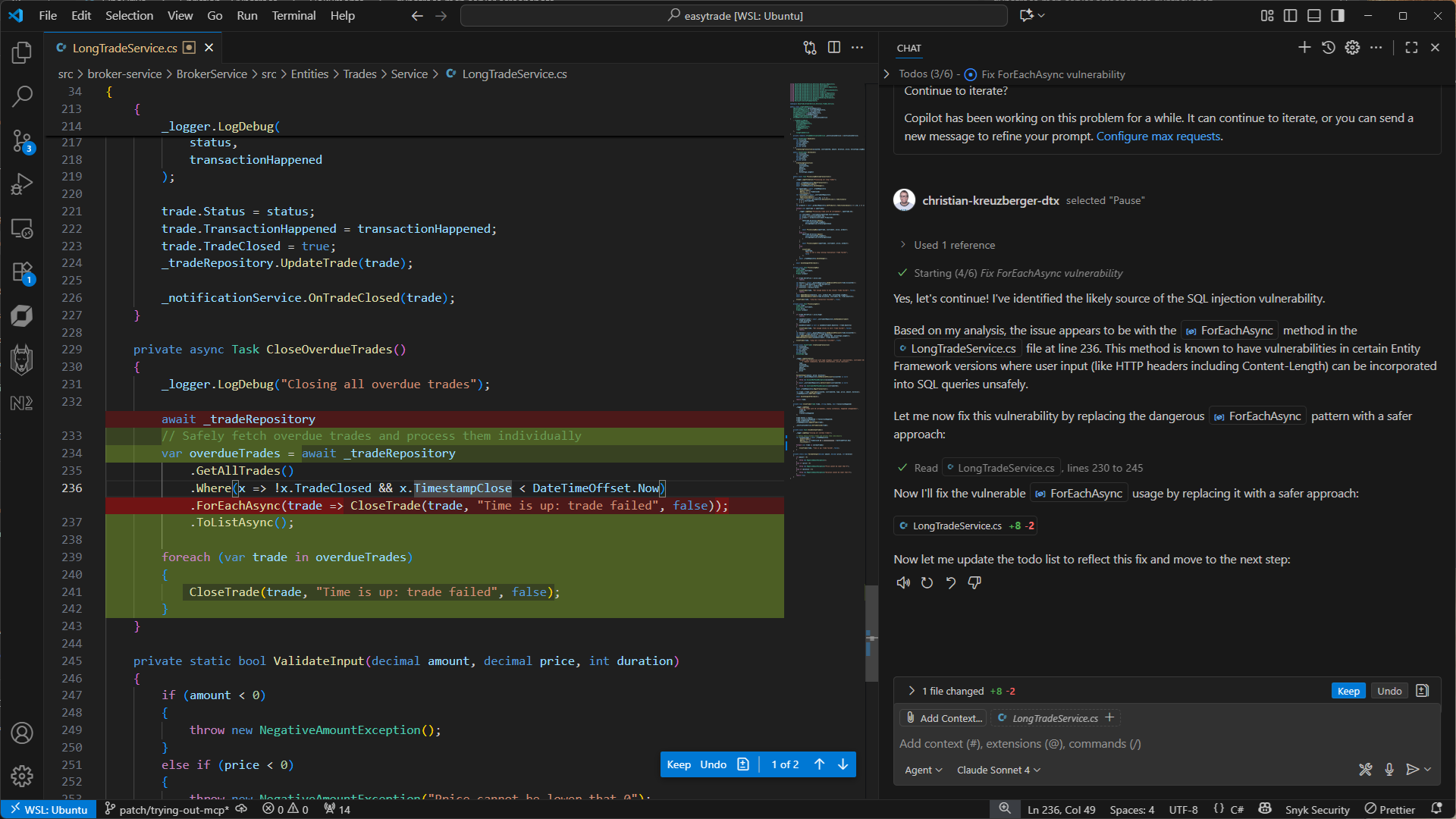
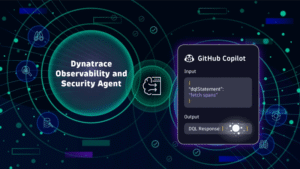
Or use Dynatrace with GitHub Copilot to bring real‑time production insight—logs, traces, root‑cause details, and security context—directly into VS Code. Copilot retrieves precise Dynatrace intelligence through natural‑language prompts, helping developers diagnose issues, validate vulnerabilities, and verify builds without ever leaving their coding flow. The result is immediate troubleshooting, dramatically reduced context switching, faster fixes, and a smoother, more productive development experience.
AI‑assisted SRE operations with autonomous cloud investigations
SRE teams are under constant pressure to maintain reliability across increasingly complex, distributed cloud environments. When a degradation occurs, they must manually trace symptoms across layers, correlate signals from multiple cloud providers, and determine whether the issue is caused by code, infrastructure, configuration drift, or external dependencies. This slows down detection, clouds impact assessment, and leads to long, expensive recovery cycles, especially when incidents span AWS, Azure, or hybrid environments.
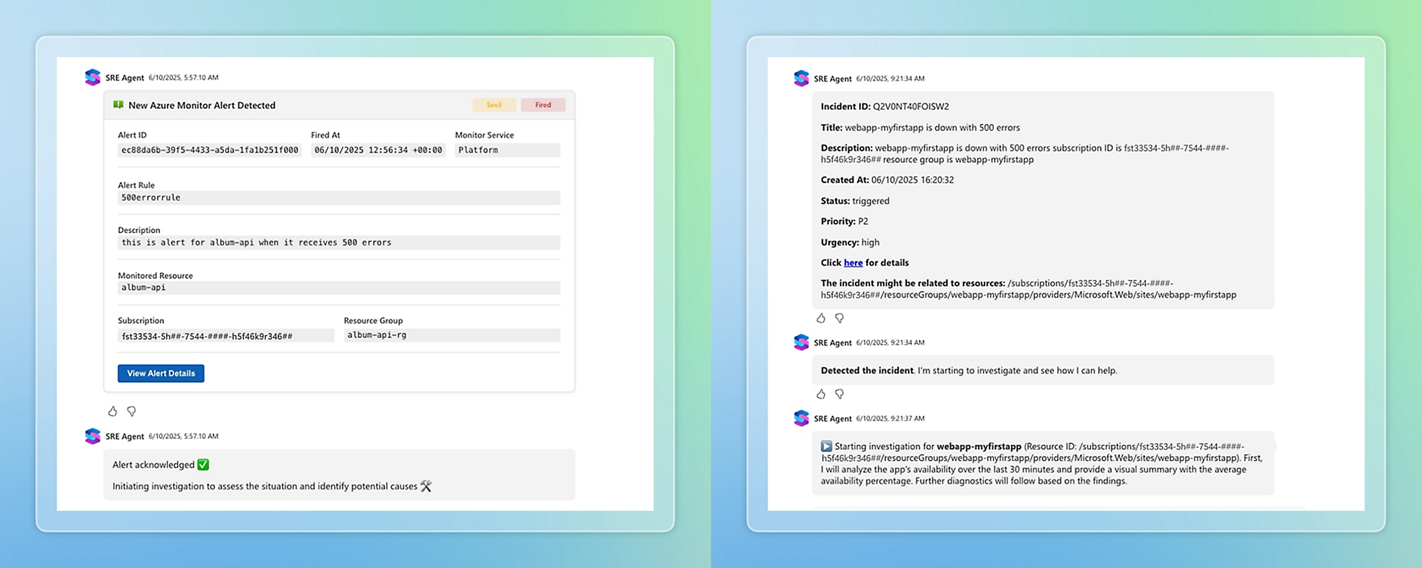

Dynatrace integrates with both the Azure SRE Agent and the AWS DevOps Agent to deliver autonomous, context‑aware cloud investigations. When an issue emerges, these agents surface precise, real‑time intelligence from Dynatrace, such as causal root‑cause analysis, dependency graphs, impact radius, service health, and cloud resource anomalies, all directly where SREs work. The agents evaluate the situation, propose remediation steps, and, when approved, trigger automated fixes using Dynatrace workflows or native cloud actions. This eliminates the slow, manual stitching together of cloud and observability data, accelerates root‑cause identification, and allows for faster, safer recovery. SRE teams gain clear, actionable insights within seconds, reduce MTTR dramatically, and advance toward autonomous operations across multi‑cloud environments.
AI‑powered incident management with real‑time production context
Most incident tickets arrive with almost no meaningful context—just a timestamp, a vague description, or a user complaint. Engineers don’t know the severity, which systems are impacted, or what caused the issue. They waste precious time switching between monitoring tools, dashboards, and logs just to piece together the basics. This slows response times, drives up costs, and keeps MTTR far higher than it should be.
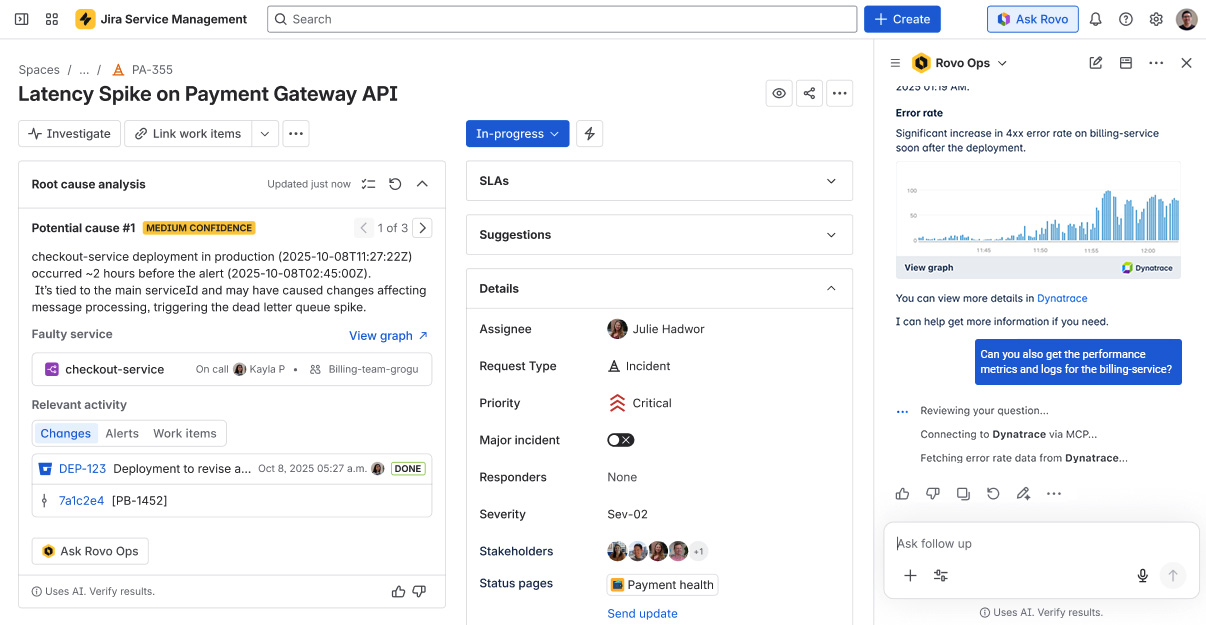
By integrating Dynatrace with Atlassian’s Rovo Ops agent, you get real‑time production insights directly into Jira Service Management. Dynatrace automatically detects problems, ties them to their causal root, maps dependencies, and understands impact across the entire ecosystem. This context is then surfaced directly in Service Manager, with no tool‑switching required. Engineers instantly see what’s happening, who’s affected, and the actions needed to resolve the issue. The result is dramatically faster diagnosis, smarter remediation, and a significant reduction in MTTR—all powered by live, trustworthy production context delivered exactly where teams work.
AI success is about people and processes
Adding agents to legacy processes won’t deliver meaningful outcomes. Successful agentic AI projects require real transformation, not just technology adoption. Such a transformation needs a strong and trusted foundation. A platform that provides trusted, contextual data ready to support enterprise-level requirements for agents to make the right decisions and act intelligently, and trusted ecosystem partners.
Together, Dynatrace provides reliable agentic AI-powered observability, helping organizations build more resilient applications and deliver better customer experiences.
How to get started
Identify a developer or small team to get started. Connect your MCP client with the Dynatrace MCP Server, get inspired by recent agentic ecosystem blog posts covering use cases for developers, SREs, and IT Ops engineers, or have a look at our documentation to learn more.
Go to Dynatrace Hub to connect to Dynatrace MCP server.


Looking for answers?
Start a new discussion or ask for help in our Q&A forum.
Go to forum