



TL;DR:
A critical flaw in React’s Flight protocol (CVE-2025-55182) allows attackers to run code on servers using React Server Components. In short, if your organization uses React Server Components, Next.js, or related frameworks, attackers could potentially take control of your servers, making this a top priority for immediate action.
What’s at risk?
- Vulnerable: React Server Components, Next.js, React Router, Waku, and several related frameworks.
- Impacted: Any organization running affected versions in production.
- Exploits: Proof-of-concept code is publicly available and active scanning is underway.
- Remediation: Upgrade to patched versions now to prevent remote code execution.
Real-world scenario:
Imagine a production server running an unpatched version of Next.js. An attacker sends a crafted payload, triggering remote code execution, and gaining unauthorized access to your infrastructure. The window between disclosure and exploitation is shrinking—don’t wait to act.
Immediate steps:
- Audit your environment for affected frameworks (e.g. leveraging Dynatrace Runtime Vulnerability Analytics).
- Upgrade dependencies to patched versions.
- Use Dynatrace Runtime Vulnerability Analytics to verify remediation.
- Monitor continuously for new threats.
What is React2Shell (CVE-2025-55182)?
A critical vulnerability called React2Shell has been discovered in React’s Flight protocol that could allow attackers to execute arbitrary code on servers running React Server Components. CVE-2025-55182 affects multiple popular frameworks, including Next.js, React Router, and Waku, with exploitation possible under default configurations. While no verified public exploits exist yet, the severity and widespread nature of this vulnerability make immediate patching essential. Organizations using React Server Components should prioritize upgrading to patched versions to protect their applications from potential remote code execution attacks.
How to fix React2Shell vulnerability (CVE-2025-55182): patching guide
To address this vulnerability, it is recommended to upgrade to the patched versions of the affected packages.
Upgrade react-server-dom-* packages to one of the following versions, or higher:
- 19.0.1
- 19.1.2
- 19.2.1
Upgrade Next.js to one of the following versions, or higher:
- 15.0.5
- 15.1.9
- 15.2.6
- 15.3.6
- 15.4.8
- 15.5.7
- 16.0.7
| Two additional vulnerabilities have been found in React Server Components (RSC). They affect packages that have been patched for the original React2Shell vulnerability (CVE-2025-55182), which are listed above. None of the additional vulnerabilities allows Remote Code Execution. Upgrade again to the latest patched versions listed below. |
Technical details of the React2Shell vulnerability
CVE-2025-55182 is an unsafe deserialization vulnerability in React’s Flight protocol, affecting server component payloads. This flaw allows attackers to craft malicious payloads that, when processed by the server, can lead to unauthenticated remote code execution. Exploitation is possible under the default configuration of several popular frameworks, making the vulnerability critical and widely exploitable.
Which React and Next.js versions are vulnerable?
The following packages are vulnerable to CVE-2025-55182 because they implement parts of React’s Flight protocol, which handles server component payloads and is the source of the unsafe deserialization flaw:
| Package | Affected Versions |
| react-server-dom-parcel (npm) | 19.0, 19.1.0, 19.1.1, 19.2.0 |
| react-server-dom-turbopack (npm) | 19.0, 19.1.0, 19.1.1, 19.2.0 |
| react-server-dom-webpack (npm) | 19.0, 19.1.0, 19.1.1, 19.2.0 |
Frameworks that implement React Server Components and rely on these packages are also affected. These include: Next.js, React Router, Waku, @parcel/rsc, @vitejs/plugin-rsc, and rwsdk.
The react and react-dom libraries are not impacted because they do not include the Flight protocol or any server-side component handling. Environments that render React exclusively on the client, or that do not integrate frameworks, bundlers, or plugins supporting React Server Components, remain outside the scope of this vulnerability.
The related vulnerability, CVE-2025-66478, was initially published for Next.js and marked as critical. It was later rejected and classified as a duplicate of CVE-2025-55182, because the root cause lies in Next.js depending on vulnerable React packages that implement the Flight protocol.
While the dependency link is correct, Next.js does not rely on the npm ecosystem to resolve these React Server Component packages. Instead, Next.js includes compiled versions of the react-server-dom-* packages directly in its repository. This means that upgrading React in isolation will not remediate the vulnerability for Next.js users because the vulnerable code is embedded within Next.js itself.
The following Next.js versions are affected:
| Package | Affected Versions |
| next (npm) | >= 14.3.0-canary.77, < 15.0.5 >= 15.2.0-canary.0, < 15.2.6 >= 15.3.0-canary.0, < 15.3.6 >= 15.4.0-canary.0, < 15.4.8 >= 16.0.0-canary.0, < 16.0.7 >= 15.1.0-canary.0, < 15.1.9 >= 15.5.0-canary.0, < 15.5.7 |
What are the related RSC vulnerabilities?
On December 11, 2025, two additional vulnerabilities were discovered in React Server Components, affecting the react-server-dom-* and Next.js packages:
- Denial of Service – High Severity: CVE-2025-55184 and CVE-2025-67779
- Source Code Exposure – Medium Severity: CVE-2025-55183
For the Denial of Service vulnerability, there are two CVE numbers due to an incomplete fix for the first CVE.
We recommend updating the affected packages to the latest patch version, as outlined below:
| Package | Affected versions | Fixed in |
| next (npm) | >=13.3 | Upgrade to 14.2.35 |
| 14.x | 14.2.35 | |
| 15.0.x | 15.0.7 | |
| 15.1.x | 15.1.11 | |
| 15.2.x | 15.2.8 | |
| 15.3.x | 15.3.8 | |
| 15.4.x | 15.4.10 | |
| 15.5.x | 15.5.9 | |
| 15.x canary | 15.6.0-canary.60 | |
| 16.0.x | 16.0.10 | |
| 16.x canary | 16.1.0-canary.19 | |
| react-server-dom-webpack (npm) react-server-dom-turbopack (npm) react-server-dom-webpack (npm) |
19.0.x | 19.0.3 |
| 19.1.x | 19.1.4 | |
| 19.2.x | 19.2.3 |
Are there working exploits for React2Shell vulnerability?
Proof-of-concept exploits for React2Shell (CVE-2025-55182) have been developed and made publicly available. The vulnerability has also been added to the CISA Known Exploited Vulnerabilities (KEV) catalog, confirming active exploitation. Additionally, the vulnerability reporter has published several exploit variants on GitHub:
lachlan2k/React2Shell-CVE-2025-55182-original-poc.
const payload = {
    '0': '$1',
    '1': {
        'status':'resolved_model',
        'reason':0,
        '_response':'$4',
        'value':'{"then":"$3:map","0":{"then":"$B3"},"length":1}',
        'then':'$2:then'
    },
    '2': '$@3',
    '3': [],
    '4': {
        '_prefix':'console.log(7*7+1)//',
        '_formData':{
            'get':'$3:constructor:constructor'
        },
        '_chunks':'$2:_response:_chunks',
    }
}
The root cause of this vulnerability lies in how React’s Flight protocol processes incoming data. The data is processed as chunks, as seen above, which can reference each other, denoted by the $ symbols. The exploit takes advantage of this behavior along with a bug caused by missing attribute checks, which allows access to properties such as constructor. The fix for the attribute check can be seen in the patch here.
The crafted payload chains internal gadgets to create a Promise-like object with an attacker-controlled “.then” property. During deserialization, these Promise-like objects are automatically resolved, which results in code execution.
The vulnerability is actively being scanned in the wild, significantly increasing the risk for organizations running vulnerable versions of affected packages. Given the critical nature of React2Shell and the existence of working exploits, immediate remediation is strongly advised.
Detecting React2Shell (CVE-2025-55182) with Runtime Vulnerability Analytics
You can use Dynatrace Runtime Vulnerability Analytics to detect if vulnerable React Server Component packages or Next.js packages are present by filtering for CVE-2025-55182 in the app.
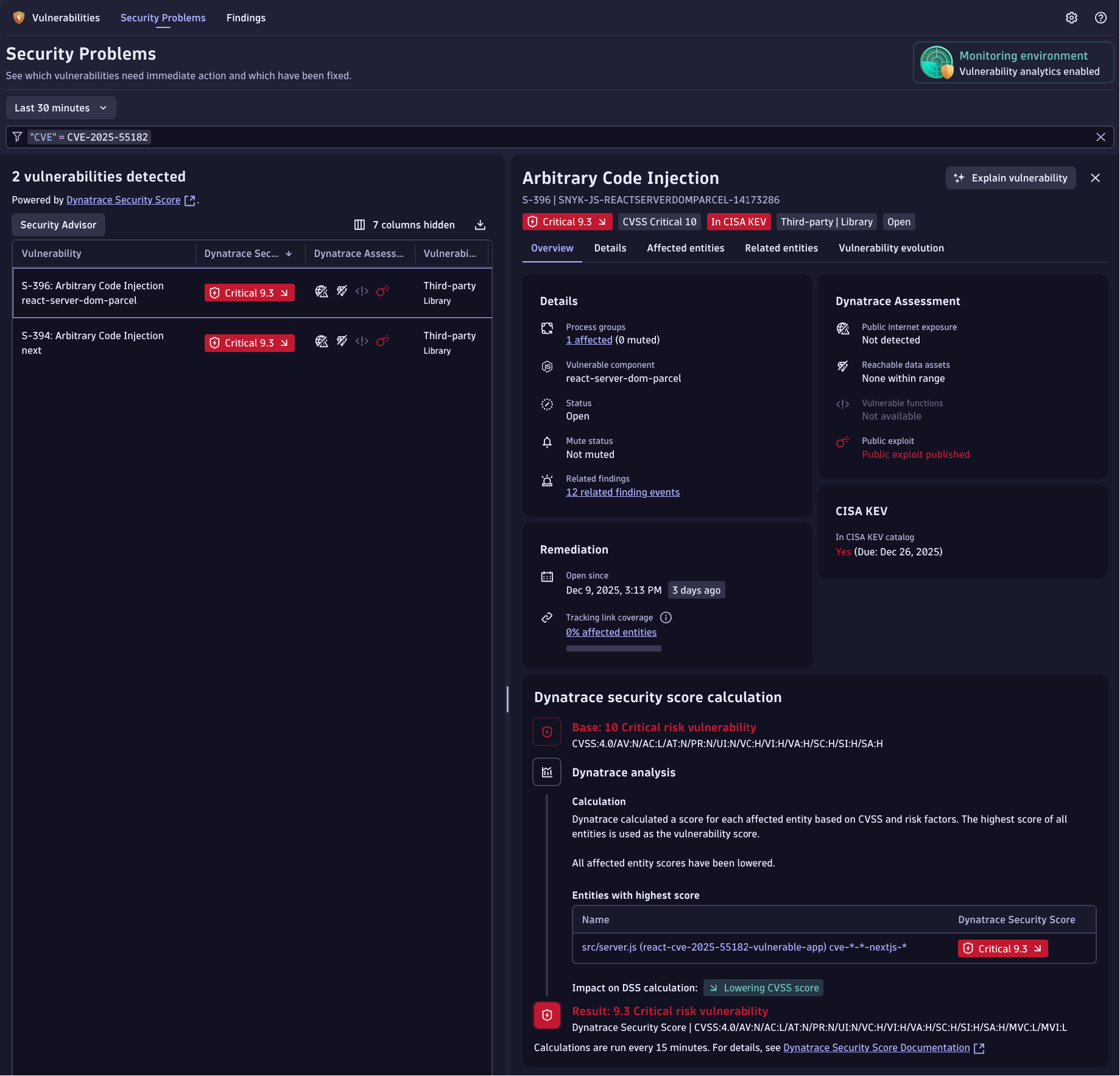
Bottom Line: If you’re running React Server Components or Next.js in production, review your dependencies immediately and upgrade to patched versions.
Searching for React2Shell vulnerable components (CVE-2025-55182) with DQL
You can also use Smartscape to manually search for vulnerable software components.
fetch dt.entity.software_component
  | fieldsAdd vulnerable =  if(in(entity.name, {
      "react-server-dom-parcel:19.0",
      "react-server-dom-parcel:19.1.0",
      "react-server-dom-parcel:19.1.1",
      "react-server-dom-parcel:19.2.0",
      "react-server-dom-webpack:19.0",
      "react-server-dom-webpack:19.1.0",
      "react-server-dom-webpack:19.1.1",
      "react-server-dom-webpack:19.2.0",
      "react-server-dom-turbopack:19.0",
      "react-server-dom-turbopack:19.1.0",
      "react-server-dom-turbopack:19.1.1",
      "react-server-dom-turbopack:19.2.0"
      }), true)

  // Make sure to check if the found next version is vulnerable
  | fieldsAdd potentially_vulnerable =
      startsWith(entity.name, "next:14.3.0") or
      startsWith(entity.name, "next:15") or
      startsWith(entity.name, "next:16")

  | filter
      vulnerable == true or
      potentially_vulnerable == true
Important note: When using this manual search method (as opposed to Runtime Vulnerability Analytics), you’ll need to:
- Manually and reactively search for affected versions whenever an incident occurs
- Work without the additional context and guidance that RVA provides, such as:
- Davis Security Score
- Public internet exposure analysis
- Exploit availability information
How to detect React2Shell (CVE-2025-55182) exploitation activity
If you have logs containing process execution events, you can detect the common attack patterns (tactics, techniques, and procedures or TTPs) that adversaries use when exploiting vulnerabilities like CVE-2025-55182.
The Dynatrace platform can ingest data from any source that provides this information. The following example (with an alternate for Windows systems) uses Tetragon as the data source. By combining these logs with Smartscape attributes, you get full context for detecting exploitation activity—which helps reduce false positives and speeds up investigations.
// Adjust timeframe accordingly
fetch logs,
  from: -14d,
  scanLimitGBytes: -1

// We use Tetragon as an example, any source for process execution could be used
| filter log.source == "Container Output"
| filter k8s.workload.name == "tetragon"
| parse content, "JSON:content"

// Filter on process start events
| filter isNotNull(content[process_exec])

// Add fields for further processing
| fieldsAdd k8s.pod.uid = content[process_exec][process][pod][uid]
| fieldsAdd process.parent.executable.path = content[process_exec][parent][binary]
| fieldsAdd process.parent.executable.name = splitString(process.parent.executable.path, "/")[-1]
| fieldsAdd process.executable.path = content[process_exec][process][binary]
| fieldsAdd process.executable.name = splitString(process.executable.path, "/")[-1]
| fieldsAdd process.cmd_line = concat(process.executable.path, " ", content[process_exec][process][arguments])
| fieldsRemove k8s.deployment.name

// Filter on node instances
| filter in(lower(process.parent.executable.name), {
    "node",
    "bun"
  })

// Filter for common shell processes
| filter in(lower(process.executable.name), {
    "ash",
    "bash",
    "bash-static",
    "busybox",
    "csh",
    "dash",
    "fish",
    "ksh",
    "lksh",
    "mksh",
    "mksh-static",
    "posh",
    "rksh",
    "rksh93",
    "sash",
    "static-sh",
    "sh",
    "tcsh",
    "yash",
    "zsh"
  }) and iAny(contains(lower(process.cmd_line), array(
    "cat",
    "curl",
    "dig",
    "env",
    "head",
    "hostid",
    "hostname",
    "id",
    "ifconfig",
    "ip",
    "install",
    "less",
    "mkfifo",
    "more",
    "nc",
    "ncat",
    "netcat",
    "netstat",
    "nslookup",
    "perl",
    "ping",
    "pwd",
    "route",
    "socat",
    "shred",
    "ss",
    "stat",
    "tail",
    "tee",
    "uname",
    "wget",
    "who",
    "whoami",
    "/dev/tcp",
    "/dev/udp",
    "/etc/passwd",
    "/etc/shadow"
  )[], caseSensitive: false)) or in(lower(process.executable.name), {
    "cat",
    "curl",
    "dig",
    "env",
    "head",
    "hostid",
    "hostname",
    "id",
    "ifconfig",
    "ip",
    "install",
    "less",
    "mkfifo",
    "more",
    "nc",
    "ncat",
    "netcat",
    "netstat",
    "nslookup",
    "perl",
    "ping",
    "pwd",
    "route",
    "socat",
    "shred",
    "ss",
    "stat",
    "tail",
    "tee",
    "uname",
    "wget",
    "who",
    "whoami"
  })

// Get smartscape data for affected entity
| join [
    smartscapeNodes "K8S_POD"
],
on: { k8s.pod.uid },
kind: leftOuter,
fields: {
  k8s.node.name,
  k8s.namespace.name,
  k8s.workload.name,
  k8s.workload.kind,
  k8s.pod.name,
  id_classic
}
fetch logs
| filter winlog.eventid == "1"
| parse content, """
LD CR LF
'RuleName: 'LD:RuleName CR LF
'UtcTime: 'LD:UtcTime CR LF
'ProcessGuid:' LD:ProcessId CR LF
'ProcessId: 'LD:PorcessId CR LF
'Image: 'LD:Image CR LF
'FileVersion: 'LD:FileVersion CR LF
'Description: 'LD:Description CR LF
'Product: ' LD:Product CR LF
'Company: ' LD:Company CR LF
'OriginalFileName: ' LD:OriginalFileName CR LF
'CommandLine: ' LD:CommandLine CR LF
'CurrentDirectory: ' LD:CurrentDirectory CR LF
'User: ' LD:User CR LF
'LogonGuid: ' LD:LogonGuid CR LF
'LogonId: ' LD:LoginId CR LF
'TerminalSessionId: ' LD:TerminalSessionId CR LF
'IntegrityLevel: ' LD:IntegrityLevel CR LF
'Hashes: ' LD:Hashes CR LF
'ParentProcessGuid: ' LD:ParentProcessGuid CR LF
'ParentProcessId: ' LD:ParentProcessId CR LF
'ParentImage: ' LD:ParentImage CR LF
'ParentCommandLine: ' LD:ParentCommandLine CR LF
'ParentUser: ' LD:ParentUser
"""
| filter iAny(endsWith(ParentImage, array(
"node.exe",
"bun.exe")[], caseSensitive: false))
| filter iAny(contains(CommandLine, array(
"-enc",
"-EncodedCommand",
"-w hidden",
"-windowstyle hidden",
"Test-NetConnection"
)[], caseSensitive: false)) or in(lower(OriginalFileName), {
"cmd.exe",
"powershell.exe",
"pwsh.exe",
"arp.exe",
"at.exe",
"bash.exe",
"bitsadmin.exe",
"certutil.exe",
"csript.exe",
"dsget.exe",
"dsquery.exe",
"find.exe",
"findstr.exe",
"hostname.exe",
"ipconfig.exe",
"nbtstat.exe",
"net.exe",
"net1.exe",
"netsh.exe",
"netstat.exe",
"nslookup.exe",
"ntdsutil.exe",
"reg.exe",
"rundll32.exe",
"sc.exe",
"schtasks.exe",
"systeminfo.exe",
"tasklist.exe",
"tracert.exe",
"ver.exe",
"wevtutil.exe",
"whoami.exe",
"wmic.exe",
"wscript.exe"
})How to detect suspicious React2Shell (CVE-2025-55182) requests
Most React2Shell exploits work by sending special HTTP headers.
- In Next.js apps, this header is next-action.
- In other apps, it may be rsc-action-id.
Some public exploit PoCs also exfiltrate data using query parameters during redirects. In Next.js, these values appear in the x-action-redirect response header.
Capturing these headers with Dynatrace OneAgent
Dynatrace OneAgent can record these headers as custom request attributes. For setup and configuration instructions, go to Capture request attributes based on web request data.
Use the following settings:
- For next-action or rsc-action-id
- Data source: HTTP request header
- Capture on: Server side
- For x-action-redirect
- Data source: HTTP response header
We recommend setting multi-value capture to “All distinct values.”
If real-time updates are disabled in Dynatrace, make sure to restart all affected processes so the changes can take effect.
Capturing headers with OpenTelemetry
If you’re using OpenTelemetry instead of OneAgent, you can also capture the same request and response headers. (See: https://opentelemetry.io/docs/zero-code/java/agent/instrumentation/http/)
Detect suspicious requests using DQL
In both cases, you can use the following DQL queries to fetch all the requests that use one of the relevant headers.
fetch spans

// Filter for relevant spans coming from a nodejs agent or via OpenTelemetry,
// which are a server span for a POST request
| filter (dt.openpipeline.source == "oneagent" AND dt.agent.module.type == "nodejs") OR
    dt.openpipeline.source == "/api/v2/otlp/v1/traces"
| filter span.kind == "server"
| filter http.request.method == "POST"

// update the values on the right hand side to use the name of the request attribute configured
| fieldsRename request_attribute.next_action_header = `request_attribute.next-action header`
| fieldsRename request_attribute.rsc_action_id_header = `request_attribute.rsc-action-id header`
| fieldsRename request_attribute.x_action_redirect_header = `request_attribute.x-action-redirect header`

// Collect all spans with one of the relevant headers set
| filter
    isNotNull(`http.request.header.next-action`) OR
    isNotNull(request_attribute.next_action_header) OR
    isNotNull(`http.request.header.rsc-action-id`) OR
    isNotNull(request_attribute.rsc_action_id_header)

// Collect all unique action IDs from each request into a single field
| fieldsAdd action_id = arrayDistinct(
    arrayRemoveNulls(
      arrayConcat(
        array(
          `http.request.header.next-action`,
          `http.request.header.rsc-action-id`
        ),
        arrayFlatten(array(request_attribute.next_action_header)),
        arrayFlatten(array(request_attribute.rsc_action_id_header))
      )
    )
  )
| expand action_id

// Collect action redirect response header values
| fieldsAdd action_redirect = arrayDistinct(
    arrayRemoveNulls(
      arrayConcat(
        array(`http.response.header.x-action-redirect`),
        arrayFlatten(array(request_attribute.x_action_redirect_header))
      )
    )
  )

// Count usage for each action ID per process group
| summarize {
    count = count(),
    actor.ips = arrayDistinct(arrayRemoveNulls(collectDistinct(client.ip))),
    traces = collectDistinct(trace.id),
    action_redirects = arrayDistinct(arrayRemoveNulls(arrayFlatten(collectDistinct(action_redirect))))
  },
  by: {
    action_id,
    dt.entity.process_group
  }

| fieldsAdd dt.process_group.name = entityName(dt.entity.process_group)
Review the results for requests that use suspicious action IDs. Many public exploit PoCs set the next-action header to a static value, such as “x”.
You can also review the x-action-redirect header values for suspicious values.
Detecting Crypto Miners After React2Shell Exploitation
Attackers exploiting the React2Shell vulnerability commonly deploy cryptocurrency miners on compromised systems. These miners consume significant CPU resources, meaning an affected application or service will often show abnormally high CPU usage shortly after exploitation.
To proactively hunt for this activity, you can correlate observability data (such as CPU metrics) with vulnerability data in a single DQL query. This approach helps identify workloads that are both:
- Vulnerable to React2Shell, and
- Exhibiting sudden or sustained CPU spikes consistent with crypto-mining behavior.
Below is an example query pattern you can use. Adjust the metrics, thresholds, and entity types to fit your environment and detection strategy.
timeseries sum(dt.kubernetes.container.cpu_usage, default: 0, rollup: sum, rate: 1m), nonempty: true, by:{dt.entity.container_group_instance}

| join [
    fetch dt.entity.software_component
      | fieldsAdd vulnerable =  if(in(entity.name, {
          "react-server-dom-parcel:19.0",
          "react-server-dom-parcel:19.1.0",
          "react-server-dom-parcel:19.1.1",
          "react-server-dom-parcel:19.2.0",
          "react-server-dom-webpack:19.0",
          "react-server-dom-webpack:19.1.0",
          "react-server-dom-webpack:19.1.1",
          "react-server-dom-webpack:19.2.0",
          "react-server-dom-turbopack:19.0",
          "react-server-dom-turbopack:19.1.0",
          "react-server-dom-turbopack:19.1.1",
          "react-server-dom-turbopack:19.2.0"
          }), true)

    // Make sure to check if the found next version is vulnerable
    | fieldsAdd potentially_vulnerable =
        startsWith(entity.name, "next:14.3.0") or
        startsWith(entity.name, "next:15") or
        startsWith(entity.name, "next:16")

    | filter
        vulnerable == true or
        potentially_vulnerable == true

    | fieldsAdd dt.entity.process_group_instance = belongs_to[dt.entity.process_group_instance]
    | expand dt.entity.process_group_instance

    | join [
       fetch dt.entity.process_group_instance
      | fieldsAdd dt.entity.container_group_instance = belongs_to[dt.entity.container_group_instance]
    ],
    on: { left[dt.entity.process_group_instance] == right[id]},
    fields: { dt.entity.container_group_instance }
],
on: { dt.entity.container_group_instance }
Take action now
CVE-2025-55182 poses a critical threat to organizations using React Server Components in production, as public exploits are already available and actively being used.
Here’s what you should do immediately:
- Audit your environment. Identify all applications using React Server Components, Next.js, or related frameworks.
- Upgrade dependencies. Apply the patched versions listed in the mitigation section above.
- Verify remediation. Use Dynatrace Runtime Vulnerability Analytics or similar tools to confirm vulnerable packages have been eliminated.
- Monitor continuously. Implement ongoing vulnerability scanning to catch issues before they become incidents.
The combination of critical severity, default exploitability, and widespread framework adoption makes this vulnerability a top priority for security and development teams. Take action today to protect your applications and infrastructure.
Need help assessing your exposure?
Learn more about Dynatrace Runtime Vulnerability Analytics and how it can help you identify and prioritize vulnerabilities across your entire application portfolio.


Looking for answers?
Start a new discussion or ask for help in our Q&A forum.
Go to forum