


All
0 Results filtered by:

We couldn't find any results
You can search all listings, or try a different spelling or keyword. Still nothing? Dynatrace makes it easy to create custom apps.
 Syslog (via Fluentd)
Stream Syslog data do Dynatrace via Fluentd for analysis.
TechnologySyslog is a standard protocol for message logging and system logs management. Devices like routers, printers, hosts, switches, and many other devices across many platforms use the Syslog standard to log users' activity, system/software life-cycle events, status, or diagnostics.
In network monitoring, the Syslog protocol is very useful because of its client-server architecture, where the remote Syslog server listens to the client's log messages. Such consolidation of logging data in a central repository allows taking advantage of unified Dynatrace Log Management and Analytics Powered by Grail for actionable insights and automation.
Stream syslog via Fluentd if you already collect logs with it or if a specific use case requires an additional component (e.g., forwarding logs to different targets). If you want to benefit from a secure, trusted edge component with enterprise support and life-cycle management, please refer to Syslog ingest via Dynatrace ActiveGate.
In the case where Linux system syslog observability is the main focus, we recommend deploying OneAgent, which auto-discovers host syslog data, preserves topology context, and requires minimal configuration and maintenance.
This is intended for users who want to: Complement observability data in Dynatrace, extend the Davis AI engine and enable App Owners, DevOps, and SRE teams to analyze all syslog data centrally.
This enables you to: Leverage the Fluentd Syslog input plugin to get syslogs from your devices into Dynatrace where you can immediately benefit from Dynatrace AI-driven root cause analysis.
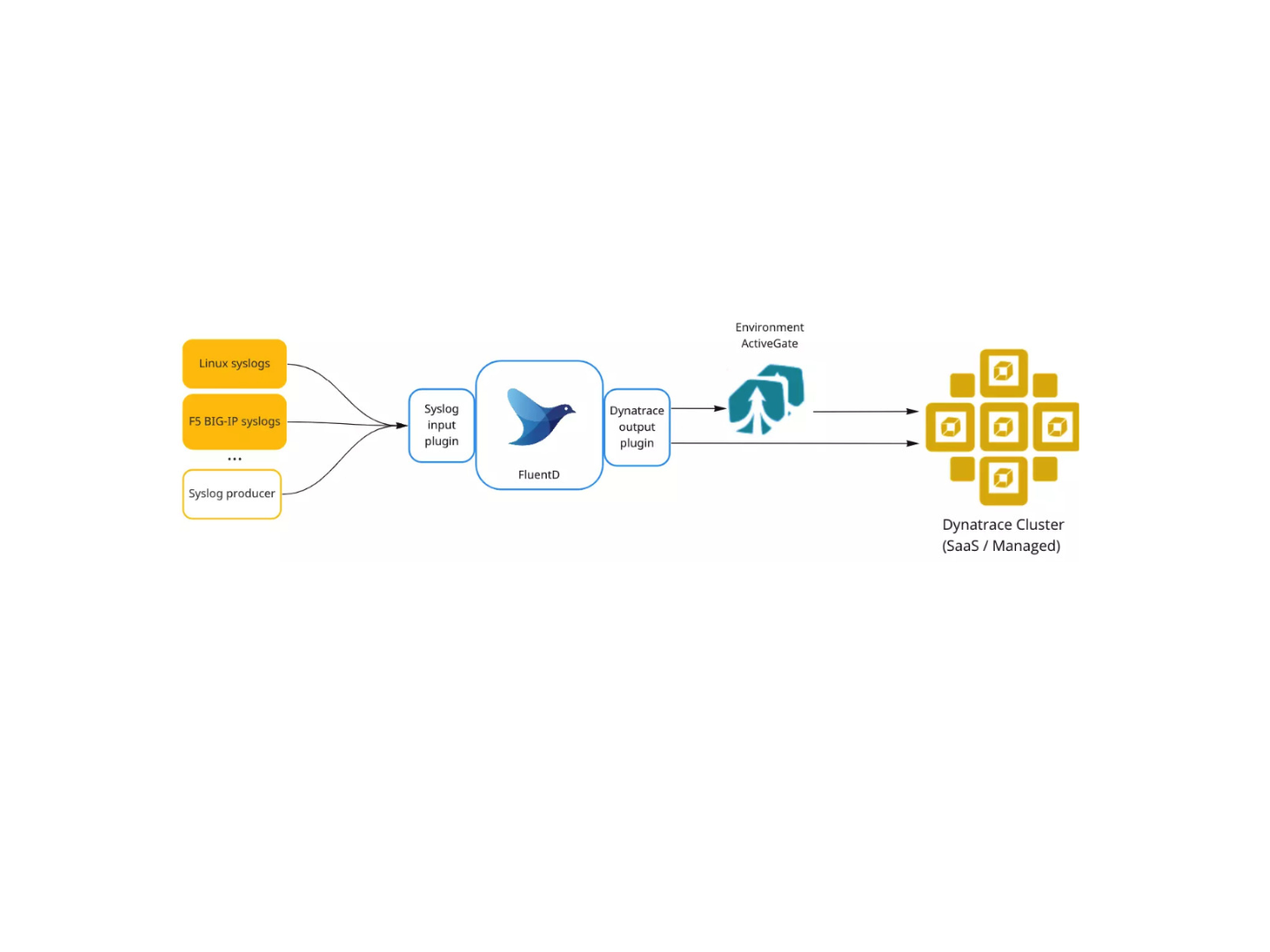
Set up the flow from Syslog producer over Fluentd to Dynatrace with the following steps:
Get a Dynatrace API token with the logs.ingest (Ingest Logs) scope
Add the following line to the syslog daemon configuration file /etc/rsyslog.conf (UDP protocol):
*.* @<fluentd host IP>:5140
*.* - instructs the daemon to forward all messages to the specified Fluentd instance listening on port 5140 and <fluentd host IP> needs to point to the IP address of Fluentd.
@@ - if you are using TCP, type two @ symbols
Refer to F5 BIG-IP documentation for procedures regarding remote Syslog configuration.
The Dynatrace software intelligence platform and its Davis AI engine depend on context-rich, high-quality data. You can provide the context for your data ingested via Generic log ingest API that supports a set of keys and semantic attributes. You can also provide custom attributes that don't require indexing in Dynatrace Grail database.
The syslog message often needs additional context to differentiate sources while analysing. In this example, there are two separate syslog endpoints exposed in Fluentd. One for linux syslogs and the second for f5 syslogs. This helps decorate log streams with meaningful log.source attribute. Fluentd configuration file would look like this:
<source>
    @type syslog
    port 5140
    bind 0.0.0.0
    tag system-linux
</source>

<source>
    @type syslog
    port 5141
    bind 0.0.0.0
    tag system-f5
</source>
Add log.source attribute based on fluentd tag.
<filter system-linux.**>
    @type record_transformer
    <record>
    log.source "linux syslogs"
    </record>
</filter>

<filter system-f5.**>
    @type record_transformer
    <record>
    log.source "f5 syslogs"
    </record>
 </filter>
Refer to Fluentd record_transformer filter plugin documentation for more details.