


Skip to technology filters Skip to main content
Dynatrace Hub

Extend the platform,
empower your team.

Popular searches:
Home hero bg
SlackSlack
Slack

Slack

Automate Slack messaging for security incidents, attacks, remediation, and more.

App
Free trialDocumentation
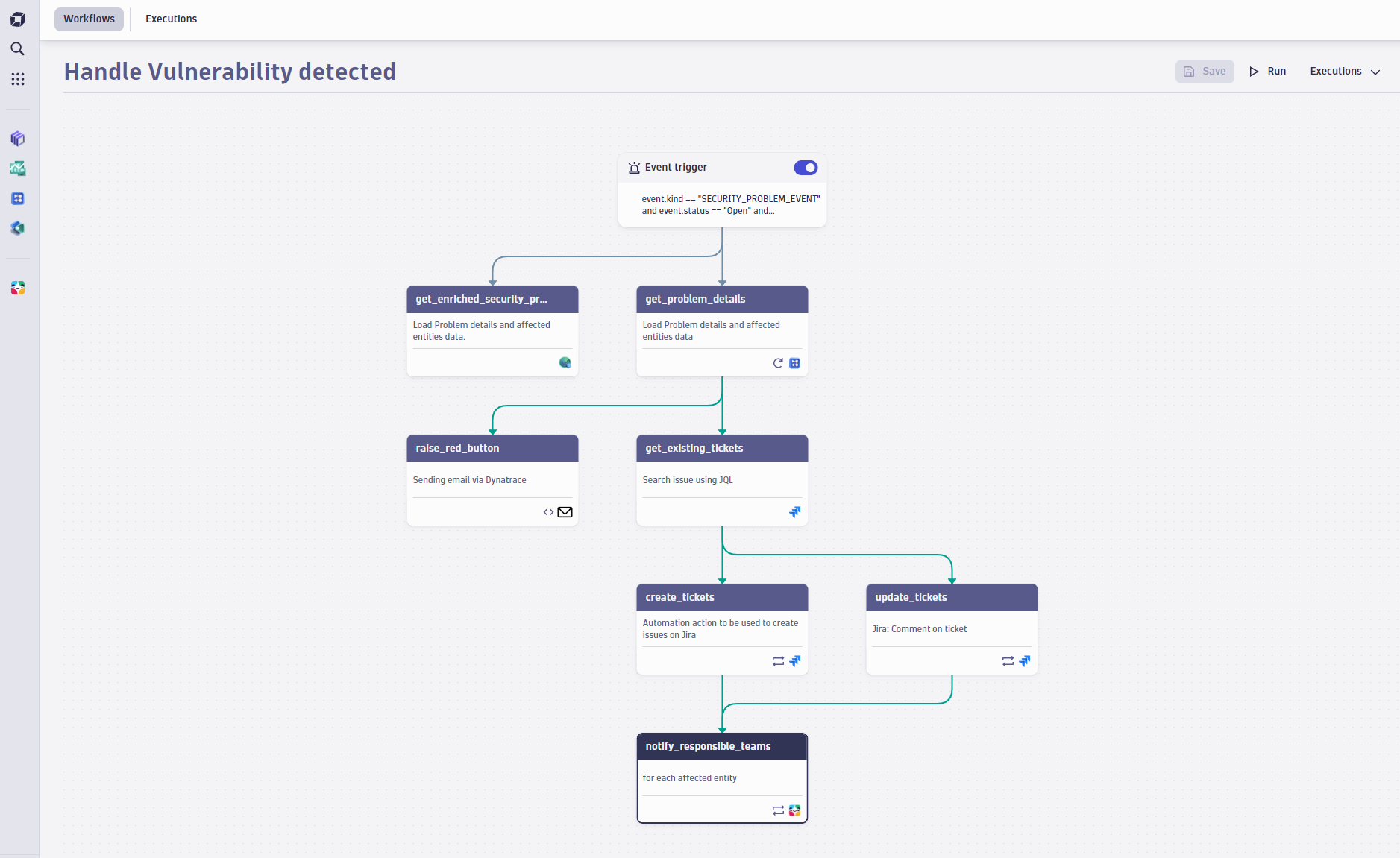
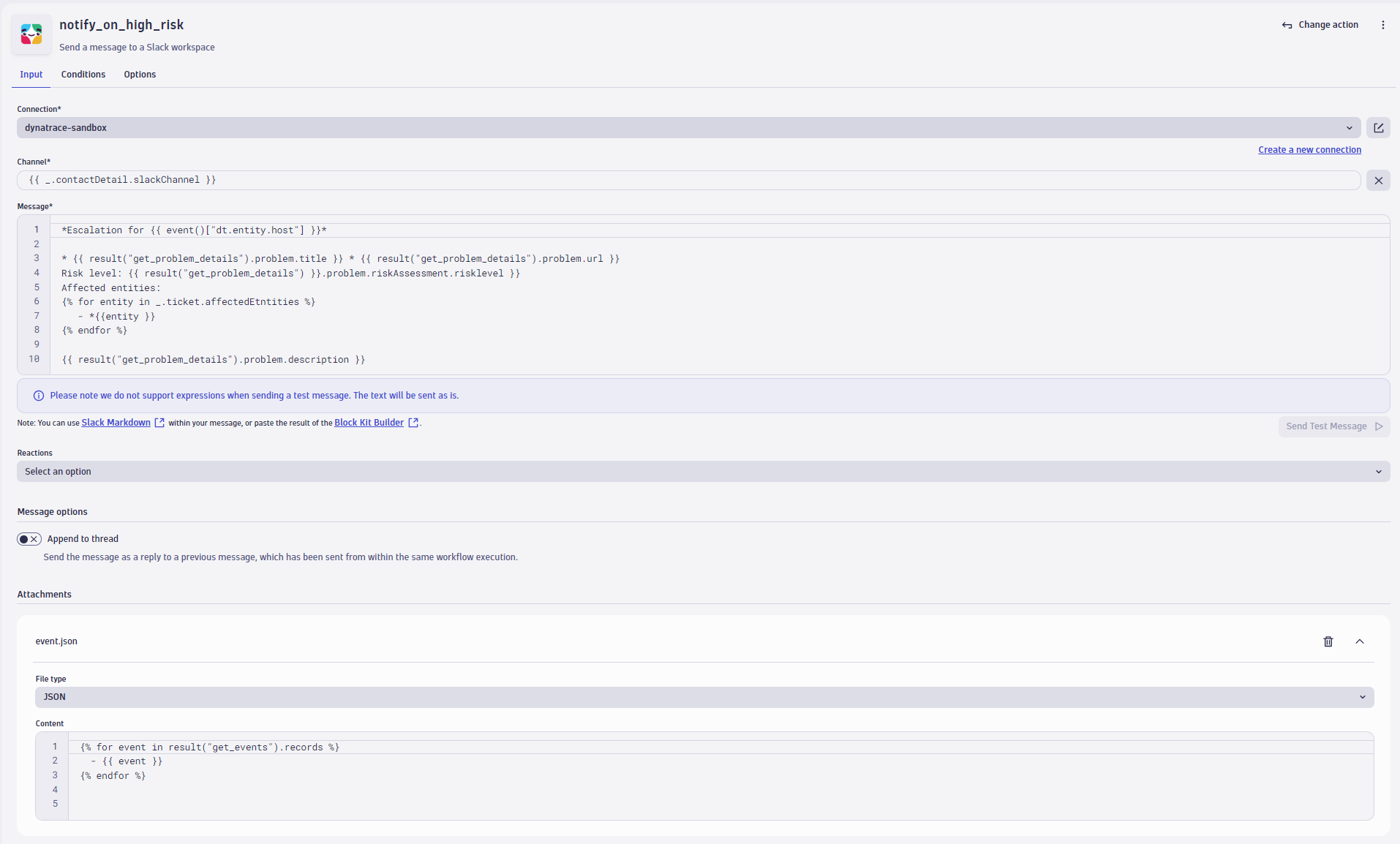
Slack is accessed through the Workflows app.You can compose advanced messages, leverage scripts, combine information from previous steps, append messages to threads, and add attachments, such as log files or reactions to a thread. Leverage ownership information to dynamically send messages to the correct channel and send a test message to ensure the connection works properly.
  • Product information
  • Release notes

Overview

Slack enables you to model communication flows within Dynatrace through actions like these:

Define various notification triggers
  • Use the power of DQL and leverage events to react to any problem, security incident, or attack within workflows.
  • Use Business events as a trigger to react on extended events like a failed release validation, certain log messages, or external system events.
  • Define a scheduler and be informed at specific time intervals.
Flexible content composing
  • Enrich message information with tags, hierarchy details, or any arbitrary entity information.
  • Leverage the expression builder for simple message composition.
  • Reuse workflow step results, such as creating a Jira ticket and posting the ticket number to a specific group channel.
  • Use Slack blocks to format your message.
  • Send a test message to ensure that a connection is configured properly.
Closed Loop Communication
  • Use ownership information to address the correct user groups and reduce repetitive configurations.
  • Update messages within a thread to inform users about changes to a problem state or the progress of a remediation.

Use cases

  • Send Slack notifications when a problem, security incident, or attack occurs.
  • Add reports, logs, and other files for improved insights.
  • Post updates about a problem status or remediation in progress to a Slack thread, giving visualization of the automation lifecycle.
  • Mark a Slack thread as done and add reactions when a problem is closed.

Get started

Install Slack. Then follow the instructions detailed in Dynatrace Documentation.

Before you start, make sure that Slack is installed, outbound connections are configured, and the connection to Slack is authorized.

We suggest that you follow the tutorial in Workflow Automation Creator for more details.

Dynatrace
Documentation
By Dynatrace
Dynatrace support center
Subscribe to new releases
Copy to clipboard

Related to Slack

Workflows logo

Workflows

Automate tasks in your IT landscape, remediate problems, and visualize processes

Full version history

ReleaseDate

Full version history

  • Removed Legacy File Upload Support – The send‑message action no longer supports the deprecated legacy file upload method, which has been officially removed from the Slack API. To continue using file uploads, ensure that the required scope files:read is granted. See the official documentation for details.
  • Thread Reply Enhancement for Intent – A direct link to a message can now be used inside the send-message intent when replying to a thread, making it easier to target and maintain context.

Full version history

  • Removed Send-Test-Message Button – The send-test-message button is now hidden when sending messages via intent, streamlining the interface.
  • Fixed Connector Management Titles – Resolved an issue where the title was incorrect when no entries were present in the connectors management view.

Full version history

  • Intent Schema Update Compatibility – Updated the app to support changes introduced in intent schema v0.8.0:
    • Added support for new fields: instantMessage and description
    • Removed deprecated fields: message, target and type
  • Bugfix for Action Widget - Fixed an issue that could cause the action widget to crash when provided with an invalid connection ID.

Full version history

  • Minor improvements - This release includes a fix for a documentation link.

Full version history

  • Various improvements and dependency updates.

Full version history

  • Bugfix for Connection Settings Form - Resolved an issue where the connection settings form remained open after editing a connection.
  • Improved Connection Management - When creating or editing a connection from within an intent, the form now opens in a new tab, offering better usability.

Full version history

  • Various improvements and dependency updates.

Full version history

  • New Intents - Reworked the send-message intent to enable forwarding of problems to Slack.
  • Access Control for Connectors Management - Added fine-grained access control for connections, enabling only specific users to have access to connection settings.
  • Improved Attachments Handling - If an attachment is added to message, but the content of it is not set, an error will now be thrown.
  • Attachments in Intents - Attachments can now be sent with intents.

Full version history

  • Grouped input fields - Improved the user experience by grouping related input fields, making navigation and usage easier.
  • Improved Threaded Messaging Feature - Added the ability to specify which thread a message should be attached to, enhancing message organization and context.
  • Bugfix - Fixed an issue where the attachment title input field would close when clicking a button that is part of the same field.

Full version history

  • Expression in Connection Selection - An expression can now be used when selecting the connection, providing greater flexibility and customization.
  • Enhanced Error Details - Added error details to Slack API error messages for improved troubleshooting.
  • Send Message Action - Increased the fetching duration for Slack channels to up to 120 seconds, allowing for more robust data retrieval.

Full version history

  • Connection Management - All connections of the App can now be managed via the newly released Settings App. To manage your connections got to Settings > Connections > Slack.

Full version history

  • New Connectors Management - Introduce a new, streamlined connection management experience with a modernized interface. This update makes adding and editing connections directly within workflows easier and provides connection control and convenience in one place.
  • App renamed to "Slack" - Streamlined the app name by removing the suffix “for Workflows”.

Full version history

  • Bugfix: Fixed an issue with dropdowns breaking in Chrome 129

Full version history

  • Send message action: The intent is now an add-on intent, meaning that it will show up in an in-app modal instead of a different window.
  • Send message action: Visual improvements

Full version history

  • Bugfix: Fixed an issue in the message field where the cursor occasionally jumped to the beginning of the editor.
  • Breaking change: Changed Connection list to an unordered list.
  • Updated the App icon.

Full version history

  • Update for uploading files - The file upload feature has been updated to align with Slack's newest functionality improvements. Users might now see a log message guiding them to update the necessary permissions for a seamless experience.
  • New file type for attachments - When adding attachments, the new file type CSV is now available.

Full version history

  • Maintenance release

Full version history

  • General App and performance improvements

Full version history

  • Performance optimizations for threading messages

Full version history

  • General App and performance improvements

Full version history

  • UI improvement - The attachments layout has a new design now, following more closely the platform standards.
  • UX improvement - Sending a test message is enhanced by a clearer user flow.

Full version history

1.2.5

Patch Changes

  • Fix inconsistency in the select channel component

1.2.4

Patch Changes

  • Removal of settings:objects:read permission since it is not needed anymore

1.2.3

Patch Changes

  • Improve UI of the Slack for Workflows app

1.2.2

Patch Changes

  • Improve error message when unable to fetch channels from Slack
  • Send message action now accepts JavaScript objects as message

1.2.1

Patch Changes

  • Improve input validation error message

1.2.0

Minor Changes

  • Allow "blocks" formatting to be used in messages

Patch Changes

  • Display error details when testing the connection failed

Full version history

1.2.4

Patch Changes

  • Removal of settings:objects:read permission since it is not needed anymore

1.2.3

Patch Changes

  • Improve UI of the Slack for Workflows app

1.2.2

Patch Changes

  • Improve error message when unable to fetch channels from Slack
  • Send message action now accepts JavaScript objects as message

1.2.1

Patch Changes

  • Improve input validation error message

1.2.0

Minor Changes

  • Allow "blocks" formatting to be used in messages

Patch Changes

  • Display error details when testing the connection failed

Full version history

1.2.3

Patch Changes

  • Improve UI of the Slack for Workflows app

1.2.2

Patch Changes

  • Improve error message when unable to fetch channels from Slack
  • Send message action now accepts JavaScript objects as message

1.2.1

Patch Changes

  • Improve input validation error message

1.2.0

Minor Changes

  • Allow "blocks" formatting to be used in messages

Patch Changes

  • Display error details when testing the connection failed

Full version history

1.2.1

Patch Changes

  • 551520d: Improve input validation error message

1.2.0

Minor Changes

  • Allow "blocks" formatting to be used in messages

Patch Changes

  • Display error details when testing the connection failed

Full version history

1.0.0

Major Changes

  • Release 1.0

Full version history

0.4.12

Patch Changes

  • 1095656: Reduce bundle size

0.4.11

Patch Changes

  • b918ece: Required maintenance update

0.4.10

Patch Changes

  • c4573b1: Link to Workflows App

0.4.9

Patch Changes

  • 3343d0a: Minor improvements

0.4.8

Patch Changes

  • d5743dc: Improve User Experience
  • 297b633: Fix Slack channel selector to display the correct channel when editing a workflow
  • b039fdd: Fix channel selector not cleared correctly when changing Slack Connection

0.4.7

Patch Changes

  • 716d9b1: Fix channel selector clearing when invalid connection was selection
  • cce38a4: Document API function and action contracts
  • d38c867: Added a link for Slack Formatting
  • 51f347c: Allow UUIDs and numbers as WorkflowID and ExecutionID
  • 76f4b87: Fix bug that causes the action to timeout if app-state:delete permission is not granted

0.4.6

Patch Changes

  • 8a955db: Fetch only relevant data in ConnectionPicker
  • afea3a1: Added changeset for release notes
  • 8a955db: Fixed: Auto-join slack channels when using reactions on a message

0.4.5

Major Changes

  • Added "Slack: Send message" action
  • Send Slack Messages to a channel or within a thread
  • Upload a file to a channel
  • Ability to react on a message with three default reactions: Thumbs up, eyes (looking) and check mark

Full version history

0.4.10

Patch Changes

  • c4573b1: Link to Workflows App

0.4.9

Patch Changes

  • 3343d0a: Minor improvements

0.4.8

Patch Changes

  • d5743dc: Improve User Experience
  • 297b633: Fix Slack channel selector to display the correct channel when editing a workflow
  • b039fdd: Fix channel selector not cleared correctly when changing Slack Connection

0.4.7

Patch Changes

  • 716d9b1: Fix channel selector clearing when invalid connection was selection
  • cce38a4: Document API function and action contracts
  • d38c867: Added a link for Slack Formatting
  • 51f347c: Allow UUIDs and numbers as WorkflowID and ExecutionID
  • 76f4b87: Fix bug that causes the action to timeout if app-state:delete permission is not granted

0.4.6

Patch Changes

  • 8a955db: Fetch only relevant data in ConnectionPicker
  • afea3a1: Added changeset for release notes
  • 8a955db: Fixed: Auto-join slack channels when using reactions on a message

0.4.5

Major Changes

  • Added "Slack: Send message" action
  • Send Slack Messages to a channel or within a thread
  • Upload a file to a channel
  • Ability to react on a message with three default reactions: Thumbs up, eyes (looking) and check mark

Full version history

No release notes

Dynatrace Hub
Hub HomeGet data into DynatraceBuild your own app
Log Management and AnalyticsKubernetesAI and LLM ObservabilityInfrastructure ObservabilitySoftware DeliveryApplication ObservabilityApplication SecurityDigital ExperienceBusiness Observability
Filter
Type
Built and maintained by
Deployment model
SaaS
  • SaaS
  • Managed
Partner FinderBecome a partnerDynatrace Developer

All

769 Results filtered by:

Chroma logo

Chroma

Gain insights into the health of your vector and embedding databases from Chroma

Technology

Amazon Kinesis Video Streams logo

Amazon Kinesis Video Streams

Provides you SDKs to install on your devices to make it easy to stream media.

Technology

Fluentd logo

Fluentd

Stream log data to Dynatrace via Fluentd for analysis.

Technology

Palo Alto firewalls logo

Palo Alto firewalls

Palo Alto extension for problems detection

Extension

AWS Elastic Beanstalk logo

AWS Elastic Beanstalk

Quickly deploy and manage applications in the AWS Cloud without having to learn about the infrastructure beneath.

Technology

Workflows logo

Workflows

Automate tasks in your IT landscape, remediate problems, and visualize processes

App
Security Posture Management logo

Security Posture Management

Detect, prioritize, and remediate security and compliance findings with SPM.

App

Amazon Route 53 logo

Amazon Route 53

Effectively connects user requests to infrastructure running in AWS.

Technology

Amazon Inspector logo

Amazon Inspector

Tests the network accessibility of your EC2 instances and the security state of your applications that run on those instances.

Technology

NGINX Plus logo

NGINX Plus

All‑in‑one web server, load balancer, content cache, and media streaming.

Technology

Databases logo

Databases

Easily monitor, troubleshoot, and optimize your entire database fleets.

App

Amazon DocumentDB logo

Amazon DocumentDB

Amazon DocumentDB (with MongoDB compatibility) is a fast, reliable, and fully managed database service.

Technology

Dynatrace MCP Server logo

Dynatrace MCP Server

Fuel your AI agents with high quality data and real-time production insights

Technology
IBM IMS SOAP Gateway logo

IBM IMS SOAP Gateway

Intelligently monitor your transactions end-to-end and analyze the performance of your IMS SOAP Gateway.

Technology

Amazon Keyspaces for Apache Cassandra logo

Amazon Keyspaces for Apache Cassandra

Scalable, highly available, and managed Apache Cassandra–compatible database service.

Technology

Apache Camel logo

Apache Camel

Intelligently monitor, analyze, and optimize your integration framework and all applications deployed in your stack.

Technology

Amazon Elastic Kubernetes Service (EKS) logo

Amazon Elastic Kubernetes Service (EKS)

Harness automation and AI to simplify Kubernetes observability at scale.

Technology

WordPress logo

WordPress

Content management system written in PHP and paired with a MySQL or MariaDB database.

Technology

Azure Cosmos DB logo

Azure Cosmos DB

Fully managed and serverless distributed database supporting open-source PostgreSQL, MongoDB, and Apache Cassandra.

Technology

AWS Glue logo

AWS Glue

Fully managed extract, transform, and load (ETL) service.

Technology

Azure Event Hub Clusters logo

Azure Event Hub Clusters

Big data streaming platform and event ingestion service. It can receive and process millions of events per second.

Technology

Confluent Cloud (Kafka) logo

Confluent Cloud (Kafka)

Remotely monitor your Confluent Cloud Kafka Clusters and other resources!

Extension
Kong - Prometheus logo

Kong - Prometheus

Monitor Prometheus metrics exposed by Kong and proxied upstream services

Extension

BOSH bpm logo

BOSH bpm

Automated monitoring of platform processes running in BOSH bpm containers.

Technology

Prometheus in Kubernetes logo

Prometheus in Kubernetes

Collect metrics from Prometheus exporters in Kubernetes for Dynatrace analytics

Technology

Nutanix Clusters logo

Nutanix Clusters

Monitor Nutanix clusters' performance, usage and availability, with Nutanix API.

Extension
Azure Service-Fabric logo

Azure Service-Fabric

Intelligent end-to-end observability for serverless and hybrid environments using Azure Service Fabric.

Technology

Luna Network HSM Device logo

Luna Network HSM Device

Monitor your Luna Network Hardware Security Module (HSM) Devices through SNMP.

Extension

Consul Service Mesh (StatsD) logo

Consul Service Mesh (StatsD)

Extend visibility into your Consul Service Mesh instances to monitor health and improve performance.

Extension

Azure Relays logo

Azure Relays

Enables you to securely expose services that run in your corporate network to the public cloud.

Technology

Microsoft IIS logo

Microsoft IIS

Flexible and secure web server for hosting with Windows Server.

Extension

Kubernetes Monitoring Statistics logo

Kubernetes Monitoring Statistics

Troubleshoot your Dynatrace Kubernetes monitoring and Prometheus integration.

Extension
Google Cloud logo

Google Cloud

Meet your business challenges head on with cloud computing services from Google.

Technology
Snyk logo

Snyk

Ingest Snyk vulnerability findings, scans, and audit logs.

Extension

Amazon EventBridge logo

Amazon EventBridge

Serverless event bus to connect applications together using data from your own applications, integrated SaaS applications, and AWS services.

Technology

Ruby logo

Ruby

Dynatrace monitors your Ruby applications and services on the process level.

Technology

Apache OpenEJB logo

Apache OpenEJB

Automatically and intelligently monitor, analyze and optimize your applications based on Apache OpenEJB.

Technology
Log ingestion API logo

Log ingestion API

Stream your logs and log records to Dynatrace via the log ingest API

Technology
Citrix DaaS & Virtual Apps and Desktops logo

Citrix DaaS & Virtual Apps and Desktops

Gain insight into your Citrix DaaS & Virtual Apps and Desktops environments

Extension

Azure Device Provisioning Service logo

Azure Device Provisioning Service

Helper service for IoT Hub that enables just-in-time provisioning to the right IoT hub without human intervention.

Technology

Milvus logo

Milvus

Gain insights about vector database resource utilization and cache behavior

Technology

Google Memorystore logo

Google Memorystore

Get insights into Google Memorystore service metrics collected from the Google Operations API to ensure health of your cloud infrastructure.

Extension

Azul Platform Core (Zulu) logo

Azul Platform Core (Zulu)

Automatically and intelligently monitor, analyze, and optimize the performance of your virtual machine.

Technology

VirusTotal logo

VirusTotal

Enrich observables with threat intelligence from VirusTotal.

App

AWS Outposts logo

AWS Outposts

Fully managed service extending AWS infrastructure, services, APIs and more.

Technology

Databricks Workspace logo

Databricks Workspace

Remotely monitor your Databricks Workspaces!

Extension

LlamaIndex logo

LlamaIndex

Monitor your LLM-powered agents and workflows built with LlamaIndex framework.

Technology
UPS Device logo

UPS Device

Monitor your Uninterruptible Power Supplies (UPS) over SNMP

Extension

TensorFlow Keras logo

TensorFlow Keras

Observe the training progress of TensorFlow Keras AI models

Technology

Amazon Elastic Container Service (ECS) logo

Amazon Elastic Container Service (ECS)

Fully managed container orchestration service.

Technology