

Skip to technology filters Skip to main content
Dynatrace Hub

Extend the platform,
empower your team.

Popular searches:
Home hero bg
Microsoft Hyper-V InfrastructureMicrosoft Hyper-V Infrastructure
Microsoft Hyper-V Infrastructure

Microsoft Hyper-V Infrastructure

Monitor health and performance of the Hyper-V clusters, hosts and VMs.

Extension
Free trialDocumentation
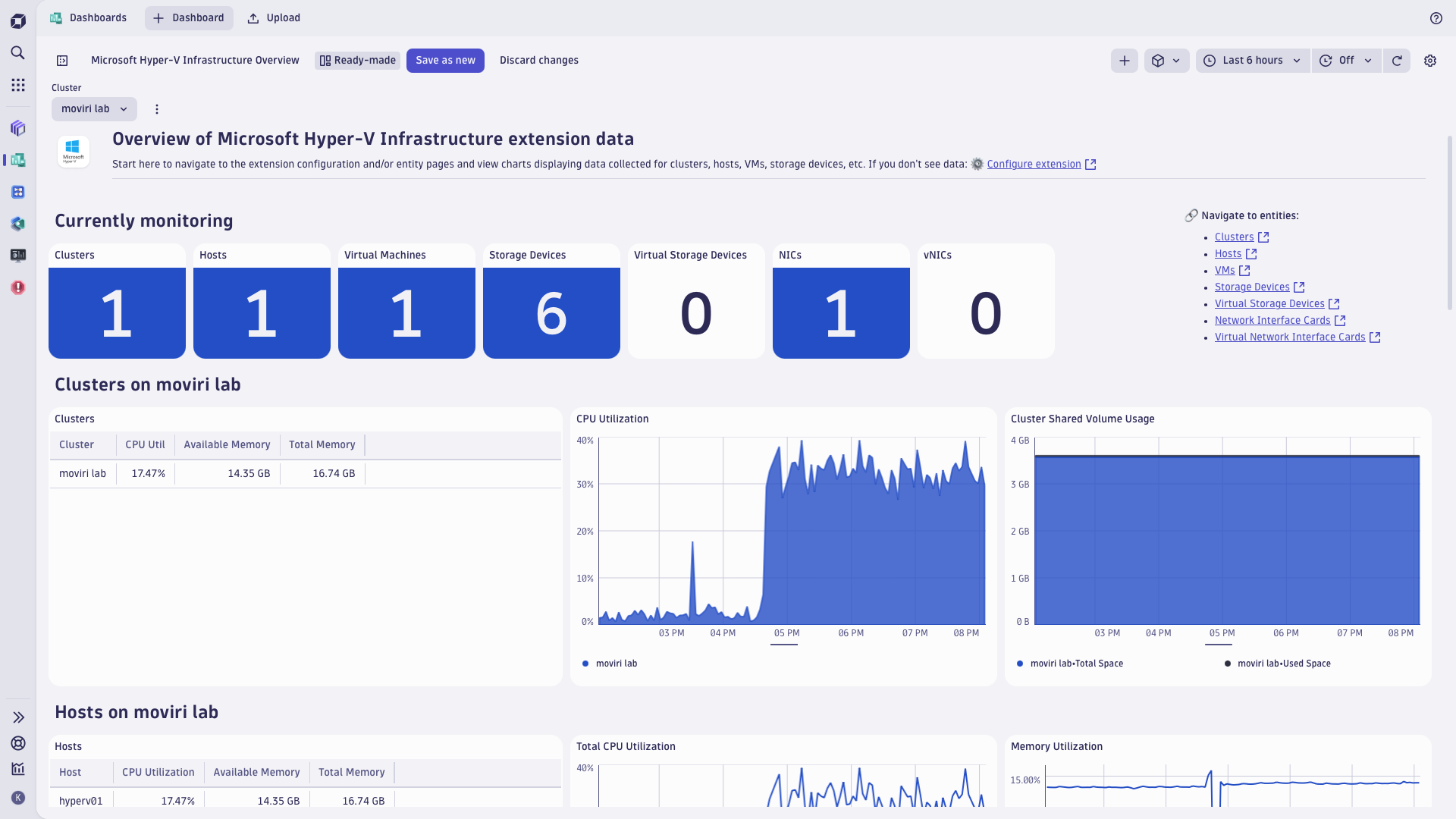
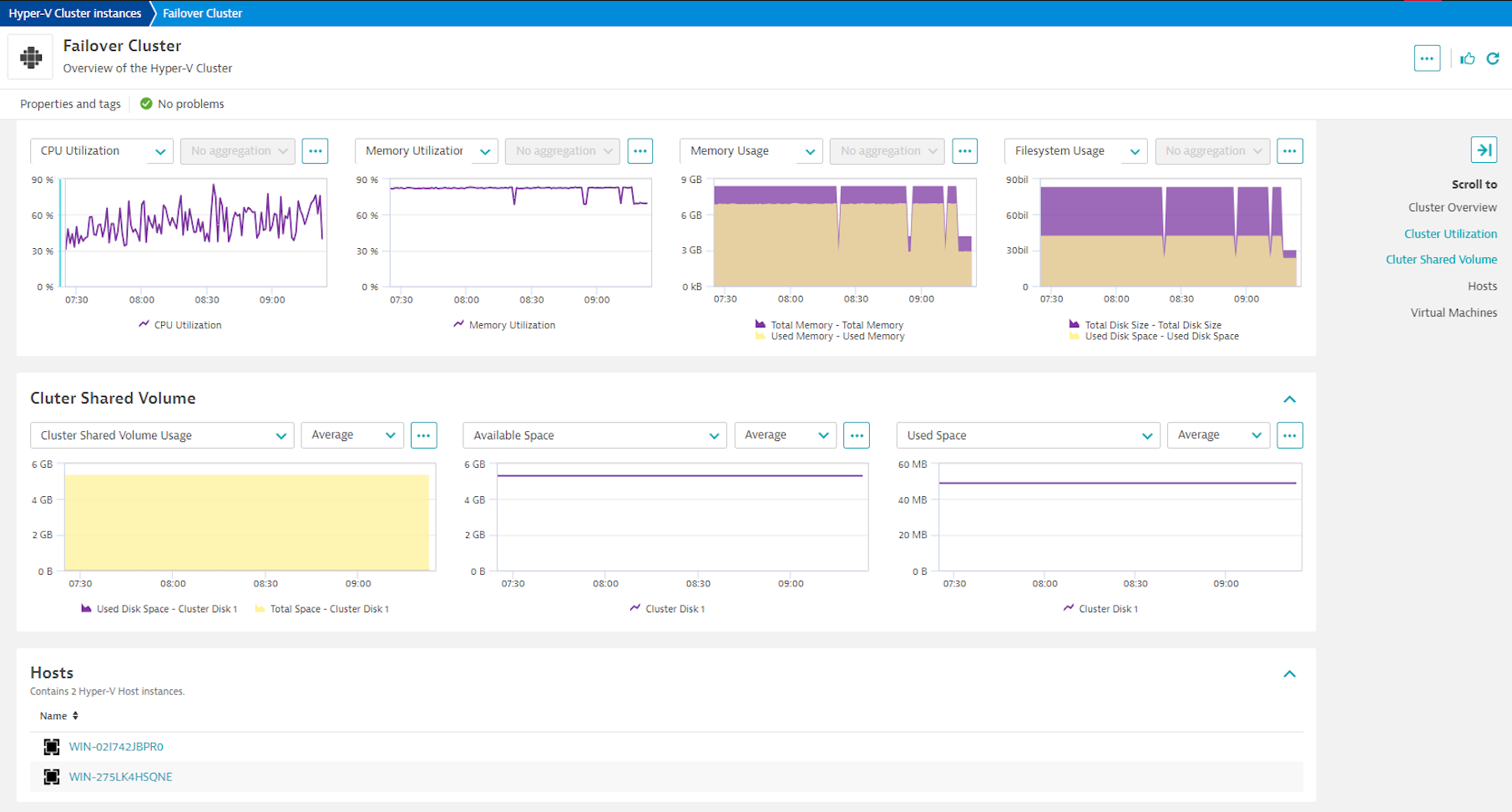
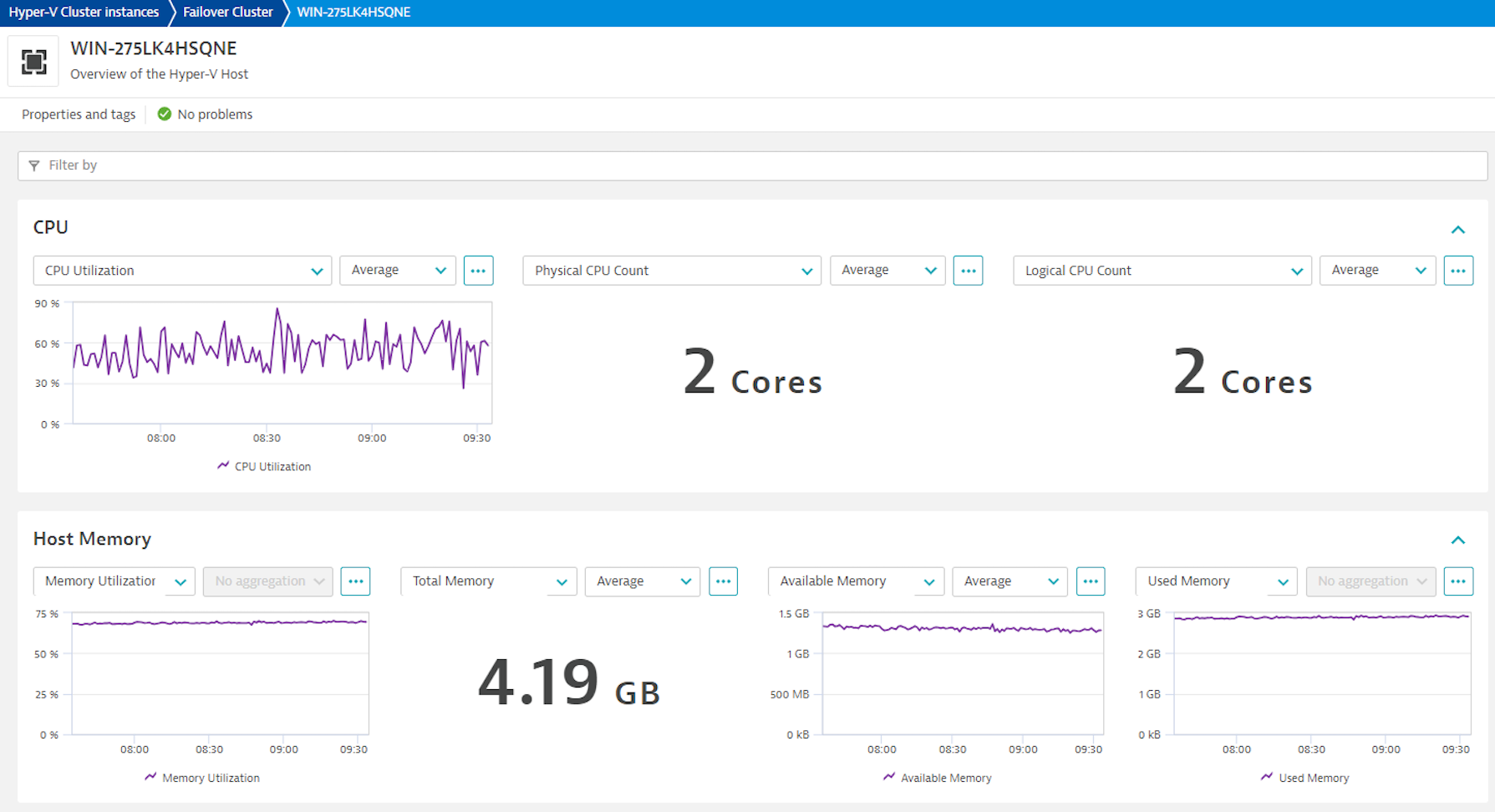
Hyper-V top level dashboardFailover cluster overviewFailover cluster performance metricsHyper-V host overview
  • Product information
  • Release notes

Overview

Get insights into performance of the Hyper-V fabric, tracking health, performance and resource utilization of the Hyper-V VMs, together with the context of their host and cluster resources. Monitor Hyper-V clusters, detect problems ahead of serious impact, and pinpoint the bottlenecks in the virtualization and application layer, including:

  • Processor bottlenecks
  • Memory shortages
  • Network overload
  • Storage shortages
  • Slowness in the dependent applications hosted on the Hyper-V cluster

Hyper-V extension leverages PowerShell cmdlets and WMI queries to collect data from the Windows hypervisor, following best practices employed by Microsoft, as well as Dynatrace customers who contributed to validation of this extension in real-life situations.

Use cases

  • Monitor health and performance of your Hyper-V cluster, using built-in analysis screens and easy-to-navigate dashboards
  • Make sure resources are split optimally between the virtual machines
  • Relate performance of the applications and VMs monitored with OneAgent to the underlying Hyper-V resources allotted to the VMs

Compatibility information

This extension requires:

  • x64 OS with BIOS-activated virtualization:
    • Windows 10 Enterprise/Pro/Education
    • Windows Server 2016 or newer
  • Hyper-V VM Configuration Version 9.0 or higher

Note on topological relationships between discovered Hyper-V VMs and OneAgent-monitored VM instances:

  • This extension maintains SAME_AS relationship between discovered VMs and OneAgent-monitored instances of the guest OS, using IP address as the join property.
  • This relationship enables:
    • Davis AI analytics to look together at metrics obtained by this extension and from OneAgent, to completely characterize monitored guest OS instances performance
    • Discovery and Coverage app to suggest which discovered VMs should be instrumented with OneAgent for full visibility into performance
  • This relationship works for known Windows guest OSes, but has limitations when guest OS is Linux. This limitation stems from the fact that on Hyper-V, Linux guest OS should be instrumented with the Microsoft's Linux Integration Service, while this service supports limited spectrum of the Linux distributions. See the link for details.
Dynatrace
DocumentationMore Information
By Dynatrace
Dynatrace support center
Subscribe to new releases
Copy to clipboard

Extension content

Content typeNumber of items included
list screen layout
7
screen injections
1
screen properties
2
document dashboard
1
alert template
10
screen dql table
7
metric metadata
51
generic type
7
screen chart groups
32
screen entities lists
11
alerts
10
generic relationship
8
screen layout
14
dashboards
1

Feature sets

Below is a complete list of the feature sets provided in this version. To ensure a good fit for your needs, individual feature sets can be activated and deactivated by your administrator during configuration.

Feature setsNumber of metrics included
Metric nameMetric keyDescriptionUnit
Disk Read Ratehyperv.host.disk.read_rate-PerSecond
Disk Write Ratehyperv.host.disk.write_rate-PerSecond
Metric nameMetric keyDescriptionUnit
Network Bytes Senthyperv.host.network_interface_card.bytes_sent-BytePerSecond
Network Bytes Receivedhyperv.host.network_interface_card.bytes_received-BytePerSecond
Network Bytes Transferredhyperv.host.network_interface_card.bytes_transferred-BytePerSecond
Metric nameMetric keyDescriptionUnit
Total Disk Sizehyperv.host.disk.total_size-Byte
Available Disk Spacehyperv.host.disk.space_free-Byte
Metric nameMetric keyDescriptionUnit
CPU Counthyperv.virtual_machine.cpu_count.gauge-Cores
CPU Reservehyperv.virtual_machine.cpu_reserve-Percent
CPU Utilizationhyperv.virtual_machine.cpu_utilizationCPU Utilization % relative to the hosts total capacity.Percent
Real CPU Utilizationhyperv.virtual_machine.real_cpu_utilizationCPU Utilization % as seen on the VMPercent
Total Memoryhyperv.virtual_machine.total_memory-Byte
Used Memoryhyperv.virtual_machine.used_memory-Byte
Memory Pressurehyperv.virtual_machine.memory_pressure-Percent
Metric nameMetric keyDescriptionUnit
Virtual Machine Counthyperv.host.virtual_machine_count.gauge-Count
Running Virtual Machine Counthyperv.host.running_virtual_machine_count.gauge-Count
Uptimehyperv.host.uptime-Second
Metric nameMetric keyDescriptionUnit
Network Bytes Senthyperv.virtual_machine.network_interface_card.bytes_sent-BytePerSecond
Network Bytes Receivedhyperv.virtual_machine.network_interface_card.bytes_received-BytePerSecond
Network Bytes Transferredhyperv.virtual_machine.network_interface_card.bytes_transferred-BytePerSecond
Metric nameMetric keyDescriptionUnit
Total Memoryhyperv.host.total_memory-KiloByte
Available Memoryhyperv.host.available_memory-KiloByte
Metric nameMetric keyDescriptionUnit
Total Disk Spacehyperv.virtual_machine.storage_device.total_disk_space-Byte
Used Disk Spacehyperv.virtual_machine.storage_device.used_disk_space-Byte
Metric nameMetric keyDescriptionUnit
Network Packets Senthyperv.virtual_machine.network_interface_card.packets_sent-PerSecond
Network Packets Receivedhyperv.virtual_machine.network_interface_card.packets_received-PerSecond
Network Packets Transferredhyperv.virtual_machine.network_interface_card.packets_transferred-PerSecond
Metric nameMetric keyDescriptionUnit
CPU Utilizationhyperv.host.cpu_utilization-Percent
Logical CPU Counthyperv.host.logical_cpu_count.gauge-Cores
Physical CPU Counthyperv.host.physical_cpu_count.gauge-Cores
CPU Reservehyperv.host.cpu_reserve-Percent
Metric nameMetric keyDescriptionUnit
Total Spacehyperv.cluster_shared_volume.total_space-Byte
Used Disk Spacehyperv.cluster_shared_volume.used_space-Byte
Available Disk Spacehyperv.cluster_shared_volume.free_space-Byte
Metric nameMetric keyDescriptionUnit
Network Packets Senthyperv.host.network_interface_card.packets_sent-BytePerSecond
Network Packets Receivedhyperv.host.network_interface_card.packets_received-BytePerSecond
Network Packets Transferredhyperv.host.network_interface_card.packets_transferred-BytePerSecond
Metric nameMetric keyDescriptionUnit
Disk Read Ratehyperv.virtual_machine.storage_device.read_rate-PerSecond
Disk Write Ratehyperv.virtual_machine.storage_device.write_rate-PerSecond

Related to Microsoft Hyper-V Infrastructure

Microsoft Hyper-V Virtual Machines logo

Microsoft Hyper-V Virtual Machines

Monitor Microsoft Hyper-V virtual machines from the guest OS perspective.

Full version history

To have more information on how to install the downloaded package, please follow the instructions on this page.
ReleaseDate

Full version history

⚠️ Important Change:

  • This release requires a Minimum Dynatrace Version version of 1.318.0 or higher.

New in this version:

  • Added ALERT_TEMPLATES for anomaly detectors in the Davis Anomaly Detection app (latest Dynatrace only).

Full version history

Hyper-V extension release notes

Full version history

3.0.9

Published Thu Dec 4 2025

Patch level changes

  • Expire virtual machines so they don't appear on multiple hosts after a VM has been migrated
  • Clean up the DB to avoid re-ingesting existing datapoints

3.0.7

Published Thu Aug 28 2025

Patch level changes

  • Fixed an issue with improper filtering when the Hyper-V host is not part of a cluster or fails to retrieve the cluster name
  • Refreshed alert definitions

3.0.5

Published Fri Aug 08 2025

⚠️IMPORTANT CHANGES

  1. This extension release requires Dynatrace cluster version 1.313 or later.
  2. The extension now runs with elevated privileges, which requires editing the extensionsuser.conf to allow the extension to run with such privileges. In return, you get much improved scalability and stability of the monitoring. See the tile text for more details.
  3. Breaking change this upgrade will require recreation of the monitoring configurations.

New features

  • Added the ability to interpret entity filters as an allow or deny rule, which simplifies filtering configuration and makes it more flexible.
  • The dt.security_context attribute is now propagated to all entities created by the extension. When enabling entity access control based on dt.security_context ensure you set the Grail security context destination property to dt.security_context.
  • Enabled the extension to present the Dynatrace Platform (a.k.a. Gen3) entity details screens in the future platform apps that will expect these screens.

2.2.39

Published Tue Jun 24 2025

⚠️IMPORTANT CHANGE This extension release requires Dynatrace cluster version 1.310 or later. ⚠️If your Dynatrace cluster is on an earlier version, use previous release of this extension, tagged 2.2.38.

New features

  • Added the Dynatrace Platform (a.k.a. Gen3) dashboard

Plus, carry-on from release 2.2.38

  • Added an option to choose between Interactive and Batch logon types
  • Bug fixes related to the Cluster Shared Volume and Disk metrics reporting
  • Switch to use FQDNs instead of hostnames wherever possible in the cluster and host identification

2.2.38

Published Tue Jun 24 2025

New features

  • Added an option to choose between Interactive and Batch logon types

Patch level changes

  • Bug fixes related to the Cluster Shared Volume and Disk metrics reporting
  • Switch to use FQDNs instead of hostnames wherever possible in the cluster and host identification

2.2.21

Published Thu Mar 27 2025

Patch level changes

  • fixed CPU utilization metric readouts that were artificially inflated for multicore processors

2.2.15

Published Mon Feb 10 2025

New features

  • Added Real CPU Utilization metric

Patch level changes

  • Fixed slow memory leak showing up in some environments where PowerShell calls were not cleared entirely after each execution due to race conditions

2.2.11

Published Fri Aug 16 2024

Patch level changes

  • Changed way of reading the cluster name to PowerShell instead of WMI - to address an issue with access permissions

2.2.10

Published Tue Aug 06 2024

New features

  • Generate a log event when a VM is moved between hosts

Patch level changes

  • Fixed issue with multiple threads modifying the same list of VMs
  • Improve error handling for WMI queries

2.2.5

Published Fri Jul 12 2024

Patch level changes

  • Added ability to set a debug log level and the collection frequency
  • A fix for an incorrect count of VMs on one of the UA screens

2.2.4

Published Wed Jul 03 2024

Patch level changes

  • Fix locks that hindered performance and clean up the VM stats

2.0.15

Published Wed May 15 2024

New features

  • Added option to use the credential vault to manage user credentials required by the extension

Patch level changes

  • Split VM collection into 3 separate "query" methods to improve execution time
  • Added sourceEntityType for all metrics

2.0.14

Published Fri Apr 05 2024

Patch level changes

  • Fixed alert json for func metrics since they were using metricId instead of metricSelector.

2.0.13

Published Thu Apr 04 2024

New features

  • Added SAME_AS relationship between discovered VMs and OneAgent-monitored instances of the guest OS, using IP address as the join property. This relationship enables
    • Davis AI analytics to look together at metrics obtained by this extension and from OneAgent, to completely characterize monitored guest OS instances performance
    • Discovery and Coverage app to suggest which discovered VMs should be instrumented with OneAgent for full visibility into performance

Patch level changes

  • Stated the requirement that Windows user account who runs the extension requires Read and Write access to the Windows TEMP directory.

2.0.12

Published Mon Feb 26 2024

New features

  • This release introduces an important change Hyper-V extension requires local activation now (i..e. activation on an OneAgent-instrumented host).
  • Previous releases allowed remote installation (i.e. activation on an ActiveGate), but because of Hyper-V specifics, this very often caused permission issues that severely limited extension functionality and weren't solvable. So anyway - we have been advising you to move to local activation. Now it's the only way to activate this extension.

Patch level changes

  • Additionally, this release fixes some issues with filtering monitored entities.

2.0.10

Published Fri Feb 09 2024

Patch level changes

  • Fixed reporting of the rate metrics and occasional issues with metric extraction from nested environments.

2.0.3

Published Wed Nov 29 2023

Patch level changes

  • Fixed a bug affecting extension activation under certain conditions. Extension logs on affected systems reported "AttributeError 'dict' object has no attribute 'feature_sets' "

2.0.0

Published Wed Sep 27 2023

Dynatrace Hub
Hub HomeGet data into DynatraceBuild your own app
Log Management and AnalyticsKubernetesAI and LLM ObservabilityInfrastructure ObservabilitySoftware DeliveryApplication ObservabilityApplication SecurityDigital ExperienceBusiness Observability
Filter
Type
Built and maintained by
Deployment model
SaaS
  • SaaS
  • Managed
Partner FinderBecome a partnerDynatrace Developer

All

769 Results filtered by:

Chroma logo

Chroma

Gain insights into the health of your vector and embedding databases from Chroma

Technology

Amazon Kinesis Video Streams logo

Amazon Kinesis Video Streams

Provides you SDKs to install on your devices to make it easy to stream media.

Technology

Fluentd logo

Fluentd

Stream log data to Dynatrace via Fluentd for analysis.

Technology

Palo Alto firewalls logo

Palo Alto firewalls

Palo Alto extension for problems detection

Extension

AWS Elastic Beanstalk logo

AWS Elastic Beanstalk

Quickly deploy and manage applications in the AWS Cloud without having to learn about the infrastructure beneath.

Technology

Workflows logo

Workflows

Automate tasks in your IT landscape, remediate problems, and visualize processes

App
Security Posture Management logo

Security Posture Management

Detect, prioritize, and remediate security and compliance findings with SPM.

App

Amazon Route 53 logo

Amazon Route 53

Effectively connects user requests to infrastructure running in AWS.

Technology

Amazon Inspector logo

Amazon Inspector

Tests the network accessibility of your EC2 instances and the security state of your applications that run on those instances.

Technology

NGINX Plus logo

NGINX Plus

All‑in‑one web server, load balancer, content cache, and media streaming.

Technology

Databases logo

Databases

Easily monitor, troubleshoot, and optimize your entire database fleets.

App
Amazon DocumentDB logo

Amazon DocumentDB

Amazon DocumentDB (with MongoDB compatibility) is a fast, reliable, and fully managed database service.

Technology

Dynatrace MCP Server logo

Dynatrace MCP Server

Fuel your AI agents with high quality data and real-time production insights

Technology
IBM IMS SOAP Gateway logo

IBM IMS SOAP Gateway

Intelligently monitor your transactions end-to-end and analyze the performance of your IMS SOAP Gateway.

Technology

Amazon Keyspaces for Apache Cassandra logo

Amazon Keyspaces for Apache Cassandra

Scalable, highly available, and managed Apache Cassandra–compatible database service.

Technology

Apache Camel logo

Apache Camel

Intelligently monitor, analyze, and optimize your integration framework and all applications deployed in your stack.

Technology

Amazon Elastic Kubernetes Service (EKS) logo

Amazon Elastic Kubernetes Service (EKS)

Harness automation and AI to simplify Kubernetes observability at scale.

Technology

WordPress logo

WordPress

Content management system written in PHP and paired with a MySQL or MariaDB database.

Technology

Azure Cosmos DB logo

Azure Cosmos DB

Fully managed and serverless distributed database supporting open-source PostgreSQL, MongoDB, and Apache Cassandra.

Technology

AWS Glue logo

AWS Glue

Fully managed extract, transform, and load (ETL) service.

Technology

Azure Event Hub Clusters logo

Azure Event Hub Clusters

Big data streaming platform and event ingestion service. It can receive and process millions of events per second.

Technology

Confluent Cloud (Kafka) logo

Confluent Cloud (Kafka)

Remotely monitor your Confluent Cloud Kafka Clusters and other resources!

Extension
Kong - Prometheus logo

Kong - Prometheus

Monitor Prometheus metrics exposed by Kong and proxied upstream services

Extension

BOSH bpm logo

BOSH bpm

Automated monitoring of platform processes running in BOSH bpm containers.

Technology

Prometheus in Kubernetes logo

Prometheus in Kubernetes

Collect metrics from Prometheus exporters in Kubernetes for Dynatrace analytics

Technology

Nutanix Clusters logo

Nutanix Clusters

Monitor Nutanix clusters' performance, usage and availability, with Nutanix API.

Extension

Azure Service-Fabric logo

Azure Service-Fabric

Intelligent end-to-end observability for serverless and hybrid environments using Azure Service Fabric.

Technology

Luna Network HSM Device logo

Luna Network HSM Device

Monitor your Luna Network Hardware Security Module (HSM) Devices through SNMP.

Extension

Consul Service Mesh (StatsD) logo

Consul Service Mesh (StatsD)

Extend visibility into your Consul Service Mesh instances to monitor health and improve performance.

Extension

Azure Relays logo

Azure Relays

Enables you to securely expose services that run in your corporate network to the public cloud.

Technology

Microsoft IIS logo

Microsoft IIS

Flexible and secure web server for hosting with Windows Server.

Extension

Kubernetes Monitoring Statistics logo

Kubernetes Monitoring Statistics

Troubleshoot your Dynatrace Kubernetes monitoring and Prometheus integration.

Extension
Google Cloud logo

Google Cloud

Meet your business challenges head on with cloud computing services from Google.

Technology
Snyk logo

Snyk

Ingest Snyk vulnerability findings, scans, and audit logs.

Extension

Amazon EventBridge logo

Amazon EventBridge

Serverless event bus to connect applications together using data from your own applications, integrated SaaS applications, and AWS services.

Technology

Ruby logo

Ruby

Dynatrace monitors your Ruby applications and services on the process level.

Technology

Apache OpenEJB logo

Apache OpenEJB

Automatically and intelligently monitor, analyze and optimize your applications based on Apache OpenEJB.

Technology

Log ingestion API logo

Log ingestion API

Stream your logs and log records to Dynatrace via the log ingest API

Technology
Citrix DaaS & Virtual Apps and Desktops logo

Citrix DaaS & Virtual Apps and Desktops

Gain insight into your Citrix DaaS & Virtual Apps and Desktops environments

Extension

Azure Device Provisioning Service logo

Azure Device Provisioning Service

Helper service for IoT Hub that enables just-in-time provisioning to the right IoT hub without human intervention.

Technology

Milvus logo

Milvus

Gain insights about vector database resource utilization and cache behavior

Technology

Google Memorystore logo

Google Memorystore

Get insights into Google Memorystore service metrics collected from the Google Operations API to ensure health of your cloud infrastructure.

Extension

Azul Platform Core (Zulu) logo

Azul Platform Core (Zulu)

Automatically and intelligently monitor, analyze, and optimize the performance of your virtual machine.

Technology

VirusTotal logo

VirusTotal

Enrich observables with threat intelligence from VirusTotal.

App

AWS Outposts logo

AWS Outposts

Fully managed service extending AWS infrastructure, services, APIs and more.

Technology

Databricks Workspace logo

Databricks Workspace

Remotely monitor your Databricks Workspaces!

Extension

LlamaIndex logo

LlamaIndex

Monitor your LLM-powered agents and workflows built with LlamaIndex framework.

Technology
UPS Device logo

UPS Device

Monitor your Uninterruptible Power Supplies (UPS) over SNMP

Extension

TensorFlow Keras logo

TensorFlow Keras

Observe the training progress of TensorFlow Keras AI models

Technology

Amazon Elastic Container Service (ECS) logo

Amazon Elastic Container Service (ECS)

Fully managed container orchestration service.

Technology