


Skip to technology filters Skip to main content
Dynatrace Hub

Extend the platform,
empower your team.

Popular searches:
Home hero bg
LinkerdLinkerd
Linkerd

Linkerd

LInkerd service mesh provides runtime debugging, observability, reliability, and security with zero code changes.

Extension
Free trialDocumentation
  • Product information
  • Release notes

Overview

Configurations to enable dashboards and alerts for Linkerd service mesh metrics coming in through the Prometheus exporter integration. It requires metrics already ingested into Dynatrace via Prometheus integration. Follow the steps described in the Setup section for proper installation.

Use cases

  • Monitor Linkerd control plane performance and sidecar proxies performance
  • Alert on anomalies leading to performance issues
  • Visualize service mesh component status and performance on dashboards
  • Leverage Kubernetes Prometheus exporter integration to obtain all necessary telemetry data.

Get started

For more information on the installation and configuration, please see Linkerd extension in the Dynatrace Documentation.

Details

Setup

1. Enable Prometheus monitoring in Dynatrace

In your Dynatrace environment, go to Settings > Cloud and virtualization > Kubernetes and turn on Enable monitoring and Monitor Prometheus exporters. For more information see our official documentation.

2. Annotate resources to begin collecting metrics

Annotations can either be set on the services (requires ActiveGate or Dynatrace Operator 1.215+) or on the pods. If you annotate the pods directly the annotations will go away when they are destroyed so be sure to add the annotations in the pod template at the deployment or replica set level. But do not annotate the deployments themselves as this will have no effect.

Refer to documentation for annotation best practices.

Start ingesting Linkerd (control plane) metrics

Controller

This component has been removed in the latest Kubernetes releases of Linkerd, so can be skipped if you do not see a linkerd-controller service.

metrics.dynatrace.com/port: "9995"
metrics.dynatrace.com/scrape: "true"
metrics.dynatrace.com/filter: |
  {
    "mode": "include",
    "names": [
      "http_client_requests_total",
      "http_server_requests_total"
    ]
  }

Proxy injector

This is the linkerd-proxy-injector service and deployment.

metrics.dynatrace.com/port: "9995"
metrics.dynatrace.com/scrape: "true"
metrics.dynatrace.com/filter: |
  {
    "mode": "include",
    "names": [
      "http_client_requests_total",
      "proxy_inject_admission_requests_total",
      "proxy_inject_admission_responses_total"
    ]
  }

Identity

This is the linkerd-identity service and deployment.

metrics.dynatrace.com/port: "9990"
metrics.dynatrace.com/scrape: "true"
metrics.dynatrace.com/filter: |
  {
    "mode": "include",
    "names": [
      "grpc_server_handled_total",
      "grpc_server_msg_received_total",
      "grpc_server_msg_sent_total",
      "grpc_server_started_total",
      "http_client_requests_total"
    ]
  }

Destination

This may either be linkerd-destination or linkerd-dst in the latest versions.

metrics.dynatrace.com/port: "9996"
metrics.dynatrace.com/scrape: "true"
metrics.dynatrace.com/filter: |
  {
    "mode": "include",
    "names": [
      "grpc_server_handled_total",
      "grpc_server_msg_received_total",
      "grpc_server_msg_sent_total",
      "grpc_server_started_total",
      "http_client_requests_total"
    ]
  }

Service profile validator

This is the linkerd-sp-validator service and deployment. If you see a service for this component but no deployments/pods, this functionality was moved to the linkerd-destination component in the latest releases so you do not need to add annotations for this.

metrics.dynatrace.com/port: "9997"
metrics.dynatrace.com/scrape: "true"
metrics.dynatrace.com/filter: |
  {
    "mode": "include",
    "names": [
      "http_client_requests_total"
    ]
  }

Start ingesting Linkerd (data plane) metrics

Set the below annotations on on either the services in front of the pods or in the pod templates for the pods that you would like to collect Linkerd metrics for. The pods must have the sidecar proxy injected into them for the metrics to be available.

metrics.dynatrace.com/port: "4191"
metrics.dynatrace.com/scrape: "true"
metrics.dynatrace.com/filter: |
  {
    "mode": "include",
    "names": [
      "response_total",
      "request_total",
      "tcp_close_total",
      "tcp_open_total",
      "tcp_read_bytes_total",
      "tcp_write_bytes_total"
    ]
  }

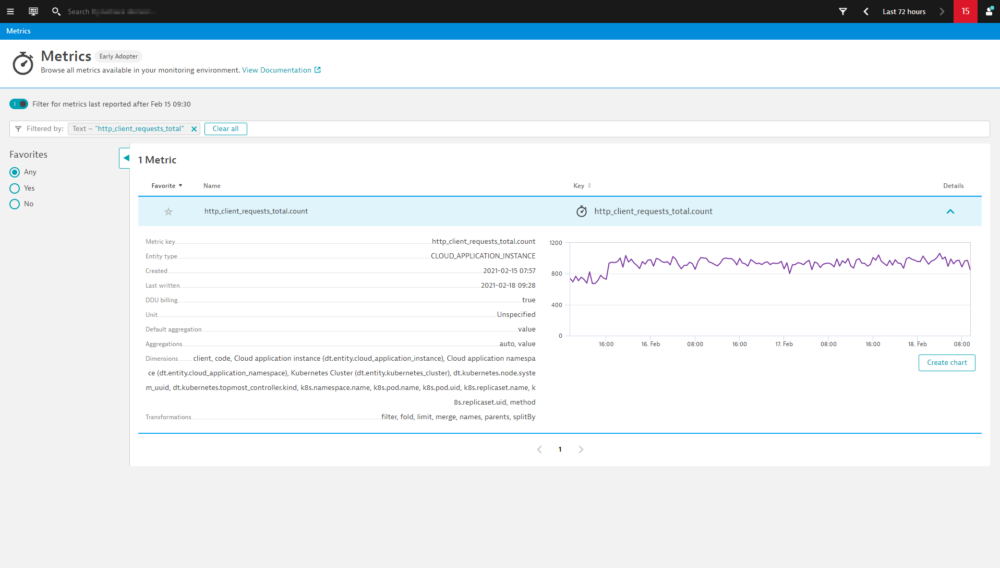
After some minutes, you can verify if everything works as expected by finding Linkerd related metrics using the Dynatrace metrics browser. The metric keys included in our filter annotations will be the best to look for.

For troubleshooting and further annotation methods, see Monitor Prometheus metrics in Dynatrace documentation.

4. Add extension to environment

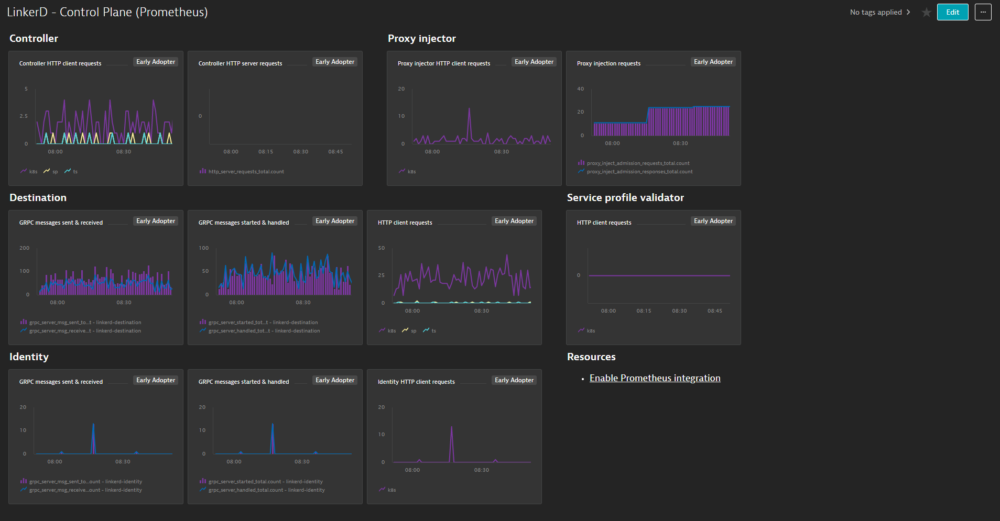
To add this extension to your environment click Add to environment on the page of this extension in the Dynatrace Hub. After activating the extension, select Dashboards in Dynatrace. You should now find out of the box dashboards for Linkerd - Control Plane and Linkerd - Data Plane.

5. Activate metric events for alerting

Additionally, the extension comes with a pre-configured metric event for alerting. To activate it:

  1. From the Dynatrace navigation menu, select Settings > Anomaly detection > Custom events for alerting.

  2. Find the following event

    • Linkerd - Large number of failure responses: notifies you if more than 10 failure responses are detected in 3 minutes in any 5 minute period.
  3. If necessary, select the Edit button to customize the event conditions.

  4. Move the switch next an event to the On position to activate it.

Compatibility information

Requires metrics already ingested into Dynatrace via Prometheus integration. See Kubernetes Prometheus exporter integration documentation for details.

Dynatrace
DocumentationMore Information
By Dynatrace
Dynatrace support center
Subscribe to new releases
Copy to clipboard

Full version history

To have more information on how to install the downloaded package, please follow the instructions on this page.
ReleaseDate

Full version history

No release notes

Dynatrace Hub
Hub HomeGet data into DynatraceBuild your own app
Dynatrace Intelligence - Agentic Operations SystemThe Dynatrace Agentic AI ecosystem
Log Management and AnalyticsKubernetesAI and LLM ObservabilityInfrastructure ObservabilitySoftware DeliveryApplication ObservabilityApplication SecurityBusiness ObservabilityDigital Experience
Filter
Type
Built and maintained by
Deployment model
SaaS
  • SaaS
  • Managed
Partner FinderBecome a partnerDynatrace Developer

All

222 Results filtered by:

Akamai logo

Akamai

Ingest logs and security events from Akamai products.

Extension

Alibaba Cloud logo

Alibaba Cloud

Automatically discover, baseline, and monitor Alicloud environment components.

Extension

Anypoint MQ logo

Anypoint MQ

Gather metrics about your Anypoint MQ Queues.

Extension

Apache ActiveMQ Classic logo

Apache ActiveMQ Classic

Automatic and smart observability for ActiveMQ with trace and metric insights.

Extension

Apache Cassandra logo

Apache Cassandra

Improve Apache Cassandra observability.

Extension

Apache CouchDB logo

Apache CouchDB

Intelligently observe and optimize health and performance of your database.

Extension

Apache Kafka logo

Apache Kafka

Automatic and intelligent observability with trace and metric insights.

Extension

Apache Solr logo

Apache Solr

Open-source enterprise-search platform, written in Java.

Extension

Apache Spark logo

Apache Spark

Enhanced insights for Spark Components.

Extension

Apache Zookeeper logo

Apache Zookeeper

Monitor and analyze your Apache Zookeeper with this JMX-based extension.

Extension

Apigee logo

Apigee

Remotely monitor your Apigee proxies.

Extension

AWS Cloud Monitoring logo

AWS Cloud Monitoring

New and enhanced monitoring capabilities for your AWS cloud platforms.

Extension

AWS Entities for Metric Streaming logo

AWS Entities for Metric Streaming

Analyse metrics in the context of an entity based on AWS Metric Streaming.

Extension

Azure Cloud Monitoring logo

Azure Cloud Monitoring

New and enhanced monitoring capabilities for your Azure cloud platforms.

Extensioncoming soon

Azure Managed Apache Cassandra logo

Azure Managed Apache Cassandra

Gain insights into your Azure Managed Cassandra Instance health and performance.

Extension

Black Duck logo

Black Duck

Ingest Black Duck security events and audit logs.

Extension

Ceph storage logo

Ceph storage

Monitor usage of Ceph storage system at both client side and host level.

Extension

Checkmarx logo

Checkmarx

Ingest Checkmarx security events and audit logs.

Extension

Check Point Firewall logo

Check Point Firewall

Gain insights into the performance of your Check Point Firewall devices.

Extension
Cisco ACI/APIC logo

Cisco ACI/APIC

Get insights into your Cisco Application Centric Infrastructure (ACI).

Extension

Cisco Catalyst Center (DNA Center) logo

Cisco Catalyst Center (DNA Center)

Get insights into the Cisco Catalyst Center infrastructure (f.k.a. DNA Center).

Extension
Cisco Catalyst SD-WAN Manager (Viptela) logo

Cisco Catalyst SD-WAN Manager (Viptela)

Get insights into the Cisco SD-WAN performance through the vManage API.

Extension

Cisco Firepower logo

Cisco Firepower

Monitor Cisco Firepower devices using SNMP.

Extension

Cisco UCS C-Series logo

Cisco UCS C-Series

Get insights into your Cisco UCS C-Series devices.

Extension

Cisco UCS M-Series logo

Cisco UCS M-Series

Get insights into your Cisco UCS M-Series devices.

Extension
Citrix DaaS & Virtual Apps and Desktops logo

Citrix DaaS & Virtual Apps and Desktops

Gain insight into your Citrix DaaS & Virtual Apps and Desktops environments.

Extension

Citrix Netscaler ADC logo

Citrix Netscaler ADC

Remotely monitor your Citrix NetScaler devices.

Extension
Citrix NetScaler SDX logo

Citrix NetScaler SDX

Remotely monitor your Citrix NetScaler SDX devices.

Extension

Cloudflare (extension) logo

Cloudflare (extension)

Collect notification history and various metrics from your Cloudflare accounts.

Extension

Cloud Foundry logo

Cloud Foundry

Monitor your Cloud Foundry resource definitions by connecting to the foundation.

Extension

Confluent Cloud (Kafka) logo

Confluent Cloud (Kafka)

Remotely monitor your Confluent Cloud Kafka Clusters and other resources!.

Extension

Connection Pools: Apache Commons logo

Connection Pools: Apache Commons

Application method of pooling and sharing multiple connections to a database.

Extension

Connection Pools: C3P0 logo

Connection Pools: C3P0

Application server method of pooling and sharing connections to a database.

Extension

Connection Pools: JBoss logo

Connection Pools: JBoss

Application server method of pooling and sharing connections to a database.

Extension

Connection Pools: WebLogic logo

Connection Pools: WebLogic

Application server method of pooling and sharing connections to a database.

Extension

Connection Pools: WebSphere Liberty logo

Connection Pools: WebSphere Liberty

Application server method of pooling and sharing connections to a database.

Extension

Consul Service Mesh (StatsD) logo

Consul Service Mesh (StatsD)

Extend visibility into your Consul Service Mesh instances to monitor health and improve performance.

Extension

Control-M Jobs v2 logo

Control-M Jobs v2

Monitor your Control-M jobs execution status.

Extension

CoreDNS (2.0) logo

CoreDNS (2.0)

Collect important data from your CoreDNS processes.

Extension

Couchbase logo

Couchbase

Couchbase Capella (SaaS) database monitoring.

Extension

CPU Core Monitoring logo

CPU Core Monitoring

Get insights into CPU Core utilization on your OneAgent hosts.

Extension

CrowdStrike logo

CrowdStrike

Ingest CrowdStrike detection findings, threat reports, and audit logs.

Extension

CyberArk logo

CyberArk

Ingest CyberArk audit logs via SIEM integration for reporting and analysis.

Extension

Databricks logo

Databricks

Monitor your Databricks Clusters via its multiple APIs!.

Extension

Databricks Workspace logo

Databricks Workspace

Remotely monitor your Databricks Workspaces!.

Extension

definity logo

definity

Monitor and optimize your Lakehouse, Spark, and Databricks pipelines.

Extension

Defunct Process Monitoring logo

Defunct Process Monitoring

Monitoring defunct processes stuck on your linux servers.

Extension

Dell EMC Isilon - PowerScale logo

Dell EMC Isilon - PowerScale

Monitor your Dell EMC Isilon / Powerscale clusters through the OneFS API.

Extension

Dell EMC PowerMax logo

Dell EMC PowerMax

Monitor PowerMax Arrays for performance and health, with Dell Unisphere API.

Extension

Dell iDRAC logo

Dell iDRAC

Connect to the Redfish API to get insights into your Dell iDRAC environment.

Extension